window FIAT 500 GUCCI 2012 2.G User Guide
[x] Cancel search | Manufacturer: FIAT, Model Year: 2012, Model line: 500 GUCCI, Model: FIAT 500 GUCCI 2012 2.GPages: 80, PDF Size: 1.87 MB
Page 3 of 80
INTRODUCTION/WELCOME
Welcome From Fiat.............2
CONTROLS AT A GLANCE
Driver Cockpit...............4
Instrument Cluster.............6
GETTING STARTED
Key Fo b...................8
Theft Alarm.................8
Power Door Locks.............8
Seat Belt...................9
Supplemental Restraint System (SRS) —
Air Bags...................9
Child Restraints...............10
Front Seats.................12
Rear Seats..................14
Tilt Steering Column............14
Heated Seats................15
OPERATING YOUR VEHICLE
Turn Signal/Lights/High Beam Lever.....16
Wiper/Washer Lever............17
Speed Control................18
Power Windows...............19
Manual Climate Controls..........20
Automatic Temperature Controls
(ATC)....................21
Rear Park Assist...............21
Sport Mode.................22
Manual Transmission.............22
Power Sunroof...............22
Power Convertible Top Operation.....23
Wind Buffeting...............24
Cold Weather Operation (Engine Block
Heater)...................25
ELECTRONICS
Your Vehicle's Sound System.........26
AM/FM Radio With CD Player And Sirius
XM™ Satellite Radio............28
BLUE&ME™ Hands-Free
Communication...............29
iPod®/USB/MP3 Control..........34
Electronic Vehicle Information
Center (EVIC)................35
Programmable Features...........35
Trip Button.................36
Power Outlet................37
UTILITY
Trailer Towing................38
Recreational Towing (Behind
Motorhome, Etc.)..............38
WHAT TO DO IN EMERGENCIES
24-Hour Roadside Assistance........39
Instrument Cluster Warning Lights.....39
If Your Engine Overheats..........42
Jacking And Tire Changing..........43
TIREFIT Kit.................49
Jump-Starting Procedure..........53
Shift Lever Override.............56
Towing A Disabled Vehicle..........56
Enhanced Accident Response System....57
Freeing A Stuck Vehicle...........58
Event Data Recorder (EDR).........59
MAINTAINING YOUR VEHICLE
Opening The Hood.............60
Engine Compartment............61
Fluids And Capacities............62
Maintenance Chart.............63
Fuses....................65
Tire Pressures................66
Wheel And Wheel Trim Care....... 67
Exterior Bulbs................67
CONSUMER ASSISTANCE
Fiat Customer Center............68
Assistance For The Hearing Impaired... 68
Publications Ordering............68
Reporting Safety Defects In The 50 United
States And Washington, D.C..........69
MOPAR ACCESSORIES
Authentic Accessories By MOPAR®.....70
INDEX.................. 71
FAQ(HowTo?)
Frequently Asked Questions.........73
TABLE OF CONTENTS
1
Page 7 of 80
A. Turn Signal/Lights Lever pg. 16
B. Instrument Cluster pg. 6
C. Electronic Vehicle Information Center (EVIC)
Display pg. 35
D. Electronic Vehicle Information Center (EVIC)
Controls pg. 35
E. Wiper/Washer Lever pg. 17
F. Audio System pg. 28G. SWITCH PANEL
− Sport Function pg. 22
− Hazard Switch
− Rear Defrost
H. Climate Controls pg. 20
I. Passenger Power Window Switch
J. Transmission Gear Selector K. Driver Power Window Switch
L. Speed Control pg. 18
M. Hood Release
N. BLUE&ME™ Hands-Free Communication
pg. 29
O. Door Handle/Power Door Locks
P. Power Mirror Switches
CONTROLS AT A GLANCE
5
Page 10 of 80
KEY FOB
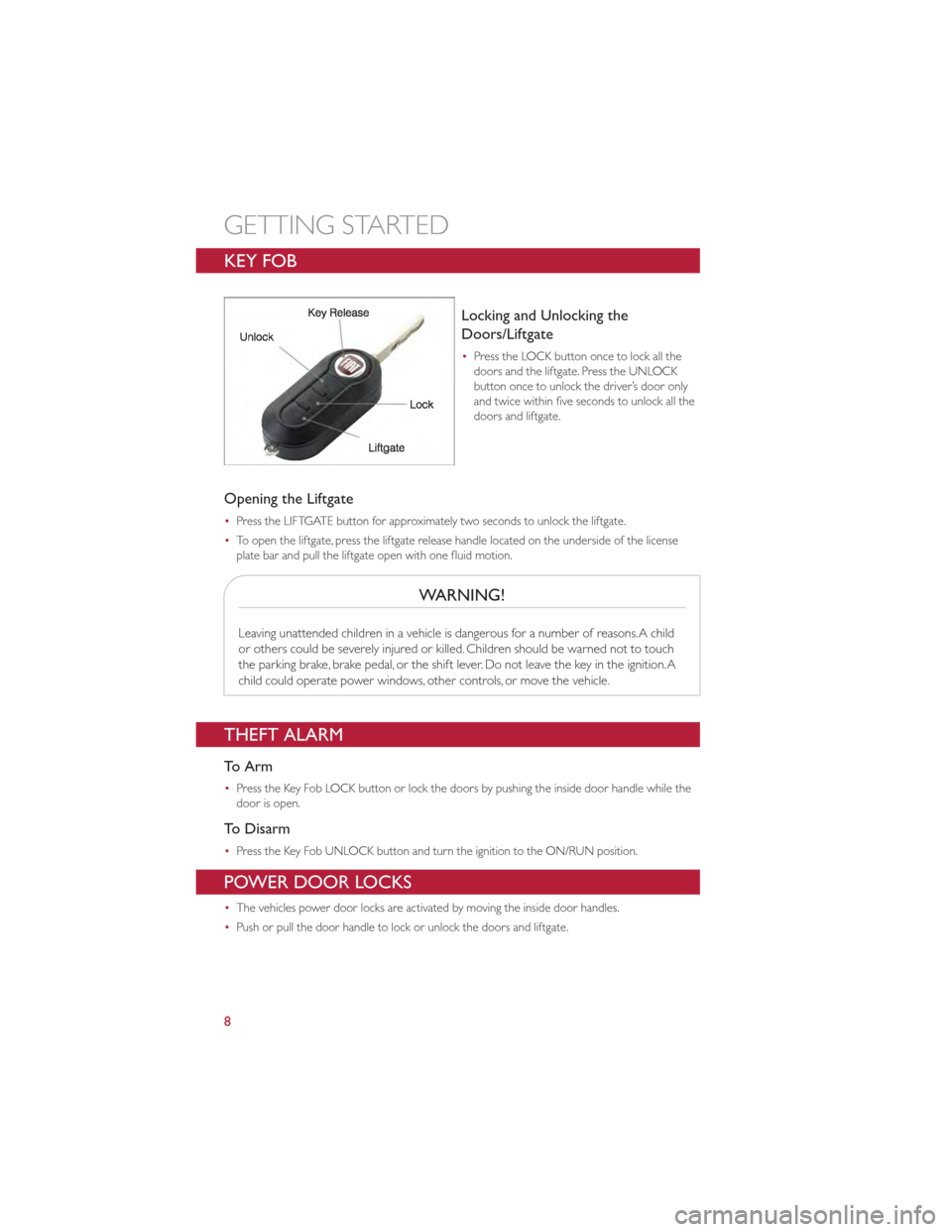
Locking and Unlocking the
Doors/Liftgate
•Press the LOCK button once to lock all the
doors and the liftgate. Press the UNLOCK
button once to unlock the driver’s door only
and twice within five seconds to unlock all the
doors and liftgate.
Opening the Liftgate
•Press the LIFTGATE button for approximately two seconds to unlock the liftgate.
• To open the liftgate, press the liftgate release handle located on the underside of the license
plate bar and pull the liftgate open with one fluid motion.
WARNING!
Leaving unattended children in a vehicle is dangerous for a number of reasons.A child
or others could be severely injured or killed. Children should be warned not to touch
the parking brake, brake pedal, or the shift lever. Do not leave the key in the ignition.A
child could operate power windows, other controls, or move the vehicle.
THEFT ALARM
To Arm
•Press the Key Fob LOCK button or lock the doors by pushing the inside door handle while the
door is open.
To Disarm
•Press the Key Fob UNLOCK button and turn the ignition to the ON/RUN position.
POWER DOOR LOCKS
•The vehicles power door locks are activated by moving the inside door handles.
• Push or pull the door handle to lock or unlock the doors and liftgate.
GETTING STARTED
8
Page 11 of 80
SEAT BELT
•Be sure everyone in your vehicle is in a seat and using a seat belt properly.
• Position the lap belt across your thighs, below your abdomen.To remove slack in the lap portion,
pull up a bit on the shoulder belt.To loosen the lap belt if it is too tight, tilt the latch plate and
pull on the lap belt.A snug belt reduces the risk of sliding under the belt in a collision.
• Position the shoulder belt on your chest so that it is comfortable and not resting on your neck.
The retractor will withdraw any slack in the belt.
• A shoulder belt placed behind you will not protect you from injury during a collision.You are
more likely to hit your head in a collision if you do not wear your shoulder belt.The lap and
shoulder belt are meant to be used together.
• A belt that is too loose will not protect you properly. In a sudden stop you could move too far
forward, increasing the possibility of injury.Wear your seat belt snugly.
• A frayed or torn belt could rip apart in a collision and leave you with no protection. Inspect the
belt system periodically, checking for cuts, frays, or loose parts. Damaged parts must be replaced
immediately. Do not disassemble or modify the system. Seat belt assemblies must be replaced
after a collision if they have been damaged (bent retractor, torn webbing, etc.).
• The seat belts for both front seating positions are equipped with pretensioning devices that are
designed to remove slack from the seat belt in the event of a collision.
• A deployed pretensioner or a deployed air bag must be replaced immediately.
WARNING!
In a collision, you and your passengers can suffer much greater injuries if you are not
buckled up properly.You can strike the interior of your vehicle or other passengers, or
you can be thrown out of the vehicle.Always be sure you and others in your vehicle
are buckled up properly.
SUPPLEMENTAL RESTRAINT SYSTEM (SRS) — AIR BAGS
•This vehicle has Advanced Front Air Bags for both the driver and right front passenger as a
supplement to the seat belt restraint system.The Advanced Front Air Bags will not deploy in
every type of collision.
• Advanced Front Air Bags are designed to provide additional protection by supplementing the
seat belts in certain frontal collisions depending on the severity and type of collision.Advanced
Front Air Bags are not expected to reduce the risk of injury in rear, side, or rollover collisions.
• This vehicle is equipped with Supplemental Side Air Bag Inflatable Curtains to protect the driver,
front and rear passengers sitting next to a window.
• This vehicle is equipped with Supplemental Seat-Mounted Side Air Bags to provide enhanced
protection to help protect an occupant during a side impact.
• This vehicle is equipped with Supplemental Driver Side Knee Air Bag to provide enhanced
protection and work together with the Driver Advanced Front Air Bag during a frontal impact.
• If the Air Bag Warning Light
is not on during starting, stays on, or turns on while driving,
have the vehicle serviced by an authorized service center immediately.
GETTING STARTED
9
Page 12 of 80
•Refer to the Owner's Manual on the DVD for further details regarding the Supplemental
Restraint System (SRS).
WARNING!
•Relying on the air bags alone could lead to more severe injuries in a collision.The air
bags work with your seat belt to restrain you properly. In some collisions, the air bags
won't deploy at all.Always wear your seat belts even though you have air bags.
• Being too close to the steering wheel or instrument panel during Advanced Front
Air Bag deployment could cause serious injury, including death.Air bags need room
to inflate. Sit back, comfortably extending your arms to reach the steering wheel or
instrument panel.
• Supplemental Side Air Bag Inflatable Curtains and Supplemental Seat-Mounted Side
Air Bags need room to inflate. Do not lean against the door or window. Sit upright in
the center of the seat.
• Being too close to the Supplemental Side Air Bag Inflatable Curtain and/or
Seat-Mounted Side Air Bag during deployment could cause you to be severely
injured or killed.
• Do not drive your vehicle after the air bags have deployed. If you are involved in
another collision, the air bags will not be in place to protect you.
• After any collision, the vehicle should be taken to an authorized dealer immediately.
CHILD RESTRAINTS
•Children 12 years and under should ride properly buckled up in a rear seat, if available.
According to crash statistics, children are safer when properly restrained in the rear seats rather
than in the front.
• Every state in the United States and all Canadian provinces require that small children ride in
proper restraint systems.This is the law, and you can be prosecuted for ignoring it.
Installing The LATCH - Compatible Child Restraint System
•Your vehicle's second row passenger seats are equipped with the child restraint anchorage
system called LATCH, which stands for Lower Anchors and Tether for CHildren. LATCH child
restraint anchorage systems are installed in both rear seating positions.
• NEVER install compatible child seats so that two seats share a common lower anchorage.
GETTING STARTED
10
Page 21 of 80
WARNING!
•Leaving the Electronic Speed Control system on when not in use is dangerous.You
could accidentally set the system or cause it to go faster than you want.You could
lose control and have a collision.Always leave the Electronic Speed Control system
off when you are not using it.
• Electronic Speed Control can be dangerous where the system cannot maintain a
constant speed.Your vehicle could go too fast for the conditions, and you could lose
control.A collision could be the result. Do not use Electronic Speed Control in heavy
traffic or on roads that are winding, icy, snow-covered or slippery.
POWER WINDOWS
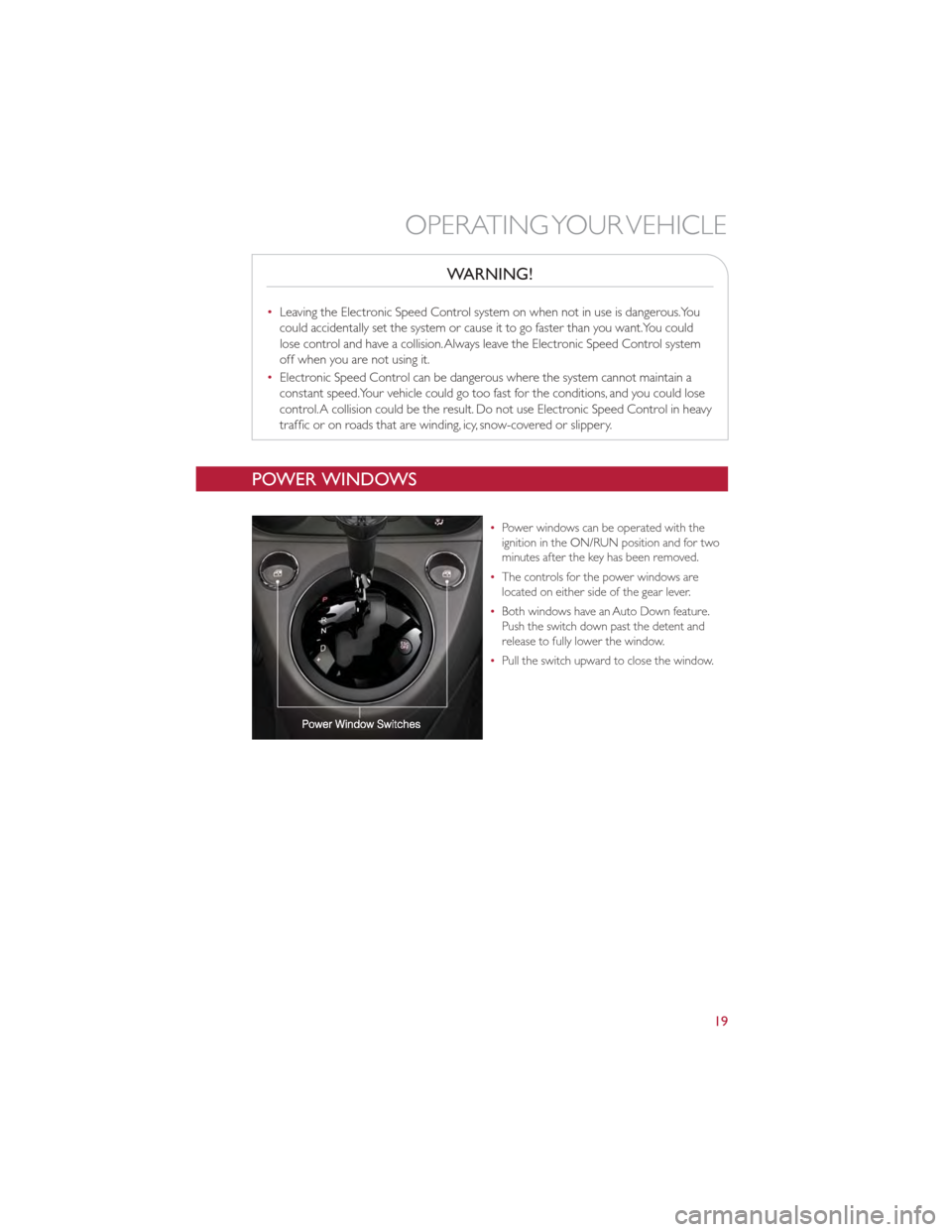
•Power windows can be operated with the
ignition in the ON/RUN position and for two
minutes after the key has been removed.
• The controls for the power windows are
located on either side of the gear lever.
• Both windows have an Auto Down feature.
Push the switch down past the detent and
release to fully lower the window.
• Pull the switch upward to close the window.
OPERATING YOUR VEHICLE
19
Page 22 of 80
MANUAL CLIMATE CONTROLS
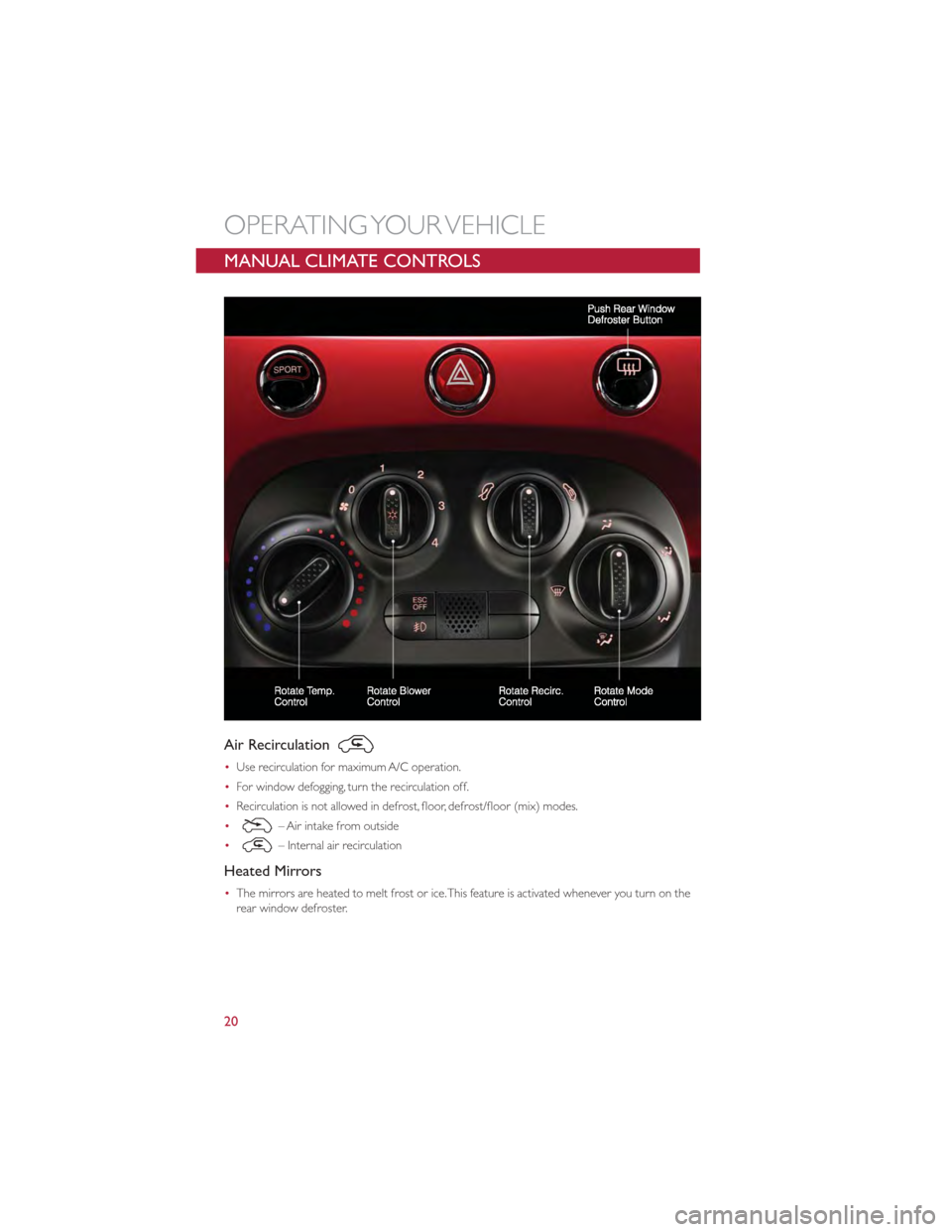
Air Recirculation
•Use recirculation for maximum A/C operation.
• For window defogging, turn the recirculation off.
• Recirculation is not allowed in defrost, floor, defrost/floor (mix) modes.
•
– Air intake from outside
•
– Internal air recirculation
Heated Mirrors
• The mirrors are heated to melt frost or ice.This feature is activated whenever you turn on the
rear window defroster.
OPERATING YOUR VEHICLE
20
Page 23 of 80
AUTOMATIC TEMPERATURE CONTROLS (ATC)
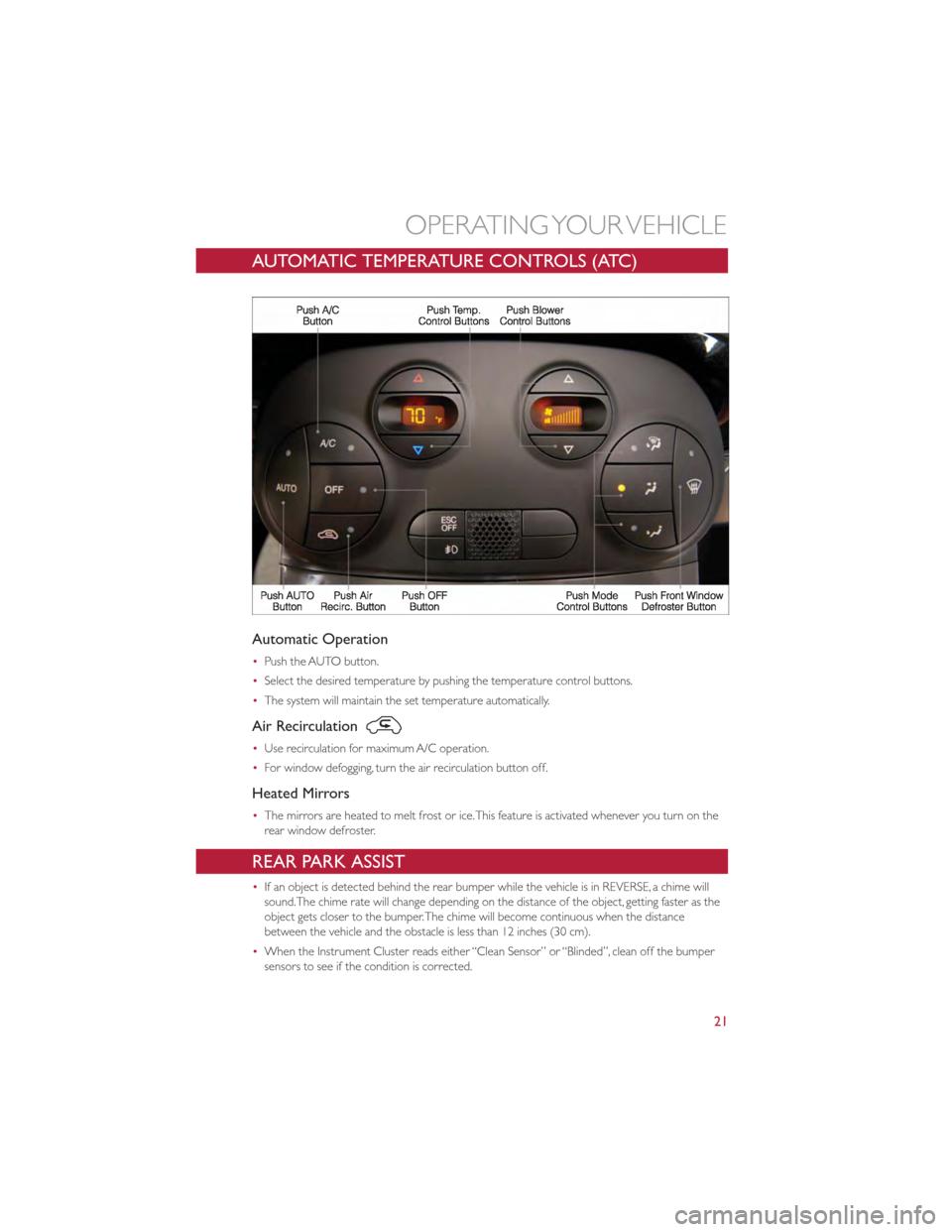
Automatic Operation
•Push the AUTO button.
• Select the desired temperature by pushing the temperature control buttons.
• The system will maintain the set temperature automatically.
Air Recirculation
•Use recirculation for maximum A/C operation.
• For window defogging, turn the air recirculation button off.
Heated Mirrors
•The mirrors are heated to melt frost or ice.This feature is activated whenever you turn on the
rear window defroster.
REAR PARK ASSIST
•If an object is detected behind the rear bumper while the vehicle is in REVERSE, a chime will
sound.The chime rate will change depending on the distance of the object, getting faster as the
object gets closer to the bumper.The chime will become continuous when the distance
between the vehicle and the obstacle is less than 12 inches (30 cm).
• When the Instrument Cluster reads either “Clean Sensor” or “Blinded”, clean off the bumper
sensors to see if the condition is corrected.
OPERATING YOUR VEHICLE
21
Page 26 of 80
Wind Stop
•The Wind Stop installs in the backseat area of the vehicle.The Wind Stop will not interfere with
power top operation.Therefore, it can remain installed when the top is up.
CAUTION!
Failure to follow these cautions may cause interior water damage, stains or mildew on
the top material:
•Avoid high-pressure car washes, as they can damage the top material.Also, increased
water pressure may force water past the weather strips.
• Remove any standing water from the top and dry the surface before opening it.
Operating the top, opening a door or lowering a window while the top is wet may
allow water to drip into the vehicles interior.
• Use care when washing the vehicle, water pressure directed at the weather strip
seals may cause water to leak into the vehicles interior.
WARNING!
The convertible top does not provide the structural protection that a reinforced metal
roof does and the fabric top cannot be expected to prevent the ejection of the
occupants in a collision.Therefore, it is important that all occupants wear their seat
belts at all times. Death or serious injuries could occur if you are ejected from the
vehicle during a collision.
WIND BUFFETING
•Wind buffeting can be described as a helicopter-type percussion sound. If buffeting occurs with
the windows down, or top down (convertible models), adjust one or both windows up or down
slightly.
OPERATING YOUR VEHICLE
24
Page 31 of 80
MENU
•Press the MENU button and one of the following options will appear on the Radio display. Use
the up and down arrows to scroll through the options; use the left and right arrows to change a
selection setting.
• Speech Volume •Sirius Telephone Number
• Aux Audio Offset •System Reset
• Radio Off •Speed Volume
• Sat ID •On Volume Limit
Clock Setting
• The time is set using the Electronic Vehicle Information Center (EVIC) Display.
• With the Date and Time shown in the EVIC display, press the MENU ESC button to enter the
menu mode.
• Press the plus or minus buttons until "Set Time" is displayed and press the MENU ESC button
again.
• Press the MENU ESC button;“hours” will flash on the display.
• Press the plus or minus buttons to adjust the hours.
• When setting the hour is complete, briefly press the MENU ESC button and “minutes” will flash
in the display. Press the plus or minus buttons to adjust the minutes.
• When setting the time is complete, press and hold the MENU ESC button.
Station Presets
•To store a tuned station, find the station to store by either pressing the right and left arrow
(Seek) buttons or by pressing up or down arrow (Manual Tune) buttons.
• Once the station is found, press and hold one of the PRESET buttons, until you hear a
confirmation beep (Preset Saved will be shown in the radio display).A total of 15 FM, 10 AM
and 15 Sirius XM™ Satellite Radio stations can be preset by pressing the A-B-C button.
A-B-C Button
•Press the A-B-C button to choose between the presets stored in the AM, FM or SAT modes.
The mode (AM, FM, SAT), station preset (A, B, C) and preset button number (P 1-5) will be
displayed in the middle of the radio display.
BLUE&ME™ Hands-Free Communication
•FIAT’s Windows Mobile™ based BLUE&ME™ Hands-Free Communication is a personal
telematics system that incorporates communication and entertainment applications that are
expressly designed for use in your car.
• The BLUE&ME™ Hands-Free Communication package installed in your car is equipped with
integral hands-free kit, message reader, and media player. BLUE&ME™ is designed to support the
future installation of additional services.
ELECTRONICS
29