fuel FIAT 500C 2013 2.G User Guide
[x] Cancel search | Manufacturer: FIAT, Model Year: 2013, Model line: 500C, Model: FIAT 500C 2013 2.GPages: 423, PDF Size: 9.86 MB
Page 175 of 423
3. Briefly press theSET ESCbutton to go back to the
menu screen, or press and hold theSET ESCbutton
(approximately one second) to go back to the main
screen.
Autoclose
With this function active, the doors will automatically
lock at when the vehicle’s speed exceeds 15 mph
(24 km/h).
To change the setting proceed as follows:
1. Briefly press theSET ESCbutton “On” or “Off” will
flash on the display (according to the previous set-
ting).
2. Press the UPor DOWNbutton for setting.
3. Briefly press theSET ESCbutton to go back to the
menu screen, or press and hold theSET ESCbutton
(approximately one second) to go back to the main
screen without storing the settings.
Units (Set Units)
This function may be used to set the measurement unit in
three submenus: “Distance,” “Temperature” and “Fuel
Economy.”
To set the required unit, proceed as follows:
1. Briefly press theSET ESCbutton to display the three
sub-menus.
2. Press the UPor DOWNbutton to navigate
the three sub-menus.
3. Select the required sub-menu and then briefly press
theSET ESCbutton.
4
UNDERSTANDING YOUR INSTRUMENT PANEL 173
Page 176 of 423
4. When accessing the “Distance” submenu: briefly press
theSET ESCbutton. Either “mi” or “km” will appear
on the display (according to the previous setting).
5. Press the UPor DOWNbutton for setting.
6. Briefly press theSET ESCbutton to return to the
sub-menu.
7. When accessing the “Fuel Economy” submenu, briefly
press theSET ESCbutton. Either “mpg,” “km/l ” or
“l/100km” will appear on the display (according to
the previous setting).
If the distance unit set is “mi,” the fuel economy unit will
be displayed in “mpg.”
If the distance unit set is “km,” the fuel economy unit will
be displayed in either km/l or l/100km.
1. Press the UPor DOWNbutton for setting.
2. Briefly press theSET ESCbutton to return to the
sub-menu.
3. When accessing the “Temperature” submenu: briefly
press theSET ESCbutton. Either “°F” or “°C” will
appear on the display (according to the previous
setting).
4. Press the UPor DOWNbutton for setting.
5. Briefly press theSET ESCbutton to return to the
sub-menu.
When you have made the required settings, briefly press
theSET ESCbutton to go back to the sub-menu screen,
or press and hold theSET ESCbutton (approximately
one second) to go back to the main screen without storing
the settings.
174 UNDERSTANDING YOUR INSTRUMENT PANEL
Page 178 of 423
Button Volume (Button Volume Adjustment)
This function may be used to adjust the volume of
the beep accompanying the buttons.SET ESC,UP
or DOWNbuttons can be adjusted according to
8 levels.
To adjust the volume, proceed as follows:
1. Briefly press theSET ESCbutton. The previously set
volume “level” will flash on the display.
2. Press the UPor DOWNbutton for setting.
3. Briefly press theSET ESCbutton to go back to the
menu screen, or press and hold theSET ESCbutton
(approximately one second) to go back to the main
screen without storing the settings.
Belt Buzzer (Buzzer Activation For S.B.R. Indication)
This function will only be displayed after a FIAT Group
Automobiles studio has deactivated the S.B.R. system.
Daytime Running Lamps (DRL)
This function may be used to activate / deactivate the
Daytime Running Lamps.
Proceed as follows to switch this function on or off:
1. Briefly press theSET ESCbutton to display the three
sub-menus.
2. Briefly press theSET ESCbutton. “On” or “Off” will
flash on the display (according to previous setting).
3. Press the UPor DOWNbutton for setting.
4. Briefly press theSET ESCbutton to go back to the
menu screen, or press and hold the button (approxi-
mately one second) to go back to the main screen
without storing the settings.
GSI (Gear Shift Indicator)
This function may be used to set the Gear Shift Indicator
in two submenus: “Fuel Econ On” and “Fuel Econ Off.”
176 UNDERSTANDING YOUR INSTRUMENT PANEL
Page 179 of 423
•Fuel Econ On – turns on a fuel economy upshift light
in the instrument cluster, for optimum fuel economy,
when operating in base driving mode.
•Fuel Econ Off – the fuel economy upshift light is
disabled.
To set the required unit, proceed as follows:
1. Briefly press theSET ESCbutton to display the two
sub-menus.
2. Press the UPor DOWNbutton to navigate
the two sub-menus.
3. Select the required sub-menu and then briefly press
theSET ESCbutton.
4. Press the UPor DOWNbutton for setting.
5. Briefly press theSET ESCbutton to return to the
sub-menu.
When you have made the required settings, briefly press
theSET ESCbutton to go back to the sub-menu screen,
or press and hold theSET ESCbutton (approximately
one second) to go back to the main screen without storing
the settings.
Hill Start Assist
This function is used when starting a vehicle from a stop
on a hill. Hill Start Assist maintains the same level of
brake pressure the driver applied for a short period of
time after the foot has been removed from the brake
pedal.
Proceed as follows to switch this function on or off:
1. Briefly press theSET ESCbutton. “On” or “Off” will
flash on the display (according to previous setting).
2. Press the UPor DOWNbutton for setting.
4
UNDERSTANDING YOUR INSTRUMENT PANEL 177
Page 212 of 423
to the windshield. This setting is good for maintaining
comfort while reducing moisture on the windshield.
•Defrost
Air is directed through the windshield and side
window demister outlets. Use this mode with
maximum blower and temperature settings for best
windshield and side window defrosting.
NOTE:The air conditioning compressor operates in Mix
or Defrost, even if the Air Conditioning (A/C) button is
not pressed. This dehumidifies the air to help dry the
windshield. To improve fuel economy, use these modes
only when necessary.
5. A/C Button
Press this button to engage the Air Conditioning. A light
will illuminate when the Air Conditioning system is
engaged.
MAX A/C
For maximum cooling, use the A/C and recirculation
modes at the same time.
ECONOMY MODE
If economy mode is desired, press the A/C button to turn
OFF the indicator light and the A/C compressor. Then,
move the temperature control to the desired temperature.
Automatic Temperature Control (ATC) — If
Equipped
•The Automatic Temperature Control (ATC) allows the
driver to select individual comfort settings.
•The system provides set-and-forget operation for op-
timum comfort and convenience.
•The system can be controlled manually, if desired.
The ATC system automatically maintains the interior
comfort level desired by the driver and passenger.
210 UNDERSTANDING YOUR INSTRUMENT PANEL
Page 223 of 423
▫Tire Pressure........................268
▫Tire Inflation Pressures.................269
▫Tire Pressures For High Speed Operation . . . .270
▫Radial Ply Tires......................271
▫All Season Tires – If Equipped............272
▫Summer Or Three Season Tires – If Equipped . . .272
▫Snow Tires..........................272
▫Spare Tire Matching Original Equipped Tire
And Wheel – If Equipped................273
▫Compact Spare Tire....................273
▫Tire Spinning........................274
▫Tread Wear Indicators..................274
▫Life Of Tire.........................275
▫Replacement Tires.....................276
!TIRE CHAINS.........................277
!TIRE ROTATION RECOMMENDATIONS.....279
!TIRE PRESSURE MONITORING
SYSTEM (TPMS).......................280
▫Base System.........................282
▫Enhanced System– If Equipped............285
▫General Information...................285
!FUEL REQUIREMENTS..................285
!FUEL REQUIREMENTS – 1.4L Turbo........286
▫Reformulated Gasoline.................286
▫Gasoline/Oxygenate Blends..............287
▫E-85 Usage In Non-Flex Fuel Vehicles.......287
5
STARTING AND OPERATING 221
Page 224 of 423
▫MMT In Gasoline.....................288
▫Materials Added To Fuel................288
▫Fuel System Cautions...................289
▫Carbon Monoxide Warnings.............290
!ADDING FUEL........................291
▫Fuel Filler Cap (Gas Cap)...............291
▫Loose Fuel Filler Cap Message............292
!TRAILER TOWING.....................292
!RECREATIONAL TOWING (BEHIND
MOTORHOME, ETC.)...................293
▫Towing This Vehicle Behind Another Vehicle . .293
222 STARTING AND OPERATING
Page 226 of 423
Turn the ignition switch to the AVV (START) position and
release it when the engine starts. If the engine fails to start
within 10 seconds, turn the ignition switch to the STOP
(OFF/LOCK) position, wait 10 to 15 seconds, then repeat
the “Normal Starting” procedure.
Cold Weather Operation
To prevent possible engine damage while starting at low
temperatures, this vehicle will inhibit engine cranking
when the ambient temperature is less than –22° F (–30° C)
and the oil temperature sensor reading indicates an
engine block heater has not been used. An externally-
powered electric engine block heater is available as
optional equipment or from your authorized studio.
The message “plug in engine heater” will be displayed in the
instrument cluster when the ambient temperature is below
5° F (–15° C) at the time the engine is shut off as a reminder
to avoid possible crank delays at the next cold start.
CAUTION!
Use of the recommended SAE 5W-30 oil and adher-
ing to the prescribed oil change intervals is important
to prevent engine damage and ensure satisfactory
starting in cold conditions.
If Engine Fails To Start
WARNING!
Never pour fuel or other flammable liquids into the
throttle body air inlet opening in an attempt to start
the vehicle. This could result in a flash fire causing
serious personal injury.
224 STARTING AND OPERATING
Page 227 of 423
CAUTION!
•Do not attempt to push or tow your vehicle to get it
started. Vehicles equipped with an automatic trans-
mission cannot be started this way. Unburned fuel
could enter the catalytic converter and once the
engine has started, ignite and damage the converter
and vehicle.
•To prevent damage to the starter, do not continu-
ously crank the engine for more than 15 seconds at
a time. Wait 10 to 15 seconds before trying again.
After Starting
The idle speed is controlled automatically and it will
decrease as the engine warms up.
5
STARTING AND OPERATING 225
Page 230 of 423
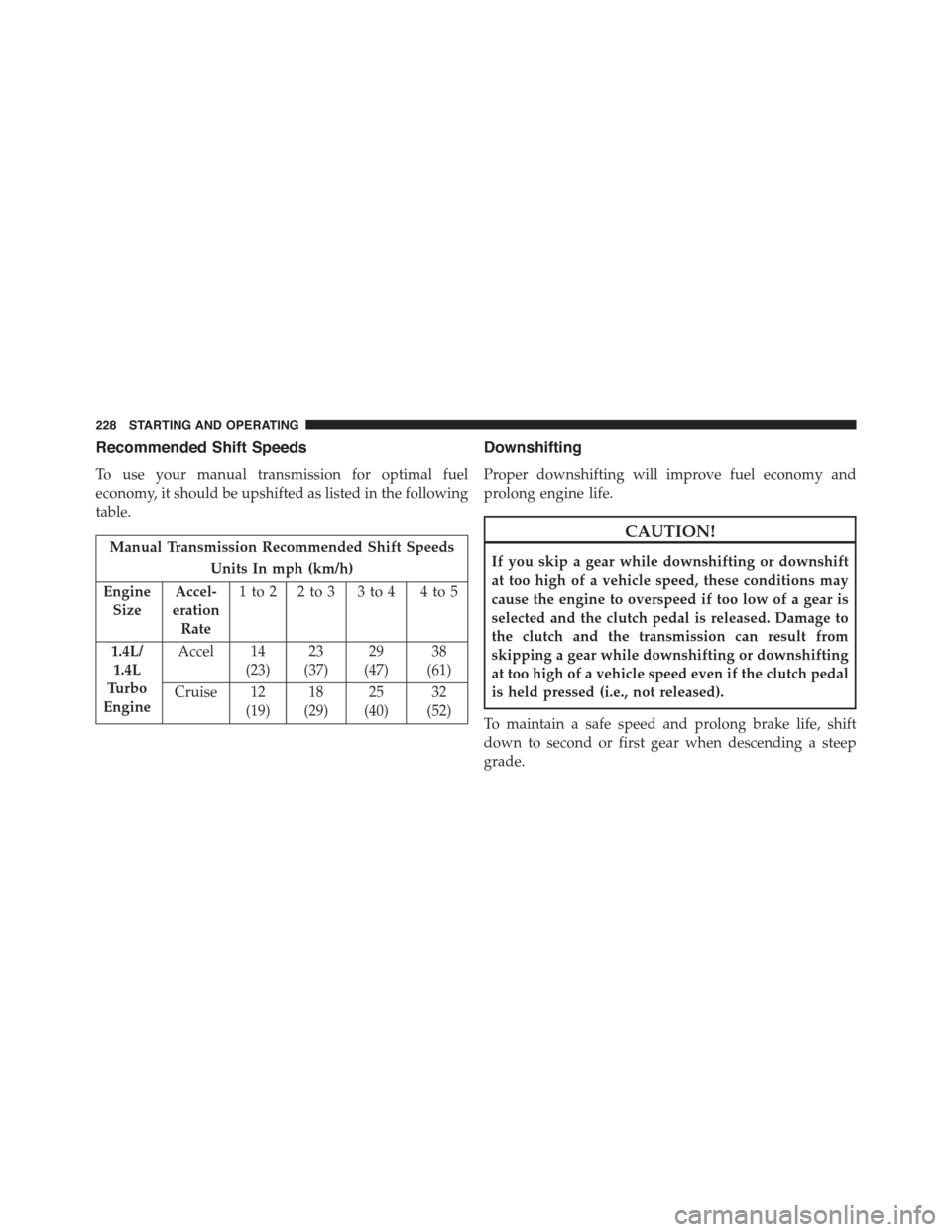
Recommended Shift Speeds
To use your manual transmission for optimal fuel
economy, it should be upshifted as listed in the following
table.
Manual Transmission Recommended Shift Speeds
Units In mph (km/h)
Engine
Size
Accel-
eration
Rate
1to2 2to3 3to4 4to5
1.4L/
1.4L
Turbo
Engine
Accel 14
(23)
23
(37)
29
(47)
38
(61)
Cruise 12
(19)
18
(29)
25
(40)
32
(52)
Downshifting
Proper downshifting will improve fuel economy and
prolong engine life.
CAUTION!
If you skip a gear while downshifting or downshift
at too high of a vehicle speed, these conditions may
cause the engine to overspeed if too low of a gear is
selected and the clutch pedal is released. Damage to
the clutch and the transmission can result from
skipping a gear while downshifting or downshifting
at too high of a vehicle speed even if the clutch pedal
is held pressed (i.e., not released).
To maintain a safe speed and prolong brake life, shift
down to second or first gear when descending a steep
grade.
228 STARTING AND OPERATING