air FIAT 500E 2014 2.G Owner's Guide
[x] Cancel search | Manufacturer: FIAT, Model Year: 2014, Model line: 500E, Model: FIAT 500E 2014 2.GPages: 363, PDF Size: 2.66 MB
Page 112 of 363
your mobile phone manually and visually using the
steering wheel controls and the instrument panel multi-
function display.To get started with BLUE&ME™ hands-free kit with
voice recognition, you have to simply pair your
Bluetooth® wireless technology enabled mobile phone
with the system.
Pairing is an operation that has to be made only once.
NOTE:
•
During the mobile phone pairing procedure,
BLUE&ME™ attempts to detect a phone equipped
with Bluetooth® wireless technology within range and
then establishes the connection using a Personal Iden-
tification Number (PIN).
• Once your phone is paired, you have the option to
transfer your mobile phone contacts to the hands-free
kit, to make a phone call either by using the contacts
list or directly pronouncing the phone number, to
answer a call and also to answer another incoming
phone call.
1 — Mute/ESC 3 — Phone Hang Up
2 — Phone/Main 4 — Voice Recognition (VR)
110 UNDERSTANDING THE FEATURES OF YOUR VEHICLE
Page 114 of 363
•Conference Call — You can call another contact while
you are engaged in a phone conversation (with
Bluetooth® phones supporting this option).
• Call Waiting — While engaged in a phone conversa-
tion, you can receive notification of another incoming
phone call, answer the other incoming phone call, and
switch between two ongoing phone conversations.
(Call waiting is only supported by a subset of compat-
ible mobile phones).
• Refusing Incoming Call Or Ending A Call — You can
refuse an incoming call or end a current call by
pushing the Phone Hang-up button on the steering
wheel. After pairing and connecting your phone with the
BLUE&ME™ system, you can make phone calls by
speaking keywords or pushing buttons on the steering
wheel. When using the hands-free phone, the audio
output of a phone conversation is heard through your car
sound speakers.
Message Reader
The BLUE&ME™ message reader enables automatic
reading, through the car sound system, of the SMS texts
you receive on your Bluetooth® wireless technology
mobile phone that are received when the phone is paired
and connected to the BLUE&ME™ system. It does not
provide access to messages that were received before the
device was connected with the BLUE&ME™ system. The
message reader will also interpret any abbreviation and
emoticon contained in the SMS text.
112 UNDERSTANDING THE FEATURES OF YOUR VEHICLE
Page 115 of 363
NOTE:Not all mobile phones support the SMS text
message reader function or automatic phonebook transfer
via Bluetooth®. For further information on the list of
compatible mobile phones go to http://www.fiatusa.com,
find the SUPPORT section near the bottom of web page
and click on the Bluetooth® logo.
Message reader functions are managed by the control
buttons on the steering wheel or by the BLUE&ME™
voice commands.
The BLUE&ME™ message reader enables the following
operations:
• To display an indicator on the instrument panel that
indicates you have received a new SMS text. It will
display the sender’s number/name and will ask you
whether to read the text of the message to you.
• To manage the list of SMS texts received on your
BLUE&ME™ paired mobile phone. •
To read the messages received and stored. Messages
can be read multiple times.
• To call the SMS text sender using the buttons on the
steering wheel or voice commands.
• To delete individual messages or the entire inbox using
the buttons on the steering wheel or voice commands.
The BLUE&ME™ system can also recognize and read
abbreviations, if any (e.g. “ILUVU” will be read like “I
love you”) and interpret the most usual emoticons (e.g. :-)
will be read like “Smile”), that are currently used to write
SMS texts.
Media Player
With the BLUE&ME™ media player you can play, the
digital audio files stored on a USB device by simply
connecting it to the USB port located in the glove box of
the car.
3
UNDERSTANDING THE FEATURES OF YOUR VEHICLE 113
Page 157 of 363
INSTRUMENT PANEL FEATURES
1 — Side Vent6 — Storage Compartment 11 — Power Window Controls
2—Multifunction Lever – Light Control7 — Passenger Air Bag 12 — Heated Seat Controls/Front Fog Light Control
3 — Instrument Cluster And Electronic Vehicle
Information Center 8 — Rear Defrost Button 13 — ESC Off
4 — Windshield Wiper, Washer, Trip Computer 9 — Hazard Button 14 — Horn/Driver Airbag
5 — Central Air Vents 10 — Climate Controls
4
UNDERSTANDING YOUR INSTRUMENT PANEL 155
Page 159 of 363
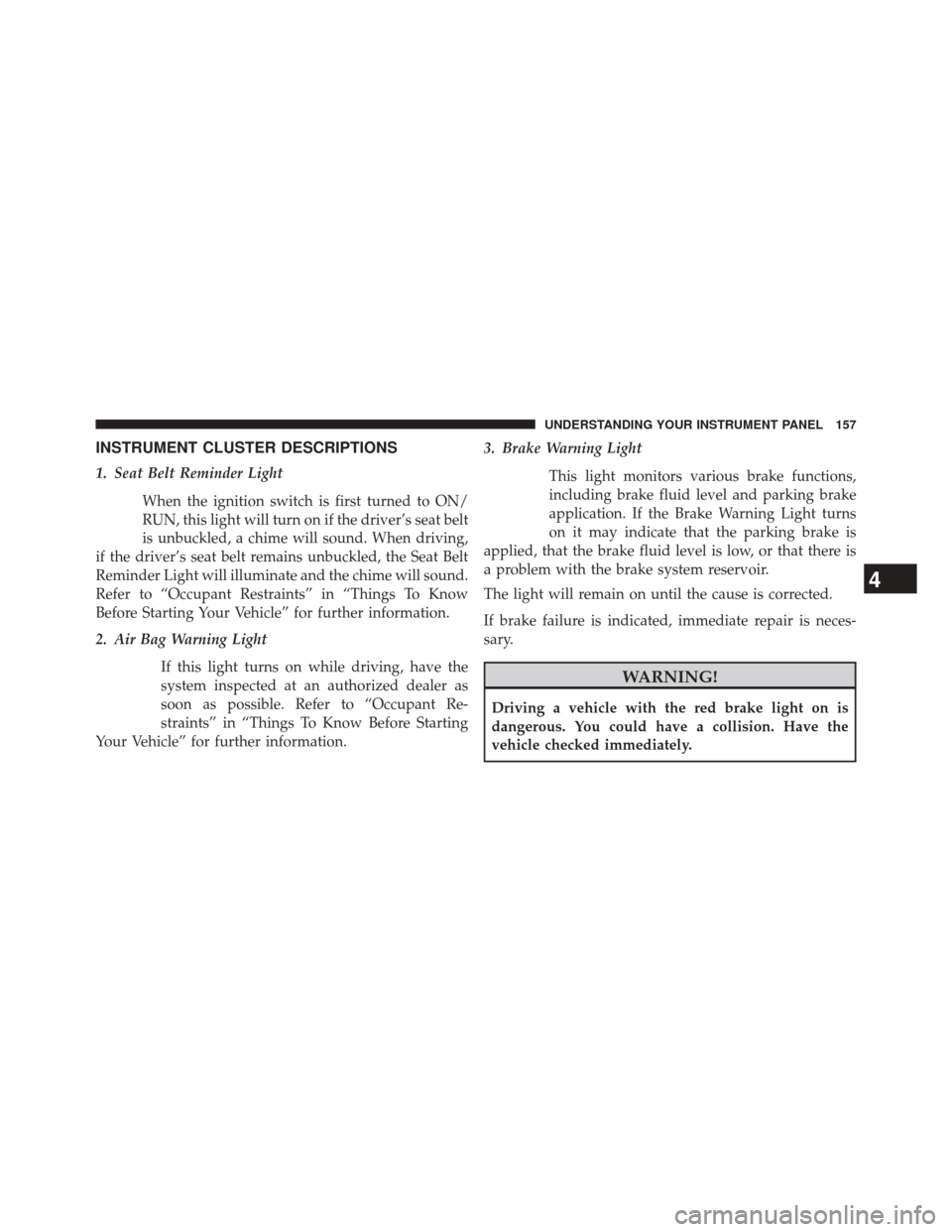
INSTRUMENT CLUSTER DESCRIPTIONS
1. Seat Belt Reminder LightWhen the ignition switch is first turned to ON/
RUN, this light will turn on if the driver’s seat belt
is unbuckled, a chime will sound. When driving,
if the driver’s seat belt remains unbuckled, the Seat Belt
Reminder Light will illuminate and the chime will sound.
Refer to “Occupant Restraints” in “Things To Know
Before Starting Your Vehicle” for further information.
2. Air Bag Warning Light
If this light turns on while driving, have the
system inspected at an authorized dealer as
soon as possible. Refer to “Occupant Re-
straints” in “Things To Know Before Starting
Your Vehicle” for further information. 3. Brake Warning Light
This light monitors various brake functions,
including brake fluid level and parking brake
application. If the Brake Warning Light turns
on it may indicate that the parking brake is
applied, that the brake fluid level is low, or that there is
a problem with the brake system reservoir.
The light will remain on until the cause is corrected.
If brake failure is indicated, immediate repair is neces-
sary.
WARNING!
Driving a vehicle with the red brake light on is
dangerous. You could have a collision. Have the
vehicle checked immediately.
4
UNDERSTANDING YOUR INSTRUMENT PANEL 157
Page 160 of 363
Vehicles equipped with the Anti-Lock Brake System
(ABS), are also equipped with Electronic Brake Force
Distribution (EBD). In the event of an EBD failure, the
Brake Warning Light will turn on along with the ABS
Light. Immediate repair to the ABS system is required.
Operation of the Brake Warning Light can be checked by
turning the ignition switch from the OFF/LOCK position
to the ON/RUN position. The light should illuminate for
approximately two seconds. The light should then turn
off unless the parking brake is applied or a brake fault is
detected. If the light does not illuminate, have the light
inspected by an authorized dealer.
The light also will turn on when the parking brake is
applied with the ignition switch in the ON/RUN posi-
tion.NOTE:
This light shows only that the parking brake is
applied. It does not show the degree of brake application.
4. Rear Defrost Button
Press and release this button to turn on the rear
window defroster. This indicator will illuminate
when the rear window defroster is on. The rear window
defroster automatically turns off after 20 minutes.
CAUTION!
Failure to follow these cautions can cause damage to
the heating elements:
• Use care when washing the inside of the rear
window. Do not use abrasive window cleaners on
the interior surface of the window. Use a soft cloth
and a mild washing solution, wiping parallel to the
heating elements. Labels can be peeled off after
soaking with warm water.
(Continued)
158 UNDERSTANDING YOUR INSTRUMENT PANEL
Page 202 of 363
Operating Instructions — Hands-Free Phone
(If Equipped)
Refer to the appropriate Blue&Me™ User ’s Manual for
further information.
CD/DVD DISC MAINTENANCE
To keep a CD/DVD in good condition, take the following
precautions:
1. Handle the disc by its edge; avoid touching thesurface.
2. If the disc is stained, clean the surface with a soft cloth, wiping from center to edge.
3. Do not apply paper or tape to the disc; avoid scratch- ing the disc.
4. Do not use solvents such as benzene, thinner, cleaners, or anti-static sprays. 5. Store the disc in its case after playing.
6. Do not expose the disc to direct sunlight.
7. Do not store the disc where temperatures may become
too high.
NOTE: If you experience difficulty in playing a particular
disc, it may be damaged (e.g., scratched, reflective coat-
ing removed, a hair, moisture or dew on the disc)
oversized, or have protection encoding. Try a known
good disc before considering disc player service.
RADIO OPERATION AND MOBILE PHONES
Under certain conditions, the mobile phone being on in
your vehicle can cause erratic or noisy performance from
your radio. This condition may be lessened or eliminated
by relocating the mobile phone antenna. This condition is
not harmful to the radio. If your radio performance does
not satisfactorily “clear” by the repositioning of the
200 UNDERSTANDING YOUR INSTRUMENT PANEL
Page 203 of 363
antenna, it is recommended that the radio volume be
turned down or off during mobile phone operation.
CLIMATE CONTROLS
The air conditioning and heating system is designed to
make you comfortable in all types of weather.
Automatic Temperature Control (ATC)
•The Automatic Temperature Control (ATC) allows the
occupant to select a comfort settings.
• The system provides set-and-forget operation for op-
timum comfort and convenience.
• The system can be controlled manually, if desired.
The ATC system automatically maintains the interior
comfort level desired by the occupant.
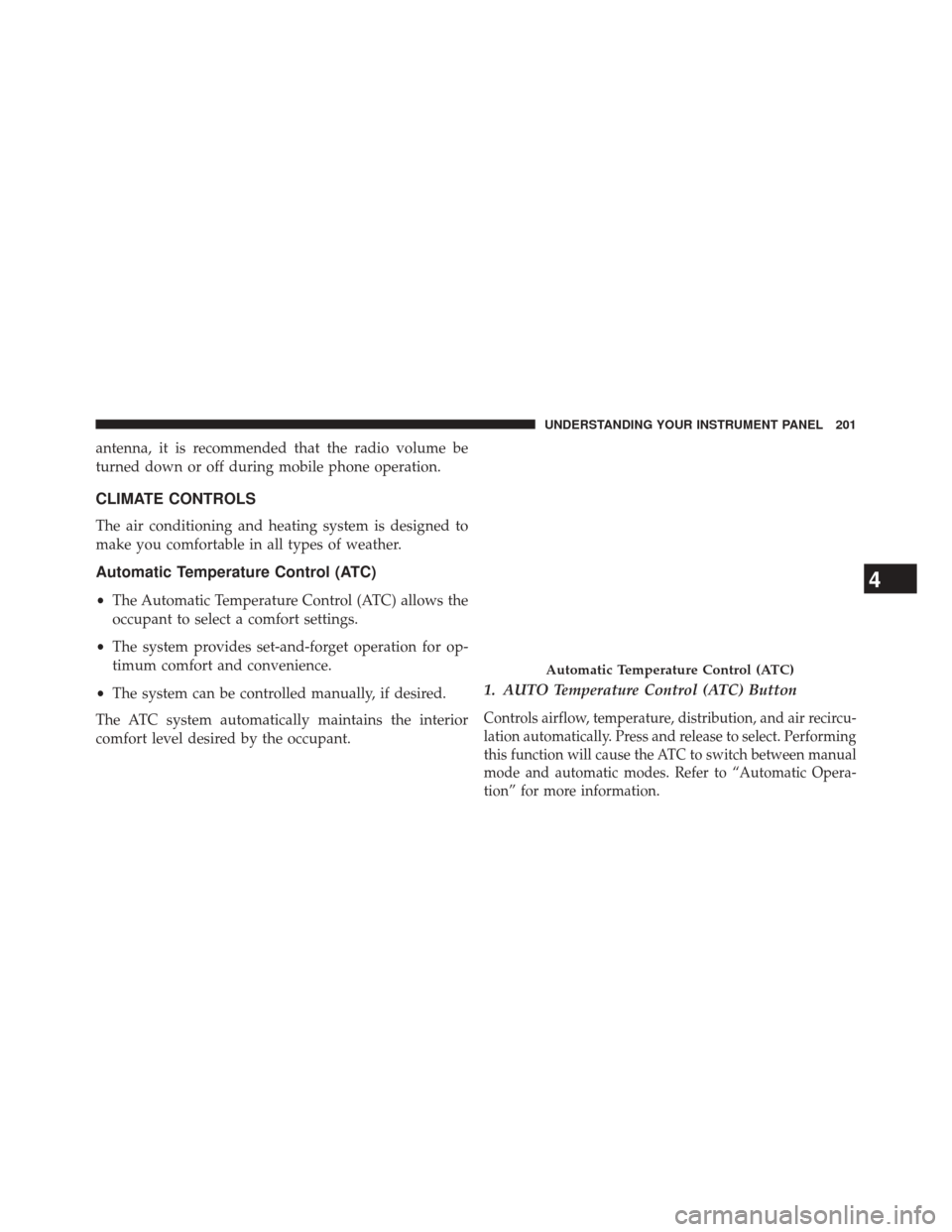
1. AUTO Temperature Control (ATC) Button
Controls airflow, temperature, distribution, and air recircu-
lation automatically. Press and release to select. Performing
this function will cause the ATC to switch between manual
mode and automatic modes. Refer to “Automatic Opera-
tion” for more information.
Automatic Temperature Control (ATC)
4
UNDERSTANDING YOUR INSTRUMENT PANEL 201
Page 204 of 363
2. A/C Button
Press and release to change the current Air Conditioning
(A/C) setting. Performing this function will cause the
ATC to switch into manual mode.
3. Temperature Control Up Button
Provides temperature up control. Push the button for
warmer temperature settings.
4. Blower Control Up Button
There are 12 blower speeds. The blower speed increases
as you press this button. Performing this function will
cause the ATC to switch into manual mode.
5. Mix Mode
Air is directed through the floor, defrost, and side win-
dow demister outlets. This setting works best in cold orsnowy conditions that require extra heat to the wind-
shield. This setting is good for maintaining comfort while
reducing moisture on the windshield. Performing this
function will cause the ATC to switch into manual mode.
6. Front Defrost
Press and release to change the current setting. The
indicator illuminates when ON. The blower will auto-
matically default to medium-high if the Defrost mode is
selected. Performing this function will cause the ATC to
switch into manual mode.
7. Floor Mode
Air is directed through the floor outlets with a small
amount flowing through the defrost and side window
demister outlets. Performing this function will cause the
ATC to switch into manual mode.
202 UNDERSTANDING YOUR INSTRUMENT PANEL
Page 205 of 363
8. Panel Mode
Air is directed through the outlets in the instrument
panel. These outlets can be adjusted to direct airflow.
Performing this function will cause the ATC to switch
into manual mode.
NOTE:The center instrument panel outlets can be aimed
so that they are directed toward the rear seat passengers
for maximum airflow to the rear.
9. Blower Control Down Button
There are 12 blower speeds. The blower speed decreases
as you press this button. Performing this function will
cause the ATC to switch into manual mode.
10. Temperature Control Down Button
Provides temperature down control. Push the button for
cooler temperature settings.
11. Climate Control ON/OFF Button
Press and release to turn the Climate Control ON or OFF.
12. Recirculation Control Button
Press and release to change the current setting. The
indicator illuminates when ON.
NOTE:
•When in Defrost mode, the Recirculation button will
flash if pressed. This indicates that you can not
proceed to this mode due to fogging risk.
• When the Auto indicator is on and the Recirculation
indicator is off, the Recirculation is in AUTO mode. If
the Recirculation indicator is on, the Recirculation
setting is manual and Recirculation is on.
4
UNDERSTANDING YOUR INSTRUMENT PANEL 203