light FIAT 500E 2014 2.G Owner's Guide
[x] Cancel search | Manufacturer: FIAT, Model Year: 2014, Model line: 500E, Model: FIAT 500E 2014 2.GPages: 363, PDF Size: 2.66 MB
Page 159 of 363
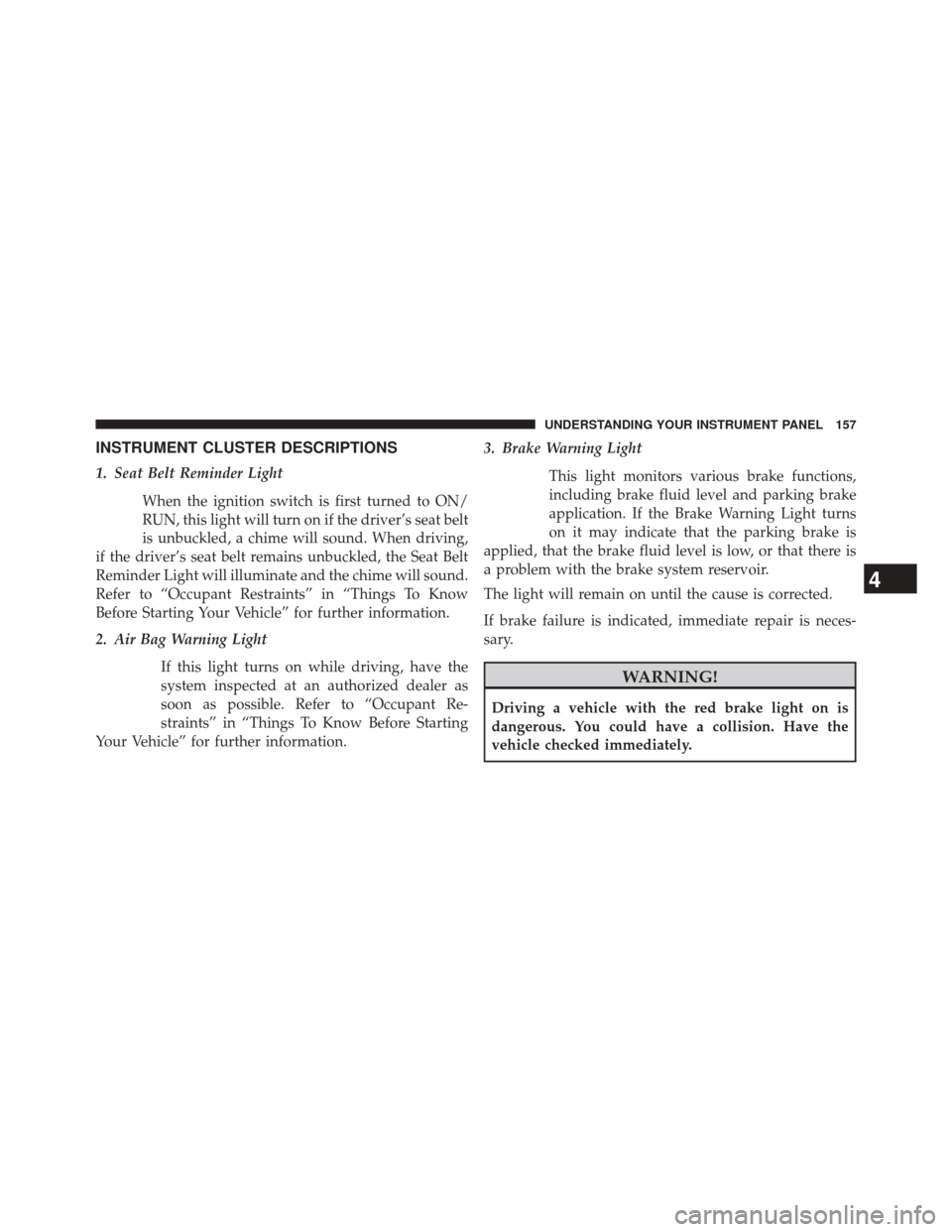
INSTRUMENT CLUSTER DESCRIPTIONS
1. Seat Belt Reminder LightWhen the ignition switch is first turned to ON/
RUN, this light will turn on if the driver’s seat belt
is unbuckled, a chime will sound. When driving,
if the driver’s seat belt remains unbuckled, the Seat Belt
Reminder Light will illuminate and the chime will sound.
Refer to “Occupant Restraints” in “Things To Know
Before Starting Your Vehicle” for further information.
2. Air Bag Warning Light
If this light turns on while driving, have the
system inspected at an authorized dealer as
soon as possible. Refer to “Occupant Re-
straints” in “Things To Know Before Starting
Your Vehicle” for further information. 3. Brake Warning Light
This light monitors various brake functions,
including brake fluid level and parking brake
application. If the Brake Warning Light turns
on it may indicate that the parking brake is
applied, that the brake fluid level is low, or that there is
a problem with the brake system reservoir.
The light will remain on until the cause is corrected.
If brake failure is indicated, immediate repair is neces-
sary.
WARNING!
Driving a vehicle with the red brake light on is
dangerous. You could have a collision. Have the
vehicle checked immediately.
4
UNDERSTANDING YOUR INSTRUMENT PANEL 157
Page 160 of 363
Vehicles equipped with the Anti-Lock Brake System
(ABS), are also equipped with Electronic Brake Force
Distribution (EBD). In the event of an EBD failure, the
Brake Warning Light will turn on along with the ABS
Light. Immediate repair to the ABS system is required.
Operation of the Brake Warning Light can be checked by
turning the ignition switch from the OFF/LOCK position
to the ON/RUN position. The light should illuminate for
approximately two seconds. The light should then turn
off unless the parking brake is applied or a brake fault is
detected. If the light does not illuminate, have the light
inspected by an authorized dealer.
The light also will turn on when the parking brake is
applied with the ignition switch in the ON/RUN posi-
tion.NOTE:
This light shows only that the parking brake is
applied. It does not show the degree of brake application.
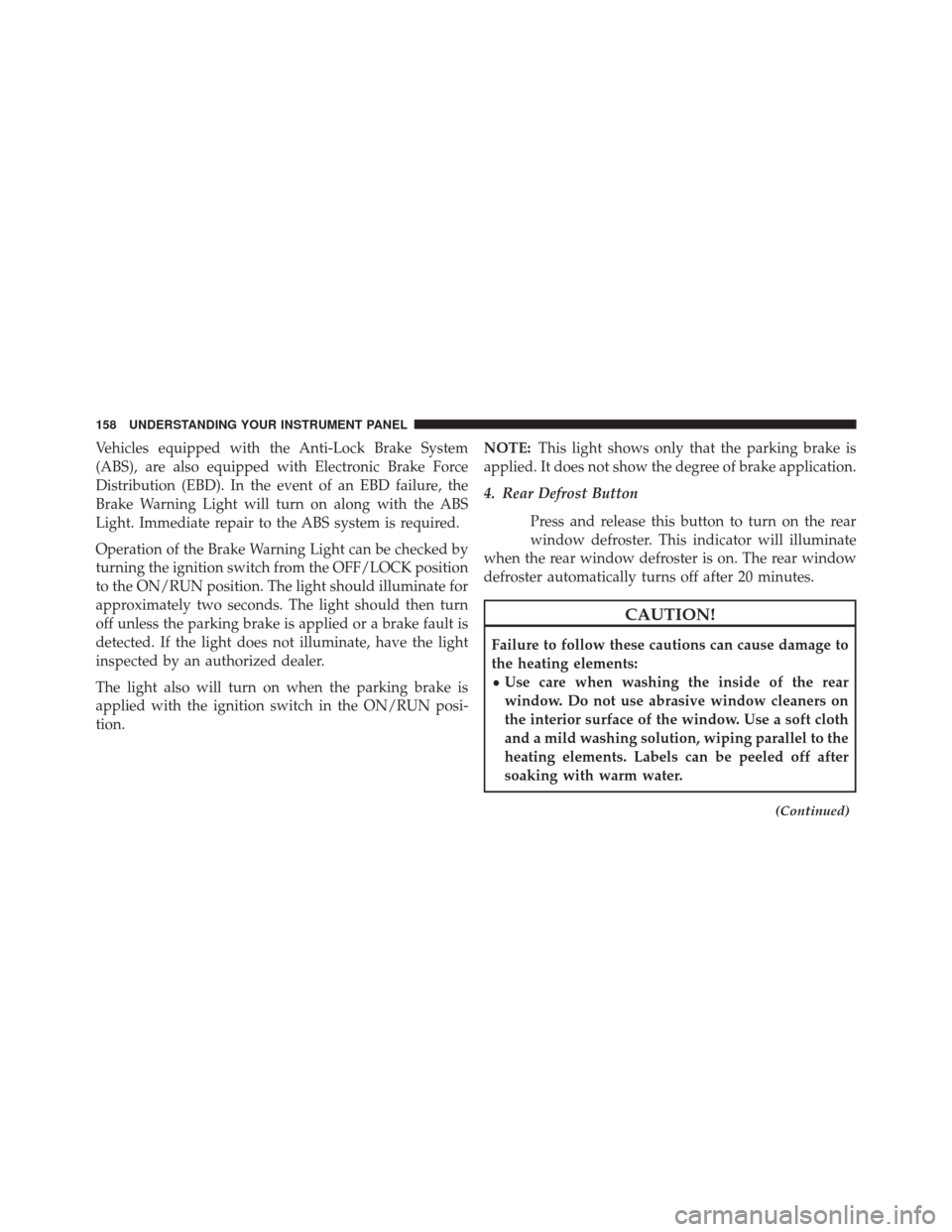
4. Rear Defrost Button
Press and release this button to turn on the rear
window defroster. This indicator will illuminate
when the rear window defroster is on. The rear window
defroster automatically turns off after 20 minutes.
CAUTION!
Failure to follow these cautions can cause damage to
the heating elements:
• Use care when washing the inside of the rear
window. Do not use abrasive window cleaners on
the interior surface of the window. Use a soft cloth
and a mild washing solution, wiping parallel to the
heating elements. Labels can be peeled off after
soaking with warm water.
(Continued)
158 UNDERSTANDING YOUR INSTRUMENT PANEL
Page 161 of 363
CAUTION!(Continued)
•Do not use scrapers, sharp instruments, or abrasive
window cleaners on the interior surface of the
window.
• Keep all objects a safe distance from the window.
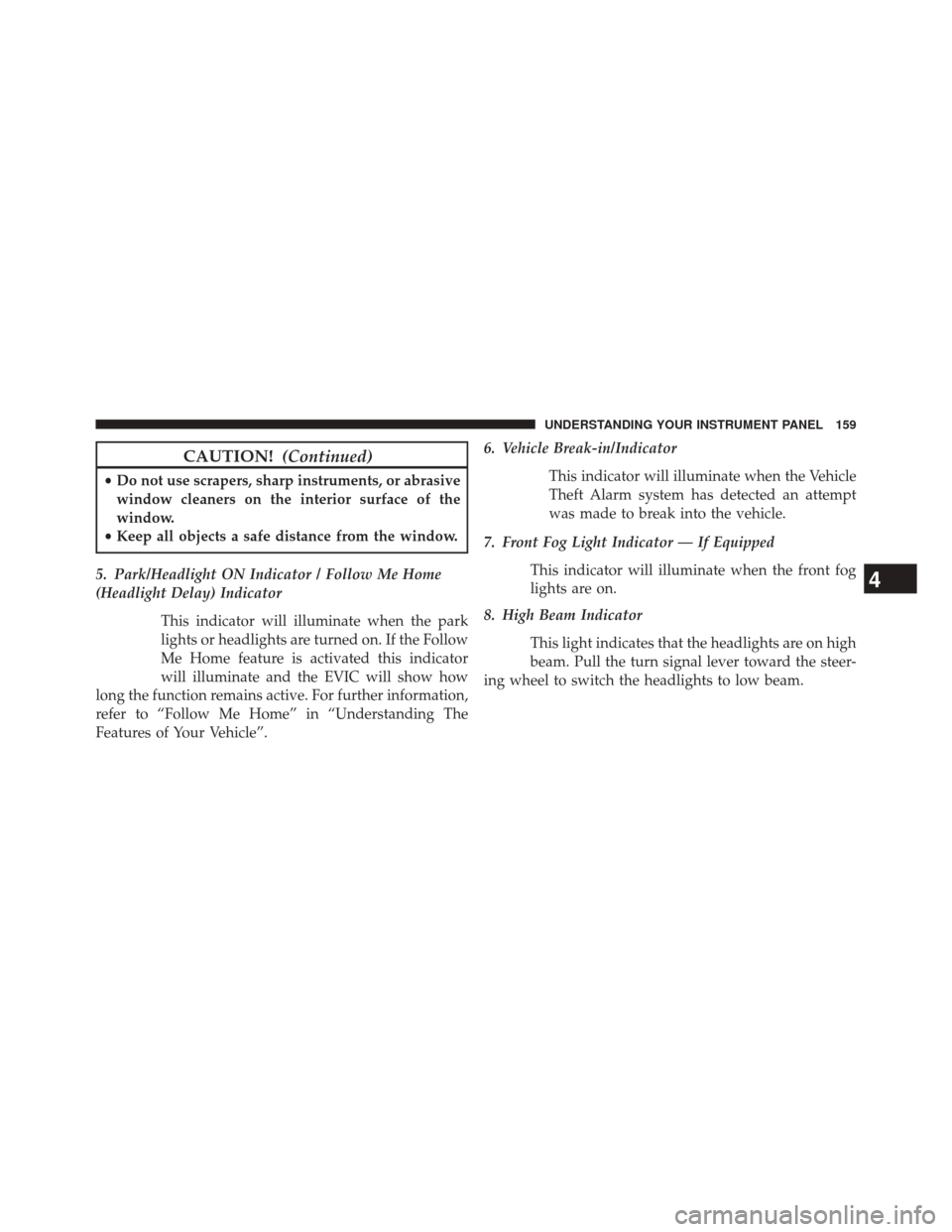
5. Park/Headlight ON Indicator / Follow Me Home
(Headlight Delay) Indicator This indicator will illuminate when the park
lights or headlights are turned on. If the Follow
Me Home feature is activated this indicator
will illuminate and the EVIC will show how
long the function remains active. For further information,
refer to “Follow Me Home” in “Understanding The
Features of Your Vehicle”. 6. Vehicle Break-in/Indicator
This indicator will illuminate when the Vehicle
Theft Alarm system has detected an attempt
was made to break into the vehicle.
7. Front Fog Light Indicator — If Equipped This indicator will illuminate when the front fog
lights are on.
8. High Beam Indicator
This light indicates that the headlights are on high
beam. Pull the turn signal lever toward the steer-
ing wheel to switch the headlights to low beam.
4
UNDERSTANDING YOUR INSTRUMENT PANEL 159
Page 162 of 363
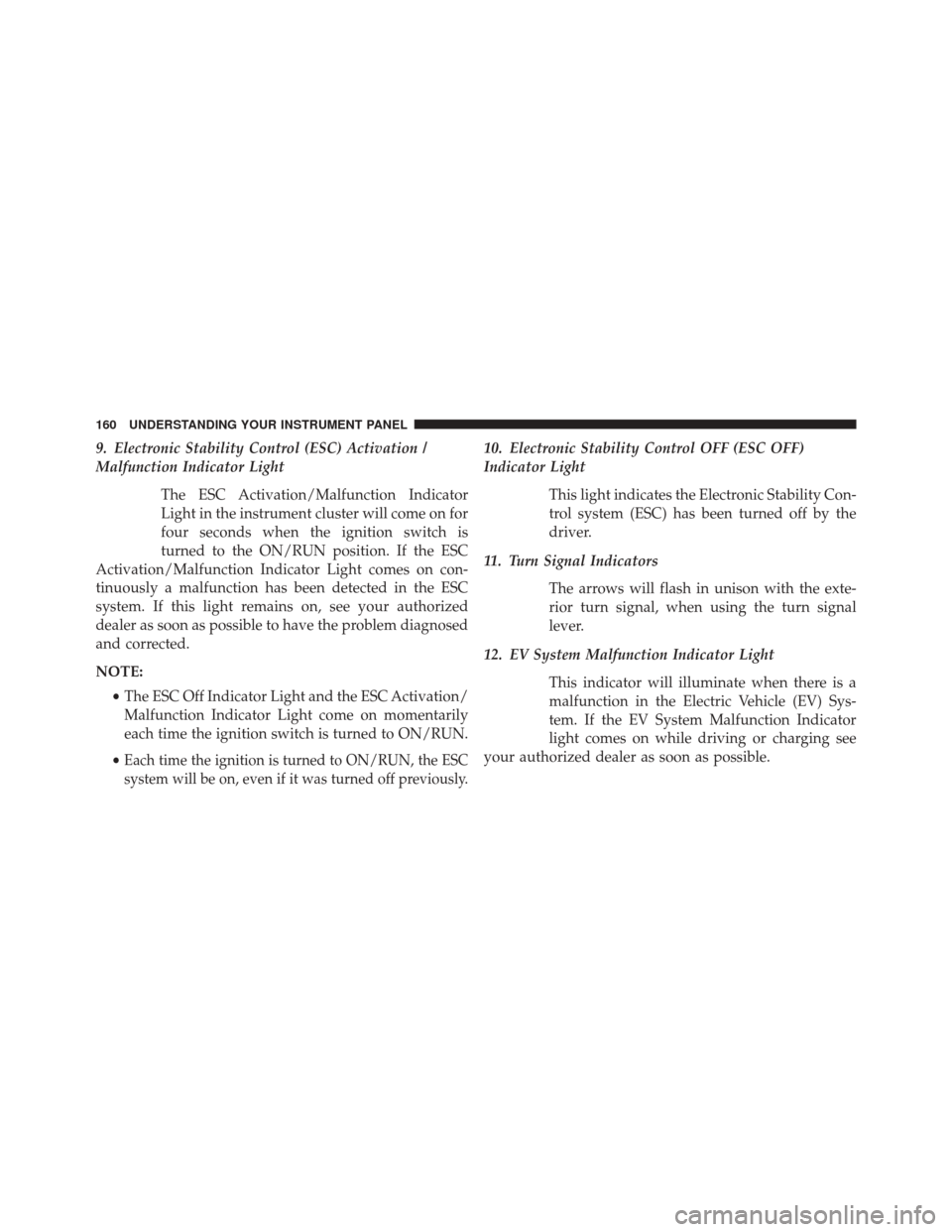
9. Electronic Stability Control (ESC) Activation /
Malfunction Indicator LightThe ESC Activation/Malfunction Indicator
Light in the instrument cluster will come on for
four seconds when the ignition switch is
turned to the ON/RUN position. If the ESC
Activation/Malfunction Indicator Light comes on con-
tinuously a malfunction has been detected in the ESC
system. If this light remains on, see your authorized
dealer as soon as possible to have the problem diagnosed
and corrected.
NOTE:
•The ESC Off Indicator Light and the ESC Activation/
Malfunction Indicator Light come on momentarily
each time the ignition switch is turned to ON/RUN.
•
Each time the ignition is turned to ON/RUN, the ESC
system will be on, even if it was turned off previously.
10. Electronic Stability Control OFF (ESC OFF)
Indicator Light
This light indicates the Electronic Stability Con-
trol system (ESC) has been turned off by the
driver.
11. Turn Signal Indicators The arrows will flash in unison with the exte-
rior turn signal, when using the turn signal
lever.
12. EV System Malfunction Indicator Light This indicator will illuminate when there is a
malfunction in the Electric Vehicle (EV) Sys-
tem. If the EV System Malfunction Indicator
light comes on while driving or charging see
your authorized dealer as soon as possible.
160 UNDERSTANDING YOUR INSTRUMENT PANEL
Page 163 of 363
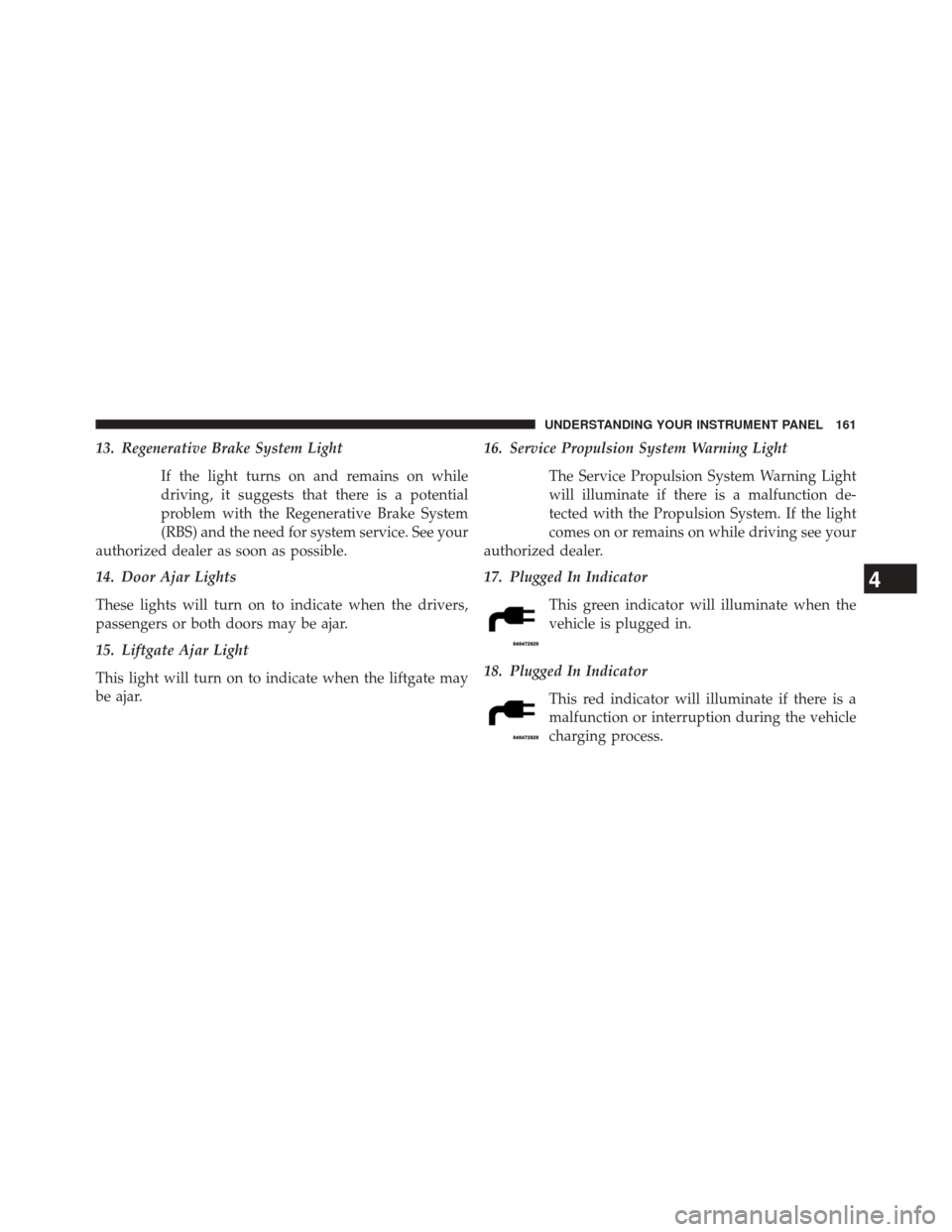
13. Regenerative Brake System LightIf the light turns on and remains on while
driving, it suggests that there is a potential
problem with the Regenerative Brake System
(RBS) and the need for system service. See your
authorized dealer as soon as possible.
14. Door Ajar Lights
These lights will turn on to indicate when the drivers,
passengers or both doors may be ajar.
15. Liftgate Ajar Light
This light will turn on to indicate when the liftgate may
be ajar. 16. Service Propulsion System Warning Light
The Service Propulsion System Warning Light
will illuminate if there is a malfunction de-
tected with the Propulsion System. If the light
comes on or remains on while driving see your
authorized dealer.
17. Plugged In Indicator
This green indicator will illuminate when the
vehicle is plugged in.
18. Plugged In Indicator This red indicator will illuminate if there is a
malfunction or interruption during the vehicle
charging process.
4
UNDERSTANDING YOUR INSTRUMENT PANEL 161
Page 164 of 363
19. Icy Road IndicatorThis light will illuminate during an icy road
condition.
20. Electronic Speed Control SET This light will turn on when the electronic
speed control is SET. For further information,
refer to “Electronic Speed Control” in “Under-
standing The Features Of Your Vehicle.”
21. Electronic Speed Control ON
This telltale will illuminate amber when the
electronic speed control is ON. For further infor-
mation, refer to “Electronic Speed Control” in
“Understanding The Features Of Your Vehicle.”
22. Charging System Light
This light shows the status of the electrical charg-
ing system. If the light stays on or comes on while
driving, turn off some of the vehicle’s non-essential
electrical devices. If the charging system light remains on,
it means that the vehicle is experiencing a problem with
the charging system. Obtain SERVICE IMMEDIATELY.
See an authorized dealer.
If jump starting is required, refer to “Jump Starting
Procedures” in “What To Do In Emergencies”.
For vehicles equipped with a premium cluster this indi-
cator will display in the Electronic Vehicle Information
Center (EVIC). Refer to ”Electronic Vehicle Information
Center (EVIC) — If Equipped” for further information.
162 UNDERSTANDING YOUR INSTRUMENT PANEL
Page 165 of 363
23. Exterior Bulb Failure Indicator
This light will illuminate when there is a malfunction in
one of the exterior bulbs.
24. Power Steering System WarningThis light is used to manage the electrical
warning of the EPS (Power Steering System).
Refer to “Power Steering” in “Starting and
Operating” for further information.
25. Speedometer
The Speedometer shows the vehicle speed in miles per
hour (mph) and/or kilometers per hour (km/h).
26. Anti-Lock Brake (ABS) Light
This light monitors the Anti-Lock Brake System
(ABS). The light will turn on when the ignition
switch is turned to the ON/RUN position and
may stay on for as long as four seconds. If the ABS light remains on or turns on while driving, it
indicates that the Anti-Lock portion of the brake system
is not functioning and that service is required. However,
the conventional brake system will continue to operate
normally if the BRAKE warning light is not on.
If the ABS light is on, the brake system should be serviced
as soon as possible to restore the benefits of Anti-Lock
brakes. If the ABS light does not turn on when the
ignition switch is turned to the ON/RUN position, have
the light inspected by an authorized dealer.
27. Tire Pressure Monitoring Telltale Light
Each tire, including the spare (if provided),
should be checked monthly when cold and
inflated to the inflation pressure recommended
by the vehicle manufacturer on the vehicle
placard or tire inflation pressure label. (If your vehicle
has tires of a different size than the size indicated on the
4
UNDERSTANDING YOUR INSTRUMENT PANEL 163
Page 169 of 363
Press the + button to scroll upward through the dis-
played menu and the related options or to increase the
displayed value. Press the – button to scroll downward
through the displayed menu and the related options or to
decrease the value displayed.
+ and – buttons activate different functions according to
the following situations:
•To scroll the menu options upwards or downwards.
• To increase or decrease values during settings.
When opening one of the front doors, the EVIC display
will come on and information such as odometer and
clock will be displayed.
Electronic Vehicle Information Center (EVIC)
Setup Menu
The menu comprises a series of functions arranged in a
cycle. Press the + and – buttons to access the different
options and settings (setup). The setup menu can be activated by pressing the MENU
ESC button. Single presses on the + or – buttons will
scroll through the setup menu options. The menu in-
cludes the following functions:
•
Charging Schedule
• Set Date
• Set Time
• Units
• Languages
• Battery % Display
• Auto Door Lock
• Remote Unlock
• Daytime Running Lights
• Button Volume
4
UNDERSTANDING YOUR INSTRUMENT PANEL 167
Page 175 of 363
CDs
The presence of dirt, scratches or distortions on the CDs
could cause skipping and poor sound quality while it is
playing. For optimal playback conditions, follow these
guidelines:
•Only use branded CDs.
• Clean every CD thoroughly removing any finger
marks or dust using a soft cloth. Hold CDs by the
outside and clean them from the middle outwards.
• Never use chemicals (e.g. antistatics or thinners or
sprays) for cleaning as they could damage the surface
of the CDs.
• After listening to them place CDs back in their boxes to
prevent them from being damaged.
• Do not expose CDs to direct sunlight, high tempera-
tures or moisture for long periods. •
Do not stick labels on the CD surface or write on the
recorded surface with pencils or pens.
• Do not use CDs that are very scratched, flawed,
distorted, etc. Using discs like these will result in
malfunctions or damage to the player.
• The use of original CD media is required for the best
quality audio production. Correct operation is not
guaranteed when CD-R/RW media are used that were
not correctly burned and/or with a maximum capacity
above 650 Mb.
• Do not use commercially available protective sheets
for CDs or discs, with stabilizers, etc. as they could get
stuck in the internal mechanism and damage the disc.
• If a copy-protected CD is used, it may take a few
seconds before the system starts to play it. The CD
player cannot be guaranteed to play all protected
discs. The fact that the CD is protected from being
4
UNDERSTANDING YOUR INSTRUMENT PANEL 173
Page 185 of 363
Loudness Function — If Equipped
The Loudness function improves the volume of the
sound while listening at low volumes, increasing the bass
and treble.
To activate/deactivate this function, select the “Loud-
ness” setting in the AUDIO menu. The condition of the
function (on or off) is shown on the display for a few
seconds by the wording “Loudness On” or “Loudness
Off”.
Preset/User/Classic/Rock/Jazz Functions —
If Equipped
The built-in equalizer can be activated/deactivated.
When the equalizer function is off, the audio settings can
only be changed by adjusting the “Bass” and “Treble”
settings, whereas when the function is on, the acoustic
curves can be adjusted. To deactivate the equalizer, select
the “EQ Preset” function in the audio menu.To activate the equalizer, use the AUDIO button or to
select one of the adjustments:
•
“EQ User” (adjustment of 7 equalizer bands that can
be changed by the user)
• “Classic” (equalizer preset for optimal classic music
sound)
• “Rock” (equalizer preset for optimal rock and pop
music sound)
• “Jazz” (equalizer preset for optimal jazz music sound)
When one of the equalizer adjustments is activated the
wording “EQ” lights up.
4
UNDERSTANDING YOUR INSTRUMENT PANEL 183