ECO mode FIAT 500E 2015 2.G User Guide
[x] Cancel search | Manufacturer: FIAT, Model Year: 2015, Model line: 500E, Model: FIAT 500E 2015 2.GPages: 367, PDF Size: 9.42 MB
Page 196 of 367
CD Loading/Ejecting
To load the CD, insert it gently into the slot to activate the
motorized loading system, which will position it cor-
rectly.
The CD can be loaded with the radio off and the ignition
key turned to ON/RUN. In this case, the radio will
remain off. When the radio is turned on, the last source
listened to before being switched off, will be activated.
When a CD is inserted, the display will show the symbol
“CD” and the wording “CD Reading.” They will remain
displayed for the whole time required for the radio to
read the CD. When this time has elapsed the radio
automatically starts playing the first track.
Push thebutton with the radio turned on, to
activate the motorized CD ejection system. After ejec-
tion, the last audio source listened to before playing
the CD will be heard.
If the CD is not removed from the radio, it will automati-
cally be reloaded about 20 seconds later but will not
resume playing until the#MEDIA#button is pushed to
select the CD mode. The radio will switch to the last
source prior to CD mode.
The CD cannot be ejected if the radio is off.
Possible Error Messages
If the loaded CD cannot be read (e.g. a CD ROM has been
inserted or the CD is inserted the wrong way or there is
a reading error) the display shows the wording “CD Disc
error.”
The CD will then be ejected and the audio source
activated before the CD mode selection will be heard.
A CD which cannot be read will not be ejected until these
functions are over. At the end, with the CD mode
activated, the display will show the wording “CD Disc
error” for a few seconds and then the CD will be ejected.
194 UNDERSTANDING YOUR INSTRUMENT PANEL
Page 198 of 367
MP3 Mode
In addition to playing regular audio CDs, the radio is also
enabled to play CDROMs on which compressed audio
files have been recorded in an MP3 format.
To guarantee optimal reproduction, it is advisable to use
good quality CDs burned at the lowest speed possible.
The files on an MP3 CD are structured in folders that
create lists of all the folders containing MP3 tracks
(folders or subfolders are all on the same level). The
folders that do not contain MP3 tracks cannot be selected.
The specifications and operating conditions for playing
MP3 files are the following:
•The CD-ROMs used should be burned in accordance
with ISO standard 9660.
•The music files should have the extension “.mp3” or
“.wma” files with a different extension will not be
reproduced.
•The sampling frequencies that can be reproduced are:
44.1 kHz, stereo (from 96 to 320 kbit/s) – 22.05 kHz,
mono or stereo (from 32 to 80 kbit/s).
•Tracks with a variable bit-rate can be reproduced.
NOTE:The track names must not include the following
characters: spaces, ‘ (apostrophes), ( and ) (open and close
brackets). During the burning of a MP3 CD, make sure
that the names of the files do not contain these characters;
if not, the radio will not be able to play the tracks
involved.
196 UNDERSTANDING YOUR INSTRUMENT PANEL
Page 199 of 367
Selecting MP3 Sessions With Hybrid Discs
If a hybrid disc is inserted (Mixed Mode, Enhanced,
CD-Extra) also containing MP3 files, the radio automati-
cally starts playing the audio session. It is possible to
move to the MP3 session while playing by keeping the
CD button pressed for more than two seconds.
NOTE:When the function is activated the radio may take
a few seconds to start playing. While checking the disc
the display will show “CD Reading.” If no MP3 files are
detected, the radio will resume playing the audio session
from the point where it was interrupted.
Display Information
ID3–Tag Information Display
In addition to the information relating to the time
elapsed, folder name and file name, the radio is also
capable of displaying ID3–TAG information relating to
Title Track, Artist and Author.
When one of the ID3-TAG pieces of information is chosen
to be displayed (Title, Artist, Album) and this informa-
tion has not been recorded for the track played, the text
#UNKNOWN#will be displayed for that field.
Selection Of Next/Previous Folder
Push thebutton to select a next folder or the
button to select the previous folder. The display
will show the number of the folder.
The folders are selected cyclically. The first folder is
selected after the last folder and vice versa.
If no other folder/track is selected in the next two
seconds, the first track on the new folder will be played.
After the last track in a folder is played, the next folder
will be played.
4
UNDERSTANDING YOUR INSTRUMENT PANEL 197
Page 201 of 367
The Duration Of The Mp3 Tracks Is Not Correctly
Displayed:
In some cases (due to the recording mode) the duration of
the MP3 tracks can be displayed incorrectly.
Operating Instructions — Hands-Free Phone
Refer to the appropriate “BLUE&ME™ User ’s Manual”
for further information.
Personal/Portable Navigation Device (PND)
A Personal/Portable Navigation Device (PND) is avail-
able as optional equipment for this vehicle, refer to the
Navigation User Guide for further information.
iPod®/USB/MEDIA PLAYER CONTROL — IF
EQUIPPED
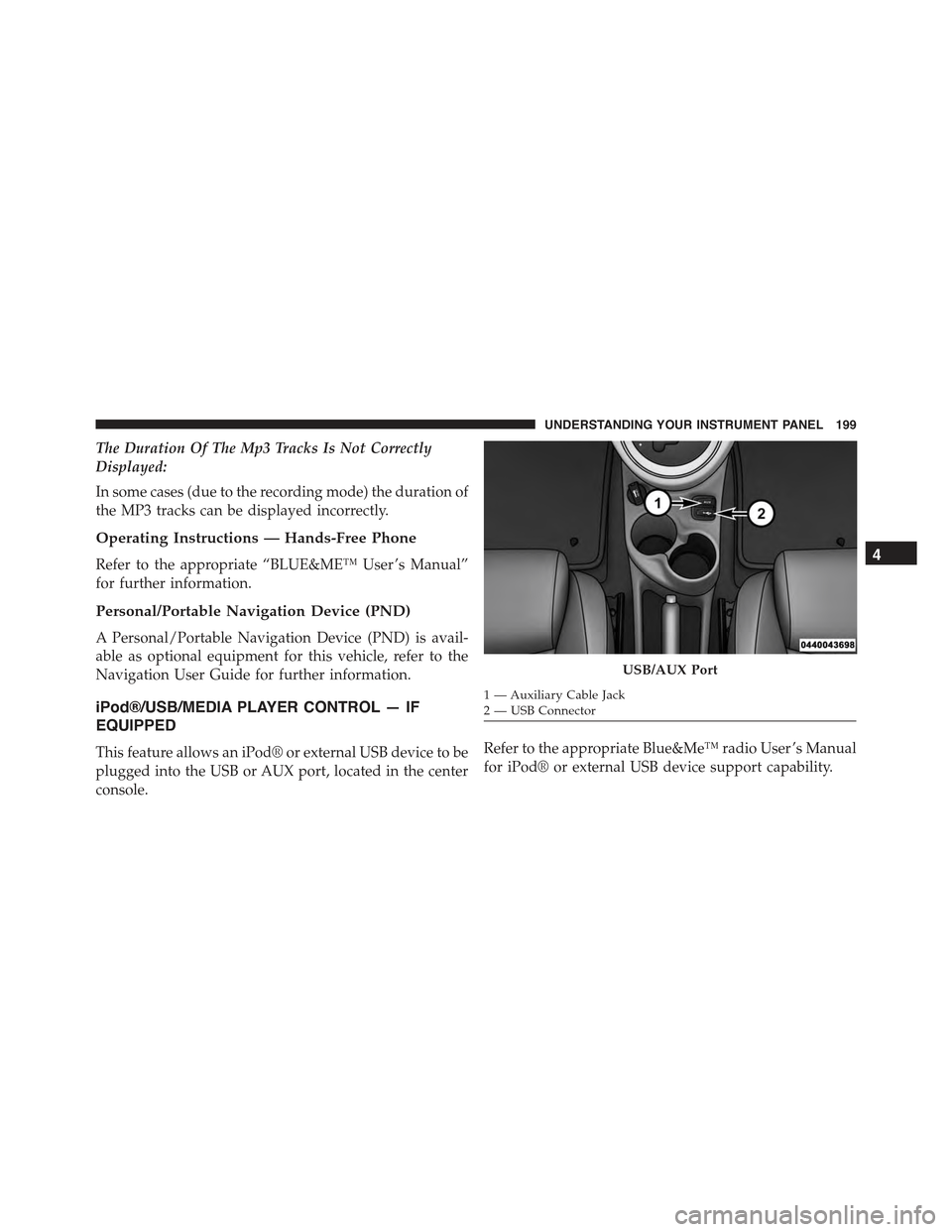
This feature allows an iPod® or external USB device to be
plugged into the USB or AUX port, located in the center
console.
Refer to the appropriate Blue&Me™ radio User ’s Manual
for iPod® or external USB device support capability.
USB/AUX Port
1 — Auxiliary Cable Jack2—USBConnector
4
UNDERSTANDING YOUR INSTRUMENT PANEL 199
Page 207 of 367
NOTE:The center instrument panel outlets can be aimed
so that they are directed toward the rear seat passengers
for maximum airflow to the rear.
9. Bi-Level
Air is directed through the panel and floor outlets.
Press and release the Panel mode button and Floor
mode button to enter Bi-Level mode, the indicators
illuminate when ON. Performing this function will cause
the ATC to switch into manual mode.
10. Temperature Control Down Button
Provides temperature down control. Push the button for
cooler temperature settings.
NOTE:If the temperature is lowered until#Lo#is dis-
played, all high voltage Heating, Ventilation, and Air
Conditioning (HVAC) systems are deactivated and am-
bient air is circulated according to the Heating, Ventila-
tion, and Air Conditioning (HVAC) control settings.
11. Climate Control ON/OFF Button
Push and release to turn the Climate Control ON or OFF.
12. Recirculation Control Button
Push and release to change the current setting. The
indicator illuminates when ON.
NOTE:When in Defrost mode, the Recirculation button
will flash if pushed. This indicates that you can not
proceed to this mode due to fogging risk.
Climate Control Functions
Air Conditioning (A/C)
The Air Conditioning (A/C) button allows the operator to
manually activate or deactivate the air conditioning system.
When in A/C mode with the ATC set to a cool temperature,
dehumidified air flows through the air outlets. If Economy
mode is desired, push the A/C button to turn off the A/C
mode in the ATC display and deactivate the A/C system.
4
UNDERSTANDING YOUR INSTRUMENT PANEL 205
Page 208 of 367
NOTE:
•If the system is in Mix or Defrost Mode, the A/C can
be turned off, but the A/C system shall remain active
to prevent fogging of the windows.
•If fog or mist appears on the windshield or side glass,
select Defrost mode and adjust blower speed if
needed.
Recirculation Control
When outside air contains smoke, odors, or high
humidity, or if rapid cooling is desired, you may
wish to recirculate interior air by pushing the RECIRCU-
LATION control button. Recirculation mode should only
be used temporarily. The recirculation LED will illumi-
nate when this button is selected. Push the button a
second time to turn off the Recirculation mode LED and
allow outside air into the vehicle.
NOTE:In cold weather, use of Recirculation mode may lead
to excessive window fogging. The recirculation feature may
be unavailable (indicator light shall blink) if conditions exist
that could create fogging on the inside of the windshield. On
systems with Manual Climate Controls, the Recirculation
mode is not allowed in Defrost mode to improve window
clearing operation. Recirculation will be disabled automati-
cally if this mode is selected. Attempting to use Recirculation
while in this mode will cause the LED in the control button
to blink and then turn off.
Automatic Operation
1. Push the AUTO button on the Automatic Temperature
Control (ATC) Panel, the indicator will illuminate
when on.
2.Next, adjust the temperature you would like the system
to maintain by adjusting the temperature control buttons.
Once the desired temperature is displayed, the system
will achieve and automatically maintain that comfort
level.
206 UNDERSTANDING YOUR INSTRUMENT PANEL
Page 217 of 367
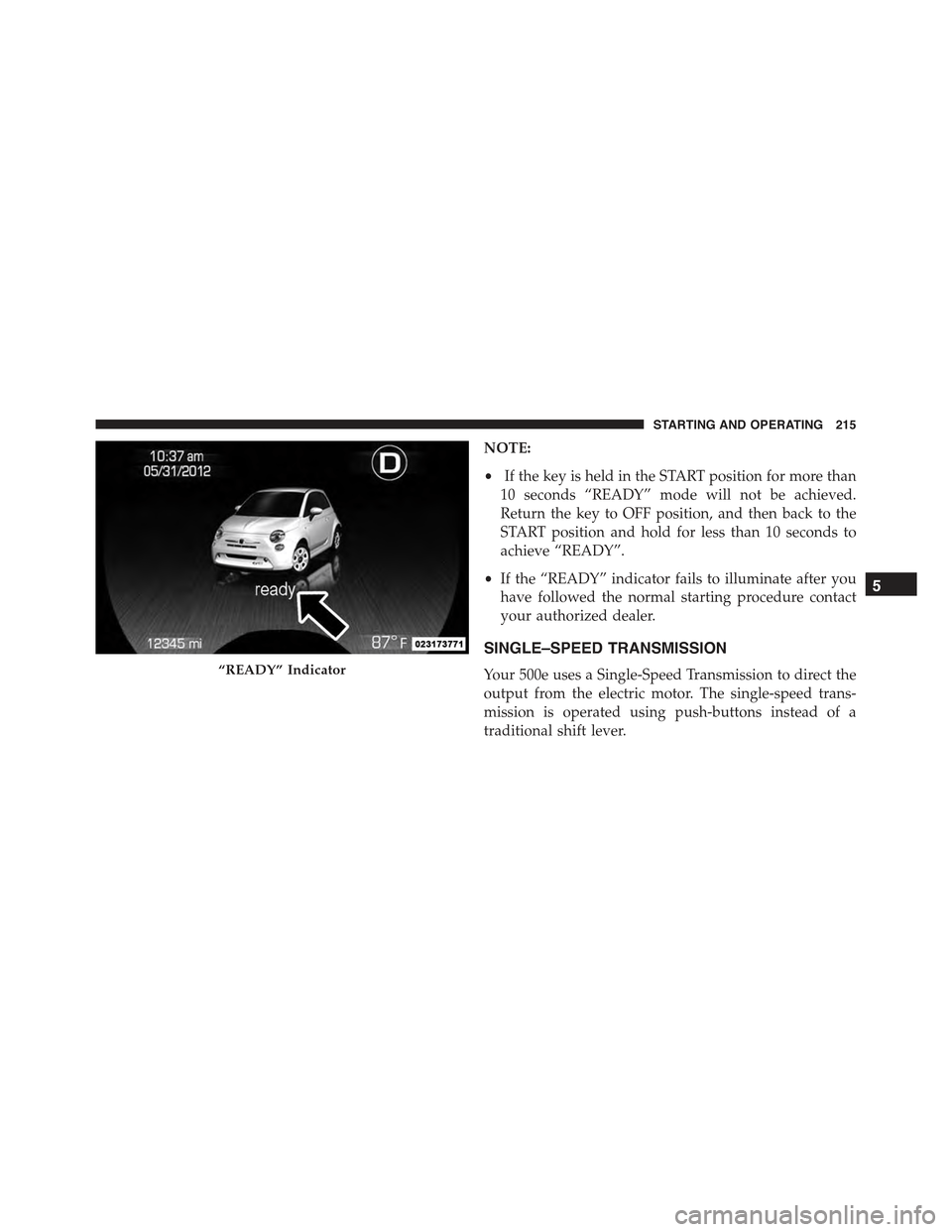
NOTE:
•If the key is held in the START position for more than
10 seconds “READY” mode will not be achieved.
Return the key to OFF position, and then back to the
START position and hold for less than 10 seconds to
achieve “READY”.
•If the “READY” indicator fails to illuminate after you
have followed the normal starting procedure contact
your authorized dealer.
SINGLE–SPEED TRANSMISSION
Your 500e uses a Single-Speed Transmission to direct the
output from the electric motor. The single-speed trans-
mission is operated using push-buttons instead of a
traditional shift lever.
“READY” Indicator
5
STARTING AND OPERATING 215
Page 235 of 367
NOTE:To improve the vehicle’s traction when driving
with snow chains, or starting off in deep snow, sand or
gravel, it may be desirable to switch to the Partial Off
mode by pressing the switch. Once the situation requir-
ing ESC to be switched to the Partial Off mode is
overcome, turn ESC back on by momentarily pressing the
switch. This may be done while the vehicle is in motion.
WARNING!
•When in “Partial Off” mode, the TCS functionality
of ESC, (except for the limited slip feature de-
scribed in the TCS section), has been disabled and
the “ESC Off Indicator Light” will be illuminated.
When in “Partial Off” mode, the engine power
reduction feature of TCS is disabled, and the
enhanced vehicle stability offered by the ESC sys-
tem is reduced.
ESC Activation/Malfunction Indicator Light And
ESC OFF Indicator Light
The ESC Activation/Malfunction Indicator
Light in the instrument cluster will come on
when the ignition switch is turned to the MAR
(ACC/ON/RUN) position for four seconds. If
the ESC Activation/Malfunction Indicator Light comes
on continuously with the vehicle operating running, a
malfunction has been detected in the ESC system. If this
light remains on after several ignition cycles, and the
vehicle has been driven several miles (kilometers) at
speeds greater than 30 mph (48 km/h), see your autho-
rized dealer as soon as possible to have the problem
diagnosed and corrected.
The ESC Activation/Malfunction Indicator Light (located
in the instrument cluster) starts to flash as soon as the
tires lose traction and the ESC system becomes active.
5
STARTING AND OPERATING 233
Page 255 of 367
Run Flat Tires — If Equipped
Run Flat tires allow you the capability to drive 50 miles
(80 km) at 50 mph (80 km/h) after a rapid loss of inflation
pressure. This rapid loss of inflation is referred to as the
Run Flat mode. A Run Flat mode occurs when the tire
inflation pressure is of/or below 14 psi (96 kPa). Once a
Run Flat tire reaches the run flat mode it has limited
driving capabilities and needs to be replaced immedi-
ately. A Run Flat tire is not repairable.
It is not recommended driving a vehicle loaded at full
capacity or to tow a trailer while a tire is in the run flat
mode.
See the tire pressure monitoring section for more infor-
mation.
Spare Tires — If Equipped
NOTE:For vehicles equipped with Tire Service Kit
instead of a spare tire, please refer to “Tire Service Kit” in
“What To Do In Emergencies” for further information.
CAUTION!
Because of the reduced ground clearance, do not take
your vehicle through an automatic car wash with a
compact or limited-use temporary spare installed.
Damage to the vehicle may result.
5
STARTING AND OPERATING 253
Page 280 of 367
Using The Mode Select Knob And Hoses
Your Tire Service Kit is equipped with the following
symbols to indicate the air or sealant mode.
Selecting Air Mode
Push in the Mode Select Knob (5) and turn to
this position for air pump operation only. Use
the Black Air Pump Hose (7) when selecting
this mode.
Selecting Sealant Mode
Push in the Mode Select Knob (5) and
turn to this position to inject the Tire
Service Kit Sealant and to inflate the
tire. Use the Sealant Hose (clear hose)
(6) when selecting this mode.
Using The Power Button
Push and release the Power Button (4) once to
turn On the Tire Service Kit. Push and release
the Power Button (4) again to turn Off the Tire
Service Kit.
Using The Deflation Button
Push the Deflation Button (2) to reduce the air
pressure in the tire if it becomes over-inflated.
Tire Service Kit Usage Precautions
•Replace the Tire Service Kit Sealant Bottle (1) and
Sealant Hose (6) prior to the expiration date (printed at
the lower right hand corner on the bottle label) to
assure optimum operation of the system. Refer to
“Sealing a Tire with Tire Service Kit” section (F)
“Sealant Bottle and Hose Replacement”.
278 WHAT TO DO IN EMERGENCIES