arm FIAT 500E 2015 2.G User Guide
[x] Cancel search | Manufacturer: FIAT, Model Year: 2015, Model line: 500E, Model: FIAT 500E 2015 2.GPages: 367, PDF Size: 9.42 MB
Page 83 of 367
Children Too Large For Booster Seats
Children who are large enough to wear the shoulder belt
comfortably, and whose legs are long enough to bend over
the front of the seat when their back is against the seatback,
should use the seat belt in a rear seat. Use this simple 5-step
test to decide whether the child can use the vehicle’s seat
belt alone:
1. Can the child sit all the way back against the back of
the vehicle seat?
2. Do the child’s knees bend comfortably over the front
of the vehicle seat – while they are still sitting all the
way back?
3. Does the shoulder belt cross the child’s shoulder
between their neck and arm?
4. Is the lap part of the seat belt as low as possible,
touching the child’s thighs and not their stomach?
5. Can the child stay seated like this for the whole trip?
If the answer to any of these questions was “no,” then the
child still needs to use a booster seat in this vehicle. If the
child is using the lap/shoulder belt, check seat belt fit
periodically and make sure the seat belt buckle is latched.
A child’s squirming or slouching can move the seat belt
out of position. If the shoulder belt contacts the face or
neck, move the child closer to the center of the vehicle, or
use a booster seat to position the seat belt on the child
correctly.
WARNING!
Never allow a child to put the shoulder belt under an
arm or behind their back. In a crash, the shoulder belt
will not protect a child properly, which may result in
serious injury or death. A child must always wear
both the lap and shoulder portions of the seat belt
correctly.
2
THINGS TO KNOW BEFORE STARTING YOUR VEHICLE 81
Page 97 of 367
WARNING!
•An incorrectly anchored tether strap could lead to
increased head motion and possible injury to the
child. Use only the anchorage position directly
behind the child seat to secure a child restraint top
tether strap.
•If your vehicle is equipped with a split rear seat,
make sure the tether strap does not slip into the
opening between the seatbacks as you remove
slack in the strap.
Transporting Pets
Air Bags deploying in the front seat could harm your pet.
An unrestrained pet will be thrown about and possibly
injured, or could injure a passenger during panic braking
or in a collision.
Pets should be restrained in the rear seat in pet harnesses
or pet carriers that are secured by seat belts.
SAFETY TIPS
Transporting Passengers
NEVER TRANSPORT PASSENGERS IN THE CARGO
AREA.
WARNING!
•Do not leave children or animals inside parked
vehicles in hot weather. Interior heat build-up may
cause serious injury or death.
•It is extremely dangerous to ride in a cargo area,
inside or outside of a vehicle. In a collision, people
riding in these areas are more likely to be seriously
injured or killed.
•Do not allow people to ride in any area of your
vehicle that is not equipped with seats and seat belts.
•Be sure everyone in your vehicle is in a seat and
using a seat belt properly.
2
THINGS TO KNOW BEFORE STARTING YOUR VEHICLE 95
Page 109 of 367
having to take your eyes off the road or remove your
hands from the steering wheel. To use voice commands
you are not required to train the voice recognition system
to recognize your voice. This implies that the system is
nearly equally performing with different persons, i.e.: the
voice recognition system is of the “speaker independent”
type.
With this system you can also play your favorite music
stored on USB device and select tracks and playback
modes with both voice commands or buttons on the
steering wheel.
This device complies with Part 15 of the FCC rules
subject to the following two conditions:
•This device may not cause harmful interference.
•This device must accept all interference received, includ-
ing interference that may cause undesired operation.
The Hands-Free Kit
The basic characteristic of this hands-free kit is voice
recognition with Bluetooth® wireless technology. With
this system you can make and receive calls safely and
securely by using either voice commands or buttons on
the steering wheel. This can be done under any driving
condition without ever having to take your eyes off the
road or remove your hands from the steering wheel, as
required by current laws.
Bluetooth® wireless technology enables wireless connec-
tion between your mobile phone and the hands-free kit
installed on your car.
To use the hands-free kit, you need a Bluetooth® wireless
technology enabled mobile phone. This hands-free kit
gives you the possibility of interacting vocally with your
mobile phone while driving, even if your mobile device
does not feature Voice Recognition. You can also interact
with your mobile phone manually and visually using the
3
UNDERSTANDING THE FEATURES OF YOUR VEHICLE 107
Page 153 of 367
REAR WINDOW FEATURES
Rear Window Defroster
The rear window defroster button is located in the
center of the instrument panel, below the radio.
Push this button to turn on the rear window defroster. An
indicator in the instrument panel cluster will illuminate
when the rear window defroster is on. The rear window
defroster automatically turns off after approximately 20
minutes. To manually shut the defroster off, push the
button a second time.
CAUTION!
Failure to follow these cautions can cause damage to
the heating elements:
•Use care when washing the inside of the rear
window. Do not use abrasive window cleaners on
the interior surface of the window. Use a soft cloth
and a mild washing solution, wiping parallel to the
heating elements. Labels can be peeled off after
soaking with warm water.
•Do not use scrapers, sharp instruments, or abrasive
window cleaners on the interior surface of the
window.
•Keep all objects a safe distance from the window.
3
UNDERSTANDING THE FEATURES OF YOUR VEHICLE 151
Page 161 of 367
Vehicles equipped with the Anti-Lock Brake System
(ABS), are also equipped with Electronic Brake Force
Distribution (EBD). In the event of an EBD failure, the
Brake Warning Light will turn on along with the ABS
Light. Immediate repair to the ABS system is required.
Operation of the Brake Warning Light can be checked by
turning the ignition switch from the OFF/LOCK position
to the ON/RUN position. The light should illuminate for
approximately two seconds. The light should then turn
off unless the parking brake is applied or a brake fault is
detected. If the light does not illuminate, have the light
inspected by an authorized dealer.
The light also will turn on when the parking brake is
applied with the ignition switch in the ON/RUN posi-
tion.
NOTE:This light shows only that the parking brake is
applied. It does not show the degree of brake application.
4. Rear Defrost Button
Push and release this button to turn on the rear
window defroster. This indicator will illuminate
when the rear window defroster is on. The rear window
defroster automatically turns off after 20 minutes.
CAUTION!
Failure to follow these cautions can cause damage to
the heating elements:
•Use care when washing the inside of the rear
window. Do not use abrasive window cleaners on
the interior surface of the window. Use a soft cloth
and a mild washing solution, wiping parallel to the
heating elements. Labels can be peeled off after
soaking with warm water.
(Continued)
4
UNDERSTANDING YOUR INSTRUMENT PANEL 159
Page 162 of 367
CAUTION!(Continued)
•Do not use scrapers, sharp instruments, or abrasive
window cleaners on the interior surface of the
window.
•Keep all objects a safe distance from the window.
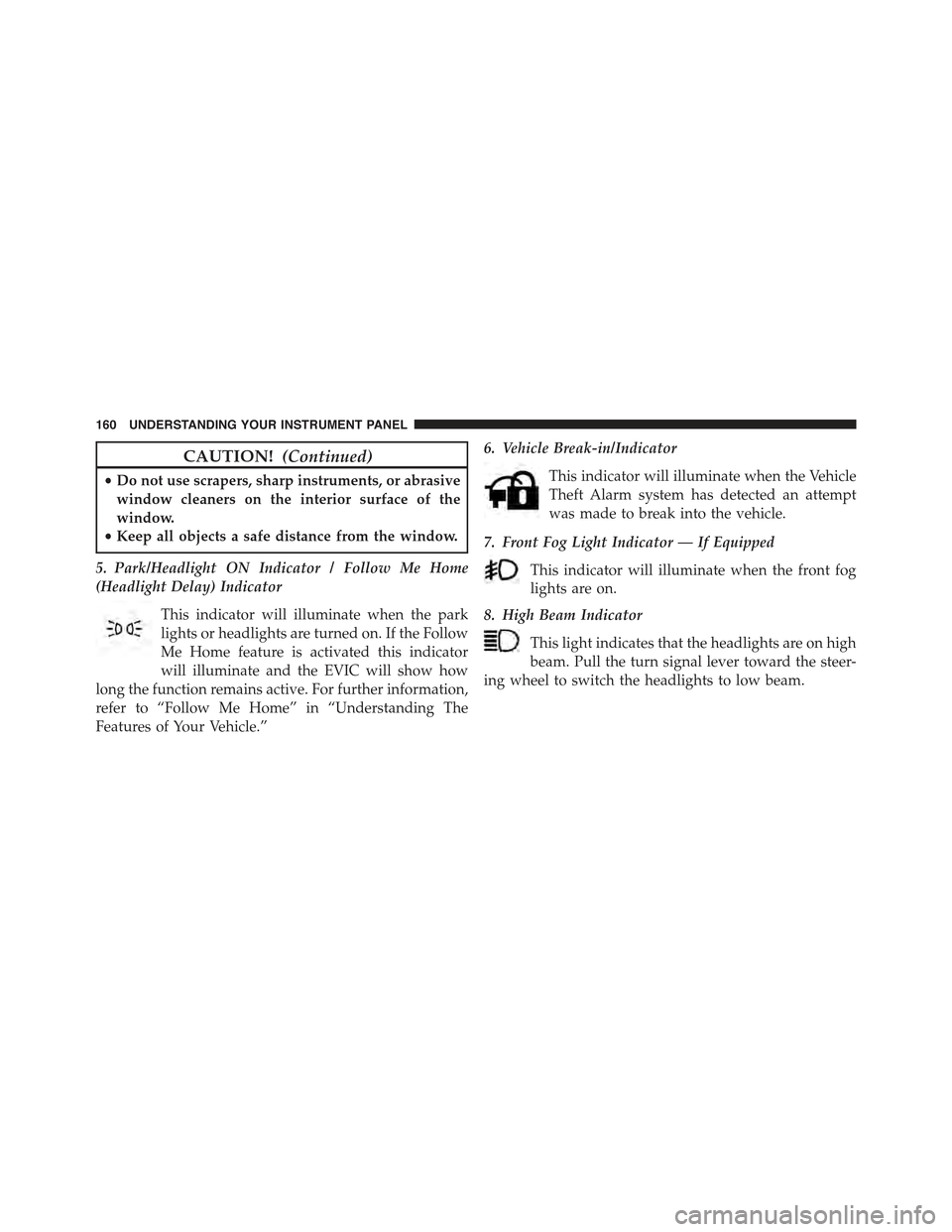
5. Park/Headlight ON Indicator / Follow Me Home
(Headlight Delay) Indicator
This indicator will illuminate when the park
lights or headlights are turned on. If the Follow
Me Home feature is activated this indicator
will illuminate and the EVIC will show how
long the function remains active. For further information,
refer to “Follow Me Home” in “Understanding The
Features of Your Vehicle.”
6. Vehicle Break-in/Indicator
This indicator will illuminate when the Vehicle
Theft Alarm system has detected an attempt
was made to break into the vehicle.
7. Front Fog Light Indicator — If Equipped
This indicator will illuminate when the front fog
lights are on.
8. High Beam Indicator
This light indicates that the headlights are on high
beam. Pull the turn signal lever toward the steer-
ing wheel to switch the headlights to low beam.
160 UNDERSTANDING YOUR INSTRUMENT PANEL
Page 204 of 367
5. Store the disc in its case after playing.
6. Do not expose the disc to direct sunlight.
7. Do not store the disc where temperatures may become
too high.
NOTE:If you experience difficulty in playing a particular
disc, it may be damaged (e.g., scratched, reflective coat-
ing removed, a hair, moisture or dew on the disc)
oversized, or have protection encoding. Try a known
good disc before considering disc player service.
RADIO OPERATION AND MOBILE PHONES
Under certain conditions, the mobile phone being on in
your vehicle can cause erratic or noisy performance from
your radio. This condition may be lessened or eliminated
by relocating the mobile phone antenna. This condition is
not harmful to the radio. If your radio performance does
not satisfactorily “clear” by the repositioning of the an-
tenna, it is recommended that the radio volume be turned
down or off during mobile phone operation.
CLIMATE CONTROLS
The air conditioning and heating system is designed to
make you comfortable in all types of weather.
Automatic Temperature Control (ATC)
•The Automatic Temperature Control (ATC) allows the
occupant to select a comfort settings.
•The system provides set-and-forget operation for op-
timum comfort and convenience.
•The system can be controlled manually, if desired.
The ATC system automatically maintains the interior
comfort level desired by the occupant.
202 UNDERSTANDING YOUR INSTRUMENT PANEL
Page 205 of 367
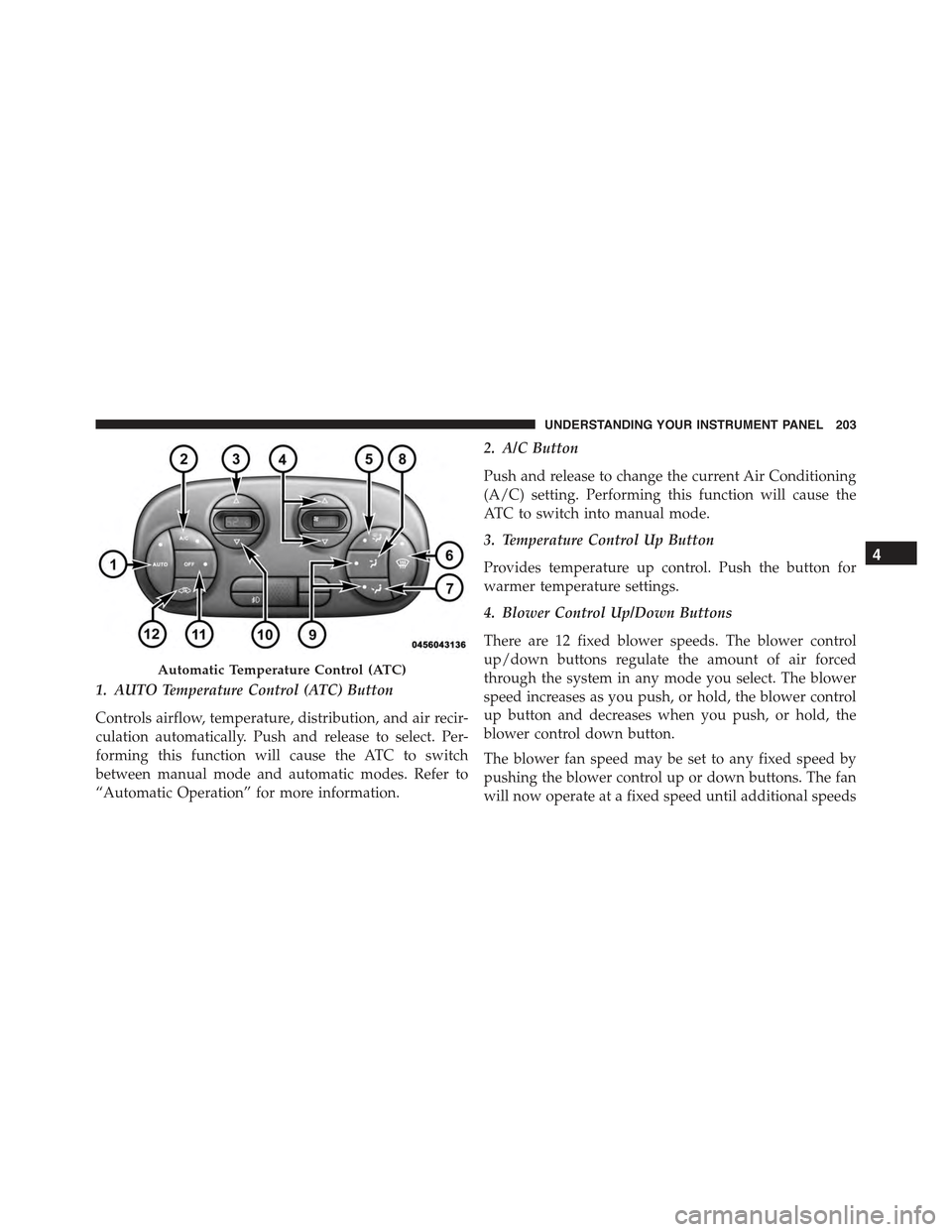
1. AUTO Temperature Control (ATC) Button
Controls airflow, temperature, distribution, and air recir-
culation automatically. Push and release to select. Per-
forming this function will cause the ATC to switch
between manual mode and automatic modes. Refer to
“Automatic Operation” for more information.
2. A/C Button
Push and release to change the current Air Conditioning
(A/C) setting. Performing this function will cause the
ATC to switch into manual mode.
3. Temperature Control Up Button
Provides temperature up control. Push the button for
warmer temperature settings.
4. Blower Control Up/Down Buttons
There are 12 fixed blower speeds. The blower control
up/down buttons regulate the amount of air forced
through the system in any mode you select. The blower
speed increases as you push, or hold, the blower control
up button and decreases when you push, or hold, the
blower control down button.
The blower fan speed may be set to any fixed speed by
pushing the blower control up or down buttons. The fan
will now operate at a fixed speed until additional speeds
Automatic Temperature Control (ATC)
4
UNDERSTANDING YOUR INSTRUMENT PANEL 203
Page 271 of 367
Once you repair or replace the original road tire and
reinstall it, the TPMS will update automatically. In addi-
tion, the “Tire Pressure Monitoring Telltale Light” will
turn off and the graphic in the EVIC will display a new
pressure value instead of dashes (- -), as long as no tire
pressure is below the low-pressure warning limit in any
of the four active road tires. The vehicle may need to be
driven for up to 20 minutes above 15 mph (24 km/h) in
order for the TPMS to receive this information.
General Information
This device complies with Part 15 of the FCC rules and
RSS 210 of Industry Canada. Operation is subject to the
following conditions:
•This device may not cause harmful interference.
•This device must accept any interference received, includ-
ing interference that may cause undesired operation. The
tire pressure sensors are covered under one of the follow-
ing licenses: United States MRXC4W4MA4 Canada
2546A-C4W4MA4.
TRAILER TOWING
Trailer towing with this vehicle is not recommended.
5
STARTING AND OPERATING 269
Page 282 of 367
WARNING!
•Do not attempt to seal a tire on the side of the
vehicle closest to traffic. Pull far enough off the
road to avoid the danger of being hit when using
the Tire Service Kit.
•Do not use Tire Service Kit or drive the vehicle
under the following circumstances:
– If the puncture in the tire tread is approximately
1/4” (6 mm) or larger.
– If the tire has any sidewall damage.
– If the tire has any damage from driving with
extremely low tire pressure.
– If the tire has any damage from driving on a flat
tire.
– If the wheel has any damage.
– If you are unsure of the condition of the tire or
the wheel.
(Continued)
WARNING!(Continued)
•Keep Tire Service Kit away from open flames or
heat source.
•A loose Tire Service Kit thrown forward in a
collision or hard stop could endanger the occupants
of the vehicle. Always stow the Tire Service Kit in
the place provided. Failure to follow these warn-
ings can result in injuries that are serious or fatal to
you, your passengers, and others around you.
•Take care not to allow the contents of Tire Service
Kit to come in contact with hair, eyes, or clothing.
Tire Service Kit is harmful if inhaled, swallowed,
or absorbed through the skin. It causes skin, eye,
and respiratory irritation. Flush immediately with
plenty of water if there is any contact with eyes or
skin. Change clothing as soon as possible, if there
is any contact with clothing.
(Continued)
280 WHAT TO DO IN EMERGENCIES