phone FIAT 500E 2015 2.G User Guide
[x] Cancel search | Manufacturer: FIAT, Model Year: 2015, Model line: 500E, Model: FIAT 500E 2015 2.GPages: 367, PDF Size: 9.42 MB
Page 113 of 367
Message reader functions are managed by the control
buttons on the steering wheel or by the BLUE&ME™
voice commands.
The BLUE&ME™ message reader enables the following
operations:
•To display an indicator on the instrument panel that
indicates you have received a new SMS text. It will
display the sender’s number/name and will ask you
whether to read the text of the message to you.
•To manage the list of SMS texts received on your
BLUE&ME™ paired mobile phone.
•To read the messages received and stored. Messages
can be read multiple times.
•To call the SMS text sender using the buttons on the
steering wheel or voice commands.
•To delete individual messages or the entire inbox using
the buttons on the steering wheel or voice commands.
The BLUE&ME™ system can also recognize and read
abbreviations, if any (e.g. “ILUVU” will be read like “I
love you”) and interpret the most usual emoticons (e.g. :-)
will be read like “Smile”), that are currently used to write
SMS texts.
Media Player
With the BLUE&ME™ media player you can play the
digital audio files stored on a USB device by simply
connecting it to the USB port located in the center console
of the car. A second USB port, used for charging only, is
located in the glovebox.
In this way, while you are driving you can play your
favorite music collections.
•iPod® Player— See dedicated paragraph under Me-
dia Player Functions.
3
UNDERSTANDING THE FEATURES OF YOUR VEHICLE 111
Page 147 of 367
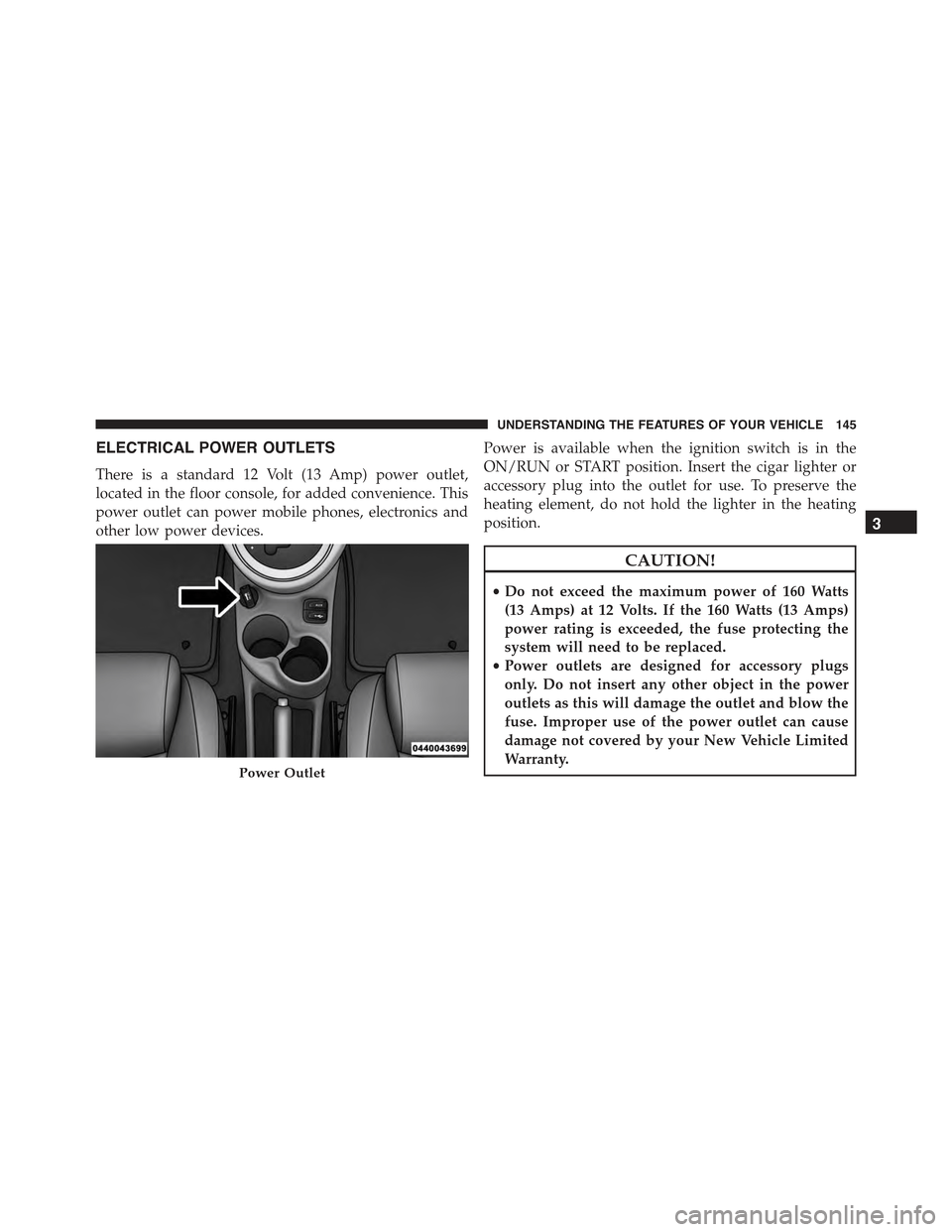
ELECTRICAL POWER OUTLETS
There is a standard 12 Volt (13 Amp) power outlet,
located in the floor console, for added convenience. This
power outlet can power mobile phones, electronics and
other low power devices.
Power is available when the ignition switch is in the
ON/RUN or START position. Insert the cigar lighter or
accessory plug into the outlet for use. To preserve the
heating element, do not hold the lighter in the heating
position.
CAUTION!
•Do not exceed the maximum power of 160 Watts
(13 Amps) at 12 Volts. If the 160 Watts (13 Amps)
power rating is exceeded, the fuse protecting the
system will need to be replaced.
•Power outlets are designed for accessory plugs
only. Do not insert any other object in the power
outlets as this will damage the outlet and blow the
fuse. Improper use of the power outlet can cause
damage not covered by your New Vehicle Limited
Warranty.Power Outlet
3
UNDERSTANDING THE FEATURES OF YOUR VEHICLE 145
Page 149 of 367
CAUTION!
•Many accessories that can be plugged in draw
power from the vehicle’s battery, even when not in
use (i.e., cellular phones, etc.). Eventually, if
plugged in long enough, the vehicle’s battery will
discharge sufficiently to degrade battery life and/or
prevent the engine from starting.
•Accessories that draw higher power (i.e., coolers,
vacuum cleaners, lights, etc.) will degrade the bat-
tery even more quickly. Only use these intermit-
tently and with great caution.
•After the use of high power draw accessories, or
long periods of the vehicle not being started (with
accessories still plugged in), the vehicle must be
driven a sufficient length of time to allow the
generator to recharge the vehicle’s battery.
CIGAR LIGHTER — IF EQUIPPED
This is located on the center console, in front of the cup
holders. To activate the cigar lighter, push and release the
knob. After a few seconds the knob automatically returns
to its initial position, and the cigar lighter is ready for use.
WARNING!
When the cigar lighter is in use it becomes very hot.
To avoid serious injury, handle the cigar lighter with
care. Always check that the cigar lighter has turned
off.
3
UNDERSTANDING THE FEATURES OF YOUR VEHICLE 147
Page 156 of 367
▫Troubleshooting.......................198
!iPod®/USB/MEDIA PLAYER CONTROL — IF
EQUIPPED...........................199
!STEERING WHEEL AUDIO CONTROLS......200
▫Radio Operation......................201
▫CD Player Operation...................201
▫Operating Instructions — Hands-Free Phone
(If Equipped).........................201
!CD/DVD DISC MAINTENANCE...........201
!RADIO OPERATION AND MOBILE PHONES . .202
!CLIMATE CONTROLS...................202
▫Automatic Temperature Control (ATC)......202
▫Operating Tips.......................208
154 UNDERSTANDING YOUR INSTRUMENT PANEL
Page 188 of 367
Menu
MENU Button Functions
Push the MENU button briefly to activate the Menu
function.
Use theorbuttons to scroll through the menu
functions. To change the setting of the selected func-
tion, use theorbuttons.
The current status of the selected function appears on the
display.
The functions managed by the Menu are:
•Speech Volume
•Aux Audio Offset
•Radio Off
•Sat ID
•SiriusXM Telephone Number
•System Reset
•Speed Volume
•On Volume Limit
Push the MENU button again to exit the Menu function.
Speed Volume Function — If Equipped
This function automatically adapts the volume level to
the speed of the car, turning up the volume when the
speed increases to maintain the ratio with the noise level
inside the passenger compartment. To activate/
deactivate the function, use the buttons. The wording
“Speed volume” appears on the display, followed by the
current status of the function:
•Off: function deactivated
•Low: function activated (low sensitivity)
•High: function activated (high sensitivity)
186 UNDERSTANDING YOUR INSTRUMENT PANEL
Page 201 of 367
The Duration Of The Mp3 Tracks Is Not Correctly
Displayed:
In some cases (due to the recording mode) the duration of
the MP3 tracks can be displayed incorrectly.
Operating Instructions — Hands-Free Phone
Refer to the appropriate “BLUE&ME™ User ’s Manual”
for further information.
Personal/Portable Navigation Device (PND)
A Personal/Portable Navigation Device (PND) is avail-
able as optional equipment for this vehicle, refer to the
Navigation User Guide for further information.
iPod®/USB/MEDIA PLAYER CONTROL — IF
EQUIPPED
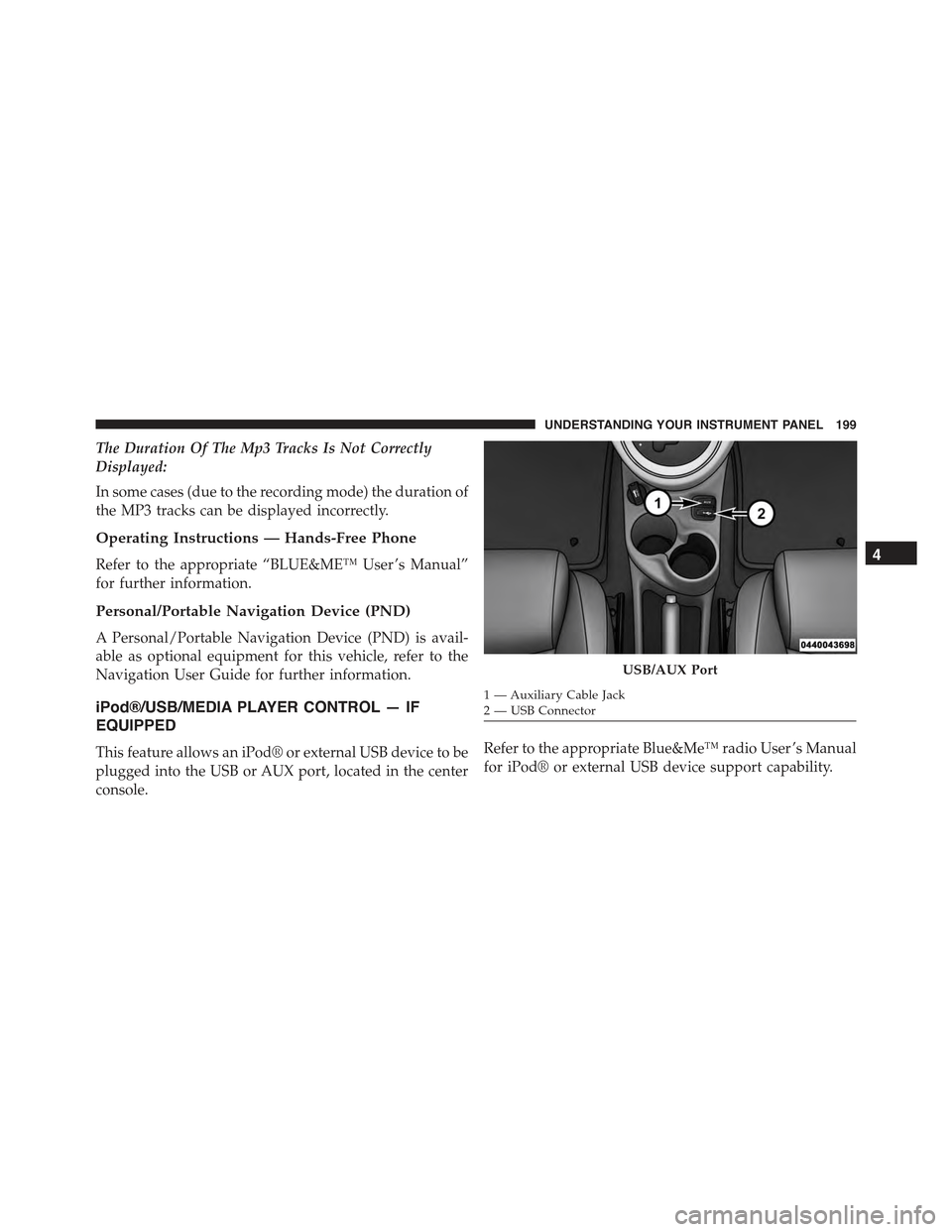
This feature allows an iPod® or external USB device to be
plugged into the USB or AUX port, located in the center
console.
Refer to the appropriate Blue&Me™ radio User ’s Manual
for iPod® or external USB device support capability.
USB/AUX Port
1 — Auxiliary Cable Jack2—USBConnector
4
UNDERSTANDING YOUR INSTRUMENT PANEL 199
Page 203 of 367
Radio Operation
Pushing the top of the switch will “Seek” up for the next
listenable station and pushing the bottom of the switch
will “Seek” down for the next listenable station.
The button located in the center of the left-hand control
will tune to the next preset station that you have pro-
grammed in the radio preset button.
CD Player Operation
Pushing the top of the switch once will go to the next
track on the CD. Pushing the bottom of the switch once
will go to the beginning of the current track, or to the
beginning of the previous track if it is within one second
after the current track begins to play.
If you push the switch up or down twice, it plays the
second track; three times, it will play the third, etc.
Operating Instructions — Hands-Free Phone
(If Equipped)
Refer to the appropriate Blue&Me™ User ’s Manual for
further information.
CD/DVD DISC MAINTENANCE
To keep a CD/DVD in good condition, take the following
precautions:
1. Handle the disc by its edge; avoid touching the
surface.
2. If the disc is stained, clean the surface with a soft cloth,
wiping from center to edge.
3. Do not apply paper or tape to the disc; avoid scratch-
ing the disc.
4. Do not use solvents such as benzene, thinner, cleaners,
or anti-static sprays.
4
UNDERSTANDING YOUR INSTRUMENT PANEL 201
Page 204 of 367
5. Store the disc in its case after playing.
6. Do not expose the disc to direct sunlight.
7. Do not store the disc where temperatures may become
too high.
NOTE:If you experience difficulty in playing a particular
disc, it may be damaged (e.g., scratched, reflective coat-
ing removed, a hair, moisture or dew on the disc)
oversized, or have protection encoding. Try a known
good disc before considering disc player service.
RADIO OPERATION AND MOBILE PHONES
Under certain conditions, the mobile phone being on in
your vehicle can cause erratic or noisy performance from
your radio. This condition may be lessened or eliminated
by relocating the mobile phone antenna. This condition is
not harmful to the radio. If your radio performance does
not satisfactorily “clear” by the repositioning of the an-
tenna, it is recommended that the radio volume be turned
down or off during mobile phone operation.
CLIMATE CONTROLS
The air conditioning and heating system is designed to
make you comfortable in all types of weather.
Automatic Temperature Control (ATC)
•The Automatic Temperature Control (ATC) allows the
occupant to select a comfort settings.
•The system provides set-and-forget operation for op-
timum comfort and convenience.
•The system can be controlled manually, if desired.
The ATC system automatically maintains the interior
comfort level desired by the occupant.
202 UNDERSTANDING YOUR INSTRUMENT PANEL
Page 273 of 367
The 500e uses high voltage components to heat and cool
the cabin, so when using automatic climate control,
consider setting temperatures a few degrees higher or
lower during hot and cold days. If your 500e has been
soaking in hot or cold temperatures for an extended
period, it is recommended that the car be preconditioned
using the FIAT Access smartphone app while still
plugged into a charging source. This will allow 500e to
use external power to establish a comfortable cabin
temperature before the drive and allow the battery to
maintain the temperature at significantly lower energy
levels.
Additional tips:
•Keep tires properly inflated
•When practical, choose surface streets over the high-
way, and work to maintain a steady speed
•Avoid carrying nonessential cargo
•Be mindful of adding external accessories that may
increase aerodynamic drag
•Perform all scheduled maintenance at recommended
intervals
Driver Behavior Gauge
To help the driver extend the driving range of the high
voltage battery your vehicle is equipped with a Driver
Behavior Gauge. The Driver Behavior Gauge is located
on the right side of the instrument cluster and contains
three driving ranges:
•Power
The needle will move into the Power range when under
acceleration.
•ECO
The needle will move into the ECO range when you are
maximizing the driving range of the high voltage battery.
5
STARTING AND OPERATING 271
Page 348 of 367
are most concerned that you get prompt and high quality
service. The manufacturer’s authorized dealer have the
facilities, factory-trained technicians, special tools, and
the latest information to ensure the vehicle is fixed
correctly and in a timely manner.
This is why you should always talk to an authorized
dealer service manager first. Most matters can be re-
solved with this process.
•If for some reason you are still not satisfied, talk to the
general manager or owner of the authorized dealer.
They want to know if you need assistance.
•If an authorized dealer is unable to resolve the con-
cern, you may contact the manufacturer’s customer
center.
Any communication to the manufacturer’s customer cen-
ter should include the following information:
•Owner’s name and address
•Owner’s telephone number (home and office)
•Authorized dealer name
•Vehicle Identification Number (VIN)
•Vehicle delivery date and mileage
FIAT Customer Center
P.O. Box 21–8004 Auburn Hills, MI 48321–8004 Phone:
1-888-242-6342
FIAT Canada Customer Center
P.O. Box 1621 Windsor, Ontario N9A 4H6 Phone:
1-800-465-2001 (English) Phone: 1-800-387-9983 (French)
346 IF YOU NEED CONSUMER ASSISTANCE