instrument panel FIAT 500E 2015 2.G Owner's Manual
[x] Cancel search | Manufacturer: FIAT, Model Year: 2015, Model line: 500E, Model: FIAT 500E 2015 2.GPages: 367, PDF Size: 9.42 MB
Page 136 of 367
To Deactivate
A soft tap on the brake pedal, pushing the CANC button,
or normal brake pressure while slowing the vehicle will
deactivate Electronic Speed Control without erasing the
set speed memory. Pushing the ON/OFF button or
turning the ignition switch OFF erases the set speed in
memory.
To Resume Speed
To resume a previously set speed, push the RES (+)
button and release. Resume can be used at any speed
above 20 mph (32 km/h).
To Vary The Speed Setting
To Increase Speed
When the Electronic Speed Control is set, you can in-
crease speed by pushing the RES (+) button.
The drivers preferred units can be selected through the
instrument panel settings if equipped. Refer to “ Under-
standing Your Instrument Panel” for more information.
The speed increment shown is dependent on the selected
speed unit of U.S. (mph) or Metric (km/h):
U.S. Speed (mph)
•Pushing the RES (+) button once will result ina1mph
increase in set speed. Each subsequent tap of the
button results in an increase of 1 mph.
•If the button is continually pushed, the set speed will
continue to increase until the button is released, then
the new set speed will be established.
Metric Speed (km/h)
•Pushing the RES (+) button once will result in a
1 km/h increase in set speed. Each subsequent tap of
the button results in an increase of 1 km/h.
134 UNDERSTANDING THE FEATURES OF YOUR VEHICLE
Page 137 of 367
•If the button is continually pushed, the set speed will
continue to increase until the button is released, then
the new set speed will be established.
To Decrease Speed
When the Electronic Speed Control is set, you can de-
crease speed by pushing the SET (-) button.
The drivers preferred units can be selected through the
instrument panel settings if equipped. Refer to “ Under-
standing Your Instrument Panel” for more information.
The speed decrement shown is dependant on the selected
speed unit of U.S. (mph) or Metric (km/h):
U.S. Speed (mph)
•Pushing the SET (-) button once will result ina1mph
decrease in set speed. Each subsequent tap of the
button results in a decrease of 1 mph.
•If the button is continually pushed, the set speed will
continue to decrease until the button is released, then
the new set speed will be established.
Metric Speed (km/h)
•Pushing the SET (-) button once will result in a 1 km/h
decrease in set speed. Each subsequent tap of the
button results in a decrease of 1 km/h.
•If the button is continually pushed, the set speed will
continue to decrease until the button is released, then
the new set speed will be established.
To Accelerate For Passing
Push the accelerator as you would normally. When the
pedal is released, the vehicle will return to the set speed.
3
UNDERSTANDING THE FEATURES OF YOUR VEHICLE 135
Page 139 of 367
If several obstacles are detected, the Rear Park Assist
system indicates the nearest obstacle.
The minimum height of a detectable obstacle corresponds
to the maximum height of an obstacle that would clear the
underside of the car during the parking maneuver.
Rear Park Assist Warning Display
The Rear Park Assist Warning screen is located within the
Electronic Vehicle Information Center (EVIC). It provides
audible and visual warnings to indicate the distance
between the rear fascia/bumper and the detected ob-
stacle. Refer to#Electronic Vehicle Information Center
(EVIC)#in “Understanding Your Instrument Panel#for
further information.
Rear Park Assist Audible Alerts
If an obstacle is behind the vehicle when the transmission
is placed into REVERSE, an audible alert is activated.
The tones emitted by the loudspeaker inform the driver
that the vehicle is approaching an obstacle. The pauses
between the tones are directly proportional to the dis-
tance from the obstacle. Pulses emitted in quick succes-
sion indicate the presence of a very close obstacle. A
continuous tone indicates that the obstacle is less than
12 in (30 cm) away.
3
UNDERSTANDING THE FEATURES OF YOUR VEHICLE 137
Page 140 of 367
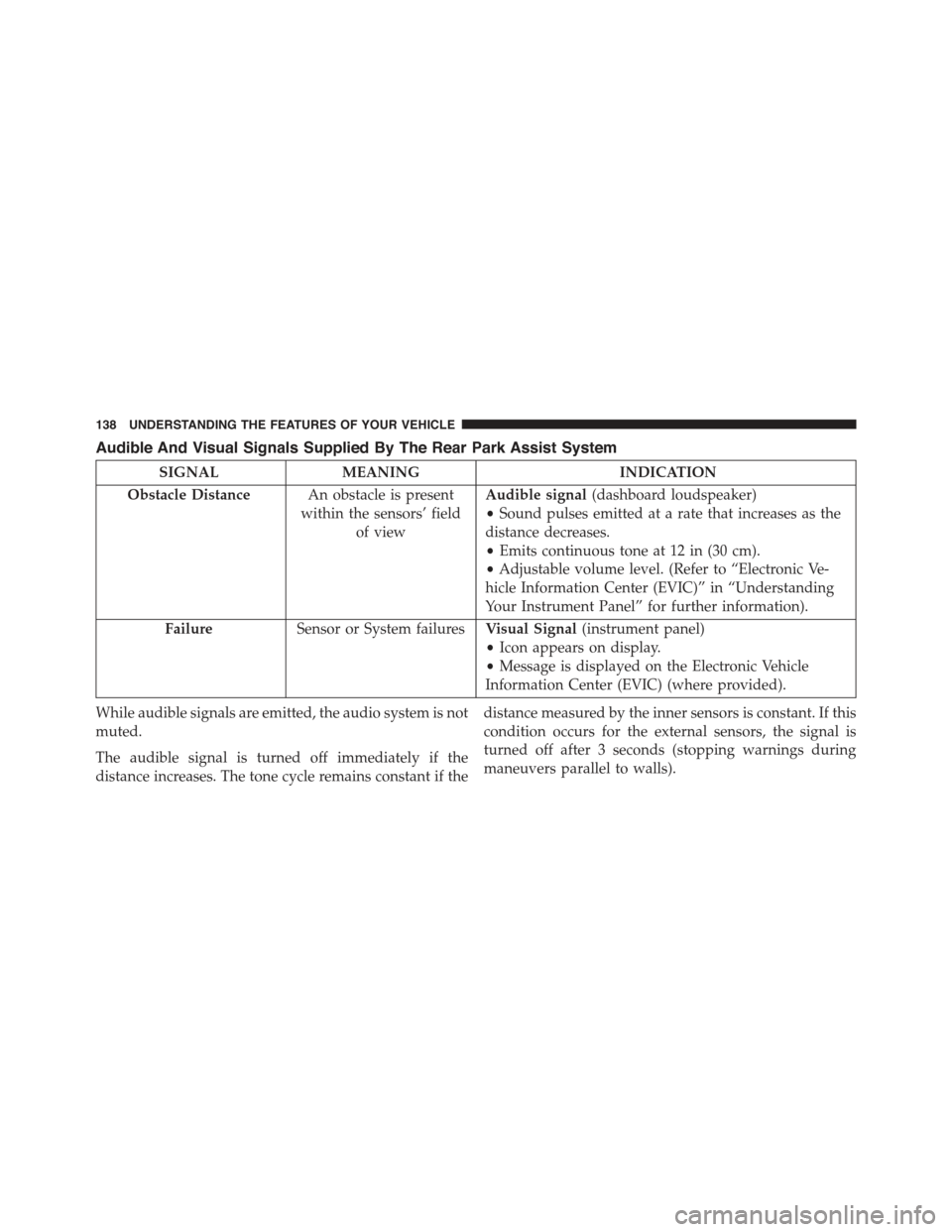
Audible And Visual Signals Supplied By The Rear Park Assist System
SIGNALMEANINGINDICATION
Obstacle DistanceAn obstacle is present
within the sensors’ field
of view
Audible signal(dashboard loudspeaker)
•Sound pulses emitted at a rate that increases as the
distance decreases.
•Emits continuous tone at 12 in (30 cm).
•Adjustable volume level. (Refer to “Electronic Ve-
hicle Information Center (EVIC)” in “Understanding
Your Instrument Panel” for further information).
FailureSensor or System failuresVisual Signal(instrument panel)
•Icon appears on display.
•Message is displayed on the Electronic Vehicle
Information Center (EVIC) (where provided).
While audible signals are emitted, the audio system is not
muted.
The audible signal is turned off immediately if the
distance increases. The tone cycle remains constant if the
distance measured by the inner sensors is constant. If this
condition occurs for the external sensors, the signal is
turned off after 3 seconds (stopping warnings during
maneuvers parallel to walls).
138 UNDERSTANDING THE FEATURES OF YOUR VEHICLE
Page 141 of 367
Failure Indications
A malfunction of the Rear Park Assist sensors or system is
indicated, during REVERSE gear engagement, by the in-
strument panel warning icon and message displayed on
the Electronic Vehicle Information Center (EVIC) display.
The warning icon is illuminated and a message
is displayed on the EVIC display (if equipped).
Refer to#Electronic Vehicle Information Center
(EVIC)#in “Understanding Your Instrument
Panel” for further information.
The sensors and wiring are tested continuously when the
ignition is in the ON/RUN position. Failures are indi-
cated immediately if they occur when the system is ON.
Even if the system is able to identify that a specific sensor
is in failure condition, the EVIC shall indicate that the
Rear Park Assist system is unavailable, without reference
to the sensor in failure condition. If even a single sensor
fails, the entire system must be disabled. The system is
turned off automatically.
Cleaning The Rear Park Assist System
Clean the Rear Park Assist sensors with water, car wash
soap and a soft cloth. Do not use rough or hard cloths. In
washing stations, clean sensors quickly keeping the va-
por jet/high pressure washing nozzles at least 4 in
(10 cm) from the sensors. Do not scratch or poke the
sensors. Otherwise, you could damage the sensors.
Park Assist System Usage Precautions
NOTE:
•Ensure that the outer surface and the underside of the
rear bumper is clean and clear of snow, ice, mud, dirt
or other obstruction to keep the Rear Park Assist
system operating properly.
•Jackhammers, large trucks, and other vibrations could
affect the performance of Rear Park Assist.
3
UNDERSTANDING THE FEATURES OF YOUR VEHICLE 139
Page 151 of 367
STORAGE
Glove Compartment
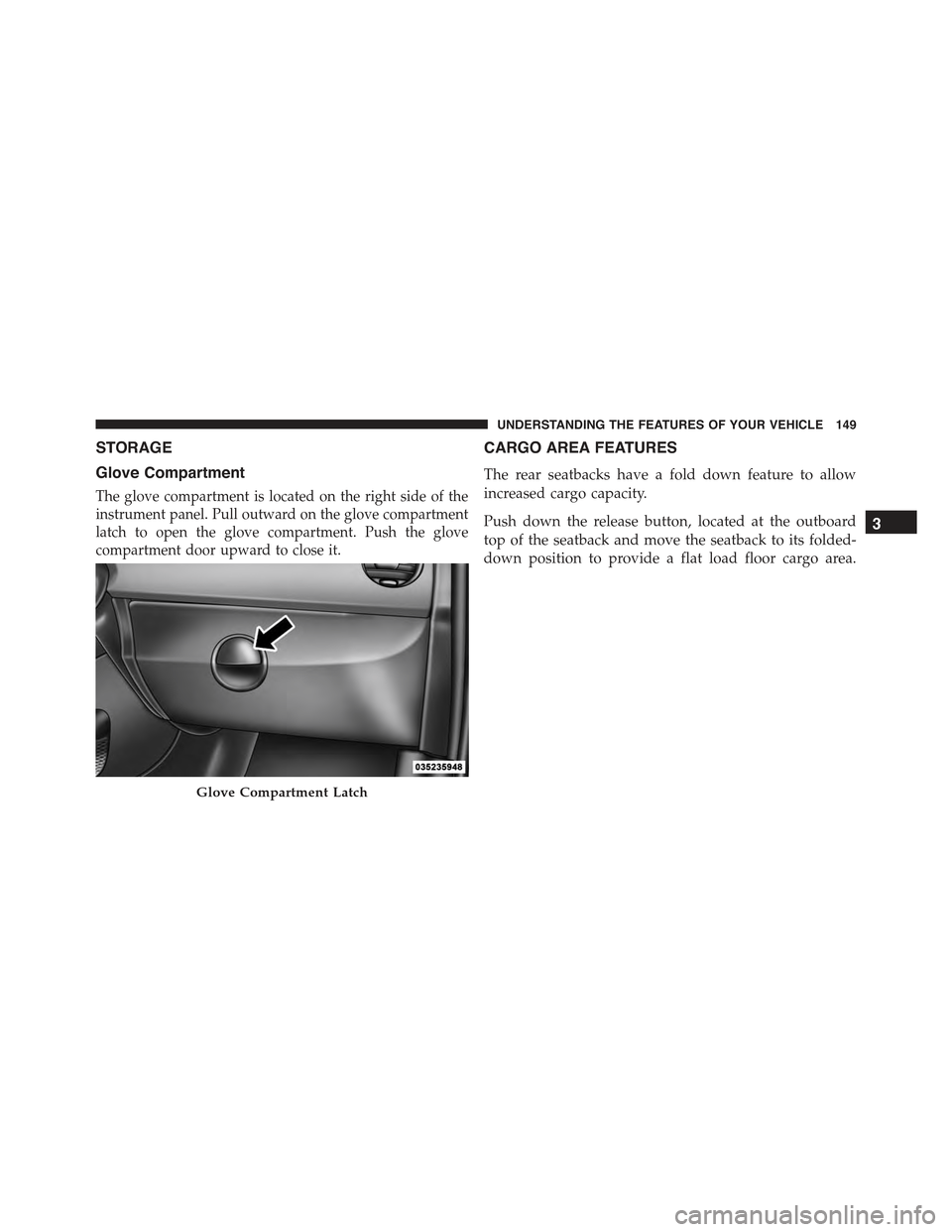
The glove compartment is located on the right side of the
instrument panel. Pull outward on the glove compartment
latch to open the glove compartment. Push the glove
compartment door upward to close it.
CARGO AREA FEATURES
The rear seatbacks have a fold down feature to allow
increased cargo capacity.
Push down the release button, located at the outboard
top of the seatback and move the seatback to its folded-
down position to provide a flat load floor cargo area.
Glove Compartment Latch
3
UNDERSTANDING THE FEATURES OF YOUR VEHICLE 149
Page 153 of 367
REAR WINDOW FEATURES
Rear Window Defroster
The rear window defroster button is located in the
center of the instrument panel, below the radio.
Push this button to turn on the rear window defroster. An
indicator in the instrument panel cluster will illuminate
when the rear window defroster is on. The rear window
defroster automatically turns off after approximately 20
minutes. To manually shut the defroster off, push the
button a second time.
CAUTION!
Failure to follow these cautions can cause damage to
the heating elements:
•Use care when washing the inside of the rear
window. Do not use abrasive window cleaners on
the interior surface of the window. Use a soft cloth
and a mild washing solution, wiping parallel to the
heating elements. Labels can be peeled off after
soaking with warm water.
•Do not use scrapers, sharp instruments, or abrasive
window cleaners on the interior surface of the
window.
•Keep all objects a safe distance from the window.
3
UNDERSTANDING THE FEATURES OF YOUR VEHICLE 151
Page 155 of 367
UNDERSTANDING YOUR INSTRUMENT PANEL
CONTENTS
!INSTRUMENT PANEL FEATURES..........155
!INSTRUMENT CLUSTER.................157
!INSTRUMENT CLUSTER DESCRIPTIONS.....158
!ELECTRONIC VEHICLE INFORMATION
CENTER (EVIC).......................166
▫EVIC Control Buttons..................167
▫Electronic Vehicle Information Center (EVIC)
Setup Menu.........................169
▫Trip Computer.......................170
!SALES CODE (RAB) RADIO..............173
▫Introduction.........................173
▫Suggestions..........................173
▫Technical Specifications.................176
▫Quick Guide.........................177
▫General Information....................180
▫Functions And Adjustments..............181
▫Radio..............................188
▫SiriusXM Satellite Radio — If Equipped......190
▫CD Player...........................193
▫CD MP3 Player.......................195
4
Page 156 of 367
▫Troubleshooting.......................198
!iPod®/USB/MEDIA PLAYER CONTROL — IF
EQUIPPED...........................199
!STEERING WHEEL AUDIO CONTROLS......200
▫Radio Operation......................201
▫CD Player Operation...................201
▫Operating Instructions — Hands-Free Phone
(If Equipped).........................201
!CD/DVD DISC MAINTENANCE...........201
!RADIO OPERATION AND MOBILE PHONES . .202
!CLIMATE CONTROLS...................202
▫Automatic Temperature Control (ATC)......202
▫Operating Tips.......................208
154 UNDERSTANDING YOUR INSTRUMENT PANEL
Page 157 of 367
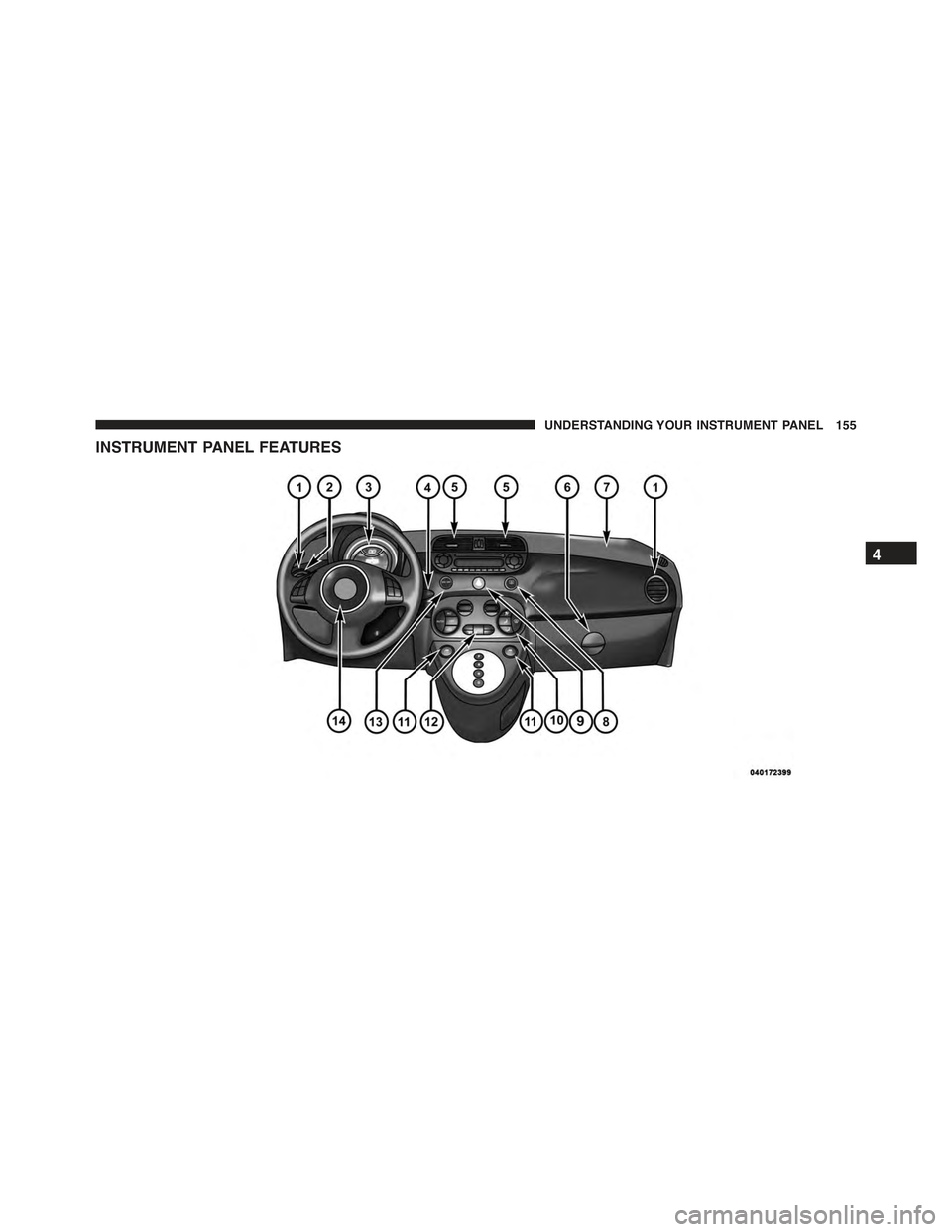
INSTRUMENT PANEL FEATURES
4
UNDERSTANDING YOUR INSTRUMENT PANEL 155