charging FIAT 500E 2017 2.G User Guide
[x] Cancel search | Manufacturer: FIAT, Model Year: 2017, Model line: 500E, Model: FIAT 500E 2017 2.GPages: 300, PDF Size: 2.58 MB
Page 24 of 300
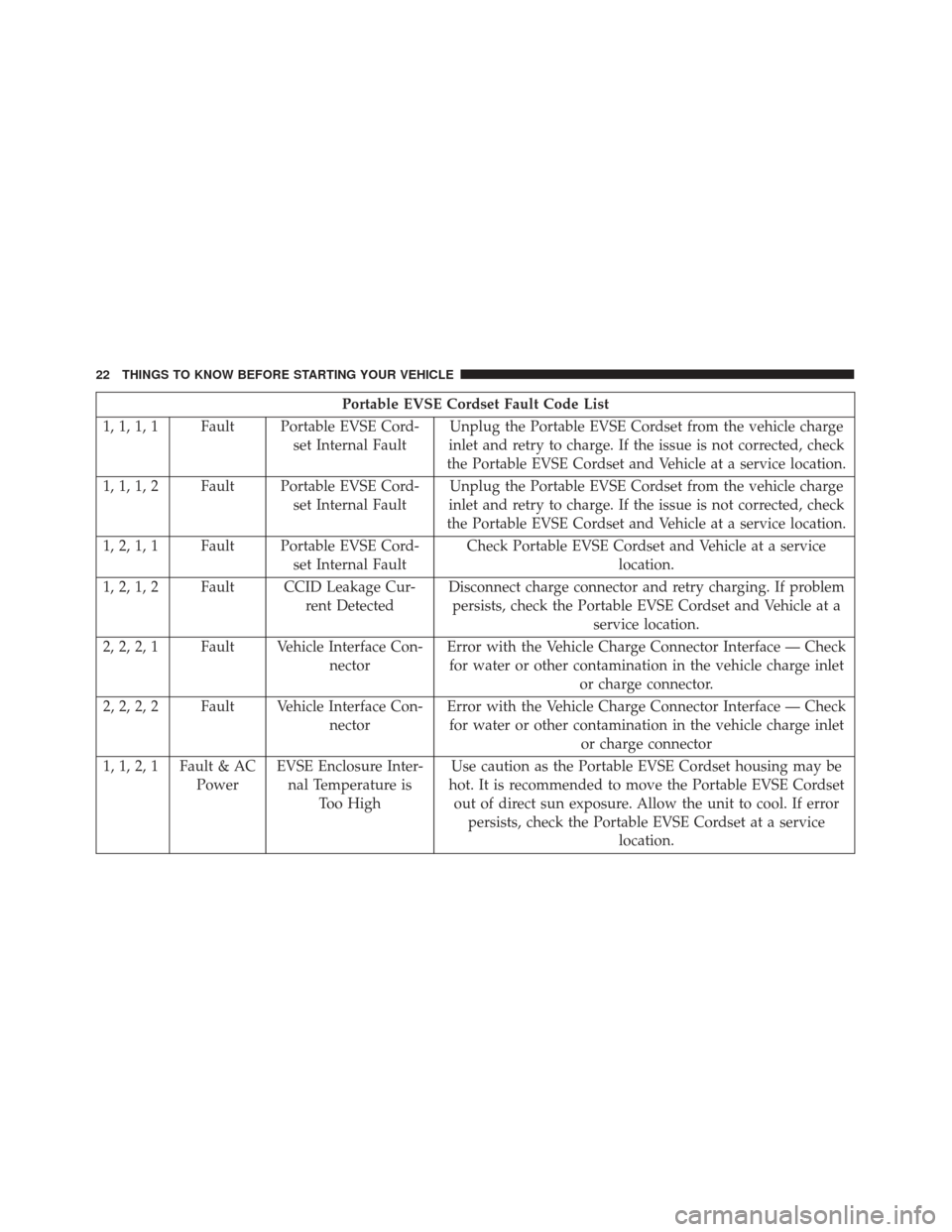
Portable EVSE Cordset Fault Code List
1, 1, 1, 1 Fault Portable EVSE Cord- set Internal FaultUnplug the Portable EVSE Cordset from the vehicle charge
inlet and retry to charge. If the issue is not corrected, check
the Portable EVSE Cordset and Vehicle at a service location.
1, 1, 1, 2 Fault Portable EVSE Cord- set Internal FaultUnplug the Portable EVSE Cordset from the vehicle charge
inlet and retry to charge. If the issue is not corrected, check
the Portable EVSE Cordset and Vehicle at a service location.
1, 2, 1, 1 Fault Portable EVSE Cord- set Internal FaultCheck Portable EVSE Cordset and Vehicle at a service
location.
1, 2, 1, 2 Fault CCID Leakage Cur- rent DetectedDisconnect charge connector and retry charging. If problem
persists, check the Portable EVSE Cordset and Vehicle at a service location.
2, 2, 2, 1 Fault Vehicle Interface Con- nectorError with the Vehicle Charge Connector Interface — Check
for water or other contamination in the vehicle charge inlet or charge connector.
2, 2, 2, 2 Fault Vehicle Interface Con- nectorError with the Vehicle Charge Connector Interface — Check
for water or other contamination in the vehicle charge inlet or charge connector
1, 1, 2, 1 Fault & AC PowerEVSE Enclosure Inter-
nal Temperature is Too High Use caution as the Portable EVSE Cordset housing may be
hot. It is recommended to move the Portable EVSE Cordset out of direct sun exposure. Allow the unit to cool. If error persists, check the Portable EVSE Cordset at a service location.
22 THINGS TO KNOW BEFORE STARTING YOUR VEHICLE
Page 25 of 300
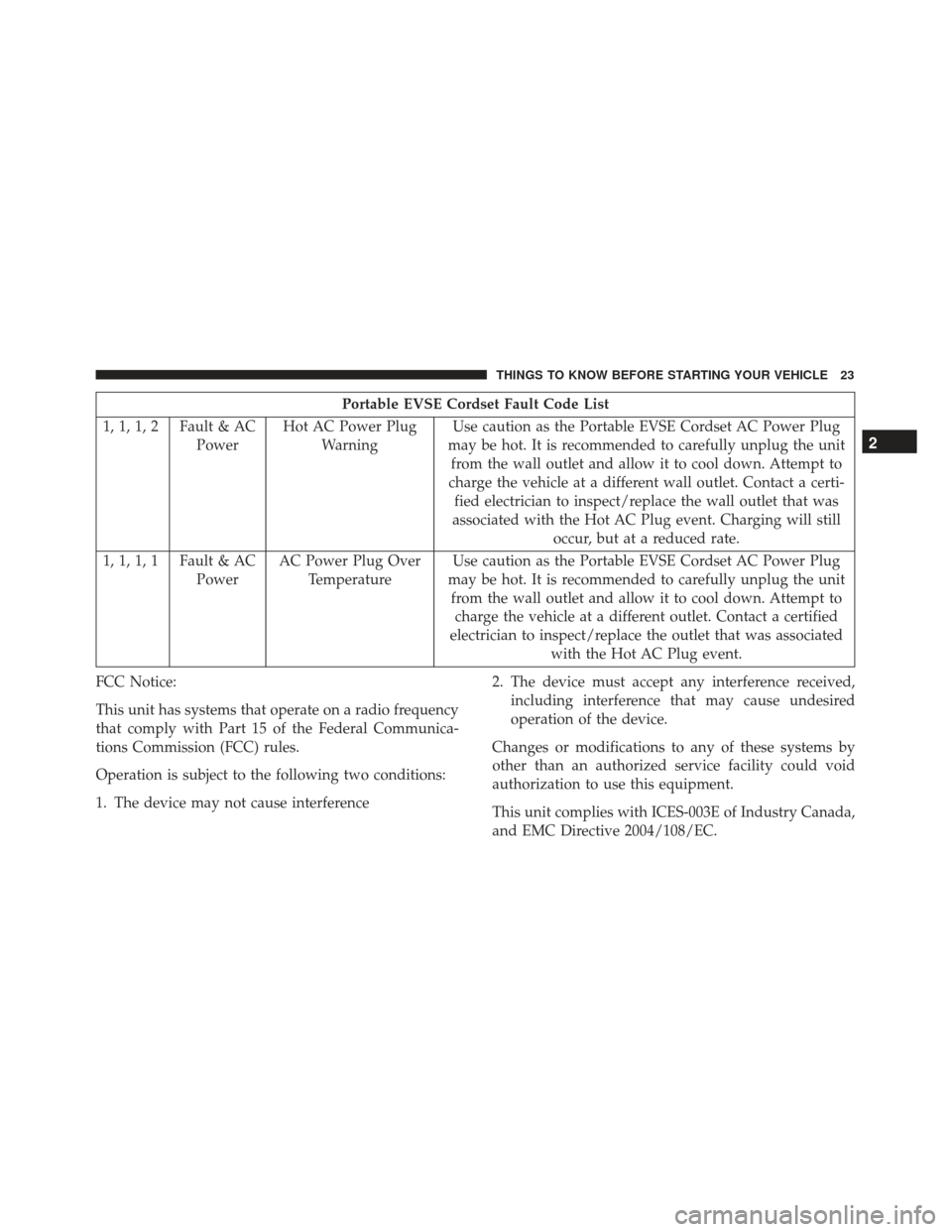
Portable EVSE Cordset Fault Code List
1, 1, 1, 2 Fault & AC PowerHot AC Power Plug
Warning Use caution as the Portable EVSE Cordset AC Power Plug
may be hot. It is recommended to carefully unplug the unit from the wall outlet and allow it to cool down. Attempt to
charge the vehicle at a different wall outlet. Contact a certi- fied electrician to inspect/replace the wall outlet that was
associated with the Hot AC Plug event. Charging will still occur, but at a reduced rate.
1, 1, 1, 1 Fault & AC PowerAC Power Plug Over
Temperature Use caution as the Portable EVSE Cordset AC Power Plug
may be hot. It is recommended to carefully unplug the unit from the wall outlet and allow it to cool down. Attempt to charge the vehicle at a different outlet. Contact a certified
electrician to inspect/replace the outlet that was associated with the Hot AC Plug event.
FCC Notice:
This unit has systems that operate on a radio frequency
that comply with Part 15 of the Federal Communica-
tions Commission (FCC) rules.
Operation is subject to the following two conditions:
1. The device may not cause interference 2. The device must accept any interference received,
including interference that may cause undesired
operation of the device.
Changes or modifications to any of these systems by
other than an authorized service facility could void
authorization to use this equipment.
This unit complies with ICES-003E of Industry Canada,
and EMC Directive 2004/108/EC.
2
THINGS TO KNOW BEFORE STARTING YOUR VEHICLE 23
Page 26 of 300
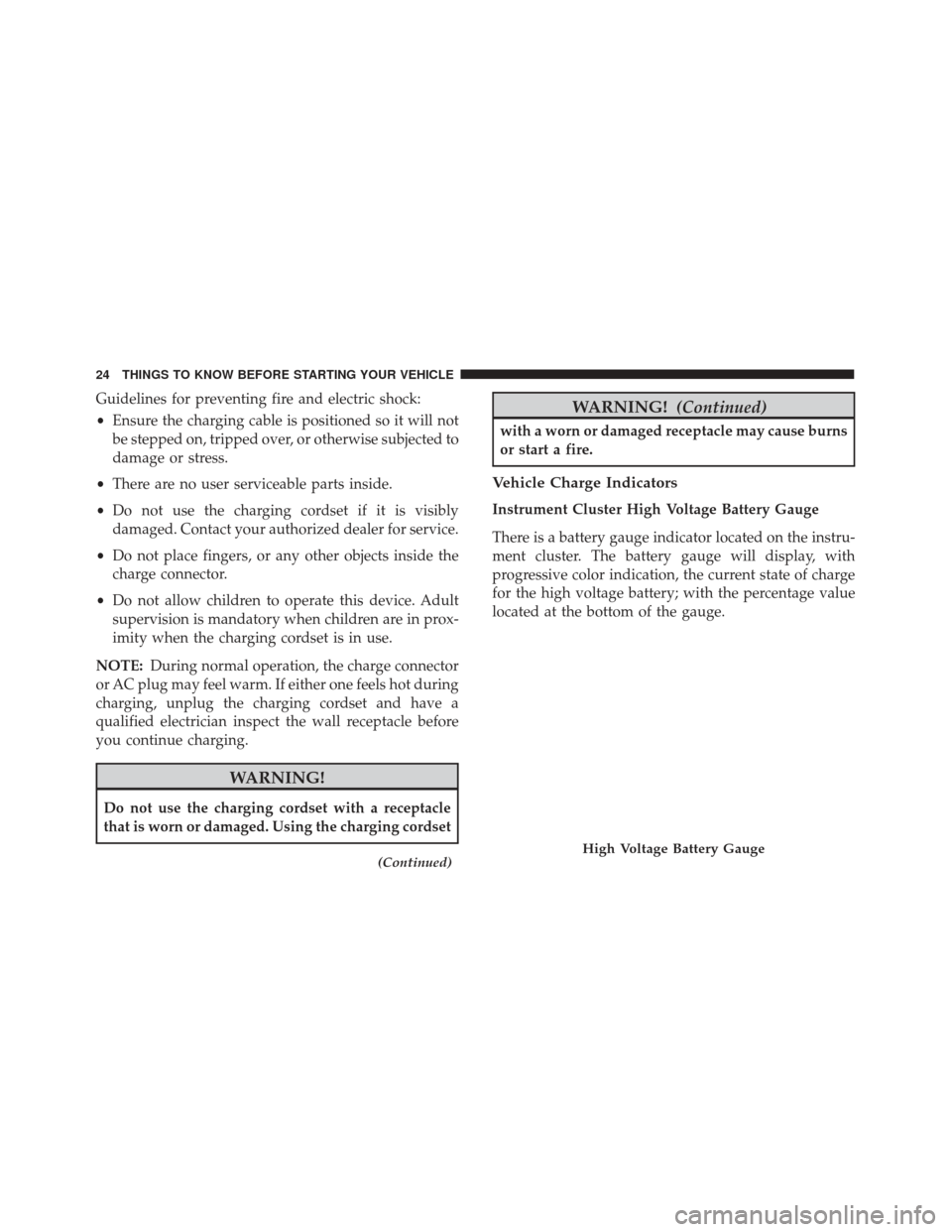
Guidelines for preventing fire and electric shock:
•Ensure the charging cable is positioned so it will not
be stepped on, tripped over, or otherwise subjected to
damage or stress.
• There are no user serviceable parts inside.
• Do not use the charging cordset if it is visibly
damaged. Contact your authorized dealer for service.
• Do not place fingers, or any other objects inside the
charge connector.
• Do not allow children to operate this device. Adult
supervision is mandatory when children are in prox-
imity when the charging cordset is in use.
NOTE: During normal operation, the charge connector
or AC plug may feel warm. If either one feels hot during
charging, unplug the charging cordset and have a
qualified electrician inspect the wall receptacle before
you continue charging.
WARNING!
Do not use the charging cordset with a receptacle
that is worn or damaged. Using the charging cordset
(Continued)
WARNING! (Continued)
with a worn or damaged receptacle may cause burns
or start a fire.
Vehicle Charge Indicators
Instrument Cluster High Voltage Battery Gauge
There is a battery gauge indicator located on the instru-
ment cluster. The battery gauge will display, with
progressive color indication, the current state of charge
for the high voltage battery; with the percentage value
located at the bottom of the gauge.
High Voltage Battery Gauge
24 THINGS TO KNOW BEFORE STARTING YOUR VEHICLE
Page 28 of 300
Instrument Panel State Of Charge Indicator
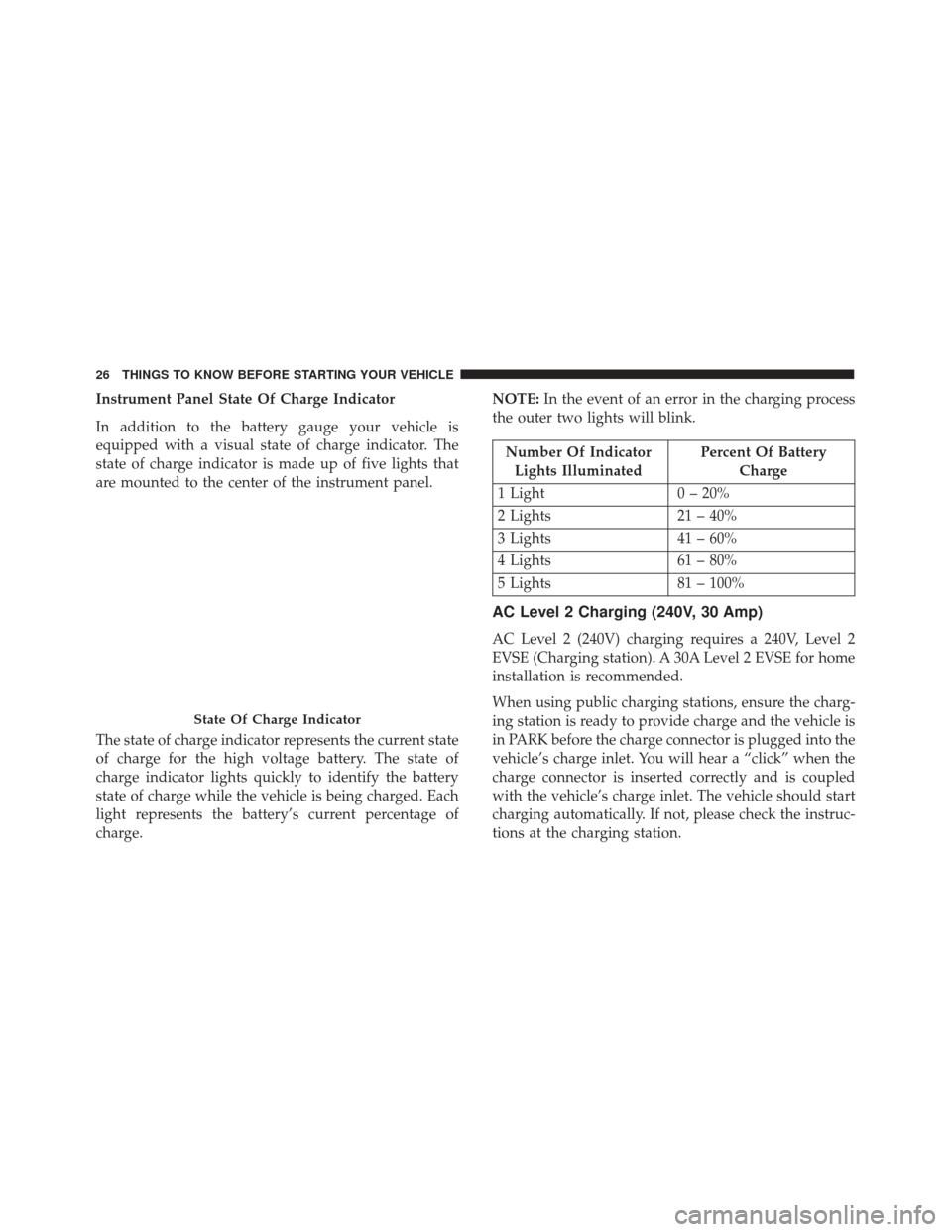
In addition to the battery gauge your vehicle is
equipped with a visual state of charge indicator. The
state of charge indicator is made up of five lights that
are mounted to the center of the instrument panel.
The state of charge indicator represents the current state
of charge for the high voltage battery. The state of
charge indicator lights quickly to identify the battery
state of charge while the vehicle is being charged. Each
light represents the battery’s current percentage of
charge.NOTE:
In the event of an error in the charging process
the outer two lights will blink.
Number Of Indicator Lights Illuminated Percent Of Battery
Charge
1 Light 0 – 20%
2 Lights 21 – 40%
3 Lights 41 – 60%
4 Lights 61 – 80%
5 Lights 81 – 100%
AC Level 2 Charging (240V, 30 Amp)
AC Level 2 (240V) charging requires a 240V, Level 2
EVSE (Charging station). A 30A Level 2 EVSE for home
installation is recommended.
When using public charging stations, ensure the charg-
ing station is ready to provide charge and the vehicle is
in PARK before the charge connector is plugged into the
vehicle’s charge inlet. You will hear a “click” when the
charge connector is inserted correctly and is coupled
with the vehicle’s charge inlet. The vehicle should start
charging automatically. If not, please check the instruc-
tions at the charging station.
State Of Charge Indicator
26 THINGS TO KNOW BEFORE STARTING YOUR VEHICLE
Page 29 of 300
NOTE:The vehicle should start charging automati-
cally. If not, please check the following:
• Charging Station – Check the indications and instruc-
tions at the charging station.
• Charging Schedule – Check whether the charging
schedule is enabled and if so, whether the vehicle is
currently within the scheduled charge time/date. If
the charging schedule is enabled, you may override
them for this charging event by plugging in the
charge connector, unplugging it, and then plugging it
back into the vehicle charge inlet. Complete the
double plug sequence within 10 seconds for it to
override the set schedule.
To stop the charging process, disconnect the charge
connector from the vehicle inlet.
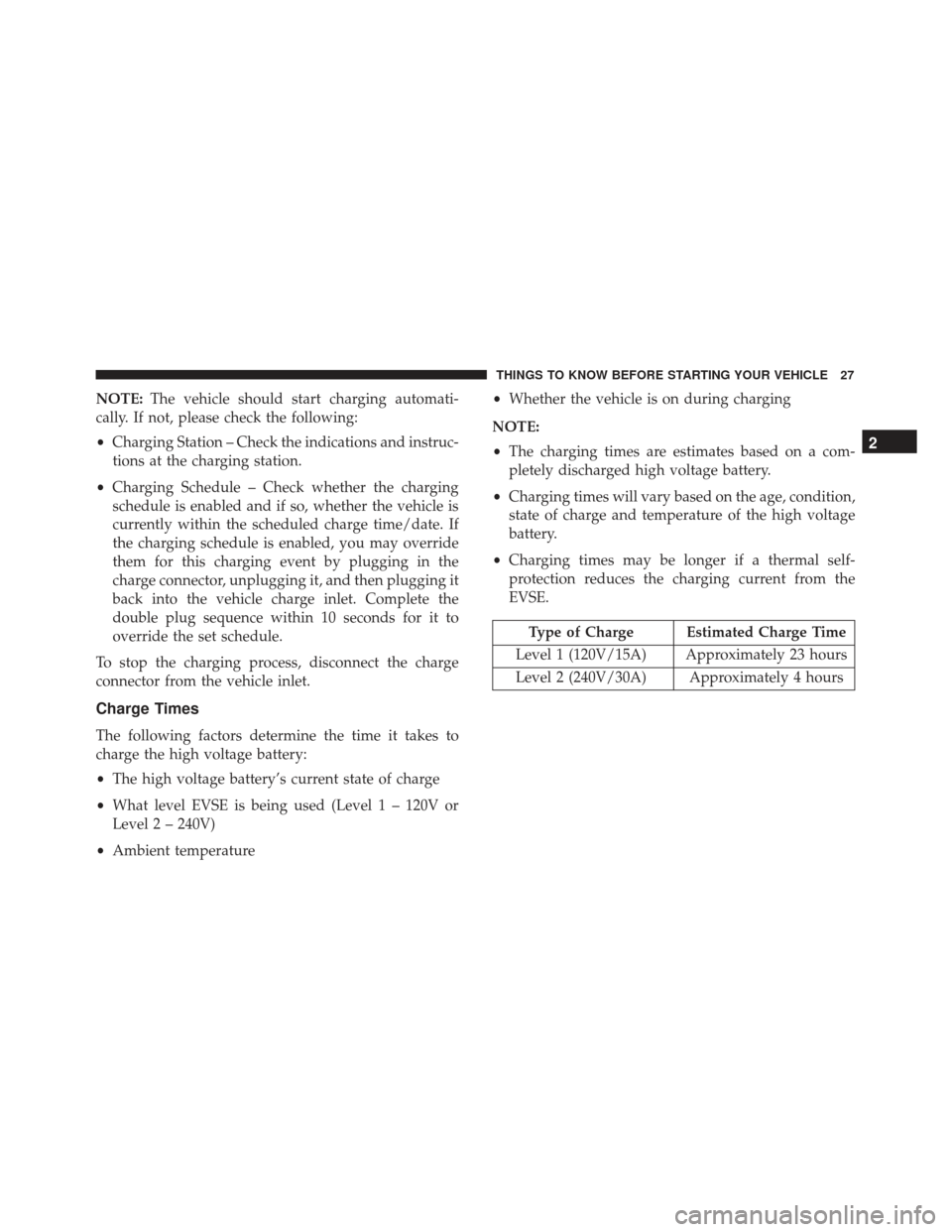
Charge Times
The following factors determine the time it takes to
charge the high voltage battery:
• The high voltage battery’s current state of charge
• What level EVSE is being used (Level 1 – 120V or
Level 2 – 240V)
• Ambient temperature •
Whether the vehicle is on during charging
NOTE:
• The charging times are estimates based on a com-
pletely discharged high voltage battery.
• Charging times will vary based on the age, condition,
state of charge and temperature of the high voltage
battery.
• Charging times may be longer if a thermal self-
protection reduces the charging current from the
EVSE.
Type of Charge Estimated Charge Time
Level 1 (120V/15A) Approximately 23 hours
Level 2 (240V/30A) Approximately 4 hours
2
THINGS TO KNOW BEFORE STARTING YOUR VEHICLE 27
Page 127 of 300
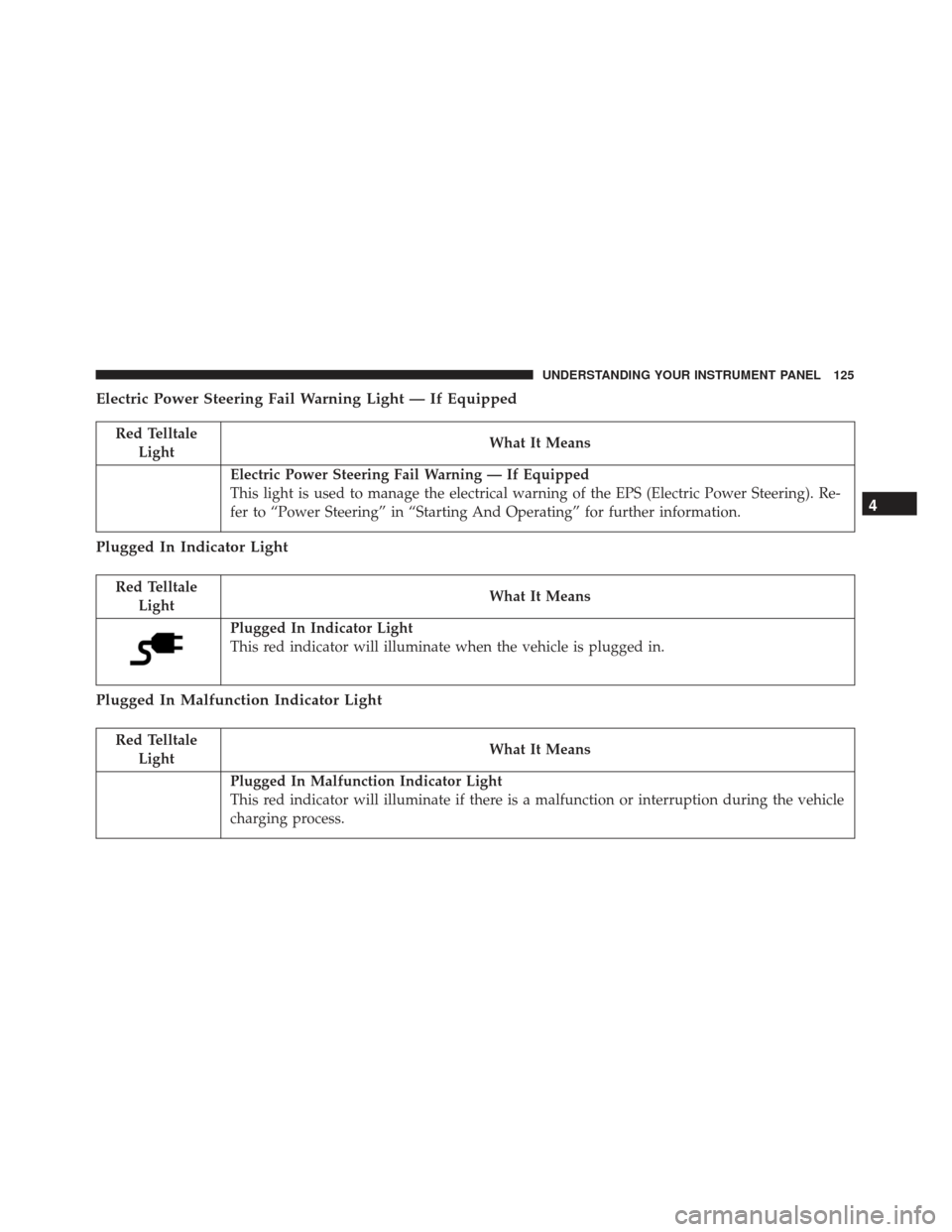
Electric Power Steering Fail Warning Light — If Equipped
Red TelltaleLight What It Means
Electric Power Steering Fail Warning — If Equipped
This light is used to manage the electrical warning of the EPS (Electric Power Steering). Re-
fer to “Power Steering” in “Starting And Operating” for further information.
Plugged In Indicator Light
Red Telltale
Light What It Means
Plugged In Indicator Light
This red indicator will illuminate when the vehicle is plugged in.
Plugged In Malfunction Indicator Light
Red Telltale
Light What It Means
Plugged In Malfunction Indicator Light
This red indicator will illuminate if there is a malfunction or interruption during the vehicle
charging process.
4
UNDERSTANDING YOUR INSTRUMENT PANEL 125
Page 129 of 300
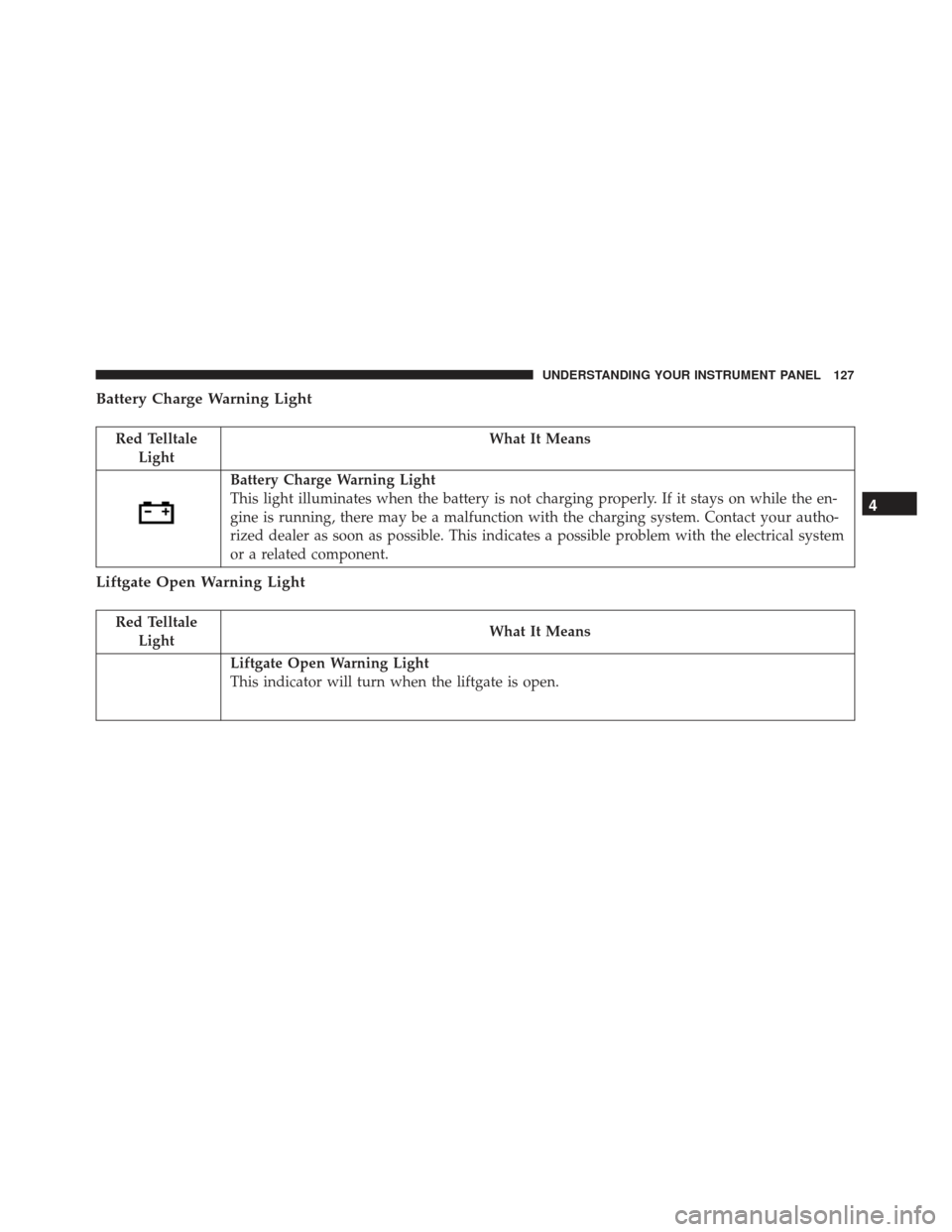
Battery Charge Warning Light
Red TelltaleLight What It Means
Battery Charge Warning Light
This light illuminates when the battery is not charging properly. If it stays on while the en-
gine is running, there may be a malfunction with the charging system. Contact your autho-
rized dealer as soon as possible. This indicates a possible problem with the electrical system
or a related component.
Liftgate Open Warning Light
Red Telltale
Light What It Means
Liftgate Open Warning Light
This indicator will turn when the liftgate is open.
4
UNDERSTANDING YOUR INSTRUMENT PANEL 127
Page 130 of 300
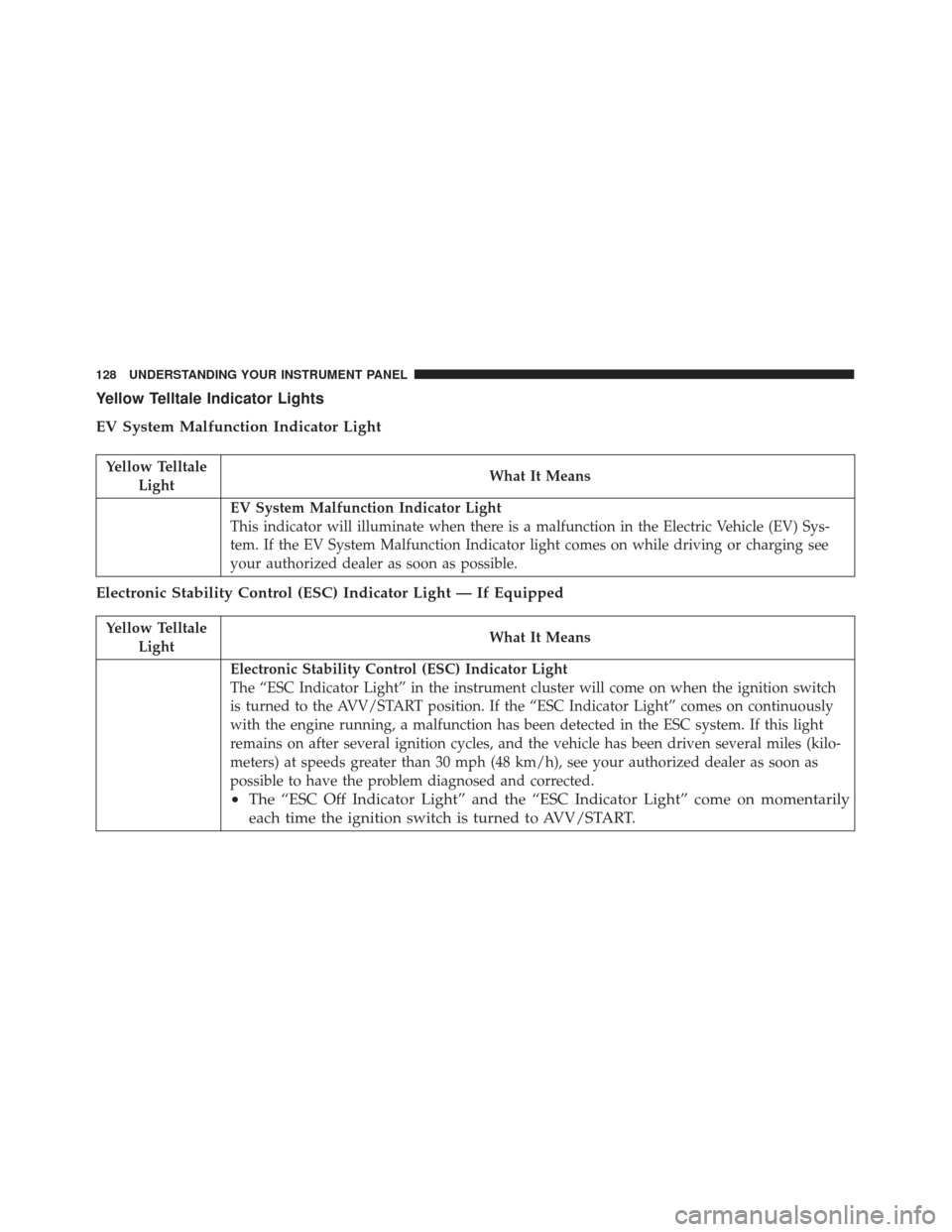
Yellow Telltale Indicator Lights
EV System Malfunction Indicator Light
Yellow TelltaleLight What It Means
EV System Malfunction Indicator Light
This indicator will illuminate when there is a malfunction in the Electric Vehicle (EV) Sys-
tem. If the EV System Malfunction Indicator light comes on while driving or charging see
your authorized dealer as soon as possible.
Electronic Stability Control (ESC) Indicator Light — If Equipped
Yellow Telltale
Light What It Means
Electronic Stability Control (ESC) Indicator Light
The “ESC Indicator Light” in the instrument cluster will come on when the ignition switch
is turned to the AVV/START position. If the “ESC Indicator Light” comes on continuously
with the engine running, a malfunction has been detected in the ESC system. If this light
remains on after several ignition cycles, and the vehicle has been driven several miles (kilo-
meters) at speeds greater than 30 mph (48 km/h), see your authorized dealer as soon as
possible to have the problem diagnosed and corrected.
•
The “ESC Off Indicator Light” and the “ESC Indicator Light” come on momentarily
each time the ignition switch is turned to AVV/START.
128 UNDERSTANDING YOUR INSTRUMENT PANEL
Page 151 of 300
Charging Schedule
To set up a charging schedule, press the “More” or
“Settings” button on the touchscreen.
Setting NameSelectable Options
Enable Schedule
NOTE:
Continue setting up the schedule, picking from the following menus:
•Weekdays or Weekends
•Start and End Times
Safety/Assistance
After pressing the “Safety/Assistance” button on the
touchscreen, the following setting will be available:
Setting Name Selectable Options
Hill Start Assist OnOff
4
UNDERSTANDING YOUR INSTRUMENT PANEL 149
Page 163 of 300
TELEMATICS MODEM
Your vehicle is equipped with a 3G CDMA cellular
modem to connect the vehicle with your device to
provide the following features:
•Range and State of Charge Information
• Configure Scheduled Charging Profile
• Average and total energy used
• Charge station location and availability on in vehicle
NAV map
• Send navigation destination to vehicle from within
Mobile App
• Remote Door Lock/Unlock
• Remote Horn and Lights Activation
• Pre-conditioning of interior temperature
• Email and SMS notifications
NOTE: This device complies with Part 15 of the FCC.
Operation is subject to the following conditions:
• This device may not cause harmful interference. •
This device must accept any interference received,
including interference that may cause undesired op-
eration.
Changes or modifications not expressly approved by
the party responsible for compliance could void the
user ’s authority to operate the equipment.
CLIMATE CONTROLS
Automatic Temperature Control Overview
Automatic Temperature Controls
4
UNDERSTANDING YOUR INSTRUMENT PANEL 161