lights FIAT 500E 2017 2.G Owner's Manual
[x] Cancel search | Manufacturer: FIAT, Model Year: 2017, Model line: 500E, Model: FIAT 500E 2017 2.GPages: 300, PDF Size: 2.58 MB
Page 137 of 300
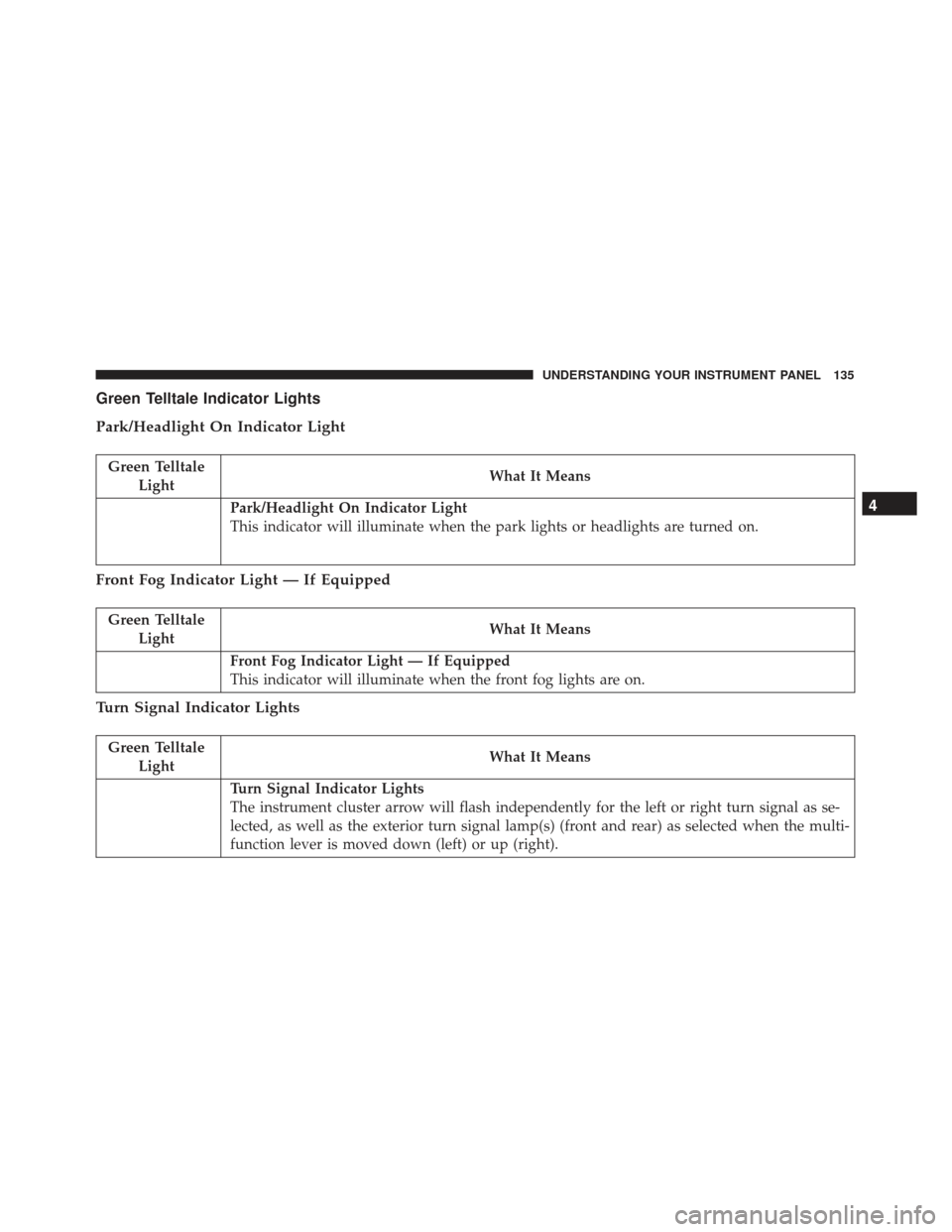
Green Telltale Indicator Lights
Park/Headlight On Indicator Light
Green TelltaleLight What It Means
Park/Headlight On Indicator Light
This indicator will illuminate when the park lights or headlights are turned on.
Front Fog Indicator Light — If Equipped
Green Telltale
Light What It Means
Front Fog Indicator Light — If Equipped
This indicator will illuminate when the front fog lights are on.
Turn Signal Indicator Lights
Green Telltale
Light What It Means
Turn Signal Indicator Lights
The instrument cluster arrow will flash independently for the left or right turn signal as se-
lected, as well as the exterior turn signal lamp(s) (front and rear) as selected when the multi-
function lever is moved down (left) or up (right).
4
UNDERSTANDING YOUR INSTRUMENT PANEL 135
Page 139 of 300
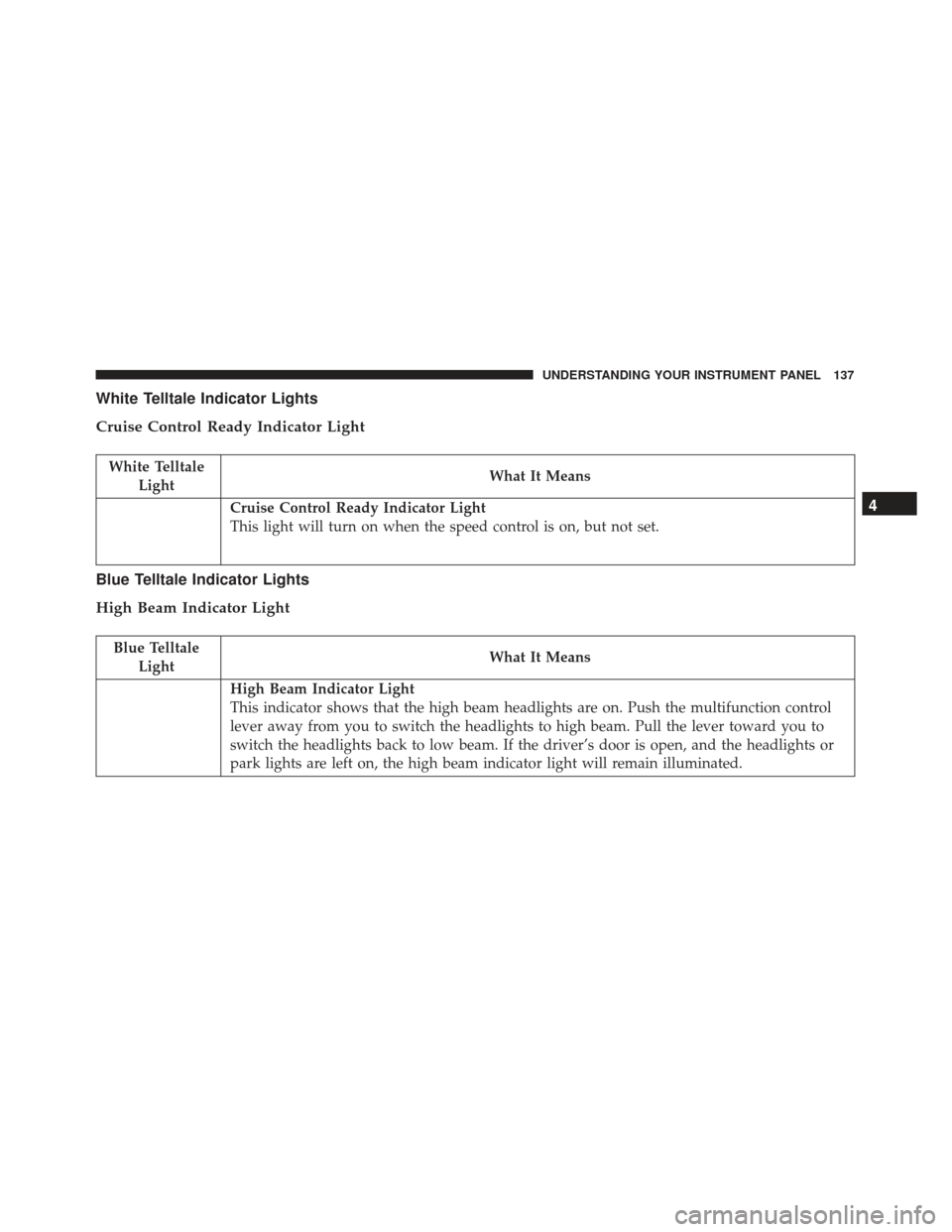
White Telltale Indicator Lights
Cruise Control Ready Indicator Light
White TelltaleLight What It Means
Cruise Control Ready Indicator Light
This light will turn on when the speed control is on, but not set.
Blue Telltale Indicator Lights
High Beam Indicator Light
Blue Telltale
Light What It Means
High Beam Indicator Light
This indicator shows that the high beam headlights are on. Push the multifunction control
lever away from you to switch the headlights to high beam. Pull the lever toward you to
switch the headlights back to low beam. If the driver’s door is open, and the headlights or
park lights are left on, the high beam indicator light will remain illuminated.
4
UNDERSTANDING YOUR INSTRUMENT PANEL 137
Page 148 of 300
Customer Programmable Features — Uconnect
5.0/5.0 NAV Settings
Push the Settingsbutton on the faceplate, to dis-
play the settings menu screen. In this mode the
Uconnect system allows you to access programmable
feature settings.
NOTE: Only one touchscreen area may be selected at a
time.
When making a selection, press the button on the
touchscreen to enter the desired mode. Once in the
desired mode, press and release the preferred setting and make your selection. Once the setting is complete,
either press the Back Arrow button on the touchscreen
or the Back button on the faceplate to return to the
previous menu or press the “X” button on the touch-
screen to close out of the settings screen. Pressing the
Up or Down Arrow buttons on the right side of the
screen will allow you to toggle up or down through the
available settings.
NOTE:
All settings should be changed with the ignition
in the “AVV/ACC” position.
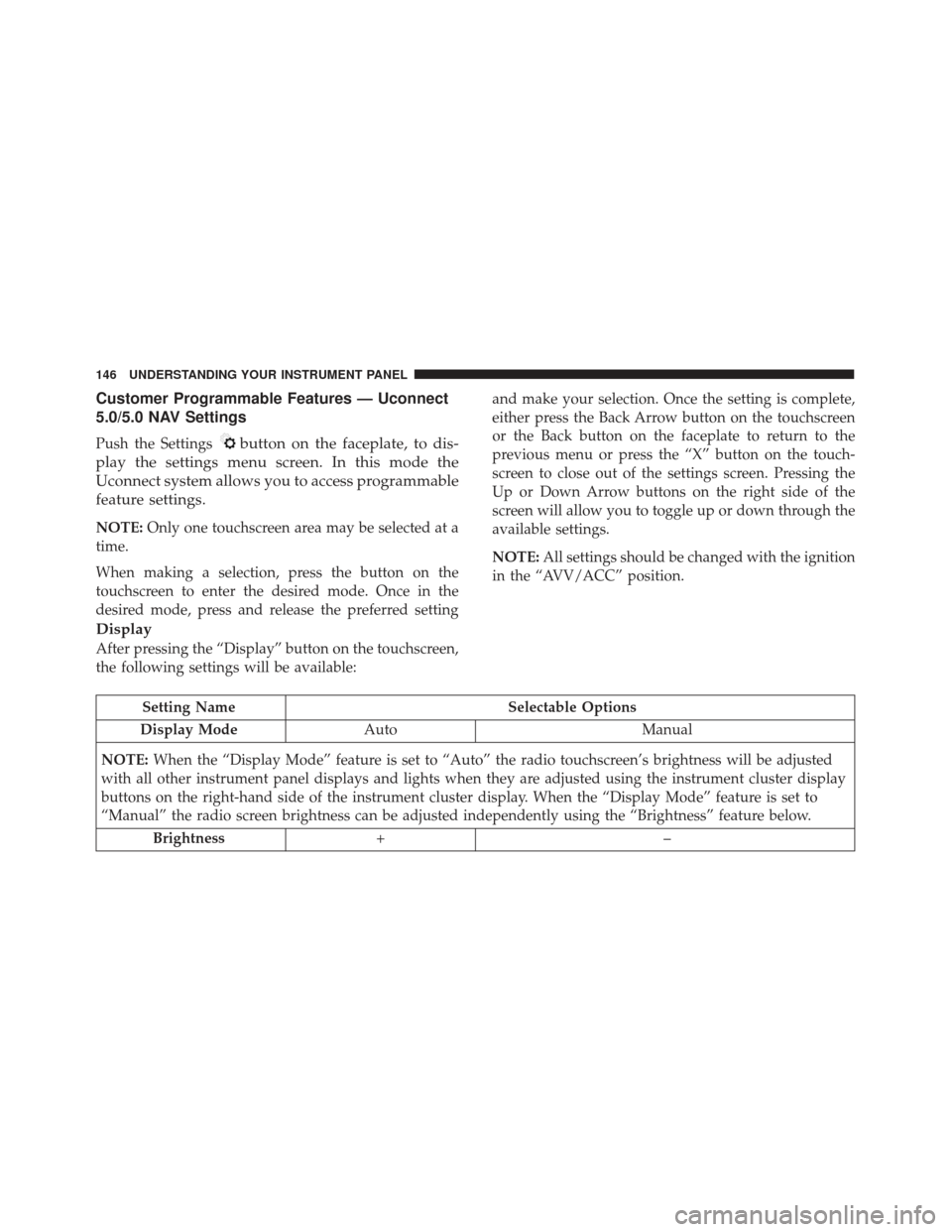
Display
After pressing the “Display” button on the touchscreen,
the following settings will be available:
Setting Name Selectable Options
Display Mode Auto Manual
NOTE: When the “Display Mode” feature is set to “Auto” the radio touchscreen’s brightness will be adjusted
with all other instrument panel displays and lights when they are adjusted using the instrument cluster display
buttons on the right-hand side of the instrument cluster display. When the “Display Mode” feature is set to
“Manual” the radio screen brightness can be adjusted independently using the “Brightness” feature below.
Brightness +–
146 UNDERSTANDING YOUR INSTRUMENT PANEL
Page 152 of 300
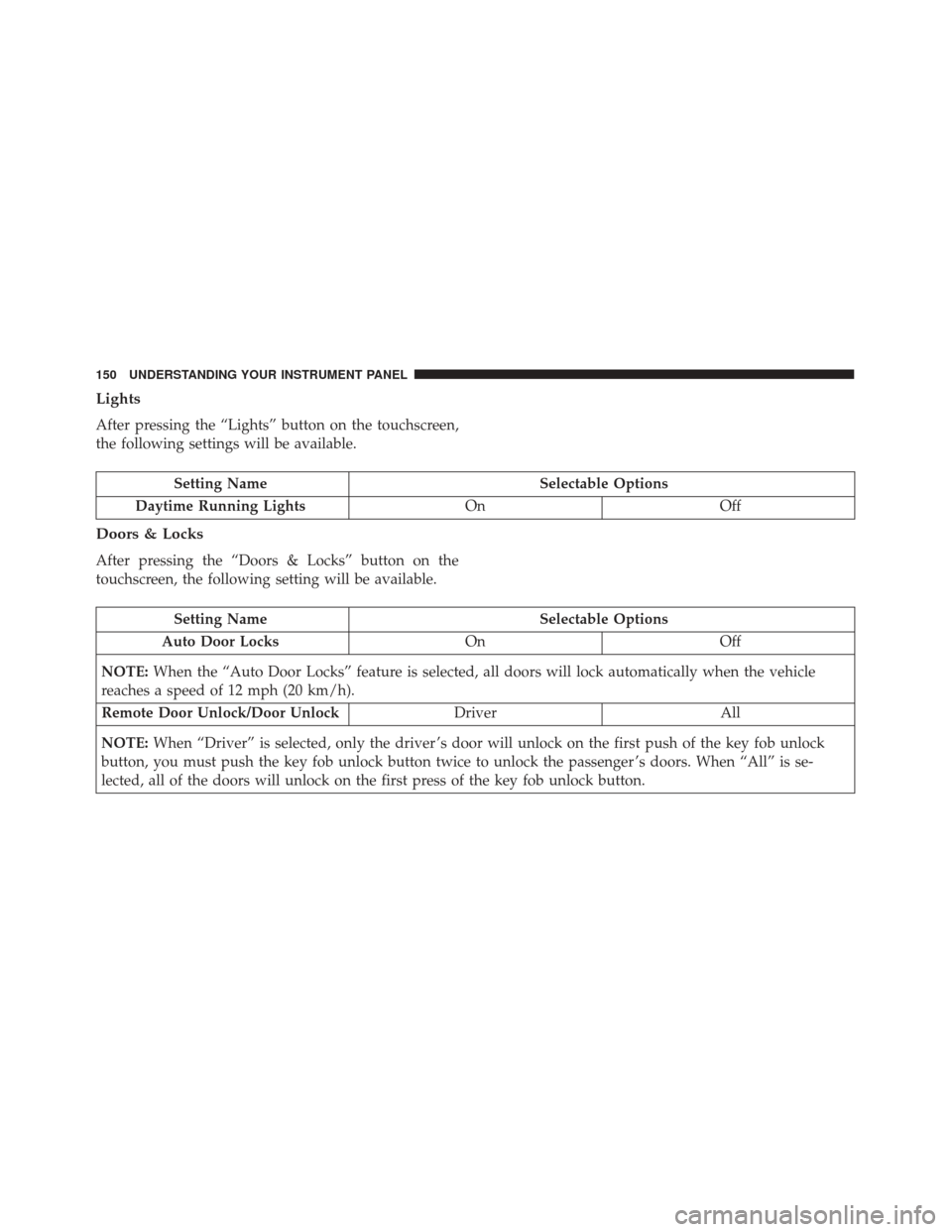
Lights
After pressing the “Lights” button on the touchscreen,
the following settings will be available.
Setting NameSelectable Options
Daytime Running Lights OnOff
Doors & Locks
After pressing the “Doors & Locks” button on the
touchscreen, the following setting will be available.
Setting Name Selectable Options
Auto Door Locks OnOff
NOTE: When the “Auto Door Locks” feature is selected, all doors will lock automatically when the vehicle
reaches a speed of 12 mph (20 km/h).
Remote Door Unlock/Door Unlock DriverAll
NOTE: When “Driver” is selected, only the driver ’s door will unlock on the first push of the key fob unlock
button, you must push the key fob unlock button twice to unlock the passenger ’s doors. When “All” is se-
lected, all of the doors will unlock on the first press of the key fob unlock button.
150 UNDERSTANDING YOUR INSTRUMENT PANEL
Page 163 of 300
TELEMATICS MODEM
Your vehicle is equipped with a 3G CDMA cellular
modem to connect the vehicle with your device to
provide the following features:
•Range and State of Charge Information
• Configure Scheduled Charging Profile
• Average and total energy used
• Charge station location and availability on in vehicle
NAV map
• Send navigation destination to vehicle from within
Mobile App
• Remote Door Lock/Unlock
• Remote Horn and Lights Activation
• Pre-conditioning of interior temperature
• Email and SMS notifications
NOTE: This device complies with Part 15 of the FCC.
Operation is subject to the following conditions:
• This device may not cause harmful interference. •
This device must accept any interference received,
including interference that may cause undesired op-
eration.
Changes or modifications not expressly approved by
the party responsible for compliance could void the
user ’s authority to operate the equipment.
CLIMATE CONTROLS
Automatic Temperature Control Overview
Automatic Temperature Controls
4
UNDERSTANDING YOUR INSTRUMENT PANEL 161
Page 259 of 300
WARNING!
Do not use volatile solvents for cleaning purposes.
Many are potentially flammable, and if used in
closed areas they may cause respiratory harm.
CAUTION!
•Direct contact of air fresheners, insect repellents,
suntan lotions, or hand sanitizers to the plastic,
painted, or decorated surfaces of the interior may
cause permanent damage. Wipe away immedi-
ately.
• Damage caused by these type of products may not
be covered by your New Vehicle Limited War-
ranty.
• Do not use Alcohol and Alcohol-based and/or
Keton based cleaning products to clean leather
seats, as damage to the seat may result.
Cleaning Headlights
Your vehicle has plastic headlights that are lighter and
less susceptible to stone breakage than glass headlights. Plastic is not as scratch resistant as glass and therefore
different lens cleaning procedures must be followed.
To minimize the possibility of scratching the lenses and
reducing light output, avoid wiping with a dry cloth. To
remove road dirt, wash with a mild soap solution
followed by rinsing.
Do not use abrasive cleaning components, solvents,
steel wool or other aggressive material to clean the
lenses.
Glass Surfaces
All glass surfaces should be cleaned on a regular basis
with Mopar Glass Cleaner, or any commercial
household-type glass cleaner. Never use an abrasive
type cleaner. Use caution when cleaning the inside rear
window equipped with electric defrosters or windows
equipped with radio antennas. Do not use scrapers or
other sharp instrument that may scratch the elements.
When cleaning the rear view mirror, spray cleaner on
the towel or cloth that you are using. Do not spray
cleaner directly on the mirror.
7
MAINTAINING YOUR VEHICLE 257
Page 262 of 300
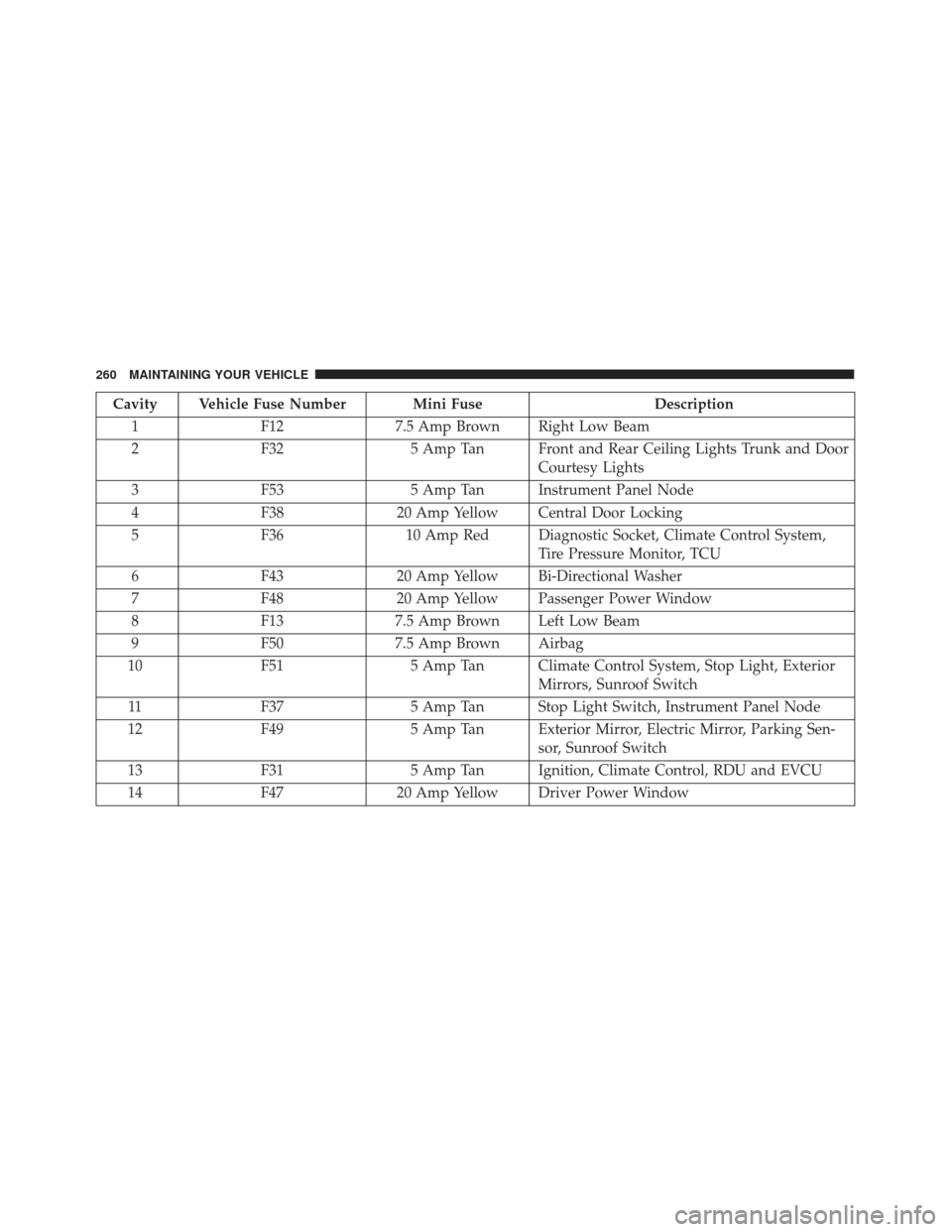
Cavity Vehicle Fuse Number Mini FuseDescription
1 F12 7.5 Amp Brown Right Low Beam
2 F32 5 Amp Tan Front and Rear Ceiling Lights Trunk and Door
Courtesy Lights
3 F53 5 Amp Tan Instrument Panel Node
4 F38 20 Amp Yellow Central Door Locking
5 F36 10 Amp Red Diagnostic Socket, Climate Control System,
Tire Pressure Monitor, TCU
6 F43 20 Amp Yellow Bi-Directional Washer
7 F48 20 Amp Yellow Passenger Power Window
8 F13 7.5 Amp Brown Left Low Beam
9 F50 7.5 Amp Brown Airbag
10 F51 5 Amp Tan Climate Control System, Stop Light, Exterior
Mirrors, Sunroof Switch
11 F37 5 Amp Tan Stop Light Switch, Instrument Panel Node
12 F49 5 Amp Tan Exterior Mirror, Electric Mirror, Parking Sen-
sor, Sunroof Switch
13 F31 5 Amp Tan Ignition, Climate Control, RDU and EVCU
14 F47 20 Amp Yellow Driver Power Window
260 MAINTAINING YOUR VEHICLE
Page 270 of 300
3. Remove the plastic cap from the back of the lamphousing.
4. Rotate bulb/socket counter-clockwise.
5. Remove the bulb and replace as needed.
6. Install the bulb into socket, and rotate bulb/socket clockwise into lamp locking it in place.
7. Reinstall the plastic cap.
Front Fog Lamps
To replace the front fog lights, see your authorized
dealer.
Front/Rear Side Marker Lamps
1. Remove portion of the wheel liner to allow hand access to side marker lamp.
2. Rotate the bulb socket counterclockwise, and remove the bulb and socket assembly from the housing.
3. Pull the bulb from the socket and insert the replace- ment bulb.
4. Install the bulb and socket assembly into the hous- ing, and rotate the socket clockwise to lock it in place.
5. Reinstall the wheel liner.
Rear Tail, Stop, Backup And Turn Signal Lamps
1. Open the liftgate.
2. Remove the two screws and remove the tail lamp assembly.
Wheel Housing Access Door
268 MAINTAINING YOUR VEHICLE
Page 276 of 300
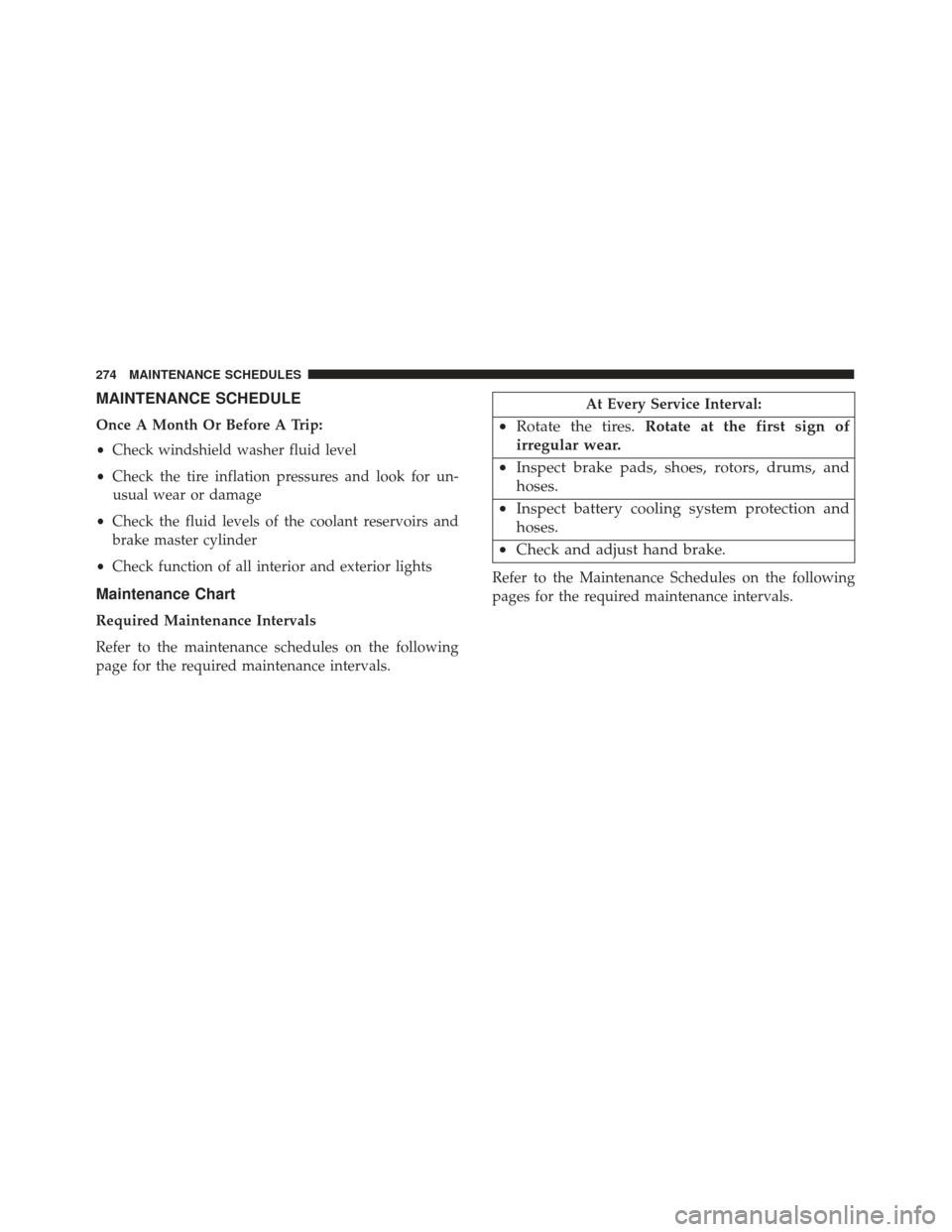
MAINTENANCE SCHEDULE
Once A Month Or Before A Trip:
•Check windshield washer fluid level
• Check the tire inflation pressures and look for un-
usual wear or damage
• Check the fluid levels of the coolant reservoirs and
brake master cylinder
• Check function of all interior and exterior lights
Maintenance Chart
Required Maintenance Intervals
Refer to the maintenance schedules on the following
page for the required maintenance intervals.
At Every Service Interval:
• Rotate the tires. Rotate at the first sign of
irregular wear.
• Inspect brake pads, shoes, rotors, drums, and
hoses.
• Inspect battery cooling system protection and
hoses.
• Check and adjust hand brake.
Refer to the Maintenance Schedules on the following
pages for the required maintenance intervals.
274 MAINTENANCE SCHEDULES
Page 287 of 300
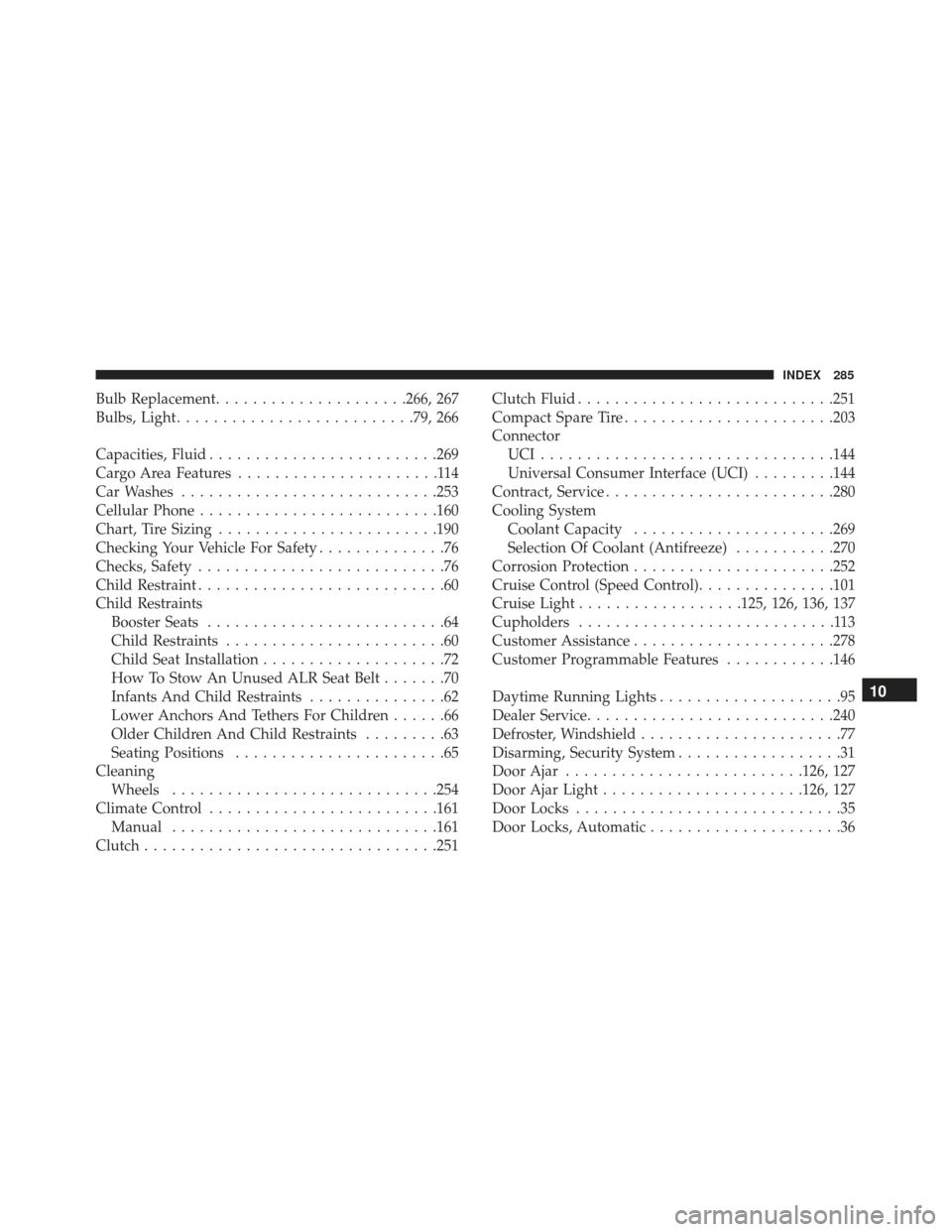
Bulb Replacement.....................266, 267
Bulbs, Light ......................... .79, 266
Capacities, Fluid ........................ .269
Cargo Area Features ......................114
Car Washes ........................... .253
Cellular Phone ......................... .160
Chart, Tire Sizing ....................... .190
Checking Your Vehicle For Safety ..............76
Checks, Safety ...........................76
Child Restraint ...........................60
Child Restraints Booster Seats ..........................64
Child Restraints ........................60
Child Seat Installation ....................72
How To Stow An Unused ALR Seat Belt .......70
Infants And Child Restraints ...............62
Lower Anchors And Tethers For Children ......66
Older Children And Child Restraints .........63
Seating Positions .......................65
Cleaning Wheels ............................ .254
Climate Control ........................ .161
Manual ............................ .161
Clutch ............................... .251Clutch Fluid
........................... .251
Compact Spare Tire ...................... .203
Connector UCI............................... .144
Universal Consumer Interface (UCI) .........144
Contract, Service ........................ .280
Cooling System Coolant Capacity ..................... .269
Selection Of Coolant (Antifreeze) ...........270
Corrosion Protection ..................... .252
Cruise Control (Speed Control) ...............101
Cruise Light ..................125, 126, 136, 137
Cupholders ............................113
Customer Assistance ..................... .278
Customer Programmable Features ............146
Daytime Running Lights ....................95
Dealer Service .......................... .240
Defroster, Windshield ......................77
Disarming,
Security System ..................31
Door Ajar ......................... .126, 127
Door Ajar Light ..................... .126, 127
Door Locks .............................35
Door Locks, Automatic .....................36
10
INDEX 285