battery FIAT 500E 2018 User Guide
[x] Cancel search | Manufacturer: FIAT, Model Year: 2018, Model line: 500E, Model: FIAT 500E 2018Pages: 302, PDF Size: 3.32 MB
Page 40 of 302
To replace the battery, proceed as follows:
1. Push mechanical release button to open the mechanicalkey.
2. Turn the screw to unlock using a small screwdriver.
3. Take out the battery case and replace the battery making sure that polarities are correct.
4. Refit the battery case inside the key and lock it turning the screw to lock.
NOTE: Used batteries should be properly disposed of as
specified by law, see an authorized dealer for assistance
needed.
Programming Additional Key Fobs
Refer to “Sentry Key” in “Getting To Know Your Vehicle”
for further information.
If you do not have a programmed key fob, contact an
authorized dealer for details.
Request For Additional Remote Controls
The system can recognize up to eight remote controls.
Should a new remote control be necessary, go to an
authorized dealer, taking an ID document and the car
ownership documents.
General Information
The following regulatory statement applies to all radio
frequency (RF) devices equipped in this vehicle:
This device complies with Part 15 of the FCC Rules and
with Industry Canada license-exempt RSS standard(s).
Operation is subject to the following two conditions:
1. This device may not cause harmful interference, and
2. This device must accept any interference received, in- cluding interference that may cause undesired opera-
tion.
NOTE: Changes or modifications not expressly approved
by the party responsible for compliance could void the
user ’s authority to operate the equipment.
IGNITION SWITCH
Mechanical Ignition Switch
The ignition switch can be turned to three different posi-
tions:
• STOP: the vehicle is off, and the key can be removed.
Some electrical devices (e.g. sound system, central door
locking system, etc.) can operate.
38 GETTING TO KNOW YOUR VEHICLE
Page 61 of 302
INTERIOR LIGHTS
The interior light switches are located in the overhead
console. The interior lights can be set to three different
positions (Off/Left Position, Center Position, On/Right
Position).
Using the switch on the left overhead, push the switch to
the right from its center position and the lights are always
on. Push the switch to the left from its center position and
the lights are always off. Leave the switch in the center
position, and the lights are turned on and off when the
doors are opened or closed. The switch on the right side of
the overhead console controls the map or reading function
of the lights. Push the switch to the right to turn on the
right light and push the switch to the left to turn on the left
light.
CAUTION!
Before getting out of the vehicle be sure that the switch
is in the center position or that the lights are off to
avoid draining the battery.
Interior Light Timing (Center Position)
There are four different modes of operation that can be
activated in this position:
•When one door is opened, a three minute timer is
activated.
• When the key is removed from the ignition (within two
minutes of the ignition being turned OFF), a 10 second
timer is activated.
• When the doors are unlocked with the key fob, a 10
second timer is activated.
• When the doors are locked with the key fob, the lights
will turn off.
Interior Light Timing (On/Right Position)
When all doors are closed a 15-minute timer is activated.
NOTE: The timer is deactivated when the key is moved
into the ON/RUN position.
3
GETTING TO KNOW YOUR VEHICLE 59
Page 73 of 302
NOTE:If the vehicle is parked and off charge for longer
than two months, the 12V battery should be disconnected.
Window Fogging
Vehicle windows tend to fog on the inside in mild, rainy
and/or humid weather. To clear the windows, select De-
frost or Mix mode and increase the front blower speed. Do
not use the Recirculation mode without A/C for long
periods, as fogging may occur.
CAUTION!
Failure to follow these cautions can cause damage to
the heating elements:
• Use care when washing the inside of the rear win-
dow. Do not use abrasive window cleaners on the
interior surface of the window. Use a soft cloth and a
mild washing solution, wiping parallel to the heat-
ing elements. Labels can be peeled off after soaking
with warm water.
• Do not use scrapers, sharp instruments, or abrasive
window cleaners on the interior surface of the win-
dow.
• Keep all objects a safe distance from the window.
Outside Air Intake
Make sure the air intake, located directly in front of the
windshield, is free of obstructions such as leaves. Leaves
collected in the air intake may reduce airflow, and if they
enter the plenum, they could plug the water drains. In
winter months, make sure the air intake is clear of ice,
slush, and snow.
A/C Air Filter
The climate control system filters out dust and pollen from
the air. Contact an authorized dealer to service your A/C
air filter, and to have it replaced when needed.
3
GETTING TO KNOW YOUR VEHICLE 71
Page 84 of 302
WARNING!
To avoid serious injury or death:
•Only devices designed for use in this type of outlet
should be inserted into any 12 Volt outlet.
• Do not touch with wet hands.
• Close the lid when not in use and while driving the
vehicle.
• If this outlet is mishandled, it may cause an electric
shock and failure.
CAUTION!
•Many accessories that can be plugged in draw power
from the vehicle’s battery, even when not in use (i.e.,
cellular phones, etc.). Eventually, if plugged in long
(Continued)
CAUTION! (Continued)
enough, the vehicle’s battery will discharge suffi-
ciently to degrade battery life and/or prevent the
vehicle from moving.
• Accessories that draw higher power (i.e., coolers,
vacuum cleaners, lights, etc.) will degrade the battery
even more quickly. Only use these intermittently and
with great caution.
• After the use of high power draw accessories, or long
periods of the vehicle not being charged (with acces-
sories still plugged in), the vehicle will likely need to
be charged.
82 GETTING TO KNOW YOUR VEHICLE
Page 87 of 302
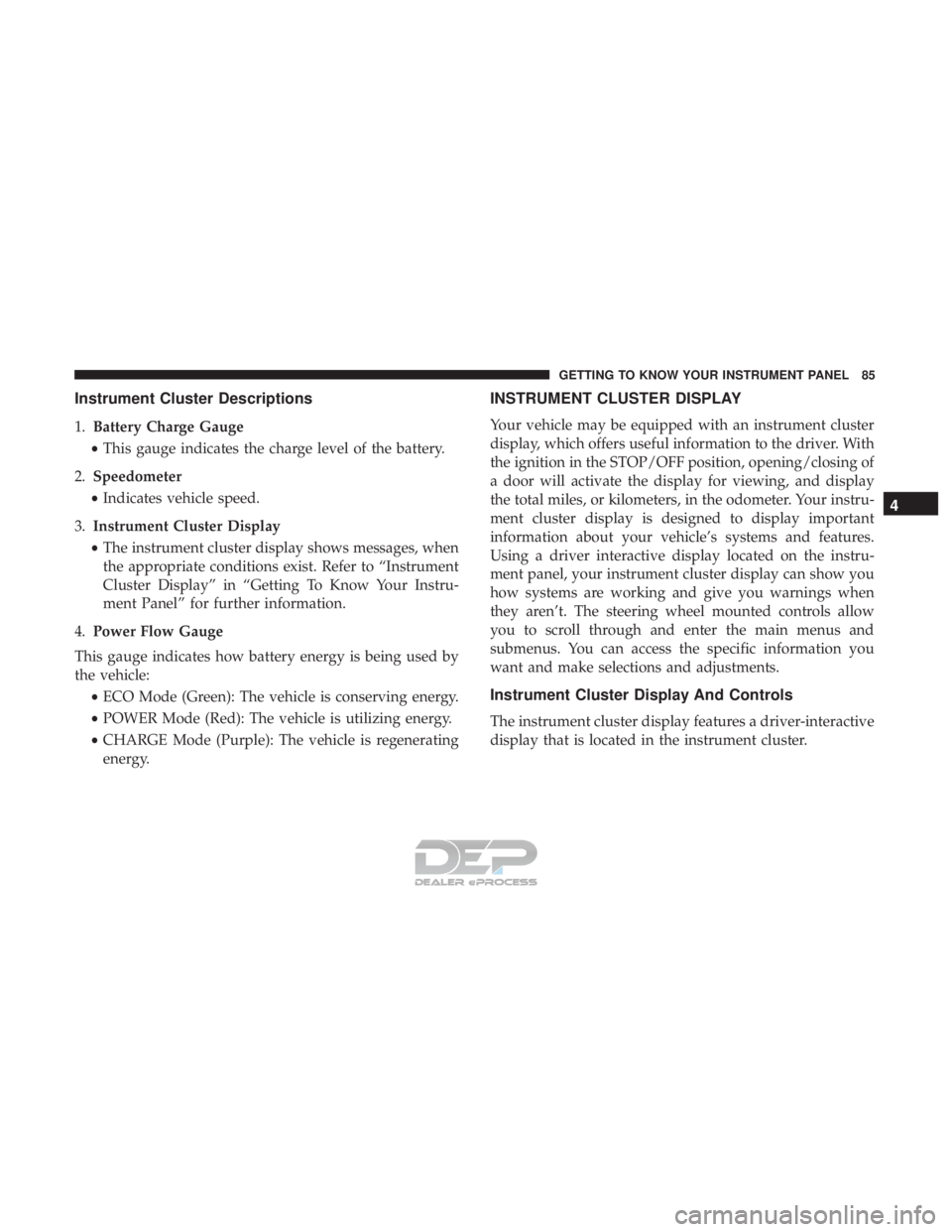
Instrument Cluster Descriptions
1.Battery Charge Gauge
• This gauge indicates the charge level of the battery.
2. Speedometer
• Indicates vehicle speed.
3. Instrument Cluster Display
• The instrument cluster display shows messages, when
the appropriate conditions exist. Refer to “Instrument
Cluster Display” in “Getting To Know Your Instru-
ment Panel” for further information.
4. Power Flow Gauge
This gauge indicates how battery energy is being used by
the vehicle: •ECO Mode (Green): The vehicle is conserving energy.
• POWER Mode (Red): The vehicle is utilizing energy.
• CHARGE Mode (Purple): The vehicle is regenerating
energy.
INSTRUMENT CLUSTER DISPLAY
Your vehicle may be equipped with an instrument cluster
display, which offers useful information to the driver. With
the ignition in the STOP/OFF position, opening/closing of
a door will activate the display for viewing, and display
the total miles, or kilometers, in the odometer. Your instru-
ment cluster display is designed to display important
information about your vehicle’s systems and features.
Using a driver interactive display located on the instru-
ment panel, your instrument cluster display can show you
how systems are working and give you warnings when
they aren’t. The steering wheel mounted controls allow
you to scroll through and enter the main menus and
submenus. You can access the specific information you
want and make selections and adjustments.
Instrument Cluster Display And Controls
The instrument cluster display features a driver-interactive
display that is located in the instrument cluster.
4
GETTING TO KNOW YOUR INSTRUMENT PANEL 85
Page 89 of 302
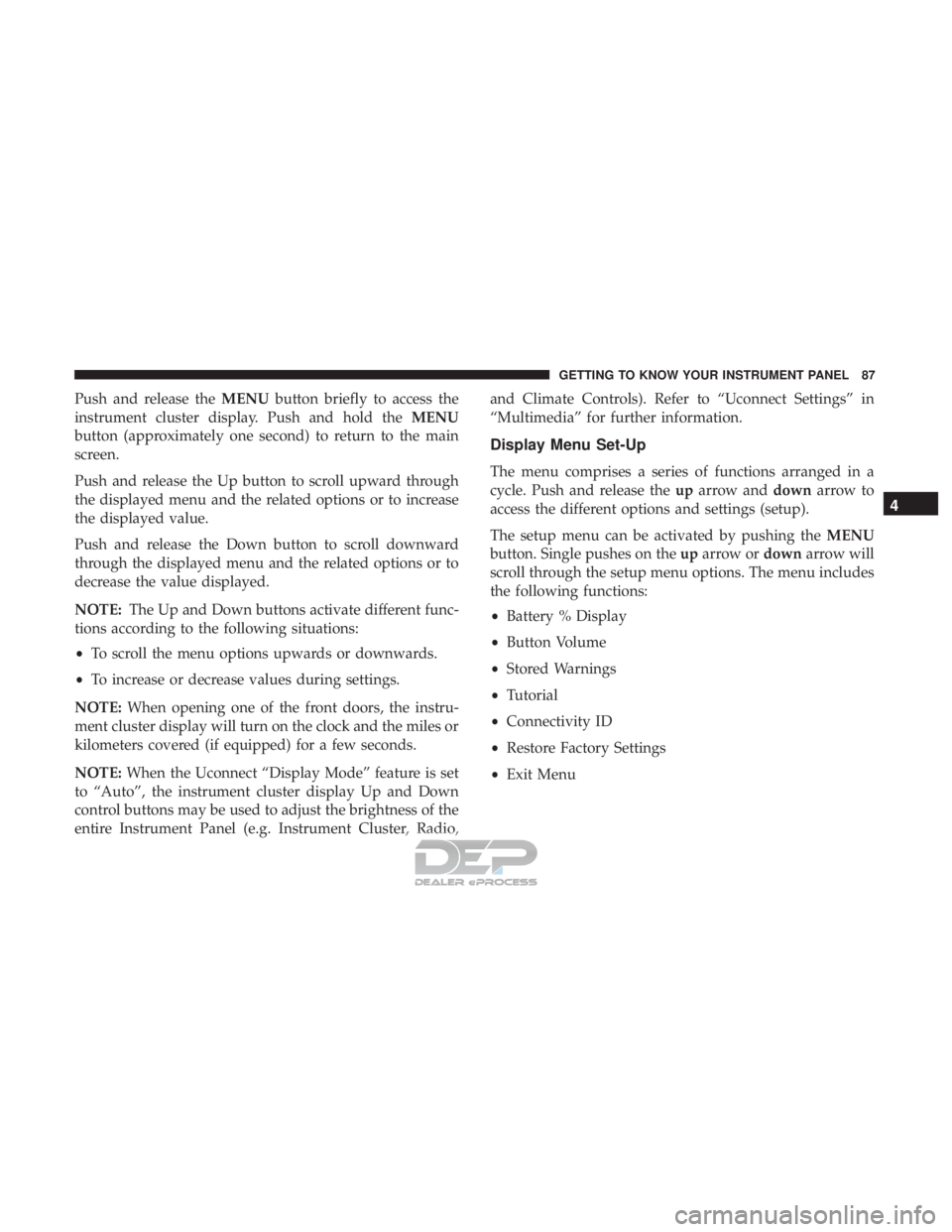
Push and release theMENUbutton briefly to access the
instrument cluster display. Push and hold the MENU
button (approximately one second) to return to the main
screen.
Push and release the Up button to scroll upward through
the displayed menu and the related options or to increase
the displayed value.
Push and release the Down button to scroll downward
through the displayed menu and the related options or to
decrease the value displayed.
NOTE: The Up and Down buttons activate different func-
tions according to the following situations:
• To scroll the menu options upwards or downwards.
• To increase or decrease values during settings.
NOTE: When opening one of the front doors, the instru-
ment cluster display will turn on the clock and the miles or
kilometers covered (if equipped) for a few seconds.
NOTE: When the Uconnect “Display Mode” feature is set
to “Auto”, the instrument cluster display Up and Down
control buttons may be used to adjust the brightness of the
entire Instrument Panel (e.g. Instrument Cluster, Radio, and Climate Controls). Refer to “Uconnect Settings” in
“Multimedia” for further information.
Display Menu Set-Up
The menu comprises a series of functions arranged in a
cycle. Push and release the
uparrow and downarrow to
access the different options and settings (setup).
The setup menu can be activated by pushing the MENU
button. Single pushes on the uparrow or downarrow will
scroll through the setup menu options. The menu includes
the following functions:
• Battery % Display
• Button Volume
• Stored Warnings
• Tutorial
• Connectivity ID
• Restore Factory Settings
• Exit Menu
4
GETTING TO KNOW YOUR INSTRUMENT PANEL 87
Page 92 of 302
Values Displayed
Range
This indicates the distance which may be travelled with the
remaining battery charge, assuming that driving condi-
tions will not change. The message “----” will appear when
the system is initializing.
NOTE:The range depends on several factors: driving style,
type of route (freeway, residential, mountain roads, etc.),
conditions of use of the car (load, tire pressure, etc.). Trip
planning must take into account the above notes.
Distance Traveled
This value shows the distance covered since the last reset.
Average Speed
This value shows the vehicle’s average speed as a function
of the overall time elapsed since the last reset.
Average Energy
This value shows the vehicle’s average energy consump-
tion as a function of the overall time elapsed since the last
reset.
Elapsed Time
This value shows the time elapsed since the last reset.
WARNING LIGHTS AND MESSAGES
The warning/indicator lights will illuminate in the instru-
ment panel together with a dedicated message and/or
acoustic signal when applicable. These indications are
indicative and precautionary and as such must not be
considered as exhaustive and/or alternative to the infor-
mation contained in the Owner ’s Manual, which you are
advised to read carefully in all cases. Always refer to the
information in this chapter in the event of a failure indica-
tion. All active telltales will display first if applicable. The
system check menu may appear different based upon
equipment options and current vehicle status. Some tell-
tales are optional and may not appear.
Red Warning Lights
— Air Bag Warning Light
This warning light will illuminate to indicate a fault with
the air bag, and will turn on for four to eight seconds as a
bulb check when the ignition is placed in the ON/RUN or
ACC/ON/RUN position. This light will illuminate with a
single chime when a fault with the air bag has been
detected, it will stay on until the fault is cleared. If the light
is either not on during startup, stays on, or turns on while
driving, have the system inspected at an authorized dealer
as soon as possible.
90 GETTING TO KNOW YOUR INSTRUMENT PANEL
Page 94 of 302
The light also will turn on when the parking brake is
applied with the ignition switch in the ON/RUN position.
NOTE:This light shows only that the parking brake is
applied. It does not show the degree of brake application.
— Battery Charge Warning Light
This light illuminates when the battery is not charging
properly. If it stays on while the vehicle is running, there
may be a malfunction with the charging system. Contact
your authorized dealer as soon as possible.
This indicates a possible problem with the electrical system
or a related component.
— Door Open Warning Light
This indicator will illuminate when one or more door(s) are
not fully closed.
NOTE: If the vehicle is moving and a door is opened, there
will also be a single chime.
— Electric Power Steering Fault Warning Light
This warning light will turn on when there’s a fault with
the EPS (Electric Power Steering) system. Refer to “Power
Steering” in “Starting And Operating” for further informa-
tion.
WARNING!
Continued operation with reduced assist could pose a
safety risk to yourself and others. Service should be
obtained as soon as possible.
— Hood Open Warning Light — If Equipped
This warning light will illuminate when the hood is left
open and not fully closed.
— Liftgate Open Warning Light
This indicator will illuminate when the liftgate is open and
not fully closed.
— Plugged In Malfunction Indicator Light
This warning light will illuminate red if there is a malfunc-
tion or interruption during the vehicle charging process.
This warning light will also appear red alongside a “Charg-
ing Interrupted” message in the Instrument Cluster Dis-
play.
— Seat Belt Reminder Warning Light
This warning light indicates when the driver or passenger
seat belt is unbuckled. When the ignition is first placed in
the ON/RUN or ACC/ON/RUN position and if the
92 GETTING TO KNOW YOUR INSTRUMENT PANEL
Page 106 of 302
ESC Activation/Malfunction Indicator Light And
ESC OFF Indicator Light
The ESC Activation/Malfunction Indicator Light
in the instrument cluster will come on when the
ignition switch is turned to the MAR (ACC/ON/
RUN) position for four seconds. If the ESC
Activation/Malfunction Indicator Light comes on continu-
ously with the vehicle operating running, a malfunction
has been detected in the ESC system. If this light remains
on after several ignition cycles, and the vehicle has been
driven several miles (kilometers) at speeds greater than
30 mph (48 km/h), see your authorized dealer as soon as
possible to have the problem diagnosed and corrected.
The ESC Activation/Malfunction Indicator Light (located
in the instrument cluster) starts to flash as soon as the tires
lose traction and the ESC system becomes active. The ESC
Activation/Malfunction Indicator Light also flashes when
TCS is active. If the ESC Activation/Malfunction Indicator
Light begins to flash during acceleration, ease up on the
accelerator and apply as little throttle as possible. Be sure to
adapt your speed and driving to the prevailing road
conditions. NOTE:
•
The ESC Activation/Malfunction Indicator Light and
the ESC OFF Indicator Light come on momentarily each
time the ignition switch is turned ON.
• Each time the ignition is turned ON, the ESC system will
be ON even if it was turned off previously.
The ESC OFF Indicator Light indicates the Elec-
tronic Stability Control (ESC) is partially off.
Regenerative Braking System (RBS)
Your 500e has a Regenerative Braking System
(RBS). The RBS reduces the high voltage battery
consumption of the vehicle, particularly in stop-
and-go city traffic. The electric motors which
propel the vehicle forward can operate as generators when
braking. The RBS recharges the high voltage battery under
certain braking conditions by recapturing energy that
would otherwise be lost while braking. The electric power
that is generated goes back into the high voltage battery for
later use, for example when acceleration is desired.
104 SAFETY
Page 109 of 302
•Under-inflation also reduces the high voltage battery
range and tire tread life, and may affect the vehicle’s
handling and stopping ability.
• It is particularly important for you to check the tire
pressure in all of the tires on your vehicle monthly and
to maintain the proper pressure.
• The TPMS is not a substitute for proper tire mainte-
nance, and it is the driver ’s responsibility to maintain
correct tire pressure using an accurate tire pressure
gauge, even if under-inflation has not reached the level
to trigger illumination of the Tire Pressure Monitoring
System Warning Light.
• Seasonal temperature changes will affect tire pressure,
and the TPMS will monitor the actual tire pressure in the
tire.
TPM System
The Tire Pressure Monitor System (TPMS) uses wireless
technology with wheel rim mounted electronic sensors to
monitor tire pressure levels. Sensors, mounted to each
wheel as part of the valve stem, transmit tire pressure
readings to the receiver module. The TPMS consists of the following components:
•
Receiver module
• Four Tire Pressure Monitoring Sensors
• Various Tire Pressure Monitoring System messages,
which display in the instrument cluster
• Tire Pressure Monitoring System Warning Light
Tire Pressure Monitoring Low Pressure Warnings
The Tire Pressure Monitoring System Warning Light
will illuminate in the instrument cluster and a
chime will sound when tire pressure is low in one or more
of the four active road tires. In addition, the instrument
cluster will display a low pressure graphic showing the
low tire pressure tire highlighted in a different color.
5
SAFETY 107