climate control FIAT 500E 2018 User Guide
[x] Cancel search | Manufacturer: FIAT, Model Year: 2018, Model line: 500E, Model: FIAT 500E 2018Pages: 302, PDF Size: 3.32 MB
Page 71 of 302
Climate Control Functions
A/C (Air Conditioning)
The Air Conditioning (A/C) button allows the operator to
manually activate or deactivate the air conditioning sys-
tem. When the air conditioning system is turned on, cool
dehumidified air will flow through the outlets into the
cabin. For improved fuel economy, push the A/C button to
turn off the air conditioning and manually adjust the
blower and airflow mode settings. Also, make sure to select
only Panel, Bi-Level or Floor modes.
NOTE:
•For Manual Climate Controls, if the system is in Mix,
Floor or Defrost Mode, the A/C can be turned off, but
the A/C system shall remain active to prevent fogging of
the windows.
• If fog or mist appears on the windshield or side glass,
select Defrost mode, and increase blower speed if
needed.
• If your air conditioning performance seems lower than
expected, check the front of the A/C condenser (located
in front of the radiator), for an accumulation of dirt or
insects. Clean with a gentle water spray from the front of
the radiator and through the condenser. Recirculation
In cold weather, use of Recirculation mode may lead to
excessive window fogging. The Recirculation feature may
be unavailable if conditions exist that could create fogging
on the inside of the windshield.
Automatic Temperature Control (ATC) — If
Equipped
Automatic Operation
1. Push the AUTO button on the faceplate.
2. Next, adjust the temperature you would like the system
to maintain by adjusting the temperature control but-
tons. Once the desired temperature is displayed, the
system achieves and automatically maintains that com-
fort level.
3. When the system is set up for your comfort level, it is not necessary to change the settings. You experience the
greatest efficiency by simply allowing the system to
function automatically.
3
GETTING TO KNOW YOUR VEHICLE 69
Page 73 of 302
NOTE:If the vehicle is parked and off charge for longer
than two months, the 12V battery should be disconnected.
Window Fogging
Vehicle windows tend to fog on the inside in mild, rainy
and/or humid weather. To clear the windows, select De-
frost or Mix mode and increase the front blower speed. Do
not use the Recirculation mode without A/C for long
periods, as fogging may occur.
CAUTION!
Failure to follow these cautions can cause damage to
the heating elements:
• Use care when washing the inside of the rear win-
dow. Do not use abrasive window cleaners on the
interior surface of the window. Use a soft cloth and a
mild washing solution, wiping parallel to the heat-
ing elements. Labels can be peeled off after soaking
with warm water.
• Do not use scrapers, sharp instruments, or abrasive
window cleaners on the interior surface of the win-
dow.
• Keep all objects a safe distance from the window.
Outside Air Intake
Make sure the air intake, located directly in front of the
windshield, is free of obstructions such as leaves. Leaves
collected in the air intake may reduce airflow, and if they
enter the plenum, they could plug the water drains. In
winter months, make sure the air intake is clear of ice,
slush, and snow.
A/C Air Filter
The climate control system filters out dust and pollen from
the air. Contact an authorized dealer to service your A/C
air filter, and to have it replaced when needed.
3
GETTING TO KNOW YOUR VEHICLE 71
Page 74 of 302
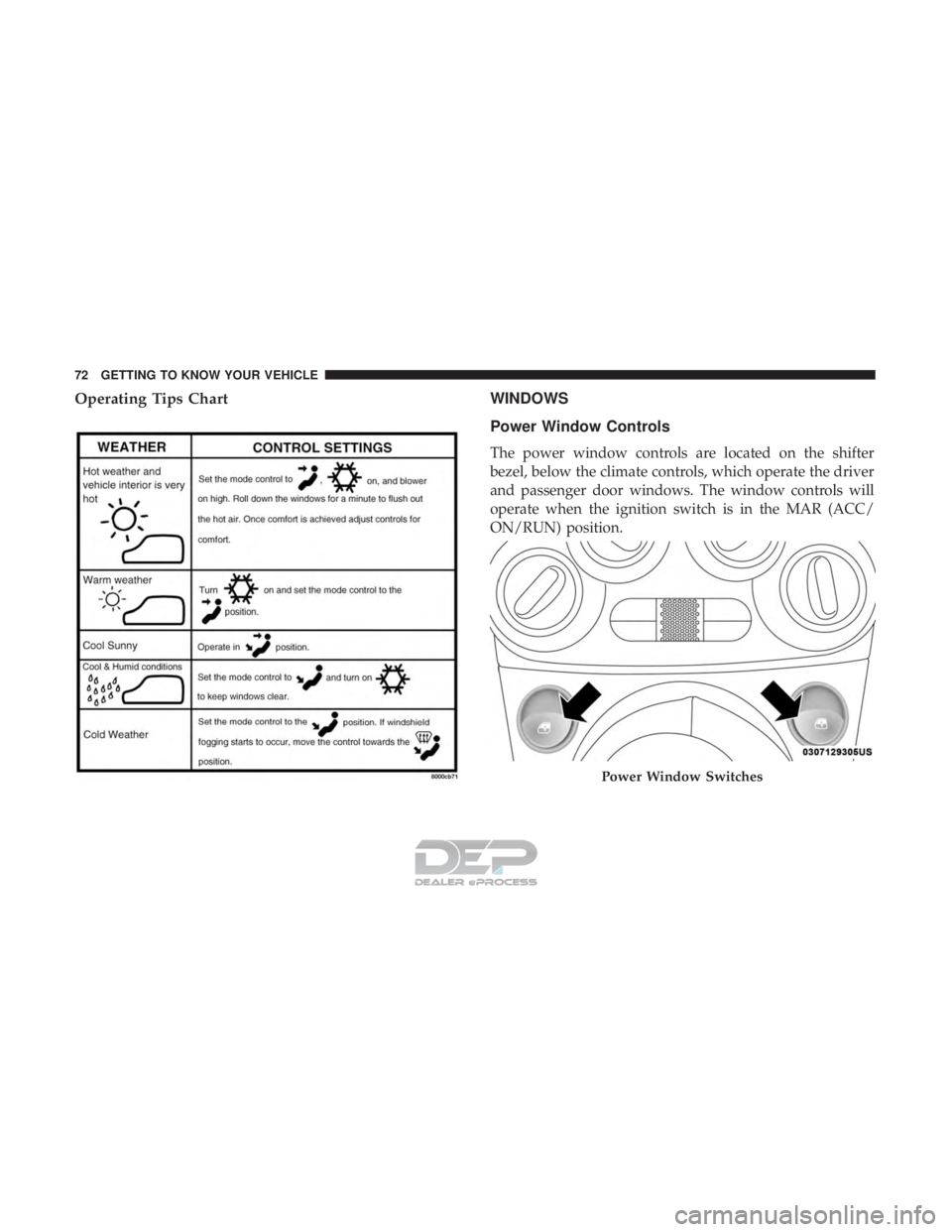
Operating Tips ChartWINDOWS
Power Window Controls
The power window controls are located on the shifter
bezel, below the climate controls, which operate the driver
and passenger door windows. The window controls will
operate when the ignition switch is in the MAR (ACC/
ON/RUN) position.
Power Window Switches
72 GETTING TO KNOW YOUR VEHICLE
Page 89 of 302
Push and release theMENUbutton briefly to access the
instrument cluster display. Push and hold the MENU
button (approximately one second) to return to the main
screen.
Push and release the Up button to scroll upward through
the displayed menu and the related options or to increase
the displayed value.
Push and release the Down button to scroll downward
through the displayed menu and the related options or to
decrease the value displayed.
NOTE: The Up and Down buttons activate different func-
tions according to the following situations:
• To scroll the menu options upwards or downwards.
• To increase or decrease values during settings.
NOTE: When opening one of the front doors, the instru-
ment cluster display will turn on the clock and the miles or
kilometers covered (if equipped) for a few seconds.
NOTE: When the Uconnect “Display Mode” feature is set
to “Auto”, the instrument cluster display Up and Down
control buttons may be used to adjust the brightness of the
entire Instrument Panel (e.g. Instrument Cluster, Radio, and Climate Controls). Refer to “Uconnect Settings” in
“Multimedia” for further information.
Display Menu Set-Up
The menu comprises a series of functions arranged in a
cycle. Push and release the
uparrow and downarrow to
access the different options and settings (setup).
The setup menu can be activated by pushing the MENU
button. Single pushes on the uparrow or downarrow will
scroll through the setup menu options. The menu includes
the following functions:
• Battery % Display
• Button Volume
• Stored Warnings
• Tutorial
• Connectivity ID
• Restore Factory Settings
• Exit Menu
4
GETTING TO KNOW YOUR INSTRUMENT PANEL 87
Page 177 of 302
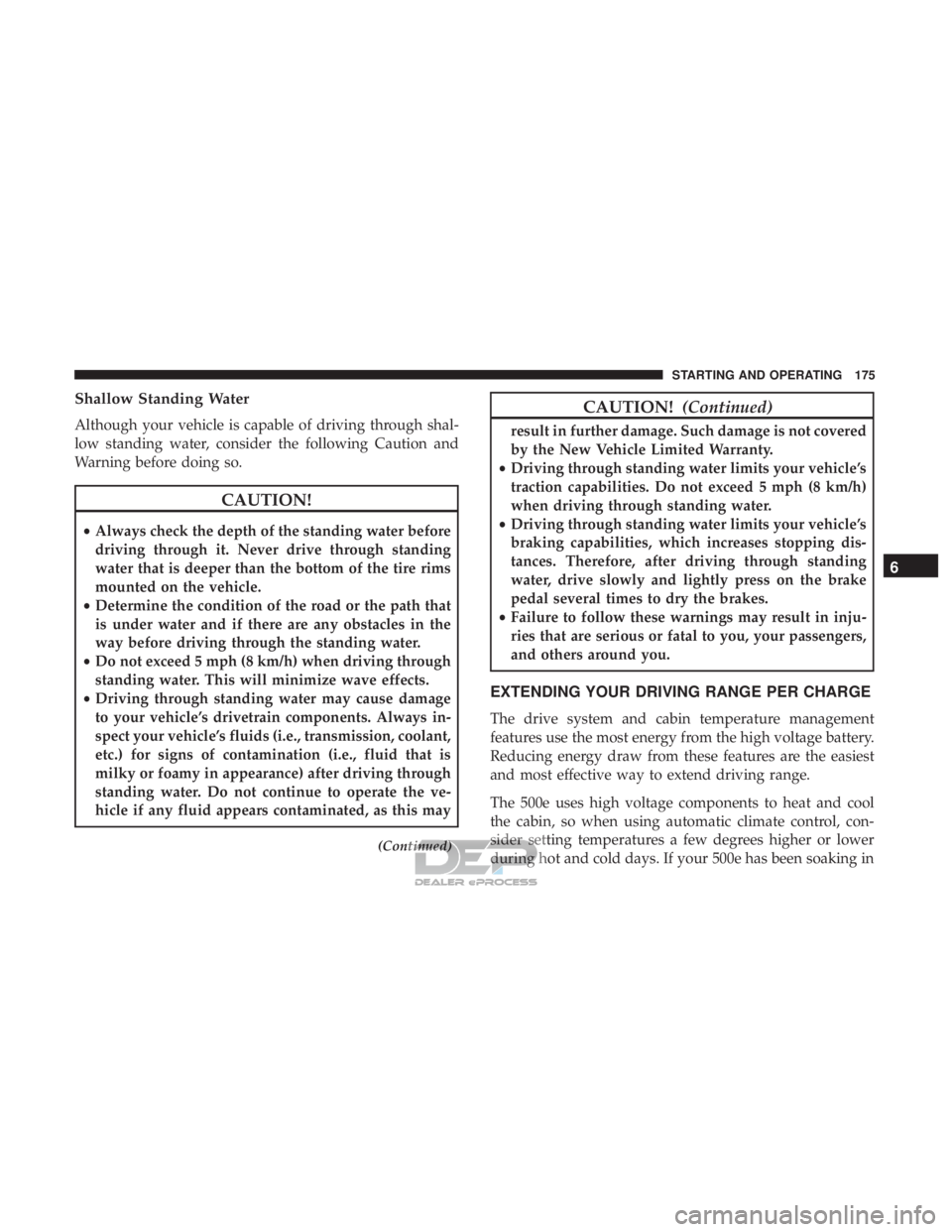
Shallow Standing Water
Although your vehicle is capable of driving through shal-
low standing water, consider the following Caution and
Warning before doing so.
CAUTION!
•Always check the depth of the standing water before
driving through it. Never drive through standing
water that is deeper than the bottom of the tire rims
mounted on the vehicle.
• Determine the condition of the road or the path that
is under water and if there are any obstacles in the
way before driving through the standing water.
• Do not exceed 5 mph (8 km/h) when driving through
standing water. This will minimize wave effects.
• Driving through standing water may cause damage
to your vehicle’s drivetrain components. Always in-
spect your vehicle’s fluids (i.e., transmission, coolant,
etc.) for signs of contamination (i.e., fluid that is
milky or foamy in appearance) after driving through
standing water. Do not continue to operate the ve-
hicle if any fluid appears contaminated, as this may
(Continued)
CAUTION! (Continued)
result in further damage. Such damage is not covered
by the New Vehicle Limited Warranty.
• Driving through standing water limits your vehicle’s
traction capabilities. Do not exceed 5 mph (8 km/h)
when driving through standing water.
• Driving through standing water limits your vehicle’s
braking capabilities, which increases stopping dis-
tances. Therefore, after driving through standing
water, drive slowly and lightly press on the brake
pedal several times to dry the brakes.
• Failure to follow these warnings may result in inju-
ries that are serious or fatal to you, your passengers,
and others around you.
EXTENDING YOUR DRIVING RANGE PER CHARGE
The drive system and cabin temperature management
features use the most energy from the high voltage battery.
Reducing energy draw from these features are the easiest
and most effective way to extend driving range.
The 500e uses high voltage components to heat and cool
the cabin, so when using automatic climate control, con-
sider setting temperatures a few degrees higher or lower
during hot and cold days. If your 500e has been soaking in
6
STARTING AND OPERATING 175
Page 187 of 302
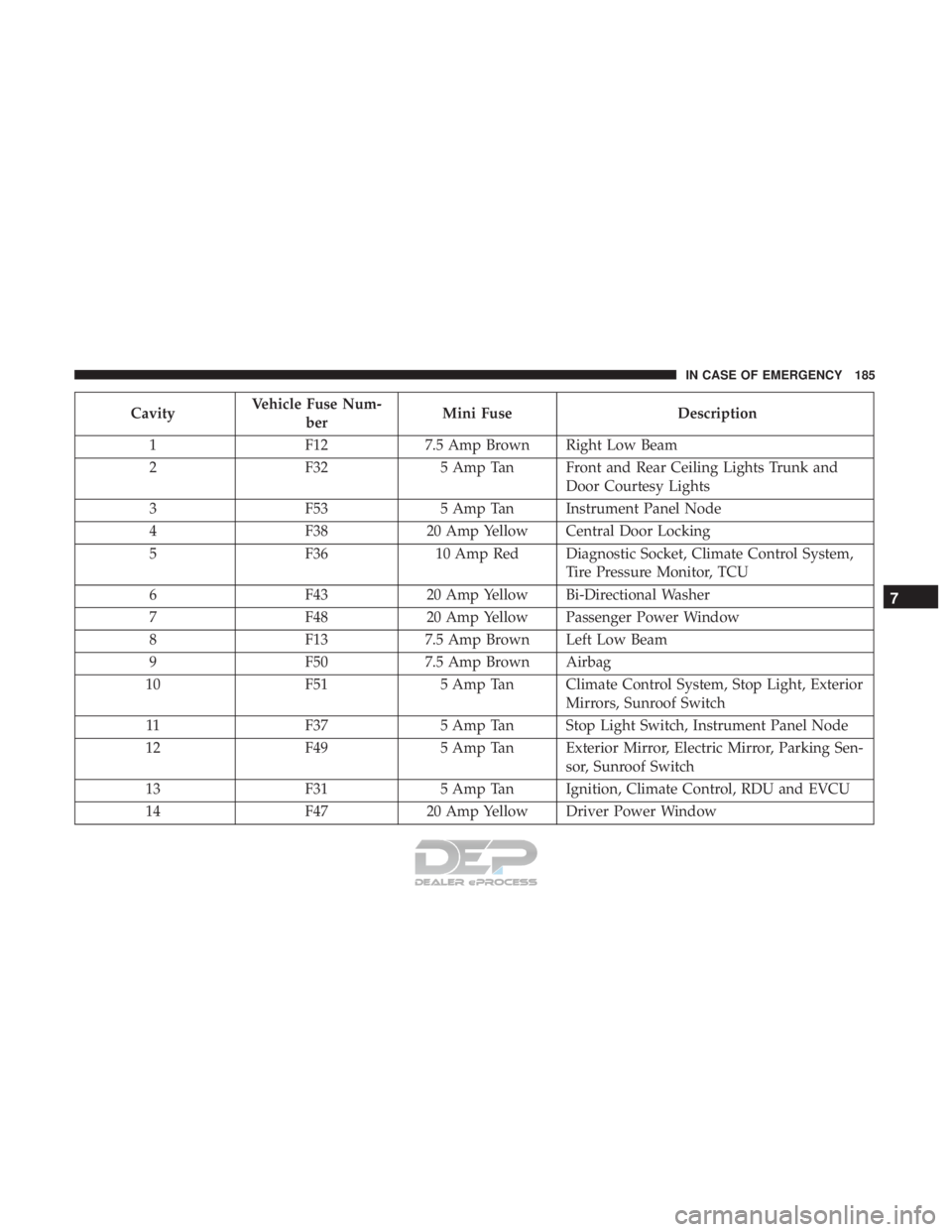
CavityVehicle Fuse Num-
ber Mini Fuse
Description
1 F127.5 Amp Brown Right Low Beam
2 F325 Amp Tan Front and Rear Ceiling Lights Trunk and
Door Courtesy Lights
3 F535 Amp Tan Instrument Panel Node
4 F3820 Amp Yellow Central Door Locking
5 F3610 Amp Red Diagnostic Socket, Climate Control System,
Tire Pressure Monitor, TCU
6 F4320 Amp Yellow Bi-Directional Washer
7 F4820 Amp Yellow Passenger Power Window
8 F137.5 Amp Brown Left Low Beam
9 F507.5 Amp Brown Airbag
10 F515 Amp Tan Climate Control System, Stop Light, Exterior
Mirrors, Sunroof Switch
11 F375 Amp Tan Stop Light Switch, Instrument Panel Node
12 F495 Amp Tan Exterior Mirror, Electric Mirror, Parking Sen-
sor, Sunroof Switch
13 F315 Amp Tan Ignition, Climate Control, RDU and EVCU
14 F4720 Amp Yellow Driver Power Window
7
IN CASE OF EMERGENCY 185
Page 251 of 302
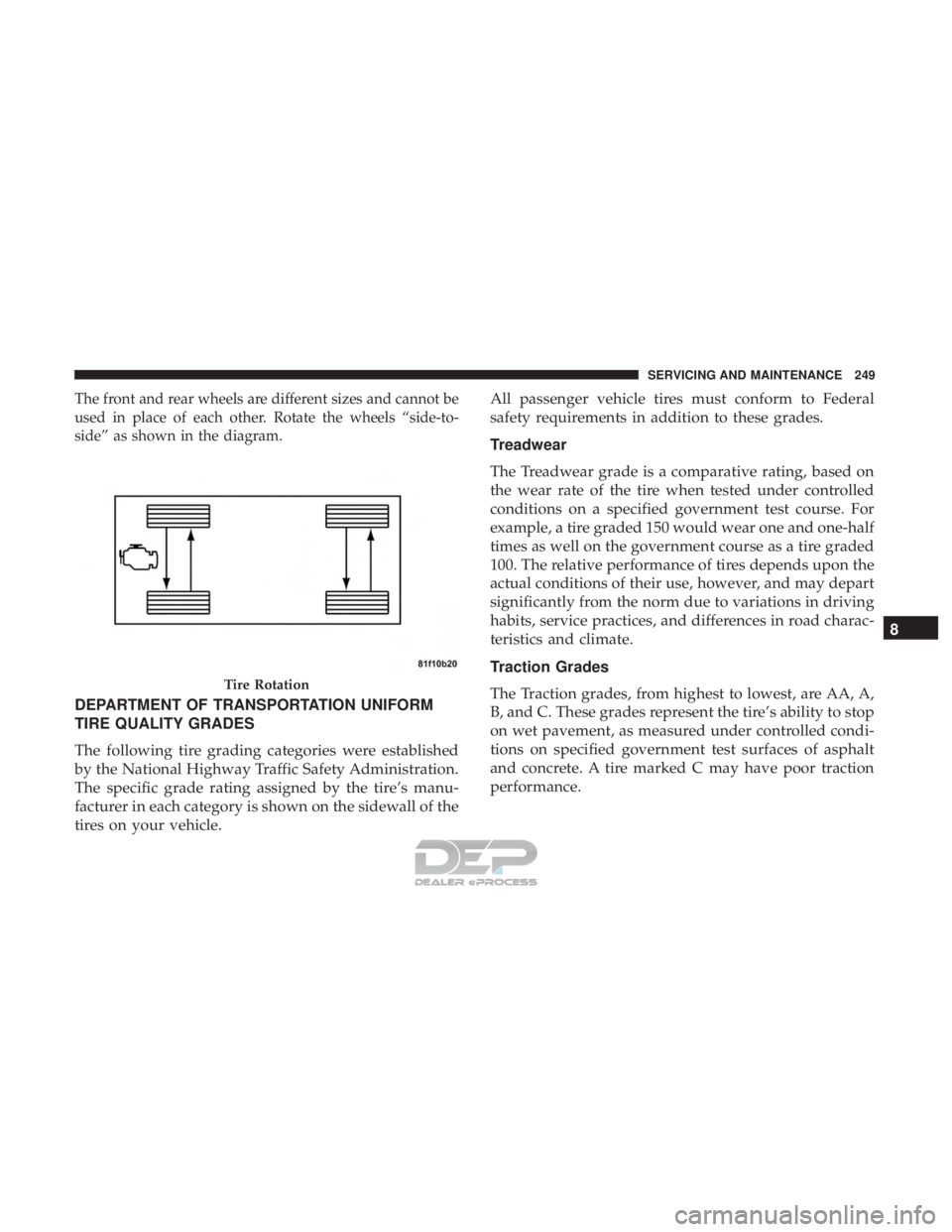
The front and rear wheels are different sizes and cannot be
used in place of each other. Rotate the wheels “side-to-
side” as shown in the diagram.
DEPARTMENT OF TRANSPORTATION UNIFORM
TIRE QUALITY GRADES
The following tire grading categories were established
by the National Highway Traffic Safety Administration.
The specific grade rating assigned by the tire’s manu-
facturer in each category is shown on the sidewall of the
tires on your vehicle.All passenger vehicle tires must conform to Federal
safety requirements in addition to these grades.
Treadwear
The Treadwear grade is a comparative rating, based on
the wear rate of the tire when tested under controlled
conditions on a specified government test course. For
example, a tire graded 150 would wear one and one-half
times as well on the government course as a tire graded
100. The relative performance of tires depends upon the
actual conditions of their use, however, and may depart
significantly from the norm due to variations in driving
habits, service practices, and differences in road charac-
teristics and climate.
Traction Grades
The Traction grades, from highest to lowest, are AA, A,
B, and C. These grades represent the tire’s ability to stop
on wet pavement, as measured under controlled condi-
tions on specified government test surfaces of asphalt
and concrete. A tire marked C may have poor traction
performance.
Tire Rotation
8
SERVICING AND MAINTENANCE 249
Page 293 of 302
Parking...............................156
Warning Light ...........................91
Bulb Replacement ..........................180
Bulbs, Light .......................... .151, 180
Camera, Rear ............................ .169
Capacities, Fluid .......................... .259
Car Washes ...............................251
Cellular Phone ............................275
Certification Label ..........................171
Chains, Tire ............................. .247
Changing A Flat Tire ........................228
Charging .................................21
AC Level 1 ..............................22
AC Level 2 ..............................35
Cordset ................................24
Indicator ...............................33
Times ..................................36
Troubleshooting ..........................27
Checking Your Vehicle For Safety ...............149
Checks, Safety ............................ .149
Child Restraint ............................133
Child Restraints Booster Seats ............................136
Child Seat Installation .....................146 How To Stow An unused ALR Seat Belt
........143
Infant And Child Restraints .................135
Lower Anchors And Tethers For Children .......138
Older Children And Child Restraints ...........135
Seating Positions ........................ .137
Cleaning Wheels ............................... .246
Climate Control ............................63
Automatic ..............................69
Compact Disc (CD) Maintenance ................281
Compact Spare Tire ........................ .244
Contract, Service .......................... .286
Cooling System Coolant Capacity ........................ .259
Selection Of Coolant (Antifreeze) .............259
Corrosion Protection ........................251
Cr uise
Control (Speed Control) .................163
Cruise Light ............................97, 98
Cupholders ...............................79
Customer Assistance ........................284
Customer Programmable Features ...............263
Cybersecurity ............................ .262
Daytime Running Lights ....................56, 57
Defroster, Windshield ........................149
12
INDEX 291