warning FIAT 500E 2018 User Guide
[x] Cancel search | Manufacturer: FIAT, Model Year: 2018, Model line: 500E, Model: FIAT 500E 2018Pages: 302, PDF Size: 3.32 MB
Page 27 of 302
WARNING!
Improper connection of the equipment-grounding con-
ductor could result in a risk of electric shock. Check
with a qualified electrician or serviceman if you are in
doubt as to whether the wall receptacle is properly
grounded. Do not modify the plug provided with the
product – if it does not fit the outlet, you must have a
proper outlet installed by a qualified electrician.
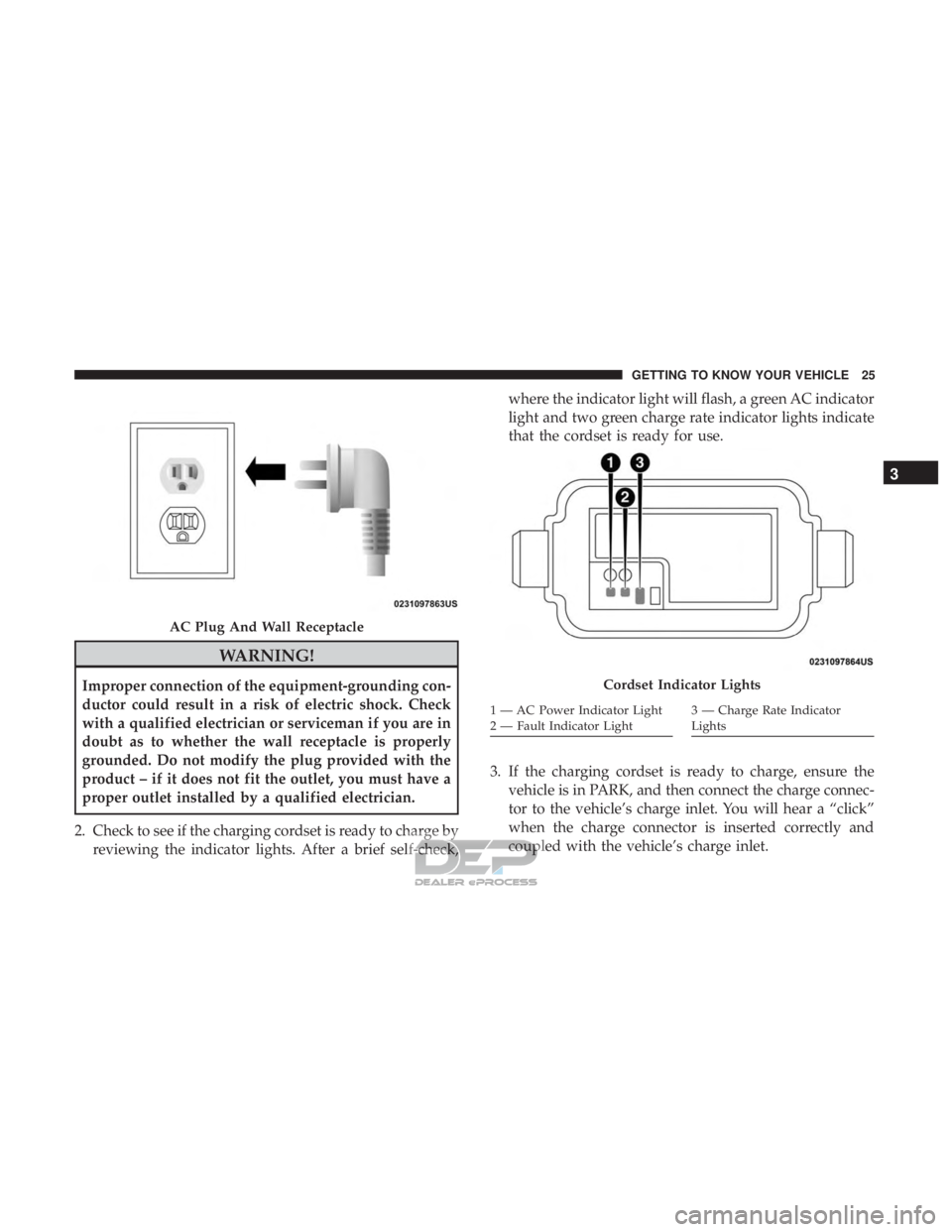
2. Check to see if the charging cordset is ready to charge by reviewing the indicator lights. After a brief self-check, where the indicator light will flash, a green AC indicator
light and two green charge rate indicator lights indicate
that the cordset is ready for use.
3. If the charging cordset is ready to charge, ensure the vehicle is in PARK, and then connect the charge connec-
tor to the vehicle’s charge inlet. You will hear a “click”
when the charge connector is inserted correctly and
coupled with the vehicle’s charge inlet.
AC Plug And Wall Receptacle
Cordset Indicator Lights
1 — AC Power Indicator Light
2 — Fault Indicator Light3 — Charge Rate Indicator
Lights
3
GETTING TO KNOW YOUR VEHICLE 25
Page 33 of 302
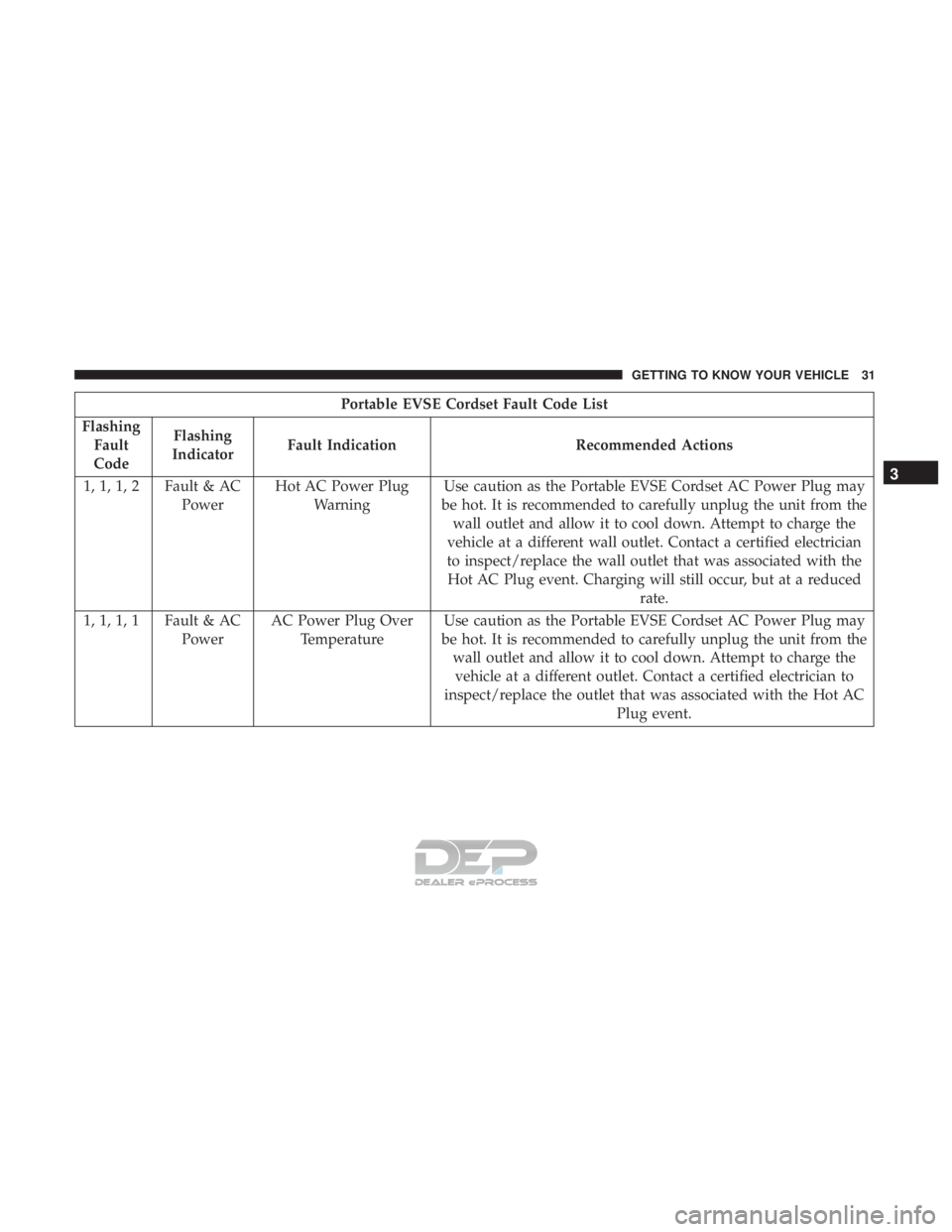
Portable EVSE Cordset Fault Code List
Flashing Fault
Code Flashing
Indicator Fault Indication Recommended Actions
1, 1, 1, 2 Fault & AC PowerHot AC Power Plug
Warning Use caution as the Portable EVSE Cordset AC Power Plug may
be hot. It is recommended to carefully unplug the unit from the wall outlet and allow it to cool down. Attempt to charge the
vehicle at a different wall outlet. Contact a certified electrician
to inspect/replace the wall outlet that was associated with the Hot AC Plug event. Charging will still occur, but at a reduced rate.
1, 1, 1, 1 Fault & AC PowerAC Power Plug Over
Temperature Use caution as the Portable EVSE Cordset AC Power Plug may
be hot. It is recommended to carefully unplug the unit from the wall outlet and allow it to cool down. Attempt to charge thevehicle at a different outlet. Contact a certified electrician to
inspect/replace the outlet that was associated with the Hot AC Plug event.
3
GETTING TO KNOW YOUR VEHICLE 31
Page 34 of 302
FCC Notice:
This unit has systems that operate on a radio frequency
that comply with Part 15 of the Federal Communications
Commission (FCC) rules.
Operation is subject to the following two conditions:
1. The device may not cause interference.
2. The device must accept any interference received, in-cluding interference that may cause undesired operation
of the device.
Changes or modifications to any of these systems by other
than an authorized service facility could void authorization
to use this equipment.
This unit complies with ICES-003E of Industry Canada,
and EMC Directive 2004/108/EC.
Guidelines for preventing fire and electric shock:
• Ensure the charging cable is positioned so it will not be
stepped on, tripped over, or otherwise subjected to
damage or stress.
• There are no user serviceable parts inside. •
Do not use the charging cordset if it is visibly damaged.
Contact an authorized dealer for service.
• Do not place fingers, or any other objects inside the
charge connector.
• Do not allow children to operate this device. Adult
supervision is mandatory when children are in proxim-
ity when the charging cordset is in use.
NOTE: During normal operation, the charge connector or
AC plug may feel warm. If either one feels hot during
charging, unplug the charging cordset and have a qualified
electrician inspect the wall receptacle before you continue
charging.
WARNING!
Do not use the charging cordset with a receptacle that
is worn or damaged. Using the charging cordset with a
worn or damaged receptacle may cause burns or start a
fire.
32 GETTING TO KNOW YOUR VEHICLE
Page 35 of 302
Vehicle Charge Indicators
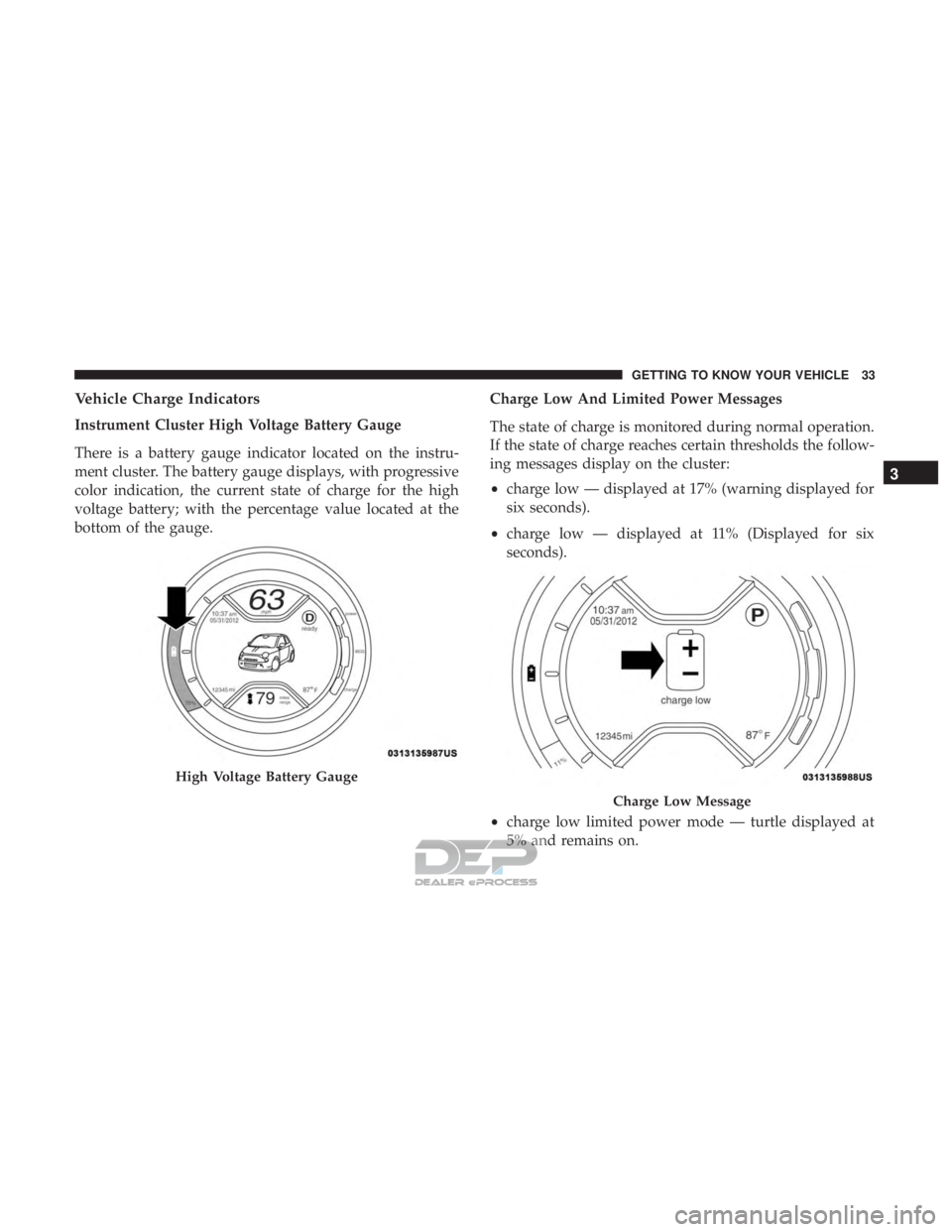
Instrument Cluster High Voltage Battery Gauge
There is a battery gauge indicator located on the instru-
ment cluster. The battery gauge displays, with progressive
color indication, the current state of charge for the high
voltage battery; with the percentage value located at the
bottom of the gauge.Charge Low And Limited Power Messages
The state of charge is monitored during normal operation.
If the state of charge reaches certain thresholds the follow-
ing messages display on the cluster:
•
charge low — displayed at 17% (warning displayed for
six seconds).
• charge low — displayed at 11% (Displayed for six
seconds).
• charge low limited power mode — turtle displayed at
5% and remains on.
High Voltage Battery Gauge
Charge Low Message
3
GETTING TO KNOW YOUR VEHICLE 33
Page 41 of 302
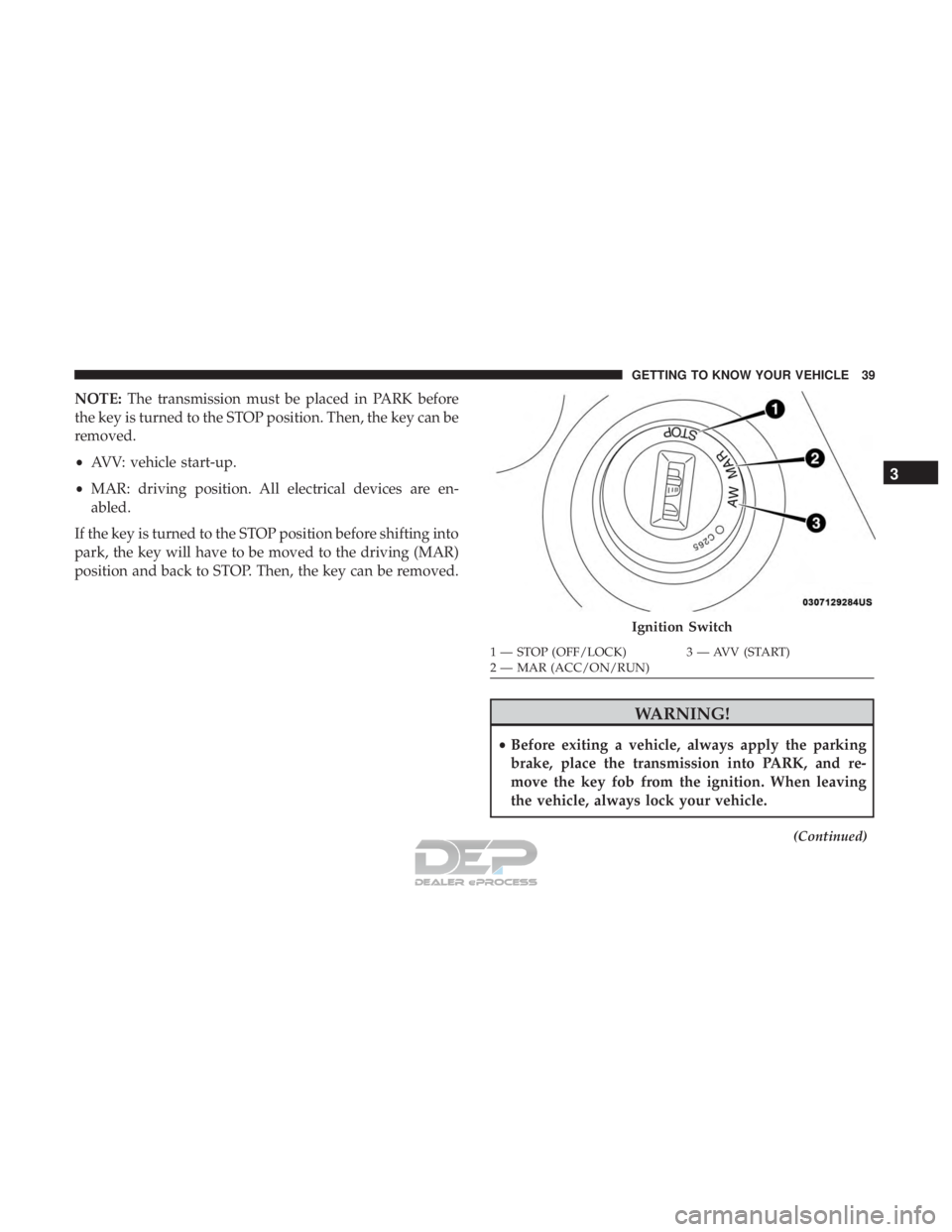
NOTE:The transmission must be placed in PARK before
the key is turned to the STOP position. Then, the key can be
removed.
• AVV: vehicle start-up.
• MAR: driving position. All electrical devices are en-
abled.
If the key is turned to the STOP position before shifting into
park, the key will have to be moved to the driving (MAR)
position and back to STOP. Then, the key can be removed.
WARNING!
• Before exiting a vehicle, always apply the parking
brake, place the transmission into PARK, and re-
move the key fob from the ignition. When leaving
the vehicle, always lock your vehicle.
(Continued)
Ignition Switch
1 — STOP (OFF/LOCK) 3 — AVV (START)
2 — MAR (ACC/ON/RUN)
3
GETTING TO KNOW YOUR VEHICLE 39
Page 42 of 302
WARNING!(Continued)
•Never leave children alone in a vehicle, or with
access to an unlocked vehicle.
• Allowing children to be in a vehicle unattended is
dangerous for a number of reasons. A child or others
could be seriously or fatally injured. Children
should be warned not to touch the parking brake,
brake pedal or the transmission gear selector but-
tons.
• Do not leave the key fob in or near the vehicle, or in
a location accessible to children. A child could oper-
ate power windows, other controls, or move the
vehicle.
• Do not leave children or animals inside parked
vehicles in hot weather. Interior heat build-up may
cause serious injury or death.
CAUTION!
An unlocked vehicle is an invitation. Always remove
the key from the ignition and lock all doors when
leaving the vehicle unattended.
Key-In-Ignition Reminder
Opening the driver’s door when the key is in the ignition
and the ignition switch position is in the OFF/LOCK
position, a signal sounds to remove the key.
SENTRY KEY
The Sentry Key Immobilizer System prevents unauthor-
ized vehicle operation by disabling the vehicle. The system
does not need to be armed or activated. Operation is
automatic, regardless of whether the vehicle is locked or
unlocked.
The system uses ignition keys which have an embedded
electronic chip (transponder) to prevent unauthorized ve-
hicle operation. Therefore, only keys that are programmed
to the vehicle can be used to start and operate the vehicle.
NOTE: A key which has not been programmed is also
considered an invalid key, even if it is cut to fit the ignition
switch lock cylinder for that vehicle.
If the vehicle security light is on after the key is turned to
the MAR (ACC/ON/RUN) position, it indicates that there
is a problem with the electronics.
40 GETTING TO KNOW YOUR VEHICLE
Page 46 of 302
DOORS
Manual Lock
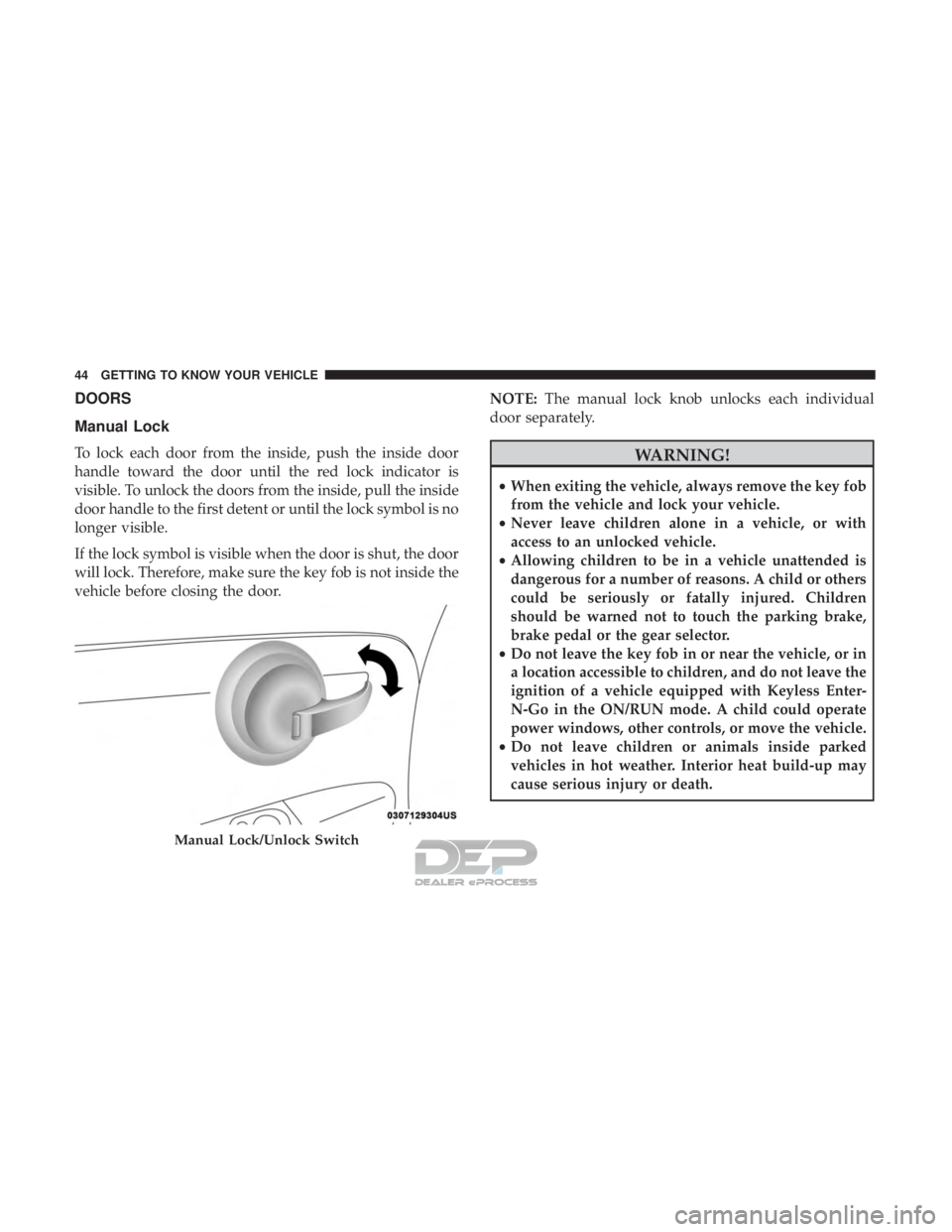
To lock each door from the inside, push the inside door
handle toward the door until the red lock indicator is
visible. To unlock the doors from the inside, pull the inside
door handle to the first detent or until the lock symbol is no
longer visible.
If the lock symbol is visible when the door is shut, the door
will lock. Therefore, make sure the key fob is not inside the
vehicle before closing the door.NOTE:
The manual lock knob unlocks each individual
door separately.WARNING!
• When exiting the vehicle, always remove the key fob
from the vehicle and lock your vehicle.
• Never leave children alone in a vehicle, or with
access to an unlocked vehicle.
• Allowing children to be in a vehicle unattended is
dangerous for a number of reasons. A child or others
could be seriously or fatally injured. Children
should be warned not to touch the parking brake,
brake pedal or the gear selector.
• Do not leave the key fob in or near the vehicle, or in
a location accessible to children, and do not leave the
ignition of a vehicle equipped with Keyless Enter-
N-Go in the ON/RUN mode. A child could operate
power windows, other controls, or move the vehicle.
• Do not leave children or animals inside parked
vehicles in hot weather. Interior heat build-up may
cause serious injury or death.
Manual Lock/Unlock Switch
44 GETTING TO KNOW YOUR VEHICLE
Page 48 of 302
SEATS
Seats are a part of the Occupant Restraint System of the
vehicle.
WARNING!
•It is dangerous to ride in a cargo area, inside or
outside of a vehicle. In a collision, people riding in
these areas are more likely to be seriously injured or
killed.
• Do not allow people to ride in any area of your
vehicle that is not equipped with seats and seat belts.
In a collision, people riding in these areas are more
likely to be seriously injured or killed.
• Be sure everyone in your vehicle is in a seat and
using a seat belt properly.
Manual Adjustment Front Seats
Forward/Rearward Adjustment
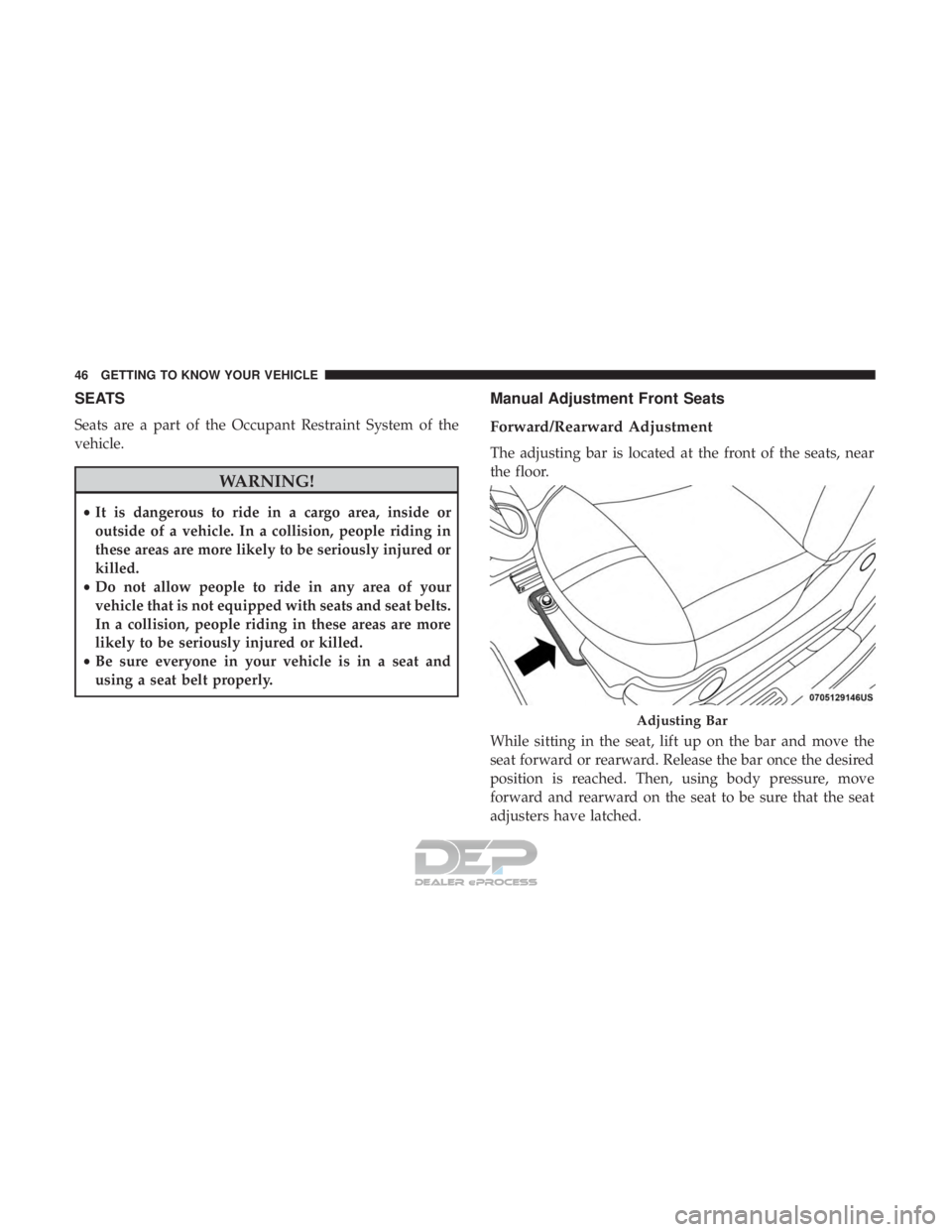
The adjusting bar is located at the front of the seats, near
the floor.
While sitting in the seat, lift up on the bar and move the
seat forward or rearward. Release the bar once the desired
position is reached. Then, using body pressure, move
forward and rearward on the seat to be sure that the seat
adjusters have latched.
Adjusting Bar
46 GETTING TO KNOW YOUR VEHICLE
Page 49 of 302
WARNING!
•Adjusting a seat while driving may be dangerous.
Moving a seat while driving could result in loss of
control which could cause a collision and serious
injury or death.
• Seats should be adjusted before fastening the seat
belts and while the vehicle is parked. Serious injury
or death could result from a poorly adjusted seat belt.
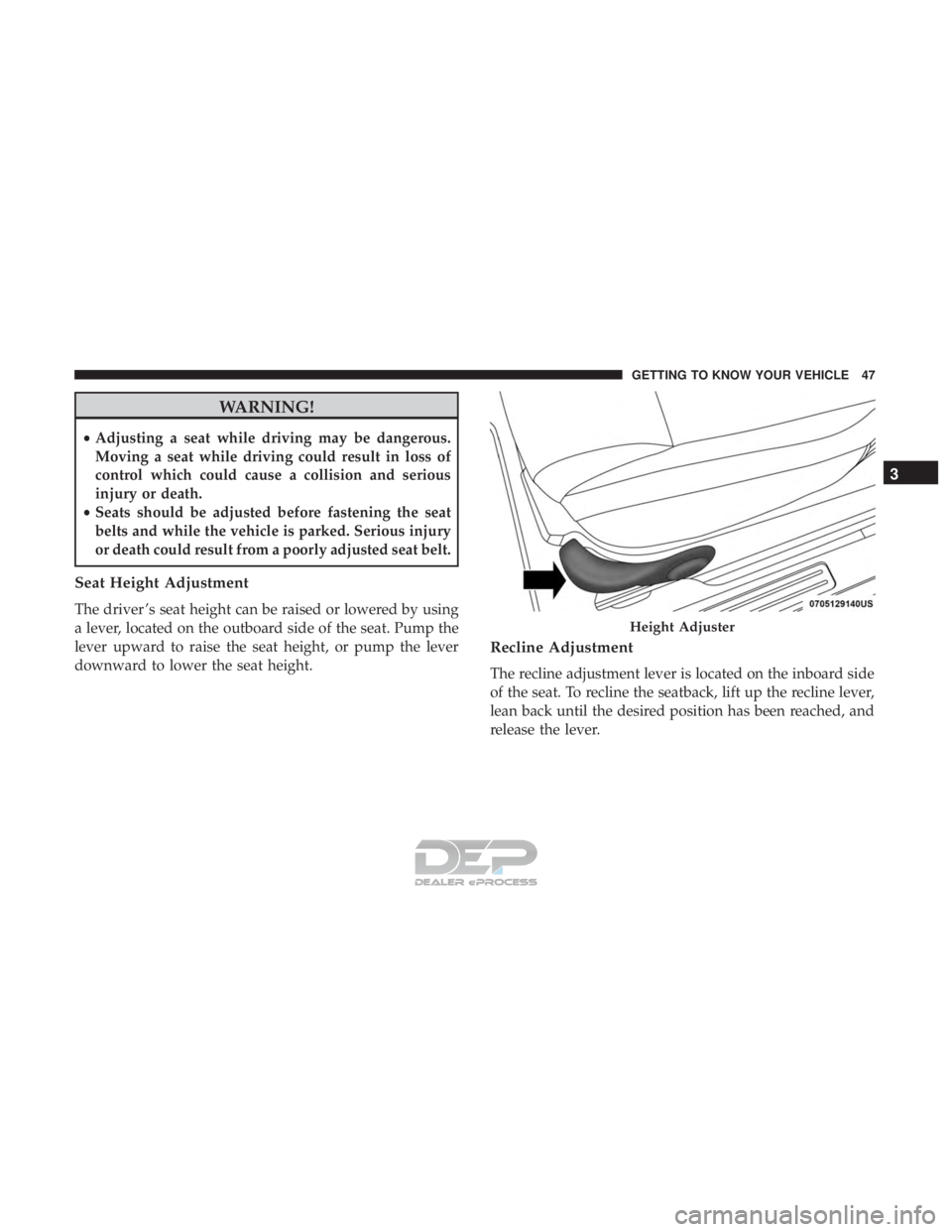
Seat Height Adjustment
The driver ’s seat height can be raised or lowered by using
a lever, located on the outboard side of the seat. Pump the
lever upward to raise the seat height, or pump the lever
downward to lower the seat height.
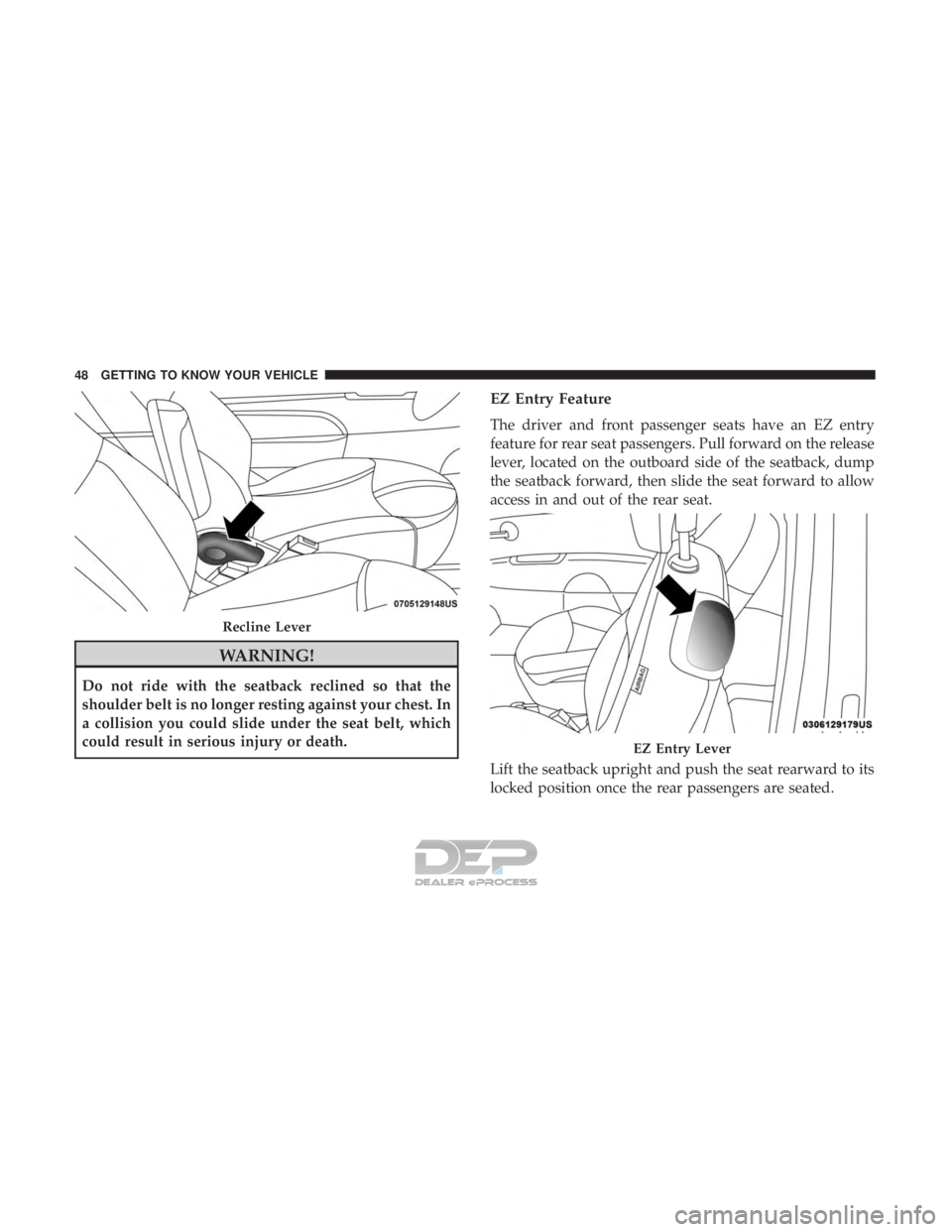
Recline Adjustment
The recline adjustment lever is located on the inboard side
of the seat. To recline the seatback, lift up the recline lever,
lean back until the desired position has been reached, and
release the lever.
Height Adjuster
3
GETTING TO KNOW YOUR VEHICLE 47
Page 50 of 302
WARNING!
Do not ride with the seatback reclined so that the
shoulder belt is no longer resting against your chest. In
a collision you could slide under the seat belt, which
could result in serious injury or death.
EZ Entry Feature
The driver and front passenger seats have an EZ entry
feature for rear seat passengers. Pull forward on the release
lever, located on the outboard side of the seatback, dump
the seatback forward, then slide the seat forward to allow
access in and out of the rear seat.
Lift the seatback upright and push the seat rearward to its
locked position once the rear passengers are seated.
Recline Lever
EZ Entry Lever
48 GETTING TO KNOW YOUR VEHICLE