reset FIAT 500E 2018 Owners Manual
[x] Cancel search | Manufacturer: FIAT, Model Year: 2018, Model line: 500E, Model: FIAT 500E 2018Pages: 302, PDF Size: 3.32 MB
Page 25 of 302
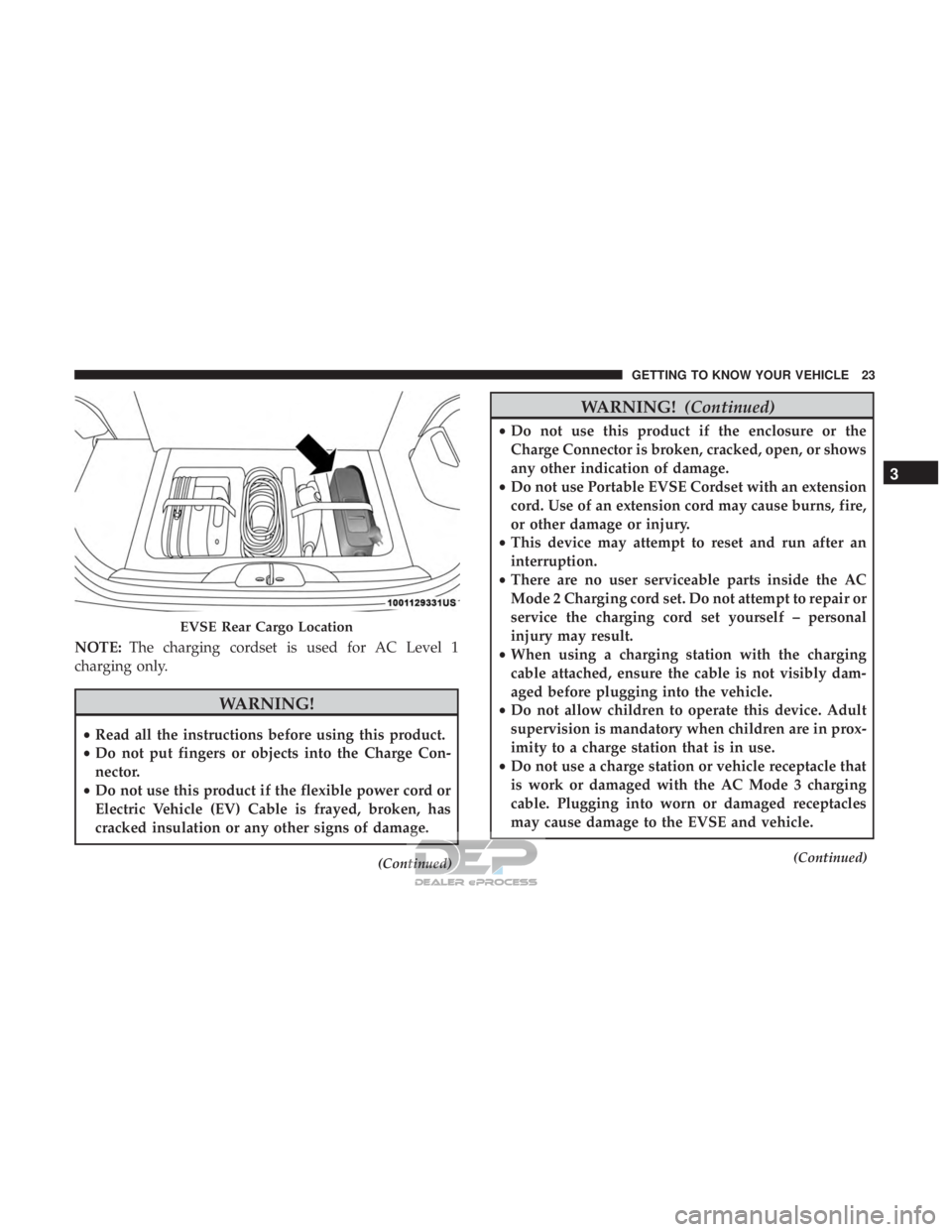
NOTE:The charging cordset is used for AC Level 1
charging only.
WARNING!
• Read all the instructions before using this product.
• Do not put fingers or objects into the Charge Con-
nector.
• Do not use this product if the flexible power cord or
Electric Vehicle (EV) Cable is frayed, broken, has
cracked insulation or any other signs of damage.
(Continued)
WARNING! (Continued)
•Do not use this product if the enclosure or the
Charge Connector is broken, cracked, open, or shows
any other indication of damage.
• Do not use Portable EVSE Cordset with an extension
cord. Use of an extension cord may cause burns, fire,
or other damage or injury.
• This device may attempt to reset and run after an
interruption.
• There are no user serviceable parts inside the AC
Mode 2 Charging cord set. Do not attempt to repair or
service the charging cord set yourself – personal
injury may result.
• When using a charging station with the charging
cable attached, ensure the cable is not visibly dam-
aged before plugging into the vehicle.
• Do not allow children to operate this device. Adult
supervision is mandatory when children are in prox-
imity to a charge station that is in use.
• Do not use a charge station or vehicle receptacle that
is work or damaged with the AC Mode 3 charging
cable. Plugging into worn or damaged receptacles
may cause damage to the EVSE and vehicle.
(Continued)
EVSE Rear Cargo Location
3
GETTING TO KNOW YOUR VEHICLE 23
Page 51 of 302
Memory Seat Feature
Both front seats have a memory feature, which can operate
in two ways:
•Memory Function Option 1 (Full Seat Back And Track
Fore/Aft Position Memory) — After using the EZ entry
function, the seatback angle and the track fore/aft
adjuster can both re-lock into the position they were
most recently adjusted to. This is accomplished if the
seat is moved fully rearward to its last fore/aft position
on the tracks before the seat back is returned upright.
•
Memory Function Option 2 (Seat Back Only Memory) —
After using the EZ entry function, the seat back may first
be returned upright prior to going back to the last fore/aft
(memory) position on the tracks. This results in the seat
back memory being set only – The track will then be
locked forward of its last set fore/aft memory position. To
then reset the fore/aft track memory feature (to reestab-
lish Memory Function Option 1), the seat has to be
returned fully rearward to its last fore/aft memory track
position as described in Memory Function Option 1.
Heated Seats — If Equipped
On some models, the front driver and passenger seats may
be equipped with heaters in both the seat cushions and seatbacks. The controls for the front heated seats are
located on the center instrument panel area.
Push the switch once to turn on the heated seats.
Push the switch a second time to shut the heating
elements off.
NOTE: Once a heat setting is selected, heat will be felt
within two to five minutes.
WARNING!
• Persons who are unable to feel pain to the skin
because of advanced age, chronic illness, diabetes,
spinal cord injury, medication, alcohol use, exhaus-
tion or other physical condition must exercise care
when using the seat heater. It may cause burns even
at low temperatures, especially if used for long
periods of time.
• Do not place anything on the seat or seatback that
insulates against heat, such as a blanket or cushion.
This may cause the seat heater to overheat. Sitting in
a seat that has been overheated could cause serious
burns due to the increased surface temperature of the
seat.
3
GETTING TO KNOW YOUR VEHICLE 49
Page 59 of 302
NOTE:When the headlights are turned on, the Daytime
Running Lights will be deactivated.
Daytime Running Lights
To activate the Daytime Running Lights (DRL), rotate the
end of the multifunction lever to the Osymbol.
NOTE: The low beams and side/taillights will not be on
with DRL.
If allowed by law in the country in which the vehicle was
purchased the DRL function can be turned on or off using
the display menus. Refer to “Uconnect Settings” in “Mul-
timedia” for further information.
High Beams
With the low beams activated, push the multifunc-
tion lever towards the instrument panel to turn on
the high beams. Pull the multifunction lever toward the
steering wheel to turn off the high beams.
Flash-To-Pass
You can signal another vehicle with your headlights by
partially pulling the multifunction lever toward the steer-
ing wheel. This will cause the high beam headlights to turn
on until the lever is released.
Parking Lights
To turn on the parking lights, remove the key or
turn the ignition to OFF/LOCK position and
turn on the headlights.
Follow Me Home/Headlight Delay
When this feature is selected, the driver can choose to have
the headlights remain on for a preset period of time.
Activation
Remove the key or turn the ignition to the STOP (OFF/
LOCK) position, and pull the multifunction lever toward
the steering wheel within two minutes. Each time the lever
is pulled, the activation of the lights will be extended by 30
seconds. The activation of the lights can be extended to a
maximum of 210 seconds.
Deactivation
Pull the multifunction lever toward the steering wheel and
hold it for more than two seconds.
Fog Lights — If Equipped
The fog light switch is located on the center stack of the
instrument panel, just below the radio.
3
GETTING TO KNOW YOUR VEHICLE 57
Page 91 of 302
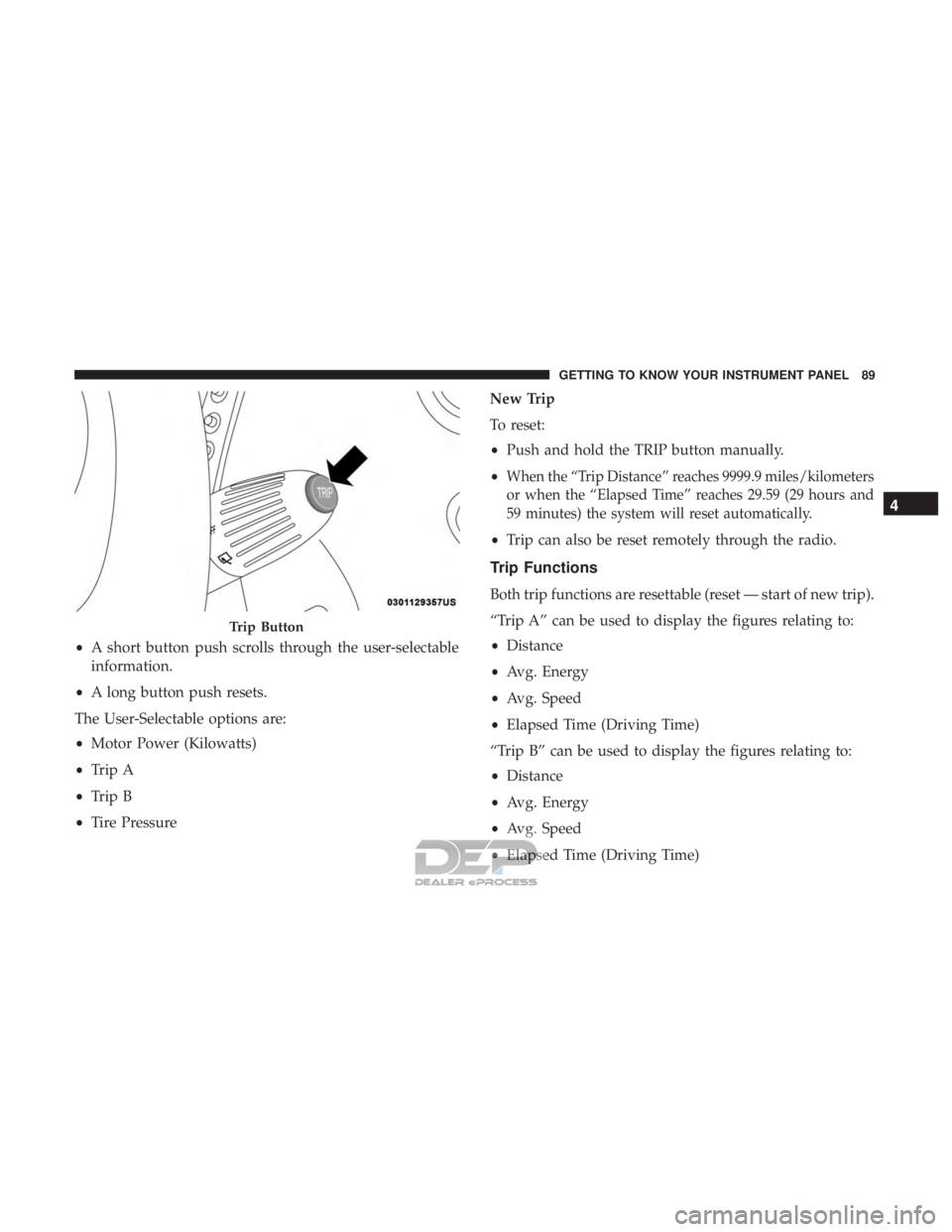
•A short button push scrolls through the user-selectable
information.
• A long button push resets.
The User-Selectable options are:
• Motor Power (Kilowatts)
• Trip A
• Trip B
• Tire Pressure New Trip
To reset:
•
Push and hold the TRIP button manually.
•
When the “Trip Distance” reaches 9999.9 miles/kilometers
or when the “Elapsed Time” reaches 29.59 (29 hours and
59 minutes) the system will reset automatically.
• Trip can also be reset remotely through the radio.
Trip Functions
Both trip functions are resettable (reset — start of new trip).
“Trip A” can be used to display the figures relating to:
•Distance
• Avg. Energy
• Avg. Speed
• Elapsed Time (Driving Time)
“Trip B” can be used to display the figures relating to:
• Distance
• Avg. Energy
• Avg. Speed
• Elapsed Time (Driving Time)
Trip Button
4
GETTING TO KNOW YOUR INSTRUMENT PANEL 89
Page 92 of 302
Values Displayed
Range
This indicates the distance which may be travelled with the
remaining battery charge, assuming that driving condi-
tions will not change. The message “----” will appear when
the system is initializing.
NOTE:The range depends on several factors: driving style,
type of route (freeway, residential, mountain roads, etc.),
conditions of use of the car (load, tire pressure, etc.). Trip
planning must take into account the above notes.
Distance Traveled
This value shows the distance covered since the last reset.
Average Speed
This value shows the vehicle’s average speed as a function
of the overall time elapsed since the last reset.
Average Energy
This value shows the vehicle’s average energy consump-
tion as a function of the overall time elapsed since the last
reset.
Elapsed Time
This value shows the time elapsed since the last reset.
WARNING LIGHTS AND MESSAGES
The warning/indicator lights will illuminate in the instru-
ment panel together with a dedicated message and/or
acoustic signal when applicable. These indications are
indicative and precautionary and as such must not be
considered as exhaustive and/or alternative to the infor-
mation contained in the Owner ’s Manual, which you are
advised to read carefully in all cases. Always refer to the
information in this chapter in the event of a failure indica-
tion. All active telltales will display first if applicable. The
system check menu may appear different based upon
equipment options and current vehicle status. Some tell-
tales are optional and may not appear.
Red Warning Lights
— Air Bag Warning Light
This warning light will illuminate to indicate a fault with
the air bag, and will turn on for four to eight seconds as a
bulb check when the ignition is placed in the ON/RUN or
ACC/ON/RUN position. This light will illuminate with a
single chime when a fault with the air bag has been
detected, it will stay on until the fault is cleared. If the light
is either not on during startup, stays on, or turns on while
driving, have the system inspected at an authorized dealer
as soon as possible.
90 GETTING TO KNOW YOUR INSTRUMENT PANEL
Page 102 of 302
SAFETY FEATURES
Four-Wheel Anti-Lock Brake System (ABS)
The Four-Wheel ABS is designed to aid the driver in
maintaining vehicle control under adverse braking condi-
tions. The system operates with a separate computer to
modulate hydraulic pressure, to prevent wheel lock-up
and to help avoid skidding on slippery surfaces.
The system’s pump motor runs during an ABS stop to
provide regulated hydraulic pressure. The pump motor
makes a low humming noise during operation, which is
normal.
The ABS includes an amber ABS Warning Light. When the
light is illuminated, the ABS is not functioning. The system
reverts to standard non-anti-lock brakes. Turning the igni-
tion OFF and ON again may reset the ABS if the fault
detected was only momentary.
WARNING!
•The ABS contains sophisticated electronic equip-
ment that may be susceptible to interference caused
(Continued)
WARNING! (Continued)
by improperly installed or high output radio trans-
mitting equipment. This interference can cause pos-
sible loss of anti-lock braking capability. Installation
of such equipment should be performed by qualified
professionals.
• Pumping of the Anti-Lock Brakes will diminish their
effectiveness and may lead to a collision. Pumping
makes the stopping distance longer. Just press firmly
on your brake pedal when you need to slow down or
stop.
• The ABS cannot prevent the natural laws of physics
from acting on the vehicle, nor can it increase brak-
ing or steering efficiency beyond that afforded by the
condition of the vehicle brakes and tires or the
traction afforded.
• The ABS cannot prevent collisions, including those
resulting from excessive speed in turns, following
another vehicle too closely, or hydroplaning.
• The capabilities of an ABS equipped vehicle must
never be exploited in a reckless or dangerous manner
that could jeopardize the user ’s safety or the safety of
others.
100 SAFETY
Page 133 of 302
•Electric power steering
• Brake booster
• Electric park brake
• Automatic transmission gear selector
• Horn
• Front wiper
• Headlamp washer pump
NOTE: After an accident, remember to cycle the ignition
to the STOP (OFF/LOCK) position and remove the key
from the ignition switch to avoid draining the battery.
Carefully check the vehicle for fuel leaks in the engine
compartment and on the ground near the engine compart-
ment and fuel tank before resetting the system and starting
the engine. If there are no fuel leaks or damage to the
vehicle electrical devices (e.g. headlights) after an accident,
reset the system by following the procedure described
below. If you have any doubt, contact an authorized dealer.
Enhanced Accident Response System Reset
Procedure
After an event occurs requiring activation of the Enhanced
Accident Response System, when the system is active, a
“Service Electrical System” message will be displayed on
the instrument cluster. The vehicle is not drivable in this state and must be towed to an authorized dealer immedi-
ately to be inspected and have the Enhanced Accident
Response System reset.
Maintaining Your Air Bag System
WARNING!
•
Modifications to any part of the air bag system could
cause it to fail when you need it. You could be
injured if the air bag system is not there to protect
you. Do not modify the components or wiring, in-
cluding adding any kind of badges or stickers to the
steering wheel hub trim cover or the upper passenger
side of the instrument panel. Do not modify the front
bumper, vehicle body structure, or add aftermarket
side steps or running boards.
• It is dangerous to try to repair any part of the air bag
system yourself. Be sure to tell anyone who works on
your vehicle that it has an air bag system.
• Do not attempt to modify any part of your air bag
system. The air bag may inflate accidentally or may
not function properly if modifications are made.
Take your vehicle to an authorized dealer for any air
bag system service. If your seat, including your trim
(Continued)
5
SAFETY 131
Page 165 of 302
cluster screen, the vehicle needs to be taken to an autho-
rized dealer for service. Refer to “Instrument Cluster
Display” in “Getting To Know Your Instrument Panel” for
further information.
NOTE:
•Even if the power steering assistance is no longer
operational, it is still possible to steer the vehicle. Under
these conditions there will be a substantial increase in
steering effort, especially at low speeds and during
parking maneuvers.
• If the condition persists, see an authorized dealer for
service.
SPEED CONTROL
When engaged, the Speed Control takes over accelerator
operations at speeds greater than 25 mph (40 km/h).
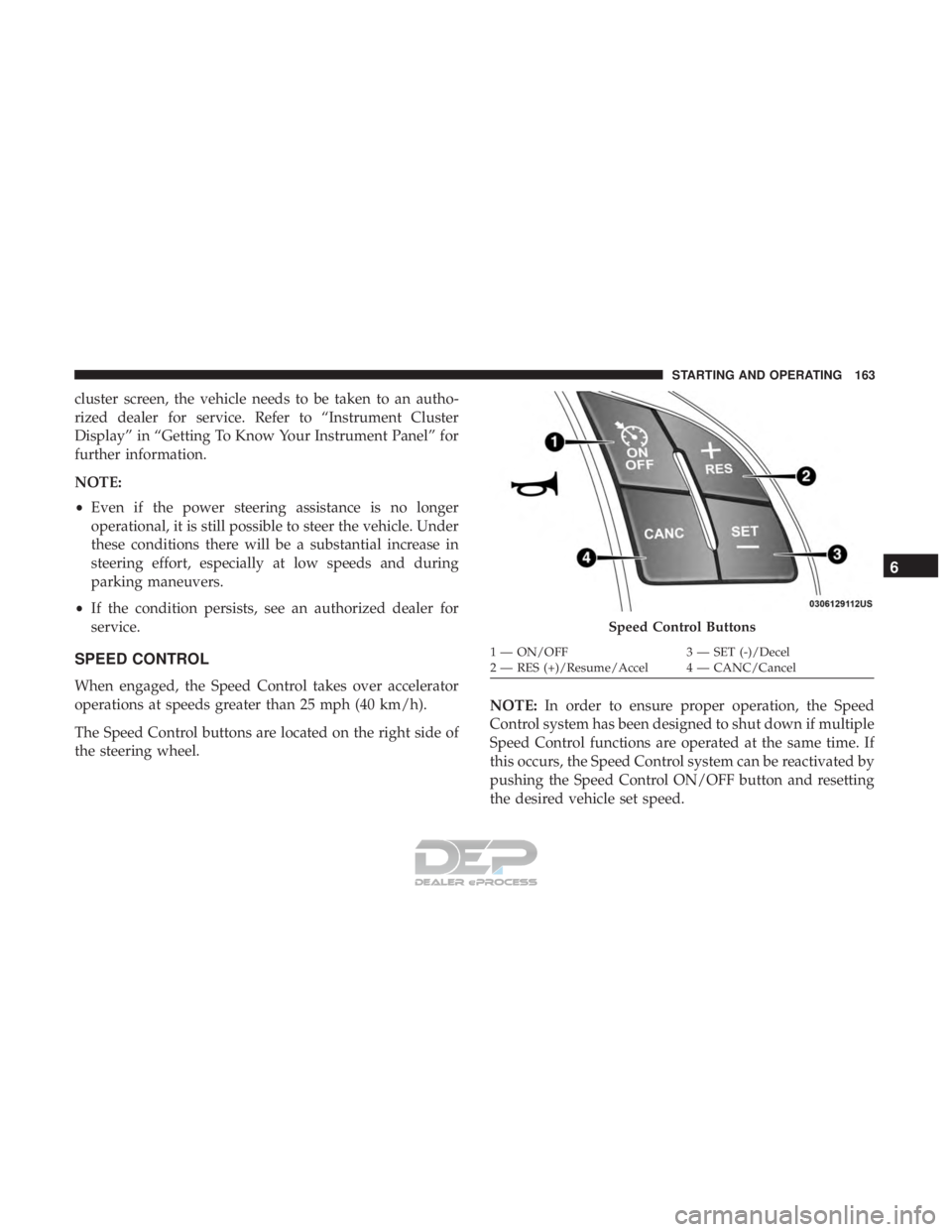
The Speed Control buttons are located on the right side of
the steering wheel. NOTE:
In order to ensure proper operation, the Speed
Control system has been designed to shut down if multiple
Speed Control functions are operated at the same time. If
this occurs, the Speed Control system can be reactivated by
pushing the Speed Control ON/OFF button and resetting
the desired vehicle set speed.
Speed Control Buttons
1 — ON/OFF 3 — SET (-)/Decel
2 — RES (+)/Resume/Accel 4 — CANC/Cancel
6
STARTING AND OPERATING 163
Page 211 of 302
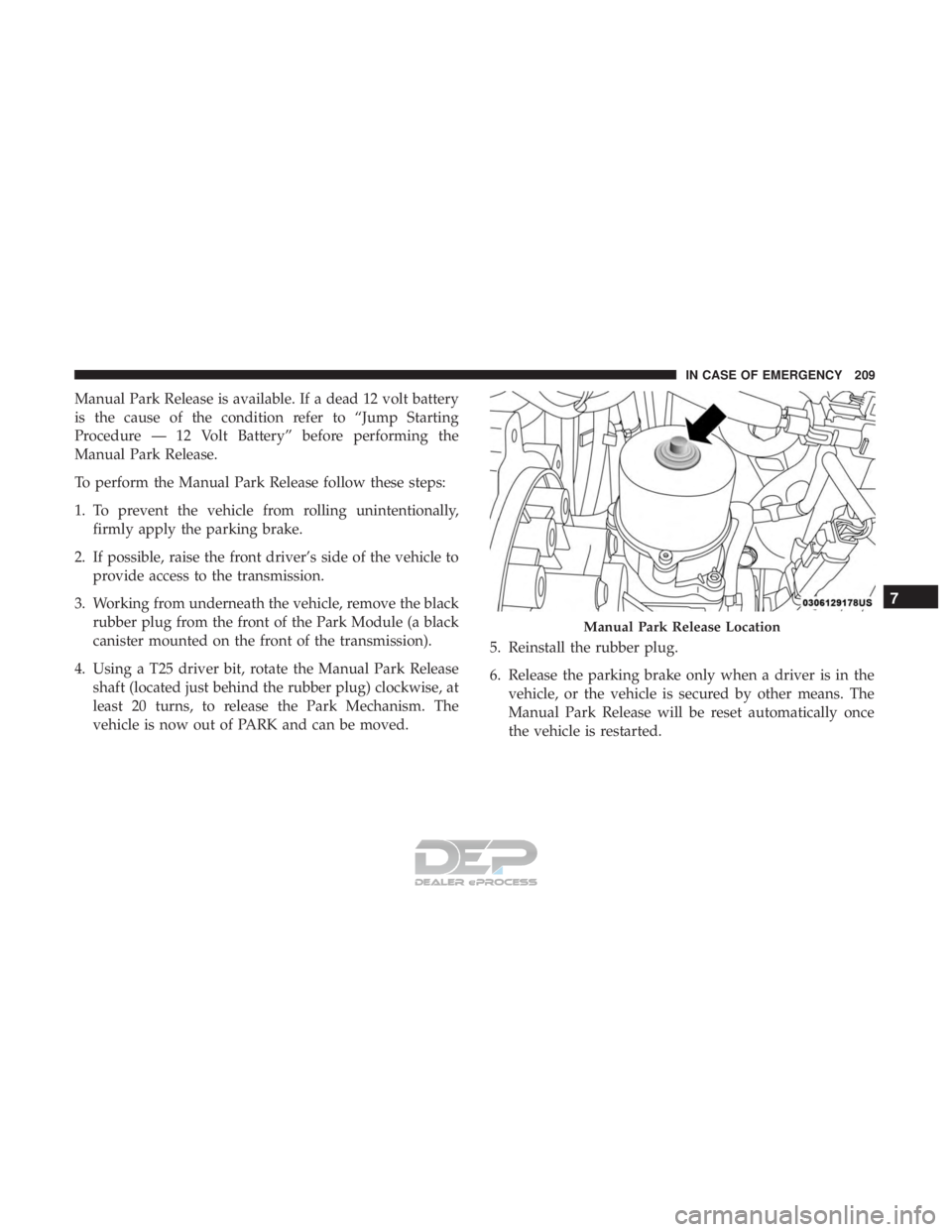
Manual Park Release is available. If a dead 12 volt battery
is the cause of the condition refer to “Jump Starting
Procedure — 12 Volt Battery” before performing the
Manual Park Release.
To perform the Manual Park Release follow these steps:
1. To prevent the vehicle from rolling unintentionally,firmly apply the parking brake.
2. If possible, raise the front driver’s side of the vehicle to provide access to the transmission.
3. Working from underneath the vehicle, remove the black rubber plug from the front of the Park Module (a black
canister mounted on the front of the transmission).
4. Using a T25 driver bit, rotate the Manual Park Release shaft (located just behind the rubber plug) clockwise, at
least 20 turns, to release the Park Mechanism. The
vehicle is now out of PARK and can be moved. 5. Reinstall the rubber plug.
6. Release the parking brake only when a driver is in the
vehicle, or the vehicle is secured by other means. The
Manual Park Release will be reset automatically once
the vehicle is restarted.
Manual Park Release Location
7
IN CASE OF EMERGENCY 209
Page 274 of 302
SiriusXM Setup — If Equipped
After pressing the “SiriusXM Setup” button on the touch-
screen, the following settings will be available:
Setting NameSelectable Options
Tune Start OnOff
NOTE: “Tune Start” begins playing the current song from the beginning when you tune to a music channel using one
of the twelve presets, so you can enjoy the complete song. This feature occurs the first time the preset is selected dur-
ing that current song. Tune Start works in the background, so you will not even realize it’s on, except that you will
miss the experience of joining your favorite song with only a few seconds left to play.
Channel Skip Channel Skip
NOTE: SiriusXM can be programmed to designate a group of channels that are the most desirable to listen to or to
exclude undesirable channels while scanning.
Subscription Information Subscription Info
NOTE:
•New vehicle purchasers or lessees will receive a free limited time subscription to SiriusXM Satellite Radio with
your radio. Following the expiration of the free services, it will be necessary to access the information on the Sub-
scription Information screen to re-subscribe.
•Write down the SIRIUS ID numbers for your receiver. To reactivate your service, either call the number listed on
the screen or visit the provider online.
272 MULTIMEDIA