transmission FIAT 500E 2019 User Guide
[x] Cancel search | Manufacturer: FIAT, Model Year: 2019, Model line: 500E, Model: FIAT 500E 2019Pages: 300, PDF Size: 3.03 MB
Page 162 of 300
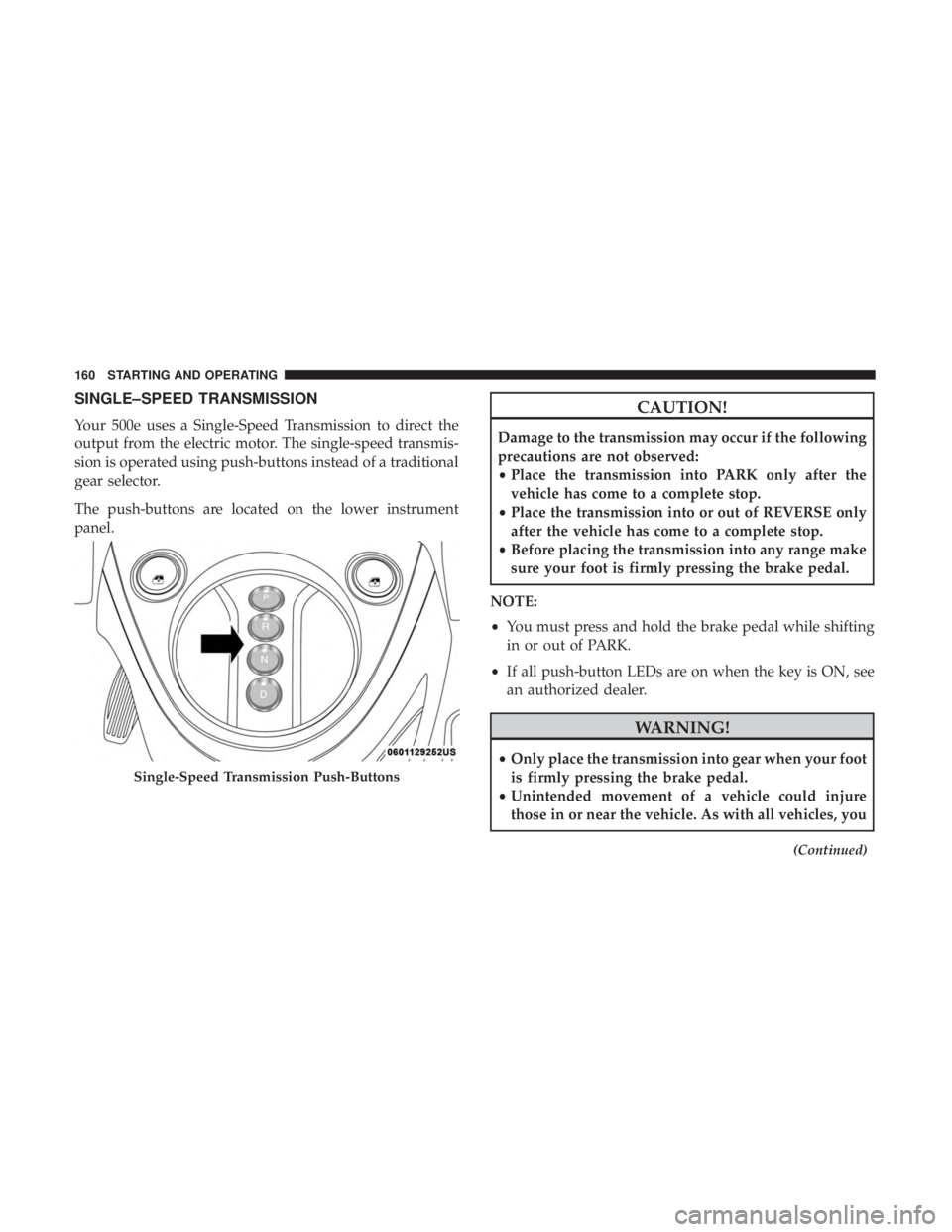
SINGLE–SPEED TRANSMISSION
Your 500e uses a Single-Speed Transmission to direct the
output from the electric motor. The single-speed transmis-
sion is operated using push-buttons instead of a traditional
gear selector.
The push-buttons are located on the lower instrument
panel.
CAUTION!
Damage to the transmission may occur if the following
precautions are not observed:
•Place the transmission into PARK only after the
vehicle has come to a complete stop.
• Place the transmission into or out of REVERSE only
after the vehicle has come to a complete stop.
• Before placing the transmission into any range make
sure your foot is firmly pressing the brake pedal.
NOTE:
• You must press and hold the brake pedal while shifting
in or out of PARK.
• If all push-button LEDs are on when the key is ON, see
an authorized dealer.
WARNING!
• Only place the transmission into gear when your foot
is firmly pressing the brake pedal.
• Unintended movement of a vehicle could injure
those in or near the vehicle. As with all vehicles, you
(Continued)
Single-Speed Transmission Push-Buttons
160 STARTING AND OPERATING
Page 163 of 300
WARNING!(Continued)
should never exit a vehicle while the vehicle is in
“READY” mode. Before exiting a vehicle, always
apply the parking brake, shift the transmission into
PARK, and remove the ignition key. Once the key is
removed, the transmission is locked in PARK, secur-
ing the vehicle against unwanted movement.
• When leaving the vehicle, always remove the igni-
tion key and lock your vehicle.
• Never leave children alone in a vehicle, or with
access to an unlocked vehicle. Allowing children to
be in a vehicle unattended is dangerous for a number
of reasons. A child or others could be seriously or
fatally injured. Children should be warned not to
touch the parking brake, brake pedal or the trans-
mission range buttons.
• Do not leave the ignition key in or near the vehicle
(or in a location accessible to children). A child could
operate power windows, other controls, or move the
vehicle.
Key Ignition Park Interlock
This vehicle is equipped with a Key Ignition Park Interlock
which requires the transmission to be in PARK before the ignition can be turned to the OFF position. The key can
only be removed from the ignition when the ignition is in
the OFF position, and once removed, the transmission is
locked in PARK.
Gear Ranges
Push the desired push button to shift into gear.
NOTE:
•
The brake pedal must be depressed to select a transmis-
sion gear.
• After selecting any gear, wait a moment to allow the
selected gear to engage before accelerating.
PARK (P)
The PARK selection supplements the parking brake by
locking the transmission. The vehicle can be started in this
range. Never attempt to use PARK while the vehicle is in
motion. Apply the parking brake when exiting the vehicle
in PARK.
When parking on a level surface, you may place the
transmission into PARK first, and then apply the parking
brake.
6
STARTING AND OPERATING 161
Page 164 of 300
When parking on a hill, apply the parking brake before
placing the transmission into PARK. As an added precau-
tion, turn the front wheels toward the curb on a downhill
grade and away from the curb on an uphill grade.
When exiting the vehicle, always:
•Apply the parking brake.
• Shift the transmission into PARK.
• Turn the vehicle OFF.
• Remove the ignition key.
NOTE: Refer to the transmission range position displayed
in the instrument cluster and verify that it indicates the
PARK position.
WARNING!
• Never use the PARK position as a substitute for the
park brake. Always apply the park brake fully when
exiting the vehicle to guard against vehicle move-
ment and possible injury or damage.
• Your vehicle could move and injure you and others if
it is not in PARK. Check by trying to move the gear
selector out of PARK with the brake pedal released.
(Continued)
WARNING! (Continued)
Make sure the transmission is in PARK before exit-
ing the vehicle.
• It is dangerous to shift out of PARK or NEUTRAL if
your foot is not firmly pressing the brake pedal. The
vehicle could accelerate quickly forward or in re-
verse. You could lose control of the vehicle and hit
someone or something. Only shift the transmission
into gear when your foot is firmly pressing the brake
pedal.
• Unintended movement of a vehicle could injure
those in or near the vehicle. As with all vehicles, you
should never exit a vehicle while the engine is
running or the propulsion system is active. Before
exiting a vehicle, always come to a complete stop,
then apply the park brake, shift the transmission into
PARK, turn the ignition OFF, and remove the key
fob. When the ignition is in the OFF mode, the
transmission is locked in PARK, securing the vehicle
against unwanted movement.
• When leaving the vehicle, always remove the igni-
tion key and lock your vehicle.
(Continued)
162 STARTING AND OPERATING
Page 165 of 300
WARNING!(Continued)
•Never leave children alone in a vehicle, or with
access to an unlocked vehicle. Allowing children to
be in a vehicle unattended is dangerous for a number
of reasons. A child or others could be seriously or
fatally injured. Children should be warned not to
touch the parking brake, brake pedal or the trans-
mission range buttons.
• Do not leave the ignition key in or near the vehicle
(or in a location accessible to children). A child could
operate power windows, other controls, or move the
vehicle.
REVERSE (R)
This range is for moving the vehicle backward. Shift into
REVERSE only after the vehicle has come to a complete
stop.
NEUTRAL (N)
The vehicle may be started in this gear. Apply the parking
brake and place the transmission into PARK if you must
exit the vehicle.
WARNING!
Do not coast in NEUTRAL and never turn off the
ignition to coast down a hill. These are unsafe practices
that limit your response to changing traffic or road
conditions. You might lose control of the vehicle and
have a collision.
CAUTION!
Towing the vehicle, coasting, or driving for any other
reason with the transmission in NEUTRAL can cause
severe transmission damage. Refer to “Recreational
Towing” in “Starting And Operating” and “Towing A
Disabled Vehicle” in “In Case Of Emergency” for
further information.
DRIVE (D)
Use this gear for all city and highway driving.
Auto Park
The Auto Park feature automatically places the transmis-
sion into PARK if there is any indication that the driver
may exit the vehicle while the transmission is in D
(DRIVE), N (NEUTRAL) or R (REVERSE).
6
STARTING AND OPERATING 163
Page 166 of 300
Auto Park is enabled under the following condition:
•Key On (12 Volt ON and High Voltage OFF) or READY
mode (12 Volt ON and High Voltage ON).
NOTE:
• Auto Park is enabled (only once) at the beginning of
each key cycle and is re-enabled each time the vehicle
speed exceeds 8 mph (13 km/h).
The instrument cluster will display an Auto Shift To Park
message and chime once when Auto Park is activated.
Mode Of Operation With Key ON:
Auto Park will be engaged when the transmission is in
DRIVE, NEUTRAL or REVERSE and the following condi-
tions are detected:
• Seat Belt is unlatched
• Brake pedal is released
• Driver’s door is ajar
• Vehicle speed is less than 2 mph (3 km/h)
Mode Of Operation With Key OFF:
Auto Park will be engaged when the transmission is in
DRIVE, NEUTRAL or REVERSE and the vehicle speed is
less than 2 mph (3 km/h).POWER STEERING
The electric power steering system will give you good
vehicle response and increased ease of maneuverability in
tight spaces. The system will vary its assist to provide light
efforts while parking and good feel while driving. If the
electric steering system experiences a fault that prevents it
from providing assist, you will still have the ability to steer
the vehicle manually.
WARNING!
Continued operation with reduced or no power steer-
ing assist could pose a safety risk to yourself and
others. Service should be obtained as soon as possible.
If the Steering icon is flashing, it indicates that the vehicle
needs to be taken to an authorized dealer for service. It is
likely the vehicle has lost power steering assistance.
If the Steering icon is displayed and the “SERVICE POWER
STEERING” message is displayed on the instrument clus-
ter screen, they indicate that extreme steering maneuvers
may have occurred which caused an over temperature
condition in the power steering system. Once driving
conditions are safe, pull over and let the vehicle idle for a
164 STARTING AND OPERATING
Page 170 of 300
To Resume Speed
To resume a previously set speed, push the RES (+) button
and release. Resume can be used at any speed above
20 mph (32 km/h).
To Deactivate
A soft tap on the brake pedal, pushing the CANC button,
or normal brake pressure while slowing the vehicle will
deactivate the Speed Control without erasing the set speed
from memory.
Pushing the ON/OFF button or turning the ignition switch
OFF erases the set speed from memory.
REAR PARK ASSIST
The Rear Park Assist system provides audible and visual
indications of the distance between the rear fascia/bumper
and a detected obstacle when backing up, e.g. during a
parking maneuver. Refer to the “Park Assist System Usage
Precautions” for the limitations of this system and recom-
mendations.
The Rear Park Assist is automatically activated when the
transmission is placed into REVERSE.
Rear Park Assist Sensors
The four Rear Park Assist sensors, located in the rear
fascia/bumper, monitor the area behind the vehicle that is
within the sensors’ field of view. The sensors can detect
obstacles, in the horizontal direction, from approximately
12 inches (30 cm) up to 55 inches (140 cm) from the center
of the rear fascia/bumper and up to 24 inches (60 cm) from
the corners of the rear fascia/bumper, depending on the
location, type and orientation of the obstacle.
If several obstacles are detected, the Rear Park Assist
system indicates the nearest obstacle.
The minimum height of a detectable obstacle corresponds
to the maximum height of an obstacle that would clear the
underside of the vehicle during the parking maneuver.
Rear Park Assist Display
When the vehicle is in REVERSE, the warning display will
turn ON indicating the system status.
The system will indicate a detected obstacle by showing
arcs in one or more regions based on the obstacle’s distance
and location relative to the vehicle.
If an obstacle is detected in the center rear region, the
display will show solid arcs in the center rear region and
168 STARTING AND OPERATING
Page 171 of 300
will produce an audible alert. As the vehicle moves closer
to the obstacle, the display will show fewer arcs and the
audible alert becomes more frequent.
If an obstacle is detected in the left and/or right rear
region, the display will show solid arcs in the left and/or
right rear region and will produce an audible alert. As the
vehicle moves closer to the obstacle, the display will show
fewer arcs and the audible alert becomes more frequent.Rear Park Assist Audible Alerts
If an obstacle is behind the vehicle when the transmission
is placed into REVERSE, an audible alert is activated.
The tones emitted by the loudspeaker inform the driver
that the vehicle is approaching an obstacle. The pauses
between the tones are directly proportional to the distance
from the obstacle. Pulses emitted in quick succession
indicate the presence of a very close obstacle. A continuous
tone indicates that the obstacle is less than 12 inches (30
cm) away.
Audible And Visual Signals Supplied By The Rear Park Assist System
SIGNALMEANING INDICATION
Obstacle Distance An obstacle is present within
the sensors’ field of view Audible Signal
(dashboard loudspeaker)
• Sound pulses emitted at a rate that increases as
the distance decreases.
• Emits continuous tone at 12 inches (30 cm).
• Adjustable volume level. (Refer to “Instrument
Cluster Display” in “Getting To Know Your Instru- ment Panel” for further information).
Failure Sensor or System failures Visual Signal(instrument panel)
• Icon appears on display.
• Message is displayed on the instrument cluster
display (if equipped).
6
STARTING AND OPERATING 169
Page 177 of 300
Improper weight distributions can have an adverse effect
on the way your vehicle steers and handles and the way
the brakes operate.
CAUTION!
Do not load your vehicle any heavier than the GVWR
or the maximum front and rear GAWR. If you do, parts
on your vehicle can break, or it can change the way
your vehicle handles. This could cause you to lose
control. Also overloading can shorten the life of your
vehicle.
TRAILER TOWING
Trailer towing with this vehicle is not recommended.
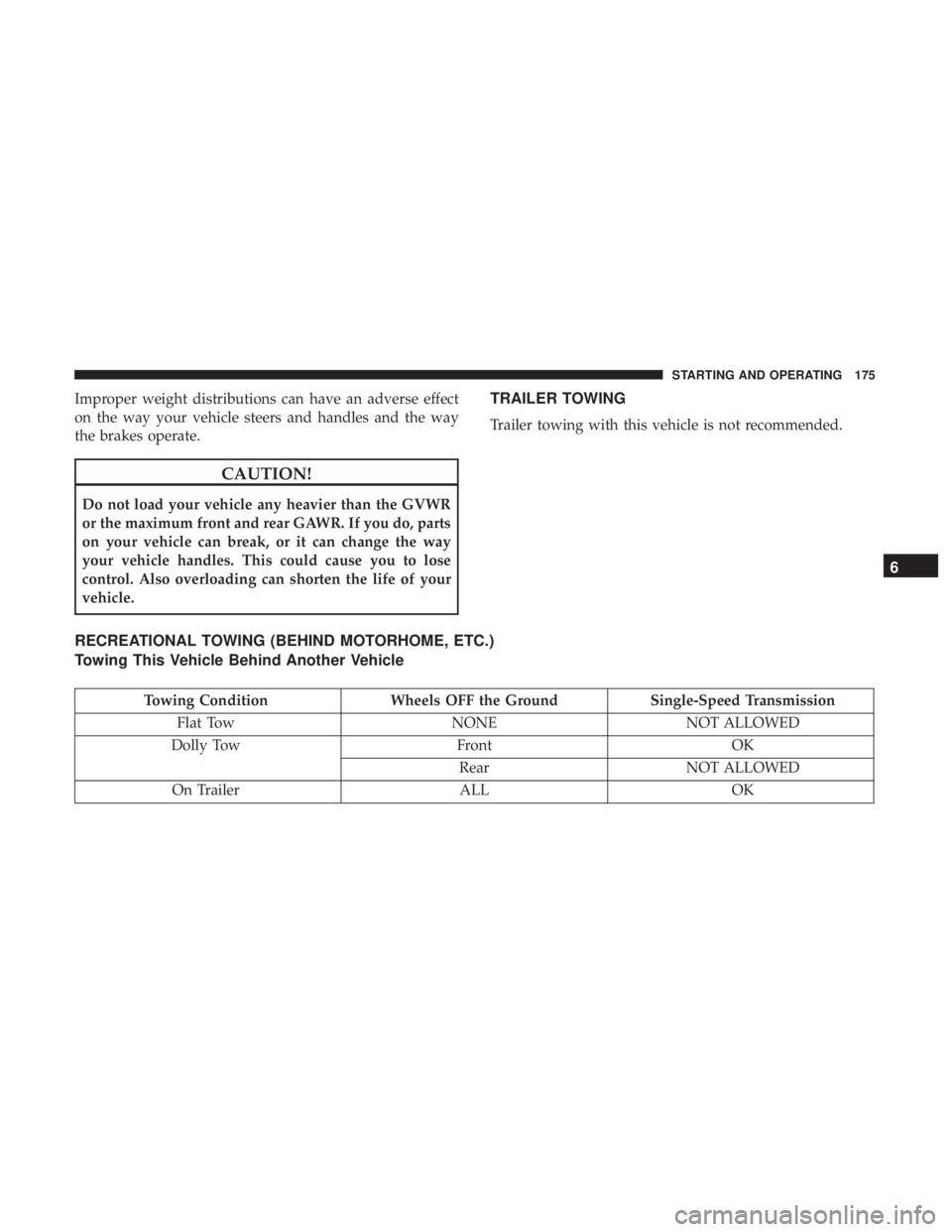
RECREATIONAL TOWING (BEHIND MOTORHOME, ETC.)
Towing This Vehicle Behind Another Vehicle
Towing ConditionWheels OFF the Ground Single-Speed Transmission
Flat Tow NONENOT ALLOWED
Dolly Tow FrontOK
Rear NOT ALLOWED
On Trailer ALLOK
6
STARTING AND OPERATING 175
Page 178 of 300
NOTE:
•When towing your vehicle, always follow applicable
state and provincial laws. Contact state and provincial
Highway Safety offices for additional details.
• This vehicle must be towed on a dolly or vehicle trailer
with the front wheels OFFthe ground.
CAUTION!
Towing this vehicle in violation of the above require-
ments can cause severe transmission damage. Damage
from improper towing is not covered under the New
Vehicle Limited Warranty.
DRIVING TIPS
Driving On Slippery Surfaces
Information in this section will aid in safe controlled
launches in adverse conditions.
Acceleration
Rapid acceleration on snow covered, wet, or other slippery
surfaces may cause the driving wheels to pull erratically to
the right or left. This phenomenon occurs when there is a difference in the surface traction under the front (driving)
wheels.
WARNING!
Rapid acceleration on slippery surfaces is dangerous.
Unequal traction can cause sudden pulling of the front
wheels. You could lose control of the vehicle and
possibly have a collision. Accelerate slowly and care-
fully whenever there is likely to be poor traction (ice,
snow, wet, mud, loose sand, etc.).
Traction
When driving on wet or slushy roads, it is possible for a
wedge of water to build up between the tire and road
surface. This is hydroplaning and may cause partial or
complete loss of vehicle control and stopping ability. To
reduce this possibility, the following precautions should be
observed:
•
Slow down during rainstorms or when the roads are
slushy.
• Slow down if the road has standing water or puddles.
• Replace the tires when tread wear indicators first be-
come visible.
176 STARTING AND OPERATING
Page 179 of 300
•Keep tires properly inflated.
• Maintain sufficient distance between your vehicle and
the vehicle in front of you to avoid a collision in a
sudden stop.
Driving Through Water
Driving through water more than a few inches/centimeters
deep will require extra caution to ensure safety and pre-
vent damage to your vehicle.
Flowing/Rising Water
WARNING!
Do not drive on or across a road or path where water is
flowing and/or rising (as in storm run-off). Flowing
water can wear away the road or path’s surface and
cause your vehicle to sink into deeper water. Further-
more, flowing and/or rising water can carry your ve-
hicle away swiftly. Failure to follow this warning may
result in injuries that are serious or fatal to you, your
passengers, and others around you.
Shallow Standing Water
Although your vehicle is capable of driving through shal-
low standing water, consider the following Caution and
Warning before doing so.
CAUTION!
• Always check the depth of the standing water before
driving through it. Never drive through standing
water that is deeper than the bottom of the tire rims
mounted on the vehicle.
• Determine the condition of the road or the path that
is under water and if there are any obstacles in the
way before driving through the standing water.
• Do not exceed 5 mph (8 km/h) when driving through
standing water. This will minimize wave effects.
• Driving through standing water may cause damage
to your vehicle’s drivetrain components. Always in-
spect your vehicle’s fluids (i.e., transmission, coolant,
etc.) for signs of contamination (i.e., fluid that is
milky or foamy in appearance) after driving through
standing water. Do not continue to operate the ve-
hicle if any fluid appears contaminated, as this may
(Continued)
6
STARTING AND OPERATING 177