charging FIAT 500E 2019 Owner's Manual
[x] Cancel search | Manufacturer: FIAT, Model Year: 2019, Model line: 500E, Model: FIAT 500E 2019Pages: 300, PDF Size: 3.03 MB
Page 195 of 300
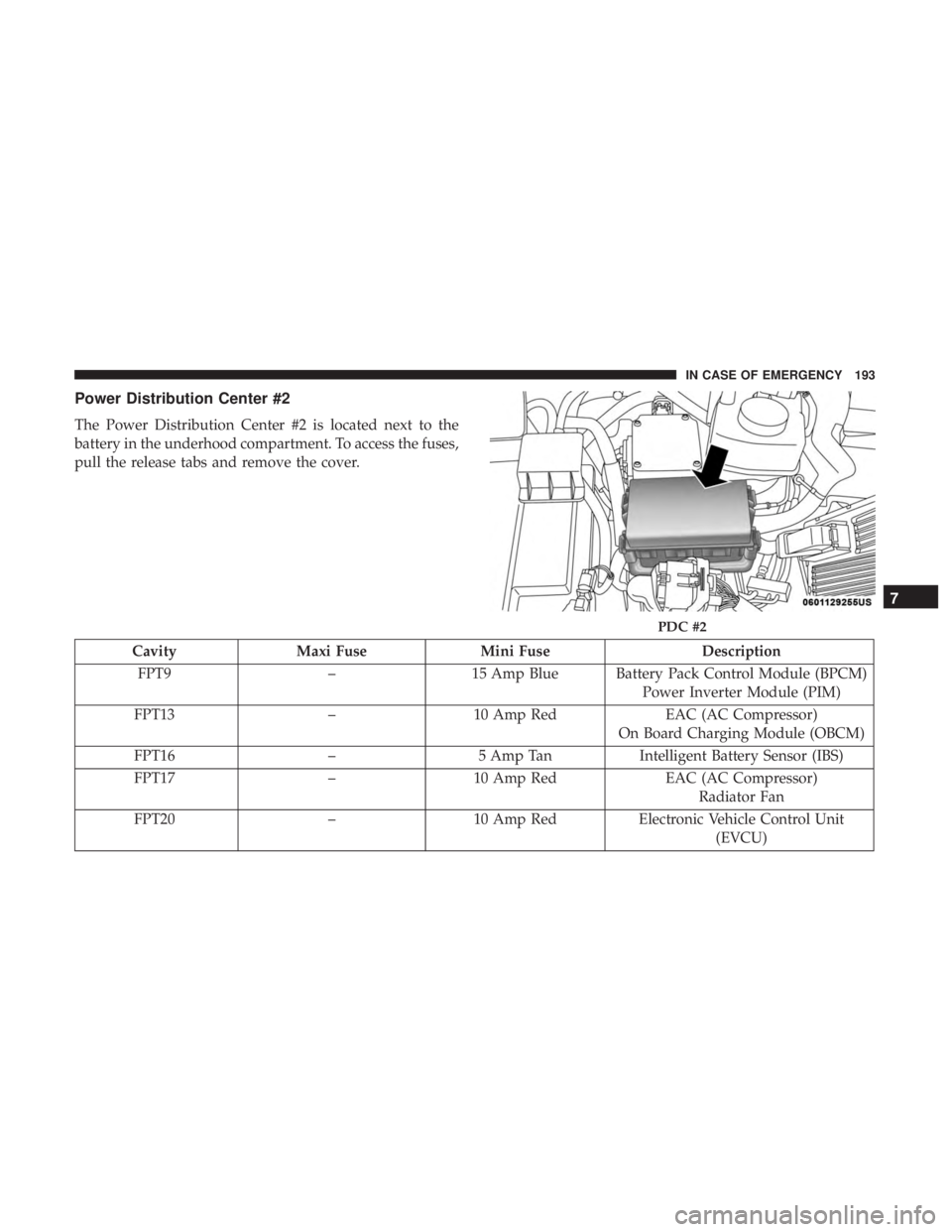
Power Distribution Center #2
The Power Distribution Center #2 is located next to the
battery in the underhood compartment. To access the fuses,
pull the release tabs and remove the cover.
CavityMaxi Fuse Mini Fuse Description
FPT9 –15 Amp Blue Battery Pack Control Module (BPCM)
Power Inverter Module (PIM)
FPT13 –10 Amp Red EAC (AC Compressor)
On Board Charging Module (OBCM)
FPT16 –5 Amp Tan Intelligent Battery Sensor (IBS)
FPT17 –10 Amp Red EAC (AC Compressor)
Radiator Fan
FPT20 –10 Amp Red Electronic Vehicle Control Unit
(EVCU)
PDC #2
7
IN CASE OF EMERGENCY 193
Page 205 of 300
WARNING!
•Take care to avoid the radiator cooling fan whenever
the hood is raised. It can start anytime the ignition
switch is ON. You can be injured by moving fan
blades.
• Remove any metal jewelry such as rings, watch
bands and bracelets that could make an inadvertent
electrical contact. You could be seriously injured.
• Batteries contain sulfuric acid that can burn your
skin or eyes and generate hydrogen gas which is
flammable and explosive. Keep open flames or
sparks away from the battery.
1. Apply the parking brake, place the transmission into PARK and turn the ignition to LOCK.
2. Turn off the heater, radio, and all unnecessary electrical accessories.
3. Remove the protective cover over the positive (+)bat-
tery post.
4. If using another vehicle to jump start the battery, park the vehicle within the jumper cables reach, apply the
parking brake and make sure the ignition is OFF.
WARNING!
Do not allow vehicles to touch each other as this could
establish a ground connection and personal injury
could result.
Jump Starting Procedure
WARNING!
Failure to follow this jump starting procedure could
result in personal injury or property damage due to
battery explosion.
CAUTION!
Failure to follow these procedures could result in
damage to the charging system of the booster vehicle
or the discharged vehicle.
Connecting The Jumper Cables
1. Connect the positive (+)end of the jumper cable to the
positive (+)post of the discharged vehicle.
2. Connect the opposite end of the positive (+)jumper
cable to the positive (+)post of the booster battery.
7
IN CASE OF EMERGENCY 203
Page 206 of 300
3. Connect the negative end(-)of the jumper cable to the
negative (-)post of the booster battery.
4. Connect the opposite end of the negative (-)jumper
cable to a good vehicle ground (exposed metal part of
the discharged vehicle underhood compartment) away
from the battery.
WARNING!
Do not connect the jumper cable to the negative (-) post
of the discharged battery. The resulting electrical spark
could cause the battery to explode and could result in
personal injury. Only use the specific ground point, do
not use any other exposed metal parts.
5. Start the vehicle that has the booster battery, and allow it to idle for a few minutes. Then turn the key to the
RUN position on the vehicle with the discharged bat-
tery. 6. Once the vehicle is started, remove the jumper cables in
the reverse sequence:
Disconnecting The Jumper Cables
1. Disconnect the negative (-)jumper cable from the ve-
hicle ground (-)of the vehicle with the discharged
battery.
2. Disconnect the negative end (-)of the jumper cable from
the negative (-)post of the booster battery.
3. Disconnect the opposite end of the positive (+)jumper
cable from the positive (+)post of the booster battery.
4. Disconnect the positive (+)end of the jumper cable from
the positive (+)post of the discharged vehicle.
If frequent jump starting is required to start your vehicle,
you should have the battery and charging system in-
spected at an authorized dealer.
204 IN CASE OF EMERGENCY
Page 268 of 300
Charging Schedule
To set up a charging schedule, press the “More” or “Set-
tings” button on the touchscreen.
Setting NameSelectable Options
Enable Schedule OnOff
NOTE:
Continue setting up the schedule, picking from the following menus:
•Weekdays or Weekends
•Start and End Times
Safety/Assistance
After pressing the “Safety/Assistance” button on the
touchscreen, the following settings will be available:
Setting Name Selectable Options
Hill Start Assist — If Equipped OnOff
Rear View Camera Delay OnOff
ParkView Backup Camera Active Guide Lines On
Off
NOTE: When this feature is enabled, active (dynamic) grid lines are overlaid on the Rear Backup Camera image to
illustrate the width of the vehicle and its projected back up path based on the steering wheel position. A dashed cen-
ter line overlay indicates the center of the vehicle to assist with parking or aligning to a hitch/receiver.
266 MULTIMEDIA
Page 275 of 300
current track, or to the beginning of the previous track if it
is within eight seconds after the current track begins to
play.
IPOD/USB/MEDIA PLAYER CONTROL — IF
EQUIPPED
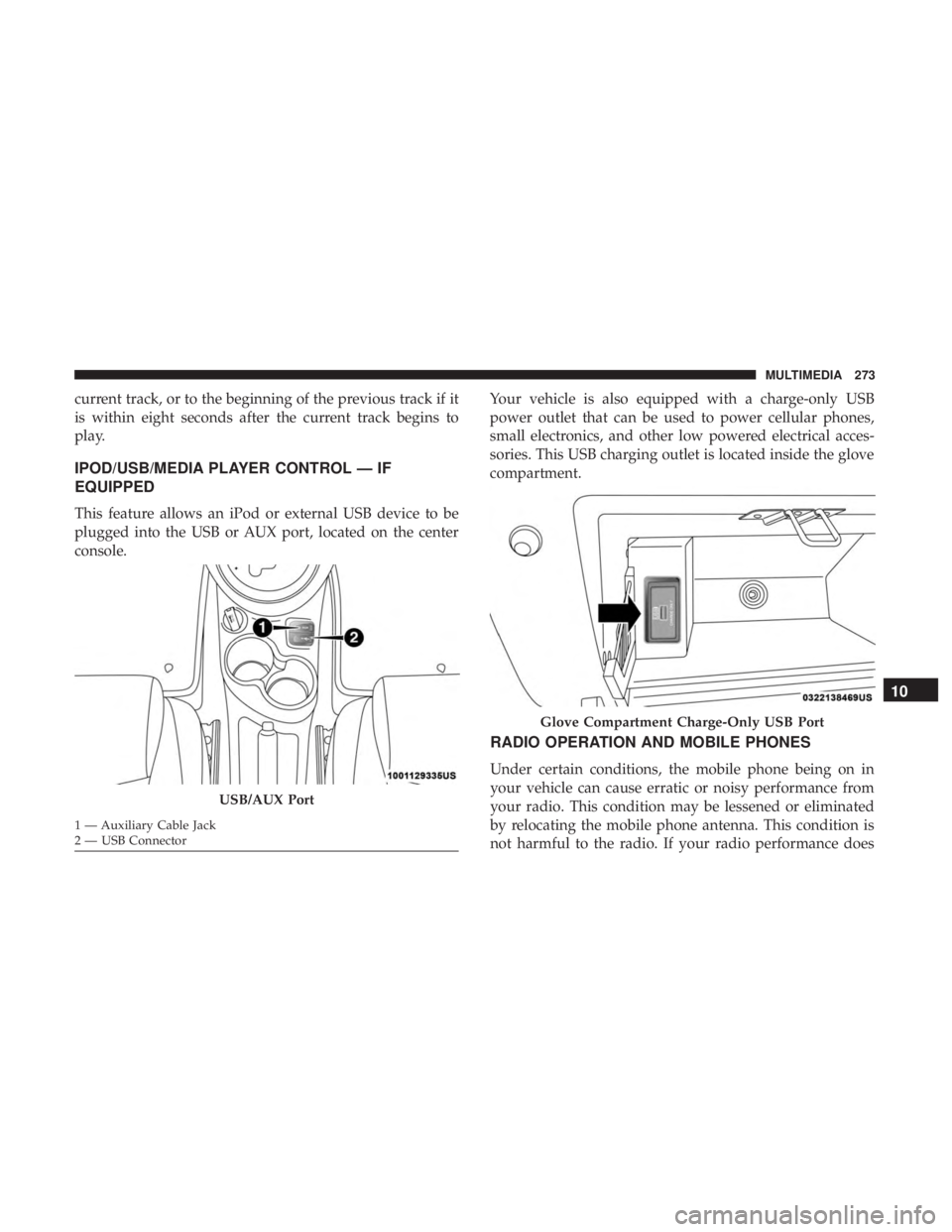
This feature allows an iPod or external USB device to be
plugged into the USB or AUX port, located on the center
console.Your vehicle is also equipped with a charge-only USB
power outlet that can be used to power cellular phones,
small electronics, and other low powered electrical acces-
sories. This USB charging outlet is located inside the glove
compartment.
RADIO OPERATION AND MOBILE PHONES
Under certain conditions, the mobile phone being on in
your vehicle can cause erratic or noisy performance from
your radio. This condition may be lessened or eliminated
by relocating the mobile phone antenna. This condition is
not harmful to the radio. If your radio performance does
USB/AUX Port
1 — Auxiliary Cable Jack
2 — USB Connector
Glove Compartment Charge-Only USB Port
10
MULTIMEDIA 273
Page 276 of 300
not satisfactorily “clear” by the repositioning of the an-
tenna, it is recommended that the radio volume be turned
down or off during mobile phone operation.
General Information
The following regulatory statement applies to all Radio
Frequency (RF) devices equipped in this vehicle:
This device complies with Part 15 of the FCC Rules and
with Industry Canada license-exempt RSS standard(s).
Operation is subject to the following two conditions:
•This device may not cause harmful interference, and
• This device must accept any interference received, in-
cluding interference that may cause undesired opera-
tion.
NOTE: Changes or modifications not expressly approved
by the party responsible for compliance could void the
user ’s authority to operate the equipment.
TELEMATICS MODEM
Your vehicle is equipped with a 3G CDMA cellular modem
to connect the vehicle with your device to provide the
following features:
• Range and State of Charge Information •
Configure Scheduled Charging Profile
• Average and total energy used
• Charge station location and availability on in vehicle
NAV map
• Send navigation destination to vehicle from within
Mobile App
• Remote Door Lock/Unlock
• Remote Horn and Lights Activation
• Pre-conditioning of interior temperature
• Email and SMS notifications
NOTE: This device complies with Part 15 of the FCC.
Operation is subject to the following conditions:
• This device may not cause harmful interference.
• This device must accept any interference received, in-
cluding interference that may cause undesired opera-
tion.
Changes or modifications not expressly approved by the
party responsible for compliance could void the user ’s
authority to operate the equipment.
274 MULTIMEDIA
Page 290 of 300
Adding Washing Fluid...................... .215
AirBag ................................ .124
Advance Front Air Bag ....................124
Air Bag Operation ....................... .126
Air Bag Warning Light .....................123
Driver Knee Air Bag ..................... .127
Enhanced Accident Response .............133, 208
Event Data Recorder (EDR) .................208
FrontAirBag .......................... .124
If Deployment Occurs .....................132
Knee Impact Bolsters ..................... .127
Maintaining Your Air Bag System .............134
Maintenance ........................... .134
Side Air Bags .......................... .127
Transporting Pets ....................... .151
Air Bag Light ...................... .92, 123, 152
Air Conditioner Maintenance ..................222
Air Conditioner Refrigerant ...................222
Air Conditioner System ..................... .222
Air Conditioning Filter .......................73
Air Conditioning, Operating Tips ................72
Air Pressure Tires................................. .235
Alarm Security Alarm ...........................42 Alarm System
Security Alarm ...........................42
Alterations/Modifications Vehicle .................................5
Anti-Lock Brake System (ABS) .................102
Anti-Lock Warning Light .................95, 98, 99
Arming System Security Alarm ...........................42
Audio Systems (Radio) ...................... .260
Automatic Dimming Mirror ....................56
Automatic Transmission ..................... .160
Gear Ranges ........................... .161
Auxiliary Driving Systems ....................107
Battery .............................. .93, 215
Charging ...............................16
Charging System Light .....................93
Belts, Seat ............................... .152
Body
Mechanism Lubrication ..................223
B-Pillar Location .......................... .230
Brake Assist System ........................ .103
Brake Fluid .............................. .257
Brake, Parking ............................ .158
Brake System ............................ .225
Anti-Lock (ABS) ........................ .102
288 INDEX
Page 291 of 300
Fluid Check........................... .225
Master Cylinder ........................ .225
Parking .............................. .158
Warning Light ...........................92
Bulb Replacement ......................... .182
Bulbs, Light .......................... .154, 182
Camera, Rear ............................ .172
Capacities, Fluid .......................... .256
Car Washes .............................. .249
Cellular Phone ........................... .273
Certification Label ......................... .173
Chains, Tire ............................. .245
Changing A Flat Tire ....................... .226
Charging .................................22
AC Level 1 ..............................22
AC Level 2 ..............................35
Cordset ................................24
Indicator ...............................32
Times ..................................36
Troubleshooting ..........................28
Checking Your Vehicle For Safety ...............152
Checks, Safety ............................ .152
Child Restraint ........................... .135Child Restraints
Booster Seats ........................... .139
Child Seat Installation .....................148
How To Stow An unused ALR Seat Belt ........145
Infant And Child Restraints .................138
Lower Anchors And Tethers For Children .......141
Older Children And Child Restraints ...........138
Seating Positions ........................ .140
Cleaning Wheels ............................... .244
Climate Control ............................65
Automatic ........................... .66, 71
Compact Disc (CD) Maintenance ................279
Compact Spare Tire ........................ .242
Contract, Service .......................... .284
Cooling System Cooling
Capacity........................ .256
Selection Of Coolant (Antifreeze) .............257
Corrosion Protection ....................... .249
Cruise Control (Speed Control) .................165
Cruise Light ...............................99
Cupholders ...............................80
Customer Assistance ....................... .282
Customer Programmable Features ...............261
Cybersecurity ............................ .260
12
INDEX 289