buttons FIAT 500L 2015 2.G User Guide
[x] Cancel search | Manufacturer: FIAT, Model Year: 2015, Model line: 500L, Model: FIAT 500L 2015 2.GPages: 438, PDF Size: 12.64 MB
Page 165 of 438
UNDERSTANDING YOUR INSTRUMENT PANEL
CONTENTS
!INSTRUMENT PANEL FEATURES..........165
!INSTRUMENT CLUSTER.................166
!INSTRUMENT CLUSTER DESCRIPTIONS.....167
!ELECTRONIC VEHICLE INFORMATION
CENTER (EVIC).......................177
▫EVIC Screen.........................177
▫EVIC Control Buttons..................178
▫Electronic Vehicle Information Center (EVIC)
Setup Menu.........................179
▫Change Engine Oil Indicator System........180
▫Trip Computer.......................181
▫Trip Button..........................181
▫Trip Functions........................182
▫Values Displayed......................183
▫Personal Settings (Customer-Programmable
Features)............................184
!Uconnect® RADIOS.....................187
!iPod®/USB/MEDIA PLAYER CONTROL.....187
!STEERING WHEEL AUDIO CONTROLS......188
▫Radio Operation......................189
4
Page 180 of 438
•Date or trip distance display in miles or kilometers
•Outside temperature
•Gear Indicator
•Odometer (display of distance travelled in miles/
kilometers)
•Car status indication (e.g. doors open, possible ice on
road, service, etc.)
EVIC Control Buttons
The EVIC control buttons are located on the instrument
panel below the radio.
Push and release theMENUbutton briefly to access the
menu and/or go to next screen or to confirm the required
menu option. Push and hold theMENUbutton (approxi-
mately one second) to return to the main screen.
Push and release the UPbutton to scroll upward
through the displayed menu and the related options
or to increase the displayed value.
Push and release the DOWNbutton to scroll down-
ward through the displayed menu and the related
options or to decrease the value displayed.
NOTE:UPand DOWNbuttons activate differ-
ent functions according to the following situations:
•To scroll the menu options upwards or downwards.
•To increase or decrease values during settings.
NOTE:When opening one of the front doors, the EVIC
display will turn on the clock, the external temperature
and the miles or kilometers covered (for versions/
markets, where provided) for a few seconds.
178 UNDERSTANDING YOUR INSTRUMENT PANEL
Page 187 of 438
Buzzer Volume (Adjusting The Failure/Warning
Buzzer Volume)
With this function the volume of the buzzer accompany-
ing any failure/warning indication can be adjusted to
one of eight volume levels.
To adjust the volume proceed as follows:
1. Briefly push and release theMENUbutton. The pre-
viously set volume “level” will flash on the display.
2. Push and release the UPor DOWNbutton for
setting.
3. Briefly push and release theMENUbutton to go back
to the menu screen, or push and hold theMENU
button (approximately one second) to go back to the
main screen without storing the settings.
Speed Buzzer (Speed Limit)
With this function it is possible to set the car speed limit
(mph or km/h); when this limit is exceeded the driver is
immediately alerted.
To set the speed limit, proceed as follows:
1. Briefly push and release theMENUbutton. The dis-
play will show the message (Speed Beep).
2. Push and release the UPor DOWNbutton to
select speed limit activation (On) or deactivation
(Off).
3. When the function is activated (On), briefly push and
release theMENUbutton to display the presently set
activation speed. Pushing the UPor DOWN
buttons selects the speed limit. PushMENUto
confirm selection.
4
UNDERSTANDING YOUR INSTRUMENT PANEL 185
Page 193 of 438
CLIMATE CONTROLS
Manual Climate Control System
Controls
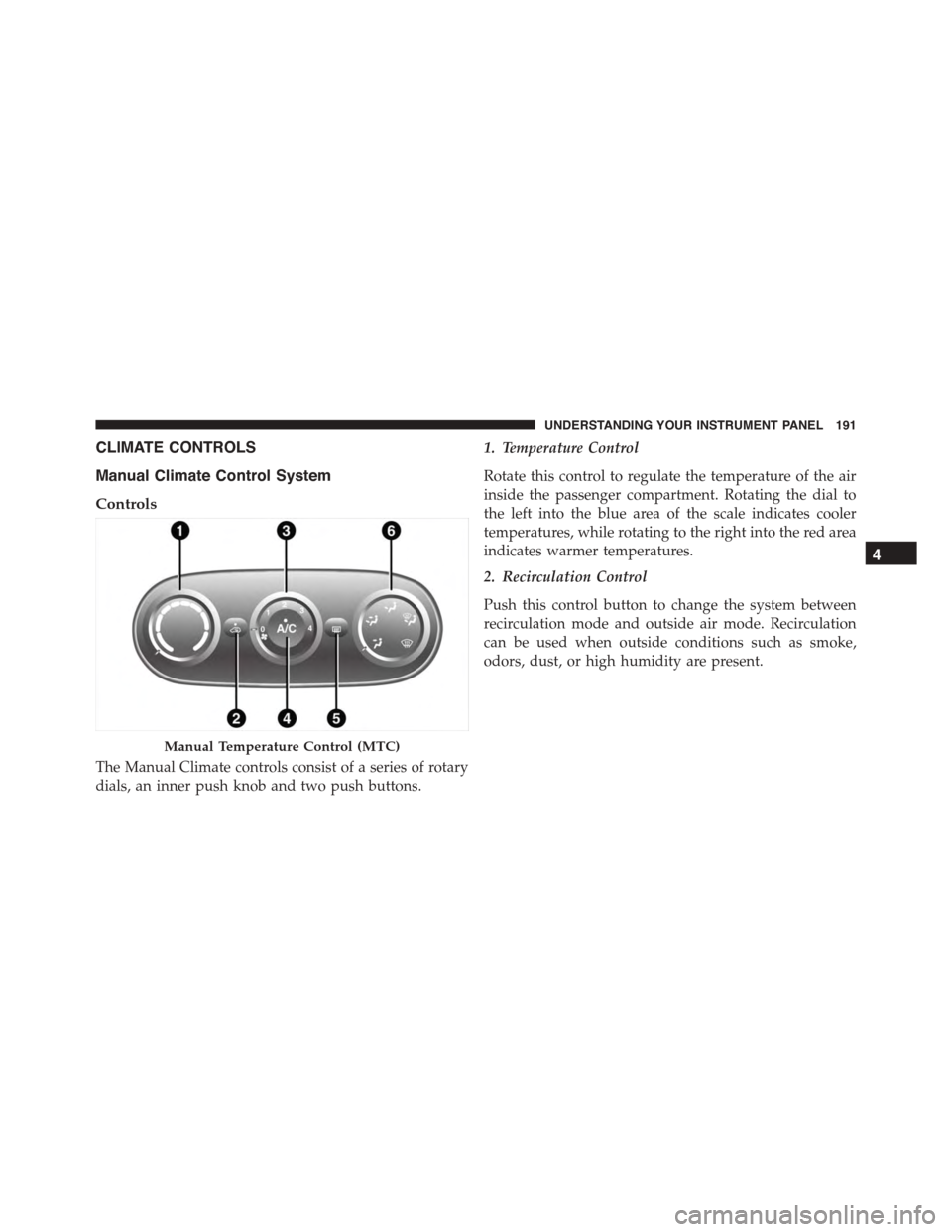
The Manual Climate controls consist of a series of rotary
dials, an inner push knob and two push buttons.
1. Temperature Control
Rotate this control to regulate the temperature of the air
inside the passenger compartment. Rotating the dial to
the left into the blue area of the scale indicates cooler
temperatures, while rotating to the right into the red area
indicates warmer temperatures.
2. Recirculation Control
Push this control button to change the system between
recirculation mode and outside air mode. Recirculation
can be used when outside conditions such as smoke,
odors, dust, or high humidity are present.
Manual Temperature Control (MTC)
4
UNDERSTANDING YOUR INSTRUMENT PANEL 191
Page 203 of 438
•air distribution to seven positions;
•compressor enablement;
•rapid defrosting/demisting function;
•air recirculation;
•heated rear window;
•system deactivation.
NOTE:The climate control system detects the passenger
compartment temperature using a mean radiant tem-
perature sensor located in the interior rear view mirror
and protected by a specific cover. Obstructing the field of
view of this sensor with any object could cause the
climate control system to operate with less than optimal
efficiency.
Switching On The Climate Control System
The climate control system can be switched on in differ-
ent ways: it is advisable to push the AUTO button and
turn the knobs to set the desired temperatures.
In this way the system operates completely automatically
to adjust the temperature, quantity and distribution of
the air introduced into the passenger compartment. It
also manages the air recirculation function and the acti-
vation of the air conditioning compressor.
During automatic operation, you can change the set
temperatures, air distribution and fan speed at any time
by using the relevant buttons or knobs: the system will
automatically change the settings to adjust to the new
requirements.
4
UNDERSTANDING YOUR INSTRUMENT PANEL 201
Page 204 of 438
During completely automatic operation (AUTO), varying
the air flow and/or distribution (which are not dis-
played) causes the AUTO function LED to disappear and
the system to operate in MANUAL mode (displaying
both the flow and distribution requested).
When the compressor is deactivated, the AUTO opera-
tion remains active only if the system can guarantee
in-car comfort. Otherwise, the system switches to
MANUAL mode (the set temperatures will flash on the
display). The fan speed is the same in all the zones of the
passenger compartment.
Adjusting The Air Temperature
Rotate the Driver Temperature Control, or the Passenger
Temperature Control, dial clockwise or anti clockwise, to
adjust the air temperature in the front left (Driver Tem-
perature Control) or right (Passenger Temperature Con-
trol) zone of the passenger compartment.
The set temperatures are shown on the displays.
Push the SYNC button to align the air temperature
between the two zones.
Turn the Passenger Temperature Control knob to return
to the separate management of air temperatures in the
two zones.
Turning the control knobs completely in one direction or
the other activates the#HI#(maximum heating) or#LO#
(maximum cooling) functions respectively.
To deactivate these functions, turn the temperature knob
to the desired temperature.
Air Distribution Selection
By pushing the Mode Control buttons (Up/Down/Right
arrows), it is possible to set one of the seven possible air
distributions manually:
•Up Arrow – Air flow to the windshield and front side
window diffusers to defrost them. Use Defrost mode
202 UNDERSTANDING YOUR INSTRUMENT PANEL
Page 206 of 438
In AUTO mode, the climate control system automatically
manages air distribution (the LEDs on the Mode Control
buttons are off ).
When set manually, the air distribution is indicated by
the LEDs on the selected buttons switching on.
In combined function mode, functions are enabled to-
gether with those already set when the relevant button is
pushed. If a button whose function is already active is
pushed, the operation is cancelled and the corresponding
LED switches off.
To restore automatic control of the air distribution after a
manual selection, push the AUTO button.
AUTO Button
When the AUTO button is pushed (LED on button lit) the
climate control system automatically adjusts the follow-
ing settings in the corresponding zones:
•quantity and distribution of the air introduced into the
passenger compartment
•climate control system compressor and
•air recirculation.
Cancelling all previous manual adjustments.
This is indicated by the LED on the AUTO button
switching on.
If the AUTO button is pushed when the AUTO LED is on,
the system switches to completely manual mode; it
displays the current flow and distribution status, which
will no longer be managed automatically.
204 UNDERSTANDING YOUR INSTRUMENT PANEL
Page 209 of 438
NOTE:With the compressor off, air cannot be introduced
to the passenger compartment with a temperature lower
than the outside temperature. Moreover, under certain
environmental conditions, windows could mist rapidly
since the air is not dehumidified.
Rapid Window Demisting (MAX-DEF function)
Push the MAX-DEF button to activate (LED on button
on) the windshield and side window demisting function.
The climate control system carries out the following
operations:
•switches on the air conditioning compressor when
environmental conditions are suitable;
•switches air recirculation off;
•sets fan speed according to the engine coolant tem-
perature;
•directs air flow to windshield and front side window
diffusers;
•activates the heated rear window;
•activates the heated windshield (if equipped);
•displays the fan speed (Blower Control Indicator LED
lit).
NOTE:The Front Defrost Control (MAX-DEF) function
remains on for about three minutes from when the engine
coolant reaches the appropriate temperature.
When the function is activated, the LED on the AUTO
button switches off. With the function activated the only
possible manual adjustments are adjusting the fan speed
and turning the heated rear window off.
When the Recirculation Control, Rear Defrost Control , or
AUTO buttons are pushed, the climate control system
will deactivate the Front Defrost (MAX-DEF) function.
4
UNDERSTANDING YOUR INSTRUMENT PANEL 207
Page 213 of 438
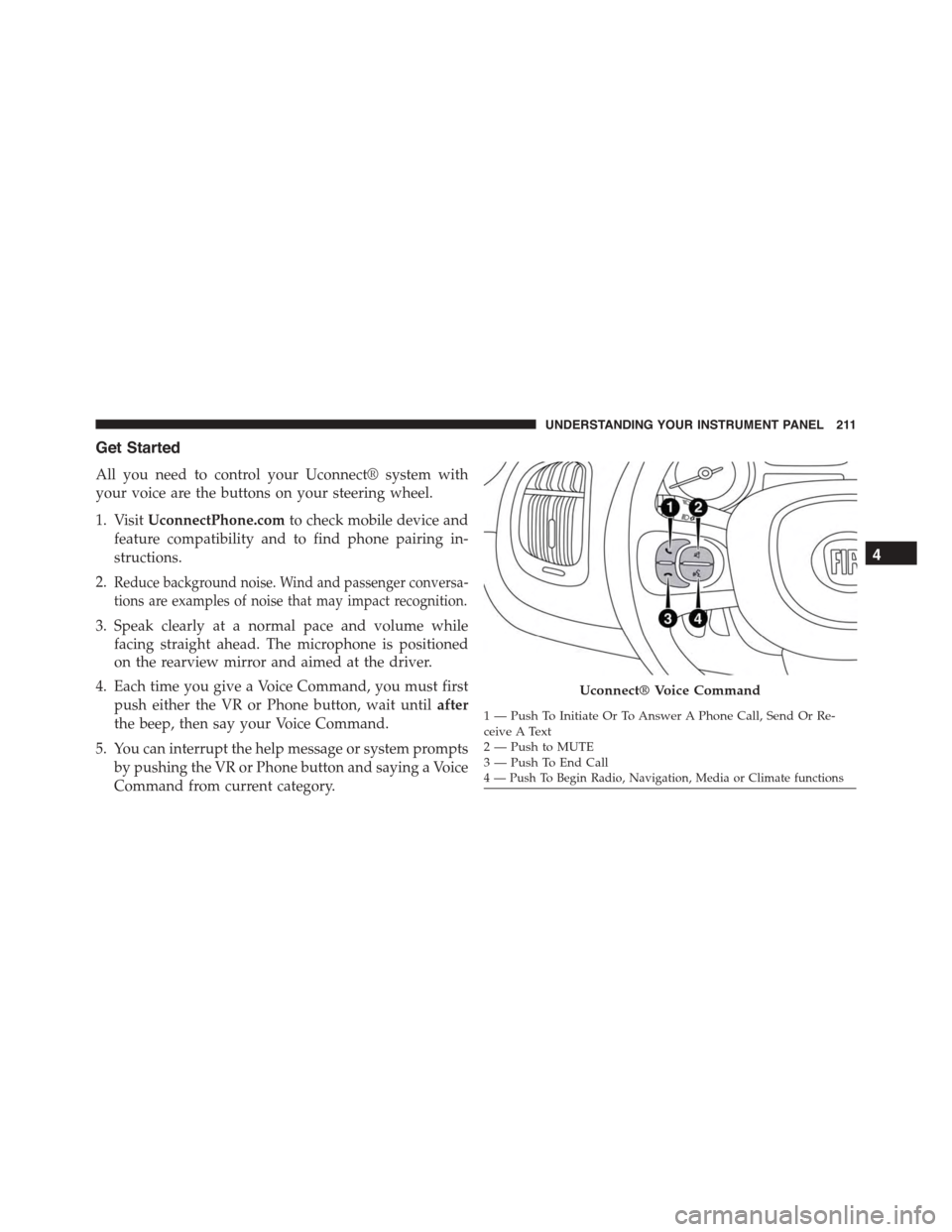
Get Started
All you need to control your Uconnect® system with
your voice are the buttons on your steering wheel.
1. VisitUconnectPhone.comto check mobile device and
feature compatibility and to find phone pairing in-
structions.
2.Reduce background noise. Wind and passenger conversa-
tions are examples of noise that may impact recognition.
3. Speak clearly at a normal pace and volume while
facing straight ahead. The microphone is positioned
on the rearview mirror and aimed at the driver.
4. Each time you give a Voice Command, you must first
push either the VR or Phone button, wait untilafter
the beep, then say your Voice Command.
5. You can interrupt the help message or system prompts
by pushing the VR or Phone button and saying a Voice
Command from current category.
Uconnect® Voice Command
1—PushToInitiateOrToAnswerAPhoneCall,SendOrRe-ceive A Text2—PushtoMUTE3—PushToEndCall4 — Push To Begin Radio, Navigation, Media or Climate functions
4
UNDERSTANDING YOUR INSTRUMENT PANEL 211