lights FIAT 500L 2015 2.G User Guide
[x] Cancel search | Manufacturer: FIAT, Model Year: 2015, Model line: 500L, Model: FIAT 500L 2015 2.GPages: 438, PDF Size: 12.64 MB
Page 117 of 438
Deactivation
Pull the multifunction lever toward the steering wheel
and hold it for more than two seconds.
Front Fog Lights — If Equipped
The fog light switch is located on the center
stack of the instrument panel, just below the
radio. Press the switch once to turn the front
fog lights on. Press the switch a second time to turn the
front fog lights off.
Interior Lights
The interior light switches are located in the overhead
console. The interior lights can be set to three different
positions (Off/Left Position, Center Position, On/Right
Position).
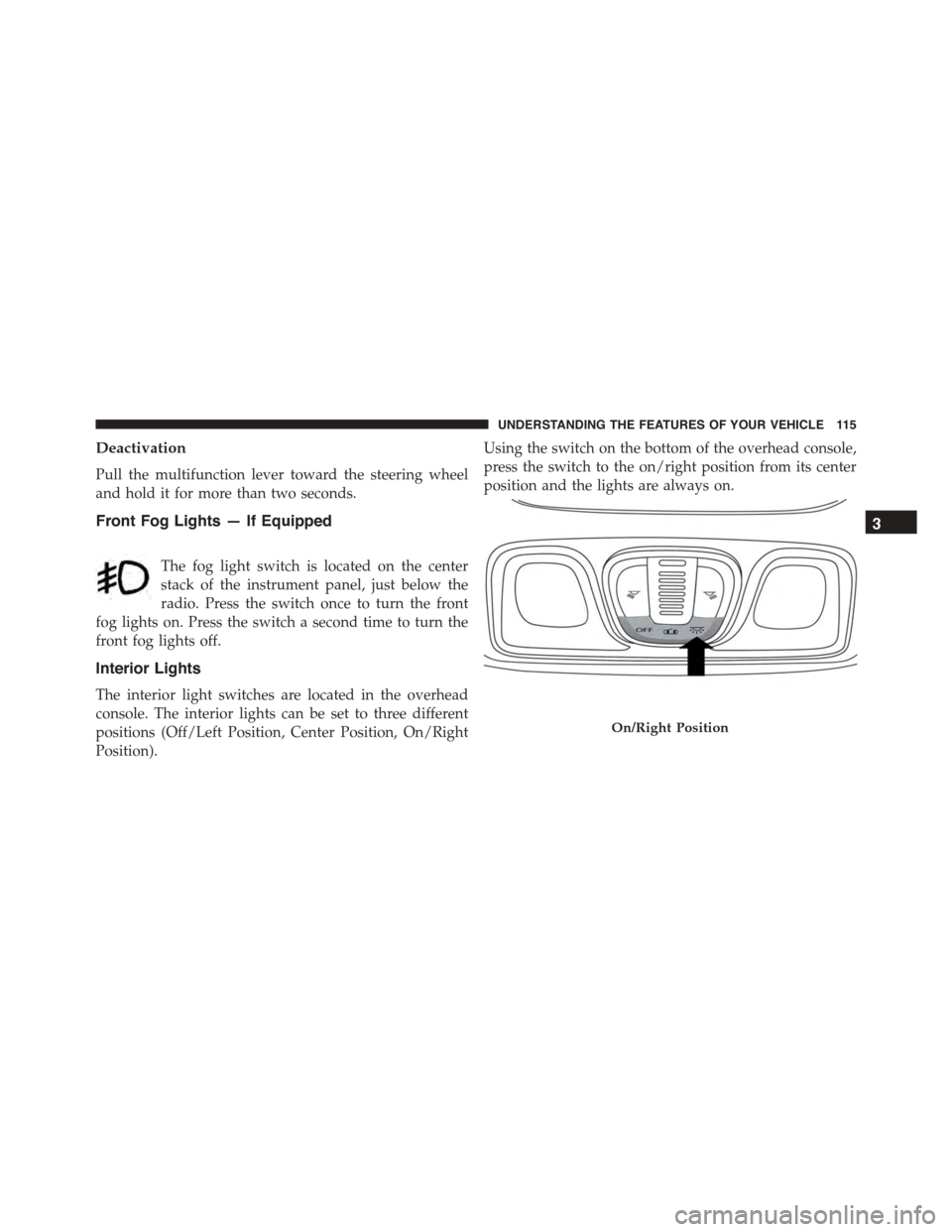
Using the switch on the bottom of the overhead console,
press the switch to the on/right position from its center
position and the lights are always on.
On/Right Position
3
UNDERSTANDING THE FEATURES OF YOUR VEHICLE 115
Page 118 of 438
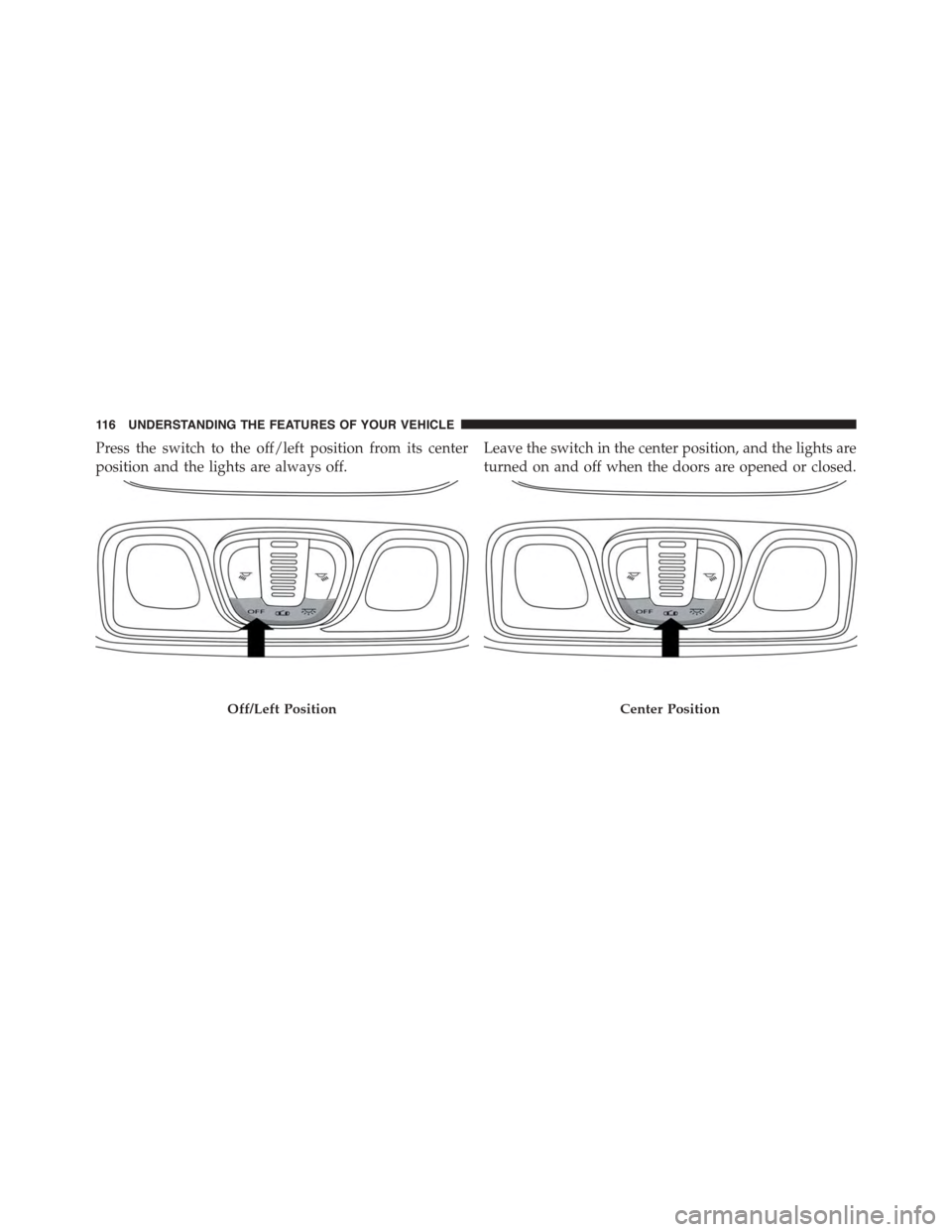
Press the switch to the off/left position from its center
position and the lights are always off.
Leave the switch in the center position, and the lights are
turned on and off when the doors are opened or closed.
Off/Left PositionCenter Position
11 6 U N D E R S TA N D I N G T H E F E AT U R E S O F Y O U R V E H I C L E
Page 119 of 438
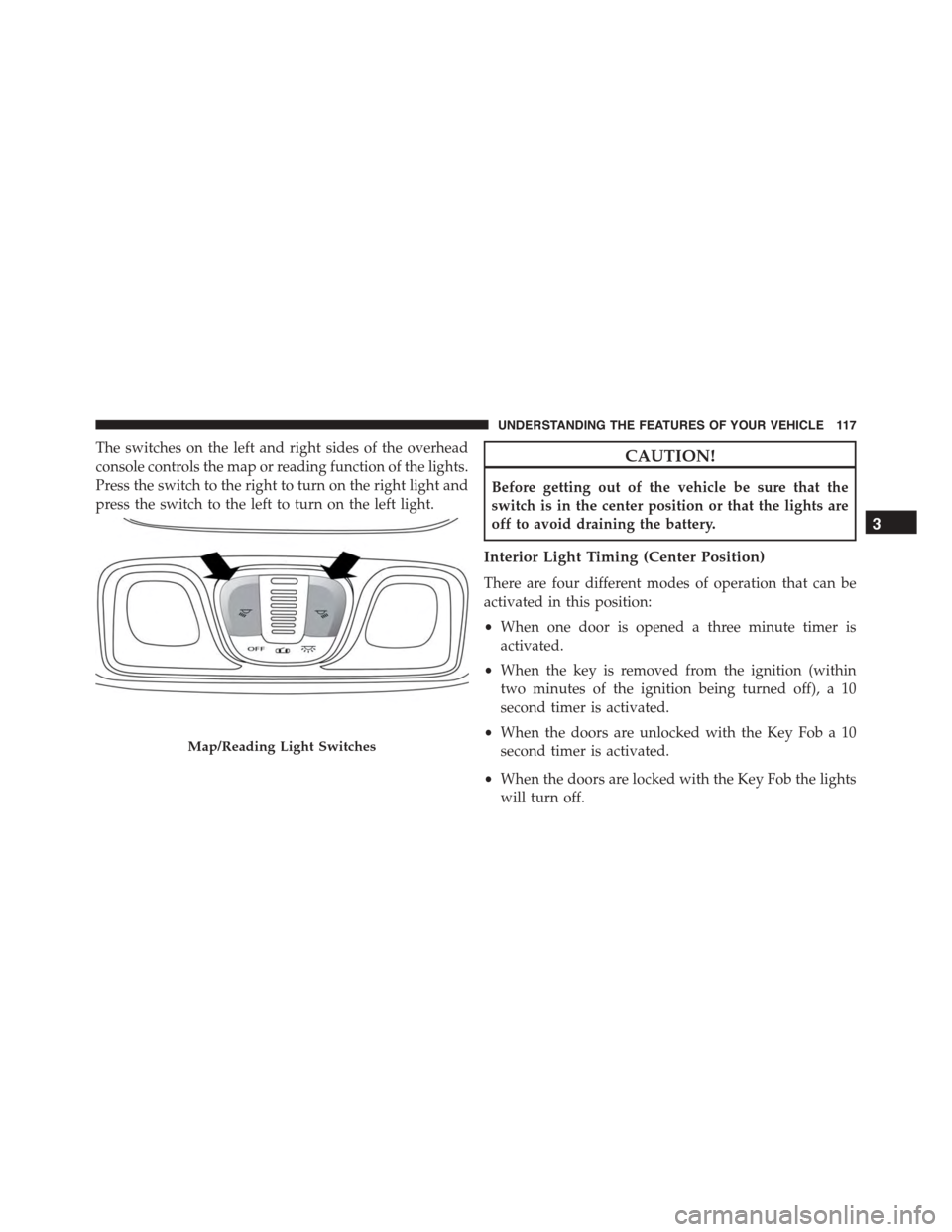
The switches on the left and right sides of the overhead
console controls the map or reading function of the lights.
Press the switch to the right to turn on the right light and
press the switch to the left to turn on the left light.
CAUTION!
Before getting out of the vehicle be sure that the
switch is in the center position or that the lights are
off to avoid draining the battery.
Interior Light Timing (Center Position)
There are four different modes of operation that can be
activated in this position:
•When one door is opened a three minute timer is
activated.
•When the key is removed from the ignition (within
two minutes of the ignition being turned off), a 10
second timer is activated.
•When the doors are unlocked with the Key Fob a 10
second timer is activated.
•When the doors are locked with the Key Fob the lights
will turn off.
Map/Reading Light Switches
3
UNDERSTANDING THE FEATURES OF YOUR VEHICLE 117
Page 167 of 438
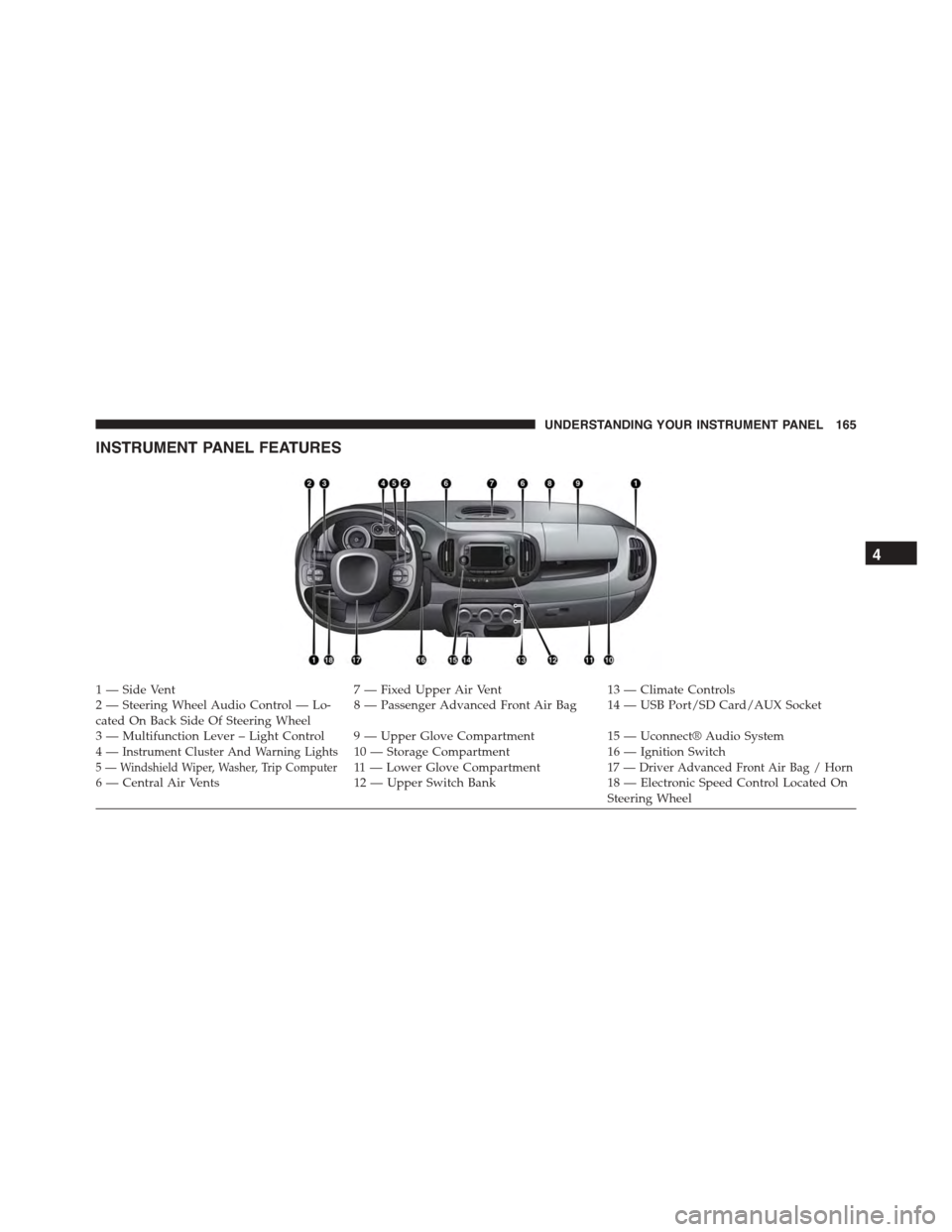
INSTRUMENT PANEL FEATURES
1 — Side Vent7 — Fixed Upper Air Vent13 — Climate Controls2—SteeringWheelAudioControl—Lo-cated On Back Side Of Steering Wheel8—PassengerAdvancedFrontAirBag 14—USBPort/SDCard/AUXSocket
3—MultifunctionLever–LightControl 9—UpperGloveCompartment15 — Uconnect® Audio System4—Instrument Cluster And Warning Lights10 — Storage Compartment16 — Ignition Switch5 — Windshield Wiper, Washer, Trip Computer11 — L o w e r G l o v e C o m p a r t m e n t17 — Driver Advanced Front Air Bag / Horn6 — Central Air Vents12 — Upper Switch Bank18 — Electronic Speed Control Located OnSteering Wheel
4
UNDERSTANDING YOUR INSTRUMENT PANEL 165
Page 173 of 438
12. High Beam Indicator
This light indicates that the headlights are on high
beam. Pull the turn signal lever toward the steer-
ing wheel to switch the headlights to low beam.
13. Park/Headlight ON Indicator / Follow Me Home
(Headlight Delay) Indicator — If Equipped
This indicator will illuminate when the park
lights or headlights are turned on. If the Follow
Me Home feature is activated this indicator
will illuminate and the Electronic Vehicle Infor-
mation Center (EVIC) will show how long the function
remains active. For further information, refer to “Follow
Me Home” in “Understanding The Features of Your
Vehicle”.
14. Tachometer
The white area of the scale shows the permissible engine
revolutions-per-minute (RPM x 1000) for each gear range.
Before reaching the red area, ease up on the accelerator to
prevent engine damage.
15. Seat Belt Reminder Light
When the ignition switch is first turned to ON/
RUN, this light will turn on if the driver’s seat belt
is unbuckled, a chime will sound. When driving,
if the driver’s seat belt remains unbuckled, the Seat Belt
Reminder Light will illuminate and the chime will sound.
Refer to “Occupant Restraints” in “Things To Know
Before Starting Your Vehicle” for further information.
4
UNDERSTANDING YOUR INSTRUMENT PANEL 171
Page 189 of 438
Hill Start Assist
This function is used when starting a vehicle from a stop
on a hill. Hill Start Assist maintains the same level of
brake pressure the driver applied for a short period of
time after the foot has been removed from the brake
pedal.
Proceed as follows to switch this function on or off:
1. Briefly push and release theMENUbutton. “On” or
“Off” will flash on the display (according to previous
setting).
2. Push and release the UPor DOWNbutton for
setting.
3. Briefly push and release theMENUbutton to go back
to the menu screen, or push and hold the button
(approximately one second) to go back to the main
screen without storing the settings.
Exit Menu
This function closes the initial menu screen.
Briefly push and release theMENUbutton to go back to
the main screen.
Push and release thebutton to return to the first
menu option (Speed Beep).
Push and release thebutton to return to the last
menu option (Daylights).
Uconnect® RADIOS
For detailed information about your Uconnect® radio,
refer to your Uconnect® supplement Manual.
iPod®/USB/MEDIA PLAYER CONTROL
This feature allows an iPod® or external USB device to be
plugged into the AUX Jack or USB port.
4
UNDERSTANDING YOUR INSTRUMENT PANEL 187
Page 384 of 438
Cleaning Headlights
Your vehicle has plastic headlights that are lighter and
less susceptible to stone breakage than glass headlights.
Plastic is not as scratch resistant as glass and therefore
different lens cleaning procedures must be followed.
To minimize the possibility of scratching the lenses and
reducing light output, avoid wiping with a dry cloth. To
remove road dirt, wash with a mild soap solution fol-
lowed by rinsing.
Do not use abrasive cleaning components, solvents, steel
wool or other aggressive material to clean the lenses.
Glass Surfaces
All glass surfaces should be cleaned on a regular basis
with MOPAR® Glass Cleaner, or any commercial
household-type glass cleaner. Never use an abrasive type
cleaner. Use caution when cleaning the inside rear win-
dow equipped with electric defrosters or windows
equipped with radio antennas. Do not use scrapers or
other sharp instrument that may scratch the elements.
When cleaning the rear view mirror, spray cleaner on the
towel or rag that you are using. Do not spray cleaner
directly on the mirror.
Instrument Panel Cover
The instrument panel cover has a low glare surface which
minimizes reflections on the windshield. Do not use
protectants or other products which may cause undesir-
able reflections. Use soap and warm water to restore the
low glare surface.
382 MAINTAINING YOUR VEHICLE
Page 397 of 438
Front Turn Signal, Parking And Daytime Running
Lamps
1. Turn front wheels inboard to access upper cover in
wheel liner.
2. Open the upper cover on the front of the wheel liner.
3. Remove the cap from the back of the lower headlamp
housing.
4. Rotate the bulb counter clockwise and remove.
5. Install the bulb into socket, and rotate bulb/socket
clockwise into lamp locking it in place.
6. Reinstall the plastic cap and close the cover on the
wheel liner.
Front Fog Lamps
To replace the front fog lights, see your authorized dealer.
Front, Rear Roof Lamps
1. Remove two screw and remove the lamp assembly.
2. Remove the socket bulb by turning counterclockwise.
3. Remove bulb and replace as needed.
4. Reinstall the bulb socket and rotate clockwise to lock
in place.
5. Reinstall lamp.7
MAINTAINING YOUR VEHICLE 395
Page 405 of 438
•Check the tire inflation pressures and look for unusual
wear or damage.
•Check the fluid levels of the coolant reservoir, and
brake master cylinder reservoir, and fill as needed.
•Check function of all interior and exterior lights.
Required Maintenance Intervals.
Refer to the maintenance schedules on the following
page for the required maintenance intervals.
At Every Oil Change Interval As Indicated By Oil
Change Indicator System:
•Change oil and filter.
•Rotate the tires.Rotate at the first sign of irregu-
lar wear, even if it occurs before the oil indicator
system turns on.
At Every Oil Change Interval As Indicated By Oil
Change Indicator System:
•Inspect battery and clean and tighten terminals as
required.
•Inspect brake pads, shoes, rotors, drums, and
hoses.
•Inspect engine cooling system protection and
hoses.
•Check and adjust hand brake.
•Inspect exhaust system.
•Inspect engine air cleaner if using in dusty or
off-road conditions.8
MAINTENANCE SCHEDULES 403
Page 425 of 438
Cooling System...........................365
Adding Coolant (Antifreeze)...............367
Coolant Level..........................365
Disposal of Used Coolant.................369
Drain, Flush, and Refill...................365
Inspection............................369
Points to Remember.....................368
Pressure Cap..........................368
Selection of Coolant (Antifreeze).............366
Corrosion Protection.......................377
Cruise Light.............................167
Cupholders.............................150
Customer Assistance.......................410
Data Recorder, Event.......................60
Daytime Running Lights....................113
Dealer Service............................349
Deck Lid, Emergency Release.................30
Defroster, Windshield.......................85
Diagnostic System, Onboard.................348
Dipsticks
Automatic Transmission..................376
Disposal
Antifreeze (Engine Coolant)................369
Door Locks..............................22
Door Opener, Garage.......................136
Downshifting............................228
Driving
Through Flowing, Rising, or Shallow Standing
Water................................252
Electrical Outlet, Auxiliary (Power Outlet)........147
Electrical Power Outlets.....................147
Electric Remote Mirrors......................95
Electronic Brake Control System...............257
Brake Assist System.....................259
Electronic Roll Mitigation (ERM)..............265
Electronic Speed Control (Cruise Control)........123
10
INDEX 423