reset FIAT 500L 2015 2.G User Guide
[x] Cancel search | Manufacturer: FIAT, Model Year: 2015, Model line: 500L, Model: FIAT 500L 2015 2.GPages: 438, PDF Size: 12.64 MB
Page 185 of 438
•Trip distance A
•Average Economy A
•Instant Economy
•Average speed A
•Travel time A (driving time).
“Trip B” can be used to display the figures relating to:
•Trip distance B
•Average Economy B
•Average speed B
•Travel time B (driving time).
NOTE:“Trip B” functions may be excluded (see “Trip B
Data”). “Range” and “Instantaneous consumption” can-
not be reset.
Values Displayed
Range
This indicates the distance which may be traveled with
the fuel remaining in the tank, assuming that driving
conditions will not change. The message “----” will
appear on the display in the following cases:
•Distance less than 30 miles (or 50 km).
•The vehicle is parked for a long time with the engine
running.
NOTE:The range depends on several factors: driving
style, type of route (freeway, residential, mountain roads,
etc.), conditions of use of the car (load, tire pressure, etc.).
Trip planning must take into account the above notes.
4
UNDERSTANDING YOUR INSTRUMENT PANEL 183
Page 186 of 438
Distance Traveled
This value shows the distance covered since the last reset.
Average Economy
This value shows the approximate average consumption
since the last reset.
Instant Economy
This indicates the fuel consumption. The value is con-
stantly updated. The message “----” will appear on the
display if the car is parked with the engine running.
Average Speed
This value shows the vehicle’s average speed as a func-
tion of the overall time elapsed since the last reset.
Travel Time
This value shows the time elapsed since the last reset.
Personal Settings (Customer-Programmable
Features)
Belt Buzzer (Buzzer Activation For BeltAlert®
Indication)
This function will only be displayed after a FIAT Group
Automobiles Dealership has deactivated the BeltAlert®
system. Refer to “Enhanced Seat Belt Use Reminder
System BeltAlert®” in “Occupant Restraints” for further
information.
To reactivate this function, proceed as follows:
•Push and release the UPor DOWNbutton
briefly;#Off#will flash on the display. Push and
release the or UPor DOWNbutton and#On#
will appear;
•Push and release theSET ESCbutton briefly to return
to the submenu screen or hold the button down to
return to the main menu screen without saving.
184 UNDERSTANDING YOUR INSTRUMENT PANEL
Page 191 of 438
The right-hand control is a rocker-type switch with a
pushbutton in the center and controls the volume and
mode of the sound system. Pushing the top of the rocker
switch will increase the volume, and pushing the bottom
of the rocker switch will decrease the volume.
Pushing the center button will make the radio switch
between the various modes available (AM/FM/SAT/
AUX/Media Player, etc.) and can also be used to select/
enter an item while scrolling through menu.
The left-hand control is a rocker-type switch with a
pushbutton in the center. The function of the left-hand
control is different depending on which mode you are in.
The following describes the left-hand control operation in
each mode.
Radio Operation
Pushing the top of the switch will “Seek” up for the next
listenable station and pushing the bottom of the switch
will “Seek” down for the next listenable station.
The button located in the center of the left-hand control
will tune to the next preset station that you have pro-
grammed in the radio preset button.
Player Operation
Pushing the top of the switch once will go to the next
track on the Player. Pushing the bottom of the switch
once will go to the beginning of the current track, or to
the beginning of the previous track if it is within one
second after the current track begins to play.
If you push the switch up or down twice, it plays the
second track; three times, it will play the third, etc.
4
UNDERSTANDING YOUR INSTRUMENT PANEL 189
Page 244 of 438
Transmission Limp Home Mode
Transmission function is monitored electronically for
abnormal conditions. If a condition is detected that could
result in transmission damage, Transmission Limp Home
Mode is activated. In this mode, some gears will be
unavailable. The transmission will operate only in a
certain select set of gears (such as 1st, 2nd, 3rd, and
Reverse, or 1st, 3rd, 5th, and Reverse, or 2nd, 4th, and 6th
[with no Reverse]). PARK and NEUTRAL will continue
to be available. The Malfunction Indicator Light (MIL)
may be illuminated. Limp Home Mode allows the vehicle
to be driven to an authorized dealer for service without
damaging the transmission.
In the event of a momentary problem, the transmission
can be reset to regain all forward gears by performing the
following steps:
1. Stop the vehicle.
2. Shift the transmission into PARK.
3. Turn the ignition switch to the OFF position.
4. Wait approximately 10 seconds.
5. Restart the engine.
6. Shift into the desired gear range. If the problem is no
longer detected, the transmission will return to normal
operation.
NOTE:Even if the transmission can be reset, we recom-
mend that you visit your authorized dealer at your
earliest possible convenience. Your authorized dealer has
diagnostic equipment to determine if the problem could
recur.
If the transmission cannot be reset, authorized dealer
service is required.
242 STARTING AND OPERATING
Page 251 of 438
range of torque converter clutch engagement. This is
done to prevent transmission damage due to overheat-
ing.
During cold temperatures, transmission operation may
be modified depending on engine coolant temperature.
Normal operation will resume once the engine tempera-
ture has risen to a suitable level.
Transmission Limp Home Mode
Transmission function is monitored electronically for
abnormal conditions. If a condition is detected that could
result in transmission damage, Transmission Limp Home
Mode is activated. In this mode, the transmission remains
in third gear regardless of which forward gear is selected.
PARK, REVERSE, and NEUTRAL will continue to oper-
ate. The Malfunction Indicator Light (MIL) may be illu-
minated. Limp Home Mode allows the vehicle to be
driven to an authorized dealer for service without dam-
aging the transmission.
In the event of a momentary problem, the transmission
can be reset to regain all forward gears by performing the
following steps:
1. Stop the vehicle.
2. Shift the transmission into PARK.
3. Turn the ignition switch to the OFF position.
4. Wait approximately 10 seconds.
5. Restart the engine.
6. Shift into the desired gear range. If the problem is no
longer detected, the transmission will return to normal
operation.
NOTE:Even if the transmission can be reset, we recom-
mend that you visit your authorized dealer at your
earliest possible convenience. Your authorized dealer has
diagnostic equipment to determine if the problem could
recur.
5
STARTING AND OPERATING 249
Page 252 of 438
If the transmission cannot be reset, authorized dealer
service is required.
AUTOSTICK
AutoStick is a driver-interactive transmission feature
providing manual shift control, giving you more control
of the vehicle. AutoStick allows you to maximize engine
braking, eliminate undesirable upshifts and downshifts,
and improve overall vehicle performance. This system
can also provide you with more control during passing,
city driving, cold slippery conditions, mountain driving,
and many other situations.
Operation
When the shift lever is in the AutoStick position (beside
the Drive position), it can be moved forward and rear-
ward. This allows the driver to manually select the
transmission gear being used. Moving the shift lever
forward (-) triggers a downshift, and rearward (+) an
upshift. The current gear is displayed in the instrument
cluster.
NOTE:In AutoStick mode, the transmission will only
shift up or down when the driver moves the shift lever
rearward (+) or forward (-), except as described below.
•The transmission will automatically upshift when nec-
essary to prevent engine over-speed.
•The transmission will automatically downshift as the
vehicle slows (to prevent engine lugging) and will
display the current gear.
•The transmission will automatically downshift to first
gear when coming to a stop. After a stop, the driver
should manually upshift (+) the transmission as the
vehicle is accelerated.
•With six-speed automatic (Aisin F21-250 HD) trans-
mission, you can start out (from a stop) in first, second,
250 STARTING AND OPERATING
Page 260 of 438
modulate hydraulic pressure, to prevent wheel lock-up
and to help avoid skidding on slippery surfaces.
The system’s pump motor runs during an ABS stop to
provide regulated hydraulic pressure. The pump motor
makes a low humming noise during operation, which is
normal.
The ABS includes an amber ABS Warning Light. When
the light is illuminated, the ABS is not functioning. The
system reverts to standard non-anti-lock brakes. Turning
the ignition Off and On again may reset the ABS if the
fault detected was only momentary.
WARNING!
•Pumping the Anti-Lock Brakes will diminish their
effectiveness and may lead to a collision. Pumping
makes the stopping distance longer. Just press
firmly on your brake pedal when you need to slow
down or stop.
•The Anti-Lock Brake System (ABS) cannot prevent
the natural laws of physics from acting on the
vehicle, nor can it increase braking or steering
efficiency beyond that afforded by the condition of
the vehicle brakes and tires or the traction afforded.
•The ABS cannot prevent collisions, including those
resulting from excessive speed in turns, following
another vehicle too closely, or hydroplaning.
•The capabilities of an ABS-equipped vehicle must
never be exploited in a reckless or dangerous
manner, which could jeopardize the user’s safety or
the safety of others.
258 STARTING AND OPERATING
Page 362 of 438
Function deactivation:
The functionality is reset if:
•Turning ON the key.
•Number of subsequent activations is 3.
•2 minutes timer has expired after turning OFF the key.
NOTE:If when turning ON the key the blades are not in
the parking position, the blades go into the parking
position.
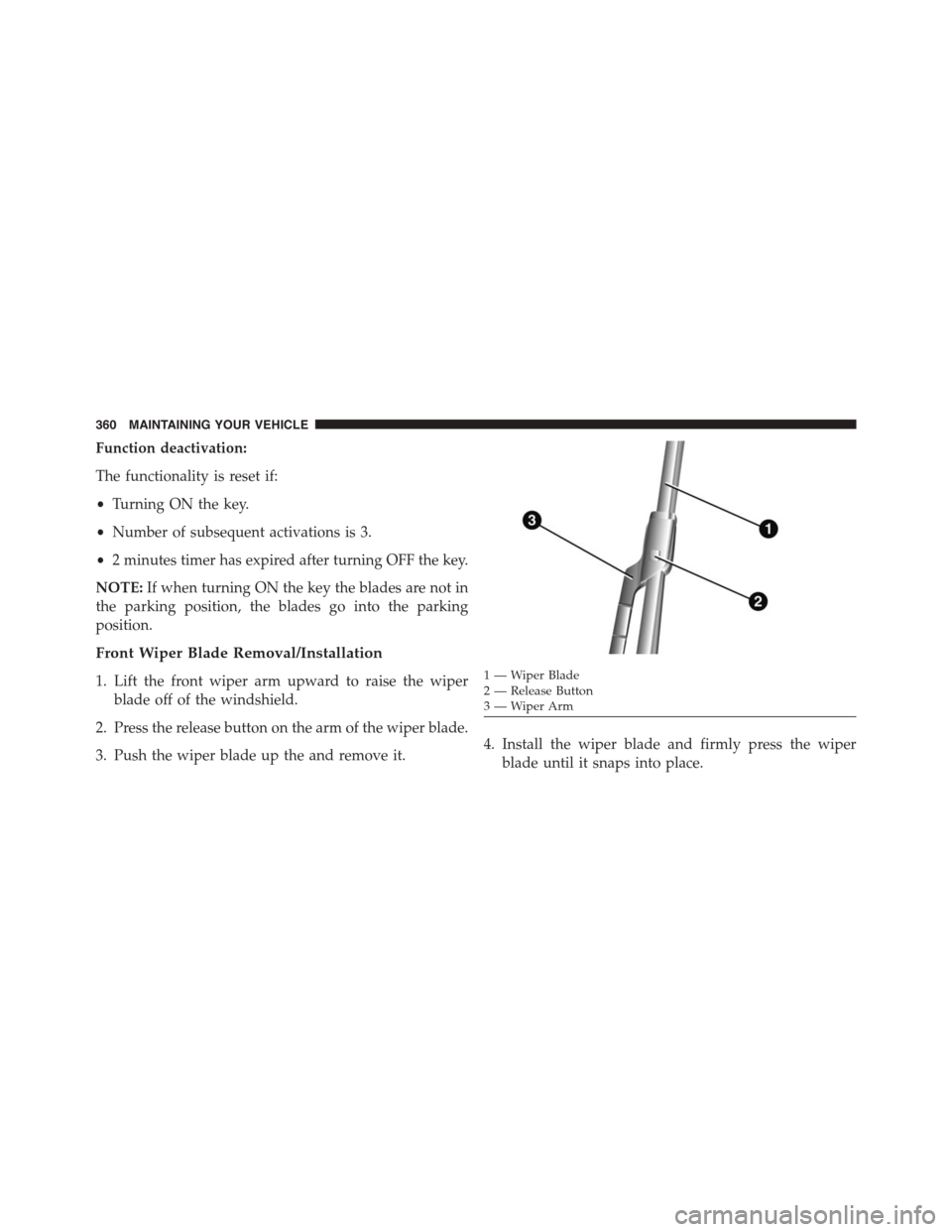
Front Wiper Blade Removal/Installation
1. Lift the front wiper arm upward to raise the wiper
blade off of the windshield.
2. Press the release button on the arm of the wiper blade.
3. Push the wiper blade up the and remove it.4. Install the wiper blade and firmly press the wiper
blade until it snaps into place.
1—WiperBlade2 — Release Button3—WiperArm
360 MAINTAINING YOUR VEHICLE
Page 376 of 438
NOTE:If contaminated with water, the fluid should be
changed immediately.
Euro Twin Clutch Transmission — If Equipped
Selection Of Lubricant
It is important to use the proper transmission fluid to
ensure optimum transmission performance and life. Use
only the manufacturer ’s specified transmission fluid.
Refer to “Fluids, Lubricants, and Genuine Parts” in this
section for fluid specifications. It is important to maintain
the transmission fluid at the correct level using the
recommended fluid. No chemical flushes should be used
in any transmission; only the approved lubricant should
be used.
Special Additives
The manufacturer strongly recommends against using
any special additives in the transmission.
Transmission fluid is an engineered product and its
performance may be impaired by supplemental addi-
tives. Therefore, do not add any fluid additives to the
transmission. The only exception to this policy is the use
of special dyes for diagnosing fluid leaks.
CAUTION!
Do not use chemical flushes in your transmission as
the chemicals can damage your transmission compo-
nents. Such damage is not covered by the New
Vehicle Limited Warranty.
Fluid Level Check
The fluid level is preset at the factory and does not
require adjustment under normal operating conditions.
Routine fluid level checks are not required, therefore the
transmission has no dipstick. Your authorized dealer can
check your transmission fluid level using special service
374 MAINTAINING YOUR VEHICLE
Page 378 of 438
CAUTION!
Using a transmission fluid other than the manufac-
turer ’s recommended fluid may cause deterioration
in transmission shift quality and/or torque converter
shudder. Refer to “Fluids, Lubricants, and Genuine
Parts” in this section for fluid specifications.
Special Additives
The manufacturer strongly recommends against using
any special additives in the transmission.
Automatic Transmission Fluid (ATF) is an engineered
product and its performance may be impaired by supple-
mental additives. Therefore, do not add any fluid addi-
tives to the transmission. The only exception to this
policy is the use of special dyes for diagnosing fluid
leaks. Avoid using transmission sealers as they may
adversely affect seals.
CAUTION!
Do not use chemical flushes in your transmission as
the chemicals can damage your transmission compo-
nents. Such damage is not covered by the New
Vehicle Limited Warranty.
Fluid Level Check
The fluid level is preset at the factory and does not
require adjustment under normal operating conditions.
Routine fluid level checks are not required, therefore the
transmission has no dipstick. Your authorized dealer can
check your transmission fluid level using special service
tools. If you notice fluid leakage or transmission malfunc-
tion, visit your authorized dealer immediately to have
the transmission fluid level checked. Operating the ve-
hicle with an improper fluid level can cause severe
transmission damage.
376 MAINTAINING YOUR VEHICLE