service FIAT 500L 2015 2.G User Guide
[x] Cancel search | Manufacturer: FIAT, Model Year: 2015, Model line: 500L, Model: FIAT 500L 2015 2.GPages: 438, PDF Size: 12.64 MB
Page 175 of 438
bulb does not come on when turning the key from
OFF/LOCK to ON/RUN, have the condition checked
promptly.
Certain conditions, such as poor fuel quality, etc., may
illuminate the MIL after engine start. The vehicle should
be serviced if the light stays on through several of your
typical driving cycles. In most situations, the vehicle will
drive normally and will not require towing.
CAUTION!
Prolonged driving with the Malfunction Indicator
Light (MIL) on could cause damage to the engine
control system. It also could affect fuel economy and
driveability. If the MIL is flashing, severe catalytic
converter damage and power loss will soon occur.
Immediate service is required.
WARNING!
A malfunctioning catalytic converter, as referenced
above, can reach higher temperatures than in normal
operating conditions. This can cause a fire if you
drive slowly or park over flammable substances such
as dry plants, wood, cardboard, etc. This could result
in death or serious injury to the driver, occupants or
others.
20. Tire Pressure Monitoring Telltale Light
Each tire, including the spare (if provided),
should be checked monthly when cold and in-
flated to the inflation pressure recommended by
the vehicle manufacturer on the vehicle placard
or tire inflation pressure label. (If your vehicle has tires of
a different size than the size indicated on the vehicle
placard or tire inflation pressure label, you should deter-
mine the proper tire inflation pressure for those tires.)
4
UNDERSTANDING YOUR INSTRUMENT PANEL 173
Page 178 of 438
U.S. Federal regulations require that upon transfer of
vehicle ownership, the seller certify to the purchaser the
correct mileage that the vehicle has been driven. If your
odometer needs to be repaired or serviced, the repair
technician should leave the odometer reading the same
as it was before the repair or service. If s/he cannot do so,
then the odometer must be set at zero, and a sticker must
be placed in the door jamb stating what the mileage was
before the repair or service. It is a good idea for you to
make a record of the odometer reading before the repair/
service, so that you can be sure that it is properly reset, or
that the door jamb sticker is accurate if the odometer
must be reset at zero.
NOTE:If the vehicle is equipped with the Electronic
Vehicle Information Center (EVIC) in the instrument
cluster, all warnings including “door” and “gate” and
“Change Engine Oil” will only be displayed in the EVIC
display. For additional information, refer to “Electronic
Vehicle Information Center (EVIC).”
23. Fuel Door Location Reminder
The fuel door reminder indicates that the fuel filler door
is located on the right side of the vehicle.
24. Electronic Throttle Control (ETC) Light
This light informs you of a problem with the
Electronic Throttle Control (ETC) system. If a
problem is detected, the light will come on
while the engine is running. Cycle the ignition
key when the vehicle has completely stopped and the
shift lever is placed in the NEUTRAL position. The light
should turn off. If the light remains lit with the engine
running, your vehicle will usually be drivable; however,
see an authorized dealer for service as soon as possible. If
the light is flashing when the engine is running, imme-
diate service is required and you may experience reduced
performance, an elevated/rough idle or engine stall and
your vehicle may require towing. The light will come on
when the ignition is first turned to ON/RUN and remain
176 UNDERSTANDING YOUR INSTRUMENT PANEL
Page 179 of 438
on briefly as a bulb check. If the light does not come on
during starting, have the system checked by an autho-
rized dealer.
25. Anti-Lock Brake (ABS) Light
This light monitors the Anti-Lock Brake System
(ABS). The light will turn on when the ignition
switch is turned to the ON/RUN position and
may stay on for as long as four seconds.
If the ABS light remains on or turns on while driving, it
indicates that the Anti-Lock portion of the brake system
is not functioning and that service is required. However,
the conventional brake system will continue to operate
normally if the BRAKE warning light is not on.
If the ABS light is on, the brake system should be serviced
as soon as possible to restore the benefits of Anti-Lock
brakes. If the ABS light does not turn on when the
ignition switch is turned to the ON/RUN position, have
the light inspected by an authorized dealer.
ELECTRONIC VEHICLE INFORMATION CENTER
(EVIC)
The Electronic Vehicle Information Center (EVIC) fea-
tures a driver-interactive display that is located in the
instrument cluster.
The EVIC consists of the following:
•System Status
•Vehicle Information Warning Message Displays
•Personal Settings (Customer-Programmable Features)
•Outside Temperature Display
•Trip Computer Functions
EVIC Screen
The EVIC will display the following:
•Time
4
UNDERSTANDING YOUR INSTRUMENT PANEL 177
Page 180 of 438
•Date or trip distance display in miles or kilometers
•Outside temperature
•Gear Indicator
•Odometer (display of distance travelled in miles/
kilometers)
•Car status indication (e.g. doors open, possible ice on
road, service, etc.)
EVIC Control Buttons
The EVIC control buttons are located on the instrument
panel below the radio.
Push and release theMENUbutton briefly to access the
menu and/or go to next screen or to confirm the required
menu option. Push and hold theMENUbutton (approxi-
mately one second) to return to the main screen.
Push and release the UPbutton to scroll upward
through the displayed menu and the related options
or to increase the displayed value.
Push and release the DOWNbutton to scroll down-
ward through the displayed menu and the related
options or to decrease the value displayed.
NOTE:UPand DOWNbuttons activate differ-
ent functions according to the following situations:
•To scroll the menu options upwards or downwards.
•To increase or decrease values during settings.
NOTE:When opening one of the front doors, the EVIC
display will turn on the clock, the external temperature
and the miles or kilometers covered (for versions/
markets, where provided) for a few seconds.
178 UNDERSTANDING YOUR INSTRUMENT PANEL
Page 192 of 438
CD/DVD DISC MAINTENANCE
To keep a CD/DVD in good condition, take the following
precautions:
1. Handle the disc by its edge; avoid touching the
surface.
2. If the disc is stained, clean the surface with a soft cloth,
wiping from center to edge.
3. Do not apply paper or tape to the disc; avoid scratch-
ing the disc.
4. Do not use solvents such as benzene, thinner, cleaners,
or anti-static sprays.
5. Store the disc in its case after playing.
6. Do not expose the disc to direct sunlight.
7. Do not store the disc where temperatures may become
too high.
NOTE:If you experience difficulty in playing a particular
disc, it may be damaged (i.e., scratched, reflective coating
removed, a hair, moisture or dew on the disc) oversized,
or have protection encoding. Try a known good disc
before considering disc player service.
RADIO OPERATION AND MOBILE PHONES
Under certain conditions, the mobile phone being on in
your vehicle can cause erratic or noisy performance from
your radio. This condition may be lessened or eliminated
by relocating the mobile phone antenna. This condition is
not harmful to the radio. If your radio performance does
not satisfactorily “clear” by the repositioning of the
antenna, it is recommended that the radio volume be
turned down or off during mobile phone operation.
190 UNDERSTANDING YOUR INSTRUMENT PANEL
Page 222 of 438

Additional Information
© 2014 Chrysler Group LLC. All rights reserved. Mopar
and Uconnect are registered trademarks and Mopar
Owner Connect is a trademark of Chrysler Group LLC.
Android is a trademark of Google Inc. SiriusXM and all
related marks and logos are trademarks of SiriusXM
Radio Inc. Yelp, Yelp logo, Yelp burst and related marks
are registered trademarks of Yelp.
Uconnect® System Support:
•U.S. residents call 1-877-855-8400 or visit
DriveUconnect.com
•Canadian residents call 1-800-465-2001 (English) or
1-800-387-9983 (French) or visit DriveUconnect.ca
Mon. – Fri., 7:00 am – 12:00 am, ET
Sat., 8:00 am – 10:00 pm, ET
Sun., 9:00 am – 5:00 pm, ET
Uconnect® Access Services Support 1-855-792-4241.
Please have your Uconnect® Security PIN ready when
you call.
220 UNDERSTANDING YOUR INSTRUMENT PANEL
Page 241 of 438
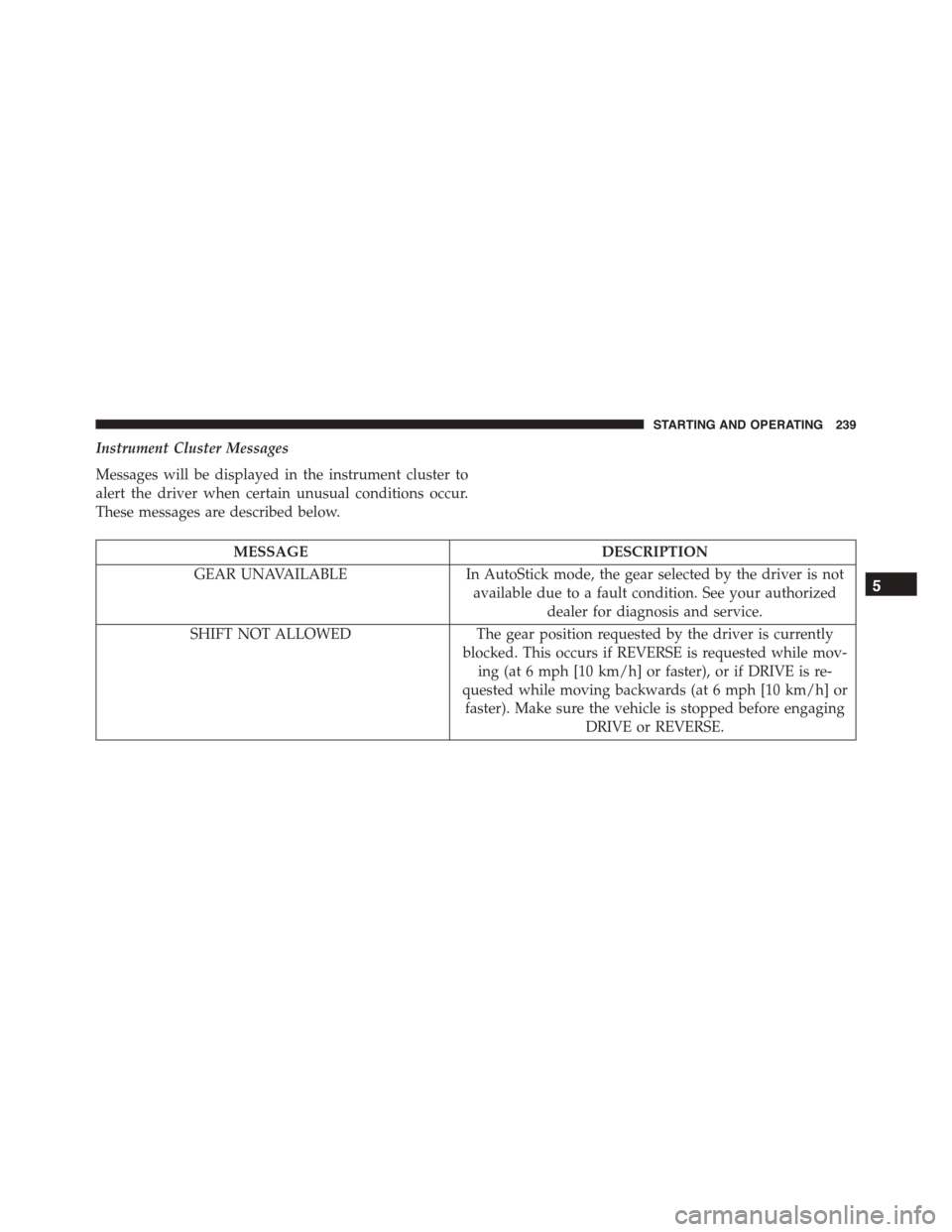
Instrument Cluster Messages
Messages will be displayed in the instrument cluster to
alert the driver when certain unusual conditions occur.
These messages are described below.
MESSAGEDESCRIPTION
GEAR UNAVAILABLEIn AutoStick mode, the gear selected by the driver is not
available due to a fault condition. See your authorized
dealer for diagnosis and service.
SHIFT NOT ALLOWEDThe gear position requested by the driver is currently
blocked. This occurs if REVERSE is requested while mov-
ing (at 6 mph [10 km/h] or faster), or if DRIVE is re-
quested while moving backwards (at 6 mph [10 km/h] or
faster). Make sure the vehicle is stopped before engaging
DRIVE or REVERSE.
5
STARTING AND OPERATING 239
Page 242 of 438
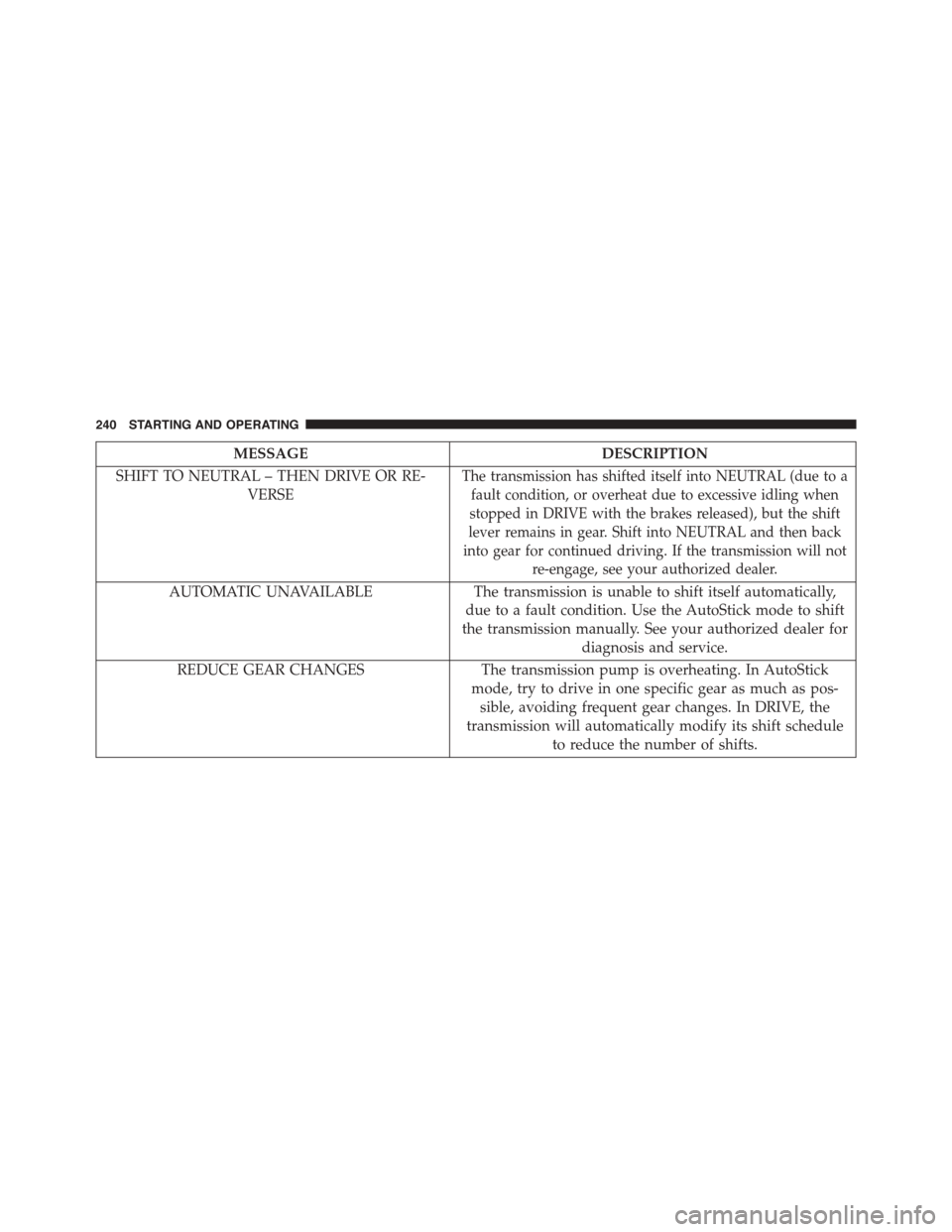
MESSAGEDESCRIPTION
SHIFT TO NEUTRAL – THEN DRIVE OR RE-
VERSE
The transmission has shifted itself into NEUTRAL (due to a
fault condition, or overheat due to excessive idling when
stopped in DRIVE with the brakes released), but the shift
lever remains in gear. Shift into NEUTRAL and then back
into gear for continued driving. If the transmission will not
re-engage, see your authorized dealer.
AUTOMATIC UNAVAILABLEThe transmission is unable to shift itself automatically,
due to a fault condition. Use the AutoStick mode to shift
the transmission manually. See your authorized dealer for
diagnosis and service.
REDUCE GEAR CHANGESThe transmission pump is overheating. In AutoStick
mode, try to drive in one specific gear as much as pos-
sible, avoiding frequent gear changes. In DRIVE, the
transmission will automatically modify its shift schedule
to reduce the number of shifts.
240 STARTING AND OPERATING
Page 243 of 438
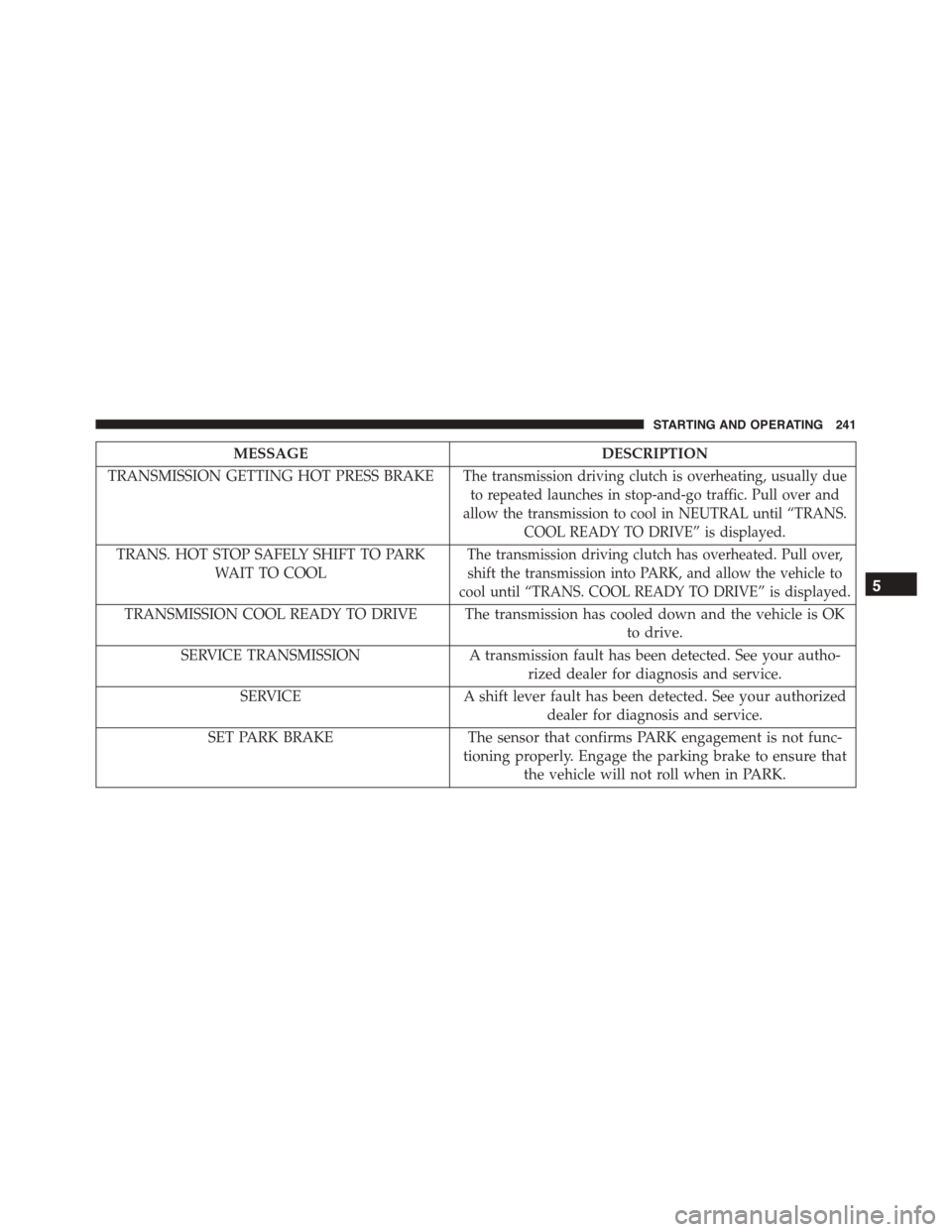
MESSAGEDESCRIPTION
TRANSMISSION GETTING HOT PRESS BRAKEThe transmission driving clutch is overheating, usually due
to repeated launches in stop-and-go traffic. Pull over and
allow the transmission to cool in NEUTRAL until “TRANS.
COOL READY TO DRIVE” is displayed.
TRANS. HOT STOP SAFELY SHIFT TO PARK
WAIT TO COOL
The transmission driving clutch has overheated. Pull over,
shift the transmission into PARK, and allow the vehicle to
cool until “TRANS. COOL READY TO DRIVE” is displayed.
TRANSMISSION COOL READY TO DRIVE The transmission has cooled down and the vehicle is OK
to drive.
SERVICE TRANSMISSIONA transmission fault has been detected. See your autho-
rized dealer for diagnosis and service.
SERVICEA shift lever fault has been detected. See your authorized
dealer for diagnosis and service.
SET PARK BRAKEThe sensor that confirms PARK engagement is not func-
tioning properly. Engage the parking brake to ensure that
the vehicle will not roll when in PARK.
5
STARTING AND OPERATING 241
Page 244 of 438
Transmission Limp Home Mode
Transmission function is monitored electronically for
abnormal conditions. If a condition is detected that could
result in transmission damage, Transmission Limp Home
Mode is activated. In this mode, some gears will be
unavailable. The transmission will operate only in a
certain select set of gears (such as 1st, 2nd, 3rd, and
Reverse, or 1st, 3rd, 5th, and Reverse, or 2nd, 4th, and 6th
[with no Reverse]). PARK and NEUTRAL will continue
to be available. The Malfunction Indicator Light (MIL)
may be illuminated. Limp Home Mode allows the vehicle
to be driven to an authorized dealer for service without
damaging the transmission.
In the event of a momentary problem, the transmission
can be reset to regain all forward gears by performing the
following steps:
1. Stop the vehicle.
2. Shift the transmission into PARK.
3. Turn the ignition switch to the OFF position.
4. Wait approximately 10 seconds.
5. Restart the engine.
6. Shift into the desired gear range. If the problem is no
longer detected, the transmission will return to normal
operation.
NOTE:Even if the transmission can be reset, we recom-
mend that you visit your authorized dealer at your
earliest possible convenience. Your authorized dealer has
diagnostic equipment to determine if the problem could
recur.
If the transmission cannot be reset, authorized dealer
service is required.
242 STARTING AND OPERATING