wheel FIAT 500L 2015 2.G User Guide
[x] Cancel search | Manufacturer: FIAT, Model Year: 2015, Model line: 500L, Model: FIAT 500L 2015 2.GPages: 438, PDF Size: 12.64 MB
Page 121 of 438
Windshield Wiper Off
This is the normal position of the wiper lever.
Intermittent Speed
Rotate the end of the lever upward to the first
detent. The wipers will operate at intermittent
speed.
Low Speed
Rotate the end of the lever upward to the second
detent. The wipers will operate at low speed.
High Speed
Rotate the end of the lever upward to the third
detent. The wipers will operate at high speed.
Manual High Speed/Mist
Push the lever upward from the off position. The wipers
will operate at high speed to clear off road mist or spray
from a passing vehicle. This operation will continue until
the lever is released. When the lever is released, the
wipers will return to the off position and automatically
shut off.
Front Windshield Washer Operation
Pull the windshield wiper/washer lever toward the
steering wheel to activate the washers. The wipers will
activate automatically for three cycles after the lever is
released.
3
UNDERSTANDING THE FEATURES OF YOUR VEHICLE 119
Page 125 of 438
To unlock the steering column, pull the control handle
down. To tilt the steering column, move the steering
wheel upward or downward as desired. To lengthen or
shorten the steering column, pull the steering wheel
outward or push it inward as desired. To lock the steering
column in position, push the control handle up until fully
engaged.
WARNING!
Do not adjust the steering column while driving.
Adjusting the steering column while driving or driv-
ing with the steering column unlocked, could cause
the driver to lose control of the vehicle. Failure to
follow this warning may result in serious injury or
death.
ELECTRONIC SPEED CONTROL
When engaged, the Electronic Speed Control takes over
accelerator operations at speeds greater than 25 mph
(40 km/h).
The Electronic Speed Control buttons are located on the
right side of the steering wheel.
3
UNDERSTANDING THE FEATURES OF YOUR VEHICLE 123
Page 137 of 438
out of REVERSE unless the forward vehicle speed ex-
ceeds 8 mph (13 km/h), the transmission is shifted into
#PARK#or the vehicle’s ignition is cycled to the OFF
position.
When enabled, active guide lines are overlaid on the
image to illustrate the width of the vehicle and its
projected backup path based on the steering wheel
position. A dashed center line overlay indicates the center
of the vehicle to assist with parking.
When enabled, fixed guide lines are overlaid on the
image to illustrate the width of the vehicle.
NOTE:The ParkView® Rear Back Up Camera has pro-
grammable modes of operation that may be selected
through the Uconnect® System. Refer to your Uconnect®
Supplement Manual for further information.
Different colored zones indicate the distance to the rear of
the vehicle.
The following table shows the approximate distances for
each zone:
ZoneDistance to the rear of the vehicle
Red0 - 1 ft (0 - 30 cm)
Yellow1 ft - 3 ft (30 cm - 1 m)
Green3 ft or greater (1 m or greater)
3
UNDERSTANDING THE FEATURES OF YOUR VEHICLE 135
Page 165 of 438
UNDERSTANDING YOUR INSTRUMENT PANEL
CONTENTS
!INSTRUMENT PANEL FEATURES..........165
!INSTRUMENT CLUSTER.................166
!INSTRUMENT CLUSTER DESCRIPTIONS.....167
!ELECTRONIC VEHICLE INFORMATION
CENTER (EVIC).......................177
▫EVIC Screen.........................177
▫EVIC Control Buttons..................178
▫Electronic Vehicle Information Center (EVIC)
Setup Menu.........................179
▫Change Engine Oil Indicator System........180
▫Trip Computer.......................181
▫Trip Button..........................181
▫Trip Functions........................182
▫Values Displayed......................183
▫Personal Settings (Customer-Programmable
Features)............................184
!Uconnect® RADIOS.....................187
!iPod®/USB/MEDIA PLAYER CONTROL.....187
!STEERING WHEEL AUDIO CONTROLS......188
▫Radio Operation......................189
4
Page 167 of 438
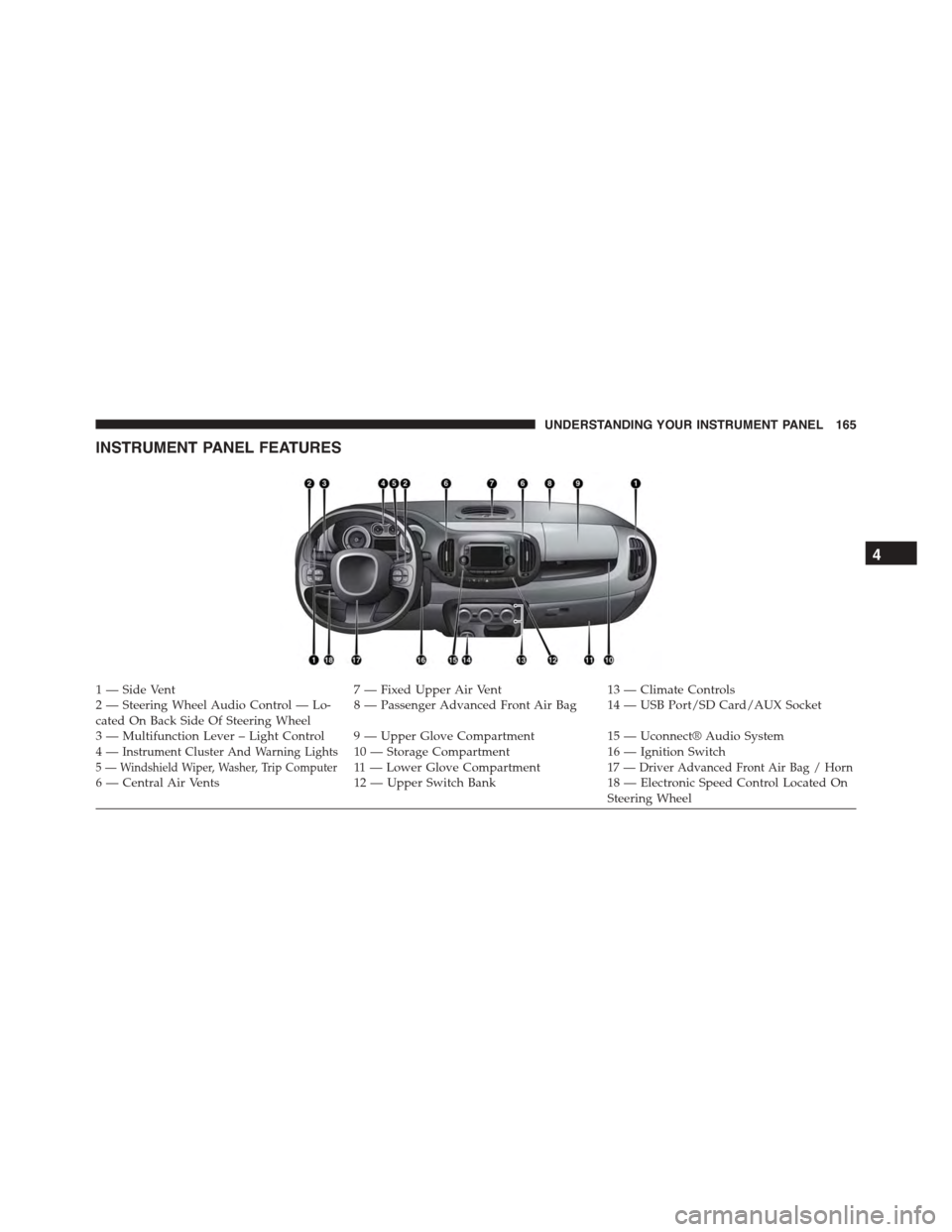
INSTRUMENT PANEL FEATURES
1 — Side Vent7 — Fixed Upper Air Vent13 — Climate Controls2—SteeringWheelAudioControl—Lo-cated On Back Side Of Steering Wheel8—PassengerAdvancedFrontAirBag 14—USBPort/SDCard/AUXSocket
3—MultifunctionLever–LightControl 9—UpperGloveCompartment15 — Uconnect® Audio System4—Instrument Cluster And Warning Lights10 — Storage Compartment16 — Ignition Switch5 — Windshield Wiper, Washer, Trip Computer11 — L o w e r G l o v e C o m p a r t m e n t17 — Driver Advanced Front Air Bag / Horn6 — Central Air Vents12 — Upper Switch Bank18 — Electronic Speed Control Located OnSteering Wheel
4
UNDERSTANDING YOUR INSTRUMENT PANEL 165
Page 173 of 438
12. High Beam Indicator
This light indicates that the headlights are on high
beam. Pull the turn signal lever toward the steer-
ing wheel to switch the headlights to low beam.
13. Park/Headlight ON Indicator / Follow Me Home
(Headlight Delay) Indicator — If Equipped
This indicator will illuminate when the park
lights or headlights are turned on. If the Follow
Me Home feature is activated this indicator
will illuminate and the Electronic Vehicle Infor-
mation Center (EVIC) will show how long the function
remains active. For further information, refer to “Follow
Me Home” in “Understanding The Features of Your
Vehicle”.
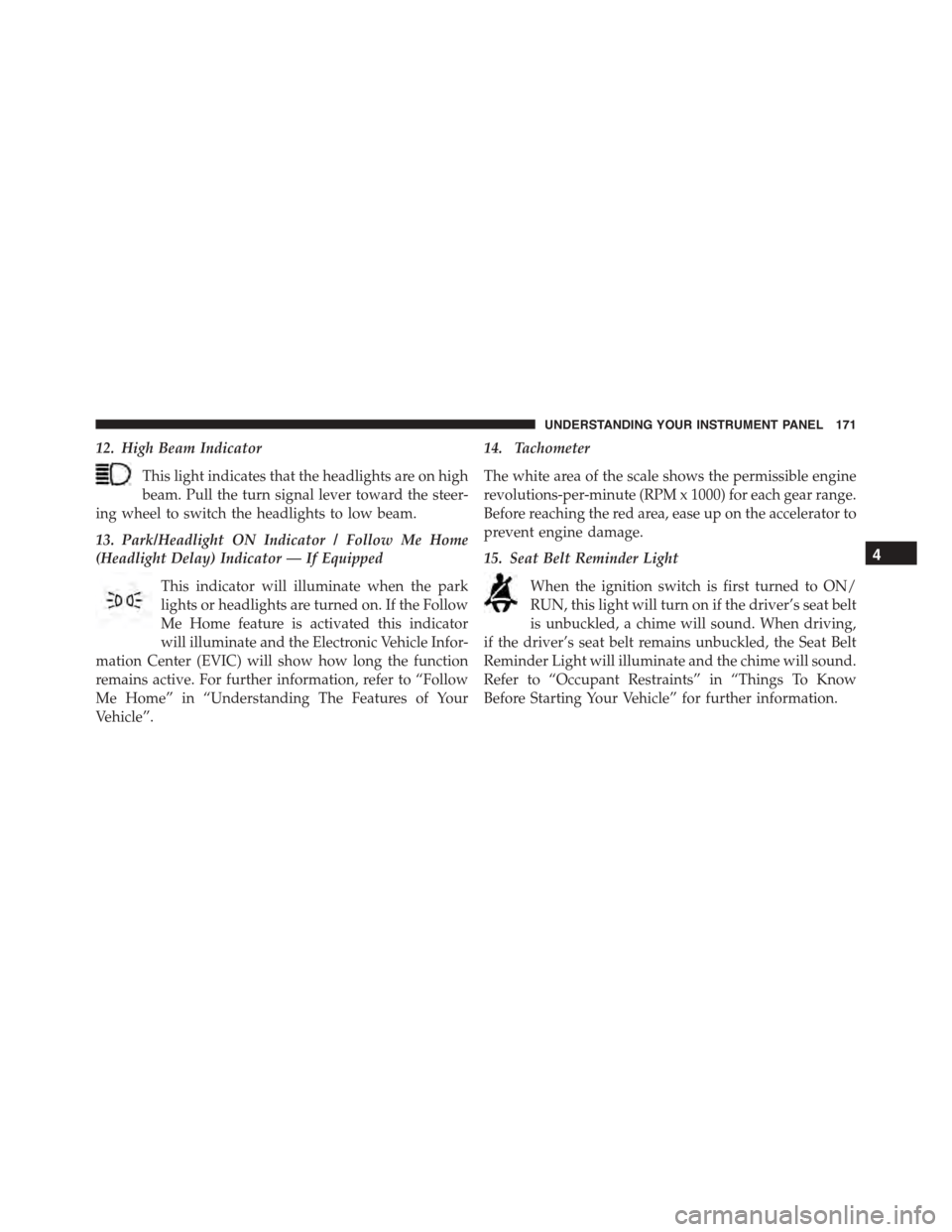
14. Tachometer
The white area of the scale shows the permissible engine
revolutions-per-minute (RPM x 1000) for each gear range.
Before reaching the red area, ease up on the accelerator to
prevent engine damage.
15. Seat Belt Reminder Light
When the ignition switch is first turned to ON/
RUN, this light will turn on if the driver’s seat belt
is unbuckled, a chime will sound. When driving,
if the driver’s seat belt remains unbuckled, the Seat Belt
Reminder Light will illuminate and the chime will sound.
Refer to “Occupant Restraints” in “Things To Know
Before Starting Your Vehicle” for further information.
4
UNDERSTANDING YOUR INSTRUMENT PANEL 171
Page 176 of 438
As an added safety feature, your vehicle has been
equipped with a Tire Pressure Monitoring System
(TPMS) that illuminates a low tire pressure telltale when
one or more of your tires is significantly under-inflated.
Accordingly, when the low tire pressure telltale illumi-
nates, you should stop and check your tires as soon as
possible, and inflate them to the proper pressure. Driving
on a significantly under-inflated tire causes the tire to
overheat and can lead to tire failure. Under-inflation also
reduces fuel efficiency and tire tread life, and may affect
the vehicles handling and stopping ability.
Please note that the TPMS is not a substitute for proper
tire maintenance, and it is the driver ’s responsibility to
maintain correct tire pressure, even if under-inflation has
not reached the level to trigger illumination of the TPMS
low tire pressure telltale.
Your vehicle has also been equipped with a TPMS
malfunction indicator to indicate when the system is not
operating properly. The TPMS malfunction indicator is
combined with the low tire pressure telltale. When the
system detects a malfunction, the telltale will flash for
approximately one minute and then remain continuously
illuminated. This sequence will continue upon subse-
quent vehicle start-ups as long as the malfunction exists.
When the malfunction indicator is illuminated, the sys-
tem may not be able to detect or signal low tire pressure
as intended. TPMS malfunctions may occur for a variety
of reasons, including the installation of replacement or
alternate tires or wheels on the vehicle that prevent the
TPMS from functioning properly. Always check the
TPMS malfunction telltale after replacing one or more
tires or wheels on your vehicle, to ensure that the
replacement or alternate tires and wheels allow the TPMS
to continue to function properly.
174 UNDERSTANDING YOUR INSTRUMENT PANEL
Page 177 of 438
CAUTION!
The TPMS has been optimized for the original
equipment tires and wheels. TPMS pressures and
warning have been established for the tire size
equipped on your vehicle. Undesirable system opera-
tion or sensor damage may result when using re-
placement equipment that is not of the same size,
type, and/or style. Aftermarket wheels can cause
sensor damage. Using aftermarket tire sealants may
cause the Tire Pressure Monitoring System (TPMS)
sensor to become inoperable. After using an after-
market tire sealant it is recommended that you take
your vehicle to an authorized dealership to have your
sensor function checked.
21. Glow Plug Light — If Equipped
This vehicle will inhibit engine cranking when the
ambient temperature is less than –22° F (–30° C)
and the oil temperature sensor reading indicates an
engine block heater has not been used. The Glow Plug
light will flash during in cold weather for up to 10
seconds.
If equipped with a block heater harness the message
#Plug In Engine Heater#, will be displayed in the instru-
ment cluster when the ambient temperature is below 5°F
(-15° C) at the time the engine is shut off as a reminder to
avoid possible crank delays at the next cold start.
22. Odometer / Trip Odometer / Electronic Vehicle Infor-
mation Center (EVIC) Display Area
This display indicates the total distance the vehicle has
been driven.
4
UNDERSTANDING YOUR INSTRUMENT PANEL 175
Page 190 of 438
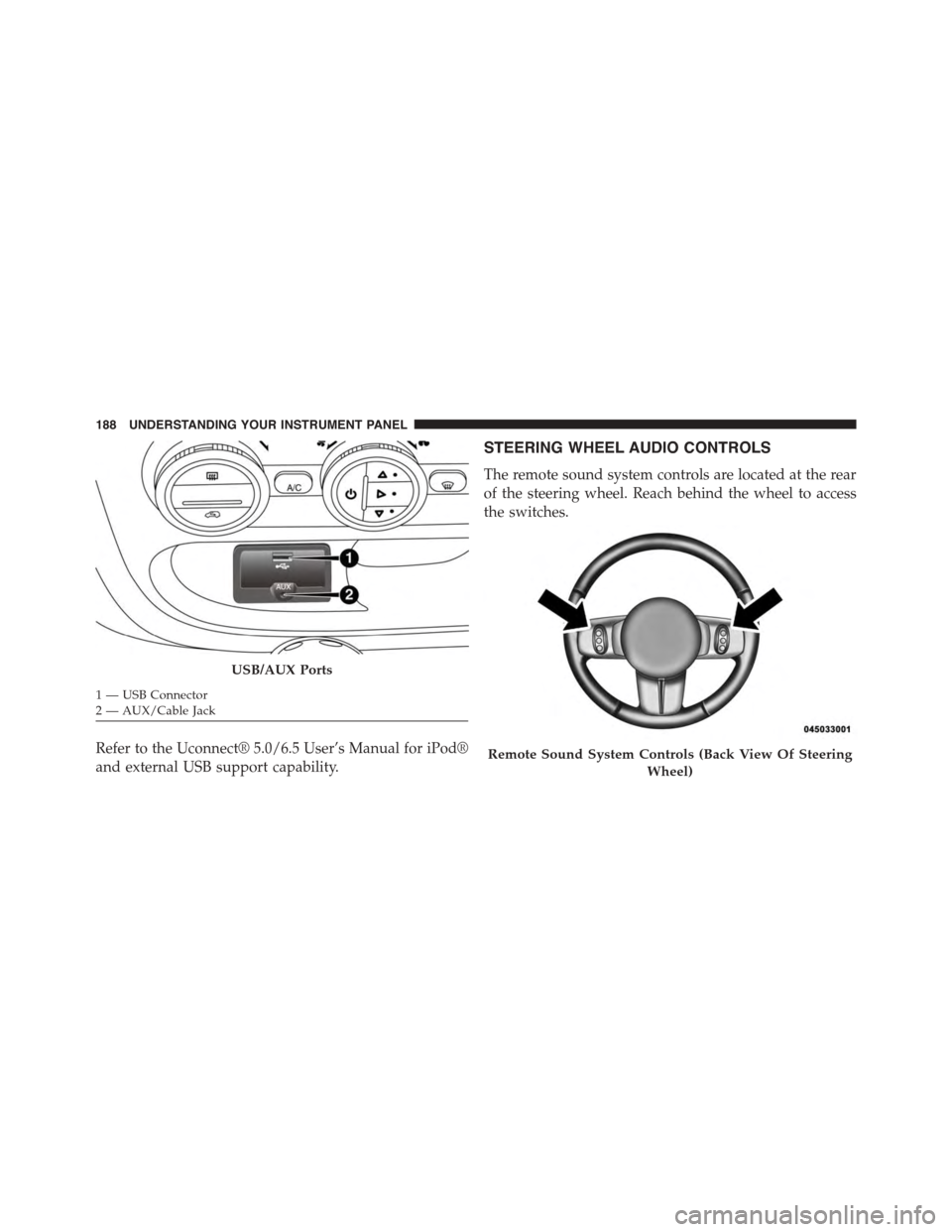
Refer to the Uconnect® 5.0/6.5 User’s Manual for iPod®
and external USB support capability.
STEERING WHEEL AUDIO CONTROLS
The remote sound system controls are located at the rear
of the steering wheel. Reach behind the wheel to access
the switches.
USB/AUX Ports
1—USBConnector2—AUX/CableJack
Remote Sound System Controls (Back View Of Steering
Wheel)
188 UNDERSTANDING YOUR INSTRUMENT PANEL
Page 205 of 438
with maximum temperature settings for best wind-
shield and side window defrosting. When the defrost
mode is selected, the blower will automatically default
to medium-high.
•Right Arrow – Air flow at central and side dashboard
vents to ventilate the chest and the face during the hot
season.
•Down Arrow – Air flow to the front and rear footwell
diffusers. This air distribution setting heats the passen-
ger compartment most quickly, giving a prompt sen-
sation of warmth.
•Right/Down Arrows – Air flow distributed between
footwell diffusers (hotter air) and central and side
dashboard vents (cooler air). This distribution setting
is useful in spring and autumn on sunny days.
•Up/Down Arrows – Air flow distributed between
footwell diffusers and windshield and front side win-
dow defrosting diffusers. This distribution setting al-
lows the passenger compartment to be warmed effec-
tively and prevents the windows from misting.
•Up/Right Arrows – Air flow distribution between
windshield defrosting diffusers and side and central
dashboard vents. This allows air to be sent to the
windshield in conditions of strong sunlight.
•Up/Right/Down Arrows – Air flow distribution to all
diffusers on the car.
NOTE:Air always flows from the side dashboard diffus-
ers: it is, however, possible to interrupt the air flow by
operating the wheel located near the corresponding
vents.
4
UNDERSTANDING YOUR INSTRUMENT PANEL 203