mph display FIAT 500L 2015 2.G Owners Manual
[x] Cancel search | Manufacturer: FIAT, Model Year: 2015, Model line: 500L, Model: FIAT 500L 2015 2.GPages: 438, PDF Size: 12.64 MB
Page 187 of 438
Buzzer Volume (Adjusting The Failure/Warning
Buzzer Volume)
With this function the volume of the buzzer accompany-
ing any failure/warning indication can be adjusted to
one of eight volume levels.
To adjust the volume proceed as follows:
1. Briefly push and release theMENUbutton. The pre-
viously set volume “level” will flash on the display.
2. Push and release the UPor DOWNbutton for
setting.
3. Briefly push and release theMENUbutton to go back
to the menu screen, or push and hold theMENU
button (approximately one second) to go back to the
main screen without storing the settings.
Speed Buzzer (Speed Limit)
With this function it is possible to set the car speed limit
(mph or km/h); when this limit is exceeded the driver is
immediately alerted.
To set the speed limit, proceed as follows:
1. Briefly push and release theMENUbutton. The dis-
play will show the message (Speed Beep).
2. Push and release the UPor DOWNbutton to
select speed limit activation (On) or deactivation
(Off).
3. When the function is activated (On), briefly push and
release theMENUbutton to display the presently set
activation speed. Pushing the UPor DOWN
buttons selects the speed limit. PushMENUto
confirm selection.
4
UNDERSTANDING YOUR INSTRUMENT PANEL 185
Page 188 of 438
NOTE:Selection is possible between 20 – 125 mph or (32
– 201 km/h), depending on the selected unit. The setting
will increase/decrease by five units each time the UP/
DOWN button is pushed. Push and hold the UP/DOWN
button to increase/decrease the setting rapidly. Save the
setting by briefly pushing the button when you approach
the required setting.
•Briefly push and release theMENUbutton to go back
to the menu screen, or push and hold theMENU
button (approximately one second) to go back to the
main screen without storing the settings.
To cancel the setting, proceed as follows:
1. Briefly push and release theMENUbutton. “On” will
flash on the display.
2. Push and release the DOWNbutton. “Off” will
flash on the display.
3. Briefly push and release theMENUbutton to go back
to the menu screen, or push and hold theMENU
button (approximately one second) to go back to the
main screen without storing the settings.
Dimmer
NOTE:The brightness of IPC will change automatically
only if the External light has changed: External light On=
Night Mode, External Light OFF= Day Mode. In both
case (Day or Night) is possible to adjust the display
brightness as described in step 1 below.
To adjust the brightness, proceed as follows:
1. Push and release the UPor DOWNbutton to
set the required brightness level.
2. Briefly push and release theMENUbutton to go back
to the menu screen or push and hold theMENU
(approximately one second) to go back to the main
screen without storing settings.
186 UNDERSTANDING YOUR INSTRUMENT PANEL
Page 234 of 438
This transmission is programmed to prevent shifting
from REVERSE to DRIVE or DRIVE to REVERSE, if
vehicle speed is above 6 mph (10 km/h). This safety
feature helps protect your transmission from damage.
Only shift from DRIVE to PARK or REVERSE when the
accelerator pedal is released and the vehicle is stopped.
Be sure to keep your foot on the brake pedal when
shifting between these gears.
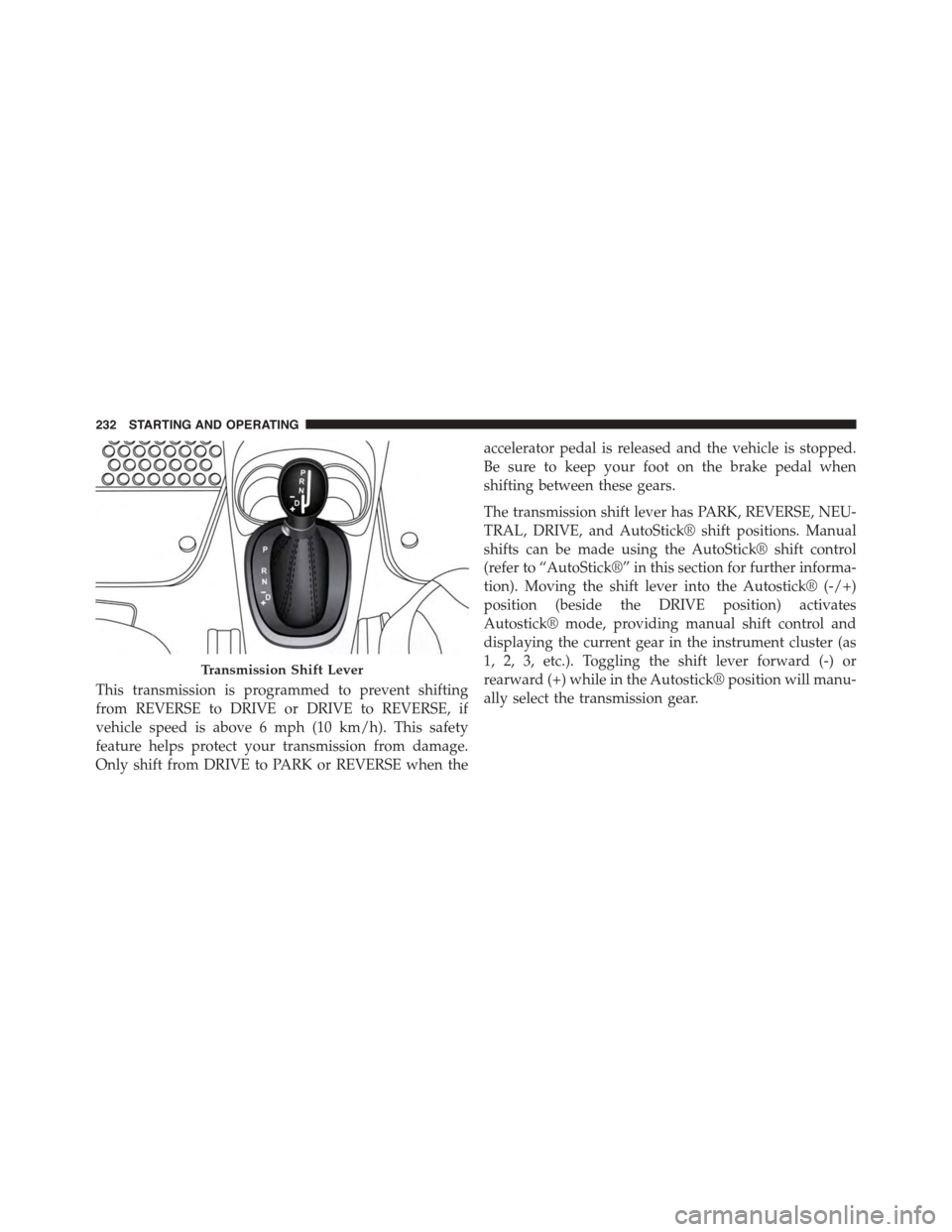
The transmission shift lever has PARK, REVERSE, NEU-
TRAL, DRIVE, and AutoStick® shift positions. Manual
shifts can be made using the AutoStick® shift control
(refer to “AutoStick®” in this section for further informa-
tion). Moving the shift lever into the Autostick® (-/+)
position (beside the DRIVE position) activates
Autostick® mode, providing manual shift control and
displaying the current gear in the instrument cluster (as
1, 2, 3, etc.). Toggling the shift lever forward (-) or
rearward (+) while in the Autostick® position will manu-
ally select the transmission gear.
Transmission Shift Lever
232 STARTING AND OPERATING
Page 241 of 438
Instrument Cluster Messages
Messages will be displayed in the instrument cluster to
alert the driver when certain unusual conditions occur.
These messages are described below.
MESSAGEDESCRIPTION
GEAR UNAVAILABLEIn AutoStick mode, the gear selected by the driver is not
available due to a fault condition. See your authorized
dealer for diagnosis and service.
SHIFT NOT ALLOWEDThe gear position requested by the driver is currently
blocked. This occurs if REVERSE is requested while mov-
ing (at 6 mph [10 km/h] or faster), or if DRIVE is re-
quested while moving backwards (at 6 mph [10 km/h] or
faster). Make sure the vehicle is stopped before engaging
DRIVE or REVERSE.
5
STARTING AND OPERATING 239
Page 299 of 438
text message will display when one or more of the four
active road tire pressures are low. Should this occur, you
should stop as soon as possible, check the inflation
pressure of each tire on your vehicle, and inflate each tire
to the vehicle’s recommended cold placard pressure
value. The system will automatically update and the Tire
Pressure Monitoring Light will extinguish once the up-
dated tire pressures have been received. The vehicle may
need to be driven for up to 20 minutes above 15 mph
(24 km/h) to receive this information.
Check TPMS Warnings
The Tire Pressure Monitoring Telltale Light will flash on
and off for 75 seconds and remain on solid when a system
fault is detected, an audible chime will be activated and
the “Service Tire Pressure Monitoring System” text mes-
sage will display. If the ignition key is cycled, this
sequence will repeat providing the system fault still
exists. The Tire Pressure Monitoring Telltale Light will
turn off when the fault condition no longer exists. A
system fault can occur with any of the following sce-
narios:
1. Jamming due to electronic devices or driving next to
facilities emitting the same radio frequencies as the
TPM sensors.
2. Installing some form of aftermarket window tinting
that affects radio wave signals.
3. Snow or ice around the wheels or wheel housings.
4. Using tire chains on the vehicle.
5. Using wheels/tires not equipped with TPM sensors.
NOTE:Your vehicle may be equipped with a compact
spare wheel and tire assembly.
1. The compact spare tire does not have a tire pressure
monitoring sensor. Therefore, the TPMS will not moni-
tor the tire pressure in the compact spare tire.
5
STARTING AND OPERATING 297