change time FIAT 500L 2017 2.G User Guide
[x] Cancel search | Manufacturer: FIAT, Model Year: 2017, Model line: 500L, Model: FIAT 500L 2017 2.GPages: 370, PDF Size: 3.56 MB
Page 172 of 370
Buttons On The Faceplate
Buttons on the faceplate are located below, and beside
the Uconnect system in the center of the instrument
panel. In addition, there is a Scroll/Enter control knob
located on the right side. Turn the control knob to scroll
through menus and change settings (i.e., 30, 60, 90),
push the center of the control knob one or more times to
select or change a setting (i.e., ON, OFF).
Your Uconnect system may also have Display Off and
back arrow buttons on the faceplate.
Push the Display Off button on the faceplate to turn off
the Uconnect screen. Push the Display Off button on the
faceplate a second time to turn the screen on.
Push the Back Arrow button on the faceplate to exit out
of a Menu or certain option on the Uconnect system.
Buttons On The Touchscreen
Buttons on the touchscreen are accessible on the
Uconnect touchscreen.
Customer Programmable Features — Uconnect
5.0 Settings
WARNING!
ALWAYS drive safely with your hands on the
wheel. You have full responsibility and assume all
risks related to the use of the Uconnect features and
applications in this vehicle. Only use Uconnect
when it is safe to do so. Failure to do so may result
in an accident involving serious injury or death.
Push the SETTINGS button on the faceplate to display
the settings menu screen. In this mode the Uconnect
system allows you to access programmable features
that may be equipped such as Display, Clock, Safety &
Driving Assistance, Lights, Doors & Locks, Auto-On
Comfort & Remote Start, Engine Off Options, Compass
Settings, Audio, Phone/Bluetooth, SiriusXM Setup and
System Information.
NOTE: Only one category may be selected at a time.
When making a selection, press the button on the
touchscreen to enter the desired mode. Once in the
desired mode, press and release the preferred setting
until the button is highlighted. Once the setting is
170 UNDERSTANDING YOUR INSTRUMENT PANEL
Page 182 of 370
Clock
After pressing the “Clock” button on the touchscreen
the following settings will be available:
Setting NameSelectable Options
Sync Time With GPS OnOff
NOTE: This feature will allow you to automatically have the radio set the time. To change the Sync Time set-
ting, press the “Sync Time with Nav” button on the touchscreen.
Set Time Hours +–
NOTE: This feature will allow you to adjust the hours. The “Sync Time with Nav” button on the touchscreen
must be unchecked.
Set Time Minutes +–
NOTE: This feature will allow you to adjust the minutes. The “Sync Time with Nav” button on the touchscreen
must be unchecked.
Time Format 12hrs24hrs
Show Time In Status Bar — If Equipped On
Off
NOTE: This feature will allow you to turn on or shut off the digital clock in the status bar.
180 UNDERSTANDING YOUR INSTRUMENT PANEL
Page 184 of 370
Lights
After pressing the “Lights” button on the touchscreen,
the following settings will be available:
Setting NameSelectable Options
Interior Ambient Lights +–
NOTE: When this feature is selected, it allows the adjustment of the brightness of the interior ambient lighting.
Headlight Sensitivity 123
NOTE: When this feature is selected, it allows the Headlight Sensitivity to be adjusted according to three levels
(level 1 = minimum sensitivity, level 2 = medium sensitivity, level 3 = maximum sensitivity); the greater the
sensitivity set, the less the external light variation required to turn on the lights (e.g. with a setting on level 3 at
sunset the headlights turn on earlier than in levels 1 and 2).
Headlight Off Delay 0 sec30 sec 60 sec 90 sec
Greeting Lights On Off
Daytime Running Lights Ye s
N o
Steering Directed Lights Ye s
N o
NOTE: When this feature is selected, the headlights will turn relative to a change in the direction of the steer-
ing wheel.
182 UNDERSTANDING YOUR INSTRUMENT PANEL
Page 212 of 370
TIP:At any time, if you are not sure of what to say or
want to learn a Voice Command, push the VR button
and say “Help.”The system will provide you
with a list of commands.
Media
Uconnect offers connections via USB Port, Bluetooth
and Auxiliary Ports (If Equipped). Voice operation is
only available for connected USB and iPod devices.
(Remote CD player optional and not available on all
vehicles.)
Push the VR button
. After the beep, say one of the
following commands and follow the prompts to
switch your media source or choose an artist.
• Change source to Bluetooth.
• Change source to iPod.
Uconnect 5.0 Radio
Uconnect 6.5 NAV Radio
210 UNDERSTANDING YOUR INSTRUMENT PANEL
Page 221 of 370
a reminder to avoid possible crank delays at the next
cold start.
CAUTION!
Use of the recommended SAE 5W-40 Synthetic oil
and adhering to the prescribed oil change intervals
is important to prevent engine damage and ensure
satisfactory starting in cold conditions.
Extended Park Starting
NOTE:Extended Park condition occurs when the ve-
hicle has not been started or driven for at least 30 days.
1. Install a battery charger or jumper cables to the battery to ensure a full battery charge during the
crank cycle.
2. Cycle the ignition in the START position and release it when the engine starts.
3. If the engine fails to start within 10 to 15 seconds, cycle the ignition to the STOP (OFF/LOCK) position,
wait five seconds to allow the starter to cool, then
repeat the Extended Park Starting procedure. 4. If the engine fails to start after eight attempts, allow
the starter to cool for at least 10 minutes, then repeat
the procedure.
CAUTION!
To prevent damage to the starter, do not crank
continuously for more than 10 seconds at a time.
Wait 10 to 15 seconds before trying again.
If Engine Fails To Start
WARNING!
Never pour fuel or other flammable liquids into the
throttle body air inlet opening in an attempt to start
the vehicle. This could result in a flash fire causing
serious personal injury.
CAUTION!
To prevent damage to the starter, do not continu-
ously crank the engine for more than 15 seconds at
a time. Wait 10 to 15 seconds before trying again.
5
STARTING AND OPERATING 219
Page 305 of 370
when the reading is at the low end of the indicated
range will result in the oil level at the full end of the
indicator range.
CAUTION!
Do not overfill the engine with oil. Overfilling the
engine with oil will cause oil aeration, which can
lead to loss of oil pressure and an increase in oil
temperature. This loss of oil pressure and increased
oil temperature could damage your engine.
Change Engine Oil
The oil change indicator system will remind you that it
is time to take your vehicle in for scheduled mainte-
nance. Refer to the “Maintenance Schedule” for further
information.
NOTE:Under no circumstances should oil change
intervals exceed 10,000 miles (16,000 km), twelve
months or 350 hours of engine run time, whichever
comes first. The 350 hours of engine run or idle time is
generally only a concern for fleet customers.
Engine Oil Selection
For best performance and maximum protection for
turbocharged engines under all types of operating
conditions, the manufacturer recommends synthetic
engine oils that are API Certified and meet the require-
ments of FCA Material Standard MS-12991.
Engine Oil Viscosity — 1.4L Turbo Engine (SAE
Grade)
MOPAR SAE 5W-40 full synthetic engine oil is recom-
mended for all operating temperatures. This engine oil
improves low temperature starting and vehicle fuel
economy.
Lubricants which do not have both the engine oil
certification mark and the correct SAE viscosity grade
number should not be used.
The engine oil filler cap also shows the recommended
engine oil viscosity for your engine. For information on
engine oil filler cap location, refer to “Engine Compart-
ment” in “Maintaining Your Vehicle” for further infor-
mation.
7
MAINTAINING YOUR VEHICLE 303
Page 312 of 370
Service Position Strategy
The service position allows the wiper blades to be
placed in a position that allows the wiper blades to be
easily changed.
To enable the Service Position Strategy the wipers must
be in the Park position before placing the ignition in the
STOP/OFF position.
Service mode must be activated within two minutes
after the ignition is placed in the STOP/OFF position.
To have a correct activation of strategy, the Service
Position command (antipanic) must be active for at least
half a second.
At every valid activation of Service Position command,
the wiper blades are activated for 250 ms.
The Service Position command can be repeated several
times to bring the blades into the desired position, up to
a maximum of three times.
After three subsequent activations the strategy is dis-
abled.Function Deactivation:
The functionality is reset if:
•
Turn the ignition to the MAR/RUN position.
• Number of subsequent activations is three.
• Two minutes timer has expired after turning the
ignition OFF.
NOTE: When turning the ignition ON, the blades will
go into the parking position.
Front Wiper Blade Removal/Installation
1. Lift the front wiper arm upward to raise the wiper blade off of the windshield.
2. Push the release button on the arm of the wiper blade.
3. Push the wiper blade up the and remove it.
310 MAINTAINING YOUR VEHICLE
Page 314 of 370
Adding Washer Fluid
The windshield washer fluid reservoir is located in the
engine compartment, and the fluid level should be
checked at regular intervals. Fill the reservoir with
windshield washer solvent (not engine coolant/ anti-
freeze). Refer to “Engine Compartment” in this section
for further information.
WARNING!
Commercially available windshield washer sol-
vents are flammable. They could ignite and burn
you. Care must be exercised when filling or work-
ing around the washer solution.
Exhaust System
The best protection against carbon monoxide entry into
the vehicle body is a properly maintained engine ex-
haust system.
If you notice a change in the sound of the exhaust
system; or if the exhaust fumes can be detected inside
the vehicle; or when the underside or rear of the vehicle
is damaged; have an authorized technician inspect the
complete exhaust system and adjacent body areas for
broken, damaged, deteriorated, or mispositioned parts.Open seams or loose connections could permit exhaust
fumes to seep into the passenger compartment. In
addition, have the exhaust system inspected each time
the vehicle is raised for lubrication or oil change.
Replace as required.
WARNING!
•
Exhaust gases can injure or kill. They contain
carbon monoxide (CO), which is colorless and
odorless. Breathing it can make you unconscious
and can eventually poison you. To avoid breath-
ing CO, refer to “Safety Tips/Exhaust Gas” in
“Things To Know Before Starting Your Vehicle”
for further information.
• A hot exhaust system can start a fire if you park
over materials that can burn. Such materials
might be grass or leaves coming into contact with
your exhaust system. Do not park or operate your
vehicle in areas where your exhaust system can
contact anything that can burn.
312 MAINTAINING YOUR VEHICLE
Page 344 of 370
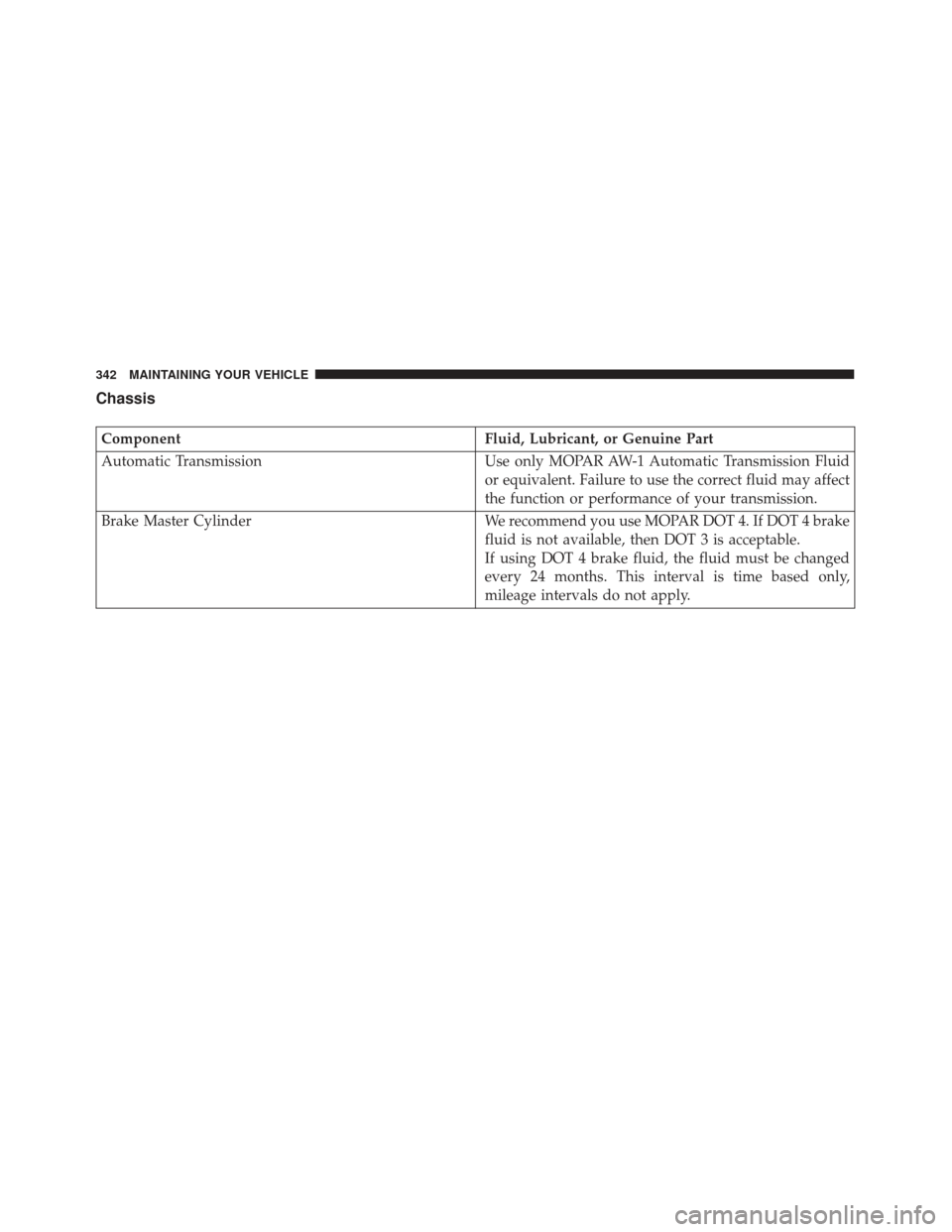
Chassis
ComponentFluid, Lubricant, or Genuine Part
Automatic Transmission Use only MOPAR AW-1 Automatic Transmission Fluid
or equivalent. Failure to use the correct fluid may affect
the function or performance of your transmission.
Brake Master Cylinder We recommend you use MOPAR DOT 4. If DOT 4 brake
fluid is not available, then DOT 3 is acceptable.
If using DOT 4 brake fluid, the fluid must be changed
every 24 months. This interval is time based only,
mileage intervals do not apply.
342 MAINTAINING YOUR VEHICLE
Page 346 of 370
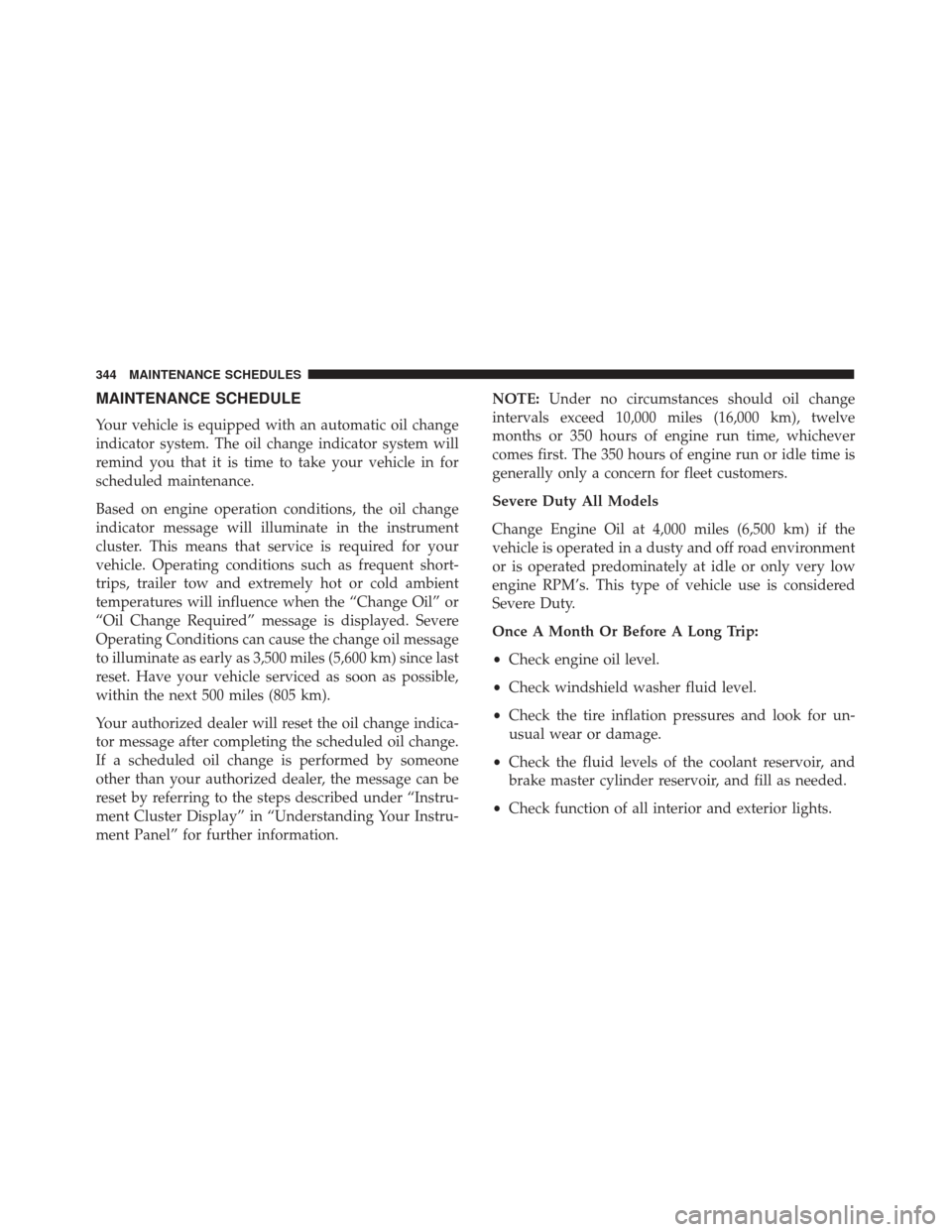
MAINTENANCE SCHEDULE
Your vehicle is equipped with an automatic oil change
indicator system. The oil change indicator system will
remind you that it is time to take your vehicle in for
scheduled maintenance.
Based on engine operation conditions, the oil change
indicator message will illuminate in the instrument
cluster. This means that service is required for your
vehicle. Operating conditions such as frequent short-
trips, trailer tow and extremely hot or cold ambient
temperatures will influence when the “Change Oil” or
“Oil Change Required” message is displayed. Severe
Operating Conditions can cause the change oil message
to illuminate as early as 3,500 miles (5,600 km) since last
reset. Have your vehicle serviced as soon as possible,
within the next 500 miles (805 km).
Your authorized dealer will reset the oil change indica-
tor message after completing the scheduled oil change.
If a scheduled oil change is performed by someone
other than your authorized dealer, the message can be
reset by referring to the steps described under “Instru-
ment Cluster Display” in “Understanding Your Instru-
ment Panel” for further information.NOTE:
Under no circumstances should oil change
intervals exceed 10,000 miles (16,000 km), twelve
months or 350 hours of engine run time, whichever
comes first. The 350 hours of engine run or idle time is
generally only a concern for fleet customers.
Severe Duty All Models
Change Engine Oil at 4,000 miles (6,500 km) if the
vehicle is operated in a dusty and off road environment
or is operated predominately at idle or only very low
engine RPM’s. This type of vehicle use is considered
Severe Duty.
Once A Month Or Before A Long Trip:
• Check engine oil level.
• Check windshield washer fluid level.
• Check the tire inflation pressures and look for un-
usual wear or damage.
• Check the fluid levels of the coolant reservoir, and
brake master cylinder reservoir, and fill as needed.
• Check function of all interior and exterior lights.
344 MAINTENANCE SCHEDULES