ignition FIAT 500L 2017 2.G User Guide
[x] Cancel search | Manufacturer: FIAT, Model Year: 2017, Model line: 500L, Model: FIAT 500L 2017 2.GPages: 370, PDF Size: 3.56 MB
Page 29 of 370
8. Do not lean against the door or window. If yourvehicle has side air bags, and deployment occurs, the
side air bags will inflate forcefully into the space
between occupants and the door and occupants
could be injured.
9. If the air bag system in this vehicle needs to be modified to accommodate a disabled person, refer to
the “If You Need Assistance” section for customer
service contact information.
WARNING!
•Never place a rear-facing child restraint in front of
an air bag. A deploying passenger front air bag
can cause death or serious injury to a child 12
years or younger, including a child in a rear-
facing child restraint.
• Only use a rear-facing child restraint in a vehicle
with a rear seat.
Seat Belt Systems
Buckle up even though you are an excellent driver, even
on short trips. Someone on the road may be a poor driver and could cause a collision that includes you.
This can happen far away from home or on your own
street.
Research has shown that seat belts save lives, and they
can reduce the seriousness of injuries in a collision.
Some of the worst injuries happen when people are
thrown from the vehicle. Seat belts reduce the possibil-
ity of ejection and the risk of injury caused by striking
the inside of the vehicle. Everyone in a motor vehicle
should be belted at all times.
Enhanced Seat Belt Use Reminder System
(BeltAlert)
Driver And Passenger BeltAlert (If Equipped)
BeltAlert is a feature intended to remind the
driver and outboard front seat passenger (if
equipped with outboard front passenger seat
BeltAlert) to buckle their seat belts. The Belt Alert
feature is active whenever the ignition switch is in
the AVV/START or MAR/ON/RUN position.
Initial Indication
If the driver is unbuckled when the ignition switch is
first in the AVV/START or MAR/ON/RUN position, a
chime will signal for a few seconds. If the driver or
2
THINGS TO KNOW BEFORE STARTING YOUR VEHICLE 27
Page 30 of 370
outboard front seat passenger (if equipped with out-
board front passenger seat BeltAlert) is unbuckled
when the ignition switch is first in the AVV/START or
MAR/ON/RUN position the Seat Belt Reminder Light
will turn on and remain on until both outboard front
seat belts are buckled. The outboard front passenger
seat BeltAlert is not active when an outboard front
passenger seat is unoccupied.
BeltAlert Warning Sequence
The BeltAlert warning sequence is activated when the
vehicle is moving above a specified vehicle speed range
and the driver or outboard front seat passenger is un-
buckled (if equipped with outboard front passenger seat
BeltAlert) (the outboard front passenger seat BeltAlert is
not active when the outboard front passenger seat is
unoccupied). The BeltAlert warning sequence starts by
blinking the Seat Belt Reminder Light and sounding an
intermittent chime. Once the BeltAlert warning sequence
has completed, the Seat Belt Reminder Light will remain
on until the seat belts are buckled. The BeltAlert warning
sequence may repeat based on vehicle speed until the
driver and occupied outboard front seat passenger seat
belts are buckled. The driver should instruct all occupants
to buckle their seat belts.
Change Of Status
If the driver or outboard front seat passenger (if
equipped with outboard front passenger seat BeltAlert)
unbuckles their seat belt while the vehicle is traveling,
the BeltAlert warning sequence will begin until the seat
belts are buckled again.
The outboard front passenger seat BeltAlert is not active
when the outboard front passenger seat is unoccupied.
BeltAlert may be triggered when an animal or other
items are placed on the outboard front passenger seat or
when the seat is folded flat (if equipped). It is recom-
mended that pets be restrained in the rear seat (if
equipped) in pet harnesses or pet carriers that are
secured by seat belts, and cargo is properly stowed.
BeltAlert can be activated or deactivated by your au-
thorized dealer. FCA US LLC does not recommend
deactivating BeltAlert.
NOTE:If BeltAlert has been deactivated and the driver
or outboard front seat passenger (if equipped with
outboard front passenger seat BeltAlert) is unbuckled
the Seat Belt Reminder Light will turn on and remain on
until the driver and outboard front seat passenger seat
belts are buckled.
28 THINGS TO KNOW BEFORE STARTING YOUR VEHICLE
Page 38 of 370
•Steering Wheel and Column
• Instrument Panel
• Knee Impact Bolsters
• Driver and Front Passenger Air Bags
• Supplemental Side Air Bags
• Supplemental Knee Air Bags
• Front and Side Impact Sensors
• Seat Belt Pretensioners
• Seat Track Position Sensors
• Seat Belt Buckle Switch
Air Bag Warning Light
The ORC monitors the readiness of the elec-
tronic parts of the air bag system whenever
the ignition switch is in the AVV/START or
MAR/ACC/ON/RUN position. If the igni-
tion switch is in the STOP/OFF/LOCK position or in
the ACC position, the air bag system is not on and the
air bags will not inflate. The ORC contains a backup power supply system that
may deploy the air bag system even if the battery loses
power or it becomes disconnected prior to deployment.
The ORC turns on the Air Bag Warning Light in the
instrument panel for approximately four to eight sec-
onds for a self-check when the ignition switch is in the
MAR/ACC/ON/RUN position. After the self-check,
the Air Bag Warning Light will turn off. If the ORC
detects a malfunction in any part of the system, it turns
on the Air Bag Warning Light, either momentarily or
continuously. A single chime will sound to alert you if
the light comes on again after initial startup.
The ORC also includes diagnostics that will illuminate
the instrument panel Air Bag Warning Light if a mal-
function is detected that could affect the air bag system.
The diagnostics also record the nature of the malfunc-
tion. While the air bag system is designed to be main-
tenance free, if any of the following occurs, have an
authorized dealer service the air bag system
immediately.
•
The Air Bag Warning Light does not come on during
the four to eight seconds when the ignition switch is
first in the MAR/ACC/ON/RUN position.
36 THINGS TO KNOW BEFORE STARTING YOUR VEHICLE
Page 39 of 370
•The Air Bag Warning Light remains on after the four
to eight-second interval.
• The Air Bag Warning Light comes on intermittently
or remains on while driving.
NOTE: If the speedometer, tachometer, or any engine
related gauges are not working, the Occupant Restraint
Controller (ORC) may also be disabled. In this condi-
tion the air bags may not be ready to inflate for your
protection. Have an authorized dealer service the air
bag system immediately.
WARNING!
Ignoring the Air Bag Warning Light in your instru-
ment panel could mean you won’t have the air bags
to protect you in a collision. If the light does not
come on as a bulb check when the ignition is first
turned on, stays on after you start the vehicle, or if
it comes on as you drive, have an authorized dealer
service the air bag system immediately.
Redundant Air Bag Warning Light
If a fault with the Air Bag Warning Light is
detected, which could affect the Supplemen-
tal Restraint System (SRS), the Redundant Air
Bag Warning Light will illuminate on the
instrument panel. The Redundant Air Bag Warning
Light will stay on until the fault is cleared. In addition,
a single chime will sound to alert you that the Redun-
dant Air Bag Warning Light has come on and a fault has
been detected. If the Redundant Air Bag Warning Light
comes on intermittently or remains on while driving
have an authorized dealer service the vehicle immedi-
ately. For additional information regarding the Redun-
dant Air Bag Warning Light, refer to the “Instrument
Panel” section of this manual.
Front Air Bags
This vehicle has front air bags and lap/shoulder belts
for both the driver and front passenger. The front air
bags are a supplement to the seat belt restraint systems.
The driver front air bag is mounted in the center of the
steering wheel. The passenger front air bag is mounted
in the instrument panel, above the glove compartment.
The words “SRS AIRBAG” or “AIRBAG” are embossed
on the air bag covers.
2
THINGS TO KNOW BEFORE STARTING YOUR VEHICLE 37
Page 48 of 370
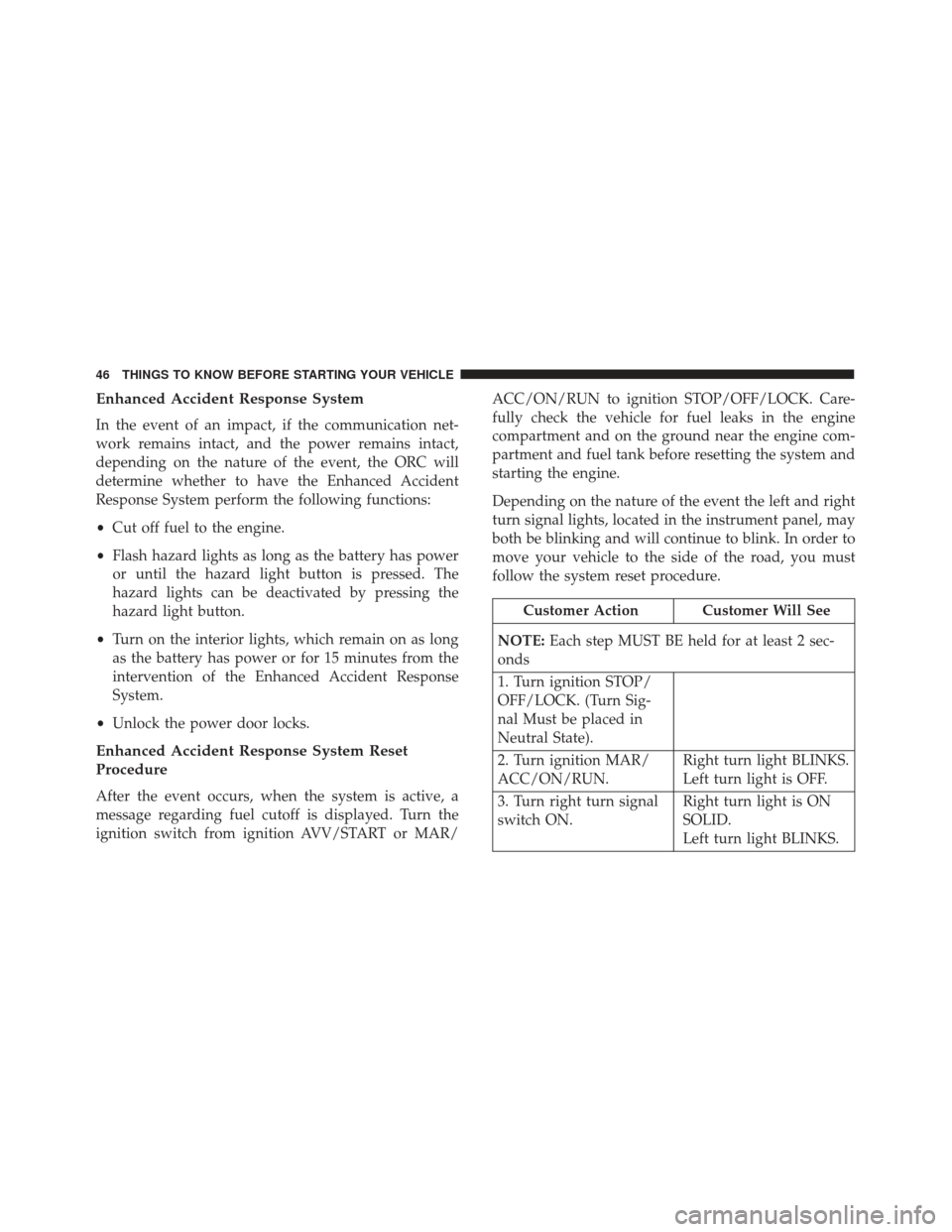
Enhanced Accident Response System
In the event of an impact, if the communication net-
work remains intact, and the power remains intact,
depending on the nature of the event, the ORC will
determine whether to have the Enhanced Accident
Response System perform the following functions:
•Cut off fuel to the engine.
• Flash hazard lights as long as the battery has power
or until the hazard light button is pressed. The
hazard lights can be deactivated by pressing the
hazard light button.
• Turn on the interior lights, which remain on as long
as the battery has power or for 15 minutes from the
intervention of the Enhanced Accident Response
System.
• Unlock the power door locks.
Enhanced Accident Response System Reset
Procedure
After the event occurs, when the system is active, a
message regarding fuel cutoff is displayed. Turn the
ignition switch from ignition AVV/START or MAR/ ACC/ON/RUN to ignition STOP/OFF/LOCK. Care-
fully check the vehicle for fuel leaks in the engine
compartment and on the ground near the engine com-
partment and fuel tank before resetting the system and
starting the engine.
Depending on the nature of the event the left and right
turn signal lights, located in the instrument panel, may
both be blinking and will continue to blink. In order to
move your vehicle to the side of the road, you must
follow the system reset procedure.
Customer Action Customer Will See
NOTE: Each step MUST BE held for at least 2 sec-
onds
1. Turn ignition STOP/
OFF/LOCK. (Turn Sig-
nal Must be placed in
Neutral State).
2. Turn ignition MAR/
ACC/ON/RUN. Right turn light BLINKS.
Left turn light is OFF.
3. Turn right turn signal
switch ON. Right turn light is ON
SOLID.
Left turn light BLINKS.
46 THINGS TO KNOW BEFORE STARTING YOUR VEHICLE
Page 49 of 370
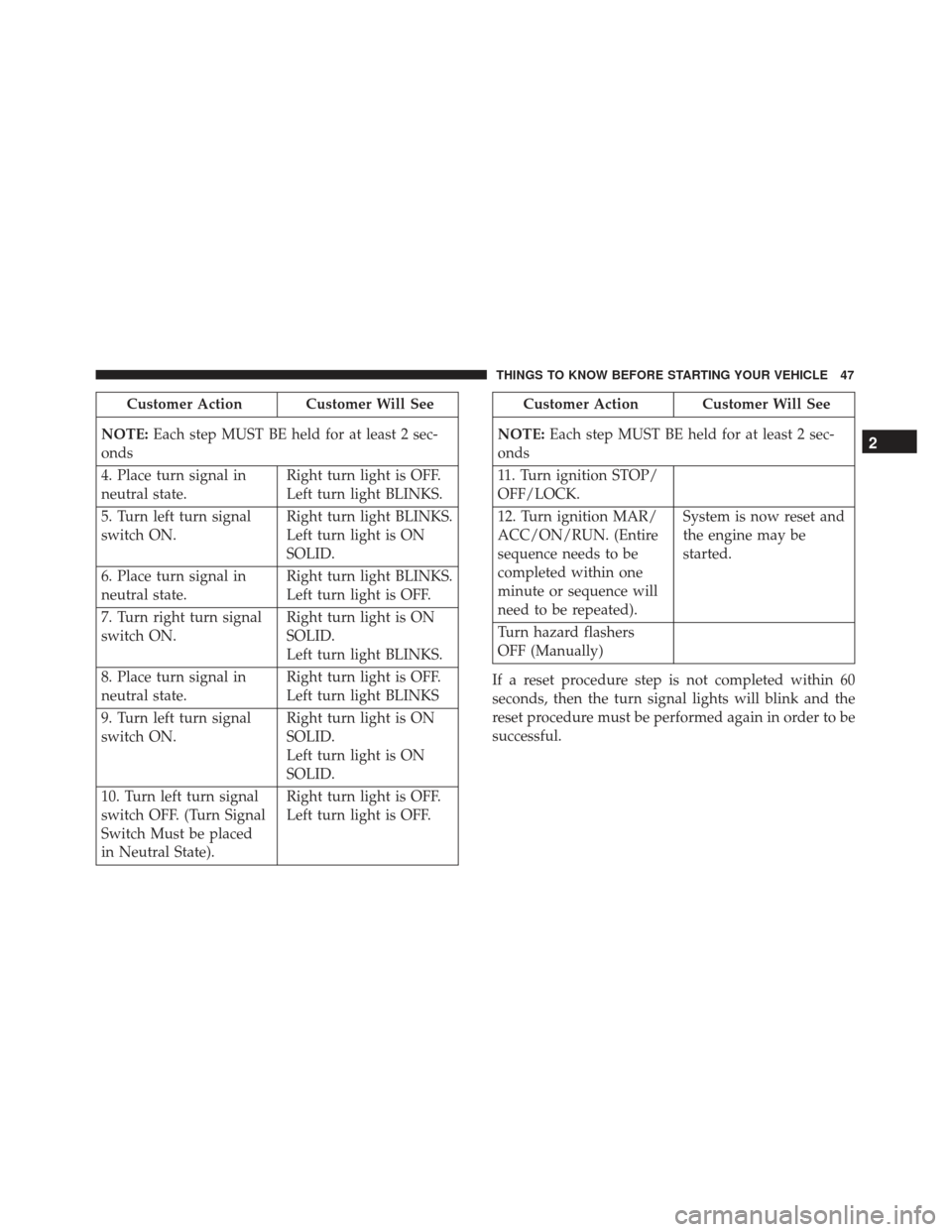
Customer Action Customer Will See
NOTE: Each step MUST BE held for at least 2 sec-
onds
4. Place turn signal in
neutral state. Right turn light is OFF.
Left turn light BLINKS.
5. Turn left turn signal
switch ON. Right turn light BLINKS.
Left turn light is ON
SOLID.
6. Place turn signal in
neutral state. Right turn light BLINKS.
Left turn light is OFF.
7. Turn right turn signal
switch ON. Right turn light is ON
SOLID.
Left turn light BLINKS.
8. Place turn signal in
neutral state. Right turn light is OFF.
Left turn light BLINKS
9. Turn left turn signal
switch ON. Right turn light is ON
SOLID.
Left turn light is ON
SOLID.
10. Turn left turn signal
switch OFF. (Turn Signal
Switch Must be placed
in Neutral State). Right turn light is OFF.
Left turn light is OFF.Customer Action Customer Will See
NOTE: Each step MUST BE held for at least 2 sec-
onds
11. Turn ignition STOP/
OFF/LOCK.
12. Turn ignition MAR/
ACC/ON/RUN. (Entire
sequence needs to be
completed within one
minute or sequence will
need to be repeated). System is now reset and
the engine may be
started.
Turn hazard flashers
OFF (Manually)
If a reset procedure step is not completed within 60
seconds, then the turn signal lights will blink and the
reset procedure must be performed again in order to be
successful.
2
THINGS TO KNOW BEFORE STARTING YOUR VEHICLE 47
Page 70 of 370
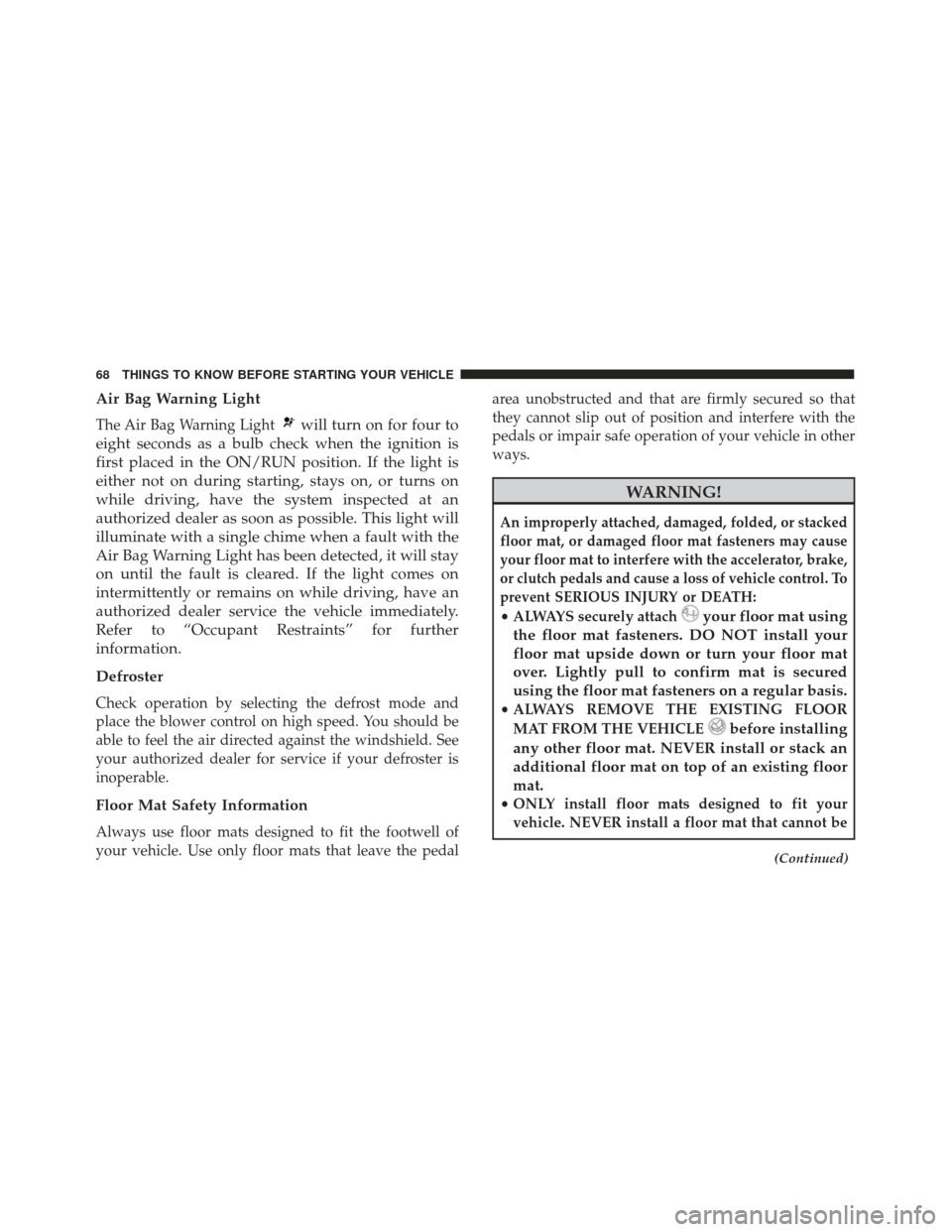
Air Bag Warning Light
The Air Bag Warning Lightwill turn on for four to
eight seconds as a bulb check when the ignition is
first placed in the ON/RUN position. If the light is
either not on during starting, stays on, or turns on
while driving, have the system inspected at an
authorized dealer as soon as possible. This light will
illuminate with a single chime when a fault with the
Air Bag Warning Light has been detected, it will stay
on until the fault is cleared. If the light comes on
intermittently or remains on while driving, have an
authorized dealer service the vehicle immediately.
Refer to “Occupant Restraints” for further
information.
Defroster
Check operation by selecting the defrost mode and
place the blower control on high speed. You should be
able to feel the air directed against the windshield. See
your authorized dealer for service if your defroster is
inoperable.
Floor Mat Safety Information
Always use floor mats designed to fit the footwell of
your vehicle. Use only floor mats that leave the pedal area unobstructed and that are firmly secured so that
they cannot slip out of position and interfere with the
pedals or impair safe operation of your vehicle in other
ways.
WARNING!
An improperly attached, damaged, folded, or stacked
floor mat, or damaged floor mat fasteners may cause
your floor mat to interfere with the accelerator, brake,
or clutch pedals and cause a loss of vehicle control. To
prevent SERIOUS INJURY or DEATH:
•
ALWAYS securely attachyour floor mat using
the floor mat fasteners. DO NOT install your
floor mat upside down or turn your floor mat
over. Lightly pull to confirm mat is secured
using the floor mat fasteners on a regular basis.
• ALWAYS REMOVE THE EXISTING FLOOR
MAT FROM THE VEHICLE
before installing
any other floor mat. NEVER install or stack an
additional floor mat on top of an existing floor
mat.
• ONLY install floor mats designed to fit your
vehicle. NEVER install a floor mat that cannot be
(Continued)
68 THINGS TO KNOW BEFORE STARTING YOUR VEHICLE
Page 92 of 370
CAUTION!
To prevent possible damage, do not slam the hood
to close it. Lower hood to approximately 12 in (30
cm) and drop the hood to close. Make sure hood is
fully closed for both latches. Never drive vehicle
unless hood is fully closed, with both latches en-
gaged.
LIGHTS
Multifunction Lever
The multifunction lever, located on the left side of the
steering wheel, controls the operation of the headlights,
headlight beam selection, passing light and turn sig-
nals.NOTE:
The external lights can only be turned on with
the ignition in the ON/RUN position.
Multifunction Lever
90 UNDERSTANDING THE FEATURES OF YOUR VEHICLE
Page 94 of 370
Parking Lights
To turn on the parking lights, remove the key
or turn the ignition to OFF/LOCK position
and turn on the headlights.
NOTE: If the parking lights are left on and the key is in
the stop position with the door open, an audible chime
will sound and a message will show in the Instrument
Cluster Display. The chime will stop as soon as the
lights are switched off.
Turn Signals
Move the multifunction lever up or down and the
arrows on each side of the instrument cluster display
will flash to show proper operation of the front and rear
turn signal lights.
NOTE: If either light remains on and does not flash, or
there is a very fast flash rate, check for a defective
outside light bulb. If an indicator fails to light when the
lever is moved, it would suggest that the indicator bulb
is defective.
Lane Change Assist
Tap the lever up or down once, without moving beyond
the detent, and the turn signal (right or left) will flash
five times then automatically turn off.
Follow Me Home/Headlight Delay
When this feature is selected the driver can choose to
have the headlights remain on for a preset period of
time.
Activation
Remove the key or turn the ignition to the STOP
(OFF/LOCK) position, and pull the multifunction lever
toward the steering wheel, within two minutes. Each
time the lever is pulled, the activation of the lights will
be extended by 30 seconds. The activation of the lights
can be extended to a maximum of 210 seconds.
Deactivation
Pull the multifunction lever toward the steering wheel
and hold it for more than two seconds.
92 UNDERSTANDING THE FEATURES OF YOUR VEHICLE
Page 97 of 370
The switches on the left and right sides of the overhead
console controls the map or reading function of the
lights. Push the switch to the right to turn on the right
light and push the switch to the left to turn on the left
light.
CAUTION!
Before getting out of the vehicle be sure that the
switch is in the center position or that the lights are
off to avoid draining the battery.
Interior Light Timing (Center Position)
There are four different modes of operation that can be
activated in this position:
•When one door is opened a three minute timer is
activated.
• When the key is removed from the ignition (within
two minutes of the ignition being turned off), a 10
second timer is activated.
• When the doors are unlocked with the key fob a 10
second timer is activated.
• When the doors are locked with the key fob the lights
will turn off.
Interior Light Timing (On/Right Position)
•When all doors are closed a 15 minute timer is
activated.
NOTE: The timer is deactivated when the key is moved
into the ON/RUN position.Map/Reading Light Switches
3
UNDERSTANDING THE FEATURES OF YOUR VEHICLE 95