key fob FIAT 500L 2017 2.G User Guide
[x] Cancel search | Manufacturer: FIAT, Model Year: 2017, Model line: 500L, Model: FIAT 500L 2017 2.GPages: 370, PDF Size: 3.56 MB
Page 23 of 370
Doors Lock With One Or More Doors Open
It is possible to lock the vehicle using the Remote
Keyless Entry, internal button, or external key fob. The
vehicle can also be locked if one or more doors are open.
At lock command request, LED is switched ON. At
closing of the last door, the vehicle maintains the central
locking status if key is not inserted in Ignition Device,
otherwise the vehicle will be unlocked and the LED will
be switched OFF.
NOTE:If the key is not inserted in the ignition switch,
but is inside the vehicle, the system does not recognize
the presence of the key and after the closing of last door,
the vehicle remains locked.
Auto — Relocking (Only For Rear Doors)
With the vehicle locked and all doors closed (LED ON),
if a passenger opens one of the rear doors (LED OFF), as
soon as the door is closed, it will be locked again (LED
ON).
Child-Protection Door Lock System — Rear
Doors
To provide a safer environment for small children
riding in the rear seats, the rear doors are equipped with
Child-Protection Door Lock system.
To Engage Or Disengage The Child-Protection
Door Lock System
1. Open the rear door.
2. Insert the tip of the key into the lock and rotate clockwise to the lock position or counter clockwise to
unlock position.
3. Repeat steps 1 and 2 for the opposite rear door.
WARNING!
Avoid trapping anyone in a vehicle in a collision.
Remember that the rear doors can only be opened
from the outside when the Child-Protection locks
are engaged (locked).
NOTE: For emergency exit from the rear seats when the
Child-Protection Door Lock System is engaged, unlock
the doors using the central unlock button, roll down the
window and open the door using the exterior handle.
2
THINGS TO KNOW BEFORE STARTING YOUR VEHICLE 21
Page 24 of 370
POWER WINDOWS
Power Window Switches
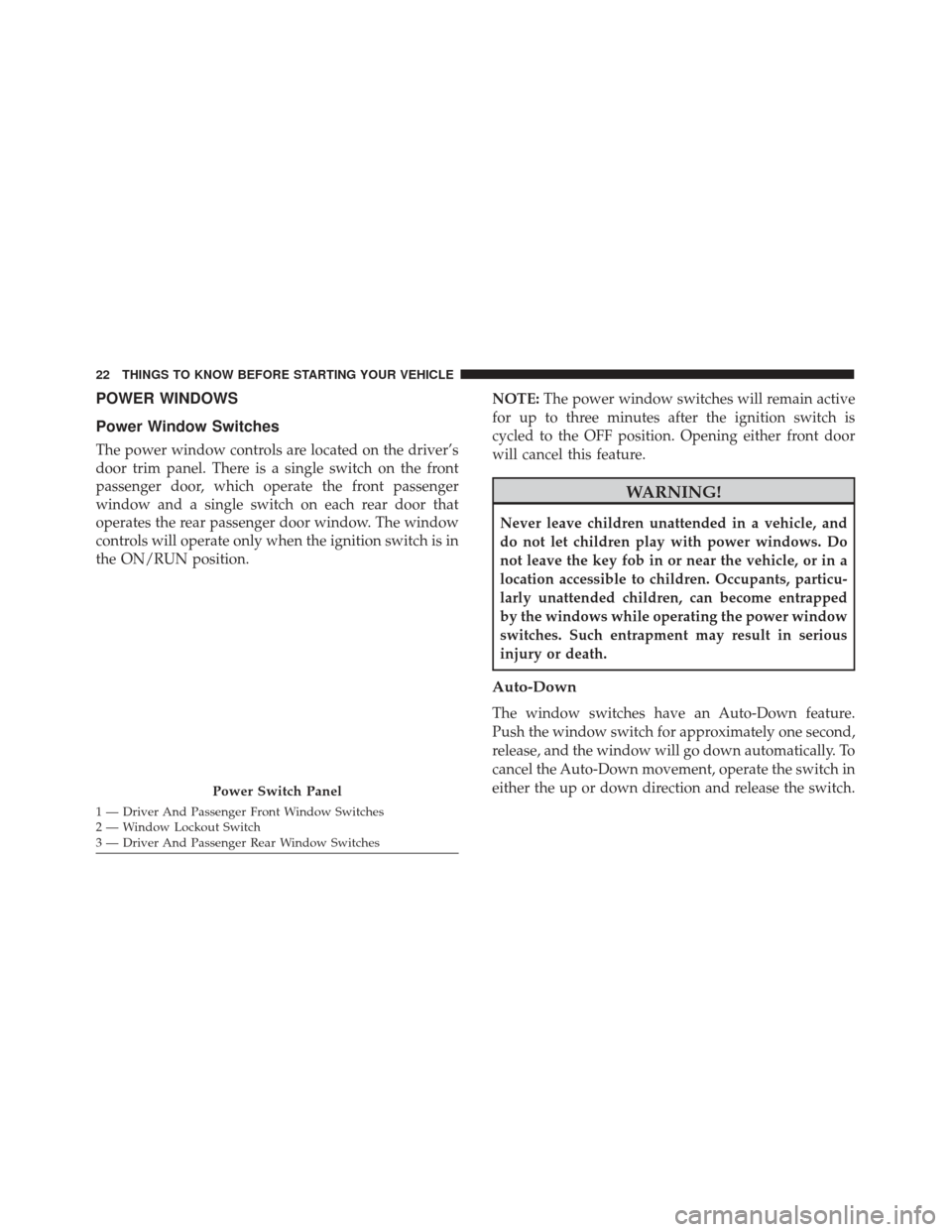
The power window controls are located on the driver’s
door trim panel. There is a single switch on the front
passenger door, which operate the front passenger
window and a single switch on each rear door that
operates the rear passenger door window. The window
controls will operate only when the ignition switch is in
the ON/RUN position.NOTE:
The power window switches will remain active
for up to three minutes after the ignition switch is
cycled to the OFF position. Opening either front door
will cancel this feature.
WARNING!
Never leave children unattended in a vehicle, and
do not let children play with power windows. Do
not leave the key fob in or near the vehicle, or in a
location accessible to children. Occupants, particu-
larly unattended children, can become entrapped
by the windows while operating the power window
switches. Such entrapment may result in serious
injury or death.
Auto-Down
The window switches have an Auto-Down feature.
Push the window switch for approximately one second,
release, and the window will go down automatically. To
cancel the Auto-Down movement, operate the switch in
either the up or down direction and release the switch.
Power Switch Panel
1 — Driver And Passenger Front Window Switches
2 — Window Lockout Switch
3 — Driver And Passenger Rear Window Switches 22 THINGS TO KNOW BEFORE STARTING YOUR VEHICLE
Page 26 of 370
Wind Buffeting
Wind buffeting can be described as the perception of
pressure on the ears or a helicopter-type sound in the
ears. Your vehicle may exhibit wind buffeting with the
windows down, or the sunroof (if equipped) in certain
open or partially open positions. This is a normal
occurrence and can be minimized. If the buffeting
occurs with the sunroof open, adjust the sunroof open-
ing to minimize the buffeting or open any window.
LIFTGATE
To unlock the liftgate, use the Remote Keyless Entry key
fob or activate the central locking button located on the
instrument panel below the radio.
To open the liftgate, push the liftgate electronic release
and pull the liftgate open with one fluid motion.
WARNING!
•Driving with the liftgate open can allow poisonous
exhaust gases into your vehicle. You and your
passengers could be injured by these fumes. Keep
the liftgate closed when you are operating the
vehicle.
(Continued)
WARNING!(Continued)
•If you are required to drive with the liftgate open,
make sure that all windows are closed, and the
climate control blower switch is set at high speed.
Do not use the recirculation mode.
Gas props support the liftgate in the open position.
However, because the gas pressure drops with tempera-
ture, it may be necessary to assist the props when
opening the liftgate in cold weather.
Liftgate Emergency Release
As a security measure, a liftgate emergency release is
built into the liftgate latching mechanism. To access the
liftgate emergency release, proceed as follows:
1. Remove the rear headrests and fold down the seats completely.
2. Take the screwdriver from the tool box supplied.
24 THINGS TO KNOW BEFORE STARTING YOUR VEHICLE
Page 97 of 370
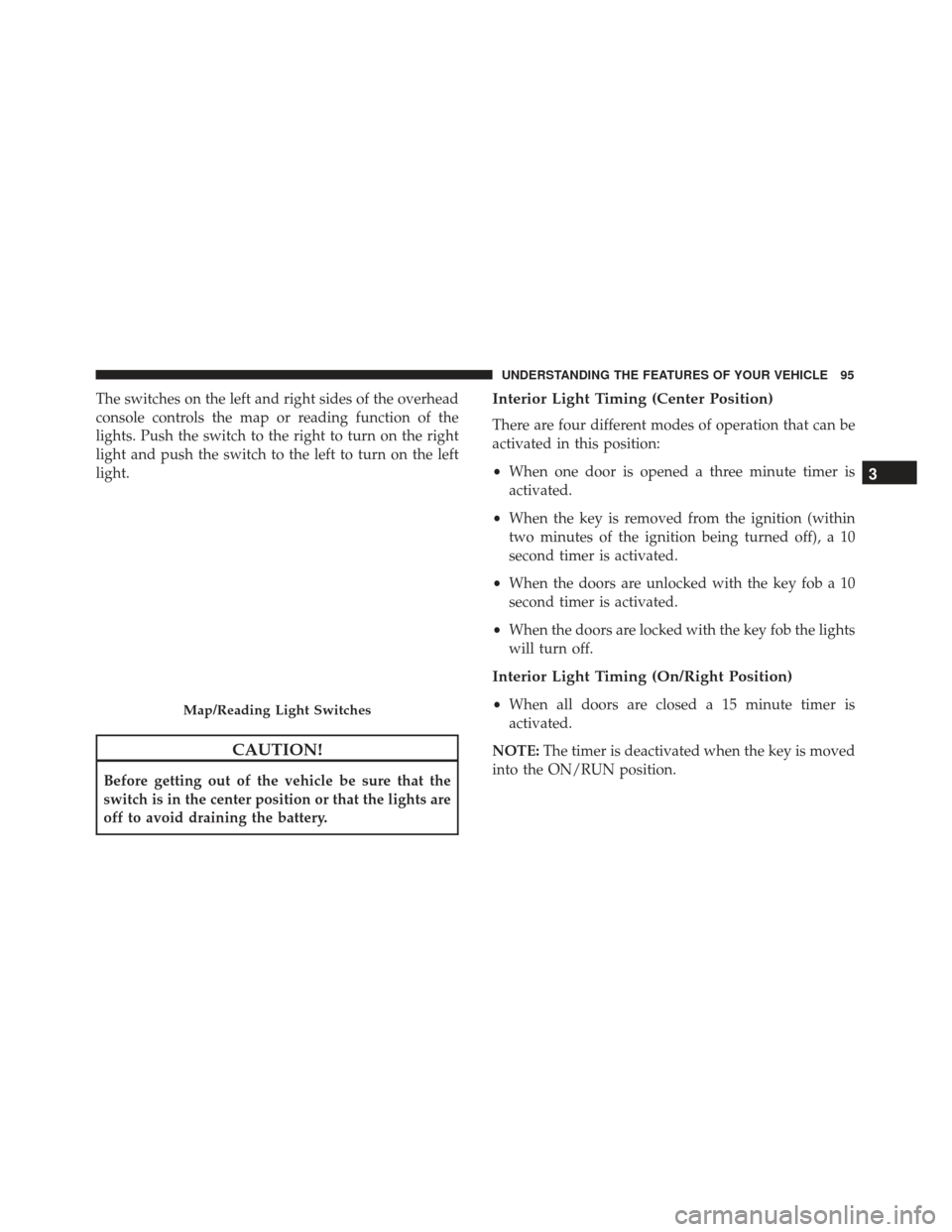
The switches on the left and right sides of the overhead
console controls the map or reading function of the
lights. Push the switch to the right to turn on the right
light and push the switch to the left to turn on the left
light.
CAUTION!
Before getting out of the vehicle be sure that the
switch is in the center position or that the lights are
off to avoid draining the battery.
Interior Light Timing (Center Position)
There are four different modes of operation that can be
activated in this position:
•When one door is opened a three minute timer is
activated.
• When the key is removed from the ignition (within
two minutes of the ignition being turned off), a 10
second timer is activated.
• When the doors are unlocked with the key fob a 10
second timer is activated.
• When the doors are locked with the key fob the lights
will turn off.
Interior Light Timing (On/Right Position)
•When all doors are closed a 15 minute timer is
activated.
NOTE: The timer is deactivated when the key is moved
into the ON/RUN position.Map/Reading Light Switches
3
UNDERSTANDING THE FEATURES OF YOUR VEHICLE 95
Page 120 of 370
WARNING!
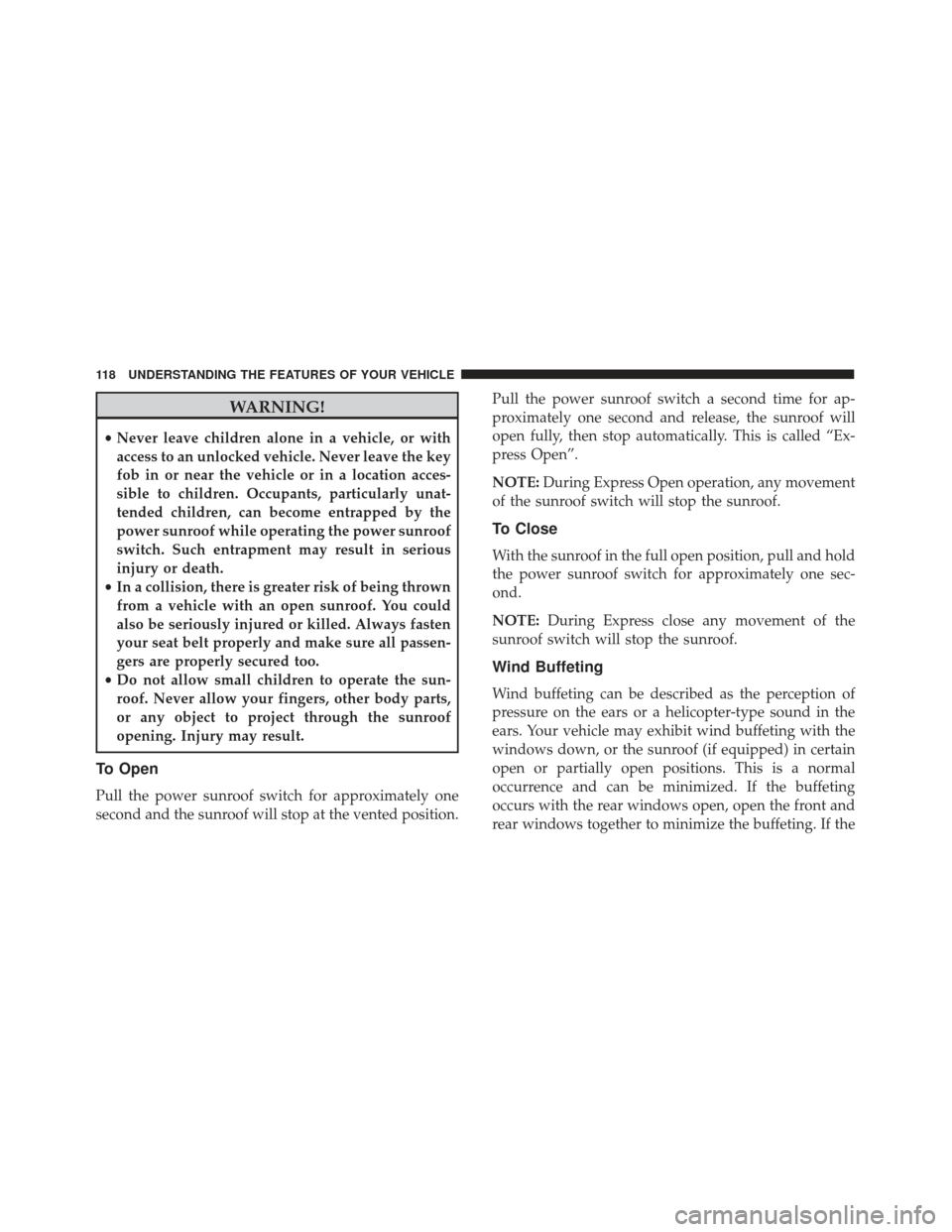
•Never leave children alone in a vehicle, or with
access to an unlocked vehicle. Never leave the key
fob in or near the vehicle or in a location acces-
sible to children. Occupants, particularly unat-
tended children, can become entrapped by the
power sunroof while operating the power sunroof
switch. Such entrapment may result in serious
injury or death.
• In a collision, there is greater risk of being thrown
from a vehicle with an open sunroof. You could
also be seriously injured or killed. Always fasten
your seat belt properly and make sure all passen-
gers are properly secured too.
• Do not allow small children to operate the sun-
roof. Never allow your fingers, other body parts,
or any object to project through the sunroof
opening. Injury may result.
To Open
Pull the power sunroof switch for approximately one
second and the sunroof will stop at the vented position. Pull the power sunroof switch a second time for ap-
proximately one second and release, the sunroof will
open fully, then stop automatically. This is called “Ex-
press Open”.
NOTE:
During Express Open operation, any movement
of the sunroof switch will stop the sunroof.
To Close
With the sunroof in the full open position, pull and hold
the power sunroof switch for approximately one sec-
ond.
NOTE: During Express close any movement of the
sunroof switch will stop the sunroof.
Wind Buffeting
Wind buffeting can be described as the perception of
pressure on the ears or a helicopter-type sound in the
ears. Your vehicle may exhibit wind buffeting with the
windows down, or the sunroof (if equipped) in certain
open or partially open positions. This is a normal
occurrence and can be minimized. If the buffeting
occurs with the rear windows open, open the front and
rear windows together to minimize the buffeting. If the
118 UNDERSTANDING THE FEATURES OF YOUR VEHICLE
Page 186 of 370
Setting NameSelectable Options
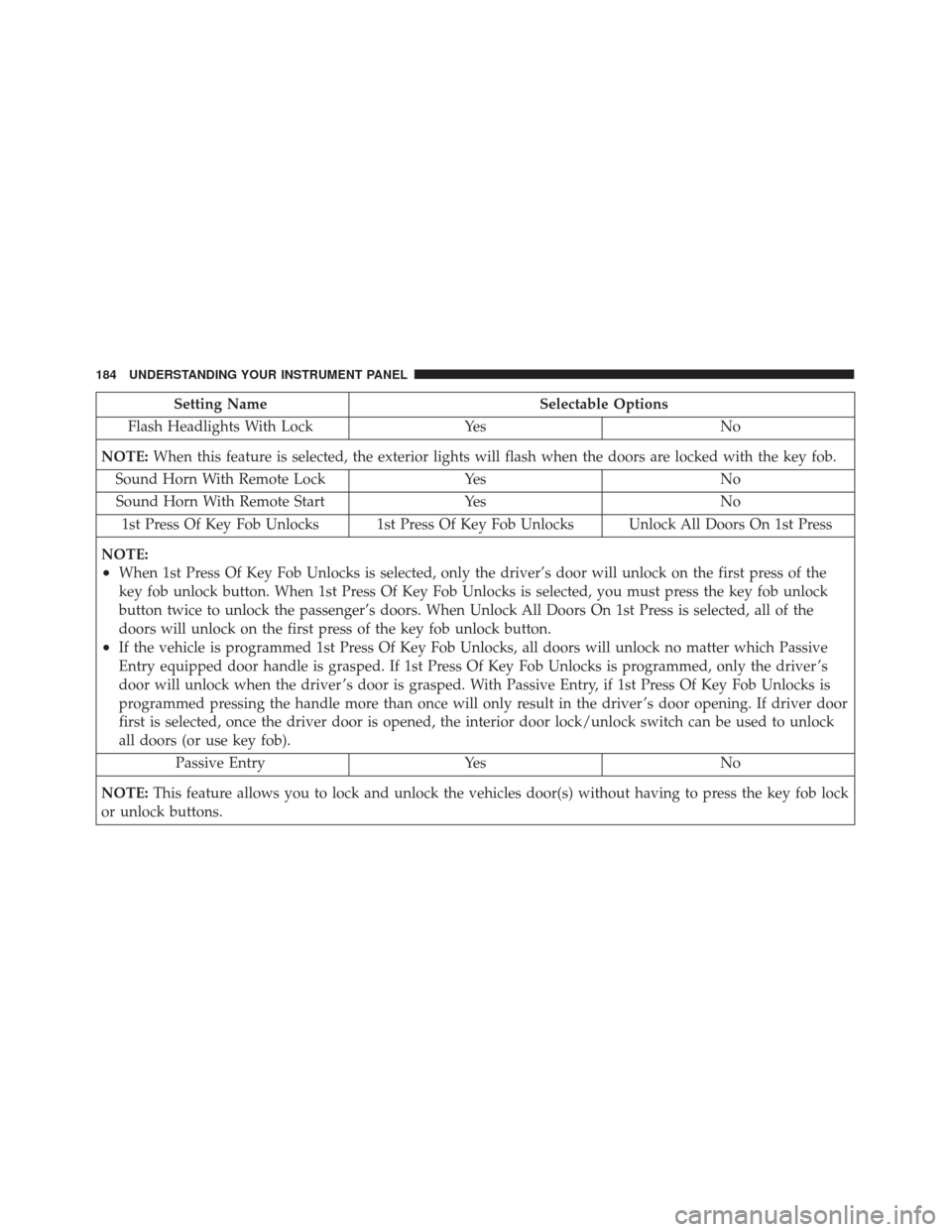
Flash Headlights With Lock YesNo
NOTE: When this feature is selected, the exterior lights will flash when the doors are locked with the key fob.
Sound Horn With Remote Lock YesNo
Sound Horn With Remote Start YesNo
1st Press Of Key Fob Unlocks 1st Press Of Key Fob Unlocks Unlock All Doors On 1st Press
NOTE:
•When 1st Press Of Key Fob Unlocks is selected, only the driver’s door will unlock on the first press of the
key fob unlock button. When 1st Press Of Key Fob Unlocks is selected, you must press the key fob unlock
button twice to unlock the passenger’s doors. When Unlock All Doors On 1st Press is selected, all of the
doors will unlock on the first press of the key fob unlock button.
•If the vehicle is programmed 1st Press Of Key Fob Unlocks, all doors will unlock no matter which Passive
Entry equipped door handle is grasped. If 1st Press Of Key Fob Unlocks is programmed, only the driver ’s
door will unlock when the driver ’s door is grasped. With Passive Entry, if 1st Press Of Key Fob Unlocks is
programmed pressing the handle more than once will only result in the driver ’s door opening. If driver door
first is selected, once the driver door is opened, the interior door lock/unlock switch can be used to unlock
all doors (or use key fob). Passive Entry YesNo
NOTE: This feature allows you to lock and unlock the vehicles door(s) without having to press the key fob lock
or unlock buttons.
184 UNDERSTANDING YOUR INSTRUMENT PANEL
Page 187 of 370
Setting NameSelectable Options
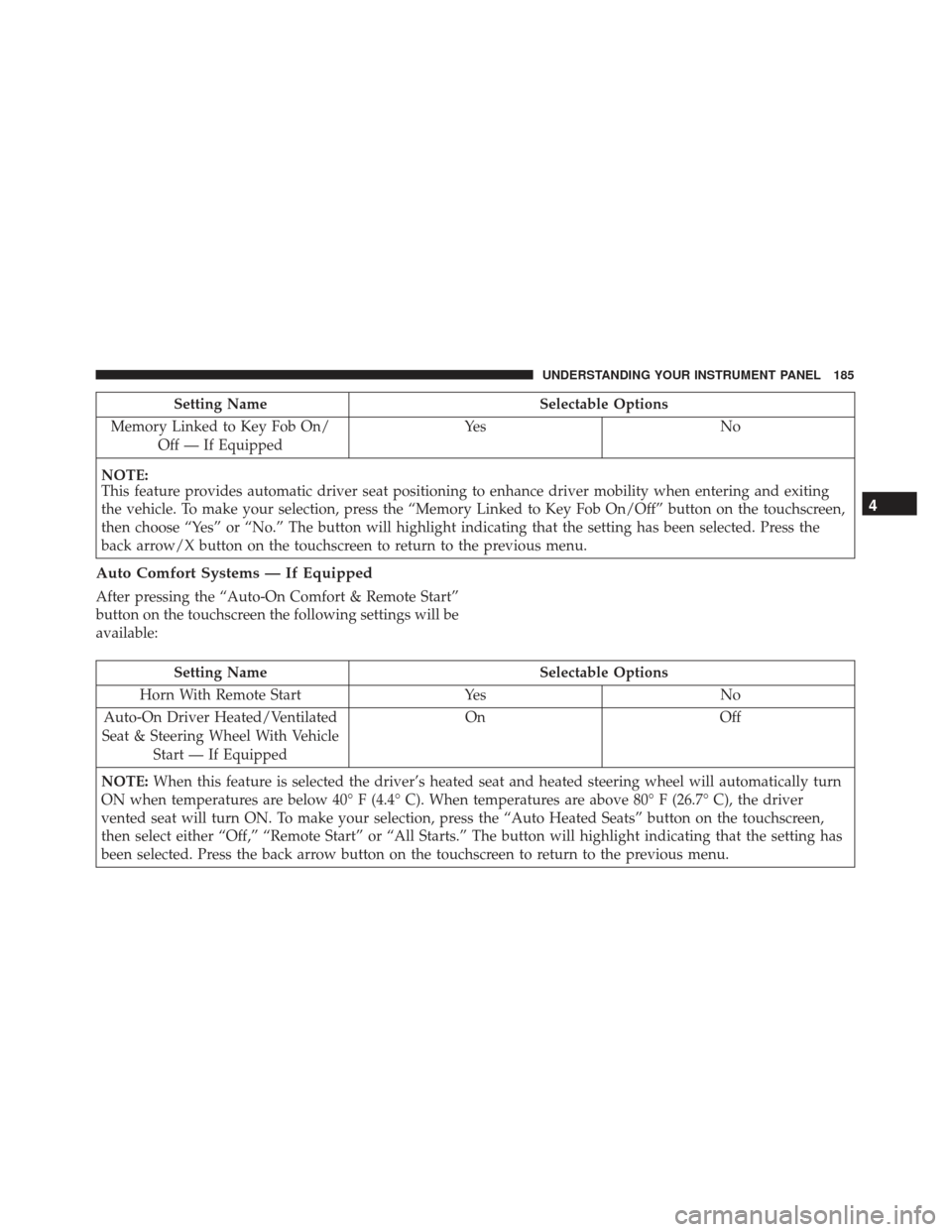
Memory Linked to Key Fob On/ Off — If Equipped Ye s
N o
NOTE:
This feature provides automatic driver seat positioning to enhance driver mobility when entering and exiting
the vehicle. To make your selection, press the “Memory Linked to Key Fob On/Off” button on the touchscreen,
then choose “Yes” or “No.” The button will highlight indicating that the setting has been selected. Press the
back arrow/X button on the touchscreen to return to the previous menu.
Auto Comfort Systems — If Equipped
After pressing the “Auto-On Comfort & Remote Start”
button on the touchscreen the following settings will be
available:
Setting Name Selectable Options
Horn With Remote Start YesNo
Auto-On Driver Heated/Ventilated
Seat & Steering Wheel With Vehicle Start — If Equipped On
Off
NOTE: When this feature is selected the driver’s heated seat and heated steering wheel will automatically turn
ON when temperatures are below 40° F (4.4° C). When temperatures are above 80° F (26.7° C), the driver
vented seat will turn ON. To make your selection, press the “Auto Heated Seats” button on the touchscreen,
then select either “Off,” “Remote Start” or “All Starts.” The button will highlight indicating that the setting has
been selected. Press the back arrow button on the touchscreen to return to the previous menu.
4
UNDERSTANDING YOUR INSTRUMENT PANEL 185
Page 220 of 370
STARTING PROCEDURES
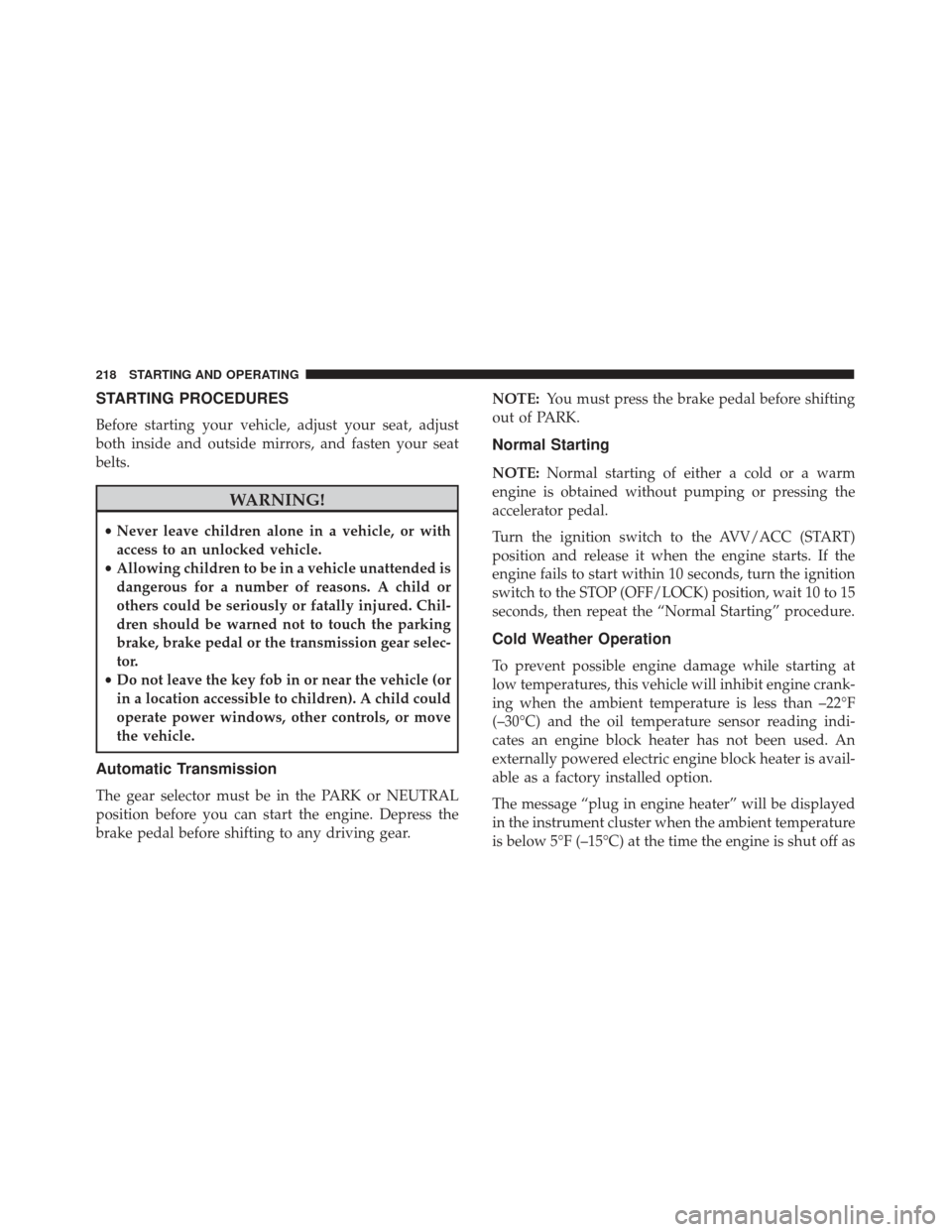
Before starting your vehicle, adjust your seat, adjust
both inside and outside mirrors, and fasten your seat
belts.
WARNING!
•Never leave children alone in a vehicle, or with
access to an unlocked vehicle.
• Allowing children to be in a vehicle unattended is
dangerous for a number of reasons. A child or
others could be seriously or fatally injured. Chil-
dren should be warned not to touch the parking
brake, brake pedal or the transmission gear selec-
tor.
• Do not leave the key fob in or near the vehicle (or
in a location accessible to children). A child could
operate power windows, other controls, or move
the vehicle.
Automatic Transmission
The gear selector must be in the PARK or NEUTRAL
position before you can start the engine. Depress the
brake pedal before shifting to any driving gear. NOTE:
You must press the brake pedal before shifting
out of PARK.
Normal Starting
NOTE: Normal starting of either a cold or a warm
engine is obtained without pumping or pressing the
accelerator pedal.
Turn the ignition switch to the AVV/ACC (START)
position and release it when the engine starts. If the
engine fails to start within 10 seconds, turn the ignition
switch to the STOP (OFF/LOCK) position, wait 10 to 15
seconds, then repeat the “Normal Starting” procedure.
Cold Weather Operation
To prevent possible engine damage while starting at
low temperatures, this vehicle will inhibit engine crank-
ing when the ambient temperature is less than –22°F
(–30°C) and the oil temperature sensor reading indi-
cates an engine block heater has not been used. An
externally powered electric engine block heater is avail-
able as a factory installed option.
The message “plug in engine heater” will be displayed
in the instrument cluster when the ambient temperature
is below 5°F (–15°C) at the time the engine is shut off as
218 STARTING AND OPERATING
Page 233 of 370
When the parking brake is applied with the ignition
switch in the MAR (ACC/ON/RUN) position, the
Brake Warning Light in the instrument cluster will
illuminate.
When parking on a hill, it is important to turn the front
wheels toward the curb on a downhill grade and away
from the curb on an uphill grade. The parking brake
should always be applied whenever the driver is not in
the vehicle.
WARNING!
•Never leave children alone in a vehicle, or with
access to an unlocked vehicle.
• Allowing children to be in a vehicle unattended is
dangerous for a number of reasons. A child or
others could be seriously or fatally injured. Chil-
dren should be warned not to touch the parking
brake, brake pedal or the gear selector.
• Do not leave the key fob in or near the vehicle or
in a location accessible to children. A child could
operate power windows, other controls, or move
the vehicle.
• Be sure the parking brake is fully disengaged
before driving; failure to do so can lead to brake
failure and a collision.
• Always fully apply the parking brake when leav-
ing your vehicle, or it may roll and cause damage
or injury.
CAUTION!
If the Brake Warning Light remains on with the
parking brake released, a brake system malfunction
(Continued)
1 — Parking Brake Release Button
2 — Parking Brake Lever
5
STARTING AND OPERATING 231