instrument cluster FIAT 500L 2017 2.G Owner's Manual
[x] Cancel search | Manufacturer: FIAT, Model Year: 2017, Model line: 500L, Model: FIAT 500L 2017 2.GPages: 370, PDF Size: 3.56 MB
Page 180 of 370
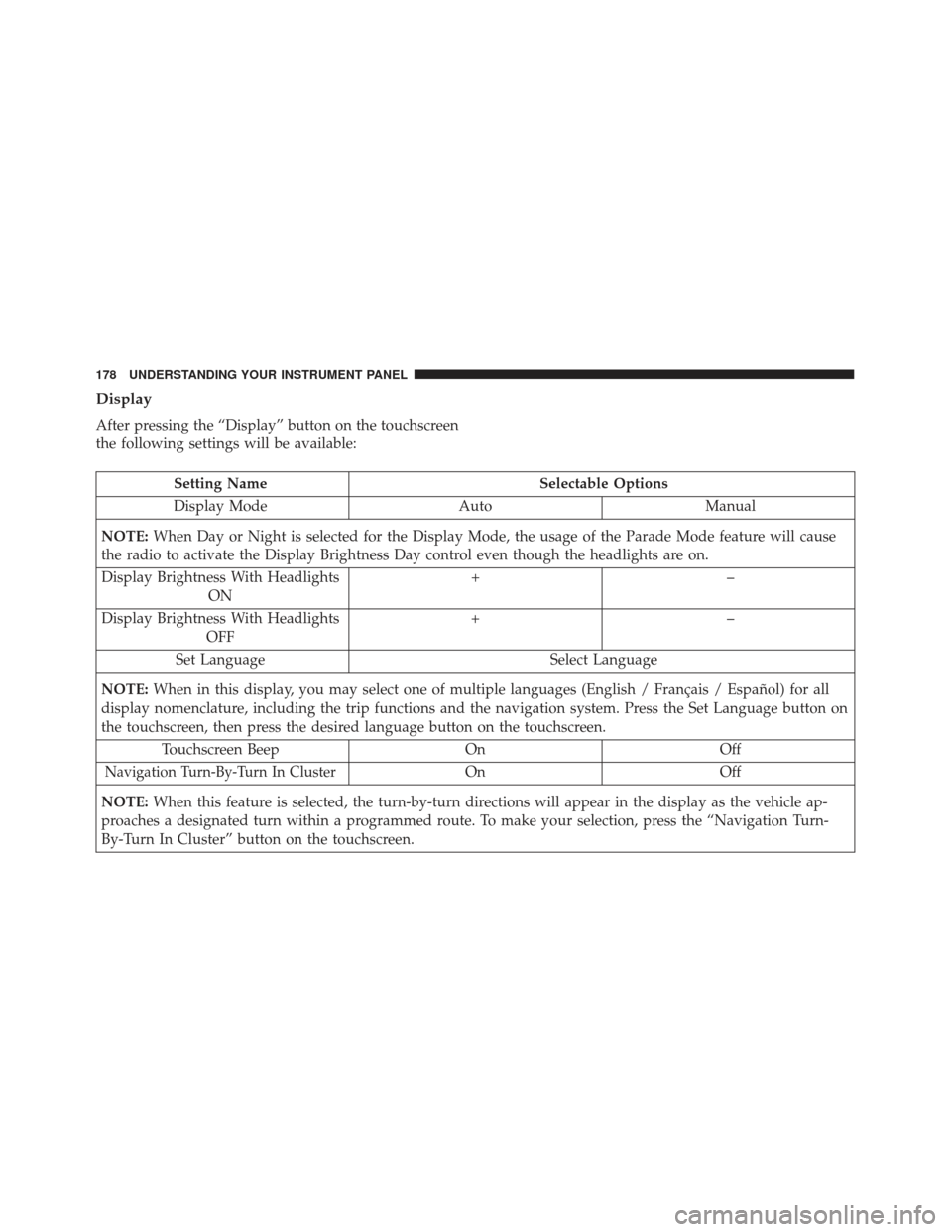
Display
After pressing the “Display” button on the touchscreen
the following settings will be available:
Setting NameSelectable Options
Display Mode AutoManual
NOTE: When Day or Night is selected for the Display Mode, the usage of the Parade Mode feature will cause
the radio to activate the Display Brightness Day control even though the headlights are on.
Display Brightness With Headlights ON +–
Display Brightness With Headlights OFF +–
Set Language Select Language
NOTE: When in this display, you may select one of multiple languages (English / Français / Español) for all
display nomenclature, including the trip functions and the navigation system. Press the Set Language button on
the touchscreen, then press the desired language button on the touchscreen.
Touchscreen Beep OnOff
Navigation Turn-By-Turn In ClusterOnOff
NOTE: When this feature is selected, the turn-by-turn directions will appear in the display as the vehicle ap-
proaches a designated turn within a programmed route. To make your selection, press the “Navigation Turn-
By-Turn In Cluster” button on the touchscreen.
178 UNDERSTANDING YOUR INSTRUMENT PANEL
Page 181 of 370
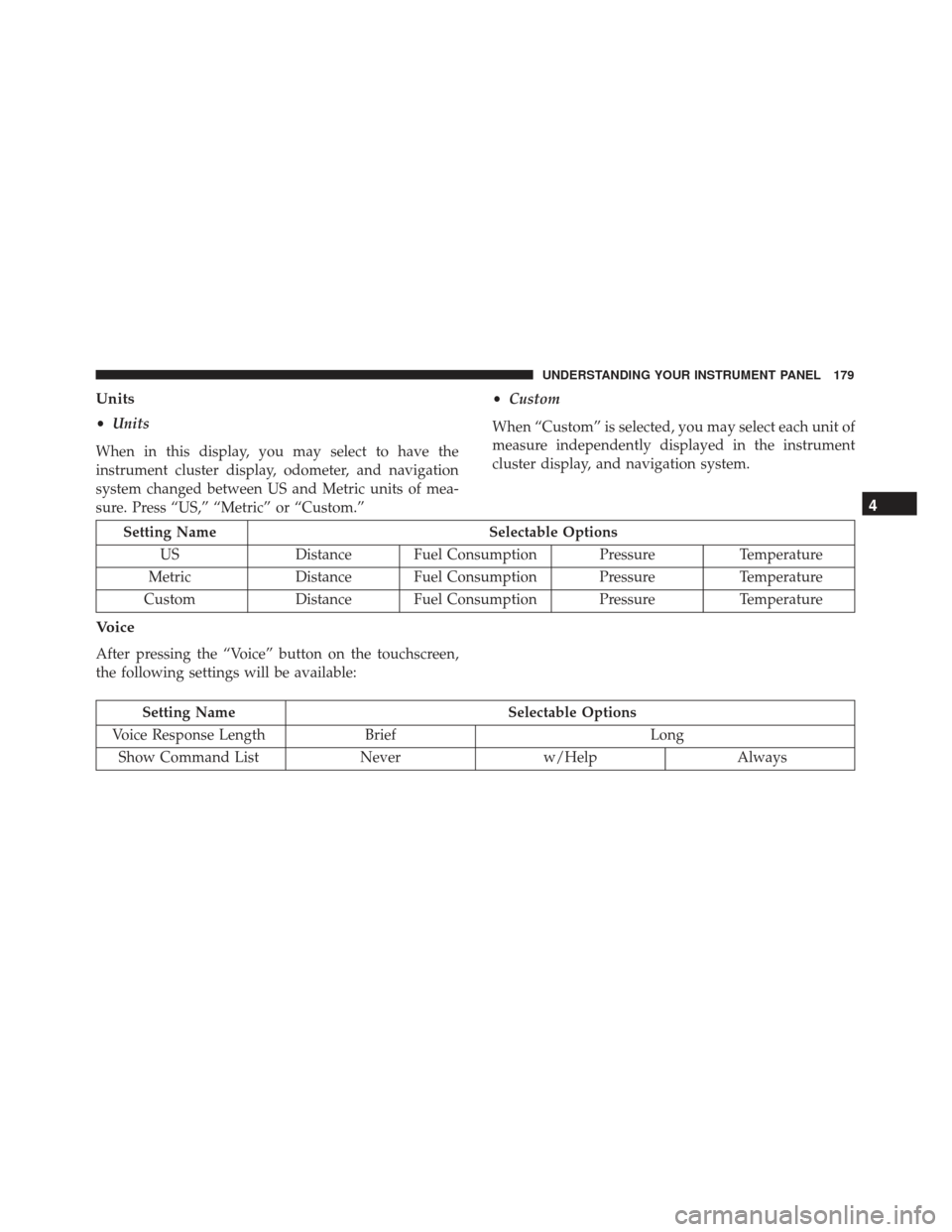
Units
•Units
When in this display, you may select to have the
instrument cluster display, odometer, and navigation
system changed between US and Metric units of mea-
sure. Press “US,” “Metric” or “Custom.” •
Custom
When “Custom” is selected, you may select each unit of
measure independently displayed in the instrument
cluster display, and navigation system.
Setting Name Selectable Options
US Distance Fuel Consumption Pressure Temperature
Metric Distance Fuel Consumption Pressure Temperature
Custom Distance Fuel Consumption Pressure Temperature
Voice
After pressing the “Voice” button on the touchscreen,
the following settings will be available:
Setting NameSelectable Options
Voice Response Length Brief Long
Show Command List Neverw/Help Always
4
UNDERSTANDING YOUR INSTRUMENT PANEL 179
Page 220 of 370
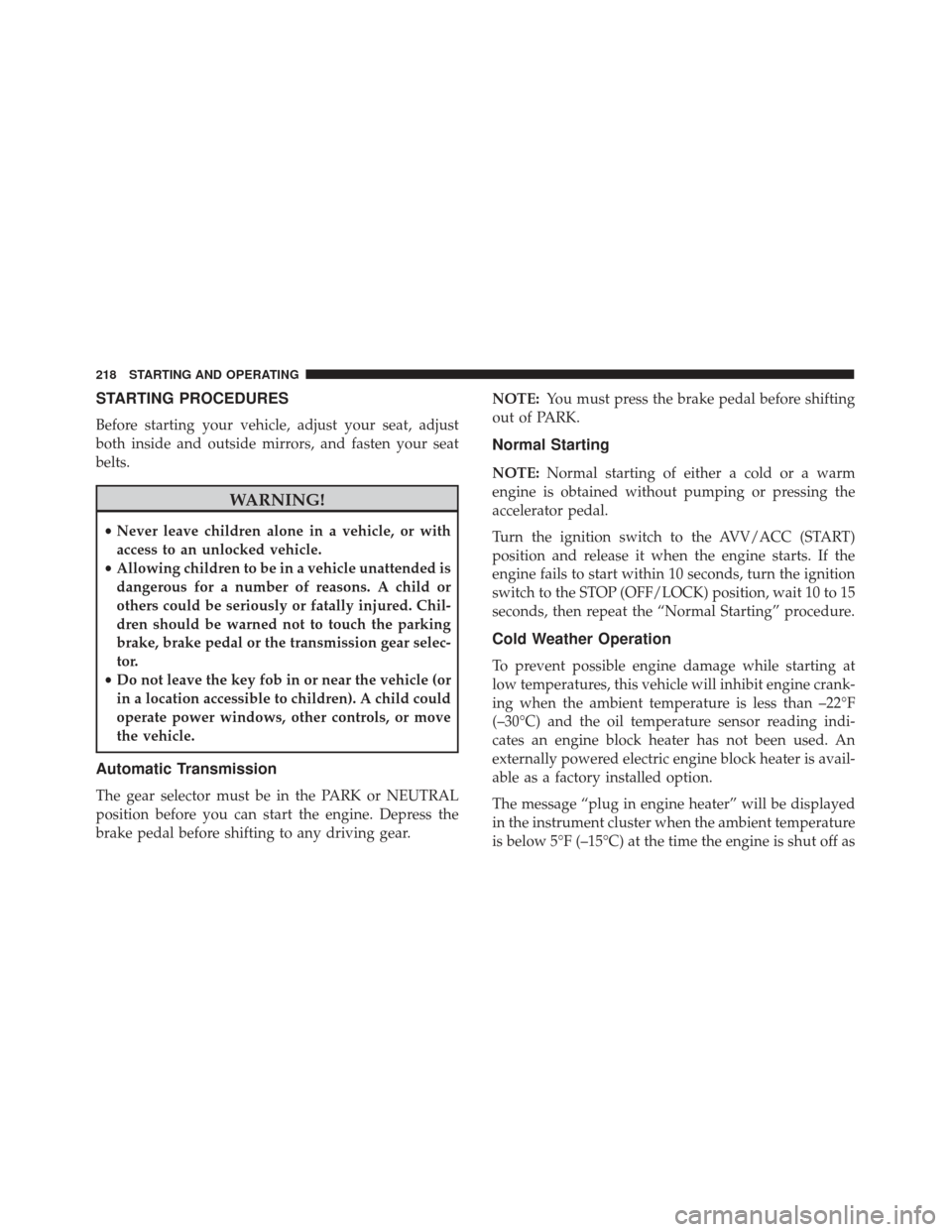
STARTING PROCEDURES
Before starting your vehicle, adjust your seat, adjust
both inside and outside mirrors, and fasten your seat
belts.
WARNING!
•Never leave children alone in a vehicle, or with
access to an unlocked vehicle.
• Allowing children to be in a vehicle unattended is
dangerous for a number of reasons. A child or
others could be seriously or fatally injured. Chil-
dren should be warned not to touch the parking
brake, brake pedal or the transmission gear selec-
tor.
• Do not leave the key fob in or near the vehicle (or
in a location accessible to children). A child could
operate power windows, other controls, or move
the vehicle.
Automatic Transmission
The gear selector must be in the PARK or NEUTRAL
position before you can start the engine. Depress the
brake pedal before shifting to any driving gear. NOTE:
You must press the brake pedal before shifting
out of PARK.
Normal Starting
NOTE: Normal starting of either a cold or a warm
engine is obtained without pumping or pressing the
accelerator pedal.
Turn the ignition switch to the AVV/ACC (START)
position and release it when the engine starts. If the
engine fails to start within 10 seconds, turn the ignition
switch to the STOP (OFF/LOCK) position, wait 10 to 15
seconds, then repeat the “Normal Starting” procedure.
Cold Weather Operation
To prevent possible engine damage while starting at
low temperatures, this vehicle will inhibit engine crank-
ing when the ambient temperature is less than –22°F
(–30°C) and the oil temperature sensor reading indi-
cates an engine block heater has not been used. An
externally powered electric engine block heater is avail-
able as a factory installed option.
The message “plug in engine heater” will be displayed
in the instrument cluster when the ambient temperature
is below 5°F (–15°C) at the time the engine is shut off as
218 STARTING AND OPERATING
Page 223 of 370
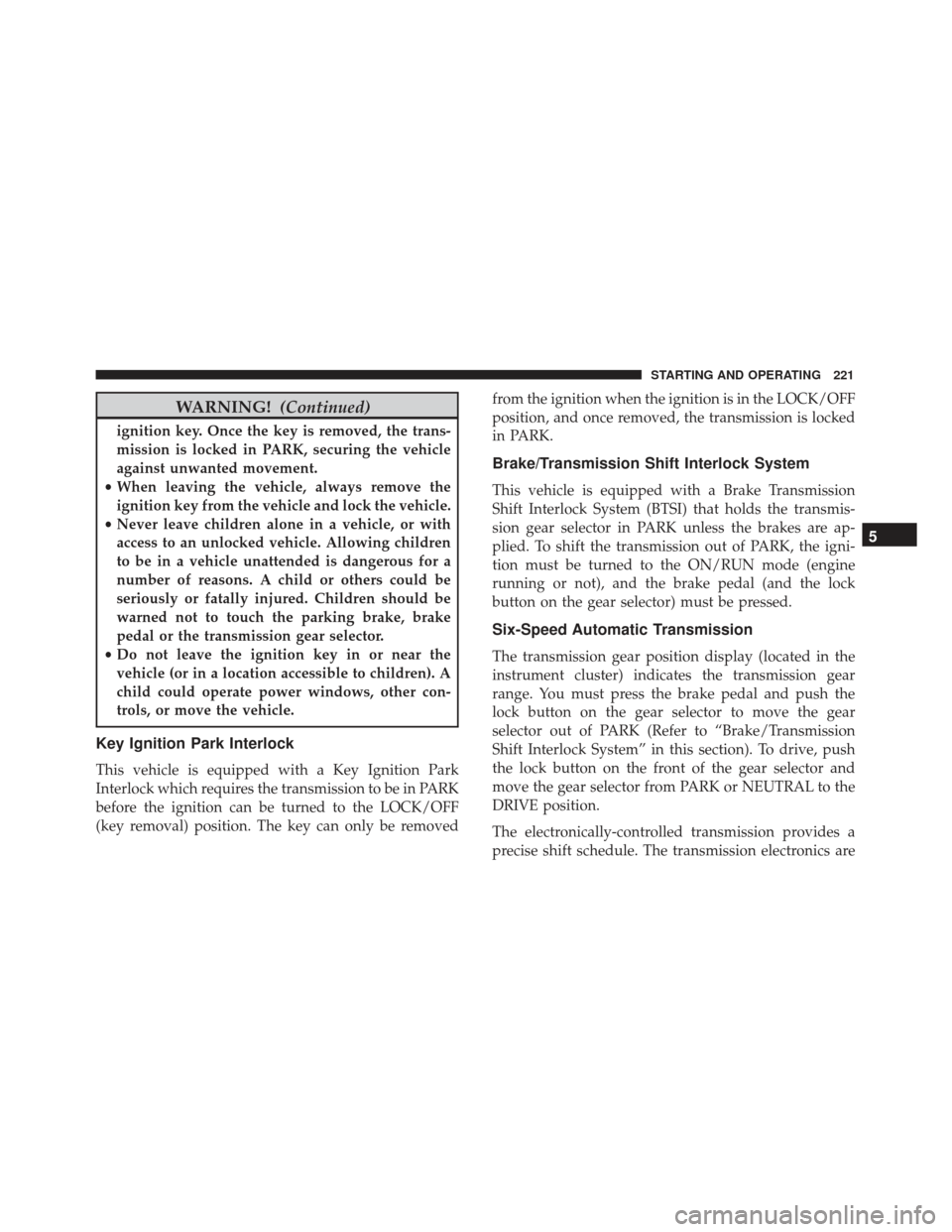
WARNING!(Continued)
ignition key. Once the key is removed, the trans-
mission is locked in PARK, securing the vehicle
against unwanted movement.
• When leaving the vehicle, always remove the
ignition key from the vehicle and lock the vehicle.
• Never leave children alone in a vehicle, or with
access to an unlocked vehicle. Allowing children
to be in a vehicle unattended is dangerous for a
number of reasons. A child or others could be
seriously or fatally injured. Children should be
warned not to touch the parking brake, brake
pedal or the transmission gear selector.
• Do not leave the ignition key in or near the
vehicle (or in a location accessible to children). A
child could operate power windows, other con-
trols, or move the vehicle.
Key Ignition Park Interlock
This vehicle is equipped with a Key Ignition Park
Interlock which requires the transmission to be in PARK
before the ignition can be turned to the LOCK/OFF
(key removal) position. The key can only be removed from the ignition when the ignition is in the LOCK/OFF
position, and once removed, the transmission is locked
in PARK.
Brake/Transmission Shift Interlock System
This vehicle is equipped with a Brake Transmission
Shift Interlock System (BTSI) that holds the transmis-
sion gear selector in PARK unless the brakes are ap-
plied. To shift the transmission out of PARK, the igni-
tion must be turned to the ON/RUN mode (engine
running or not), and the brake pedal (and the lock
button on the gear selector) must be pressed.
Six-Speed Automatic Transmission
The transmission gear position display (located in the
instrument cluster) indicates the transmission gear
range. You must press the brake pedal and push the
lock button on the gear selector to move the gear
selector out of PARK (Refer to “Brake/Transmission
Shift Interlock System” in this section). To drive, push
the lock button on the front of the gear selector and
move the gear selector from PARK or NEUTRAL to the
DRIVE position.
The electronically-controlled transmission provides a
precise shift schedule. The transmission electronics are
5
STARTING AND OPERATING 221
Page 224 of 370
self-calibrating; therefore, the first few shifts on a new
vehicle may be somewhat abrupt. This is a normal
condition, and precision shifts will develop within a
few hundred miles (kilometers).
Only shift from DRIVE to PARK or REVERSE when the
accelerator pedal is released and the vehicle is stopped.
Be sure to keep your foot on the brake pedal when
shifting between these gears.
The transmission gear selector has PARK, REVERSE,
NEUTRAL, DRIVE, and AutoStick (+/-) shift positions.
Manual shifts can be made using the AutoStick shift
control (refer to “AutoStick” in this section for furtherinformation). Moving the gear selector into the
AutoStick (+/-) position (beside the DRIVE position)
activates AutoStick mode, providing manual shift con-
trol and displaying the current gear in the instrument
cluster (as 1, 2, 3, etc). Toggling the gear selector
forward (-) or rearward (+) while in the Autostick
position will manually select the transmission gear.
NOTE:
If the gear selector cannot be moved to the
PARK, REVERSE, or NEUTRAL position (when pushed
forward) it is probably in the AutoStick (+/-) position
(beside the DRIVE position). In AutoStick mode, the
transmission gear (1, 2, 3, etc.) is displayed in the
instrument cluster. Move the gear selector to the right
(into the DRIVE [D] position) for access to PARK,
REVERSE, and NEUTRAL.
Gear Ranges
DO NOT race the engine when shifting from PARK or
NEUTRAL into another gear range.
NOTE: After selecting any gear range, wait a moment
to allow the selected gear to engage before accelerating.
This is especially important when the engine is cold.
Transmission Gear Selector
222 STARTING AND OPERATING
Page 228 of 370
During cold temperatures, transmission operation may
be modified depending on engine coolant temperature.
Normal operation will resume once the engine tempera-
ture has risen to a suitable level.
Instrument Cluster Messages
Dedicated messages will be displayed in the instrument
cluster to alert the driver when certain unusual condi-
tions occur.
Transmission Limp Home Mode
Transmission function is monitored electronically for
abnormal conditions. If a condition is detected that
could result in transmission damage, Transmission
Limp Home Mode is activated. In this mode, the
transmission remains in third gear regardless of which
forward gear is selected. PARK, REVERSE, and NEU-
TRAL will continue to operate. The Malfunction Indi-
cator Light (MIL) may be illuminated. Limp Home
Mode allows the vehicle to be driven to an authorized
dealer for service without damaging the transmission.
In the event of a momentary problem, the transmission
can be reset to regain all forward gears by performing
the following steps:
1. Stop the vehicle.2. Shift the transmission into PARK.
3. Turn the ignition to the OFF position.
4. Wait approximately 10 seconds.
5. Restart the engine.
6. Shift into the desired gear range. If the problem is no
longer detected, the transmission will return to nor-
mal operation.
NOTE: Even if the transmission can be reset, we rec-
ommend that you visit your authorized dealer at your
earliest possible convenience. Your authorized dealer
has diagnostic equipment to determine if the problem
could recur.
If the transmission cannot be reset, authorized dealer
service is required.
AUTOSTICK
AutoStick is a driver-interactive transmission feature
providing manual shift control, giving you more control
of the vehicle. AutoStick allows you to maximize engine
braking, eliminate undesirable upshifts and downshifts,
and improve overall vehicle performance. This system
226 STARTING AND OPERATING
Page 229 of 370
can also provide you with more control during passing,
city driving, cold slippery conditions, mountain driv-
ing, and many other situations.
Operation
When the gear selector is in the AutoStick position
(beside the Drive position), it can be moved forward
and rearward. This allows the driver to manually select
the transmission gear being used. Moving the gear
selector forward (-) triggers a downshift, and rearward
(+) an upshift. The current gear is displayed in the
instrument cluster.
NOTE:In AutoStick mode, the transmission will only
shift up or down when the driver moves the gear
selector rearward (+) or forward (-), except as described
below.
• The transmission will automatically upshift when
necessary to prevent engine over-speed.
• The transmission will automatically downshift as the
vehicle slows (to prevent engine lugging) and will
display the current gear. •
The transmission will automatically downshift to
first gear when coming to a stop. After a stop, the
driver should manually upshift (+) the transmission
as the vehicle is accelerated.
• You can start out (from a stop) in first, second, or
third gear. Starting out in second or third gear can be
helpful in snow or icy conditions. To select second or
third gear after the vehicle is brought to a stop, tap
the gear selector rearward (+) once or twice.
• If a requested downshift would cause the engine to
over-speed, that shift will not occur.
• The system will ignore attempts to upshift at too low
of a vehicle speed.
• Avoid using speed control when AutoStick is en-
gaged because the transmission will not shift auto-
matically.
• Transmission shifting will be more noticeable when
AutoStick is enabled.
• The system may revert to automatic shift mode if a
fault or overheat condition is detected.
To disengage AutoStick mode, return the gear selector
to the DRIVE position. You can shift in or out of the
5
STARTING AND OPERATING 227
Page 233 of 370
When the parking brake is applied with the ignition
switch in the MAR (ACC/ON/RUN) position, the
Brake Warning Light in the instrument cluster will
illuminate.
When parking on a hill, it is important to turn the front
wheels toward the curb on a downhill grade and away
from the curb on an uphill grade. The parking brake
should always be applied whenever the driver is not in
the vehicle.
WARNING!
•Never leave children alone in a vehicle, or with
access to an unlocked vehicle.
• Allowing children to be in a vehicle unattended is
dangerous for a number of reasons. A child or
others could be seriously or fatally injured. Chil-
dren should be warned not to touch the parking
brake, brake pedal or the gear selector.
• Do not leave the key fob in or near the vehicle or
in a location accessible to children. A child could
operate power windows, other controls, or move
the vehicle.
• Be sure the parking brake is fully disengaged
before driving; failure to do so can lead to brake
failure and a collision.
• Always fully apply the parking brake when leav-
ing your vehicle, or it may roll and cause damage
or injury.
CAUTION!
If the Brake Warning Light remains on with the
parking brake released, a brake system malfunction
(Continued)
1 — Parking Brake Release Button
2 — Parking Brake Lever
5
STARTING AND OPERATING 231
Page 238 of 370
•Oversteer - when the vehicle is turning more than
appropriate for the steering wheel position.
• Understeer - when the vehicle is turning less than
appropriate for the steering wheel position.
WARNING!
•The Electronic Stability Control (ESC) cannot
prevent the natural laws of physics from acting on
the vehicle, nor can it increase the traction af-
forded by prevailing road conditions. ESC cannot
prevent all accidents, including those resulting
from excessive speed in turns, driving on very
slippery surfaces, or hydroplaning. ESC also can-
not prevent collisions resulting from loss of ve-
hicle control due to inappropriate driver input for
the conditions. Only a safe, attentive, and skillful
driver can prevent accidents. The capabilities of
an ESC equipped vehicle must never be exploited
in a reckless or dangerous manner which could
jeopardize the user ’s safety or the safety of others.
• Vehicle modifications, or failure to properly
maintain your vehicle, may change the handling
(Continued)
WARNING! (Continued)
characteristics of your vehicle, and may nega-
tively affect the performance of the ESC system.
Changes to the steering system, suspension, brak-
ing system, tire type and size or wheel size may
adversely affect ESC performance. Improperly
inflated and unevenly worn tires may also de-
grade ESC performance. Any vehicle modifica-
tion or poor vehicle maintenance that reduces the
effectiveness of the ESC system can increase the
risk of loss of vehicle control, vehicle rollover,
personal injury and death.
ESC Activation/Malfunction Indicator Light And
ESC OFF Indicator Light
The ESC Activation/Malfunction Indicator
Light in the instrument cluster will come on
when the ignition switch is turned to the
MAR (ACC/ON/RUN) position for four sec-
onds. If the ESC Activation/Malfunction Indicator
Light comes on continuously with the engine running, a
malfunction has been detected in the ESC system. If this
light remains on after several ignition cycles, and the
236 STARTING AND OPERATING
Page 239 of 370
vehicle has been driven several miles (kilometers) at
speeds greater than 30 mph (48 km/h), see your autho-
rized dealer as soon as possible to have the problem
diagnosed and corrected.
The ESC Activation/Malfunction Indicator Light (lo-
cated in the instrument cluster) starts to flash as soon as
the tires lose traction and the ESC system becomes
active. The ESC Activation/Malfunction Indicator Light
also flashes when TCS is active. If the ESC Activation/
Malfunction Indicator Light begins to flash during
acceleration, ease up on the accelerator and apply as
little throttle as possible. Be sure to adapt your speed
and driving to the prevailing road conditions.
NOTE:
•The ESC Activation/Malfunction Indicator Light and
the ESC OFF Indicator Light come on momentarily
each time the ignition switch is turned ON.
• Each time the ignition is turned ON, the ESC system
will be ON even if it was turned off previously.
The ESC OFF Indicator Light indicates the
Electronic Stability Control (ESC) is partially
off or full off.ESC Operating Modes
The ESC system has two available operating modes.
Full On
This is the normal operating mode for ESC. Whenever
the vehicle is started the system will be in this mode.
This mode should be used for most driving situations.
ESC should only be turned to “Partial Off” for specific
reasons as noted. Refer to “Partial Off” for additional
information.
Partial Off
The “ESC OFF” button is located in the switch bank
above the climate control. To enter the “Partial Off”
mode, momentarily push the “ESC OFF” button and the
“ESC Activation/Malfunction Indicator Light” will il-
luminate. To turn the ESC on again, momentarily push
the “ESC OFF” button and the “ESC Activation/
Malfunction Indicator Light” will turn off. This will
restore the normal “ESC On” mode of operation.
5
STARTING AND OPERATING 237