lights FIAT 500L 2017 2.G Owner's Guide
[x] Cancel search | Manufacturer: FIAT, Model Year: 2017, Model line: 500L, Model: FIAT 500L 2017 2.GPages: 370, PDF Size: 3.56 MB
Page 185 of 370
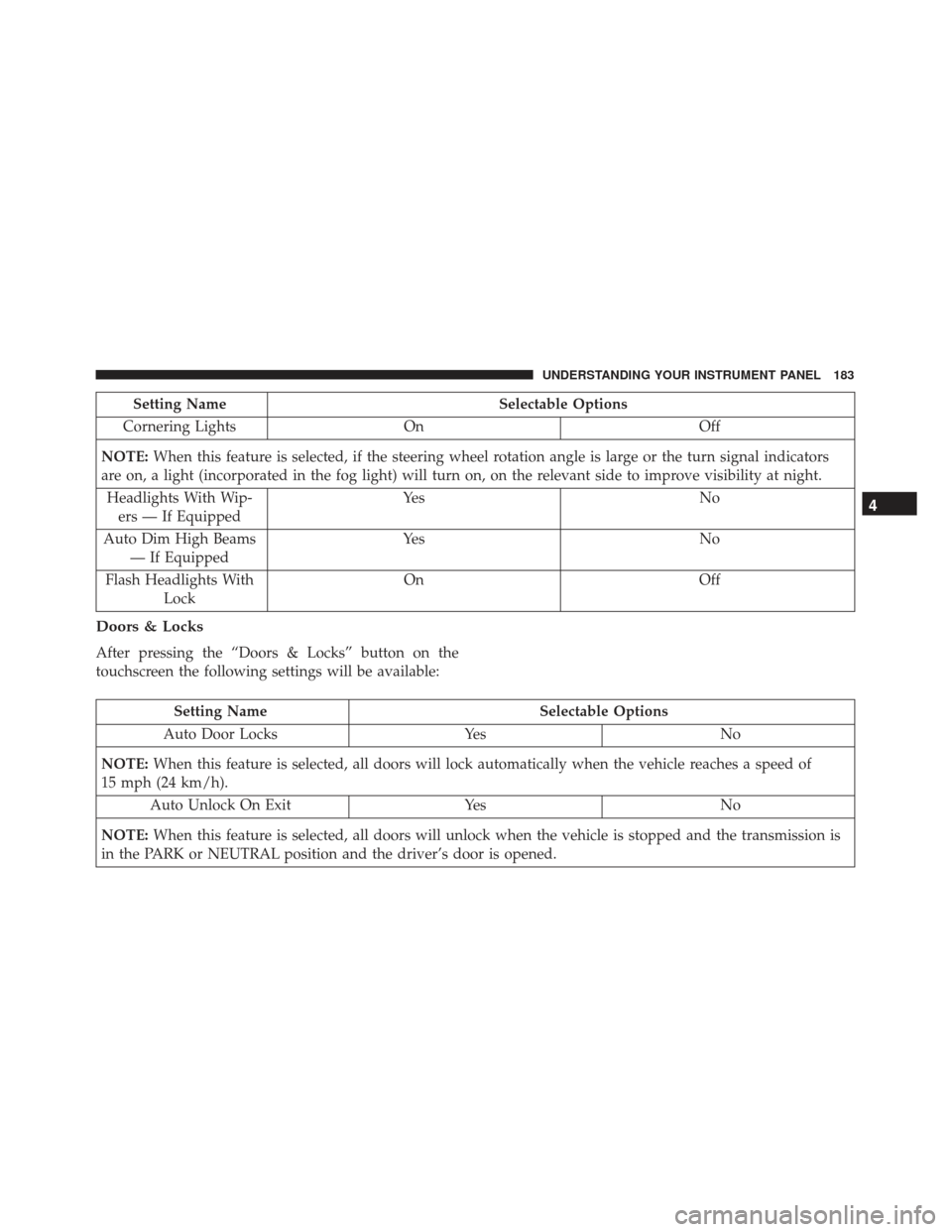
Setting NameSelectable Options
Cornering Lights On Off
NOTE: When this feature is selected, if the steering wheel rotation angle is large or the turn signal indicators
are on, a light (incorporated in the fog light) will turn on, on the relevant side to improve visibility at night.
Headlights With Wip- ers — If Equipped Ye s
N o
Auto Dim High Beams — If Equipped Ye s
N o
Flash Headlights With Lock On
Off
Doors & Locks
After pressing the “Doors & Locks” button on the
touchscreen the following settings will be available:
Setting Name Selectable Options
Auto Door Locks YesNo
NOTE: When this feature is selected, all doors will lock automatically when the vehicle reaches a speed of
15 mph (24 km/h).
Auto Unlock On Exit YesNo
NOTE: When this feature is selected, all doors will unlock when the vehicle is stopped and the transmission is
in the PARK or NEUTRAL position and the driver’s door is opened.
4
UNDERSTANDING YOUR INSTRUMENT PANEL 183
Page 186 of 370
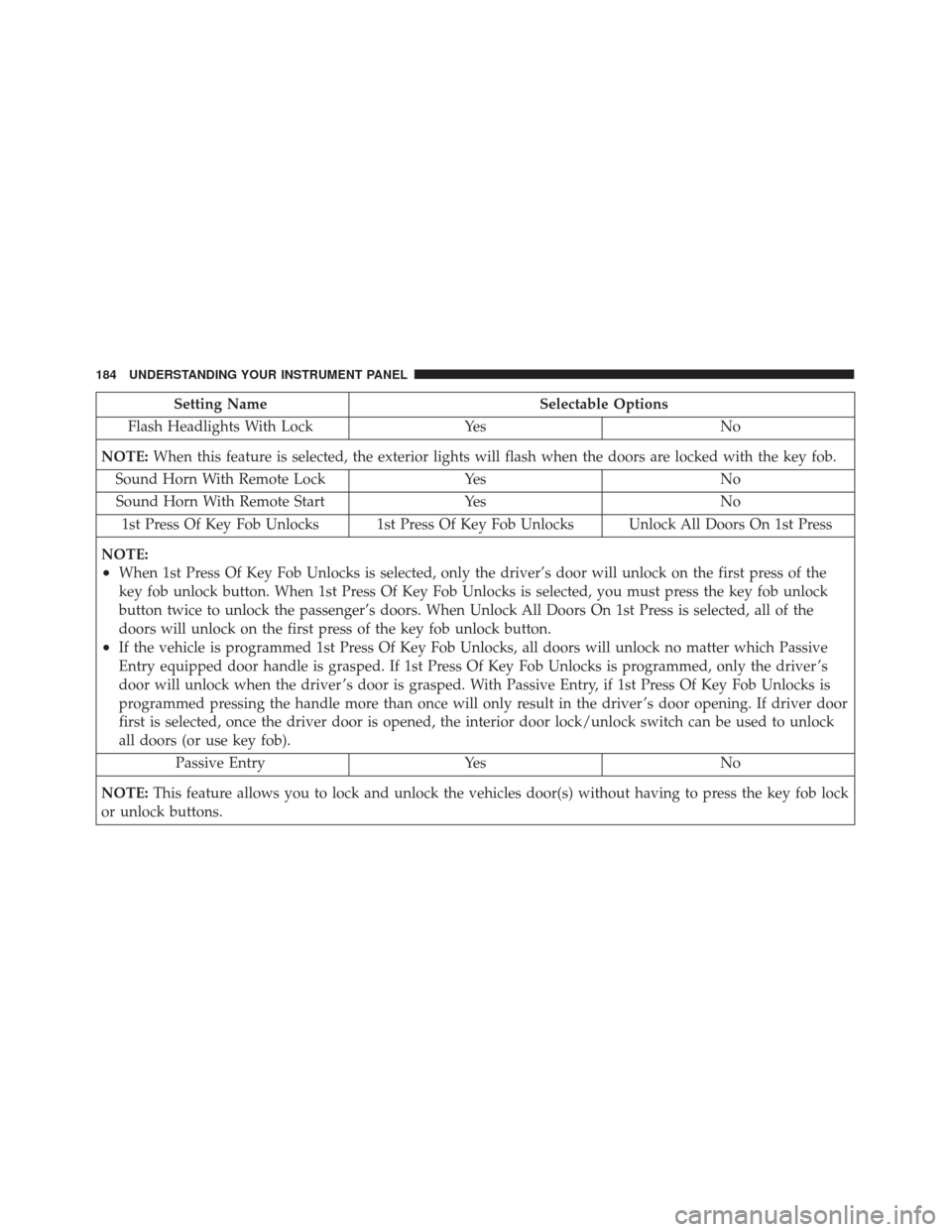
Setting NameSelectable Options
Flash Headlights With Lock YesNo
NOTE: When this feature is selected, the exterior lights will flash when the doors are locked with the key fob.
Sound Horn With Remote Lock YesNo
Sound Horn With Remote Start YesNo
1st Press Of Key Fob Unlocks 1st Press Of Key Fob Unlocks Unlock All Doors On 1st Press
NOTE:
•When 1st Press Of Key Fob Unlocks is selected, only the driver’s door will unlock on the first press of the
key fob unlock button. When 1st Press Of Key Fob Unlocks is selected, you must press the key fob unlock
button twice to unlock the passenger’s doors. When Unlock All Doors On 1st Press is selected, all of the
doors will unlock on the first press of the key fob unlock button.
•If the vehicle is programmed 1st Press Of Key Fob Unlocks, all doors will unlock no matter which Passive
Entry equipped door handle is grasped. If 1st Press Of Key Fob Unlocks is programmed, only the driver ’s
door will unlock when the driver ’s door is grasped. With Passive Entry, if 1st Press Of Key Fob Unlocks is
programmed pressing the handle more than once will only result in the driver ’s door opening. If driver door
first is selected, once the driver door is opened, the interior door lock/unlock switch can be used to unlock
all doors (or use key fob). Passive Entry YesNo
NOTE: This feature allows you to lock and unlock the vehicles door(s) without having to press the key fob lock
or unlock buttons.
184 UNDERSTANDING YOUR INSTRUMENT PANEL
Page 188 of 370
Engine Off Options
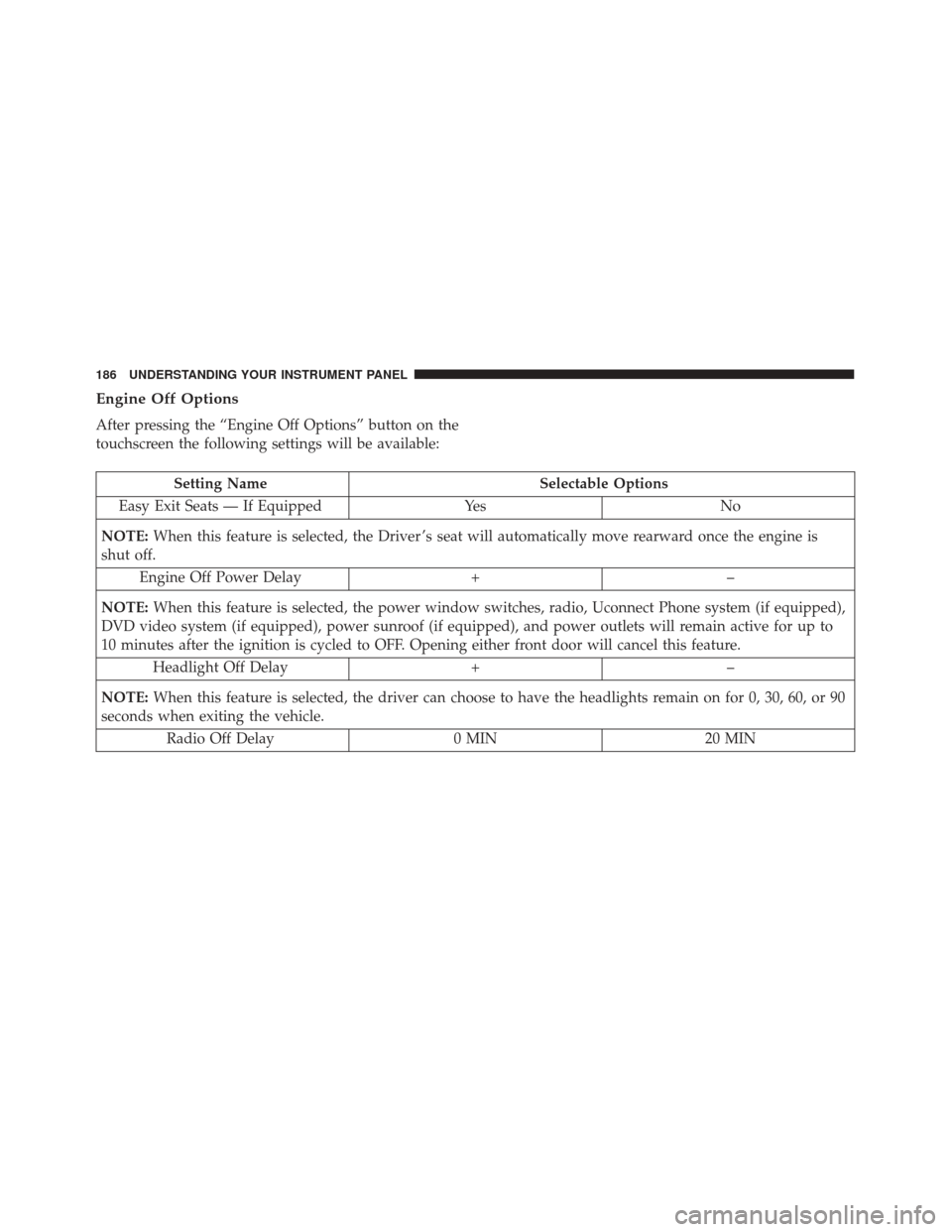
After pressing the “Engine Off Options” button on the
touchscreen the following settings will be available:
Setting NameSelectable Options
Easy Exit Seats — If Equipped YesNo
NOTE: When this feature is selected, the Driver ’s seat will automatically move rearward once the engine is
shut off.
Engine Off Power Delay +–
NOTE: When this feature is selected, the power window switches, radio, Uconnect Phone system (if equipped),
DVD video system (if equipped), power sunroof (if equipped), and power outlets will remain active for up to
10 minutes after the ignition is cycled to OFF. Opening either front door will cancel this feature.
Headlight Off Delay +–
NOTE: When this feature is selected, the driver can choose to have the headlights remain on for 0, 30, 60, or 90
seconds when exiting the vehicle.
Radio Off Delay 0 MIN20 MIN
186 UNDERSTANDING YOUR INSTRUMENT PANEL
Page 327 of 370
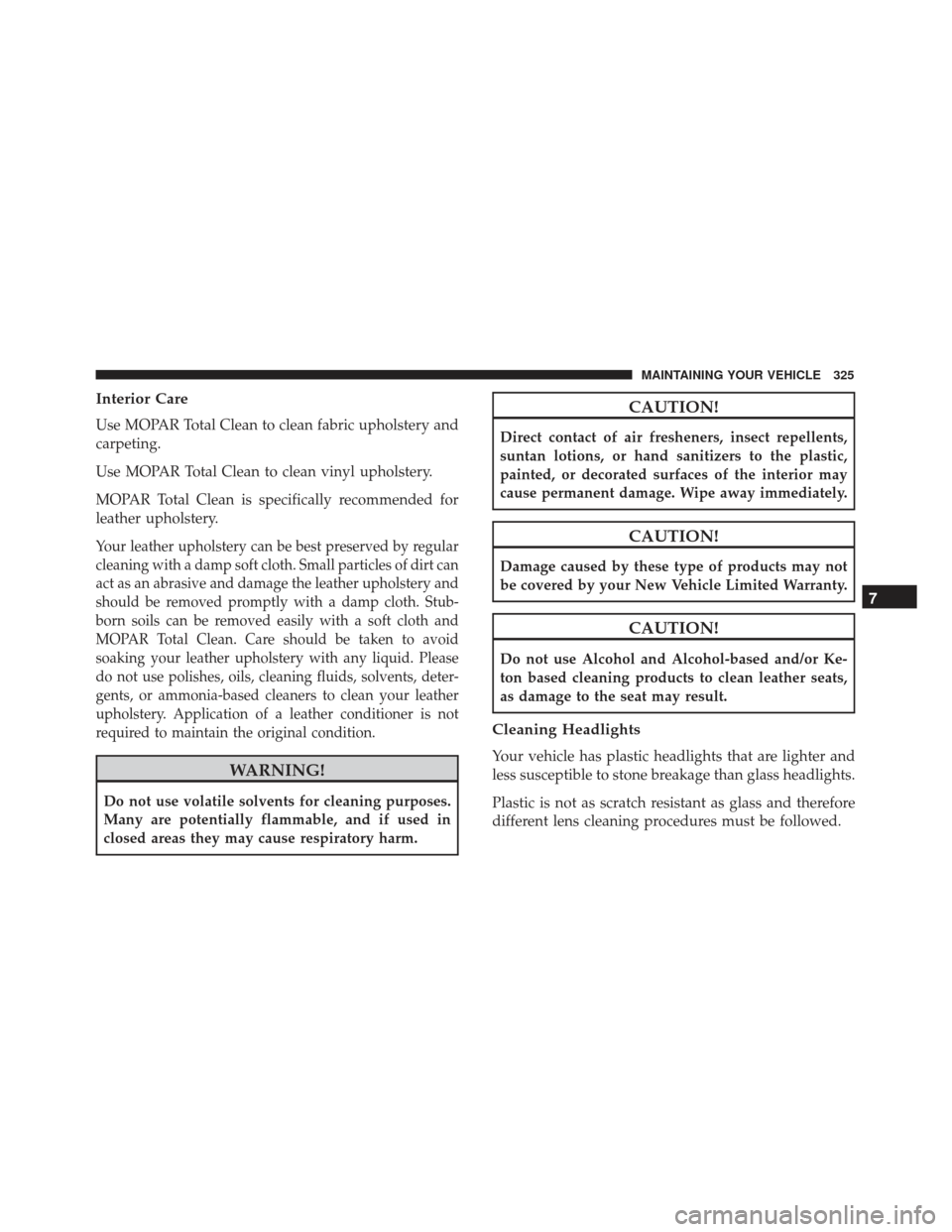
Interior Care
Use MOPAR Total Clean to clean fabric upholstery and
carpeting.
Use MOPAR Total Clean to clean vinyl upholstery.
MOPAR Total Clean is specifically recommended for
leather upholstery.
Your leather upholstery can be best preserved by regular
cleaning with a damp soft cloth. Small particles of dirt can
act as an abrasive and damage the leather upholstery and
should be removed promptly with a damp cloth. Stub-
born soils can be removed easily with a soft cloth and
MOPAR Total Clean. Care should be taken to avoid
soaking your leather upholstery with any liquid. Please
do not use polishes, oils, cleaning fluids, solvents, deter-
gents, or ammonia-based cleaners to clean your leather
upholstery. Application of a leather conditioner is not
required to maintain the original condition.
WARNING!
Do not use volatile solvents for cleaning purposes.
Many are potentially flammable, and if used in
closed areas they may cause respiratory harm.
CAUTION!
Direct contact of air fresheners, insect repellents,
suntan lotions, or hand sanitizers to the plastic,
painted, or decorated surfaces of the interior may
cause permanent damage. Wipe away immediately.
CAUTION!
Damage caused by these type of products may not
be covered by your New Vehicle Limited Warranty.
CAUTION!
Do not use Alcohol and Alcohol-based and/or Ke-
ton based cleaning products to clean leather seats,
as damage to the seat may result.
Cleaning Headlights
Your vehicle has plastic headlights that are lighter and
less susceptible to stone breakage than glass headlights.
Plastic is not as scratch resistant as glass and therefore
different lens cleaning procedures must be followed.
7
MAINTAINING YOUR VEHICLE 325
Page 333 of 370
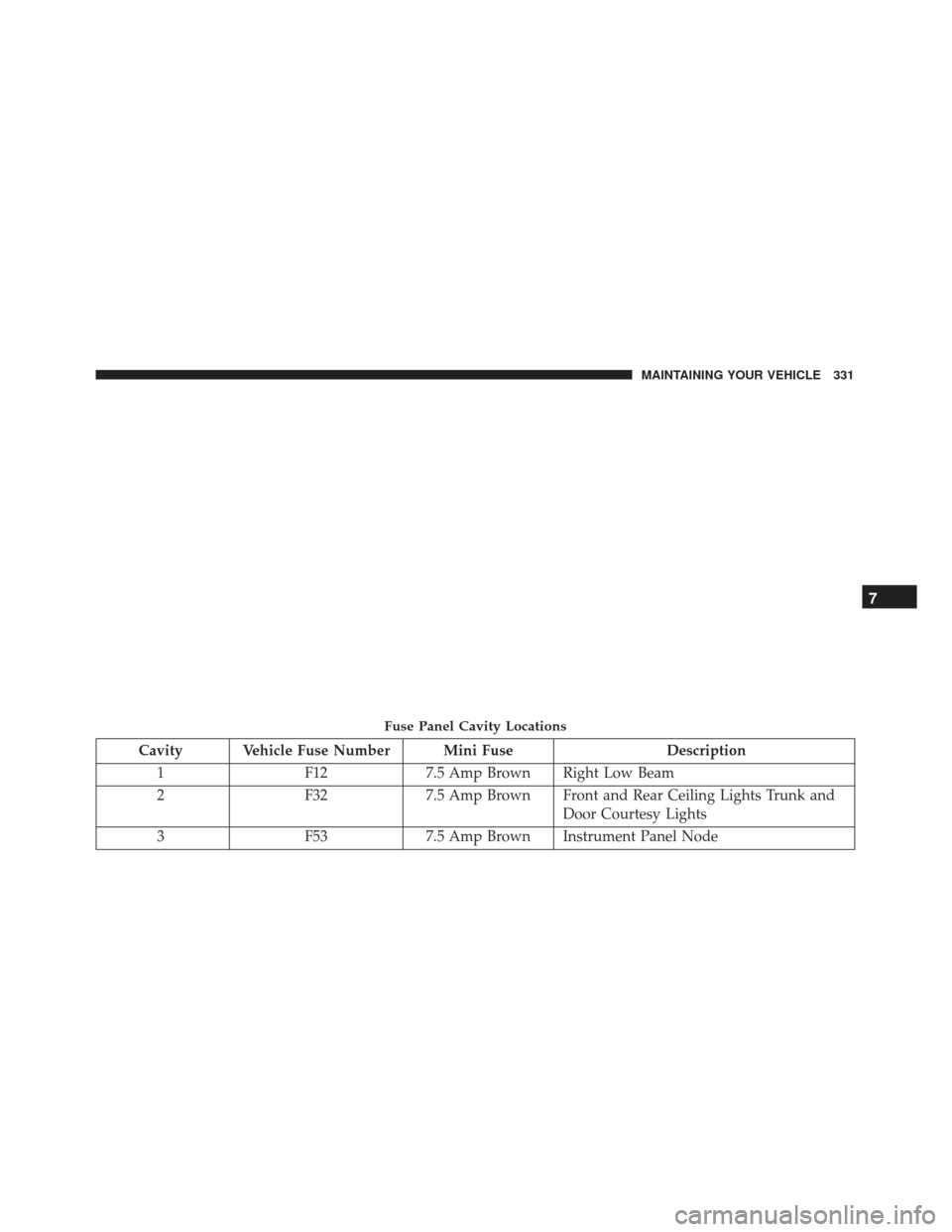
Cavity Vehicle Fuse Number Mini FuseDescription
1 F127.5 Amp Brown Right Low Beam
2 F327.5 Amp Brown Front and Rear Ceiling Lights Trunk and
Door Courtesy Lights
3 F537.5 Amp Brown Instrument Panel Node
Fuse Panel Cavity Locations
7
MAINTAINING YOUR VEHICLE 331
Page 340 of 370
6. Reinstall the plastic cap.
Front Turn Signal, Parking And Daytime
Running Lamps
1. Turn front wheels inboard to access upper cover inwheel liner.
2. Open the upper cover on the front of the wheel liner.
3. Remove the cap from the back of the lower headlamp housing. 4. Rotate the bulb counterclockwise and remove.
5. Install the bulb into socket, and rotate bulb/socket
clockwise into lamp locking it in place.
6. Reinstall the plastic cap and close the cover on the wheel liner.
Front Fog Lamps
To replace the front fog lights, see your authorized
dealer.
Front, Rear Roof Lamps
1. Remove two screw and remove the lamp assembly.
2. Remove the socket bulb by turning counterclock-wise.
3. Remove bulb and replace as needed.
4. Reinstall the bulb socket and rotate clockwise to lock in place.
5. Reinstall lamp.Headlamp Sealing Cap Installation
338 MAINTAINING YOUR VEHICLE
Page 346 of 370
MAINTENANCE SCHEDULE
Your vehicle is equipped with an automatic oil change
indicator system. The oil change indicator system will
remind you that it is time to take your vehicle in for
scheduled maintenance.
Based on engine operation conditions, the oil change
indicator message will illuminate in the instrument
cluster. This means that service is required for your
vehicle. Operating conditions such as frequent short-
trips, trailer tow and extremely hot or cold ambient
temperatures will influence when the “Change Oil” or
“Oil Change Required” message is displayed. Severe
Operating Conditions can cause the change oil message
to illuminate as early as 3,500 miles (5,600 km) since last
reset. Have your vehicle serviced as soon as possible,
within the next 500 miles (805 km).
Your authorized dealer will reset the oil change indica-
tor message after completing the scheduled oil change.
If a scheduled oil change is performed by someone
other than your authorized dealer, the message can be
reset by referring to the steps described under “Instru-
ment Cluster Display” in “Understanding Your Instru-
ment Panel” for further information.NOTE:
Under no circumstances should oil change
intervals exceed 10,000 miles (16,000 km), twelve
months or 350 hours of engine run time, whichever
comes first. The 350 hours of engine run or idle time is
generally only a concern for fleet customers.
Severe Duty All Models
Change Engine Oil at 4,000 miles (6,500 km) if the
vehicle is operated in a dusty and off road environment
or is operated predominately at idle or only very low
engine RPM’s. This type of vehicle use is considered
Severe Duty.
Once A Month Or Before A Long Trip:
• Check engine oil level.
• Check windshield washer fluid level.
• Check the tire inflation pressures and look for un-
usual wear or damage.
• Check the fluid levels of the coolant reservoir, and
brake master cylinder reservoir, and fill as needed.
• Check function of all interior and exterior lights.
344 MAINTENANCE SCHEDULES
Page 360 of 370
ConnectorUCI............................... .192
Universal Consumer Interface (UCI) .........192
Contract, Service ........................ .352
Coolant (Antifreeze) ...................339, 340
Cooling System ..........................314
Adding Coolant (Antifreeze) ..............315
Coolant Level .....................314, 317
Disposal Of Used Coolant ................317
Drain, Flush, And Refill ..................314
Inspection .......................... .317
Points To Remember .................316, 317
Pressure Cap ........................ .316
Selection Of Coolant (Antifreeze) ...........315
Corrosion Protection ..................... .321
Cruise Light ............................151
Cupholders ............................120
Customer Assistance ..................... .350
Daytime Running Lights ....................91
Dealer Service .......................... .301
Deck Lid, Emergency Release ................24
Defroster, Windshield ......................68
Diagnostic System, Onboard ................300 Dipsticks
Automatic Transmission .................320
Disposal Antifreeze (Engine Coolant) ...............317
Door Locks .............................19
Door Opener, Garage ......................110
Driving Through Flowing, Rising, Or Shallow Standing
Water ...............................229
Electrical Outlet, Auxiliary (Power Outlet) .......119
Electrical Power Outlets ....................119
Electric Remote Mirrors .....................76
Electronic Brake Control System ..............232
Brake Assist System ....................233
Electronic Roll Mitigation (ERM) .............238
Electronic Speed Control (Cruise Control) .......100
Electronic Stability Control (ESC) .............235
Electronic Throttle Control Warning Light .......141
Electr onic
Vehicle Information Center (EVIC) .....108
Emergency Deck Lid Release .................24
Emergency, In Case Of Hazard Warning Flasher .................274
Jacking ............................ .280
Jump Starting ........................ .286
358 INDEX
Page 361 of 370
Towing............................ .292
Emergency Trunk Release ...................24
Engine Air Cleaner ..........................304
Break-In Recommendations ................65
Checking Oil Level .....................302
Compartment ........................ .299
Cooling ............................ .314
Exhaust Gas Caution .................67, 269
Fails To Start ........................ .219
Flooded, Starting ..................... .219
Fuel Requirements .....................266
Oil .............................302, 339
Oil Filler Cap ........................ .303
Oil Filter ............................304
Oil Selection ..........................303
Overheating ..........................274
Starting ............................ .218
Enhanced Accident Response Feature ..........294
Ethanol ...............................267
Exhaust Gas Caution ...................67, 269
Exhaust System .......................67, 312
Exterior Lights ...........................70 Filters
Air Cleaner ..........................304
Air Conditioning ...................205, 306
Engine Fuel ..........................340
Engine Oil .......................... .304
Engine Oil Disposal ....................304
Flashers Turn Signal ........................70, 150
Flooded Engine Starting ...................219
Fluid, Brake ............................342
Fluid Capacities ........................ .339
Fluid Leaks .............................70
Fluid Level Checks Automatic Transmission .................320
Fluids, Lubricants And Genuine Parts ..........340
Fog Lights .............................. 9
3
Fold And Tumble Rear Seat ..................83
Freeing A Stuck Vehicle ....................289
Fuel ................................. .266
Adding ............................ .269
Additives ............................268
Capacity ............................339
Clean Air ............................266
Ethanol ............................ .267
Gasoline ............................26610
INDEX 359
Page 362 of 370
Light...............................145
Materials Added .......................268
Methanol ............................267
Octane Rating ........................ .266
Requirements ........................ .266
Tank Capacity ........................339
Fueling ...............................269
Fuses .................................327
Garage Door Opener (HomeLink) .............110
Gasoline, Clean Air .......................266
Gasoline (Fuel) .......................266, 339
Gasoline, Reformulated .................266, 267
Gear Ranges ............................222
Gear Select Lever Override .................290
General Maintenance ..................... .302
Glass Cleaning ..........................326
Hazard Driving Through Flowing, Rising, Or Shallow
Standing Water ........................229
Headlights ..............................91
Cleaning ............................325
Passing ..............................91
Heated Mirrors ...........................77 Hill Start Assist
........................ .234
Holder, Cup ............................120
HomeLink (Garage Door Opener) .............110
Hood Release ............................89
Ignition Key.................................11
Immobilizer (Sentry Key) ...................13
Inside Rearview Mirror .....................74
Instrument Cluster .................134, 139, 150
Instrument Cluster Display Instrument Cluster Display ...............152
Instrument Panel And Controls ..............133
Instrument Panel Cover ....................326
Instrument Panel Lens Cleaning ..............326
Interior Appearance Care ...................325
Interior Lighting ..........................93
Introduction .............................4
Jacking Instructions .......................282
Jack Location .......................... .280
Jack
Operation .......................280, 282
Jump Starting .......................... .286
Key-In Reminder .........................13
360 INDEX