Light FIAT 500L LIVING 2014 2.G Repair Manual
[x] Cancel search | Manufacturer: FIAT, Model Year: 2014, Model line: 500L LIVING, Model: FIAT 500L LIVING 2014 2.GPages: 420, PDF Size: 9.77 MB
Page 66 of 420
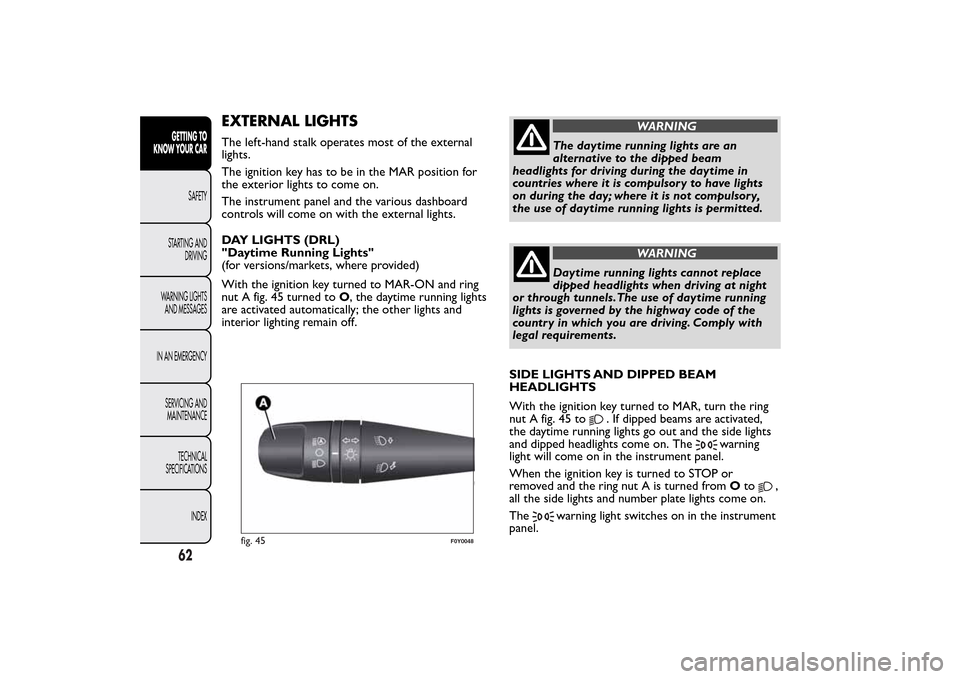
EXTERNAL LIGHTSThe left-hand stalk operates most of the external
lights.
The ignition key has to be in the MAR position for
the exterior lights to come on.
The instrument panel and the various dashboard
controls will come on with the external lights.
DAY LIGHTS (DRL)
"Daytime Running Lights"
(for versions/markets, where provided)
With the ignition key turned to MAR-ON and ring
nut A fig. 45 turned toO, the daytime running lights
are activated automatically; the other lights and
interior lighting remain off.
WARNING
The daytime running lights are an
alternative to the dipped beam
headlights for driving during the daytime in
countries where it is compulsory to have lights
on during the day; where it is not compulsory,
the use of daytime running lights is permitted.
WARNING
Daytime running lights cannot replace
dipped headlights when driving at night
or through tunnels.The use of daytime running
lights is governed by the highway code of the
country in which you are driving. Comply with
legal requirements.
SIDE LIGHTS AND DIPPED BEAM
HEADLIGHTS
With the ignition key turned to MAR, turn the ring
nut A fig. 45 to
. If dipped beams are activated,
the daytime running lights go out and the side lights
and dipped headlights come on. The
warning
light will come on in the instrument panel.
When the ignition key is turned to STOP or
removed and the ring nut A is turned fromOto
,
all the side lights and number plate lights come on.
The
warning light switches on in the instrument
panel.
fig. 45
F0Y0048
62GETTING TO
KNOW YOUR CAR
SAFETY
STARTING AND
DRIVING
WARNING LIGHTS
AND MESSAGES
IN AN EMERGENCY
SERVICING AND
MAINTENANCE
TECHNICAL
SPECIFICATIONS
INDEX
Page 67 of 420
AUTOMATIC LIGHT CONTROL
(AUTOLIGHT)
(Dusk sensor)
(for versions/markets, where provided)
This infrared LED sensor, combined with the rain
sensor and located on the windscreen, detects the
variations in outside brightness depending on the
light sensitivity set with the Setup Menu: the greater
the sensitivity, the less external light is required to
activate the exterior lights.
Activation
The dusk sensor activates when ring nut A fig. 45 is
turned to
. In this way the side lights and dipped
headlights are activated automatically according to
the external light level.
Following automatic light activation, the fog lights
(for versions/markets, where provided) and rear fog
light may still be switched on. When the lights are
automatically switched off, the front and rear fog
lights (if activated) are also switched off. The next
time the lights are switched on automatically, the fog
lights must be reactivated manually (if required).
With dusk sensor active, it is not possible to keep
the main beam headlights on constantly; only flashing
is permitted. To switch these lights on constantly,
turn ring nut A to
and pull the stalk towards the
steering wheel.On automatic sensor controlled deactivation, the
dipped headlights are deactivated first, followed
by the side lights a few seconds later.
If the sensor is activated but is malfunctioning, the
side lights and dipped beam headlights are switched
on irrespective of the outside light level: the sensor
failure is indicated on the display. It is also possible to
deactivate the sensor and switch on the desired
lights, if necessary.
IMPORTANT The sensor cannot detect the presence
of fog. These lights must therefore be switched on
manually in these circumstances.
MAIN BEAM HEADLIGHTS
To activate the main beam headlights, with ring nut A
at
, pull the stalk towards the steering wheel
beyond the end of travel position.
Thewarning light switches on in the instrument
panel.
When the stalk is pulled towards the steering wheel
again, beyond the end of travel position, the main
beam headlights deactivate, the dipped beam
headlights reactivate and the warning light
switches off.
It is not possible to switch on the main beam
headlights in fixed mode if the automatic lighting
control system is active.
63GETTING TO
KNOW YOUR CARSAFETY
STARTING AND
DRIVING
WARNING LIGHTS
AND MESSAGES
IN AN EMERGENCY
SERVICING AND
MAINTENANCE
TECHNICAL
SPECIFICATIONS
INDEX
Page 68 of 420
FLASHING
To do this, pull the stalk towards the steering wheel
(unstable position) regardless of the position of
ring nut A.
The
warning light switches on in the instrument
panel.
DIRECTION INDICATORS
Bring the stalk to the (stable) position:
upwards:right-hand direction indicator activation;
downwards:left-hand direction indicator activation.
Theor
warning light will flash on the
instrument panel.
Direction indicators are switched off automatically
when the steering wheel is straightened.
Lane change function
If you wish to signal a lane change, put the left stalk
in the unstable position for less than half a second.
The direction indicator on the side selected will
be activated for 5 flashes and then go out
automatically.
“Cornering lights”
When the dipped headlamps are on and the speed is
below 40 km/h, if the steering wheel rotation angle
is large or the direction indicators are on, a light
(incorporated in the fog light) will switch on on the
relevant side to improve visibility at nighttime.“FOLLOW ME HOME” DEVICE
This allows the space in front of the car to be lit up
for a certain period of time.
Activation: with the ignition key turned to STOP or
removed, pull the stalk towards the steering wheel
within 2 minutes from when the engine is turned off.
Each time the stalk is moved, the lights stay on for
an extra 30 seconds up to a maximum of 210
seconds; then the lights are switched off
automatically.
Also, each time the stalk is operated, the
warning light on the instrument panel switches
on. The display shows a message and the time set for
the function.
The
warning light switches on when the stalk is
first moved and stays on until the function is
automatically deactivated. Each movement of the
stalk only increases the amount of time the lights
stay on.
Deactivation: keep the stalk pulled towards the
steering wheel for more than two seconds.
64GETTING TO
KNOW YOUR CAR
SAFETY
STARTING AND
DRIVING
WARNING LIGHTS
AND MESSAGES
IN AN EMERGENCY
SERVICING AND
MAINTENANCE
TECHNICAL
SPECIFICATIONS
INDEX
Page 69 of 420
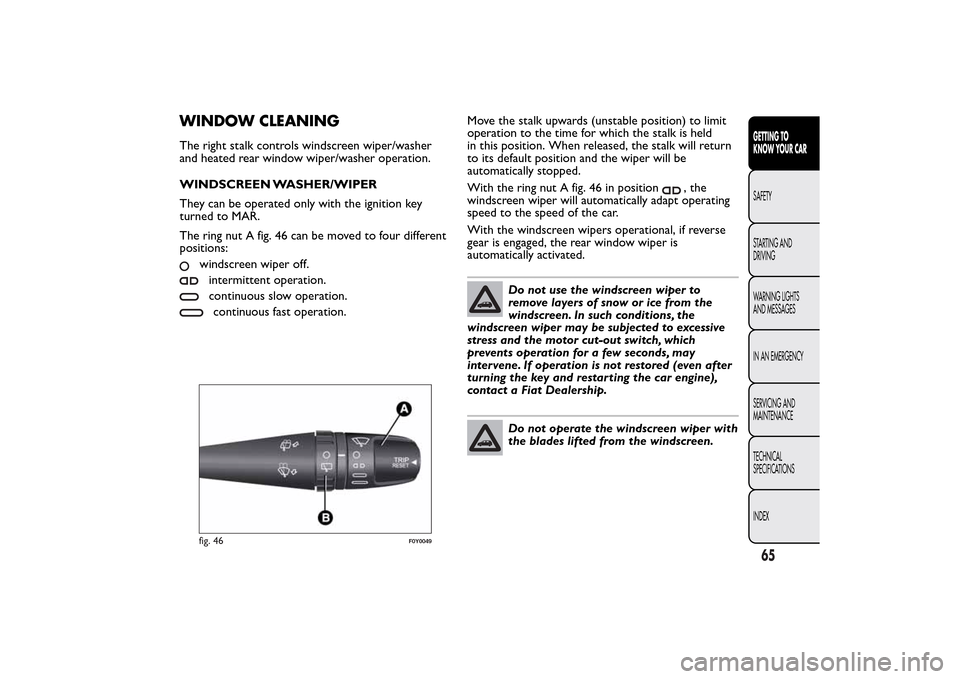
WINDOW CLEANINGThe right stalk controls windscreen wiper/washer
and heated rear window wiper/washer operation.
WINDSCREEN WASHER/WIPER
They can be operated only with the ignition key
turned to MAR.
The ring nut A fig. 46 can be moved to four different
positions:
windscreen wiper off.intermittent operation.continuous slow operation.continuous fast operation.Move the stalk upwards (unstable position) to limit
operation to the time for which the stalk is held
in this position. When released, the stalk will return
to its default position and the wiper will be
automatically stopped.
With the ring nut A fig. 46 in position
, the
windscreen wiper will automatically adapt operating
speed to the speed of the car.
With the windscreen wipers operational, if reverse
gear is engaged, the rear window wiper is
automatically activated.
Do not use the windscreen wiper to
remove layers of snow or ice from the
windscreen. In such conditions, the
windscreen wiper may be subjected to excessive
stress and the motor cut-out switch, which
prevents operation for a few seconds, may
intervene. If operation is not restored (even after
turning the key and restarting the car engine),
contact a Fiat Dealership.Do not operate the windscreen wiper with
the blades lifted from the windscreen.
fig. 46
F0Y0049
65GETTING TO
KNOW YOUR CARSAFETY
STARTING AND
DRIVING
WARNING LIGHTS
AND MESSAGES
IN AN EMERGENCY
SERVICING AND
MAINTENANCE
TECHNICAL
SPECIFICATIONS
INDEX
Page 70 of 420
"Smart washing" function
Pull the lever towards the steering wheel (unstable
position) to activate the windscreen washer.
Keeping the stalk pulled for more than half a second,
with just one movement it is possible to operate
the washer jet and the wiper at the same time.
The wiper stops working three strokes after the
stalk is released.
A further stroke after approximately six seconds
completes the wiping cycle (for versions/markets,
where provided).
RAIN SENSOR
(for versions/markets, where provided)
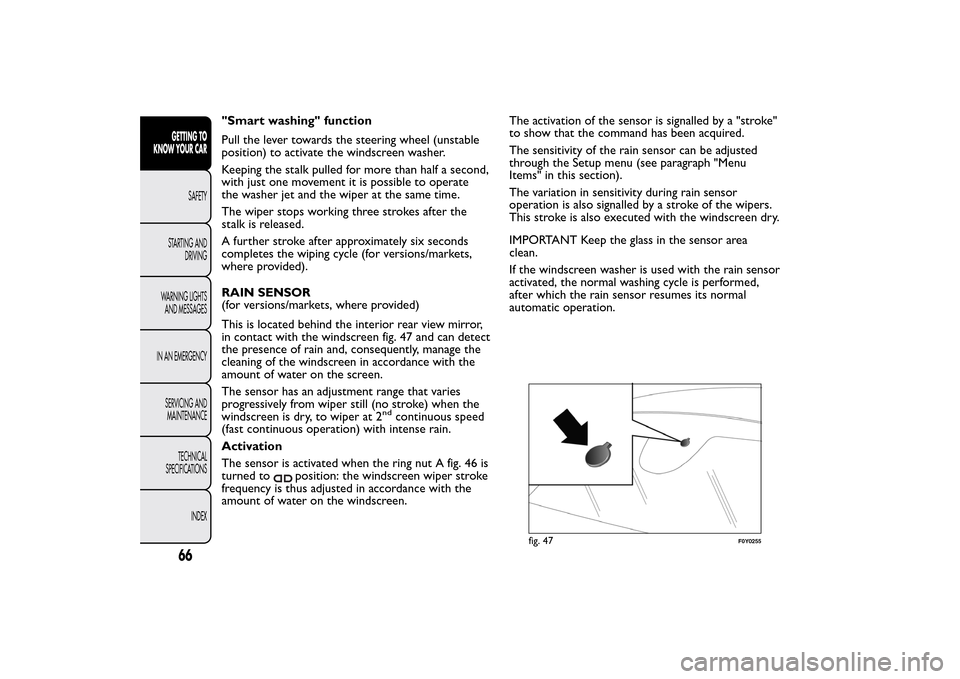
This is located behind the interior rear view mirror,
in contact with the windscreen fig. 47 and can detect
the presence of rain and, consequently, manage the
cleaning of the windscreen in accordance with the
amount of water on the screen.
The sensor has an adjustment range that varies
progressively from wiper still (no stroke) when the
windscreen is dry, to wiper at 2
nd
continuous speed
(fast continuous operation) with intense rain.
Activation
The sensor is activated when the ring nut A fig. 46 is
turned to
position: the windscreen wiper stroke
frequency is thus adjusted in accordance with the
amount of water on the windscreen.The activation of the sensor is signalled by a "stroke"
to show that the command has been acquired.
The sensitivity of the rain sensor can be adjusted
through the Setup menu (see paragraph "Menu
Items" in this section).
The variation in sensitivity during rain sensor
operation is also signalled by a stroke of the wipers.
This stroke is also executed with the windscreen dry.
IMPORTANT Keep the glass in the sensor area
clean.
If the windscreen washer is used with the rain sensor
activated, the normal washing cycle is performed,
after which the rain sensor resumes its normal
automatic operation.
fig. 47
F0Y0255
66GETTING TO
KNOW YOUR CAR
SAFETY
STARTING AND
DRIVING
WARNING LIGHTS
AND MESSAGES
IN AN EMERGENCY
SERVICING AND
MAINTENANCE
TECHNICAL
SPECIFICATIONS
INDEX
Page 71 of 420
Deactivation
Move the stalk ring nut away from the position
or turn the ignition key to STOP.
If the ignition key is turned to the STOP position
leaving the ring nut A in position
, no wiping
cycle is performed at the next startup (ignition key
to the MAR-ON position) even in case of rain.
This prevents unwanted activation of the rain sensor
when the engine is started (i.e. when the windscreen
is being washed by hand or the wipers are stuck to
the windscreen by ice).
To restore automatic operation of the rain sensor,
turn ring nut A from
position to
position and
then turn the ring nut back to theposition.
When the rain sensor is reactivated using any of the
manoeuvres described above, reactivation is
indicated by a single stroke of the windscreen wipers,
regardless of the condition of the windscreen.
In the event of malfunction of the rain sensor whilst
it is active, the windscreen wiper operates
intermittently at a speed consistent with the
sensitivity setting of the rain sensor, regardless of
whether there is rain on the glass (on some versions
sensor failure is indicated on the display).
The sensor continues to operate and it is possible to
set the windscreen wiper to continuous mode (1
st
or 2
nd
speed). The failure indication remains for
as long as the sensor is active.The rain sensor is able to recognise, and
automatically adjust itself in the presence of the
following conditions:
❒presence of dirt on the controlled surface (salt,
dirt, etc.);
❒presence of streaks of water caused by the worn
window wiper blades;
❒difference between day and night.
Do not activate the rain sensor when
washing the car in an automatic car wash.Make sure the device is switched off if
there is ice on the windscreen.
WARNING
Make sure the device is switched off
whenever the windscreen must be
cleaned.
67GETTING TO
KNOW YOUR CARSAFETY
STARTING AND
DRIVING
WARNING LIGHTS
AND MESSAGES
IN AN EMERGENCY
SERVICING AND
MAINTENANCE
TECHNICAL
SPECIFICATIONS
INDEX
Page 72 of 420
REAR WINDOW WASHER/ WIPER
It can be operated only with the ignition key turned
to MAR.
Activation
Turn the ring nut B fig. 46 from
to
to operate
the rear window wiper as follows:
❒in intermittent mode when the windscreen wiper
is not operating;
❒in synchronous mode (at half the speed of the
windscreen wiper) when the windscreen wiper
is operating;
❒in continuous mode with reverse engaged.
With the windscreen wiper on and reverse gear
engaged, rear window wiping will be continuous in
the same way.
Pushing the stalk towards the dashboard (unstable
position) the rear window washer jet will activate.
Keep the stalk pushed for more than half a second to
activate the rear window wiper as well. Releasing
the stalk will activate the smart washing function, as
described for the windscreen wiper.
Deactivation
The function stops when the stalk is released.
Do not use the rear window wiper to
removelayersofsnoworice.In
such conditions, the wiper may be
subjected to excessive stress and the motor
protection, which prevents operation for a few
seconds, may intervene. If operation is not
restored, contact a Fiat Dealership.
68GETTING TO
KNOW YOUR CAR
SAFETY
STARTING AND
DRIVING
WARNING LIGHTS
AND MESSAGES
IN AN EMERGENCY
SERVICING AND
MAINTENANCE
TECHNICAL
SPECIFICATIONS
INDEX
Page 73 of 420
CRUISE CONTROL(for versions/markets, where provided)
This is an electronically controlled driving assistance
device that allows the desired car speed to be
maintained, without having to press the accelerator
pedal.
This device can be used at a speed above 30 km/h on
long stretches of dry, straight roads with few
variations (e.g. motorways).
The use of this device on extra-urban roads with
traffic is not therefore recommended. Do not use
the device in town.
ACTIVATING THE DEVICE
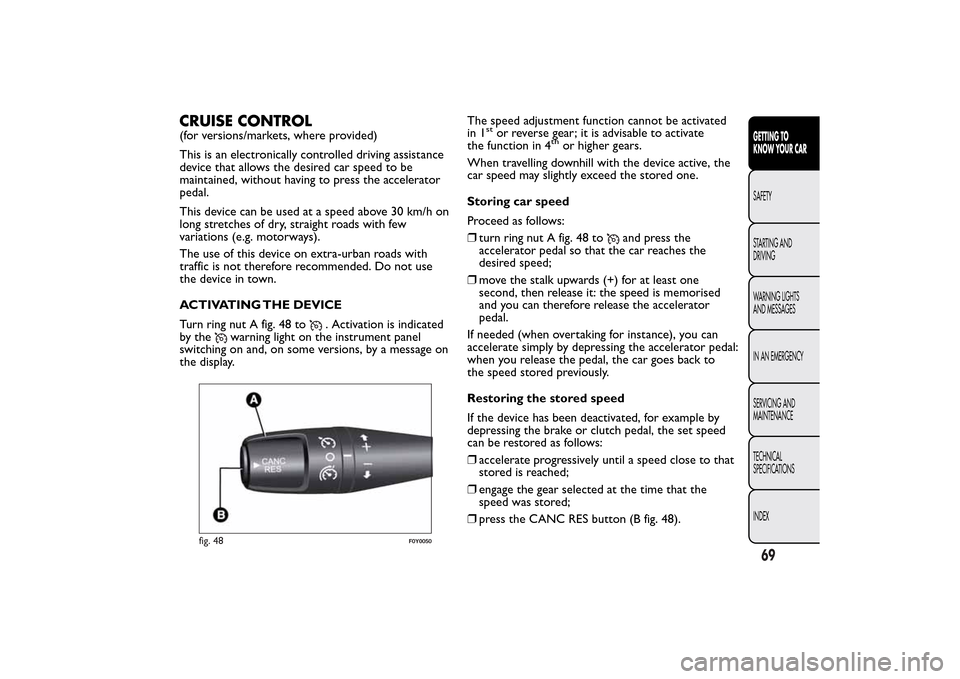
Turn ring nut A fig. 48 to
. Activation is indicated
by the
warning light on the instrument panel
switching on and, on some versions, by a message on
the display.The speed adjustment function cannot be activated
in 1
stor reverse gear; it is advisable to activate
the function in 4
th
or higher gears.
When travelling downhill with the device active, the
car speed may slightly exceed the stored one.
Storing car speed
Proceed as follows:
❒turn ring nut A fig. 48 to
and press the
accelerator pedal so that the car reaches the
desired speed;
❒move the stalk upwards (+) for at least one
second, then release it: the speed is memorised
and you can therefore release the accelerator
pedal.
If needed (when overtaking for instance), you can
accelerate simply by depressing the accelerator pedal:
when you release the pedal, the car goes back to
the speed stored previously.
Restoring the stored speed
If the device has been deactivated, for example by
depressing the brake or clutch pedal, the set speed
can be restored as follows:
❒accelerate progressively until a speed close to that
stored is reached;
❒engage the gear selected at the time that the
speed was stored;
❒press the CANC RES button (B fig. 48).
fig. 48
F0Y0050
69GETTING TO
KNOW YOUR CARSAFETY
STARTING AND
DRIVING
WARNING LIGHTS
AND MESSAGES
IN AN EMERGENCY
SERVICING AND
MAINTENANCE
TECHNICAL
SPECIFICATIONS
INDEX
Page 74 of 420
INCREASING THE STORED SPEED
This can be carried out in two ways:
❒by pressing the accelerator and storing the new
speed reached
or
❒by moving the stalk upwards (+) until the new
speed, which will be stored automatically, is
reached.
Each movement of the stalk corresponds to an
increase in speed of about 1 km/h, while keeping the
stalk held upwards will continuously increase the
speed.
REDUCING THE STORED SPEED
This can be carried out in two ways:
❒by deactivating the device and then storing the
new speed
or
❒by moving the lever downwards (–) until the new
speed, which will automatically remain stored, is
reached.
Each movement of the lever corresponds to a
reduction in speed of about 1 km/h, while keeping
the stalk held downwards will decrease the speed
continuously.DEACTIVATING THE DEVICE
The device can be deactivated by the driver in the
following ways:
❒turning ring nut A toO;
❒by stopping the engine
❒by pressing the brake pedal, the clutch or the
accelerator; in this last case the system is not
completely deactivated but gives priority to the
acceleration request. The device still remains
active, without the need to press the CANC RES
button to return to the previous condition once
acceleration is concluded.
70GETTING TO
KNOW YOUR CAR
SAFETY
STARTING AND
DRIVING
WARNING LIGHTS
AND MESSAGES
IN AN EMERGENCY
SERVICING AND
MAINTENANCE
TECHNICAL
SPECIFICATIONS
INDEX
Page 75 of 420
Automatic deactivation
The device deactivates automatically in the following
cases:
❒intervention of the ABS or ESC systems;
❒with the car speed below the set limit
❒in the event of system failure.
WARNING
When travelling with the device active,
never move the gear lever to neutral.
WARNING
In the event of device faults or failures,
turn knob A toOand contact a Fiat
Dealership.
SPEED LIMITER
This device allows the speed of the car to be limited
to values which can be set by the driver.
The maximum speed can be set both with car
stationary and in motion. The minimum speed that
can be set is 30 km/h.
When the device is active, the car speed depends on
the pressure at the accelerator pedal, until the
programmed speed limit is reached (see "Speed limit
programming" paragraph).If necessary (in the event of overtaking for example),
the programmed speed limit can be exceeded by
fully depressing the accelerator pedal.
By gradually reducing the pressure on the accelerator
pedal, the function will be reactivated as soon as
the car speed drops below the programmed speed.
Activating the device
To activate the device, turn ring nut A fig. 48 to
.
Activation of the device is indicated by the
warning light on the instrument panel switching
on and, on some versions, by a message on the
display plus last programmed speed value.
Speed limit programming
The speed limit can be programmed without
necessarily activating the device.
To store a speed value higher than that displayed,
move stalk A upwards (+). Each movement of the
stalk corresponds to an increase in speed of about 1
km/h, while keeping the stalk held upwards will
increase the speed with an increment of 5 km/h.
To store a value lower than that displayed, move
stalk A downwards (–). Each movement of the stalk
corresponds to a decrease in speed of about 1
km/h, while keeping the stalk held downwards a
decrease of 5 km/h is obtained.
71GETTING TO
KNOW YOUR CARSAFETY
STARTING AND
DRIVING
WARNING LIGHTS
AND MESSAGES
IN AN EMERGENCY
SERVICING AND
MAINTENANCE
TECHNICAL
SPECIFICATIONS
INDEX