Gear FIAT 500L LIVING 2014 2.G Owners Manual
[x] Cancel search | Manufacturer: FIAT, Model Year: 2014, Model line: 500L LIVING, Model: FIAT 500L LIVING 2014 2.GPages: 420, PDF Size: 9.77 MB
Page 6 of 420
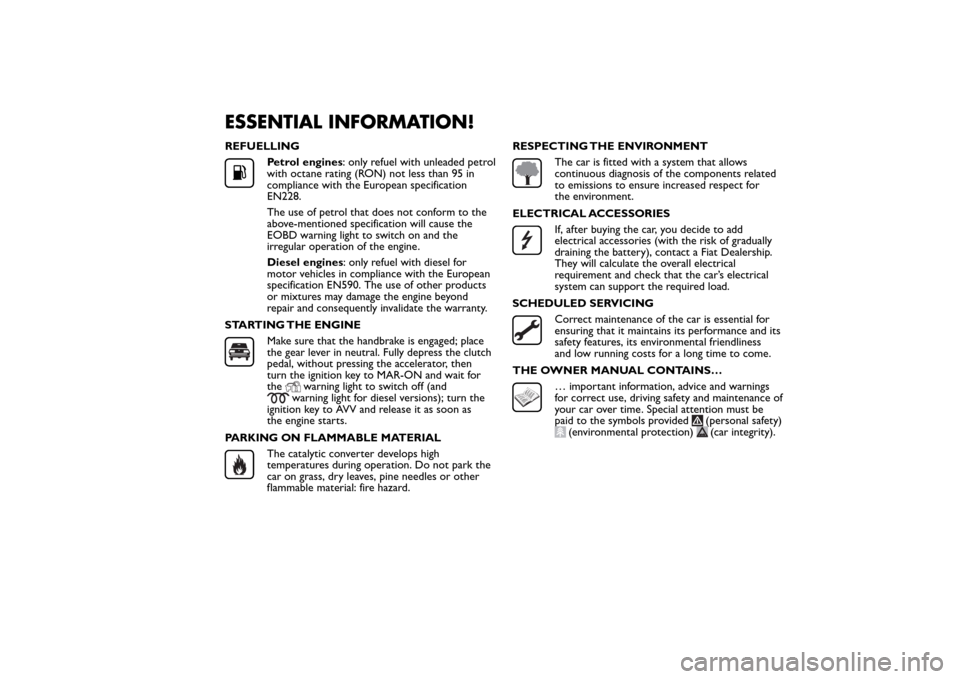
ESSENTIAL INFORMATION!REFUELLING
Petrol engines: only refuel with unleaded petrol
with octane rating (RON) not less than 95 in
compliance with the European specification
EN228.
The use of petrol that does not conform to the
above-mentioned specification will cause the
EOBD warning light to switch on and the
irregular operation of the engine.
Diesel engines: only refuel with diesel for
motor vehicles in compliance with the European
specification EN590. The use of other products
or mixtures may damage the engine beyond
repair and consequently invalidate the warranty.
STARTING THE ENGINEMake sure that the handbrake is engaged; place
the gear lever in neutral. Fully depress the clutch
pedal, without pressing the accelerator, then
turn the ignition key to MAR-ON and wait for
the
warning light to switch off (and
warning light for diesel versions); turn the
ignition key to AVV and release it as soon as
the engine starts.
PARKING ON FLAMMABLE MATERIAL
The catalytic converter develops high
temperatures during operation. Do not park the
car on grass, dry leaves, pine needles or other
flammable material: fire hazard.RESPECTING THE ENVIRONMENT
The car is fitted with a system that allows
continuous diagnosis of the components related
to emissions to ensure increased respect for
the environment.
ELECTRICAL ACCESSORIESIf, after buying the car, you decide to add
electrical accessories (with the risk of gradually
draining the battery), contact a Fiat Dealership.
They will calculate the overall electrical
requirement and check that the car’s electrical
system can support the required load.
SCHEDULED SERVICINGCorrect maintenance of the car is essential for
ensuring that it maintains its performance and its
safety features, its environmental friendliness
and low running costs for a long time to come.
THE OWNER MANUAL CONTAINS…… important information, advice and warnings
for correct use, driving safety and maintenance of
your car over time. Special attention must be
paid to the symbols provided
(personal safety)
(environmental protection)
(car integrity).
Page 11 of 420
DISPLAYThe car may be provided with a multifunction or
reconfigurable multifunction display that shows useful
information, according to the previous settings,
when driving.
With the ignition key removed, the display activates
and shows the time and total milometer reading
(in km or miles) for a few seconds when a front door
is opened/closed.
NOTE With a very low outside temperature (below
0°C) it may take longer than normal for information
to appear on the display.MULTIFUNCTION DISPLAY "STANDARD"
SCREEN
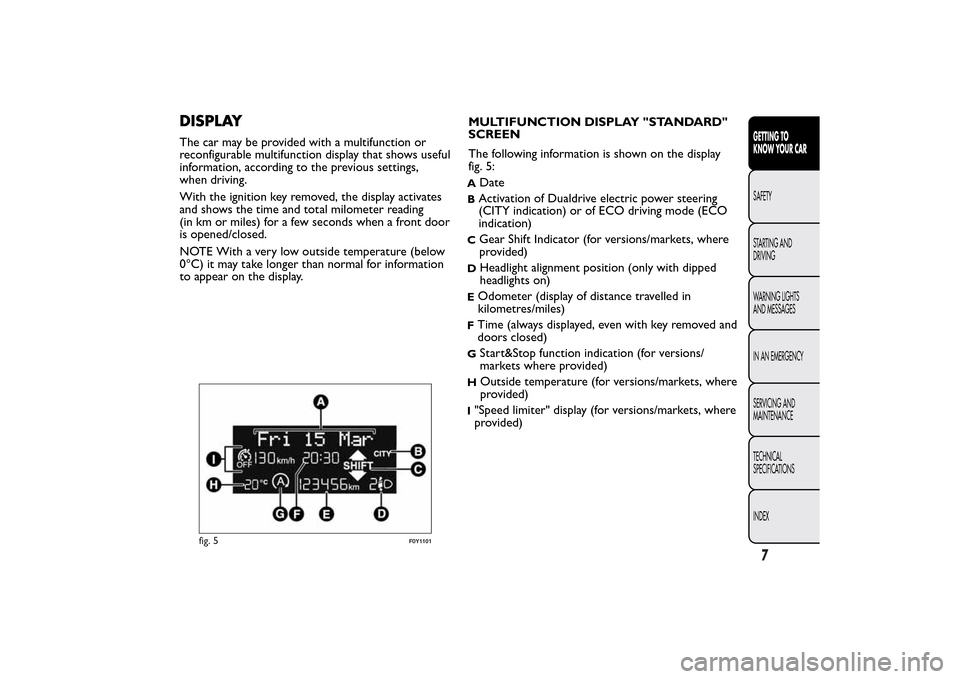
The following information is shown on the display
fig. 5:
A
Date
BActivation of Dualdrive electric power steering
(CITY indication) or of ECO driving mode (ECO
indication)C
Gear Shift Indicator (for versions/markets, where
provided)
D
Headlight alignment position (only with dipped
headlights on)
EOdometer (display of distance travelled in
kilometres/miles)FTime (always displayed, even with key removed and
doors closed)G
Start&Stop function indication (for versions/
markets where provided)
H
Outside temperature (for versions/markets, where
provided)
I"Speed limiter" display (for versions/markets, where
provided)
fig. 5
F0Y1101
7GETTING TO
KNOW YOUR CARSAFETY
STARTING AND
DRIVING
WARNING LIGHTS
AND MESSAGES
IN AN EMERGENCY
SERVICING AND
MAINTENANCE
TECHNICAL
SPECIFICATIONS
INDEX
Page 12 of 420
RECONFIGURABLE MULTIFUNCTION
DISPLAY "STANDARD" SCREEN
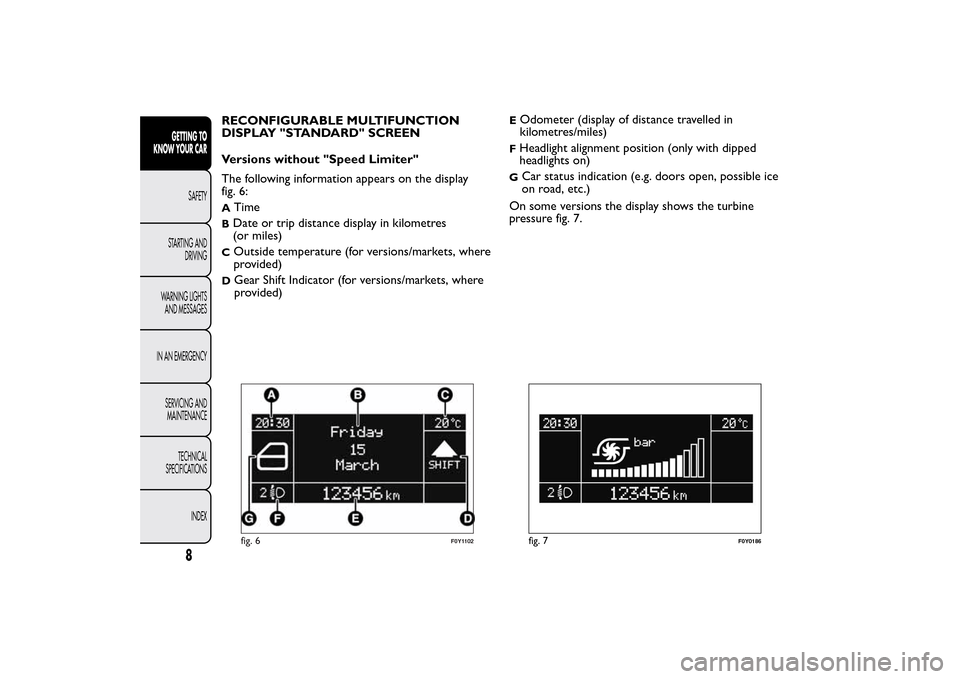
Versions without "Speed Limiter"
The following information appears on the display
fig. 6:A
Time
BDate or trip distance display in kilometres
(or miles)C
Outside temperature (for versions/markets, where
provided)
D
Gear Shift Indicator (for versions/markets, where
provided)
EOdometer (display of distance travelled in
kilometres/miles)FHeadlight alignment position (only with dipped
headlights on)G
Car status indication (e.g. doors open, possible ice
on road, etc.)
On some versions the display shows the turbine
pressure fig. 7.
fig. 6
F0Y1102
fig. 7
F0Y0186
8
GETTING TO
KNOW YOUR CAR
SAFETY
STARTING AND
DRIVING
WARNING LIGHTS
AND MESSAGES
IN AN EMERGENCY
SERVICING AND
MAINTENANCE
TECHNICAL
SPECIFICATIONS
INDEX
Page 13 of 420
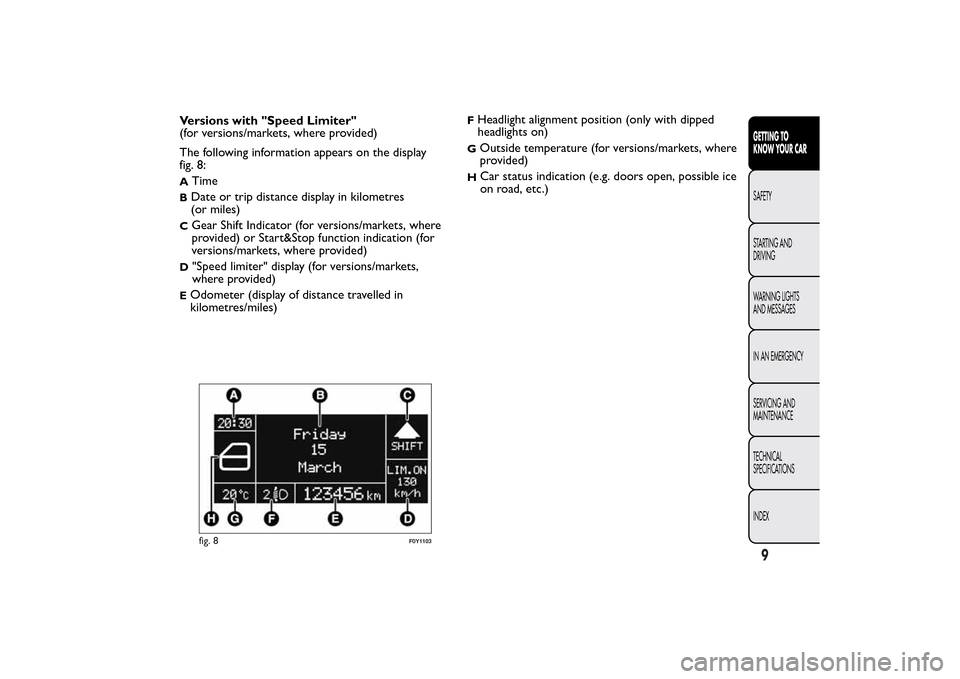
Versions with "Speed Limiter"
(for versions/markets, where provided)
The following information appears on the display
fig. 8:A
Time
BDate or trip distance display in kilometres
(or miles)C
Gear Shift Indicator (for versions/markets, where
provided) or Start&Stop function indication (for
versions/markets, where provided)
D
"Speed limiter" display (for versions/markets,
where provided)
EOdometer (display of distance travelled in
kilometres/miles)
FHeadlight alignment position (only with dipped
headlights on)G
Outside temperature (for versions/markets, where
provided)
H
Car status indication (e.g. doors open, possible ice
on road, etc.)
fig. 8
F0Y1103
9GETTING TO
KNOW YOUR CARSAFETY
STARTING AND
DRIVING
WARNING LIGHTS
AND MESSAGES
IN AN EMERGENCY
SERVICING AND
MAINTENANCE
TECHNICAL
SPECIFICATIONS
INDEX
Page 14 of 420
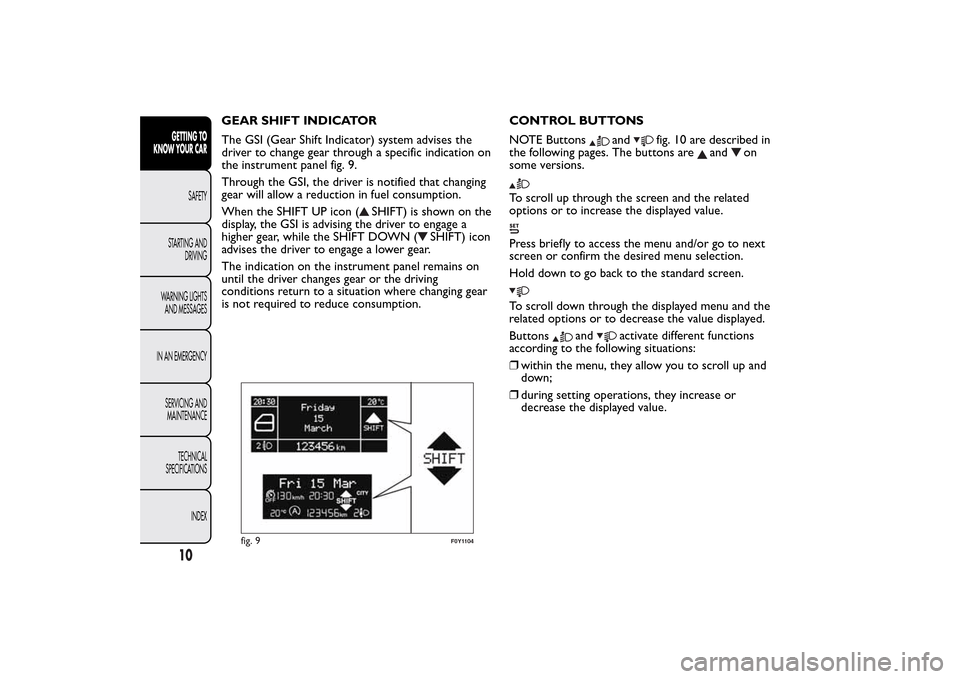
GEAR SHIFT INDICATOR
The GSI (Gear Shift Indicator) system advises the
driver to change gear through a specific indication on
the instrument panel fig. 9.
Through the GSI, the driver is notified that changing
gear will allow a reduction in fuel consumption.
When the SHIFT UP icon (
SHIFT) is shown on the
display, the GSI is advising the driver to engage a
higher gear, while the SHIFT DOWN (
SHIFT) icon
advises the driver to engage a lower gear.
The indication on the instrument panel remains on
until the driver changes gear or the driving
conditions return to a situation where changing gear
is not required to reduce consumption.CONTROL BUTTONS
NOTE Buttons
and
fig. 10 are described in
the following pages. The buttons are
and
on
some versions.
To scroll up through the screen and the related
options or to increase the displayed value.Press briefly to access the menu and/or go to next
screen or confirm the desired menu selection.
Hold down to go back to the standard screen.To scroll down through the displayed menu and the
related options or to decrease the value displayed.
Buttons
and
activate different functions
according to the following situations:
❒within the menu, they allow you to scroll up and
down;
❒during setting operations, they increase or
decrease the displayed value.
fig. 9
F0Y1104
10GETTING TO
KNOW YOUR CAR
SAFETY
STARTING AND
DRIVING
WARNING LIGHTS
AND MESSAGES
IN AN EMERGENCY
SERVICING AND
MAINTENANCE
TECHNICAL
SPECIFICATIONS
INDEX
Page 33 of 420
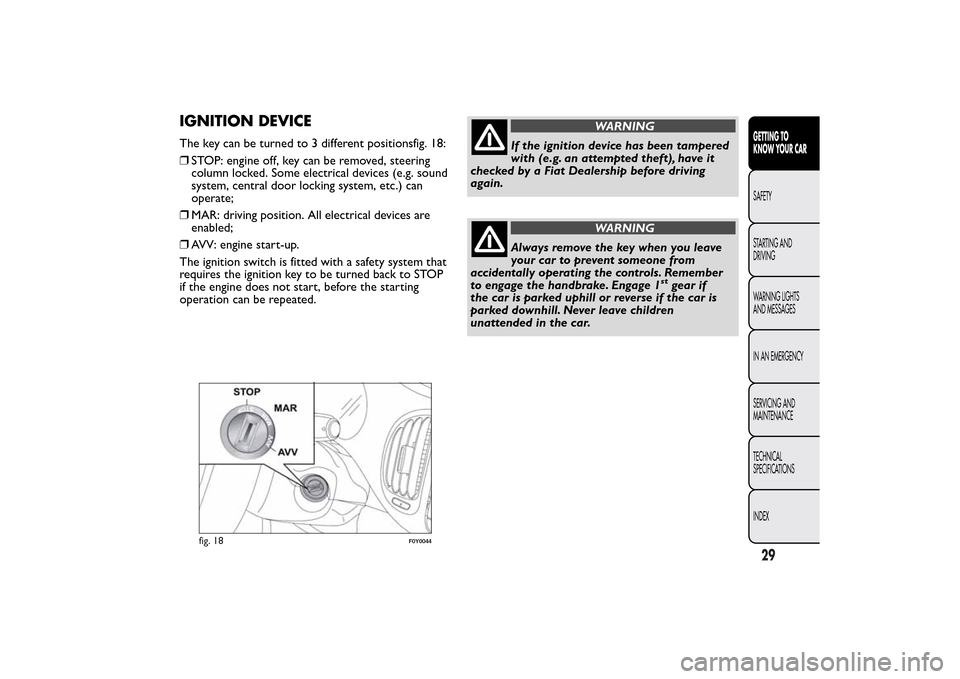
IGNITION DEVICEThe key can be turned to 3 different positionsfig. 18:
❒STOP: engine off, key can be removed, steering
column locked. Some electrical devices (e.g. sound
system, central door locking system, etc.) can
operate;
❒MAR: driving position. All electrical devices are
enabled;
❒AVV: engine start-up.
The ignition switch is fitted with a safety system that
requires the ignition key to be turned back to STOP
if the engine does not start, before the starting
operation can be repeated.
WARNING
If the ignition device has been tampered
with (e.g. an attempted theft), have it
checked by a Fiat Dealership before driving
again.
WARNING
Always remove the key when you leave
your car to prevent someone from
accidentally operating the controls. Remember
to engage the handbrake. Engage 1
stgear if
the car is parked uphill or reverse if the car is
parked downhill. Never leave children
unattended in the car.
fig. 18
F0Y0044
29GETTING TO
KNOW YOUR CARSAFETY
STARTING AND
DRIVING
WARNING LIGHTS
AND MESSAGES
IN AN EMERGENCY
SERVICING AND
MAINTENANCE
TECHNICAL
SPECIFICATIONS
INDEX
Page 43 of 420
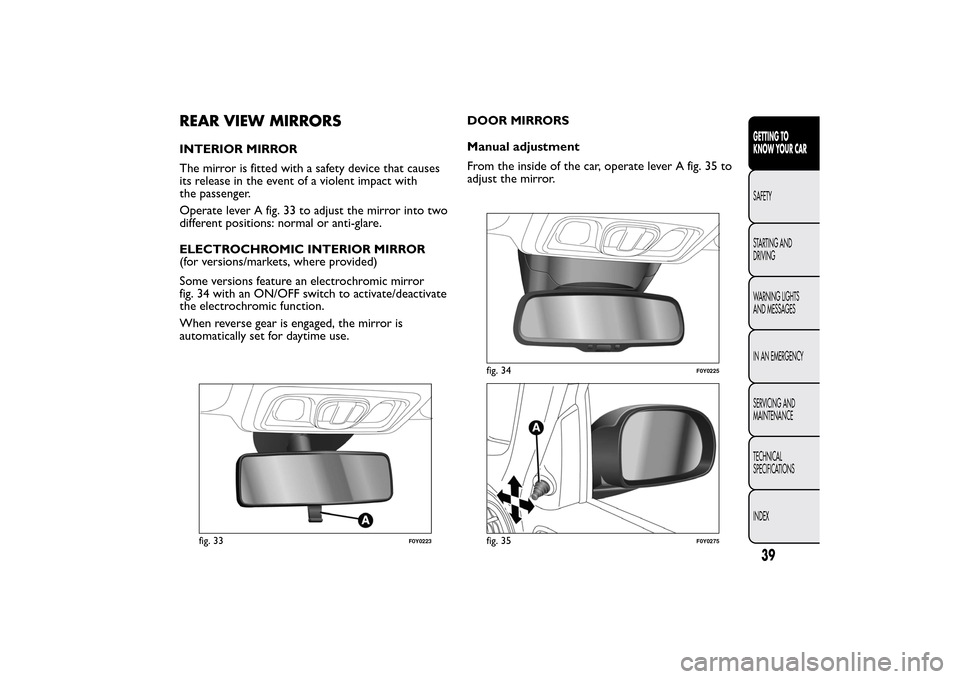
REAR VIEW MIRRORSINTERIOR MIRROR
The mirror is fitted with a safety device that causes
its release in the event of a violent impact with
the passenger.
Operate lever A fig. 33 to adjust the mirror into two
different positions: normal or anti-glare.
ELECTROCHROMIC INTERIOR MIRROR
(for versions/markets, where provided)
Some versions feature an electrochromic mirror
fig. 34 with an ON/OFF switch to activate/deactivate
the electrochromic function.
When reverse gear is engaged, the mirror is
automatically set for daytime use.DOOR MIRRORS
Manual adjustment
From the inside of the car, operate lever A fig. 35 to
adjust the mirror.
fig. 33
F0Y0223
fig. 34
F0Y0225
fig. 35
F0Y0275
39GETTING TO
KNOW YOUR CARSAFETY
STARTING AND
DRIVING
WARNING LIGHTS
AND MESSAGES
IN AN EMERGENCY
SERVICING AND
MAINTENANCE
TECHNICAL
SPECIFICATIONS
INDEX
Page 69 of 420
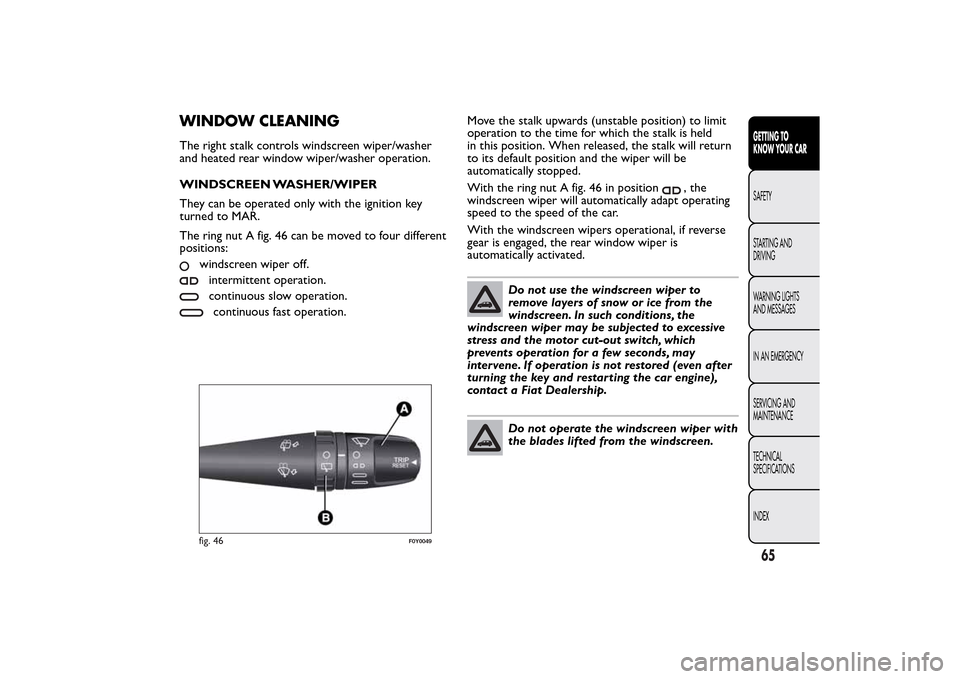
WINDOW CLEANINGThe right stalk controls windscreen wiper/washer
and heated rear window wiper/washer operation.
WINDSCREEN WASHER/WIPER
They can be operated only with the ignition key
turned to MAR.
The ring nut A fig. 46 can be moved to four different
positions:
windscreen wiper off.intermittent operation.continuous slow operation.continuous fast operation.Move the stalk upwards (unstable position) to limit
operation to the time for which the stalk is held
in this position. When released, the stalk will return
to its default position and the wiper will be
automatically stopped.
With the ring nut A fig. 46 in position
, the
windscreen wiper will automatically adapt operating
speed to the speed of the car.
With the windscreen wipers operational, if reverse
gear is engaged, the rear window wiper is
automatically activated.
Do not use the windscreen wiper to
remove layers of snow or ice from the
windscreen. In such conditions, the
windscreen wiper may be subjected to excessive
stress and the motor cut-out switch, which
prevents operation for a few seconds, may
intervene. If operation is not restored (even after
turning the key and restarting the car engine),
contact a Fiat Dealership.Do not operate the windscreen wiper with
the blades lifted from the windscreen.
fig. 46
F0Y0049
65GETTING TO
KNOW YOUR CARSAFETY
STARTING AND
DRIVING
WARNING LIGHTS
AND MESSAGES
IN AN EMERGENCY
SERVICING AND
MAINTENANCE
TECHNICAL
SPECIFICATIONS
INDEX
Page 72 of 420
REAR WINDOW WASHER/ WIPER
It can be operated only with the ignition key turned
to MAR.
Activation
Turn the ring nut B fig. 46 from
to
to operate
the rear window wiper as follows:
❒in intermittent mode when the windscreen wiper
is not operating;
❒in synchronous mode (at half the speed of the
windscreen wiper) when the windscreen wiper
is operating;
❒in continuous mode with reverse engaged.
With the windscreen wiper on and reverse gear
engaged, rear window wiping will be continuous in
the same way.
Pushing the stalk towards the dashboard (unstable
position) the rear window washer jet will activate.
Keep the stalk pushed for more than half a second to
activate the rear window wiper as well. Releasing
the stalk will activate the smart washing function, as
described for the windscreen wiper.
Deactivation
The function stops when the stalk is released.
Do not use the rear window wiper to
removelayersofsnoworice.In
such conditions, the wiper may be
subjected to excessive stress and the motor
protection, which prevents operation for a few
seconds, may intervene. If operation is not
restored, contact a Fiat Dealership.
68GETTING TO
KNOW YOUR CAR
SAFETY
STARTING AND
DRIVING
WARNING LIGHTS
AND MESSAGES
IN AN EMERGENCY
SERVICING AND
MAINTENANCE
TECHNICAL
SPECIFICATIONS
INDEX
Page 73 of 420
CRUISE CONTROL(for versions/markets, where provided)
This is an electronically controlled driving assistance
device that allows the desired car speed to be
maintained, without having to press the accelerator
pedal.
This device can be used at a speed above 30 km/h on
long stretches of dry, straight roads with few
variations (e.g. motorways).
The use of this device on extra-urban roads with
traffic is not therefore recommended. Do not use
the device in town.
ACTIVATING THE DEVICE
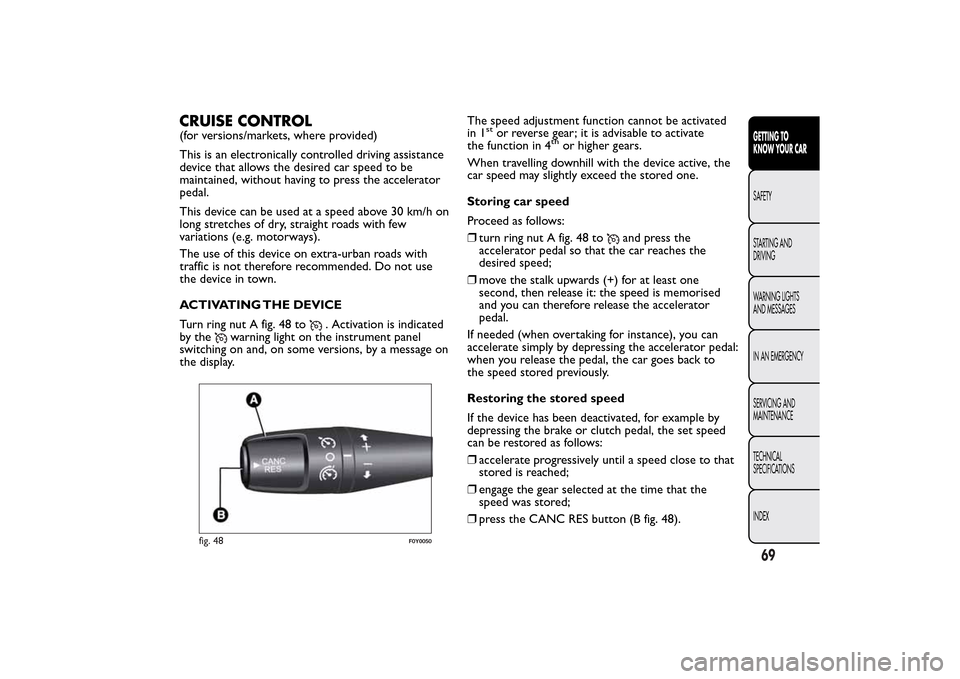
Turn ring nut A fig. 48 to
. Activation is indicated
by the
warning light on the instrument panel
switching on and, on some versions, by a message on
the display.The speed adjustment function cannot be activated
in 1
stor reverse gear; it is advisable to activate
the function in 4
th
or higher gears.
When travelling downhill with the device active, the
car speed may slightly exceed the stored one.
Storing car speed
Proceed as follows:
❒turn ring nut A fig. 48 to
and press the
accelerator pedal so that the car reaches the
desired speed;
❒move the stalk upwards (+) for at least one
second, then release it: the speed is memorised
and you can therefore release the accelerator
pedal.
If needed (when overtaking for instance), you can
accelerate simply by depressing the accelerator pedal:
when you release the pedal, the car goes back to
the speed stored previously.
Restoring the stored speed
If the device has been deactivated, for example by
depressing the brake or clutch pedal, the set speed
can be restored as follows:
❒accelerate progressively until a speed close to that
stored is reached;
❒engage the gear selected at the time that the
speed was stored;
❒press the CANC RES button (B fig. 48).
fig. 48
F0Y0050
69GETTING TO
KNOW YOUR CARSAFETY
STARTING AND
DRIVING
WARNING LIGHTS
AND MESSAGES
IN AN EMERGENCY
SERVICING AND
MAINTENANCE
TECHNICAL
SPECIFICATIONS
INDEX