display FIAT 500L LIVING 2015 2.G Service Manual
[x] Cancel search | Manufacturer: FIAT, Model Year: 2015, Model line: 500L LIVING, Model: FIAT 500L LIVING 2015 2.GPages: 224, PDF Size: 5.92 MB
Page 196 of 224
TIPS, CONTROLS
AND GENERAL
INFORMATIONROAD SAFETY
167) 168)
Learn how to use the various system
functions before setting off.
Read the instructions for the system
carefully before setting off.RECEPTION CONDITIONSReception conditions change
constantly while driving. Reception may
be interfered with by the presence of
mountains, buildings or bridges,
especially when you are far away from
the broadcaster.
IMPORTANT The volume may be
increased when receiving traffic
information and news.CARE AND MAINTENANCE
85) 86)
Observe the following precautions to
ensure the system is fully operational:
❒the display lens should not come into
contact with pointed or rigid objects
which could damage its surface; use a
soft, dry anti-static cloth to clean and
do not press.❒never use alcohol, petrols and
derivatives to clean the display lens.
❒prevent any liquid from entering the
system: this could damage it beyond
repair.
ANTI-THEFT
PROTECTIONThe system is equipped with an
anti-theft protection system based on
the exchange of information with the
electronic control unit (Body Computer)
on the vehicle.
This guarantees maximum safety and
prevents the secret code from being
entered after the power supply has
been disconnected.
If the check has a positive outcome, the
system will start to operate, whereas if
the comparison codes are not the
same or if the electronic control unit
(Body Computer) is replaced, the
system will ask the user to enter the
secret code according to the procedure
described in the paragraph below.Entering the secret codeWhen the system is switched on, if the
code is requested, the display will
show "Please enter Anti-Theft Code"
followed by the screen showing a
keypad to enter the secret code.The secret code is made up of four
digits, from 0 to 9: to insert the first digit
of the code, turn the BROWSE/ENTER
right knob and press to confirm.
After entering the fourth digit, the
system begins operating.
If an incorrect code is entered, the
system displays "Incorrect Code" to
notify the user of the need to enter the
correct code.
After the 3 available attempts to enter
the code, the system displays
"Incorrect Code. Radio locked. Wait for
30 minutes". Once the text has
disappeared you can start the code
entering procedure again.
Vehicle radio passportThis document certifies ownership of
the system. The vehicle radio passport
shows the system model, serial number
and secret code.
In the case of loss of the vehicle radio
passport, contact the Fiat Dealership,
taking an ID document and the vehicle
ownership documents.
IMPORTANT Keep the vehicle radio
passport in a safe place so that you
can give the information to the relevant
authorities if the system is stolen.
194
MULTIMEDIA
9-1-2015 12:9 Pagina 194
Page 197 of 224
IMPORTANTIn the event of a fault, the system must
only be checked and repaired by a
Fiat Dealership.
If the temperature is particularly low, the
display may take a while to reach
optimum brightness.
If the vehicle is stopped for a while and
the external temperature is very high,
the system may go into “thermal
protection” mode, suspending
operation until the radio temperature
returns to acceptable levels.
Look at the screen only when it is
necessary and safe. If you need to look
at the screen for a long time, pull over
to a safe place so as not to be
distracted while driving.Immediately stop using the system in
the event of a fault. Otherwise the
system might be damaged. Contact a
Fiat Dealership as soon as possible
to have the system repaired.
WARNING
167)Follow the safety rules below;
otherwise serious injuries may occur to the
occupants or the system may be
damaged.
168)If the volume is too loud this can be
dangerous. Adjust the volume so that
you can still hear background noises (e.g.
horns, ambulances, police vehicles, etc.).
WARNING
85)Only clean the front panel and the
display with a soft, clean, dry, anti-static
cloth. Cleaning and polishing products
may damage the surface. Do not use
alcohol or similar products to clean the
panel or the display.
86)Do not use the display as a base for
supports with suction pads or adhesives
for external navigators or smartphones
or similar devices.
195
9-1-2015 12:9 Pagina 195
Page 199 of 224
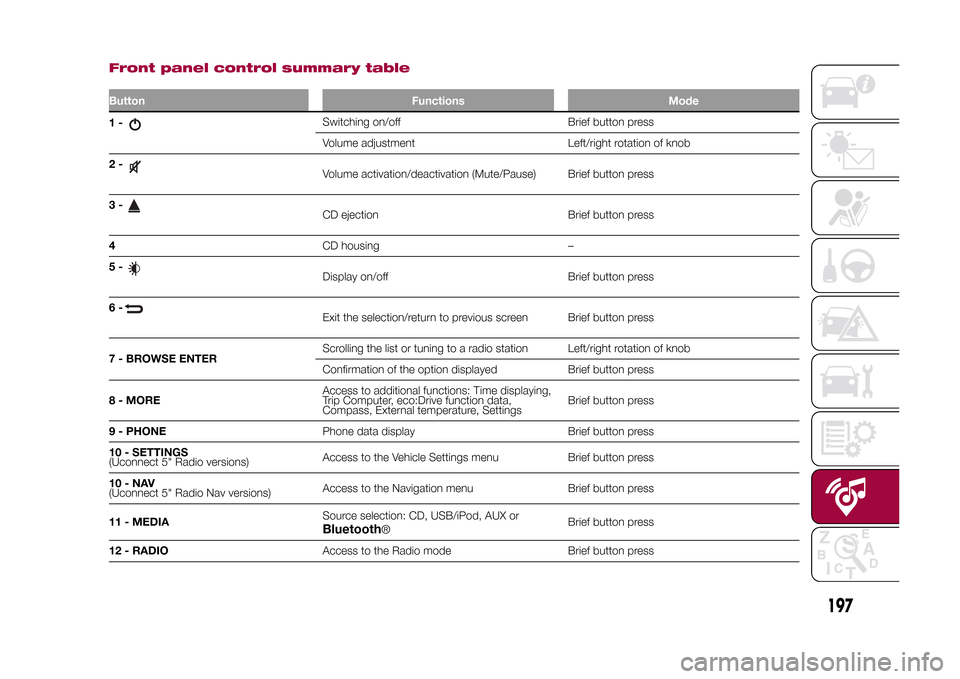
Front panel control summary tableButton Functions Mode1-
Switching on/off Brief button press
Volume adjustment Left/right rotation of knob
2-Volume activation/deactivation (Mute/Pause) Brief button press
3-CD ejection Brief button press
4CD housing –
5-Display on/off Brief button press
6-Exit the selection/return to previous screen Brief button press
7 - BROWSE ENTERScrolling the list or tuning to a radio station Left/right rotation of knob
Confirmation of the option displayed Brief button press
8 - MOREAccess to additional functions: Time displaying,
Trip Computer, eco:Drive function data,
Compass, External temperature, SettingsBrief button press
9 - PHONEPhone data display Brief button press
10 - SETTINGS
(Uconnect 5" Radio versions)Access to the Vehicle Settings menu Brief button press
10-NAV
(Uconnect 5" Radio Nav versions)Access to the Navigation menu Brief button press
11 - MEDIASource selection: CD, USB/iPod, AUX orBluetooth
®Brief button press
12 - RADIOAccess to the Radio mode Brief button press
197
9-1-2015 12:9 Pagina 197
Page 202 of 224
"TOUCH SCREEN"
FUNCTIONThe system uses the "touch screen"
function; to interact with the different
functions, press the "graphic buttons"
displayed.
Confirmation of a selection: press
the "OK" button.
Going back to the previous screen:
press the
(Delete) button or,
depending on the activated screen,
/Done.
USB/iPod/AUX SUPPORTThe vehicle has a USB/AUX port
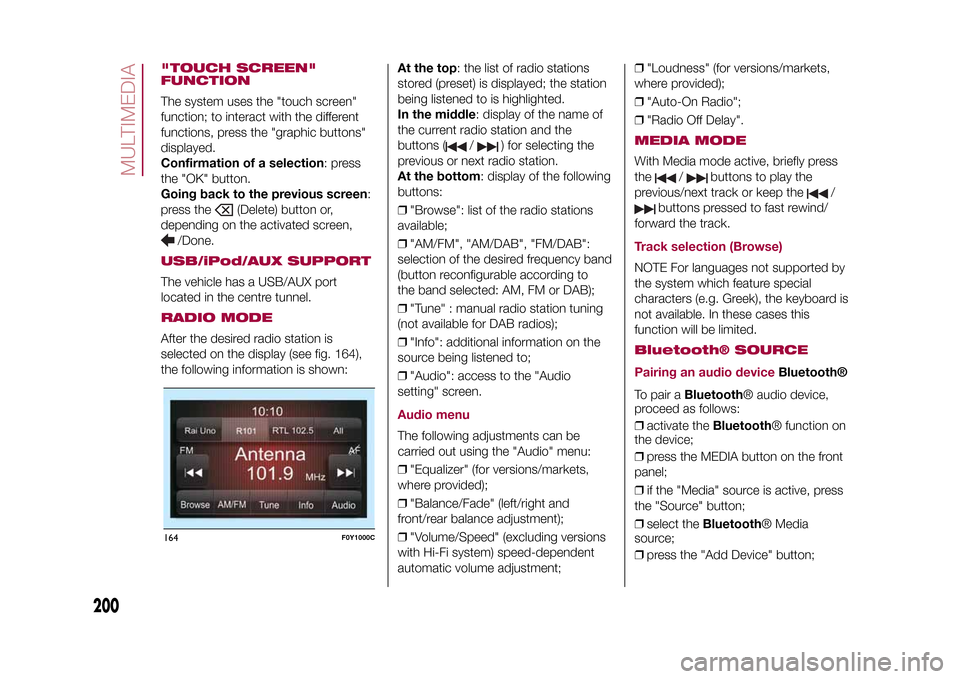
located in the centre tunnel.RADIO MODEAfter the desired radio station is
selected on the display (see fig. 164),
the following information is shown:At the top: the list of radio stations
stored (preset) is displayed; the station
being listened to is highlighted.
In the middle: display of the name of
the current radio station and the
buttons (
/
) for selecting the
previous or next radio station.
At the bottom: display of the following
buttons:
❒"Browse": list of the radio stations
available;
❒"AM/FM", "AM/DAB", "FM/DAB":
selection of the desired frequency band
(button reconfigurable according to
the band selected: AM, FM or DAB);
❒"Tune" : manual radio station tuning
(not available for DAB radios);
❒"Info": additional information on the
source being listened to;
❒"Audio": access to the "Audio
setting" screen.
Audio menuThe following adjustments can be
carried out using the "Audio" menu:
❒"Equalizer" (for versions/markets,
where provided);
❒"Balance/Fade" (left/right and
front/rear balance adjustment);
❒"Volume/Speed" (excluding versions
with Hi-Fi system) speed-dependent
automatic volume adjustment;❒"Loudness" (for versions/markets,
where provided);
❒"Auto-On Radio";
❒"Radio Off Delay".
MEDIA MODEWith Media mode active, briefly press
the
/
buttons to play the
previous/next track or keep the
/
buttons pressed to fast rewind/
forward the track.
Track selection (Browse)NOTE For languages not supported by
the system which feature special
characters (e.g. Greek), the keyboard is
not available. In these cases this
function will be limited.Bluetooth® SOURCE
Pairing an audio device
Bluetooth®
To pair aBluetooth® audio device,
proceed as follows:
❒activate theBluetooth® function on
the device;
❒press the MEDIA button on the front
panel;
❒if the "Media" source is active, press
the "Source" button;
❒select theBluetooth® Media
source;
❒press the "Add Device" button;
164
F0Y1000C
200
MULTIMEDIA
9-1-2015 12:9 Pagina 200
Page 203 of 224
❒search forUconnect™on theBlue-
tooth® audio device (during the pairing
stage a screen is displayed showing the
progress of the operation);
❒when requested by the audio device,
enter the PIN code shown on the
system display or confirm on the device
the PIN displayed;
❒if the pairing procedure is completed
successfully, a screen is displayed.
Answer "Yes" to the question to pair the
Bluetooth® audio device as favourite
(the device will have priority over all
other devices to be paired subse-
quently). If "No" is selected, the priority
is determined according to the order of
pairing. The last device connected will
have the highest priority;
❒an audio device can also be paired
by pressing the PHONE button on
the front panel and by selecting
"Settings" or, from the "Settings" menu,
selecting "Phone/Bluetooth".
IMPORTANT If theBluetooth® con-
nection between mobile phone and
system is lost, consult the mobile
phone owner's handbook.
PHONE MODEPhone mode activation: press the
PHONE button on the front panel.
The buttons on the display can be used
to:
❒compose the phone number (using
the graphic keypad on the display);
❒display and call the contacts on the
mobile phone phonebook;
❒display and call contacts from the
registers of previous calls;
❒pair up to 10 phones/audio devices
to make access and connection easier
and quicker;
❒transfer calls from the system to the
mobile phone and vice versa and
deactivate the microphone audio for
private conversations.
The mobile phone audio is transmitted
through the car’s audio system; the
system automatically mutes the radio
when the Phone function is used.Pairing a mobile phoneProceed as follows:
❒activate theBluetooth® function on
the mobile phone;
❒press the PHONE button (9-fig. 1) on
the front panel;
❒if no phone is paired with the system
yet, the display shows a dedicated
screen;❒select "Yes" to start the pairing
procedure then search for the
uconnect™device on the mobile
phone (if "No" is selected, the Phone
main screen is displayed);
❒when prompted by the mobile
phone, use its keyboard to enter the
PIN code shown on the system display
or confirm on the mobile phone the
PIN displayed;
❒from the "Phone" screen you can
always pair a mobile phone pressing
the "Settings" button: press the "Add
Device" button and proceed as
described above;
❒during the pairing stage a screen is
displayed showing the progress of
the operation;
❒when the pairing procedure is
completed successfully, a screen is
displayed: answer "Yes" to the question
to pair the mobile phone as favourite
(the mobile phone will have priority over
all other mobile phones that will be
paired subsequently). If no other
devices are paired, the system will
consider the first associated device as
favourite.
Proceed as follows:
❒activate theBluetooth® function on
the mobile phone;
❒press the PHONE button on the front
panel;
201
9-1-2015 12:9 Pagina 201
Page 204 of 224
❒if no phone is paired with the system
yet, the display shows a dedicated
screen;
❒select "Yes" to start the pairing
procedure, then search for the
Uconnect™device on the mobile
phone (if "No" is selected, the Phone
main screen is displayed);
❒when prompted by the mobile
phone, use its keypad to enter the PIN
code shown on the system display
or confirm on the mobile phone the PIN
displayed;
❒from the "Phone" screen you can
always pair a mobile phone by pressing
the "Settings" button: press the "Add
Device" button and proceed as
described above;
❒during the pairing stage a screen is
displayed showing the progress of
the operation;
❒when the pairing procedure is
completed successfully, a screen is
displayed: answer "Yes" to the question
to pair the mobile phone as favourite
(the mobile phone will have priority over
all other mobile phones to be paired
subsequently). If no other devices are
paired, the system will consider the first
associated device as favourite.
Making a phone callA call can be made by:
❒selecting the
icon (mobile
phone phonebook);
❒selecting "Recent Calls";
❒selecting the
icon;
❒pressing the "Redial" button.
NOTE The operations described above
can only be accessed if supported by
the mobile phone in use.
SMS readerThe system can read the messages
received by the mobile phone.
To use this function the mobile phone
must support the SMS exchange
function viaBluetooth®.
If this function is not supported by the
phone, the corresponding
button is
deactivated (greyed out).
When a text message is received, the
display will show a screen where the
options "Listen", "Call" or "Ignore" can
be selected.
Press the
button to access the list
of SMS messages received by the
mobile phone (the list displays a
maximum of 60 messages received).
"MORE" MODE
"Settings" menu displayVersions with Uconnect 5" Radio: press
the SETTINGS button on the front
panel.
Versions with Uconnect 5" Radio Nav:
press the "Settings" button on the
display.
The menu comprises the following
options:
❒Display;
❒Time & Date;
❒Safety/Assistance (for versions/
markets, where provided);
❒Lights (for versions/markets where
provided);
❒Doors & Locks;
❒Audio;
❒Phone / Bluetooth;
❒Radio;
❒Restore Default Settings.NAVIGATION MODE(Uconnect 5" Radio Nav versions only)Programming a routeIMPORTANT In the interest of safety
and to reduce distractions while you are
driving, you should always plan a route
before you start driving.
202
MULTIMEDIA
9-1-2015 12:9 Pagina 202
Page 205 of 224
❒tap the screen to display the Main
menu;
❒select "Navigate to" or "Drive to";
❒select "Address": you can change the
country or state setting by tapping the
flag before you select a city;
❒enter the town or city name, or the
postcode. Towns with similar names
are shown in the list while you type;
Tip: Tap the arrow to the right of the list
to expand the list of suggested towns.
When the correct city or town appears
in the list, tap the name to select the
destination.
❒enter the street name. Streets with
similar names are shown in the list while
you type. When the correct street
name appears in the list, tap the name
to select the destination;
❒enter the house number, then tap
"Done";
❒the location is shown on the map.
Tap "Select" to continue or tap "Back"
to enter another address;
Tip: If you want your final destination to
be a car park, tap "Car park" and
select a location from the list of car
parks close to your general destination.❒when the new route is shown, tap
"Done". For more information about the
route, tap "Details". To change your
route, for example, to travel via a
particular location or to select a new
destination, tap "Change route". You
are guided to your destination, using
spoken instructions and on-screen
directions.
MAP UPDATE(Uconnect 5" Radio Nav versions only)
The map can be updated in two
different ways:
❒most recent maps guarantee:ifa
new map is available for your system
within 90 day of initial use, it can be
downloaded once free of charge.
❒map update: it is possible to
purchase a new version of the map
installed on your system.Preparing a USB deviceTo update the map, a USB device that
meets the following requirements must
be used:
❒ideally, the USB device should be
empty;
❒the USB device must have at least
8 GB of memory free;
❒the USB must use a FAT-32 file
system;❒the USB device must not be blocked
and must allow files to be saved.
NOTE The use of a memory stick is
recommended, while the use of mass
storage devices, such as mobile
phones or multimedia players, is not
recommended.
To prepare a USB device, proceed as
follows:
❒ensure that the map you wish to
update is active in the navigation
system. If the navigation system has
several maps and you wish to update a
map which is not currently active,
activate the map. To do this, select
"Change map" in the "Settings" menu
of the navigation application;
❒select "Navigation updates" in the
"Settings" menu. You are asked
whether you wish to prepare a USB
device for downloading updates;
❒select "Yes";
❒insert the USB device.
The system starts to prepare the USB
device.
When the USB device is ready, the
display shows a dedicated message.
Remove the USB device and connect it
to the computer. The new map can
now be downloaded to the USB
device.
203
9-1-2015 12:9 Pagina 203
To plan a route, do the following:
Page 206 of 224
TomTom HOME installationTo install TomTom HOME and create a
MyTomTom account, proceed as
follows:
❒download and install the TomTom
HOME application on the computer. On
the computer, access
www.tomtom.com/getstarted. Select
"Download TomTom HOME", then
follow the instructions provided.
❒connect the prepared USB device to
the computer: TomTom HOME is
launched automatically.
❒select "Enter" in the top right corner
of TomTom HOME;
❒select "Create account" and enter the
required details to create a MyTomTom
account. A MyTomTom account is
required to receive map updates.
After the account is created, you are
asked whether you wish to connect the
Uconnect™system to your account.
The USB device prepared represents
theUconnect™system.
❒select "Connect device", then select
"Close".
A map can now be downloaded to the
USB device.
Download the mapTo check whether you are entitled to
download a free map update using the
Most Recent Maps Guarantee, select
"Tools", "Use most recent maps
guarantee" in TomTom HOME.
To purchase a map update, select
"Purchase maps" in TomTom HOME.
If an update has already been
purchased, select "Update device" in
TomTom HOME.Downloading a mapIf a map update is available for the
system, this update is included in the
list of updates available.
NOTE If the most recent map is already
installed on the system, the update is
not proposed.
Select the map that you wish to
download, then select "Update and
install". The map is downloaded and
copied to the USB device.
Select "Done" when the process is
complete.
NOTE Don’t disconnect the USB device
from the computer while map
downloading and copying is in
progress.
The map can now be installed on the
system.
Installing the mapNOTES
❒The update must be carried out
with engine on and might last more
than 30 minutes.
❒Never remove the USB stick in
order not do jeopardize the map
update.
After downloading a map to the USB
device, it can be installed on the
system.
Proceed as follows:
❒insert the USB device containing the
new map in theUconnect™system.
The system detects a new map on
the USB device;
❒select "Start": the system starts
updating the map.
NOTE Do not remove the USB device
and do not disconnect the system’s
power supply before the update is
complete. The system cannot be used
until the update is completed correctly.
If the system update is interrupted, start
it again.
Once the map has been updated, the
display shows a dedicated message:
select "Close". The new map is now
available on the system.
204
MULTIMEDIA
9-1-2015 12:9 Pagina 204
Page 207 of 224
TroubleshootingThe following problems may occur
during the update:
❒the map on the USB device is not
valid. In this case, download the map to
the USB device again, using TomTom
HOME. It may be necessary to prepare
the USB device again;
❒the version of the map on the USB
device is the same as or is a previous
version of the one already on the
system. If this occurs, download the
map to the USB device again, using
TomTom HOME. It may be necessary to
prepare the USB device again.VOICE COMMANDSNOTE For languages not supported by
the system, voice commands are not
available.
To use the voice commands, press the
button ("Voice" button) or("Phone" button) on the controls of
the steering wheel and give the
command you want to activate, out
loud.
Phone functionsThe
button activates the following
functions:
❒Call
❒Dial
❒Redial❒Call back
❒Last calls
❒Outgoing calls
❒Missed calls
❒Incoming calls
❒Phonebook
❒Search
❒Show SMS
Radio functionsThe
button activates the following
functions:
❒Tune to XXX-FM
❒Tune to XXX AM
❒Tune to Radio XXX
❒Tune to DAB channel
Media FunctionsThe
button activates the following
functions:
❒Play song...
❒Play album…
❒Play artist…
❒Play genre…
❒Play playlist…
❒Play podcast…
❒Play audiobook…
❒Play track number…
❒Select the media
❒Display
Navigation functions(Uconnect 5" Radio Nav versions only)
The
button activates the following
functions:
❒Drive Home
❒2D view
❒3D view
❒Clear route
❒Add Favourite
❒Repeat instruction
205
9-1-2015 12:9 Pagina 205
Page 210 of 224
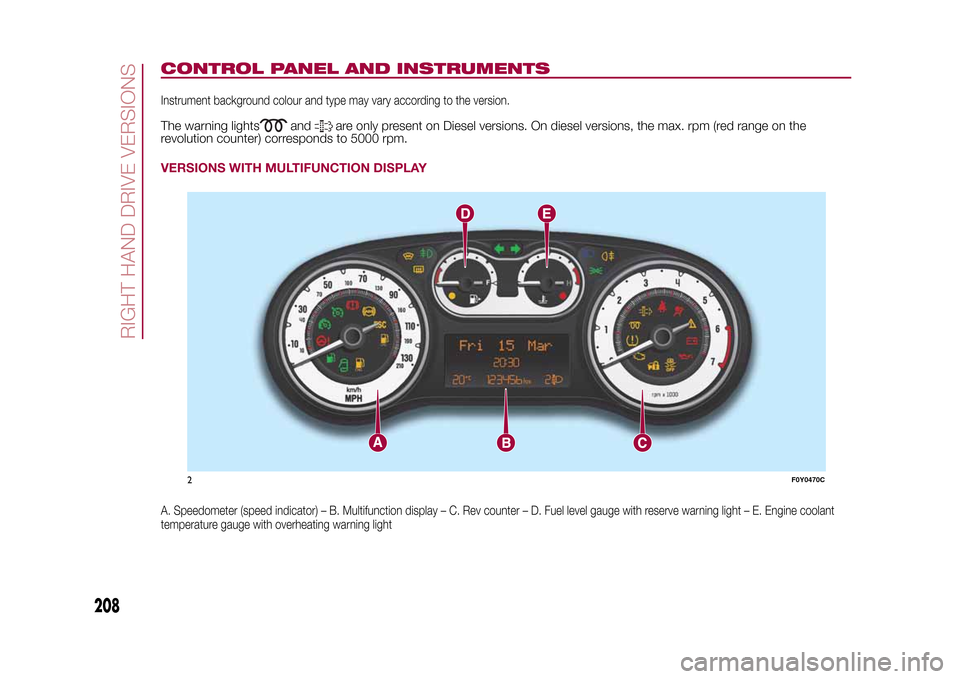
CONTROL PANEL AND INSTRUMENTSInstrument background colour and type may vary according to the version.The warning lights
and
are only present on Diesel versions. On diesel versions, the max. rpm (red range on the
revolution counter) corresponds to 5000 rpm.
VERSIONS WITH MULTIFUNCTION DISPLAYA. Speedometer (speed indicator) – B. Multifunction display – C. Rev counter – D. Fuel level gauge with reserve warning light – E. Engine coolant
temperature gauge with overheating warning light
2
F0Y0470C
RIGHT HAND DRIVE VERSIONS
208