clock FIAT 500L LIVING 2017 2.G User Guide
[x] Cancel search | Manufacturer: FIAT, Model Year: 2017, Model line: 500L LIVING, Model: FIAT 500L LIVING 2017 2.GPages: 240, PDF Size: 5.26 MB
Page 123 of 240
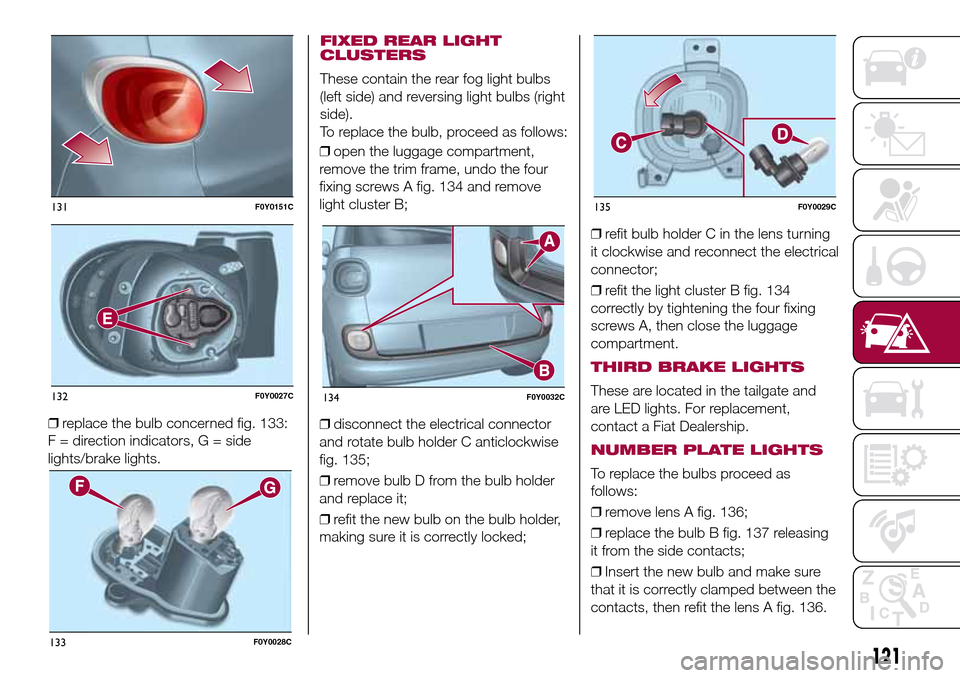
❒replace the bulb concerned fig. 133:
F = direction indicators, G = side
lights/brake lights.❒open the luggage compartment,
remove the trim frame, undo the four
fixing screws A fig. 134 and remove
light cluster B;
❒disconnect the electrical connector
and rotate bulb holder C anticlockwise
fig. 135;
❒remove bulb D from the bulb holder
and replace it;
❒refit the new bulb on the bulb holder,
making sure it is correctly locked;❒refit bulb holder C in the lens turning
it clockwise and reconnect the electrical
connector;
❒refit the light cluster B fig. 134
correctly by tightening the four fixing
screws A, then close the luggage
compartment.
THIRD BRAKE LIGHTS
These are located in the tailgate and
are LED lights. For replacement,
contact a Fiat Dealership.
NUMBER PLATE LIGHTS
To replace the bulbs proceed as
follows:
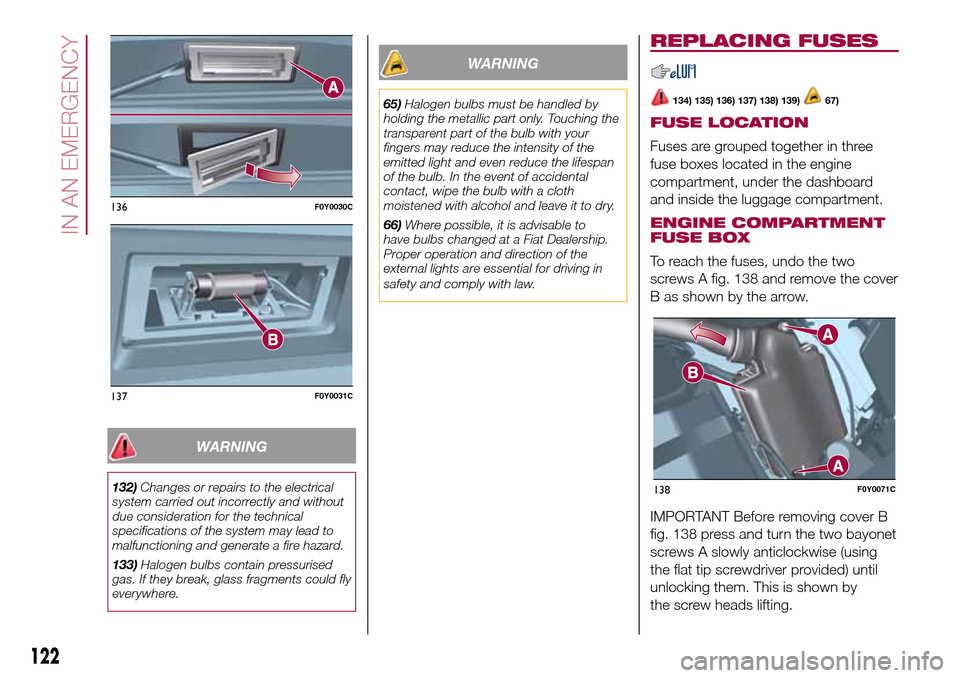
❒remove lens A fig. 136;
❒replace the bulb B fig. 137 releasing
it from the side contacts;
❒Insert the new bulb and make sure
that it is correctly clamped between the
contacts, then refit the lens A fig. 136.
131F0Y0151C
132F0Y0027C
133F0Y0028C
134F0Y0032C
135F0Y0029C
121
FIXED REAR LIGHT
CLUSTERS
These contain the rear fog light bulbs
(left side) and reversing light bulbs (right
side).
To replace the bulb, proceed as follows:
Page 124 of 240
WARNING
132)Changes or repairs to the electrical
system carried out incorrectly and without
due consideration for the technical
specifications of the system may lead to
malfunctioning and generate a fire hazard.
133)Halogen bulbs contain pressurised
gas. If they break, glass fragments could fly
everywhere.
WARNING
65)Halogen bulbs must be handled by
holding the metallic part only. Touching the
transparent part of the bulb with your
fingers may reduce the intensity of the
emitted light and even reduce the lifespan
of the bulb. In the event of accidental
contact, wipe the bulb with a cloth
moistened with alcohol and leave it to dry.
66)Where possible, it is advisable to
have bulbs changed at a Fiat Dealership.
Proper operation and direction of the
external lights are essential for driving in
safety and comply with law.
REPLACING FUSES
134) 135) 136) 137) 138) 139)67)
FUSE LOCATION
Fuses are grouped together in three
fuse boxes located in the engine
compartment, under the dashboard
and inside the luggage compartment.
ENGINE COMPARTMENT
FUSE BOX
To reach the fuses, undo the two
screws A fig. 138 and remove the cover
B as shown by the arrow.
IMPORTANT Before removing cover B
fig. 138 press and turn the two bayonet
screws A slowly anticlockwise (using
the flat tip screwdriver provided) until
unlocking them. This is shown by
the screw heads lifting.
136F0Y0030C
137F0Y0031C
138F0Y0071C
122
IN AN EMERGENCY
Page 220 of 240
IMPORTANT Do not remove the USB
memory stick nor unpair the
smartphone and theApp Uconnect™
LIVEbefore the system has
downloaded the data, since these
could be lost. During the data transfer
phase on the devices, the display of
Uconnect™could show messages to
properly carry out the operation: refer
to the information provided. These
messages are only displayed with the
ignition key at STOP and when a delay
in the system switching off is set.
Uconnect™. The data are
automatically transferred to the devices
when the engine is switched off. The
data transferred are deleted from the
system memory. You can choose
to store the trip data or not, by pressing
the "Settings" button and by setting
the storage activation and the USB or
Cloud transfer mode.
When the USB memory stick is full, the
dedicated messagesUconnect™
are shown on the radio display.
When theeco:Drive™data are not
transferred to USB memory stick for a
long time, the internal memory of the
systemUconnect™may be
exhausted: in this case follow the
recommendations provided by the
messages on the display.my:Car
my:Car allows you to keep the "health
condition" of your vehicle always under
control. The my:Car application can
detect malfunction in real time and
inform the driver about the expiry of the
servicing interval.
To interact with the application press
the "my: Car" button: the display will
show a screen with the "care:Index"
section, which provides all the detailed
information about the status of the
vehicle. Pressing the "Active warnings"
button it is possible to show (if present)
the details of the vehicle faults which
caused a warning light to switch on.
The vehicle status can be shown both
on www.driveuconnect.eu or through
theUconnect™LIVEapplication.
"SETTINGS" MENU
"Settings" menu display
Versions with Uconnect 5" Radio LIVE:
press the SETTINGS button on the
front panel.
Versions with Uconnect 5" Radio Nav
LIVE: press the "Settings" button on the
display.
The menu comprises the following
options:
❒Display;
❒Clock & Date;❒Safety/Assistance (for versions/
markets, where provided);
❒Lights (for versions/markets where
provided);
❒Doors & Locks;
❒Audio;
❒Phone/Bluetooth;
❒Radio;
❒Restore default settings;
❒Clear Personal Data.
NAVIGATION MODE(Uconnect 5" Radio Nav LIVE versions
only)
Programming a route
IMPORTANT In the interest of safety
and to reduce distractions while you are
driving, you should always plan a route
before you start driving.
To plan a route, do the following:
❒tap the screen to display the Main
menu;
❒select "Navigate to" or "Drive to";
❒select "Address": you can change the
country or state setting by tapping the
flag before you select a city;
❒enter the town or city name, or the
postcode. Towns with similar names
are shown in the list while you type;
Tip: Tap the arrow to the right of the list
to expand the list of suggested towns.
218
MULTIMEDIA