lock FIAT 500L LIVING 2017 2.G Owner's Guide
[x] Cancel search | Manufacturer: FIAT, Model Year: 2017, Model line: 500L LIVING, Model: FIAT 500L LIVING 2017 2.GPages: 240, PDF Size: 5.26 MB
Page 128 of 240
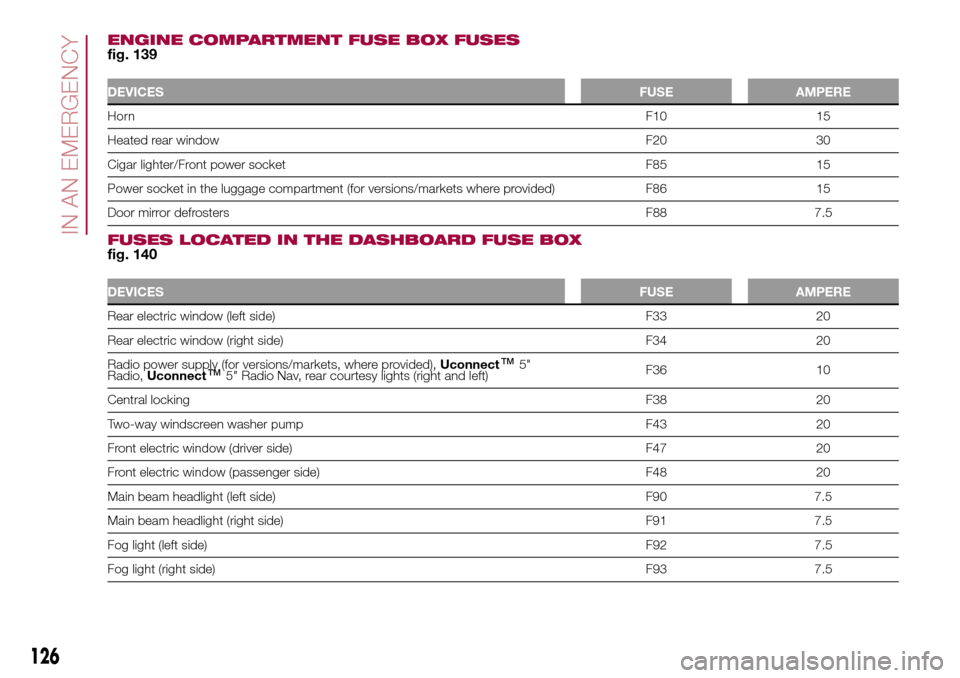
ENGINE COMPARTMENT FUSE BOX FUSESfig. 139
DEVICESFUSE AMPERE
HornF10 15
Heated rear windowF20 30
Cigar lighter/Front power socket F85 15
Power socket in the luggage compartment (for versions/markets where provided) F86 15
Door mirror defrostersF88 7.5
FUSES LOCATED IN THE DASHBOARD FUSE BOXfig. 140
DEVICESFUSE AMPERE
Rear electric window (left side) F33 20
Rear electric window (right side) F34 20
Radio power supply (for versions/markets, where provided),Uconnect
™5"
Radio,Uconnect™5" Radio Nav, rear courtesy lights (right and left)F36 10
Central lockingF38 20
Two-way windscreen washer pump F43 20
Front electric window (driver side) F47 20
Front electric window (passenger side) F48 20
Main beam headlight (left side) F90 7.5
Main beam headlight (right side) F91 7.5
Fog light (left side)F92 7.5
Fog light (right side)F93 7.5
126
IN AN EMERGENCY
Page 131 of 240
If it is often necessary to perform a
jump starting, have the vehicle battery
and the recharging system checked
by a Fiat Dealership.
IMPORTANT Any accessories (e.g.
mobile phones, etc.) connected to the
vehicle power sockets draw current
even if they are not used. These
devices, if left connected too much time
with engine off, may cause the battery
to drain with following reduction of
its life and/or failure to start the engine.
WARNING
140)Do not get too close to the radiator
cooling fan: the electric fan may start;
danger of injury. Scarves, ties and other
loose clothing may be pulled by moving
parts.
141)Remove any metal objects (e.g. rings,
watches, bracelets), that might cause an
accidental electrical contact and cause
serious injury.
142)Batteries contain acid which may burn
skin and eyes. Batteries produce
hydrogen, which is easily flammable and
explosive. Thus keep away flames or
devices which may cause sparks.
WARNING
68)Do not connect the cable to the
negative terminal (–) of the flat battery. The
following spark could lead to battery
explosion and cause serious harm. Only
use the specific earth point; do not use any
other exposed metallic part.
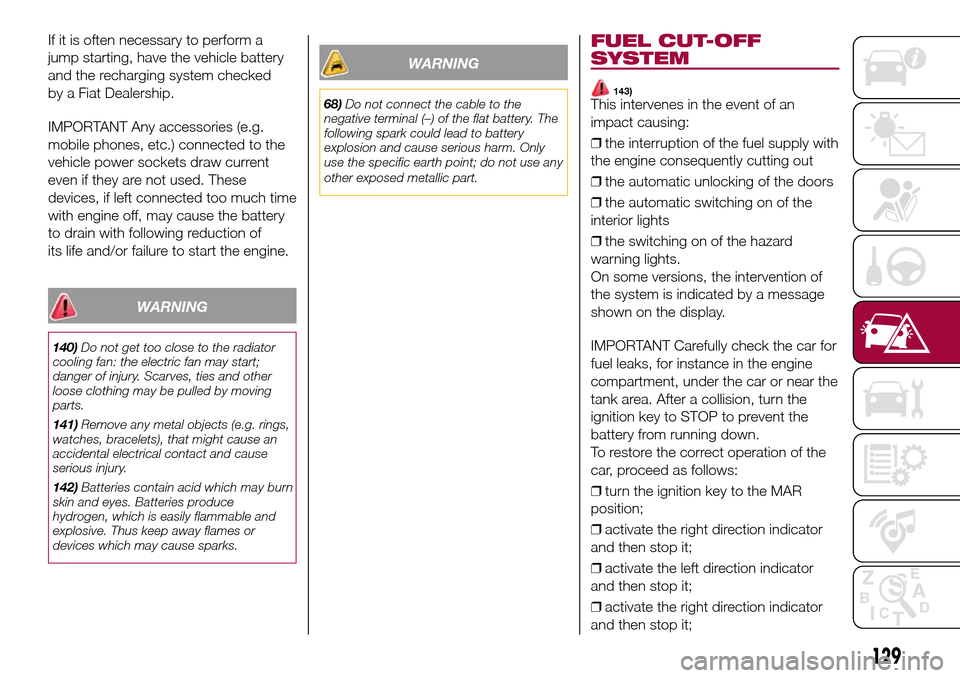
FUEL CUT-OFF
SYSTEM
143)This intervenes in the event of an
impact causing:
❒the interruption of the fuel supply with
the engine consequently cutting out
❒the automatic unlocking of the doors
❒the automatic switching on of the
interior lights
❒the switching on of the hazard
warning lights.
On some versions, the intervention of
the system is indicated by a message
shown on the display.
IMPORTANT Carefully check the car for
fuel leaks, for instance in the engine
compartment, under the car or near the
tank area. After a collision, turn the
ignition key to STOP to prevent the
battery from running down.
To restore the correct operation of the
car, proceed as follows:
❒turn the ignition key to the MAR
position;
❒activate the right direction indicator
and then stop it;
❒activate the left direction indicator
and then stop it;
❒activate the right direction indicator
and then stop it;
129
Page 133 of 240
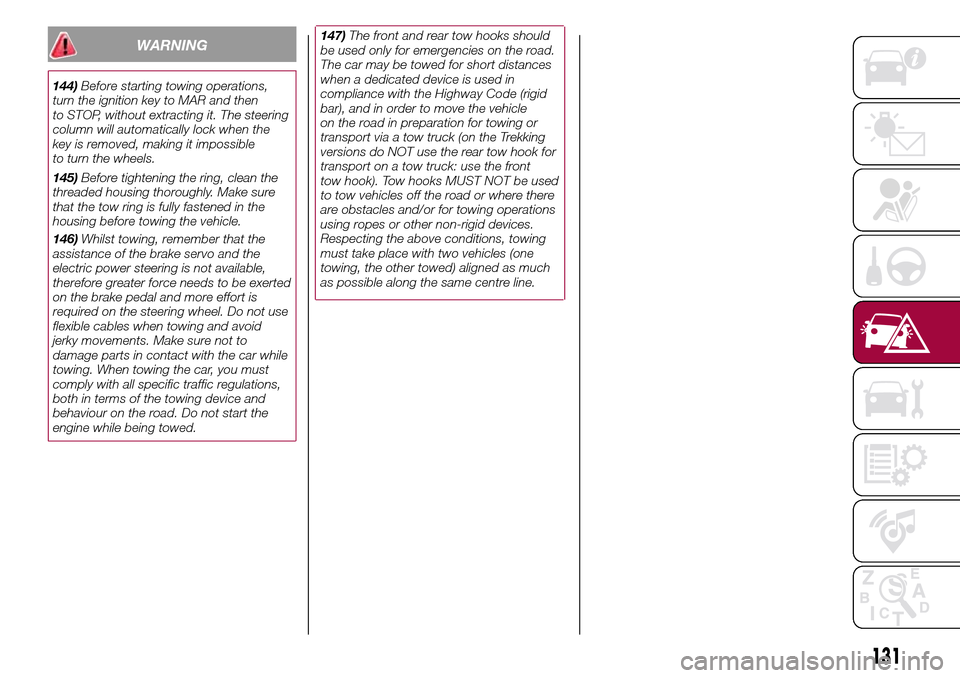
146)Whilst towing, remember that the
assistance of the brake servo and the
electric power steering is not available,
therefore greater force needs to be exerted
on the brake pedal and more effort is
required on the steering wheel. Do not use
flexible cables when towing and avoid
jerky movements. Make sure not to
damage parts in contact with the car while
towing. When towing the car, you must
comply with all specific traffic regulations,
both in terms of the towing device and
behaviour on the road. Do not start the
engine while being towed.
131
147)The front and rear tow hooks should
be used only for emergencies on the road.
The car may be towed for short distances
when a dedicated device is used in
compliance with the Highway Code (rigid
bar), and in order to move the vehicle
on the road in preparation for towing or
transport via a tow truck (on the Trekking
versions do NOT use the rear tow hook for
transport on a tow truck: use the front
tow hook). Tow hooks MUST NOT be used
to tow vehicles off the road or where there
are obstacles and/or for towing operations
using ropes or other non-rigid devices.
Respecting the above conditions, towing
must take place with two vehicles (one
towing, the other towed) aligned as much
as possible along the same centre line.WARNING
144)Before starting towing operations,
turn the ignition key to MAR and then
to STOP, without extracting it. The steering
column will automatically lock when the
key is removed, making it impossible
to turn the wheels.
145)Before tightening the ring, clean the
threaded housing thoroughly. Make sure
that the tow ring is fully fastened in the
housing before towing the vehicle.
Page 135 of 240
SCHEDULED
SERVICING
Correct servicing is crucial for
guaranteeing a long life for the vehicle
under the best conditions. For this
reason, Fiat has planned a series of
checks and services at fixed distance
intervals and, where provided, at fixed
time intervals, as described in the
Scheduled Servicing Plan.
Before each service, it is always
necessary to carefully follow the
instructions in the Scheduled Servicing
Plan (e.g. periodically check level of
fluids, tyre pressure, etc.).
Scheduled Servicing is offered by all
Fiat Dealerships according to a set time
schedule. If, during each operation, in
addition to the ones scheduled, the
need arises for further replacements or
repairs, these may be carried out with
the owner's explicit agreement only.
If your vehicle is used frequently for
towing, the interval between one
service operation and the next should
be reduced.IMPORTANT Scheduled Servicing
interventions are set out by the
Manufacturer. Failure to have them
carried out may invalidate the warranty.
It is advisable to inform a Fiat
Dealership of any small operating
irregularities without waiting for the next
service.
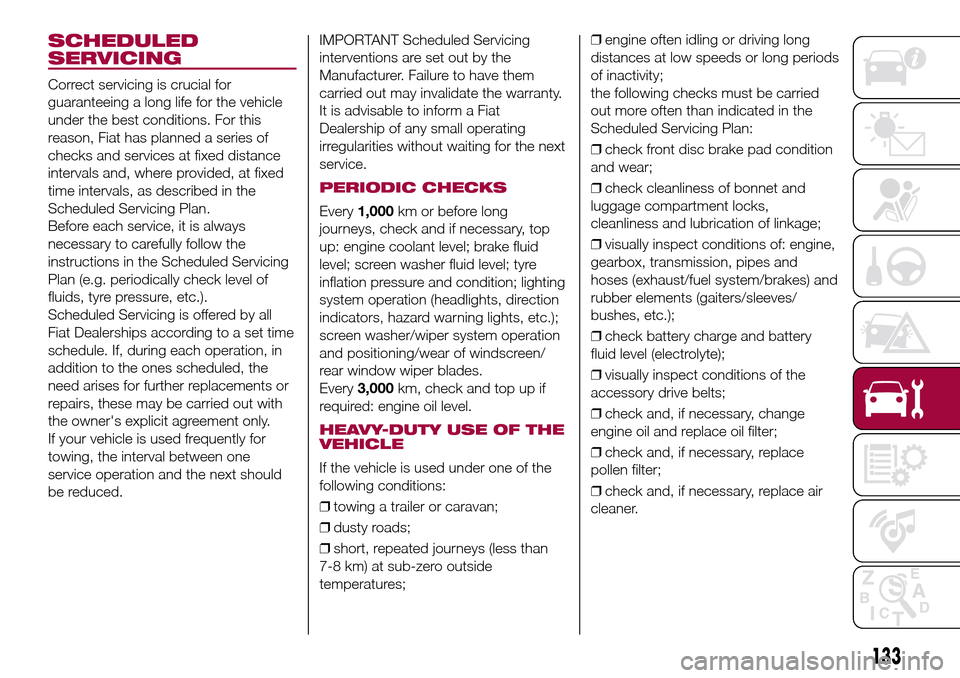
PERIODIC CHECKS
Every1,000km or before long
journeys, check and if necessary, top
up: engine coolant level; brake fluid
level; screen washer fluid level; tyre
inflation pressure and condition; lighting
system operation (headlights, direction
indicators, hazard warning lights, etc.);
screen washer/wiper system operation
and positioning/wear of windscreen/
rear window wiper blades.
Every3,000km, check and top up if
required: engine oil level.
HEAVY-DUTY USE OF THE
VEHICLE
If the vehicle is used under one of the
following conditions:
❒towing a trailer or caravan;
❒dusty roads;
❒short, repeated journeys (less than
7-8 km) at sub-zero outside
temperatures;❒engine often idling or driving long
distances at low speeds or long periods
of inactivity;
the following checks must be carried
out more often than indicated in the
Scheduled Servicing Plan:
❒check front disc brake pad condition
and wear;
❒check cleanliness of bonnet and
luggage compartment locks,
cleanliness and lubrication of linkage;
❒visually inspect conditions of: engine,
gearbox, transmission, pipes and
hoses (exhaust/fuel system/brakes) and
rubber elements (gaiters/sleeves/
bushes, etc.);
❒check battery charge and battery
fluid level (electrolyte);
❒visually inspect conditions of the
accessory drive belts;
❒check and, if necessary, change
engine oil and replace oil filter;
❒check and, if necessary, replace
pollen filter;
❒check and, if necessary, replace air
cleaner.
133
Page 137 of 240
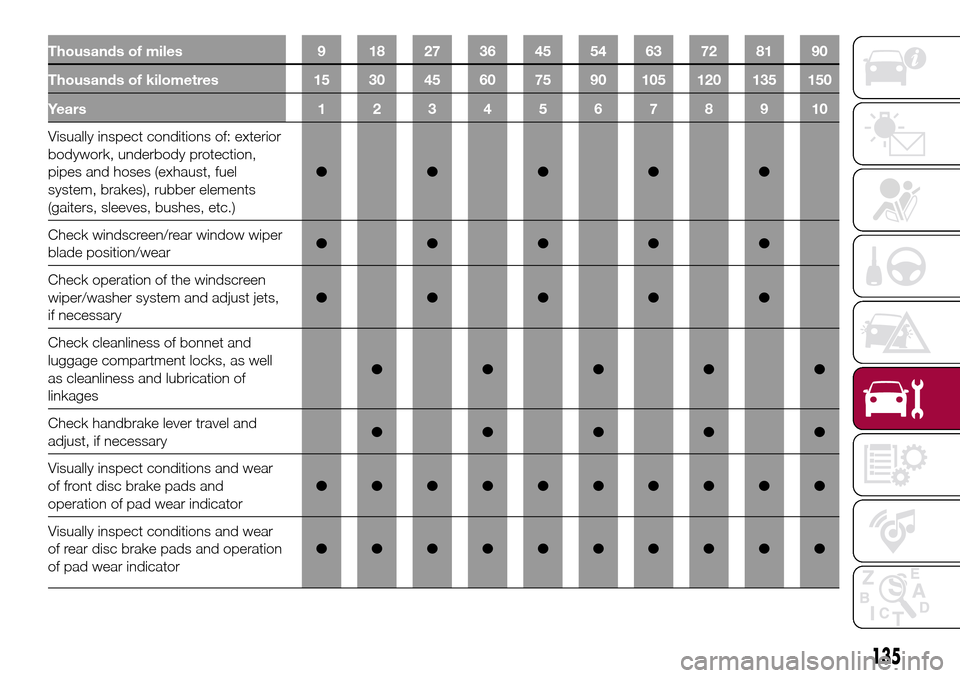
Thousands of miles 9 18 27 36 45 54 63 72 81 90
Thousands of kilometres 15 30 45 60 75 90 105 120 135 150
Years12345678910
Visually inspect conditions of: exterior
bodywork, underbody protection,
pipes and hoses (exhaust, fuel
system, brakes), rubber elements
(gaiters, sleeves, bushes, etc.)●●●●●
Check windscreen/rear window wiper
blade position/wear●●●●●
Check operation of the windscreen
wiper/washer system and adjust jets,
if necessary●●●●●
Check cleanliness of bonnet and
luggage compartment locks, as well
as cleanliness and lubrication of
linkages●●●●●
Check handbrake lever travel and
adjust, if necessary●●●●●
Visually inspect conditions and wear
of front disc brake pads and
operation of pad wear indicator●●●●●●●●●●
Visually inspect conditions and wear
of rear disc brake pads and operation
of pad wear indicator●●●●●●●●●●
135
Page 143 of 240
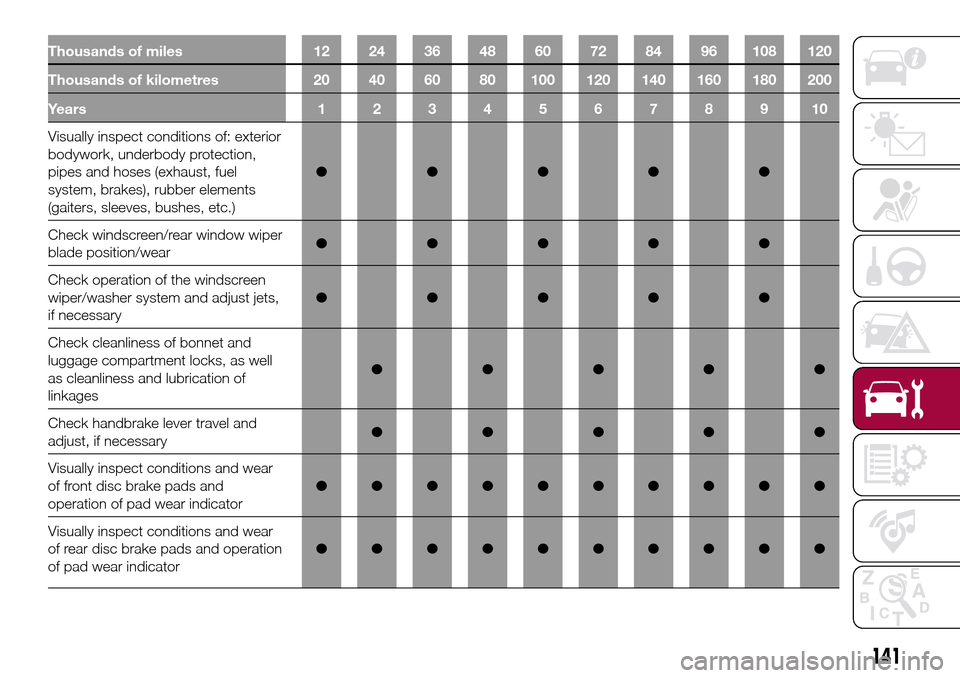
Thousands of miles 12 24 36 48 60 72 84 96 108 120
Thousands of kilometres 20 40 60 80 100 120 140 160 180 200
Years12345678910
Visually inspect conditions of: exterior
bodywork, underbody protection,
pipes and hoses (exhaust, fuel
system, brakes), rubber elements
(gaiters, sleeves, bushes, etc.)●●●●●
Check windscreen/rear window wiper
blade position/wear●●●●●
Check operation of the windscreen
wiper/washer system and adjust jets,
if necessary●●●●●
Check cleanliness of bonnet and
luggage compartment locks, as well
as cleanliness and lubrication of
linkages●●●●●
Check handbrake lever travel and
adjust, if necessary●●●●●
Visually inspect conditions and wear
of front disc brake pads and
operation of pad wear indicator●●●●●●●●●●
Visually inspect conditions and wear
of rear disc brake pads and operation
of pad wear indicator●●●●●●●●●●
141
Page 157 of 240
WINDSCREEN/REAR
WINDOW WIPER
162)75)
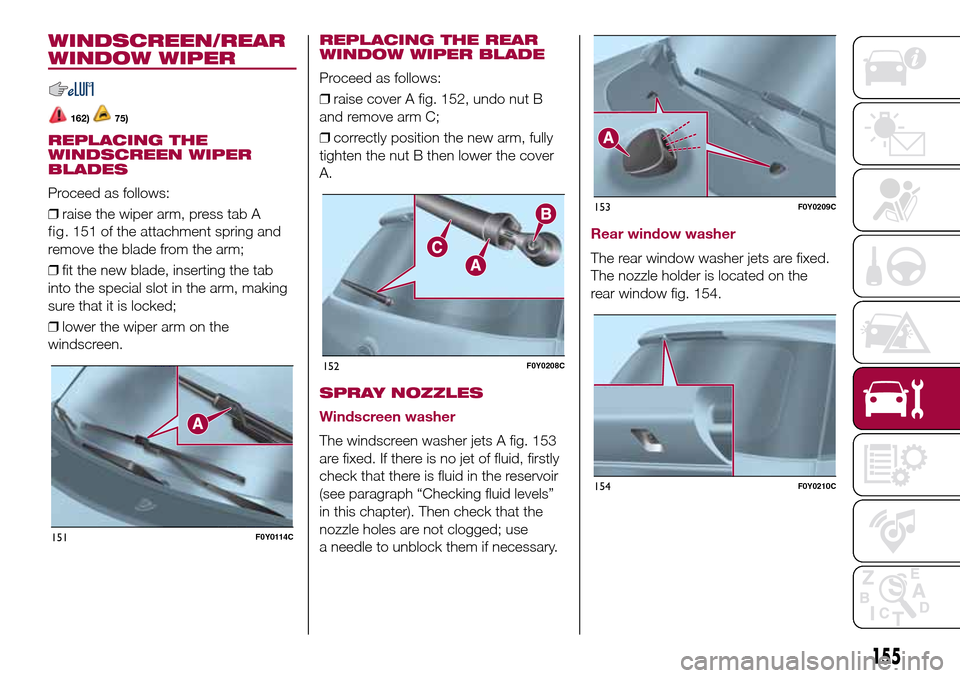
REPLACING THE
WINDSCREEN WIPER
BLADES
Proceed as follows:
❒raise the wiper arm, press tab A
remove the blade from the arm;
❒fit the new blade, inserting the tab
into the special slot in the arm, making
sure that it is locked;
❒lower the wiper arm on the
windscreen.
REPLACING THE REAR
WINDOW WIPER BLADE
Proceed as follows:
❒raise cover A fig. 152, undo nut B
and remove arm C;
❒correctly position the new arm, fully
tighten the nut B then lower the cover
A.
SPRAY NOZZLES
Windscreen washer
The windscreen washer jets A fig. 153
are fixed. If there is no jet of fluid, firstly
check that there is fluid in the reservoir
(see paragraph “Checking fluid levels”
in this chapter). Then check that the
nozzle holes are not clogged; use
a needle to unblock them if necessary.
Rear window washer
The rear window washer jets are fixed.
The nozzle holder is located on the
rear window fig. 154.
151F0Y0114C
152F0Y0208C
153F0Y0209C
154F0Y0210C
155
fig. 151 of theattachment spring and
Page 162 of 240
IDENTIFICATION
DATA
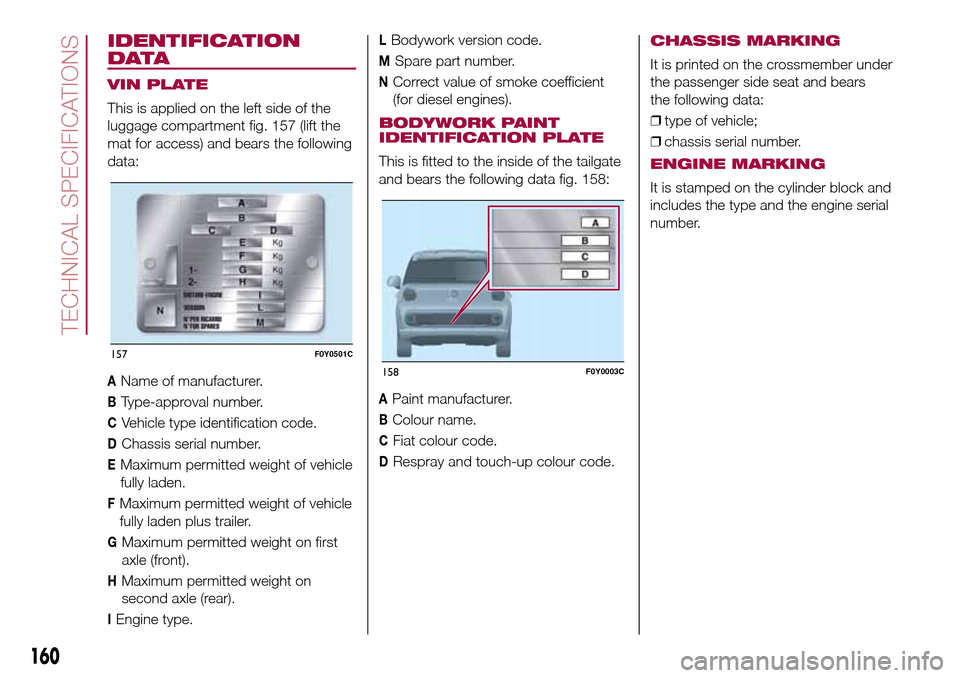
VIN PLATE
This is applied on the left side of the
luggage compartment fig. 157 (lift the
mat for access) and bears the following
data:
AName of manufacturer.
BType-approval number.
CVehicle type identification code.
DChassis serial number.
EMaximum permitted weight of vehicle
fully laden.
FMaximum permitted weight of vehicle
fully laden plus trailer.
GMaximum permitted weight on first
axle (front).
HMaximum permitted weight on
second axle (rear).
IEngine type.
LBodywork version code.
MSpare part number.
NCorrect value of smoke coefficient
(for diesel engines).
BODYWORK PAINT
IDENTIFICATION PLATE
This is fitted to the inside of the tailgate
and bears the following data fig. 158:
APaint manufacturer.
BColour name.
CFiat colour code.
DRespray and touch-up colour code.
CHASSIS MARKING
It is printed on the crossmember under
the passenger side seat and bears
the following data:
❒type of vehicle;
❒chassis serial number.
ENGINE MARKING
It is stamped on the cylinder block and
includes the type and the engine serial
number.
157F0Y0501C
158F0Y0003C
160
TECHNICAL SPECIFICATIONS
Page 209 of 240
TIPS, CONTROLS
AND GENERAL
INFORMATION
ROAD SAFETY
167) 168)
Learn how to use the various system
functions before setting off.
Read the instructions for the system
carefully before setting off.
RECEPTION CONDITIONS
Reception conditions change
constantly while driving. Reception may
be interfered with by the presence of
mountains, buildings or bridges,
especially when you are far away from
the broadcaster.
IMPORTANT The volume may be
increased when receiving traffic
information and news.
CARE AND MAINTENANCE
85) 86)
Observe the following precautions to
ensure the system is fully operational:
❒the display lens should not come into
contact with pointed or rigid objects
which could damage its surface; use a
soft, dry anti-static cloth to clean and
do not press.❒never use alcohol, petrols and
derivatives to clean the display lens.
❒prevent any liquid from entering the
system: this could damage it beyond
repair.
MULTIMEDIA DEVICES
IMPORTANT Some multimedia player
may not be compatible with the
Uconnect™ system.
ANTI-THEFT
PROTECTION
The system is equipped with an
anti-theft protection system based on
the exchange of information with the
electronic control unit (Body Computer)
on the vehicle.
This guarantees maximum safety and
prevents the secret code from being
entered after the power supply has
been disconnected.
If the check has a positive outcome, the
system will start to operate, whereas if
the comparison codes are not the
same or if the electronic control unit
(Body Computer) is replaced, the
system will ask the user to enter the
secret code according to the procedure
described in the paragraph below.
Entering the secret code
When the system is switched on, if the
code is requested, the display will
show "Please enter Anti-Theft Code"
followed by the screen showing a
keypad to enter the secret code.
The secret code is made up of four
digits, from 0 to 9: to insert the first digit
of the code, turn the BROWSE/ENTER
right knob and press to confirm.
After entering the fourth digit, the
system begins operating.
If an incorrect code is entered, the
system displays "Incorrect Code" to
notify the user of the need to enter the
correct code.
After the 3 available attempts to enter
the code, the system displays
"Incorrect Code. Radio locked. Wait for
30 minutes". Once the text has
disappeared you can start the code
entering procedure again.
Vehicle radio passport
This document certifies ownership of
the system. The vehicle radio passport
shows the system model, serial number
and secret code.
In the case of loss of the vehicle radio
passport, contact the Fiat Dealership,
taking an ID document and the vehicle
ownership documents.
207
Page 220 of 240
IMPORTANT Do not remove the USB
memory stick nor unpair the
smartphone and theApp Uconnect™
LIVEbefore the system has
downloaded the data, since these
could be lost. During the data transfer
phase on the devices, the display of
Uconnect™could show messages to
properly carry out the operation: refer
to the information provided. These
messages are only displayed with the
ignition key at STOP and when a delay
in the system switching off is set.
Uconnect™. The data are
automatically transferred to the devices
when the engine is switched off. The
data transferred are deleted from the
system memory. You can choose
to store the trip data or not, by pressing
the "Settings" button and by setting
the storage activation and the USB or
Cloud transfer mode.
When the USB memory stick is full, the
dedicated messagesUconnect™
are shown on the radio display.
When theeco:Drive™data are not
transferred to USB memory stick for a
long time, the internal memory of the
systemUconnect™may be
exhausted: in this case follow the
recommendations provided by the
messages on the display.my:Car
my:Car allows you to keep the "health
condition" of your vehicle always under
control. The my:Car application can
detect malfunction in real time and
inform the driver about the expiry of the
servicing interval.
To interact with the application press
the "my: Car" button: the display will
show a screen with the "care:Index"
section, which provides all the detailed
information about the status of the
vehicle. Pressing the "Active warnings"
button it is possible to show (if present)
the details of the vehicle faults which
caused a warning light to switch on.
The vehicle status can be shown both
on www.driveuconnect.eu or through
theUconnect™LIVEapplication.
"SETTINGS" MENU
"Settings" menu display
Versions with Uconnect 5" Radio LIVE:
press the SETTINGS button on the
front panel.
Versions with Uconnect 5" Radio Nav
LIVE: press the "Settings" button on the
display.
The menu comprises the following
options:
❒Display;
❒Clock & Date;❒Safety/Assistance (for versions/
markets, where provided);
❒Lights (for versions/markets where
provided);
❒Doors & Locks;
❒Audio;
❒Phone/Bluetooth;
❒Radio;
❒Restore default settings;
❒Clear Personal Data.
NAVIGATION MODE(Uconnect 5" Radio Nav LIVE versions
only)
Programming a route
IMPORTANT In the interest of safety
and to reduce distractions while you are
driving, you should always plan a route
before you start driving.
To plan a route, do the following:
❒tap the screen to display the Main
menu;
❒select "Navigate to" or "Drive to";
❒select "Address": you can change the
country or state setting by tapping the
flag before you select a city;
❒enter the town or city name, or the
postcode. Towns with similar names
are shown in the list while you type;
Tip: Tap the arrow to the right of the list
to expand the list of suggested towns.
218
MULTIMEDIA