light FIAT 500L LIVING 2017 2.G Manual PDF
[x] Cancel search | Manufacturer: FIAT, Model Year: 2017, Model line: 500L LIVING, Model: FIAT 500L LIVING 2017 2.GPages: 240, PDF Size: 5.26 MB
Page 153 of 240
ENGINE OIL
150)70) 71)4)
Check that the oil level is between the
MIN and MAX references on the
dipstick A. If the oil level is near or even
under the MIN mark, add oil using the
filler B to reach the MAX mark. Take out
the engine oil dipstick A, clean it with
a lint-free cloth and reinsert it. Extract
the engine oil dipstick again and check
that the level is between the MIN and
MAX marks on the dipstick. On 0.9
TwinAir Turbo 105 HP versions,
unscrew the cap, clean the dipstick
with a lint-free cloth, reinsert the
dipstick and screw the cap back on.
Unscrew the cap again and check that
the engine oil level is between the
MIN and MAX marks on the dipstick.
Engine oil consumption: the
maximum engine oil consumption is
usually 400 grams every 1000 km.
During the initial period of use the
engine oil consumption conditions
should be considered as having
stabilised after the first 5000 - 6000 k m .
ENGINE COOLANT
151)72)If the level is too low, unscrew the cap
of reservoir C and add the fluid
described in the "Technical
Specifications" chapter.
WINDSCREEN/REAR
WINDOW WASHER FLUID
152) 153)
If the level is too low, lift reservoir cap D
and add the fluid described in the
"Technical Specifications" chapter.
IMPORTANT The headlight washer
system will not operate when the fluid
level is low, even though the
windscreen/rear window washer
continues to operate. On some
versions there is a reference notch on
the dipstick: ONLY the windscreen/rear
window washer operates with the
level below this reference.
BRAKE FLUID
154) 155)73)
Check that the fluid is at the max. level.
If the fluid level in the reservoir is too
low, undo reservoir cap E and add the
fluid described in the "Technical
Specifications" chapter.
DUALOGIC GEARBOX
CONTROL OIL
5)The gearbox control oil level should only
be checked at a Fiat Dealership.
BATTERY
156) 157) 158) 159)6)
The battery does not require the
electrolyte to be topped up with distilled
water. A periodic check carried out at
a Fiat Dealership is, however, necessary
to check efficiency.
IMPORTANT After the battery is
disconnected, the steering must be
initialised. The
warning light on the
instrument panel switches on to
indicate this. To carry out this
procedure turn the steering wheel all
the way from one end to the other
or drive in a straight line for about a
hundred metres.
IMPORTANT If the charge level remains
under 50% for a long time, the battery
is damaged by sulphation, reducing
its capacity and efficiency at start-up.
151
Page 159 of 240
WHEELS AND TYRES
SUGGESTIONS ABOUT
THE ROTATION OF THE
TYRES
164)77) 78) 79) 80)
The front and rear tyres are subject to
different loads and stress due to
steering, manoeuvres and braking. For
this reason they are subject to uneven
wear.
To resolve this problem, tyres should be
rotated at the appropriate time. This
operation is recommended for tyres
with a deep tread pattern, suitable both
for on-road and off-road driving.
Tyre rotation contributes to the
preservation of the grip and traction
performance on wet, muddy or snowy
roads, guaranteeing optimal driveability
of the vehicle.
In the case of irregular wear of the
tyres, the reason must be identified and
corrected before rotating them.
WARNING
164)Do not cross switch the tyres if they
are "one-way" type. In this case, always
take care not to fit the tyres with a direction
of rotation that is opposite to that
indicated: you would risk losing grip and
control of the vehicle.
WARNING
77)Road holding depends also on the
correct tyre inflating pressure.
78)If the pressure is too low the tyre
overheats and this can cause it serious
damage.
79)Do not cross switch the tyres, moving
them from the right of the vehicle to the left
and vice versa.
80)Never submit alloy rims to repainting
treatments requiring the use of
temperatures exceeding 150°C. The
mechanical properties of the wheels could
be impaired.
BODYWORK
PRESERVING THE
BODYWORK
Paintwork
81)7)
Touch up abrasions and scratches
immediately to prevent the formation of
rust. On some versions the car may
be equipped with an exclusive matt
paint which, in order to be maintained
intact, requires special care.
82)
To correctly wash the vehicle, follow
these instructions:
❒if the vehicle is washed remove the
aerial from the roof;
❒if high pressure jets or cleaners are
used to wash the vehicle, keep a
distance of at least 40 cm from the
bodywork to avoid damage or
alteration. Build up of water could
cause damage to the vehicle in the long
term;
❒wash the bodywork using a low
pressure jet of water;
❒wipe a sponge with a slightly soapy
solution over the bodywork, frequently
rinsing the sponge;
❒rinse well with water and dry with a
jet of air or a chamois.
157
Page 215 of 240
"TOUCH SCREEN"
FUNCTION
The system uses the "touch screen"
function; to interact with the different
functions, press the "graphic buttons"
displayed.
Confirmation of a selection: press
the "OK" button.
Going back to the previous screen:
press the
(Delete) button or,
depending on the activated screen,
/Done.
USB/iPod/AUX SUPPORT
The vehicle has a USB/AUX port
located in the centre tunnel.
RADIO MODE
After the desired radio station is
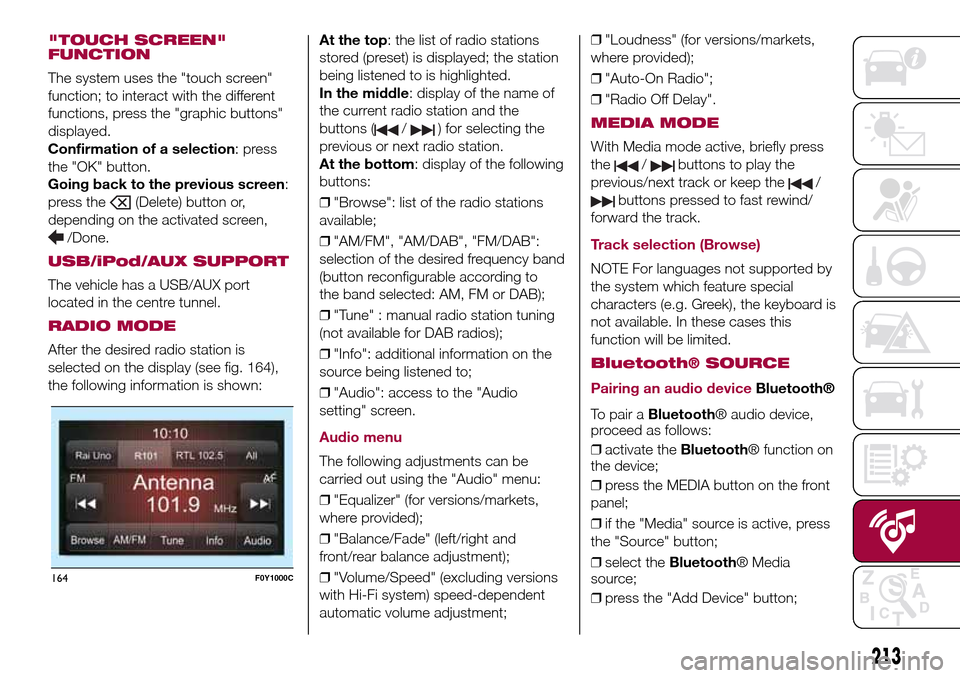
selected on the display (see fig. 164),
the following information is shown:At the top: the list of radio stations
stored (preset) is displayed; the station
being listened to is highlighted.
In the middle: display of the name of
the current radio station and the
buttons (
/) for selecting the
previous or next radio station.
At the bottom: display of the following
buttons:
❒"Browse": list of the radio stations
available;
❒"AM/FM", "AM/DAB", "FM/DAB":
selection of the desired frequency band
(button reconfigurable according to
the band selected: AM, FM or DAB);
❒"Tune" : manual radio station tuning
(not available for DAB radios);
❒"Info": additional information on the
source being listened to;
❒"Audio": access to the "Audio
setting" screen.
Audio menu
The following adjustments can be
carried out using the "Audio" menu:
❒"Equalizer" (for versions/markets,
where provided);
❒"Balance/Fade" (left/right and
front/rear balance adjustment);
❒"Volume/Speed" (excluding versions
with Hi-Fi system) speed-dependent
automatic volume adjustment;❒"Loudness" (for versions/markets,
where provided);
❒"Auto-On Radio";
❒"Radio Off Delay".
MEDIA MODE
With Media mode active, briefly press
the
/buttons to play the
previous/next track or keep the
/
buttons pressed to fast rewind/
forward the track.
Track selection (Browse)
NOTE For languages not supported by
the system which feature special
characters (e.g. Greek), the keyboard is
not available. In these cases this
function will be limited.
Bluetooth® SOURCE
Pairing an audio device
Bluetooth®
To pair aBluetooth® audio device,
proceed as follows:
❒activate theBluetooth® function on
the device;
❒press the MEDIA button on the front
panel;
❒if the "Media" source is active, press
the "Source" button;
❒select theBluetooth® Media
source;
❒press the "Add Device" button;
164F0Y1000C
213
Page 219 of 240
Only for Uconnect™5" Radio Nav
LIVE: accessing theUconnect™LIVE
services enables the TomTom LIVE
services. Further information about the
LIVE functions is available in the
dedicated chapter.
eco:Drive™
Theeco:Drive™application allows you
to display your driving behaviour in
real time, in order to help you reach a
more efficient driving style as far as
consumption and emissions are
concerned.
In addition, the data can be saved on
an USB device or thanks to the
Uconnect™LIVEApp, and the data
analysis can be made on your personal
computer thanks to theeco:Drive™
application, available on www.fiat.it
or www.driveuconnect.eu.
Evaluation of the driving style is
dependent on four indices that monitor
the following parameters:
❒Acceleration
❒Deceleration
❒Gearbox/transmission
❒Speed
Display of the eco:Drive™
Press theeco:Drive™button to
interact with the function. A screen will
be displayed showing the 4 indices
described above. These indices are
grey until the system has enough data
to evaluate the driving style.
Once sufficient data are available, the
indices will have 5 colours depending
on the evaluation: dark green (very
good), light green, yellow, orange and
red (very bad).
"Current route index" refers to the entire
value calculated in real time based on
the average of the described indices. It
represents eco-friendliness of the
driving style: from 0 (low) to 100 (high).
In the event of extended inactivity the
display will show the average of the
indices until that moment (the "Average
index"), then the indices will be
coloured again in real time as soon as
the vehicle is restarted.
To check the data average of previous
route (the "route" starts when the
ignition key is turned to MAR and stops
when it is turned to STOP), select the
"Previous route" button.
The details of the previous trip can also
be displayed by pressing the "Details"
button, in which journey duration (time
and mileage) and average speed will be
reported.Trip data storage and transfer
The trip data can be stored in
the system memory and transferred
through a properly configured USB
memory stick or by theUconnect™
LIVE App.
This allows you to display the history of
the collected data, showing the
complete analysis of the trip data and
of your driving style.
For further information visit the
www.driveuconnect.eu website.
217
Page 220 of 240
IMPORTANT Do not remove the USB
memory stick nor unpair the
smartphone and theApp Uconnect™
LIVEbefore the system has
downloaded the data, since these
could be lost. During the data transfer
phase on the devices, the display of
Uconnect™could show messages to
properly carry out the operation: refer
to the information provided. These
messages are only displayed with the
ignition key at STOP and when a delay
in the system switching off is set.
Uconnect™. The data are
automatically transferred to the devices
when the engine is switched off. The
data transferred are deleted from the
system memory. You can choose
to store the trip data or not, by pressing
the "Settings" button and by setting
the storage activation and the USB or
Cloud transfer mode.
When the USB memory stick is full, the
dedicated messagesUconnect™
are shown on the radio display.
When theeco:Drive™data are not
transferred to USB memory stick for a
long time, the internal memory of the
systemUconnect™may be
exhausted: in this case follow the
recommendations provided by the
messages on the display.my:Car
my:Car allows you to keep the "health
condition" of your vehicle always under
control. The my:Car application can
detect malfunction in real time and
inform the driver about the expiry of the
servicing interval.
To interact with the application press
the "my: Car" button: the display will
show a screen with the "care:Index"
section, which provides all the detailed
information about the status of the
vehicle. Pressing the "Active warnings"
button it is possible to show (if present)
the details of the vehicle faults which
caused a warning light to switch on.
The vehicle status can be shown both
on www.driveuconnect.eu or through
theUconnect™LIVEapplication.
"SETTINGS" MENU
"Settings" menu display
Versions with Uconnect 5" Radio LIVE:
press the SETTINGS button on the
front panel.
Versions with Uconnect 5" Radio Nav
LIVE: press the "Settings" button on the
display.
The menu comprises the following
options:
❒Display;
❒Clock & Date;❒Safety/Assistance (for versions/
markets, where provided);
❒Lights (for versions/markets where
provided);
❒Doors & Locks;
❒Audio;
❒Phone/Bluetooth;
❒Radio;
❒Restore default settings;
❒Clear Personal Data.
NAVIGATION MODE(Uconnect 5" Radio Nav LIVE versions
only)
Programming a route
IMPORTANT In the interest of safety
and to reduce distractions while you are
driving, you should always plan a route
before you start driving.
To plan a route, do the following:
❒tap the screen to display the Main
menu;
❒select "Navigate to" or "Drive to";
❒select "Address": you can change the
country or state setting by tapping the
flag before you select a city;
❒enter the town or city name, or the
postcode. Towns with similar names
are shown in the list while you type;
Tip: Tap the arrow to the right of the list
to expand the list of suggested towns.
218
MULTIMEDIA
Page 225 of 240
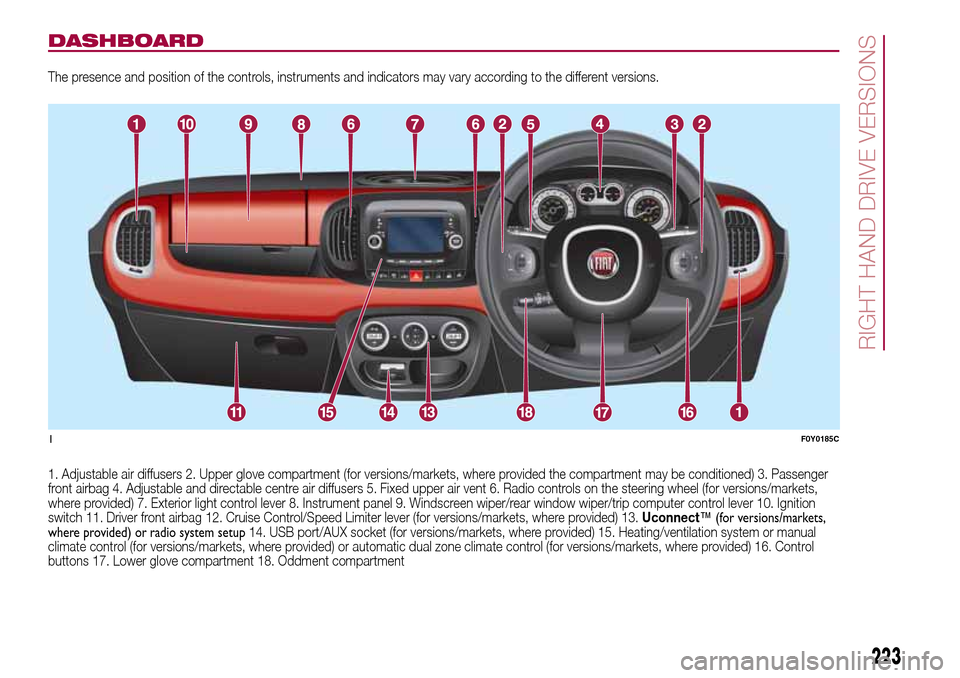
DASHBOARD
The presence and position of the controls, instruments and indicators may vary according to the different versions.
1. Adjustable air diffusers 2. Upper glove compartment (for versions/markets, where provided the compartment may be conditioned) 3. Passenger
front airbag 4. Adjustable and directable centre air diffusers 5. Fixed upper air vent 6. Radio controls on the steering wheel (for versions/markets,
where provided) 7. Exterior light control lever 8. Instrument panel 9. Windscreen wiper/rear window wiper/trip computer control lever 10. Ignition
switch 11. Driver front airbag 12. Cruise Control/Speed Limiter lever (for versions/markets, where provided) 13.Uconnect™ (for versions/markets,
where provided) or radio system setup14. USB port/AUX socket (for versions/markets, where provided) 15. Heating/ventilation system or manual
climate control (for versions/markets, where provided) or automatic dual zone climate control (for versions/markets, where provided) 16. Control
buttons 17. Lower glove compartment 18. Oddment compartment
1F0Y0185C
223
RIGHT HAND DRIVE VERSIONS
Page 226 of 240
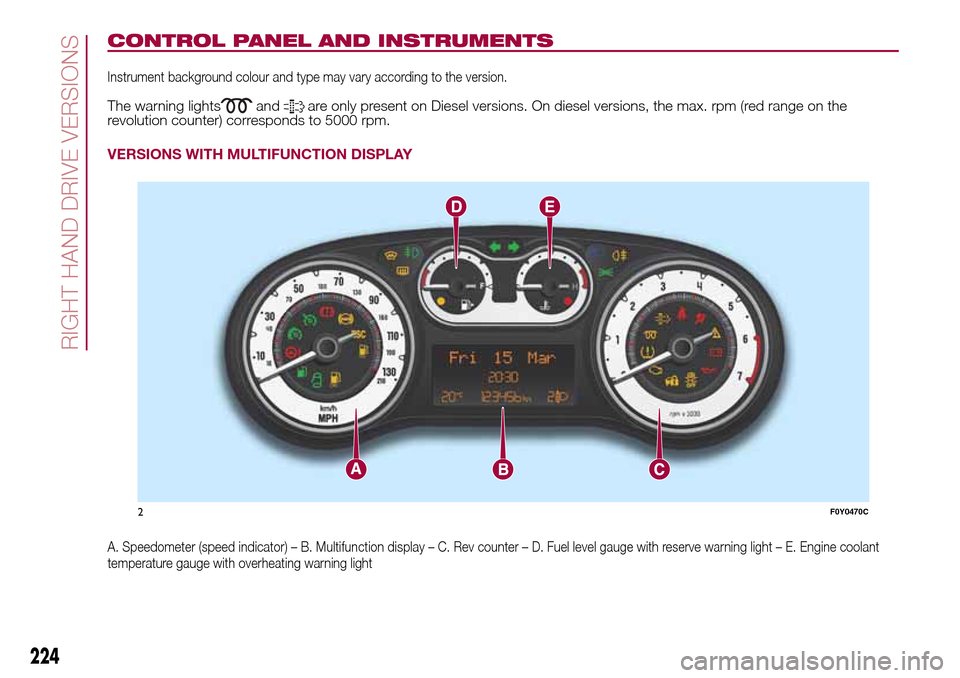
CONTROL PANEL AND INSTRUMENTS
Instrument background colour and type may vary according to the version.
The warning lightsandare only present on Diesel versions. On diesel versions, the max. rpm (red range on the
revolution counter) corresponds to 5000 rpm.
VERSIONS WITH MULTIFUNCTION DISPLAY
A. Speedometer (speed indicator) – B. Multifunction display – C. Rev counter – D. Fuel level gauge with reserve warning light – E. Engine coolant
temperature gauge with overheating warning light
2F0Y0470C
224
RIGHT HAND DRIVE VERSIONS
Page 227 of 240
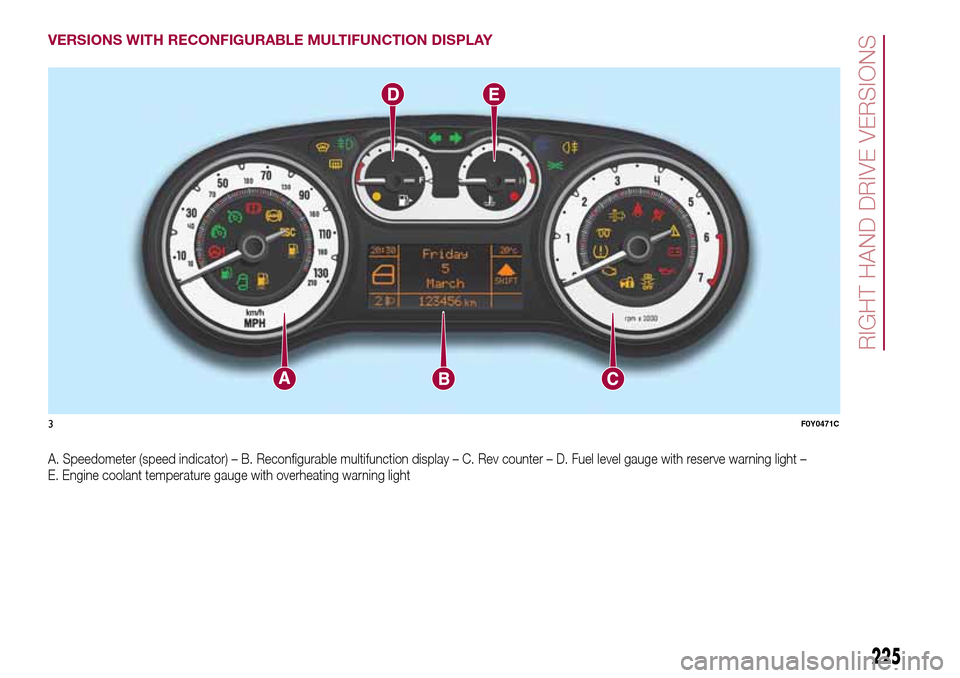
VERSIONS WITH RECONFIGURABLE MULTIFUNCTION DISPLAY
A. Speedometer (speed indicator) – B. Reconfigurable multifunction display – C. Rev counter – D. Fuel level gauge with reserve warning light –
E. Engine coolant temperature gauge with overheating warning light
3F0Y0471C
225
RIGHT HAND DRIVE VERSIONS
Page 229 of 240
IMPORTANT INFORMATION AND RECOMMENDATIONS
WARNING
INTERIOR FITTINGS
❒Do not travel with the storage compartments open: they may injure the front seat occupants in the event of an accident.
❒The cigar lighter gets extremely hot. Handle it carefully and make sure that children don’t use it: risk of fire and/or burns.
ROOF RACK/SKI RACK
❒Check that the attachment fixing screws are tight after a few kilometres.
❒Never exceed the maximum permitted loads (see chapter "Technical specifications").
❒Evenly distribute the load and take into account, when driving, the increased responsiveness of the vehicle to side wind.
LAVAZZA 500 ESPRESSO EXPERIENCE SETUP
❒Use the accessory with vehicle stationary.
ACCESSORIES PURCHASED BY THE OWNER
❒Take care when fitting additional spoilers, alloy wheel rims or non-standard wheel hubs: they could reduce the ventilation of the brakes and
affect efficiency under sharp, repeated braking or on long descents. Make sure that nothing obstructs the pedal stroke (mats, etc.).
INTERIORS
❒Never use flammable products, such as petroleum ether or modified petrol, to clean the inside of the car. The electrostatic charges which
are generated by rubbing during the cleaning operation may cause a fire.
❒Do not keep aerosol cans in the vehicle: danger of explosion. Aerosol cans must not be exposed to a temperature exceeding 50°C. When
the vehicle is exposed to sunlight, the internal temperature can greatly exceed this value.
❒There must be no obstacles on the floor underneath the pedals; make sure that mats are always flat and do not interfere with the pedals.
SUPPLY
❒Modifications or repairs to the fuel supply system that are not carried out correctly or do not take the system’s technical specifications into
account can cause malfunctions leading to the risk of fire.
Page 236 of 240
INDEX
3
rd brake light (changing bulbs)..... 121
ABS (system) ................................ 65
Active safety systems ..................... 65
ASR (system) ................................. 65
Automatic dual-zone climate
control system ............................. 18
Battery (recharging)....................... 153
Bodywork (cleaning and
maintenance) ............................... 157
Bonnet ........................................... 31
Bulb (replacement) ......................... 115
Cargo Magic Space ...................... 30
Checking levels .............................. 145
Child protection systems ................ 76
City Brake Control - Collision
Mitigation System......................... 68
Climate control system ................... 16
CO2 emissions............................... 200
Control buttons .............................. 42
Control panel and on-board
instruments .................................. 40
Cornering lights .............................. 20
Cruise Control (constant speed
regulator)...................................... 99
Dashboard.................................... 7
Daytime running lights (DRL) .......... 19
Dimensions .................................... 174Dipped headlights (bulb
replacement) ................................ 118
Direction indicators (bulb
replacement) ................................ 118
Direction indicators ........................ 20
Display ........................................... 42
Doors ............................................. 26
Driving assistance systems ............ 67
DST (system).................................. 66
Dualdrive (electric power
steering) ....................................... 32
Dusk sensor ................................... 20
Electric sun roof ............................ 24
Electric windows ............................ 28
Engine compartment...................... 145
ERM (system) ................................. 66
ESC (system) ................................. 65
Exterior lights ................................. 19
Fiat CODE (system) ....................... 8
Fixed glass roof .............................. 23
Fix&Go Automatic kit...................... 113
Flashing ......................................... 20
Fluids and lubricants ...................... 193
Fog lights (bulb replacement) ......... 120
Follow Me Home (device) ............... 21
Front airbags .................................. 86
Front seats ..................................... 11
Fuel consumption .......................... 195
Fuel cut-off system......................... 129
Fuses (replacement) ....................... 122
Gear Shift Indicator (system) ......... 42
Handbrake.................................... 94
Hazard warning lights..................... 109
Head restraints............................... 13
Heating and ventilation ................... 16
Hill Holder (system) ........................ 65
Identification data .......................... 160
Ignition device ................................ 10
Important information and
recommendations ........................ 222
iTPMS ............................................ 69
Jump starting ................................ 128
"Lane Change" function ................ 20
Lifting the vehicle .......................... 156
Luggage compartment................... 29
Main beam headlights (bulb
replacement) ................................ 118
Main beam headlights .................... 20
Manual climate control system ....... 17
Multifunction display....................... 42
Number plate lights (bulb
replacement) ................................ 121
Occupant protection systems ....... 71
On-board instruments
– multifunction display .................. 40
– reconfigurable multifunction
display....................................... 41
Parking sensors ............................ 101
INDEX