lock FIAT 500X 2014 2.G Owners Manual
[x] Cancel search | Manufacturer: FIAT, Model Year: 2014, Model line: 500X, Model: FIAT 500X 2014 2.GPages: 476, PDF Size: 5.32 MB
Page 324 of 476
NOTE:•Your vehicle may be equipped with a compact
spare tire or a limited — use spare tire. For further
information refer to “Tires — General Information”
in “Maintaining Your Vehicle”.
• For vehicles so equipped, do not attempt to install
a center cap or wheel cover on the compact spare.
8. Install the wheel bolts with the threaded end of the wheel bolt toward the wheel. Lightly tighten the
wheel bolts.
WARNING!
To avoid the risk of forcing the vehicle off the jack,
do not fully tighten the wheel bolts until the
vehicle has been lowered. Failure to follow this
warning may result in serious injury.
9. Lower the vehicle to the ground by turning the wheel bolt wrench counterclockwise.
10. Finish tightening the wheel bolts. Push down on the wrench while at the end of the handle for increased
leverage. Tighten the wheel bolts in a star pattern
until each wheel bolt has been tightened twice. Refer to “Torque Specifications” in “Technical Data”
for the proper lug bolt torque. If in doubt about the
correct tightness, have them checked with a torque
wrench by your authorized dealer or at a service
station.
11. Securely stow the jack, tools, chocks and flat tire.
WARNING!
A loose tire or jack thrown forward in a collision or
hard stop could endanger the occupants of the
vehicle. Always stow the jack parts and the spare
tire in the places provided. Have the deflated (flat)
tire repaired or replaced immediately.
Road Tire Installation
1. Mount the road tire on the axle.
2. Install the remaining wheel bolts with the threaded end of the wheel bolt toward the wheel. Lightly
tighten the wheel bolts.
322 IN CASE OF EMERGENCY
Page 325 of 476
WARNING!
To avoid the risk of forcing the vehicle off the jack,
do not tighten the lug nuts fully until the vehicle
has been lowered. Failure to follow this warning
may result in serious injury.
3. Lower the vehicle to the ground by turning the jack handle counterclockwise.
4. Finish tightening the wheel bolts. Push down on the wrench while at the end of the handle for increased
leverage. Tighten the wheel bolts in a star pattern
until each wheel bolt has been tightened twice. Refer
to “Torque Specifications” in the “Technical Data”
section for the proper lug bolt torque. If in doubt
about the correct tightness, have them checked with
a torque wrench by your authorized dealer or service
station.
5. Lower the jack until it is free. Remove the wheel chocks. Stow the jack and tools back in the proper
storage location. Release the Electric Park Brake
before driving the vehicle. 6. After 25 miles (40 km) check the wheel bolt torque
with a torque wrench to ensure that all wheel bolts
are properly seated against the wheel.
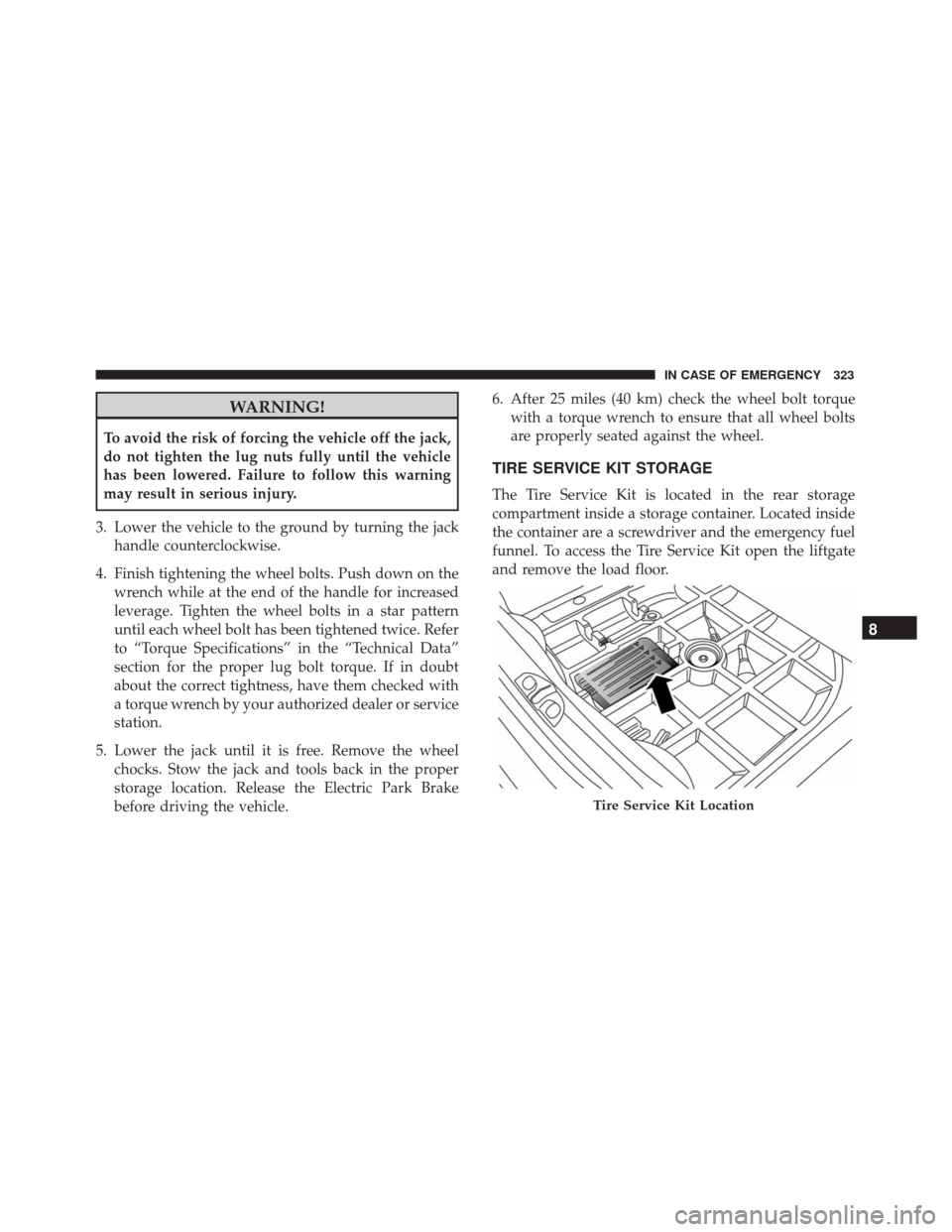
TIRE SERVICE KIT STORAGE
The Tire Service Kit is located in the rear storage
compartment inside a storage container. Located inside
the container are a screwdriver and the emergency fuel
funnel. To access the Tire Service Kit open the liftgate
and remove the load floor.
Tire Service Kit Location
8
IN CASE OF EMERGENCY 323
Page 334 of 476
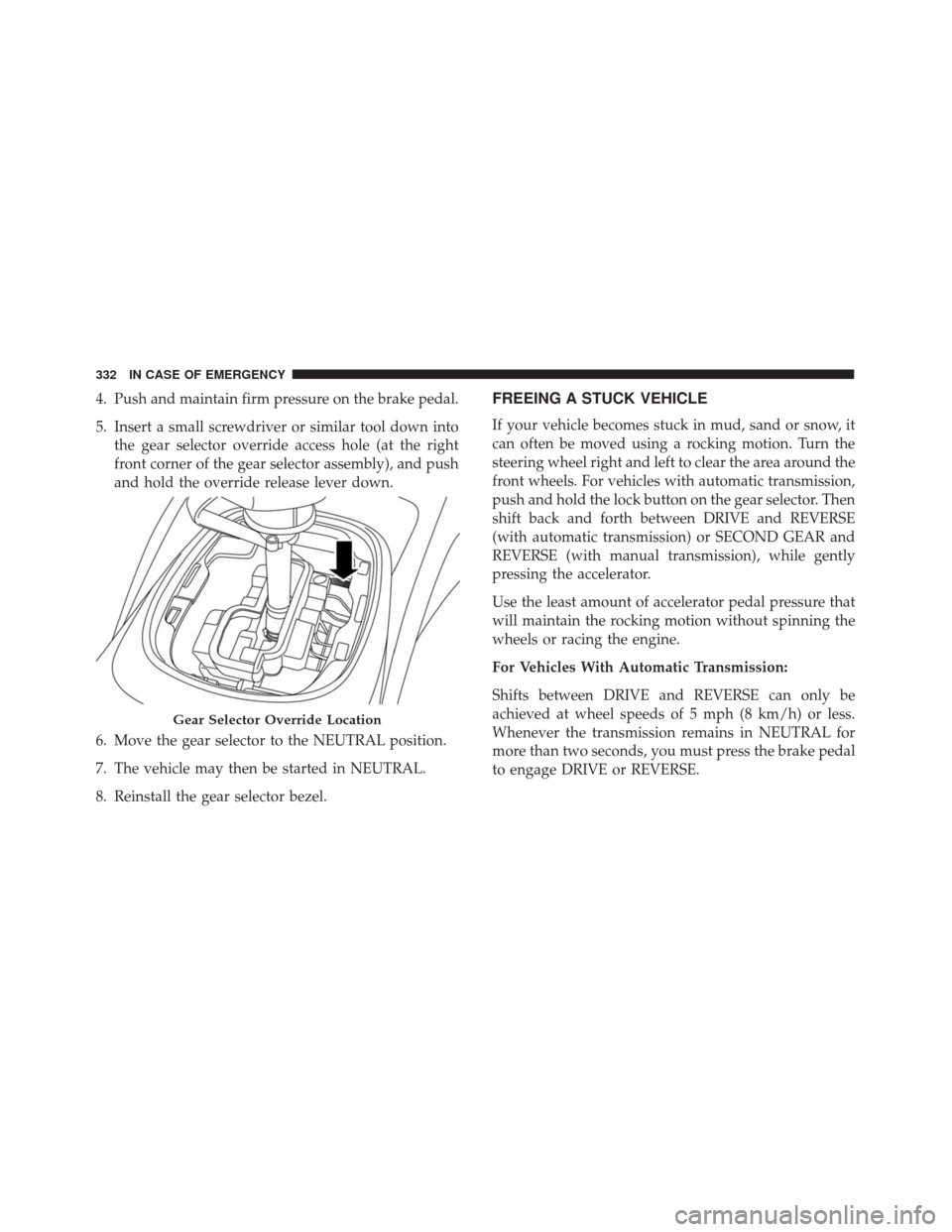
4. Push and maintain firm pressure on the brake pedal.
5. Insert a small screwdriver or similar tool down intothe gear selector override access hole (at the right
front corner of the gear selector assembly), and push
and hold the override release lever down.
6. Move the gear selector to the NEUTRAL position.
7. The vehicle may then be started in NEUTRAL.
8. Reinstall the gear selector bezel.FREEING A STUCK VEHICLE
If your vehicle becomes stuck in mud, sand or snow, it
can often be moved using a rocking motion. Turn the
steering wheel right and left to clear the area around the
front wheels. For vehicles with automatic transmission,
push and hold the lock button on the gear selector. Then
shift back and forth between DRIVE and REVERSE
(with automatic transmission) or SECOND GEAR and
REVERSE (with manual transmission), while gently
pressing the accelerator.
Use the least amount of accelerator pedal pressure that
will maintain the rocking motion without spinning the
wheels or racing the engine.
For Vehicles With Automatic Transmission:
Shifts between DRIVE and REVERSE can only be
achieved at wheel speeds of 5 mph (8 km/h) or less.
Whenever the transmission remains in NEUTRAL for
more than two seconds, you must press the brake pedal
to engage DRIVE or REVERSE.
Gear Selector Override Location
332 IN CASE OF EMERGENCY
Page 350 of 476
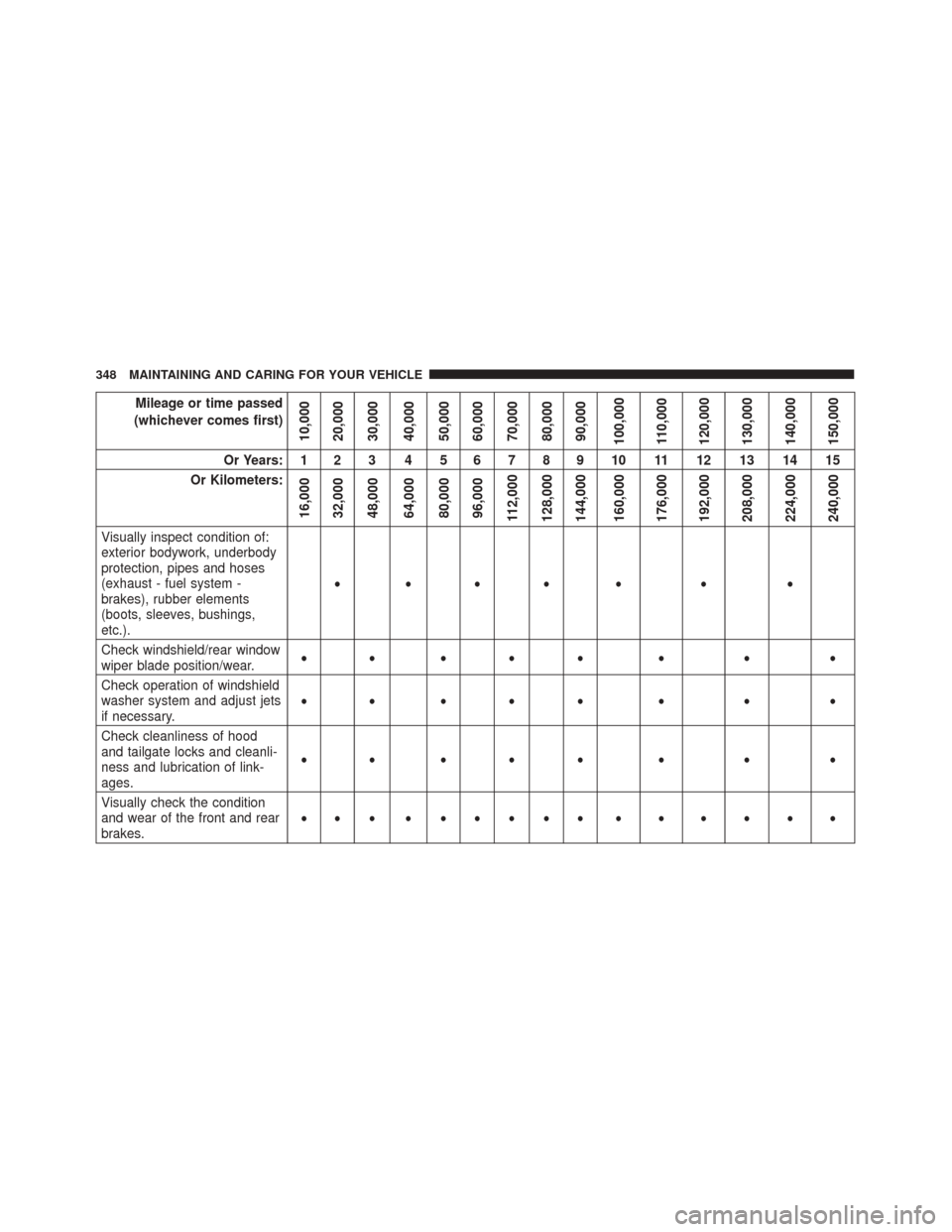
Mileage or time passed
(whichever comes first)
10,000
20,000
30,000
40,000
50,000
60,000
70,000
80,000
90,000
100,000
110,000
120,000
130,000
140,000
150,000
Or Years: 1 2 3 4 5 6 7 8 9 10 11 12 13 14 15
Or Kilometers:
16,000
32,000
48,000
64,000
80,000
96,000
112,000
128,000
144,000
160,000
176,000
192,000
208,000
224,000
240,000
Visually inspect condition of:
exterior bodywork, underbody
protection, pipes and hoses
(exhaust - fuel system -
brakes), rubber elements
(boots, sleeves, bushings,
etc.). •••• • • •
Check windshield/rear window
wiper blade position/wear. •• ••• • • •
Check operation of windshield
washer system and adjust jets
if necessary. •• ••• • • •
Check cleanliness of hood
and tailgate locks and cleanli-
ness and lubrication of link-
ages. •• ••• • • •
Visually check the condition
and wear of the front and rear
brakes. ••• •••••• • • • • • •
348 MAINTAINING AND CARING FOR YOUR VEHICLE
Page 362 of 476
Body Lubrication
Locks and all body pivot points, including such items as
seat tracks, door hinge pivot points and rollers, liftgate,
tailgate, decklid, sliding doors and hood hinges, should
be lubricated periodically with a lithium based grease,
such as Mopar Spray White Lube to assure quiet, easy
operation and to protect against rust and wear. Prior to
the application of any lubricant, the parts concerned
should be wiped clean to remove dust and grit; after
lubricating excess oil and grease should be removed.
Particular attention should also be given to hood latch-
ing components to ensure proper function. When per-
forming other underhood services, the hood latch,
release mechanism and safety catch should be cleaned
and lubricated.
The external lock cylinders should be lubricated twice a
year, preferably in the Fall and Spring. Apply a small
amount of a high quality lubricant, such as Mopar Lock
Cylinder Lubricant directly into the lock cylinder.
Wiper Blades
Clean the rubber edges of the wiper blades, the wind-
shield, and rear window periodically with a sponge orsoft cloth and a mild nonabrasive cleaner. This will
remove accumulations of salt, waxes, or road film, and
help reduce streaking and smearing.
Operation of the wipers on dry glass for long periods
may cause deterioration of the wiper blades. Always
use washer fluid when using the wipers to remove salt
or dirt from a dry windshield or rear window.
Avoid using the wiper blades to remove frost or ice
from the windshield or rear window. Make sure that
they are not frozen to the glass before turning them on
to avoid damaging the blade. Keep the wiper blade out
of contact with petroleum products such as engine oil,
gasoline, etc.
NOTE:
Life expectancy of wiper blades varies depend-
ing on geographical area and frequency of use. Poor
performance of blades may be present with chattering,
marks, water lines, or wet spots. If any of these condi-
tions are present, clean the wiper blades or replace as
necessary.
Service Position Strategy
The service position allows the wiper blades to be
placed in a position that allows the wiper blades to be
easily changed.
360 MAINTAINING AND CARING FOR YOUR VEHICLE
Page 417 of 476
Buttons On The Faceplate
Buttons on the faceplate are located below, and beside
the Uconnect system in the center of the instrument
panel. In addition, there is a Scroll/Enter control knob
located on the right side. Turn the control knob to scroll
through menus and change settings (i.e., 30, 60, 90),
push the center of the control knob one or more times to
select or change a setting (i.e., ON, OFF).
Your Uconnect system may also have Display Off and
back arrow buttons on the faceplate.
Push the Display Off button on the faceplate to turn off
the Uconnect screen. Push the Display Off button on the
faceplate a second time to turn the screen on.
Push the Back Arrow button on the faceplate to exit out
of a Menu or certain option on the Uconnect system.
Buttons On The Touchscreen
Buttons on the touchscreen are accessible on the
Uconnect touchscreen.
Customer Programmable Features — Uconnect
5.0 Settings
Push the Settingsbutton on the faceplate, to dis-
play the settings menu screen. In this mode the Uconnect system allows you to access programmable
features that may be equipped such as Display,
Units, Voice, Clock & Date, Safety/Assistance,
Lights, Doors & Locks, Engine Off Options, Audio,
Phone/Bluetooth, Radio Setup, Restore Settings and
Clear Personal Data.
NOTE:
Only one touchscreen area may be selected at a
time.
When making a selection, press the button on the
touchscreen to enter the desired mode. Once in the
desired mode, press and release the preferred setting
and make your selection. Once the setting is complete,
either press the Back Arrow button on the touchscreen
or the Back button on the faceplate to return to the
previous menu or press the “X” button on the touch-
screen to close out of the settings screen. Pressing the
Up or Down Arrow buttons on the right side of the
screen will allow you to toggle up or down through the
available settings.
NOTE: All settings should be changed with the ignition
in the “RUN” position.
11
MULTIMEDIA 415
Page 420 of 476
Clock & Date
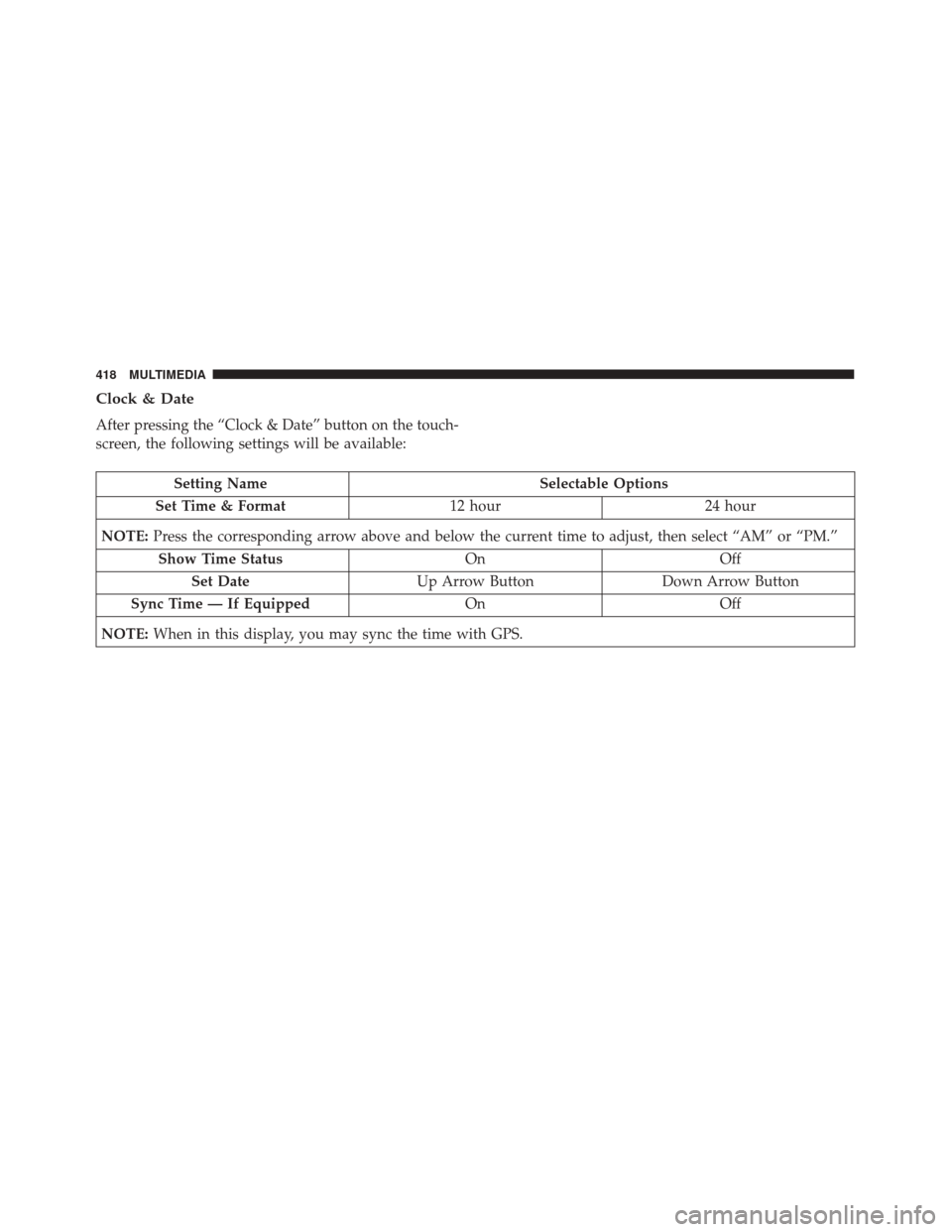
After pressing the “Clock & Date” button on the touch-
screen, the following settings will be available:
Setting NameSelectable Options
Set Time & Format 12 hour24 hour
NOTE: Press the corresponding arrow above and below the current time to adjust, then select “AM” or “PM.”
Show Time Status OnOff
Set Date Up Arrow Button Down Arrow Button
Sync Time — If Equipped OnOff
NOTE: When in this display, you may sync the time with GPS.
418 MULTIMEDIA
Page 426 of 476
Setting NameSelectable Options
Cornering Lights On Off
Flash Lights With Lock — IfEquipped On
Off
Doors & Locks
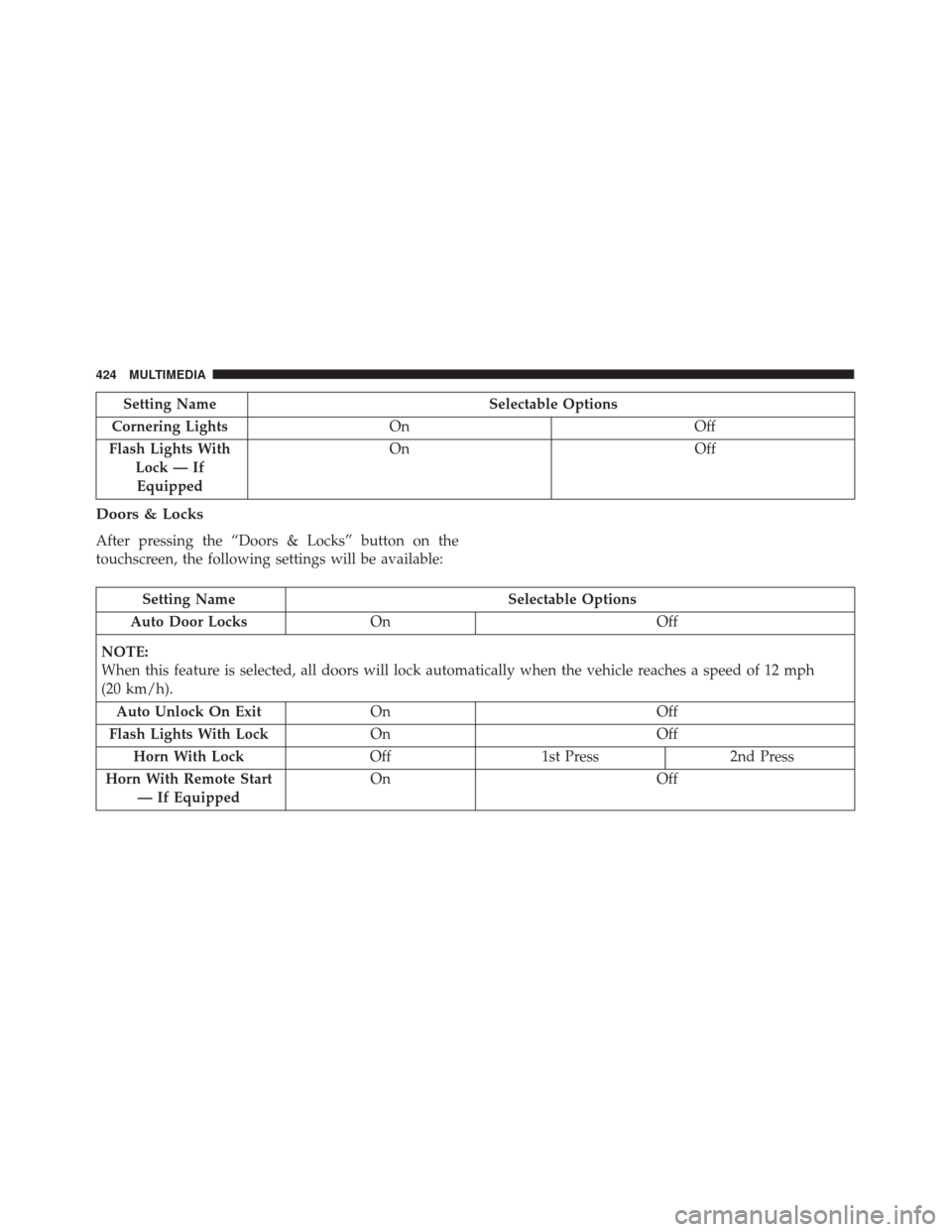
After pressing the “Doors & Locks” button on the
touchscreen, the following settings will be available:
Setting Name Selectable Options
Auto Door Locks On Off
NOTE:
When this feature is selected, all doors will lock automatically when the vehicle reaches a speed of 12 mph
(20 km/h). Auto Unlock On Exit On Off
Flash Lights With Lock On Off
Horn With Lock Off1st Press 2nd Press
Horn With Remote Start — If Equipped On
Off
424 MULTIMEDIA
Page 427 of 476
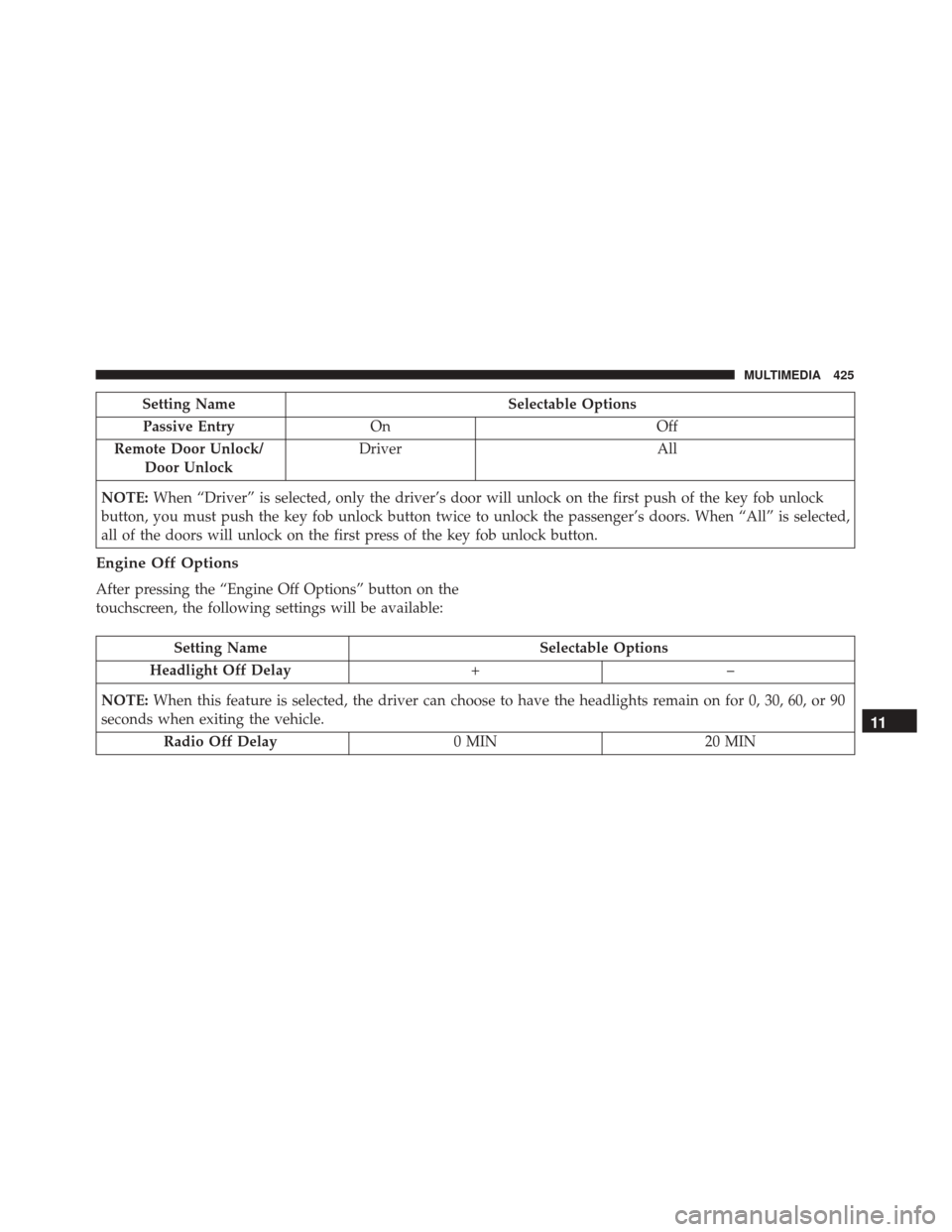
Setting NameSelectable Options
Passive Entry On Off
Remote Door Unlock/ Door Unlock Driver
All
NOTE: When “Driver” is selected, only the driver’s door will unlock on the first push of the key fob unlock
button, you must push the key fob unlock button twice to unlock the passenger’s doors. When “All” is selected,
all of the doors will unlock on the first press of the key fob unlock button.
Engine Off Options
After pressing the “Engine Off Options” button on the
touchscreen, the following settings will be available:
Setting Name Selectable Options
Headlight Off Delay +–
NOTE: When this feature is selected, the driver can choose to have the headlights remain on for 0, 30, 60, or 90
seconds when exiting the vehicle.
Radio Off Delay 0 MIN20 MIN
11
MULTIMEDIA 425
Page 432 of 476
Customer Programmable Features — Uconnect
6.5 NAV Settings
Press the Settings button to display the menu setting
screen. In this mode the Uconnect system allows you to
access programmable features that may be equipped
such as Display, Clock, Safety & Driving Assistance,
Lights, Doors & Locks, Engine Off Options, Audio,
Phone/Bluetooth, SiriusXM Setup, Restore Settings De-
faults, Clear Personal Data and System Information.
NOTE:
•Only one touchscreen area may be selected at a time.
• Depending on the vehicles options, feature settings
may vary. When making a selection, press the button on the
touchscreen to enter the desired mode. Once in the
desired mode, press and release the preferred setting
and make your selection. Once the setting is complete,
either press the Back Arrow button on the touchscreen
to return to the previous menu, or press the “X” button
on the touchscreen to close out of the settings screen.
Pressing the Up or Down Arrow button on the right
side of the screen will allow you to toggle up or down
through the available settings.
430 MULTIMEDIA