mirror FIAT 500X 2015 2.G User Guide
[x] Cancel search | Manufacturer: FIAT, Model Year: 2015, Model line: 500X, Model: FIAT 500X 2015 2.GPages: 240, PDF Size: 10.72 MB
Page 117 of 240
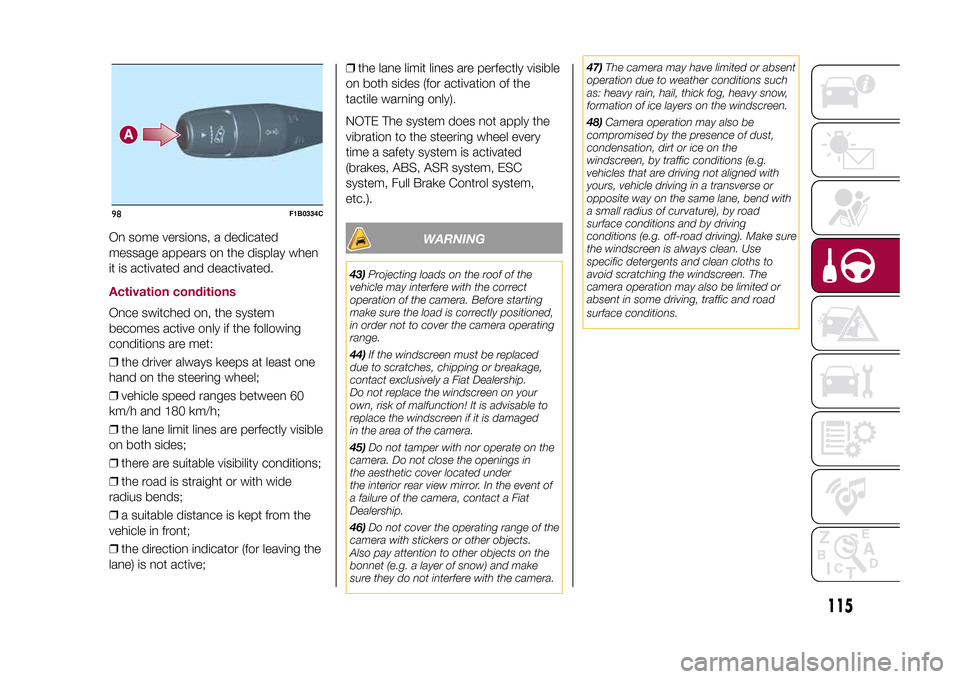
On some versions, a dedicated
message appears on the display when
it is activated and deactivated.Activation conditionsOnce switched on, the system
becomes active only if the following
conditions are met:
❒the driver always keeps at least one
hand on the steering wheel;
❒vehicle speed ranges between 60
km/h and 180 km/h;
❒the lane limit lines are perfectly visible
on both sides;
❒there are suitable visibility conditions;
❒the road is straight or with wide
radius bends;
❒a suitable distance is kept from the
vehicle in front;
❒the direction indicator (for leaving the
lane) is not active;❒the lane limit lines are perfectly visible
on both sides (for activation of the
tactile warning only).
NOTE The system does not apply the
vibration to the steering wheel every
time a safety system is activated
(brakes, ABS, ASR system, ESC
system, Full Brake Control system,
etc.).
WARNING
43)Projecting loads on the roof of the
vehicle may interfere with the correct
operation of the camera. Before starting
make sure the load is correctly positioned,
in order not to cover the camera operating
range.
44)If the windscreen must be replaced
due to scratches, chipping or breakage,
contact exclusively a Fiat Dealership.
Do not replace the windscreen on your
own, risk of malfunction! It is advisable to
replace the windscreen if it is damaged
in the area of the camera.
45)Do not tamper with nor operate on the
camera. Do not close the openings in
the aesthetic cover located under
the interior rear view mirror. In the event of
a failure of the camera, contact a Fiat
Dealership.
46)Do not cover the operating range of the
camera with stickers or other objects.
Also pay attention to other objects on the
bonnet (e.g. a layer of snow) and make
sure they do not interfere with the camera.47)The camera may have limited or absent
operation due to weather conditions such
as: heavy rain, hail, thick fog, heavy snow,
formation of ice layers on the windscreen.
48)Camera operation may also be
compromised by the presence of dust,
condensation, dirt or ice on the
windscreen, by traffic conditions (e.g.
vehicles that are driving not aligned with
yours, vehicle driving in a transverse or
opposite way on the same lane, bend with
a small radius of curvature), by road
surface conditions and by driving
conditions (e.g. off-road driving). Make sure
the windscreen is always clean. Use
specific detergents and clean cloths to
avoid scratching the windscreen. The
camera operation may also be limited or
absent in some driving, traffic and road
surface conditions.
98
F1B0334C
115
15-12-2014 8:23 Pagina 115
Page 119 of 240
TOWING TRAILERSIMPORTANT
120) 121)
For towing caravans or trailers the
vehicle must be fitted with an approved
tow hook and an adequate electrical
system. Should aftermarket installation
be requested, this must be carried
out by specialists.
Install any specific and/or additional
door mirrors as specified by the
Highway Code.
Remember that when towing a trailer,
steep hills are harder to climb, braking
distances increase and overtaking
takes longer depending on the overall
weight of the trailer. Engage a low gear
when driving downhill, rather than
constantly using the brake. The weight
the trailer exerts on the vehicle tow
hook reduces the vehicle's loading
capacity by the same amount. To make
sure that the maximum towable weight
is not exceeded (given in the vehicle
registration document) account should
be taken of the fully laden trailer,
including accessories and luggage.
Do not exceed the speed limits specific
to each country you are driving in, in
the case of vehicles towing trailers.
In any case, the top speed must not
exceed 100 km/h.Any electric brake must be powered
directly by the battery through a cable
with a cross-section of no less than 2.5
mm
2. In addition to the electrical
branches, the vehicle electrical system
can only be connected to the supply
cable for an electric brake and to the
cable for an internal light for the trailer,
not exceeding 15 W. For connections,
use the preset control unit with a
battery cable with section not less than
2.5 mm
2. The use of auxiliary loads
other than external lights (e.g. electric
brake) must take place with engine
running.
INSTALLING A TOW
HOOKThe towing device should be fastened
to the body by specialised personnel
according to any additional and/or
integrative information supplied by the
Manufacturer of the device. It must also
meet current regulations with reference
to Directive 94/20/EC and subsequent
amendments.
For any version the towing device used
must be right for the towable weight
of the vehicle on which it is to be
installed.For the electrical connection a standard
connector should be used which is
generally placed on a special bracket
normally fastened to the towing device,
and a special ECU for external trailer
light control must be installed on the
vehicle. 7 or 13-pin 12 V DC
connections should be used (CUNA/
UNI and ISO/DIN Standards). Follow
any instructions provided by the vehicle
manufacturer and/or the towing device
manufacturer.
117
15-12-2014 8:23 Pagina 117
Page 126 of 240
Bulbs Type Power Figure referenceFront side lights/Daytime running lights (DRL) P21W 21 W B
Rear side/brake light P21W 21 W B
Main beam/dipped beam headlights (halogen) H4 60/55 W D
Main beam/dipped beam headlights (Xenon gas discharge) D5S 25 W F
Front direction indicators PY21W 21 W B
Rear direction indicators P21W 21 W B
Side direction indicators (on door mirror) WY5W 5 W A
3rd brake light LED – –
Number plate W5W 5 W A
Fog lights H8 35 W E
Rear fog light P21W 21 W B
Reverse P21W 21 W B
Front roof light C5W 5 W A
Front roof lights (sun visors) C5W 5 W A
Rear roof light (versions without sun roof) XENON 6 W A
Rear roof lights (versions with sun roof) C5W 5 W C
Boot roof lights W5W 5 W A
Glove compartment light W5W 5 W A
124
IN AN EMERGENCY
15-12-2014 8:23 Pagina 124
Page 128 of 240
❒finally, refit inspection flap B fig. 106,
completely tightening fixing screws A.Fog lightsTo replace the bulbs proceed as
follows:
❒steer the vehicle wheels completely
inwards;
❒undo screws A fig. 106 using the
screwdriver provided and remove
inspection flap B;
❒identify the fog light bulb;
❒turn the bulb-bulb holder assembly
anticlockwise and then remove it sliding
it outwards;
❒disconnect the electrical connector;
❒replace the bulb-bulb holder
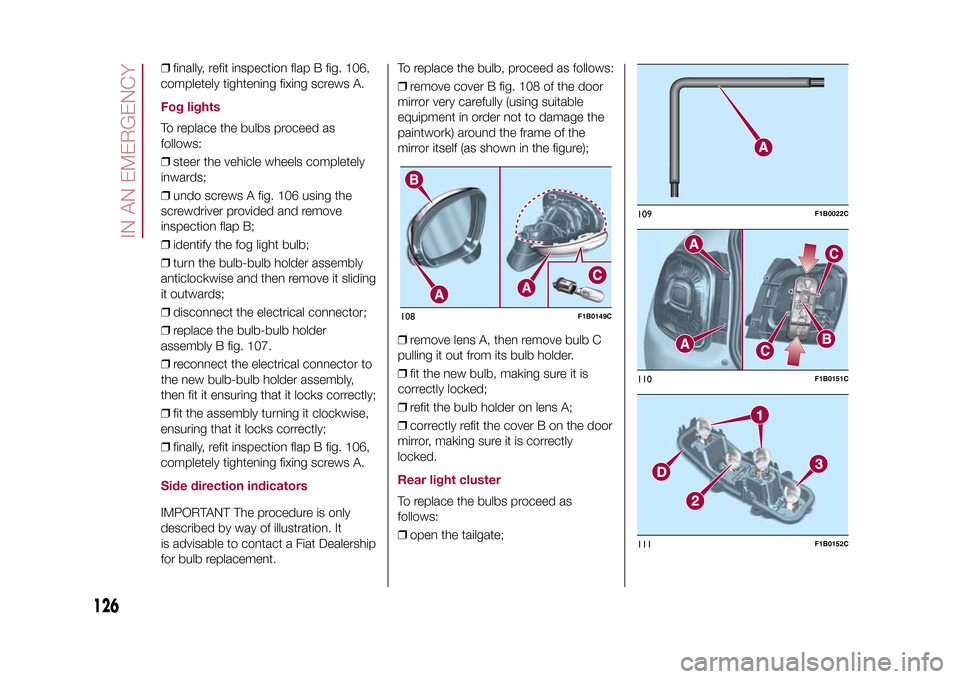
assembly B fig. 107.
❒reconnect the electrical connector to
the new bulb-bulb holder assembly,
then fit it ensuring that it locks correctly;
❒fit the assembly turning it clockwise,
ensuring that it locks correctly;
❒finally, refit inspection flap B fig. 106,
completely tightening fixing screws A.Side direction indicatorsIMPORTANT The procedure is only
described by way of illustration. It
is advisable to contact a Fiat Dealership
for bulb replacement.To replace the bulb, proceed as follows:
❒remove cover B fig. 108 of the door
mirror very carefully (using suitable
equipment in order not to damage the
paintwork) around the frame of the
mirror itself (as shown in the figure);
❒remove lens A, then remove bulb C
pulling it out from its bulb holder.
❒fit the new bulb, making sure it is
correctly locked;
❒refit the bulb holder on lens A;
❒correctly refit the cover B on the door
mirror, making sure it is correctly
locked.
Rear light clusterTo replace the bulbs proceed as
follows:
❒open the tailgate;108
F1B0149C
109
F1B0022C
110
F1B0151C
111
F1B0152C
126
IN AN EMERGENCY
15-12-2014 8:23 Pagina 126
Page 133 of 240
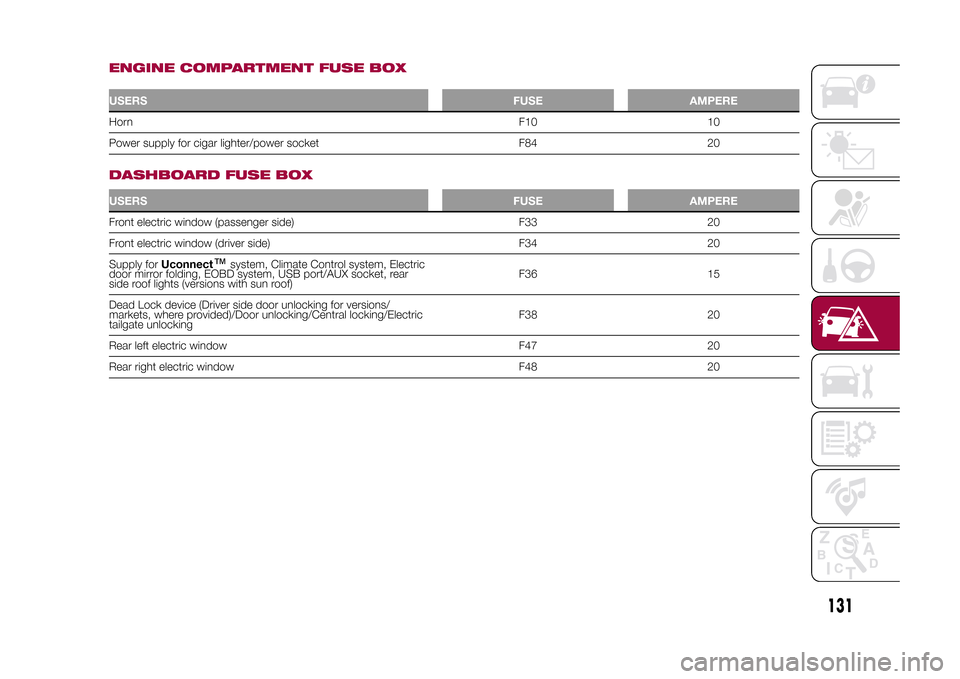
ENGINE COMPARTMENT FUSE BOXUSERSFUSE AMPEREHornF10 10
Power supply for cigar lighter/power socket F84 20
.
DASHBOARD FUSE BOXUSERSFUSE AMPEREFront electric window (passenger side) F33 20
Front electric window (driver side) F34 20
Supply forUconnect
™
system, Climate Control system, Electric
door mirror folding, EOBD system, USB port/AUX socket, rear
side roof lights (versions with sun roof)F36 15
Dead Lock device (Driver side door unlocking for versions/
markets, where provided)/Door unlocking/Central locking/Electric
tailgate unlockingF38 20
Rear left electric window F47 20
Rear right electric window F48 20
131
15-12-2014 8:23 Pagina 131
Page 166 of 240
❒turn on the battery charger. At the
end of the charging process, switch the
battery charger off;
❒after having disconnected the
charging device, reconnect connector
A to the sensor C as shown.
SERVICING
PROCEDURES
65) 66) 67)
The following pages contain the rules
on therequiredmaintenance
envisaged by the technical personnel
who designed the vehicle.
In addition to these specific
maintenance instructions specified for
routine scheduled servicing, there
are other components which
may require intervention or
replacements over the vehicle’s life
cycle.ENGINE OIL
68)
Engine oil level checkTo ensure correct engine lubrication,
the oil must always be kept at the
prescribed level (see "Engine
compartment" in this chapter).AIR CLEANER
167)
Replacing the air cleanerSee the "Scheduled servicing plan" for
the correct servicing intervals.
It is advisable to replace it with a
genuine spare part, designed especially
for this vehicle.
AIR CONDITIONING
SYSTEM MAINTENANCE
69) 70)
To ensure the best possible
performance, the air conditioning
system must be checked and undergo
maintenance at a Fiat Dealership at
the beginning of the summer.WINDOWSWhen cleaning the heated windscreen
and rear window be careful, if the
defrosting function is active, regarding
the temperature of the glass; also make
sure that children do not come into
contact with the heated surface. The
glass may be hot.
Never use an abrasive detergent to
clean the surface of the windows.
Do not use scrapers or sharp items that
might scratch the windows.
Spray the detergent on the cloth to be
used for cleaning the rear view mirror.
Do not spray the detergent directly
on the glass.
Cleaning the window with hot water
could cause the removal of any labels.
164
SERVICING AND MAINTENANCE
15-12-2014 8:23 Pagina 164
Page 212 of 240
❒"Rear Park Assist vol."(where
provided): this function can be used to
select the volume of the acoustic
warnings provided by the rear Park
Assist system.
❒"Park Assist vol."(where provided):
this function can be used to select
the volume of the acoustic warnings
provided by the Park Assist system.
❒"Lane Assist Warning"(where
provided): this function can be used to
select the LaneAssist system
intervention "readiness".
❒"Lane Assist Strength"(where
provided): this function can be used to
select the force to apply to the steering
wheel to put the vehicle back in the
lane through the electric steering
system, in the event of Lane Assist
system intervention.
❒"Blind Spot Alert"(where provided):
this function can be used to select
the type of warning ("Sound Only" or
"Sound & Display") to indicate the
presence of objects in the blind spot of
the door mirror.
❒"Rain sensor"(where provided): this
function can be used to activate/
deactivate the automatic operation of
the wipers in the event of rain.
❒"Brakes"(where provided): this
function can be used to select the
following submenus:- "Brake Service" (where provided):
allows you to activate the procedure for
carrying out braking system servicing;
- "Auto Park Brake" (where provided):
allows you to activate/deactivate the
automatic park brake engagement.
NAVIGATION(5" Uconnect Radio Nav LIVE only)Programming a routeIMPORTANT In the interest of safety
and to reduce distractions while you are
driving, you should always plan a route
before you start driving.
To plan a route, do the following:
❒tap the screen to open the Main
menu;
❒Tap "Navigate to" or "Drive to".
❒Tap "Address". You can change the
country or state setting by tapping
the flag before you select a city.
❒Enter the town or city name, or the
zip code. Towns with similar names are
shown in the list while you type. When
the desired city or town appears in
the list, tap the name to select the
destination.
❒Enter the street name. Streets with
similar names are shown in the list while
you type. When the correct street
name appears in the list, tap the name
to select the destination.❒Enter the house number, then tap
"Done".
❒The location will be shown on the
map. Tap "Select" to continue or tap
"Back" to enter another address.
❒When the new route is shown, tap
"Done". For more information about the
route, tap "Details". To change your
route, for example, to travel via a
particular location or to select a new
destination, tap "Change route".
You are guided to your destination,
using spoken instructions and
on-screen directions.
Map updatingTwo modes for downloading a map
update are available:
❒Most recent maps guarantee: if a
new map is available for your system
within 90 days of initial use, you can
download it once free of charge.
❒Map update: you can purchase a
new version of the map installed on
your system.USB device setupTo update the map, use an USB device
that meets the following requirements:
❒Ideally, the USB device should be
empty.
❒The USB device must have at least
8 GB of memory free.
210
MULTIMEDIA
15-12-2014 8:23 Pagina 210
Page 237 of 240
Fuel consumption .......................... 186
Fuel cut-off system......................... 140
Full Brake Control (system) ............. 68
Fuse boxes .................................... 128
Fuses (replacement) ....................... 128G
SI (Gear Shift Indicator)............... 41
H
azard warning lights ................... 122
– Emergency braking ................... 122
Headlight alignment adjustment ..... 23
Headlight alignment corrector ........ 23
Headlights (cleaning) ...................... 169
Head restraints............................... 18
Heated steering wheel.................... 19
Heavy-duty use of the vehicle
(scheduled servicing) .................... 155
HHC (system)................................. 63
Identification data
– chassis marking ........................ 173
– engine marking.......................... 173
– VIN plate ................................... 173
Ignition device ................................ 9
Ignition key emergency removal
(automatic transmission)............... 141
Important information and
recommendations ........................ 226
Interior lights .................................. 24
Interiors (cleaning) .......................... 170
i-Size child restraint systems .......... 86ISOFIX child restraint system
(installation) .................................. 84
iTPMS (indirect Tyre Pressure
Monitoring System) ...................... 72
Jump starting ................................ 138K
eyless Entry (system) .................. 13
Keys
– electronic key ............................ 8
– key with remote control ............. 8
Lane Assist system ....................... 114
Lane Change ................................. 23
Lifting the vehicle ........................... 167
Light switch.................................... 21M
ain beam headlights .................. 22
Main beam headlights
– Automatic main beam
headlights ................................. 23
Main menu ..................................... 42
Manual climate control system ....... 27
Manual gearbox ............................. 104
Mood Selector ............................... 110
N
umber plate lights (bulb
replacement) ................................ 127
O
ccupant protection systems ....... 75
P
aintwork (cleaning and
maintenance) ............................... 168
Park Assist (system) ....................... 112
Parking lights ................................. 22
PBA (system) ................................. 63Performance (top speed) ................ 186
Periodic checks (scheduled
servicing)...................................... 155
Prescriptions for handling the
vehicle at the end of its life ........... 189
Pretensioners ................................. 79
– Load limiters.............................. 79
R
ain sensor .................................. 25
RCP system ................................... 67
Rear direction indicators (bulb
replacement) ................................ 126
Rear seats...................................... 17
Rear side lights (bulb
replacement) ................................ 126
Rear view camera .......................... 116
Rear View Camera ......................... 116
Rear view mirrors ........................... 20
Rear window washer
– windscreen/rear window
washing fluid level ..................... 160
Rear window wiper
– blade replacement..................... 165
Rear window wiper/washer ............ 26
Reconfigurable load platform.......... 36
Refuelling procedure ...................... 119
– Emergency refuelling ................. 119
Refuelling the vehicle ...................... 119
Replacing a bulb ............................ 122
Replacing an external bulb ............. 125
Rims and tyres (dimensions)........... 176
S
BR (Seat Belt Reminder) ............. 77