start stop button FIAT 500X 2015 2.G User Guide
[x] Cancel search | Manufacturer: FIAT, Model Year: 2015, Model line: 500X, Model: FIAT 500X 2015 2.GPages: 240, PDF Size: 10.72 MB
Page 102 of 240
STARTING THE
ENGINEBefore starting the engine, adjust the
seat, the interior rear view mirrors,
the door mirrors and fasten the seat
belt correctly.
Never press the accelerator pedal for
starting the engine.
If necessary, messages indicating the
starting procedure can be shown on
the display.ENGINE STARTING
PROCEDURE
103) 104) 105) 106)33) 34) 35) 36)
Versions with manual gearboxProceed as follows:
❒engage the electric parking brake
and place the gear lever in neutral;
❒bring the ignition device to MAR. On
Diesel versions, warning light
lights up in the instrument panel:
wait for the warning light to switch off;
❒fully depress the clutch pedal without
touching the accelerator;
❒turn the ignition device to AVV and
release it as soon as the engine starts;❒if the engine does not start within 10
seconds, bring the ignition device
back to STOP and wait for 10-15
seconds before repeating the starting
procedure.
❒after the manoeuvre has been
repeated, if the problem persists,
contact a Fiat Dealership.
Versions with automatic
transmissionProceed as follows:
❒engage
the electric parking brake
and set the gear lever to P (Park) or N
(Neutral);
❒fully depress the brake pedal without
touching the accelerator;
❒set the ignition device to AVV;
❒if the engine does not start, bring the
ignition device back to STOP and
wait for 10-15 seconds before
repeating the starting procedure;
❒after the manoeuvre has been
repeated, if the problem persists,
contact a Fiat Dealership.
ENGINE STARTING
F
AILURE
Starting the engine with electronic
key battery (Keyless Go) run down
or flatIf the ignition device does not respond
when the relevant button is pressed the
electronic key battery might be run
down or flat. Therefore, the system
does not detect the presence of the
electronic key on board the vehicle and
displays a dedicated message. In this
case, rest the rounded edge of the
electronic key (the side opposite the
metal insert) on the ignition device and
press the button using the electronic
key. The ignition device is thus
activated and the engine can be
started.
WARNING
103)Do not try to start the engine by
pouring fuel or other flammable fluid inside
the throttle body air intake: this might
damage the engine and injury people
nearby.
104)It is dangerous to run the engine in
enclosed areas. The engine consumes
oxygen and produces carbon dioxide,
carbon monoxide and other toxic gases.
105)The brake servo is not operational
until the engine has been started; therefore
you need to apply much more force than
usual to the brake pedal.
100
STARTING AND DRIVING
12-1-2015 15:6 Pagina 100
Page 108 of 240
IGNITION LOCK AND
PARK POSITIONVersions equipped with the Keyless
Go system: this function requires the
gear lever to be positioned at P (Park);
then bring the ignition device to STOP.
Versions equipped with key without
remote control: this function requires
the gear lever to be positioned at P
(Park) before extracting the key from
the ignition device.
If the vehicle battery is flat and the
ignition key is engaged, the latter is
locked in position.
To remove the key manually see
paragraph "Automatic transmission
lever unlock" in chapter "In an
emergency".GEAR ENGAGEMENT
DISABLING WITHOUT
BRAKE PEDAL PRESSEDThis system prevents you from moving
the gear lever from position P (Park) if
the brake pedal has not been previously
depressed.To bring the gear lever to a position
other than P (Park), the ignition device
must be in position MAR (engine on
or off) and the brake pedal must be
depressed. Button A fig. 91 on the gear
lever knob must also be pressed.
STEERING WHEEL
CONTROLS(where provided)
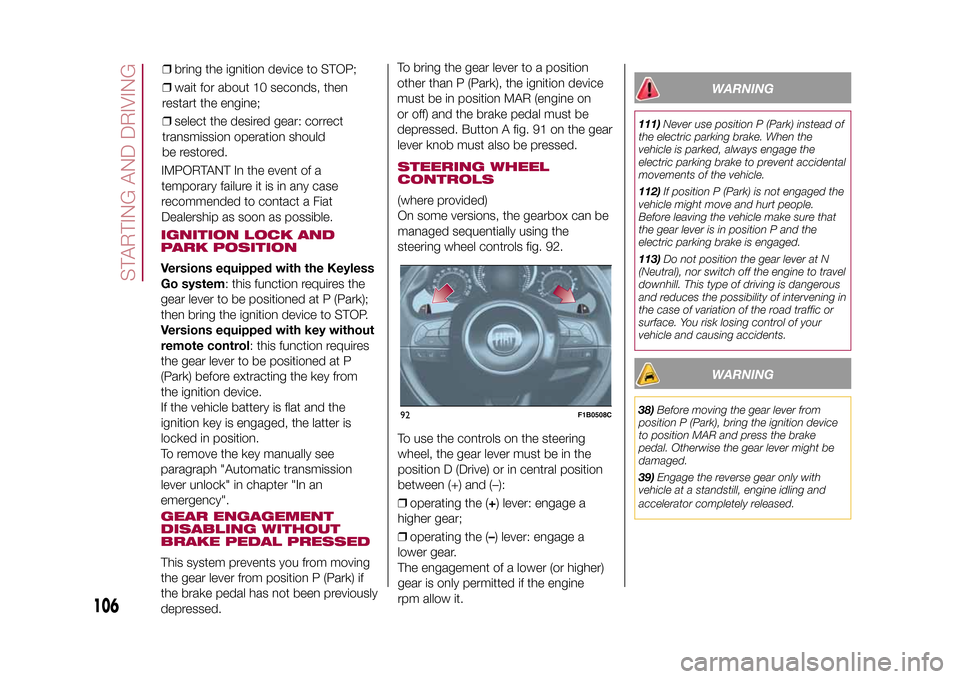
On some versions, the gearbox can be
managed sequentially using the
steering wheel controls fig. 92.
To use the controls on the steering
wheel, the gear lever must be in the
position D (Drive) or in central position
between (+) and (–):
❒operating the (+) lever: engage a
higher gear;
❒operating the (–) lever: engage a
lower gear.
The engagement of a lower (or higher)
gear is only permitted if the engine
rpm allow it.
WARNING
111)Never use position P (Park) instead of
the electric parking brake. When the
vehicle is parked, always engage the
electric parking brake to prevent accidental
movements of the vehicle.
112)If position P (Park) is not engaged the
vehicle might move and hurt people.
Before leaving the vehicle make sure that
the gear lever is in position P and the
electric parking brake is engaged.
113)Do not position the gear lever at N
(Neutral), nor switch off the engine to travel
downhill. This type of driving is dangerous
and reduces the possibility of intervening in
the case of variation of the road traffic or
surface. You risk losing control of your
vehicle and causing accidents.
WARNING
38)Before moving the gear lever from
position P (Park), bring the ignition device
to position MAR and press the brake
pedal. Otherwise the gear lever might be
damaged.
39)Engage the reverse gear only with
vehicle at a standstill, engine idling and
accelerator completely released.
92
F1B0508C
106
STARTING AND DRIVING
15-12-2014 8:23 Pagina 106
IMPORTANT In the event of a
temporary failure it is in any case
recommended to contact a Fiat
Dealership as soon as possible.❒bring the ignition device to STOP;
❒wait for about 10 seconds, then
restart the engine;
❒select the desired gear: correct
transmission operation should
be restored.
Page 109 of 240
START&STOP
SYSTEMThe Start&Stop system automatically
stops the engine each time the vehicle
is stationary and starts it again when
the driver wants to move off.
In this way, the vehicle efficiency is
increased, by reducing consumption,
dangerous gas emissions and noise
pollution.
114)40)
OPERATING MODE
Engine stopping mode
Versions with manual gearboxWith the vehicle stopped, the engine
stops with gearbox in neutral and
clutch pedal released.Versions with automatic transmissionWith vehicle at a standstill and brake
pedal pressed, the engine switches off
if the gear lever is in a position other
than R.
In the event of stops uphill, engine
switching off is disabled to make the
"Hill Hold Control" function available
(works only with running engine).The
warning light on the instrument
panel switches on to signal that the
engine was stopped.
Engine restarting mode
Versions with manual gearboxTo restart the engine, press the clutch
pedal.
If the vehicle does not start when the
clutch is pressed, place the gear lever
in neutral and repeat the procedure.
If the problem persists, contact a Fiat
Dealership.Versions with automatic transmissionTo restart the engine, release the brake
pedal.
With brake pressed, if the gear lever is
in automatic mode - D (Drive) - the
engine can be restarted by moving the
lever to R (Reverse) or N (Neutral) or
"AutoStick".
With brake pressed, if the gear lever is
in "AutoStick" mode, the engine can be
restarted by moving the lever to "+" or
"–", or R (Reverse) or N (Neutral).
When the engine has been stopped
automatically, keeping the brake pedal
pressed, the brake can be released
keeping the engine off by quickly
shifting the gear lever to P (Park).
To restart the engine, just move the
lever out of position P.
SYSTEM MANUAL
ACTIVATION/
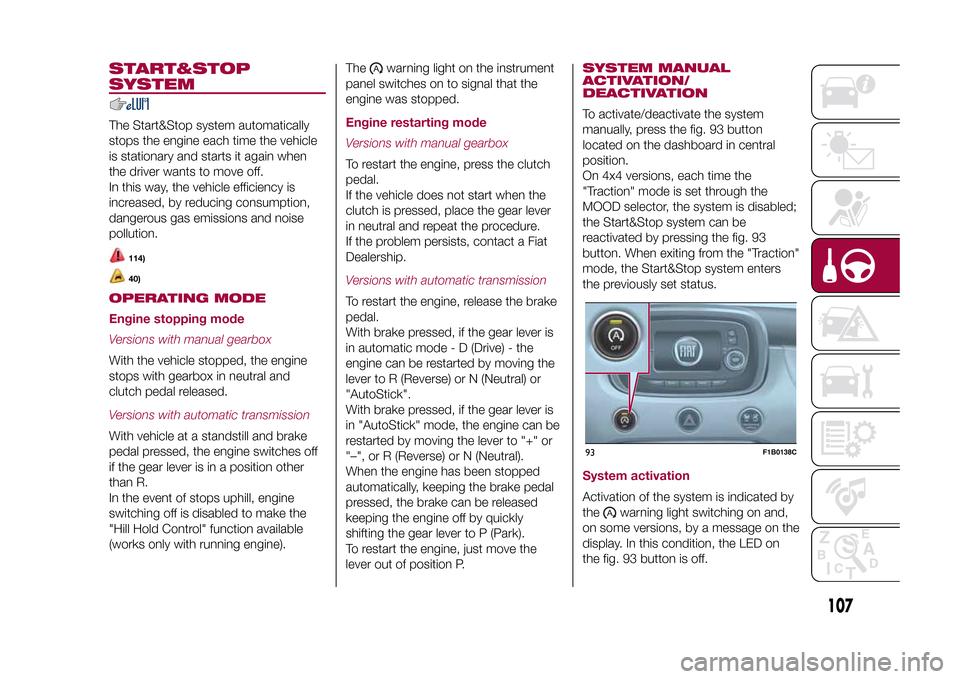
DEACTIVATIONTo activate/deactivate the system
manually, press the fig. 93 button
located on the dashboard in central
position.
On 4x4 versions, each time the
"Traction" mode is set through the
MOOD selector, the system is disabled;
the Start&Stop system can be
reactivated by pressing the fig. 93
button. When exiting from the "Traction"
mode, the Start&Stop system enters
the previously set status.System activationActivation of the system is indicated by
the
warning light switching on and,
on some versions, by a message on the
display. In this condition, the LED on
the fig. 93 button is off.
93
F1B0138C
107
15-12-2014 8:23 Pagina 107
Page 110 of 240
System deactivationA message will appear on the display
when the system is deactivated. In this
condition, the LED on the fig. 93 button
is on.SAFETY FUNCTIONSWhen the engine is stopped through
the Start&Stop system, if the driver
releases their seat belt or opens the
driver's or passenger's door, the engine
can be restarted only by using the
ignition device.
This condition is indicated to the driver
both through a buzzer and a message
on the display.
WARNING
114)If the battery needs to be replaced,
always contact a Fiat Dealership. Replace
the battery using a new one of the same
type (HEAVY DUTY) and having the same
specifications.
WARNING
40)If the climate comfort is to be favoured,
the Start&Stop system can be deactivated,
for a continuous operation of the climate
control system.
SPEED LIMITERDESCRIPTIONThis device allows the speed of the
vehicle to be limited to values which
can be set by the driver.
The maximum speed can be set both
with vehicle stationary and in motion.
The minimum speed that can be set is
30 km/h.
When the device is active, the vehicle
speed depends on the pressure at
the accelerator pedal, until the
programmed speed limit is reached
(see "Speed limit programming"
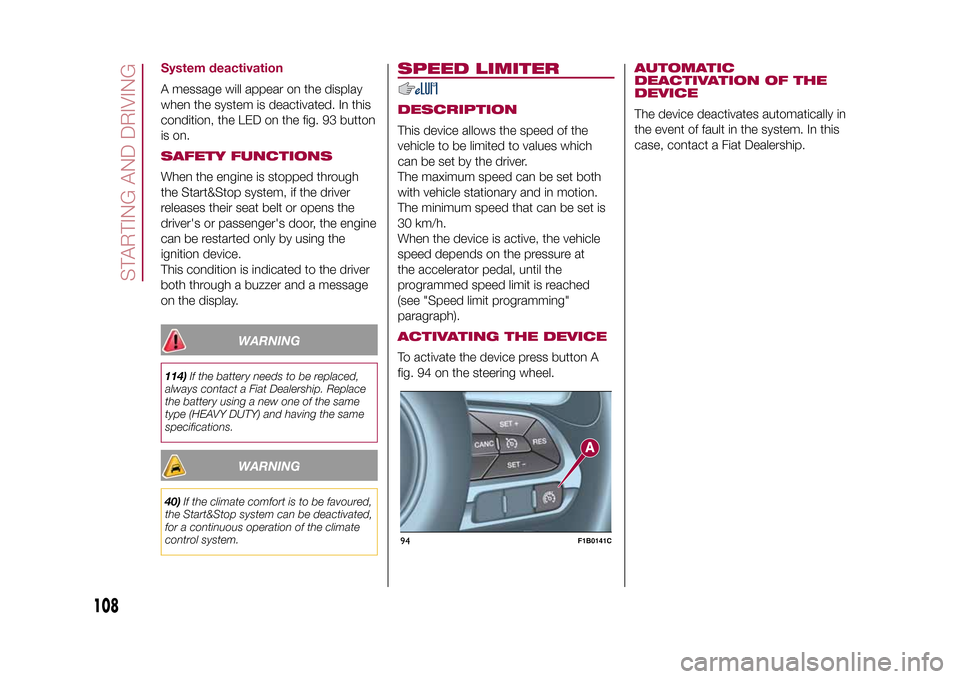
paragraph).ACTIVATING THE DEVICETo activate the device press button A
fig. 94 on the steering wheel.
AUTOMATIC
DEACTIVATION OF THE
DEVICEThe device deactivates automatically in
the event of fault in the system. In this
case, contact a Fiat Dealership.
94
F1B0141C
108
STARTING AND DRIVING
15-12-2014 8:23 Pagina 108
Page 112 of 240
DEACTIVATING THE
DEVICELightly pressing the brake pedal or
pressing the CANC button deactivates
the electronic Cruise Control without
deleting the stored speed.DEACTIVATING THE
DEVICEThe electronic Cruise Control is
deactivated by pressing button A fig. 95
or bringing the ignition device to STOP.
WARNING
115)While travelling with the device
activated, do not move the gear lever to
neutral.
116)In the event of device faults or failures,
go to a Fiat Dealership.
117)The electronic Cruise Control can be
dangerous if the system cannot keep a
constant speed. In specific conditions
speed may be excessive, resulting in the
risk of losing control of the vehicle and
causing accidents. Do not use the device
in heavy traffic or on winding, icy, snowy or
slippery roads.
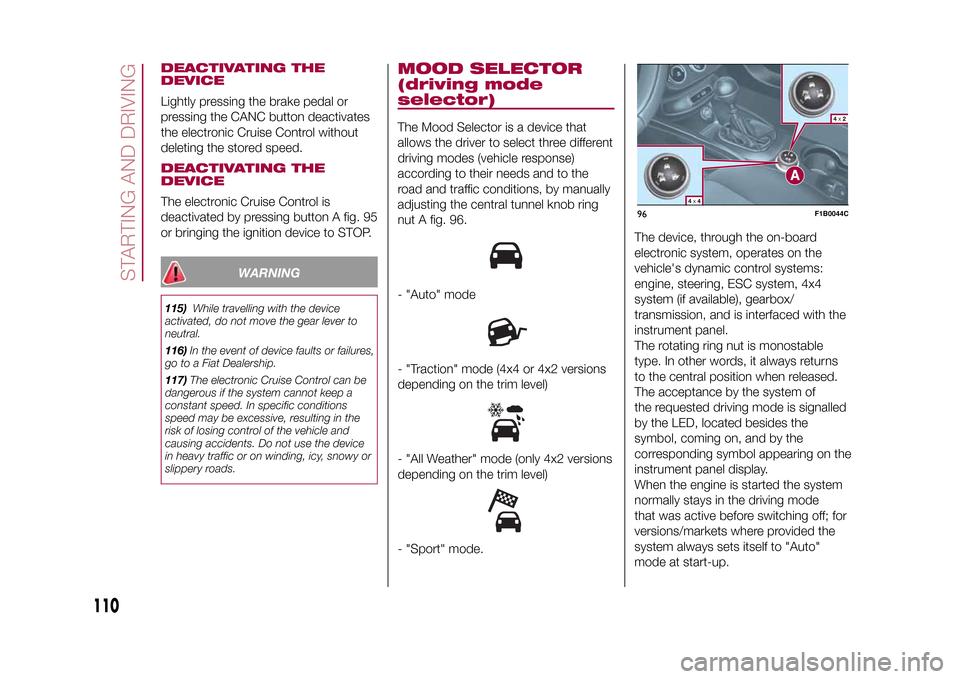
MOOD SELECTOR
(driving mode
selector)The Mood Selector is a device that
allows the driver to select three different
driving modes (vehicle response)
according to their needs and to the
road and traffic conditions, by manually
adjusting the central tunnel knob ring
nut A fig. 96.- "Auto" mode- "Traction" mode (4x4 or 4x2 versions
depending on the trim level)- "All Weather" mode (only 4x2 versions
depending on the trim level)- "Sport" mode.The device, through the on-board
electronic system, operates on the
vehicle's dynamic control systems:
engine, steering, ESC system, 4x4
system (if available), gearbox/
transmission, and is interfaced with the
instrument panel.
The rotating ring nut is monostable
type. In other words, it always returns
to the central position when released.
The acceptance by the system of
the requested driving mode is signalled
by the LED, located besides the
symbol, coming on, and by the
corresponding symbol appearing on the
instrument panel display.
When the engine is started the system
normally stays in the driving mode
that was active before switching off; for
versions/markets where provided the
system always sets itself to "Auto"
mode at start-up.
96
F1B0044C
110
STARTING AND DRIVING
15-12-2014 8:23 Pagina 110
Page 142 of 240
FUEL CUT-OFF
SYSTEMDESCRIPTIONThis intervenes in the case of an impact
causing:
❒the interruption of the fuel supply with
the engine consequently switching off;
❒the automatic unlocking of the doors;
❒turning on of the lights inside the
vehicle;
❒deactivation of climate control system
ventilation;
❒switching on of the hazard warning
lights (to deactivate the lights press the
button on the dashboard).
On some versions, the intervention of
the system is indicated by a message
shown on the display. In the same way,
a dedicated message on the display
warns the driver if system operation is
compromised.
IMPORTANT Carefully check the vehicle
for fuel leaks, for instance in the engine
compartment, under the vehicle or
near the tank area. After a collision,
bring the ignition device to STOP to
prevent the battery from running down.
FUEL CUT-OFF SYSTEM
RESETTo restore correct operation of the
vehicle, carry out the following
procedure (this procedure must be
started and completed within less than
1 minute):
152)
Operations to be carried out
With direction indicator lever in neutral
position, bring the ignition device to STOP
Bring the ignition device to MAR
Activate the right direction indicator
Activate the left direction indicator
Activate the right direction indicator
Activate the left direction indicator
Deactivate the left direction indicator
Bring the ignition device to STOP
Bring the ignition device to MAR
WARNING
152)If, after an impact, you smell fuel or
notice leaks from the fuel system, do
not reactivate the system to avoid the risk
of fire.
AUTOMATIC
TRANSMISSION
GEAR LEVER
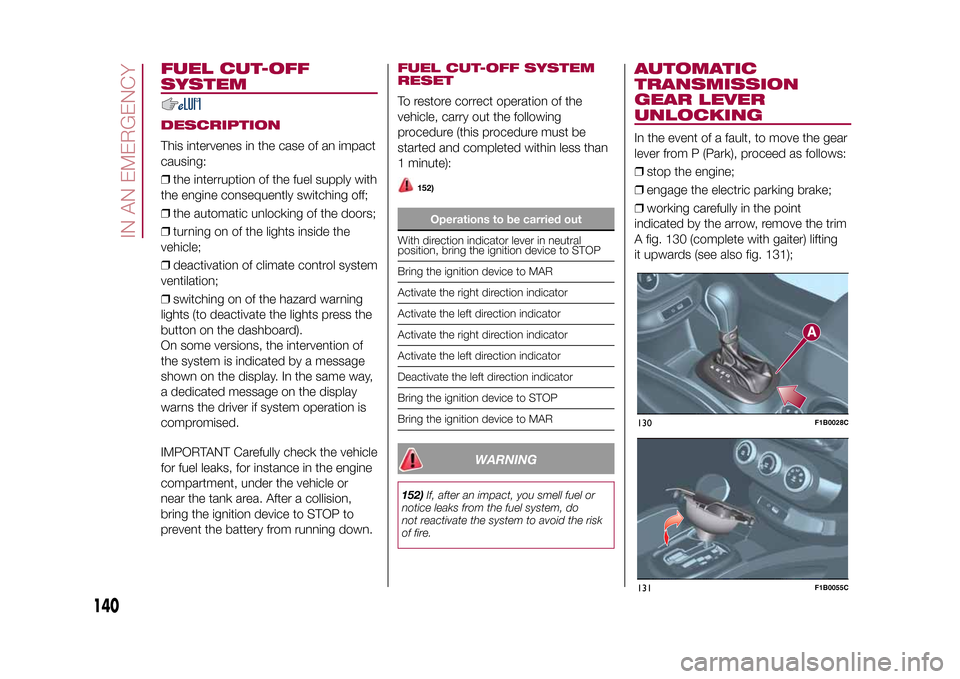
UNLOCKINGIn the event of a fault, to move the gear
lever from P (Park), proceed as follows:
❒stop the engine;
❒engage the electric parking brake;
❒working carefully in the point
indicated by the arrow, remove the trim
A fig. 130 (complete with gaiter) lifting
it upwards (see also fig. 131);130
F1B0028C
131
F1B0055C
140
IN AN EMERGENCY
15-12-2014 8:23 Pagina 140
Page 165 of 240
BATTERY
RECHARGINGIMPORTANTIMPORTANT The battery recharging
procedure is given as information only.
To carry out this operation contact a
Fiat Dealership.
IMPORTANT After setting the ignition
device to STOP and having closed the
driver side door, wait at least one
minute before disconnecting the
electrical supply from the battery. When
reconnecting the electrical supply to
the battery, make sure that the ignition
device is in the STOP position and
the driver side door is closed.
IMPORTANT Charging should be slow
at a low ampere rating for
approximately 24 hours. Charging for a
longer time may damage the battery.IMPORTANT The cables of the
electrical system must be correctly
reconnected to the battery, i.e. the
positive cable (+) to the positive
terminal and the negative cable (–) to
the negative terminal. The battery
terminals are marked with the positive
(+) and negative (–) symbols, and are
shown on the battery cover. The battery
terminals must also be corrosion-free
and firmly secured to the terminals. If a
"quick-type" battery charger is used
with the battery fitted on the vehicle,
before connecting it disconnect both
cables of the battery itself. Do not use a
"quick-type" battery charger to provide
the starting voltage.
VERSIONS WITHOUT
START&STOP SYSTEMTo recharge, proceed as follows:
❒disconnect the terminal from the
negative battery pole;
❒connect the charger cables to the
battery terminals, observing the polarity;
❒turn on the charger;
❒when it is recharged, turn the charger
off before disconnecting it from the
battery;
❒reconnect the negative battery
terminal.
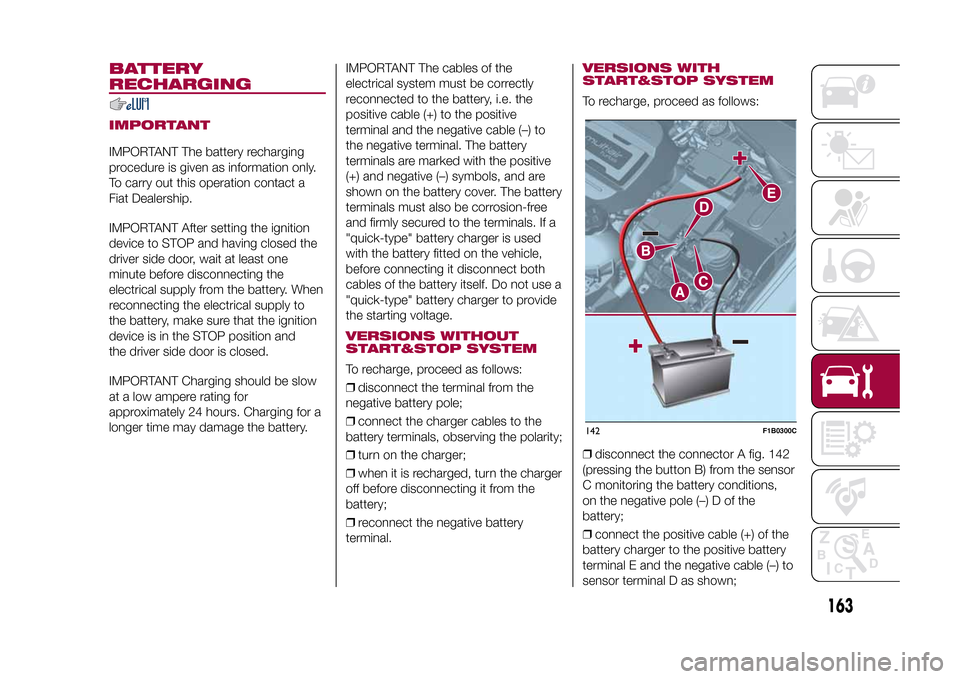
VERSIONS WITH
START&STOP SYSTEMTo recharge, proceed as follows:
❒disconnect the connector A fig. 142
(pressing the button B) from the sensor
C monitoring the battery conditions,
on the negative pole (–) D of the
battery;
❒connect the positive cable (+) of the
battery charger to the positive battery
terminal E and the negative cable (–) to
sensor terminal D as shown;142
F1B0300C
163
15-12-2014 8:23 Pagina 163
Page 201 of 240
SETTINGSPress the MENU button on the front
panel to display the "Settings" menu.
NOTE The menu items displayed can
vary according to the versions.
The menu includes the following items:
❒System Settings: Language, Reset
Default Value, Ignition time, Volume
limit, Audio-On Radio.
❒Radio Settings: FM Browse, Traffic
Announcement, Regional, Alternative
Frequency.
❒Radio off delay: permits the system
to be kept on for a preset time after
the ignition key is turned to STOP.
AUDIO MODETo access the "Audio" settings menu
briefly press the AUDIO button on
the front panel.
The menu includes the following items:
❒TREBLE: adjustment of high tones;
❒MID: adjustment of mid tones;
❒BASS: adjustment of bass tones;
❒FADER: balancing of front/rear
speakers;
❒BALANCE: balancing of left/right
speakers;
❒SVC: speed adjustment according to
vehicle speed;
❒LOUDNESS: audio improvement at
low volume;
❒AUX OFFSET: radio on or off when
the vehicle is started.
199
15-12-2014 8:23 Pagina 199
Page 210 of 240
In addition, the data can be saved on
an USB device or through theApp
Uconnect™LIVE; the data analysis
can be made on your personal
computer thanks to theeco:Drive™
desktop application, available on
www.fiat.it or www.DriveUconnect.eu.
Evaluation of the driving style is
dependent on four indices that monitor
the following parameters:
❒Acceleration
❒Deceleration
❒Gearbox
❒SpeedDisplay of the
eco:Drive™Press theeco:Drive™button to use
the function
A screen will be displayed on the radio,
showing the 4 indices described above.
These indices are grey until the system
has enough data to evaluate the driving
style.
Once sufficient data is available, the
indices will have 5 colours depending
on the evaluation: dark green (very
good), light green, yellow, orange and
red (very bad).
"Current route index" refers to the entire
value calculated in real time based on
the average of the described indices. It
represents eco-friendliness of the
driving style: from 0 (low) to 100 (high).In the event of extended inactivity the
display will show the average of the
indices until that moment (the "Average
index"), then the indices will be
coloured again in real time as soon as
the vehicle is restarted.
To check the data average of previous
route (the "route" starts when the
ignition key is turned to MAR and stops
when it is turned to STOP), select the
"Previous route" button.
The details of the previous trip can also
be displayed by pressing the "Details"
button, in which journey duration (time
and mileage) and average speed will be
reported.
Trip data storage and
transferThe trip data can be stored in the
system memory and transferred
through a properly configured USB
memory stick or theApp Uconnect™
LIVE. This allows you to display the
history of the collected data, showing
the complete analysis of the trip data
and of your driving style.
Further information is available at
www.DriveUconnect.eu.IMPORTANT Do not remove the USB
memory stick nor unpair the
smartphone and theApp Uconnect™
LIVEbefore the system has
downloaded the data, since these
could be lost. During the transfer of
data to the devices, messages may
appear on the radio display to guide the
user correctly through the operation;
follow these instructions. These
messages are only displayed with the
ignition key at STOP and when a delay
in the system switching off is set. The
data are automatically transferred to the
devices when the engine is switched
off. The data transferred are deleted
from the system memory. You can
choose to store the trip data or not, by
pressing the "Settings" button and by
setting the storage activation and
the USB or Cloud transfer mode.
When the USB memory stick is full, the
dedicated messages are shown on
the radio display.
When theeco:Drive™data are not
transferred to the USB memory stick for
a long time, the internal memory of the
Uconnect™LIVEsystem may be
full. Follow the instructions given by the
messages on the radio display.
208
MULTIMEDIA
15-12-2014 8:23 Pagina 208