sensor FIAT 500X 2015 2.G Owner's Manual
[x] Cancel search | Manufacturer: FIAT, Model Year: 2015, Model line: 500X, Model: FIAT 500X 2015 2.GPages: 240, PDF Size: 10.72 MB
Page 114 of 240
FAULT INDICATIONSIn the case of system and selector
faults, the mode change option will be
automatically disabled. The system
will automatically set itself to "Auto"
mode. In these cases the display will
show a dedicated warning. Go to a Fiat
Dealership as soon as possible to
have the system checked.
PARK ASSIST
SYSTEMSENSORS
118)41) 42)
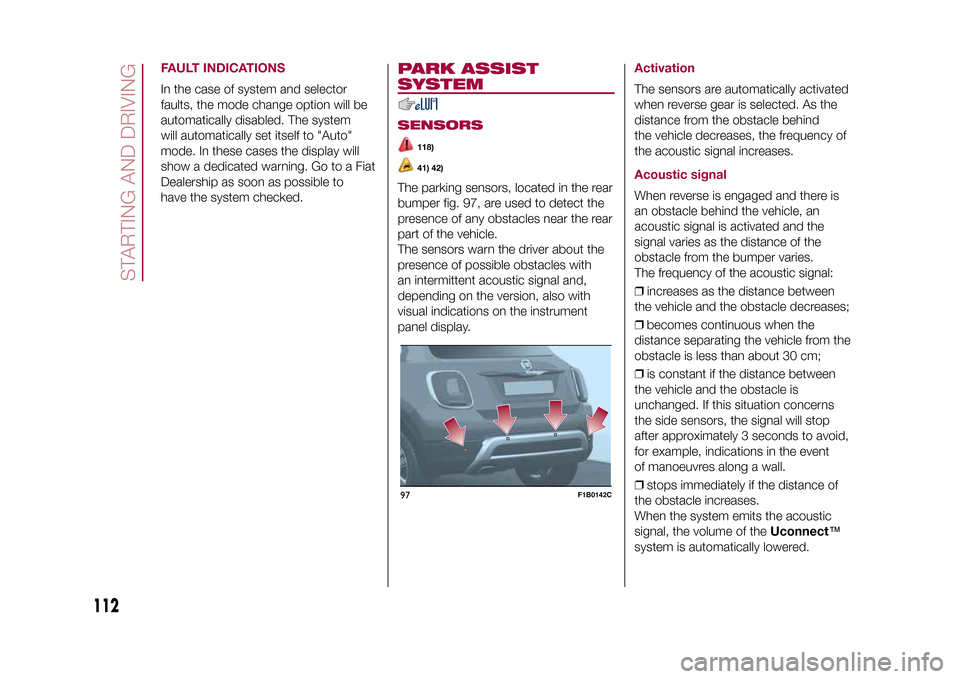
The parking sensors, located in the rear
bumper fig. 97, are used to detect the
presence of any obstacles near the rear
part of the vehicle.
The sensors warn the driver about the
presence of possible obstacles with
an intermittent acoustic signal and,
depending on the version, also with
visual indications on the instrument
panel display.
ActivationThe sensors are automatically activated
when reverse gear is selected. As the
distance from the obstacle behind
the vehicle decreases, the frequency of
the acoustic signal increases.Acoustic signalWhen reverse is engaged and there is
an obstacle behind the vehicle, an
acoustic signal is activated and the
signal varies as the distance of the
obstacle from the bumper varies.
The frequency of the acoustic signal:
❒increases as the distance between
the vehicle and the obstacle decreases;
❒becomes continuous when the
distance separating the vehicle from the
obstacle is less than about 30 cm;
❒is constant if the distance between
the vehicle and the obstacle is
unchanged. If this situation concerns
the side sensors, the signal will stop
after approximately 3 seconds to avoid,
for example, indications in the event
of manoeuvres along a wall.
❒stops immediately if the distance of
the obstacle increases.
When the system emits the acoustic
signal, the volume of theUconnect™
system is automatically lowered.
97
F1B0142C
112
STARTING AND DRIVING
15-12-2014 8:23 Pagina 112
Page 115 of 240
Detection distancesIf several obstacles are detected by the
sensors, only the nearest one is
considered.Indication on displayThe indications regarding the Park
Assist system are shown on the
instrument panel display only if the
"Acoustic signal and display" item in the
"Settings" menu of theUconnect™
system is selected (for more
information, see the description in the
dedicated chapter).
The system indicates the presence of
an obstacle by displaying a single arc in
one of the possible areas, in
accordance with the distance of the
object and the position in relation to the
vehicle. If the obstacle is detected in
the rear central area, a single arc will be
displayed as the obstacle approaches,
first constant, then flashing, in addition
to an acoustic signal.OPERATION WITH
TRAILERThe operation of the sensors is
automatically deactivated when the
trailer's electrical connection is inserted
in the vehicle's tow hook socket.Sensors are reactivated on removing
the trailer's electrical connection.
Before using the Park Assist system, it
is recommended to remove the tow
hook ball assembly and the relevant
attachment from the vehicle Failure to
comply with this prescription may
cause personal injuries or damage to
vehicles or obstacles since, when
the continuous acoustic signal is
emitted, the tow hook ball is already in
a position that is much closer to the
obstacle than the rear bumper. In
addition, the sensors may provide a
false indication, interpreting the tow
hook ball assembly and the relevant
attachment as an obstacle in the area
behind the vehicle.
GENERAL WARNINGSSome conditions may influence the
performance of the parking system:
❒reduced sensor sensitivity and a
reduction in the parking assistance
system performance could be due to
the presence of: ice, snow, mud, paint,
etc. on the surface of the sensor;
❒the sensor may detect a non-existent
obstacle ("echo interference") due to
mechanical interference, for example
when washing the vehicle, in rain
(strong wind), hail;❒the signals sent by the sensor can
also be altered by the presence of
ultrasonic systems (e.g. pneumatic
brake systems of trucks or pneumatic
drills) near the vehicle;
❒Parking assistance system
performance can also be influenced by
the position of the sensors, for example
due to a change in the ride setting
(caused by wear to the shock
absorbers, suspension), or by changing
tyres, overloading the vehicle or fitting
specific trims that require the vehicle to
be lowered;
❒the presence of a tow hook without
trailer, which may interfere with the
correct operation of the parking
sensors. If a fixed tow hook is installed,
the parking sensors cannot operate
correctly. In the case of vehicles fitted
with removable tow hook, whether
as standard or installed after the vehicle
was purchased, it is advisable to
remove it whenever it is not used, to
prevent incorrect operation of the
sensors;
❒the presence of adhesives on the
sensors. Therefore, take care not to
place adhesives on the sensors.
113
15-12-2014 8:23 Pagina 113
Page 116 of 240
WARNING
118)Parking and other potentially
dangerous manoeuvres are, however,
always the driver’s responsibility. When
performing these operations, always make
sure that there are no other people
(especially children) or animals on the route
you want to take. The parking sensors are
an aid for the driver, but the driver must
never allow their attention to lapse during
potentially dangerous manoeuvres, even
those executed at low speeds.
WARNING
41)The sensors must be clean of mud,
dirt, snow or ice in order for the system to
operate correctly. Be careful not to scratch
or damage the sensors while cleaning
them. Avoid using dry, rough or hard
cloths. The sensors should be washed
using clean water with the addition of car
shampoo if necessary. When using special
washing equipment such as high pressure
jets or steam cleaning, clean the sensors
very quickly keeping the jet more than
10 cm away.
42)Have interventions on the bumper in
the area of the sensors carried out only by
a Fiat Dealership. Interventions on the
bumper that are not carried out properly
may compromise the operation of the
parking sensors.
LANE ASSIST
SYSTEM (lane
crossing warning)DESCRIPTION
43) 44) 45) 46) 47) 48)
The Lane Assist system makes use of a
camera located on the windscreen to
detect the lane limits and calculate
the position of the vehicle within such
limits, in order to make sure that it
remains inside the lane.
When both limits of the lane are
detected and the vehicle crosses one of
them without the awareness of the
driver (direction indicator off), the Lane
Assist system provides a tactile warning
by applying torque to the steering
wheel (vibration), thus advising the
driver that he must take an action to
remain in the lane.
IMPORTANT The torque applied to the
steering wheel by the system is
sufficient for the driver to notice it, but
always limited, so that they can easily
override it, and the driver always
maintains control of the vehicle. The
driver can therefore turn the steering
wheel as required at all times.If the vehicle continues going beyond
the line of the lane without any
intervention from the driver, the
warning light (or the icon on the
display) will be displayed on the
instrument panel to urge the driver to
bring the vehicle back into the limits of
the lane.
IMPORTANT The system monitors the
presence of the driver's hands on
the steering wheel. If they are
not detected, the system emits an
acoustic signal and deactivates until it is
reactivated by pressing the dedicated
button (see description below).
When one limit of the lane is detected
and the vehicle crosses it (direction
indicator off), warning light
(or the
icon on the display) will be displayed on
the instrument panel to urge the driver
to bring the vehicle back into the lane.
In this case, the tactile warning
(vibration on the steering wheel) is not
provided.
SYSTEM ACTIVATION/
DEACTIVATIONThe Lane Assist system can be
enabled/disabled using button A fig. 98,
located on the left stalk.
Each time the engine is started, the
system keeps the activation status
there was when it was previously
switched off.
114
STARTING AND DRIVING
15-12-2014 8:23 Pagina 114
Page 118 of 240
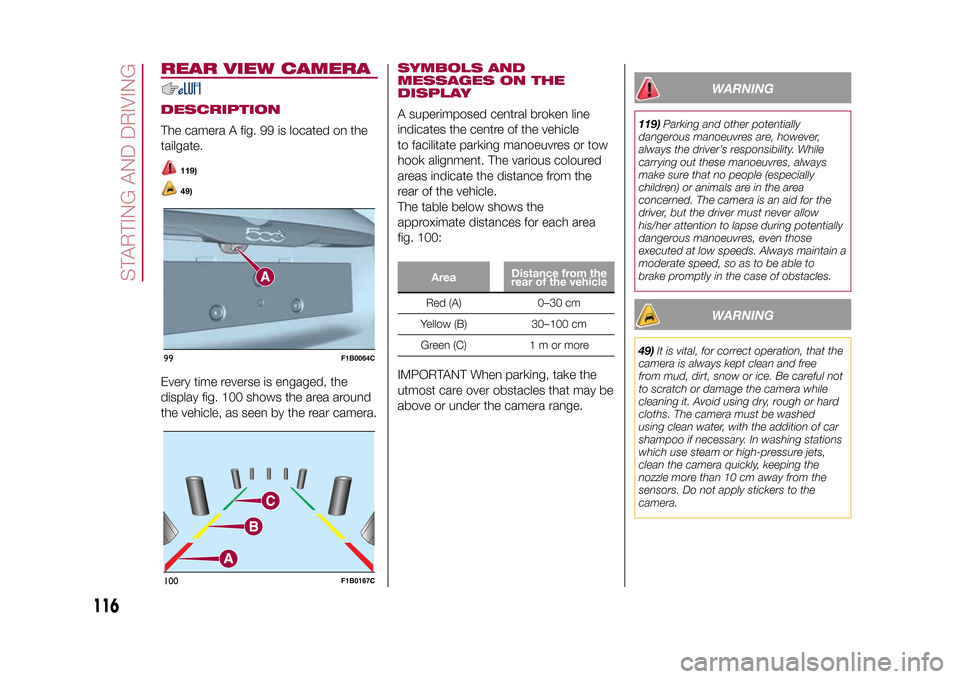
REAR VIEW CAMERADESCRIPTIONThe camera A fig. 99 is located on the
tailgate.
119)49)
Every time reverse is engaged, the
display fig. 100 shows the area around
the vehicle, as seen by the rear camera.
SYMBOLS AND
MESSAGES ON THE
DISPLAYA superimposed central broken line
indicates the centre of the vehicle
to facilitate parking manoeuvres or tow
hook alignment. The various coloured
areas indicate the distance from the
rear of the vehicle.
The table below shows the
approximate distances for each area
fig. 100:
AreaDistance from the
rear of the vehicleRed (A) 0–30 cm
Yellow (B) 30–100 cm
Green (C) 1 m or more
IMPORTANT When parking, take the
utmost care over obstacles that may be
above or under the camera range.
WARNING
119)Parking and other potentially
dangerous manoeuvres are, however,
always the driver’s responsibility. While
carrying out these manoeuvres, always
make sure that no people (especially
children) or animals are in the area
concerned. The camera is an aid for the
driver, but the driver must never allow
his/her attention to lapse during potentially
dangerous manoeuvres, even those
executed at low speeds. Always maintain a
moderate speed, so as to be able to
brake promptly in the case of obstacles.
WARNING
49)It is vital, for correct operation, that the
camera is always kept clean and free
from mud, dirt, snow or ice. Be careful not
to scratch or damage the camera while
cleaning it. Avoid using dry, rough or hard
cloths. The camera must be washed
using clean water, with the addition of car
shampoo if necessary. In washing stations
which use steam or high-pressure jets,
clean the camera quickly, keeping the
nozzle more than 10 cm away from the
sensors. Do not apply stickers to the
camera.
99
F1B0064C
100
F1B0167C
116
STARTING AND DRIVING
15-12-2014 8:23 Pagina 116
Page 165 of 240
BATTERY
RECHARGINGIMPORTANTIMPORTANT The battery recharging
procedure is given as information only.
To carry out this operation contact a
Fiat Dealership.
IMPORTANT After setting the ignition
device to STOP and having closed the
driver side door, wait at least one
minute before disconnecting the
electrical supply from the battery. When
reconnecting the electrical supply to
the battery, make sure that the ignition
device is in the STOP position and
the driver side door is closed.
IMPORTANT Charging should be slow
at a low ampere rating for
approximately 24 hours. Charging for a
longer time may damage the battery.IMPORTANT The cables of the
electrical system must be correctly
reconnected to the battery, i.e. the
positive cable (+) to the positive
terminal and the negative cable (–) to
the negative terminal. The battery
terminals are marked with the positive
(+) and negative (–) symbols, and are
shown on the battery cover. The battery
terminals must also be corrosion-free
and firmly secured to the terminals. If a
"quick-type" battery charger is used
with the battery fitted on the vehicle,
before connecting it disconnect both
cables of the battery itself. Do not use a
"quick-type" battery charger to provide
the starting voltage.
VERSIONS WITHOUT
START&STOP SYSTEMTo recharge, proceed as follows:
❒disconnect the terminal from the
negative battery pole;
❒connect the charger cables to the
battery terminals, observing the polarity;
❒turn on the charger;
❒when it is recharged, turn the charger
off before disconnecting it from the
battery;
❒reconnect the negative battery
terminal.
VERSIONS WITH
START&STOP SYSTEMTo recharge, proceed as follows:
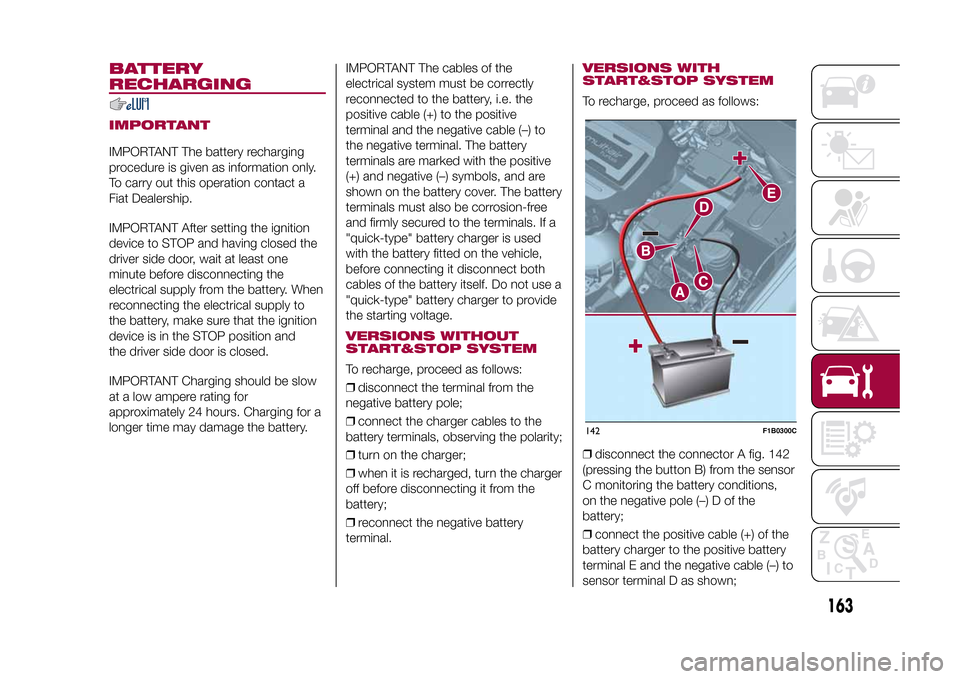
❒disconnect the connector A fig. 142
(pressing the button B) from the sensor
C monitoring the battery conditions,
on the negative pole (–) D of the
battery;
❒connect the positive cable (+) of the
battery charger to the positive battery
terminal E and the negative cable (–) to
sensor terminal D as shown;142
F1B0300C
163
15-12-2014 8:23 Pagina 163
Page 166 of 240
❒turn on the battery charger. At the
end of the charging process, switch the
battery charger off;
❒after having disconnected the
charging device, reconnect connector
A to the sensor C as shown.
SERVICING
PROCEDURES
65) 66) 67)
The following pages contain the rules
on therequiredmaintenance
envisaged by the technical personnel
who designed the vehicle.
In addition to these specific
maintenance instructions specified for
routine scheduled servicing, there
are other components which
may require intervention or
replacements over the vehicle’s life
cycle.ENGINE OIL
68)
Engine oil level checkTo ensure correct engine lubrication,
the oil must always be kept at the
prescribed level (see "Engine
compartment" in this chapter).AIR CLEANER
167)
Replacing the air cleanerSee the "Scheduled servicing plan" for
the correct servicing intervals.
It is advisable to replace it with a
genuine spare part, designed especially
for this vehicle.
AIR CONDITIONING
SYSTEM MAINTENANCE
69) 70)
To ensure the best possible
performance, the air conditioning
system must be checked and undergo
maintenance at a Fiat Dealership at
the beginning of the summer.WINDOWSWhen cleaning the heated windscreen
and rear window be careful, if the
defrosting function is active, regarding
the temperature of the glass; also make
sure that children do not come into
contact with the heated surface. The
glass may be hot.
Never use an abrasive detergent to
clean the surface of the windows.
Do not use scrapers or sharp items that
might scratch the windows.
Spray the detergent on the cloth to be
used for cleaning the rear view mirror.
Do not spray the detergent directly
on the glass.
Cleaning the window with hot water
could cause the removal of any labels.
164
SERVICING AND MAINTENANCE
15-12-2014 8:23 Pagina 164
Page 212 of 240
❒"Rear Park Assist vol."(where
provided): this function can be used to
select the volume of the acoustic
warnings provided by the rear Park
Assist system.
❒"Park Assist vol."(where provided):
this function can be used to select
the volume of the acoustic warnings
provided by the Park Assist system.
❒"Lane Assist Warning"(where
provided): this function can be used to
select the LaneAssist system
intervention "readiness".
❒"Lane Assist Strength"(where
provided): this function can be used to
select the force to apply to the steering
wheel to put the vehicle back in the
lane through the electric steering
system, in the event of Lane Assist
system intervention.
❒"Blind Spot Alert"(where provided):
this function can be used to select
the type of warning ("Sound Only" or
"Sound & Display") to indicate the
presence of objects in the blind spot of
the door mirror.
❒"Rain sensor"(where provided): this
function can be used to activate/
deactivate the automatic operation of
the wipers in the event of rain.
❒"Brakes"(where provided): this
function can be used to select the
following submenus:- "Brake Service" (where provided):
allows you to activate the procedure for
carrying out braking system servicing;
- "Auto Park Brake" (where provided):
allows you to activate/deactivate the
automatic park brake engagement.
NAVIGATION(5" Uconnect Radio Nav LIVE only)Programming a routeIMPORTANT In the interest of safety
and to reduce distractions while you are
driving, you should always plan a route
before you start driving.
To plan a route, do the following:
❒tap the screen to open the Main
menu;
❒Tap "Navigate to" or "Drive to".
❒Tap "Address". You can change the
country or state setting by tapping
the flag before you select a city.
❒Enter the town or city name, or the
zip code. Towns with similar names are
shown in the list while you type. When
the desired city or town appears in
the list, tap the name to select the
destination.
❒Enter the street name. Streets with
similar names are shown in the list while
you type. When the correct street
name appears in the list, tap the name
to select the destination.❒Enter the house number, then tap
"Done".
❒The location will be shown on the
map. Tap "Select" to continue or tap
"Back" to enter another address.
❒When the new route is shown, tap
"Done". For more information about the
route, tap "Details". To change your
route, for example, to travel via a
particular location or to select a new
destination, tap "Change route".
You are guided to your destination,
using spoken instructions and
on-screen directions.
Map updatingTwo modes for downloading a map
update are available:
❒Most recent maps guarantee: if a
new map is available for your system
within 90 days of initial use, you can
download it once free of charge.
❒Map update: you can purchase a
new version of the map installed on
your system.USB device setupTo update the map, use an USB device
that meets the following requirements:
❒Ideally, the USB device should be
empty.
❒The USB device must have at least
8 GB of memory free.
210
MULTIMEDIA
15-12-2014 8:23 Pagina 210
Page 225 of 240
❒"Frnt Coll. Warning" (where provided):
allows you to select the Full Brake
Control system operation mode. The
options available are:
- "Off": the system is deactivated;
- "Only warning": the system intervenes
only by providing the driver with a
warning (where provided);
- "Only active braking": the system
intervenes by activating automatic
braking (where provided);
- "Warning + active braking": the
system intervenes by providing the
driver with a warning and activating
automatic braking.
❒"Forward Collision System Sensitivity"
(where provided): allows you to select
the intervention readiness for the
system according to the distance of the
obstacle. The options available are
"Near", "Med", "Far".
❒"Park Assist" (where provided): allows
you to select the type of warning
provided by the Park Assist system.
The available options are:
- "Sound Only": the system warns the
driver that an obstacle is present
through acoustic warnings only, via the
speakers in the vehicle;
- "Sound & Display": the system warns
the driver that an obstacle is present
through acoustic (via the speakers
in the vehicle) and visual (on the
instrument panel) warnings.❒"Front Park Assist vol." (where
provided): allows you to select the
volume of the acoustic warnings for the
front Park Assist system;
❒"Rear Park Assist vol." (where
provided): allows you to select the
volume of the acoustic warnings for the
rear Park Assist system,
❒"Lane Assist Warning" (where
provided): allows you to select the Lane
Assist system intervention readiness;
❒"Lane Assist Strength" (where
provided): allows you to select the force
to apply to the steering wheel to put
the vehicle back in the lane through the
electric steering system, in the event
of Lane Assist system intervention.
❒"Side Assist" (where provided): allows
you to select the type of warning from
the Side Sensor system. The options
available are:
- "Off": the system is off;
- "Sound Only": the system warns the
driver that an obstacle is present
through acoustic warnings only, via the
speakers in the vehicle;
- "Sound & Display": the system warns
the driver that an obstacle is present
through acoustic (via the speakers
in the vehicle) and visual (on the
instrument panel) warnings.❒"Side Assist volume" (where
provided): allows you to select the
volume of the acoustic warnings from
the Side Sensor system.
❒"Rain sensor" (where provided):
allows you to activate/deactivate the
automatic switching on of the wipers in
the case of rain.
223
15-12-2014 8:23 Pagina 223
❒"Brakes" (where provided): this
function can be used to select the
following submenus:
- "Brake Service" (where provided):
allows you to activate the procedure for
carrying out braking system servicing;
- "Electric Park Brake" (where
provided): allows you to activate/
deactivate the electric park brake
engagement.
Page 226 of 240
❒"Auto high beams" (where provided):
allows you to deactivate the main
beam headlights when approaching a
vehicle coming from the opposite
direction;
❒"Flash Lights w/Lock" (where
provided): permits the activation of light
flashing when the doors are locked.
MAIN NAVIGATION MENUIMPORTANT Navigation maps are
pre-loaded on the system, therefore no
external support is needed.
To activate the main navigation menu,
press the NAV button on the front
panel, then press one of the following
buttons:
❒"Where to?": it searches or navigates
to the destination;
❒"View map": it displays the map;
❒"Info": it displays all info about
navigation;
❒"Emergency": it searches for
Hospitals or Police Stations located
near the destination. It is also possible
to view your current position on the
display and save, in "Favourites", the
location of the Hospitals or Police
Stations.
VIEW MAPPress the "View Map" button in the
main Navigation Menu to display the
map relative to the current position.
When the display shows the map, the
following options are available:
❒"Menu": press this button to return
to the main Navigation Menu;
❒"+/–": press the "+" or " –" button to
change the dimension of the map (it
is not possible to zoom in on minor
roads);
❒"Time of Arrival/Time to
Destination/Distance"(only during
navigation): press this button at the top
right of the display to view one of the
following options: "Time of Arrival",
"Time to Destination", "Distance".
❒"Turn List"(only during navigation):
press the list of turns along the route
at the middle of the top of the display.
Select a turn through the following
options: "Show on Map" or "Avoid
Street".
❒"Options": press this button to
display the map display options.
224
MULTIMEDIA
15-12-2014 8:23 Pagina 224
Lights (where provided)This function can be used to carry out
the following adjustments:
❒"Interior lights" (where provided):
allows you to select the interior light
brightness;
❒"Headlamp sensor" (where provided):
adjustment of headlamp activation
sensitivity;
❒"Follow me" (where provided):
permits the setting of the headlamp
deactivation delay after switching off
the engine;
❒"Courtesy lights": activation/
deactivation of courtesy lights (where
provided);
❒"Day lights": activation/deactivation of
the daytime running lights (DRLs)
(where provided);
Page 237 of 240
Fuel consumption .......................... 186
Fuel cut-off system......................... 140
Full Brake Control (system) ............. 68
Fuse boxes .................................... 128
Fuses (replacement) ....................... 128G
SI (Gear Shift Indicator)............... 41
H
azard warning lights ................... 122
– Emergency braking ................... 122
Headlight alignment adjustment ..... 23
Headlight alignment corrector ........ 23
Headlights (cleaning) ...................... 169
Head restraints............................... 18
Heated steering wheel.................... 19
Heavy-duty use of the vehicle
(scheduled servicing) .................... 155
HHC (system)................................. 63
Identification data
– chassis marking ........................ 173
– engine marking.......................... 173
– VIN plate ................................... 173
Ignition device ................................ 9
Ignition key emergency removal
(automatic transmission)............... 141
Important information and
recommendations ........................ 226
Interior lights .................................. 24
Interiors (cleaning) .......................... 170
i-Size child restraint systems .......... 86ISOFIX child restraint system
(installation) .................................. 84
iTPMS (indirect Tyre Pressure
Monitoring System) ...................... 72
Jump starting ................................ 138K
eyless Entry (system) .................. 13
Keys
– electronic key ............................ 8
– key with remote control ............. 8
Lane Assist system ....................... 114
Lane Change ................................. 23
Lifting the vehicle ........................... 167
Light switch.................................... 21M
ain beam headlights .................. 22
Main beam headlights
– Automatic main beam
headlights ................................. 23
Main menu ..................................... 42
Manual climate control system ....... 27
Manual gearbox ............................. 104
Mood Selector ............................... 110
N
umber plate lights (bulb
replacement) ................................ 127
O
ccupant protection systems ....... 75
P
aintwork (cleaning and
maintenance) ............................... 168
Park Assist (system) ....................... 112
Parking lights ................................. 22
PBA (system) ................................. 63Performance (top speed) ................ 186
Periodic checks (scheduled
servicing)...................................... 155
Prescriptions for handling the
vehicle at the end of its life ........... 189
Pretensioners ................................. 79
– Load limiters.............................. 79
R
ain sensor .................................. 25
RCP system ................................... 67
Rear direction indicators (bulb
replacement) ................................ 126
Rear seats...................................... 17
Rear side lights (bulb
replacement) ................................ 126
Rear view camera .......................... 116
Rear View Camera ......................... 116
Rear view mirrors ........................... 20
Rear window washer
– windscreen/rear window
washing fluid level ..................... 160
Rear window wiper
– blade replacement..................... 165
Rear window wiper/washer ............ 26
Reconfigurable load platform.......... 36
Refuelling procedure ...................... 119
– Emergency refuelling ................. 119
Refuelling the vehicle ...................... 119
Replacing a bulb ............................ 122
Replacing an external bulb ............. 125
Rims and tyres (dimensions)........... 176
S
BR (Seat Belt Reminder) ............. 77