tow FIAT 500X 2015 2.G Owner's Guide
[x] Cancel search | Manufacturer: FIAT, Model Year: 2015, Model line: 500X, Model: FIAT 500X 2015 2.GPages: 240, PDF Size: 10.72 MB
Page 155 of 240
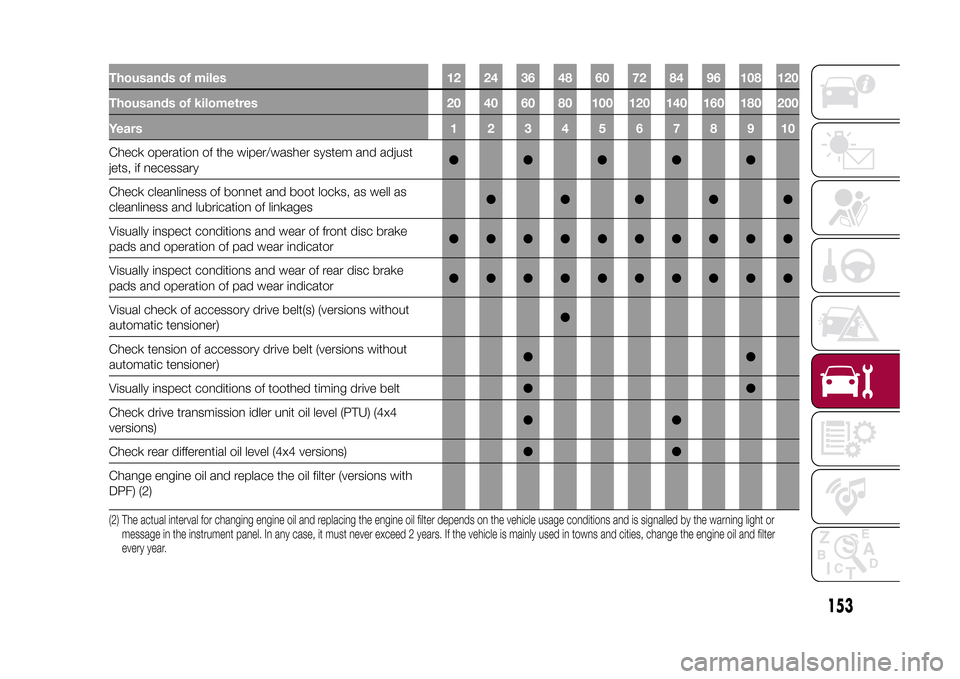
Thousands of miles 12 24 36 48 60 72 84 96 108 120
Thousands of kilometres 20 40 60 80 100 120 140 160 180 200
Years12345678910Check operation of the wiper/washer system and adjust
jets, if necessary●●●●●
Check cleanliness of bonnet and boot locks, as well as
cleanliness and lubrication of linkages●●●●●
Visually inspect conditions and wear of front disc brake
pads and operation of pad wear indicator●●●●●●●●●●
Visually inspect conditions and wear of rear disc brake
pads and operation of pad wear indicator●●●●●●●●●●
Visual check of accessory drive belt(s) (versions without
automatic tensioner)●
Check tension of accessory drive belt (versions without
automatic tensioner)●●
Visually inspect conditions of toothed timing drive belt●●
Check drive transmission idler unit oil level (PTU) (4x4
versions)●●
Check rear differential oil level (4x4 versions)●●
Change engine oil and replace the oil filter (versions with
DPF) (2)(2) The actual interval for changing engine oil and replacing the engine oil filter depends on the vehicle usage conditions and is signalled by the warning light or
message in the instrument panel. In any case, it must never exceed 2 years. If the vehicle is mainly used in towns and cities, change the engine oil and filter
every year.
153
15-12-2014 8:23 Pagina 153
Page 156 of 240
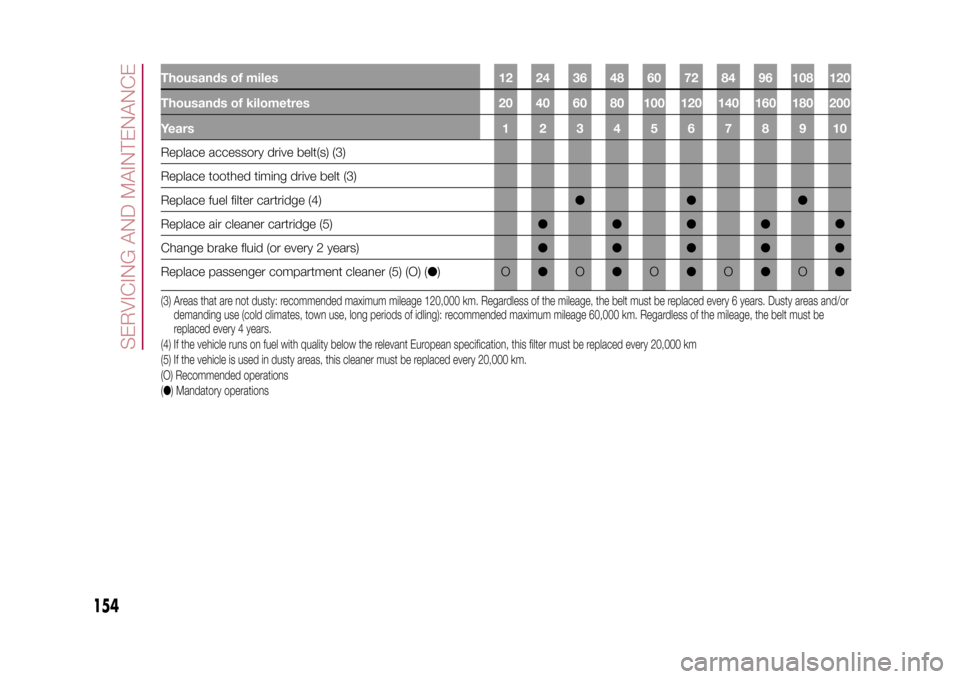
Thousands of miles 12 24 36 48 60 72 84 96 108 120
Thousands of kilometres 20 40 60 80 100 120 140 160 180 200
Years12345678910Replace accessory drive belt(s) (3)
Replace toothed timing drive belt (3)
Replace fuel filter cartridge (4)●●●
Replace air cleaner cartridge (5)●●●●
Change brake fluid (or every 2 years)●●●●●
Replace passenger compartment cleaner (5) (O) (●)O●O●O●O●O●(3) Areas that are not dusty: recommended maximum mileage 120,000 km. Regardless of the mileage, the belt must be replaced every 6 years. Dusty areas and/or
demanding use (cold climates, town use, long periods of idling): recommended maximum mileage 60,000 km. Regardless of the mileage, the belt must be
replaced every 4 years.
(4) If the vehicle runs on fuel with quality below the relevant European specification, this filter must be replaced every 20,000 km
(5) If the vehicle is used in dusty areas, this cleaner must be replaced every 20,000 km.
(O) Recommended operations
(●) Mandatory operations
154
SERVICING AND MAINTENANCE
15-12-2014 8:23 Pagina 154
●
Page 157 of 240
PERIODIC CHECKSEvery1,000km or before long trips
check and, if necessary, top up:
❒engine coolant level;
❒brake fluid level;
❒windscreen washer fluid level;
❒tyre inflation pressure and condition;
❒operation of lighting system
(headlights, direction indicators, hazard
warning lights, etc.);
❒operation of screen washer/wiper
system and positioning/wear of
windscreen/rear window wiper blades.
Every3,000km, check and top up if
required: engine oil level.HEAVY-DUTY USE OF THE
VEHICLEIf the vehicle is used mainly under one
of the following conditions:
❒towing a trailer or motorhome;
❒dusty roads;
❒short, repeated journeys (less than
7-8 km) at sub-zero outside
temperatures;
❒engine often idling or driving long
distances at low speeds or long periods
of inactivity;
the following checks must be carried
out more often than indicated in the
Scheduled Servicing Plan:❒check front disc brake pad condition
and wear;
❒check cleanliness of bonnet and boot
locks, cleanliness and lubrication of
linkage;
❒visually inspect conditions of: engine,
gearbox, transmission, pipes and
hoses (exhaust/fuel system/brakes) and
rubber elements (boots/sleeves/
bushes, etc.);
❒check battery charge and battery
fluid level (electrolyte);
❒visually inspect conditions of the
accessory drive belts;
❒check and, if necessary, change
engine oil and replace oil filter;
❒check and, if necessary, replace
pollen filter;
❒check and, if necessary, replace air
cleaner.
On versions equipped with automatic
transmission AT9, change the
transmission oil and replace filters after
90,000 km (or 2 years) if the vehicle
is used in the following conditions: city
driving, short and repeated journeys
(less than 7-8 km) or frequent towing of
trailers or caravans.
155
15-12-2014 8:23 Pagina 155
Page 182 of 240
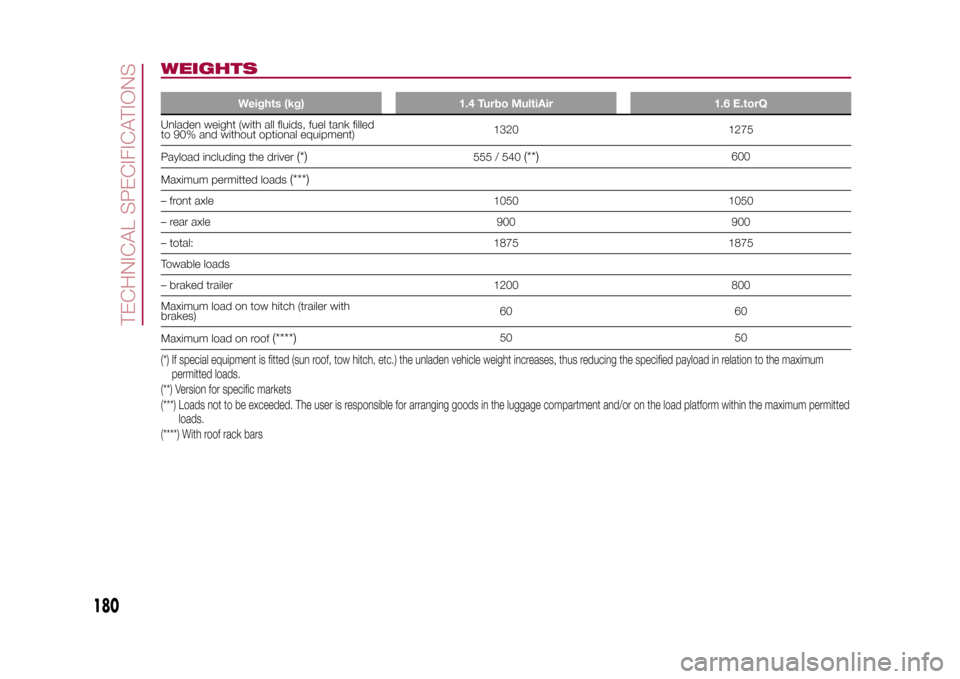
WEIGHTS
Weights (kg) 1.4 Turbo MultiAir 1.6 E.torQ
Unladen weight (with all fluids, fuel tank filled
to 90% and without optional equipment)1320 1275
Payload including the driver
(*)
555 / 540
(**)
600
Maximum permitted loads
(***)
– front axle 1050 1050
– rear axle 900 900
– total: 1875 1875
Towable loads
– braked trailer 1200 800
Maximum load on tow hitch (trailer with
brakes)60 60
Maximum load on roof
(****)
50 50
(*) If special equipment is fitted (sun roof, tow hitch, etc.) the unladen vehicle weight increases, thus reducing the specified payload in relation to the maximum
permitted loads.
(**) Version for specific markets
(***) Loads not to be exceeded. The user is responsible for arranging goods in the luggage compartment and/or on the load platform within the maximum permitted
loads.
(****) With roof rack bars
180
TECHNICAL SPECIFICATIONS
15-12-2014 8:23 Pagina 180
Page 183 of 240
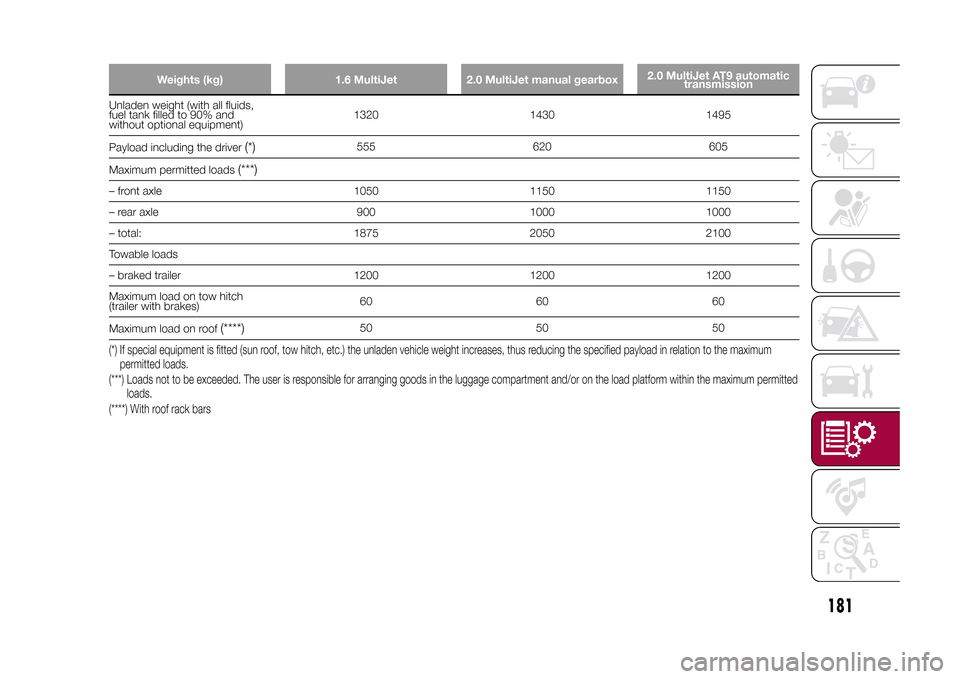
Weights (kg) 1.6 MultiJet 2.0 MultiJet manual gearbox2.0 MultiJet AT9 automatic
transmission
Unladen weight (with all fluids,
fuel tank filled to 90% and
without optional equipment)1320 1430 1495
Payload including the driver
(*)
555 620 605
Maximum permitted loads
(***)
– front axle 1050 1150 1150
– rear axle 900 1000 1000
– total: 1875 2050 2100
Towable loads
– braked trailer 1200 1200 1200
Maximum load on tow hitch
(trailer with brakes)60 60 60
Maximum load on roof
(****)
50 50 50
(*) If special equipment is fitted (sun roof, tow hitch, etc.) the unladen vehicle weight increases, thus reducing the specified payload in relation to the maximum
permitted loads.
(***) Loads not to be exceeded. The user is responsible for arranging goods in the luggage compartment and/or on the load platform within the maximum permitted
loads.
(****) With roof rack bars
181
15-12-2014 8:23 Pagina 181
Page 212 of 240
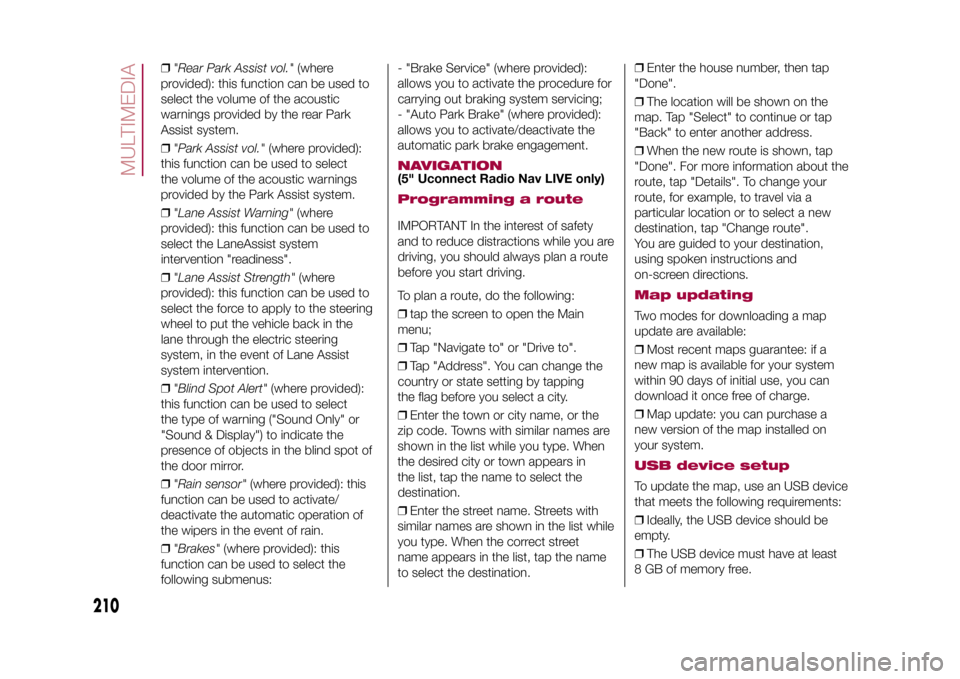
❒"Rear Park Assist vol."(where
provided): this function can be used to
select the volume of the acoustic
warnings provided by the rear Park
Assist system.
❒"Park Assist vol."(where provided):
this function can be used to select
the volume of the acoustic warnings
provided by the Park Assist system.
❒"Lane Assist Warning"(where
provided): this function can be used to
select the LaneAssist system
intervention "readiness".
❒"Lane Assist Strength"(where
provided): this function can be used to
select the force to apply to the steering
wheel to put the vehicle back in the
lane through the electric steering
system, in the event of Lane Assist
system intervention.
❒"Blind Spot Alert"(where provided):
this function can be used to select
the type of warning ("Sound Only" or
"Sound & Display") to indicate the
presence of objects in the blind spot of
the door mirror.
❒"Rain sensor"(where provided): this
function can be used to activate/
deactivate the automatic operation of
the wipers in the event of rain.
❒"Brakes"(where provided): this
function can be used to select the
following submenus:- "Brake Service" (where provided):
allows you to activate the procedure for
carrying out braking system servicing;
- "Auto Park Brake" (where provided):
allows you to activate/deactivate the
automatic park brake engagement.
NAVIGATION(5" Uconnect Radio Nav LIVE only)Programming a routeIMPORTANT In the interest of safety
and to reduce distractions while you are
driving, you should always plan a route
before you start driving.
To plan a route, do the following:
❒tap the screen to open the Main
menu;
❒Tap "Navigate to" or "Drive to".
❒Tap "Address". You can change the
country or state setting by tapping
the flag before you select a city.
❒Enter the town or city name, or the
zip code. Towns with similar names are
shown in the list while you type. When
the desired city or town appears in
the list, tap the name to select the
destination.
❒Enter the street name. Streets with
similar names are shown in the list while
you type. When the correct street
name appears in the list, tap the name
to select the destination.❒Enter the house number, then tap
"Done".
❒The location will be shown on the
map. Tap "Select" to continue or tap
"Back" to enter another address.
❒When the new route is shown, tap
"Done". For more information about the
route, tap "Details". To change your
route, for example, to travel via a
particular location or to select a new
destination, tap "Change route".
You are guided to your destination,
using spoken instructions and
on-screen directions.
Map updatingTwo modes for downloading a map
update are available:
❒Most recent maps guarantee: if a
new map is available for your system
within 90 days of initial use, you can
download it once free of charge.
❒Map update: you can purchase a
new version of the map installed on
your system.USB device setupTo update the map, use an USB device
that meets the following requirements:
❒Ideally, the USB device should be
empty.
❒The USB device must have at least
8 GB of memory free.
210
MULTIMEDIA
15-12-2014 8:23 Pagina 210
Page 227 of 240
225
15-12-2014 8:23 Pagina 223
VOICE COMMANDSFor the functions controlled with voice
commands see theUconnect™5"
Radio Nav "Voice commands"
paragraph.
NOTE For languages not supported by
the system, voice commands are not
available.
IMPORTANT The volume of the voice
commands can only be adjusted while
they are being reproduced by operating
button/knob
(ON/OFF).
The navigation system uses voice
commands for some or all of the
following functions:
❒driving information;
❒set warnings.
Two types of voices are available during
navigation:
❒computer voices: they are generated
by the navigation system. They read
responses to voice commands and
traffic;
❒human voices: which have been
recorded by an actor and provide
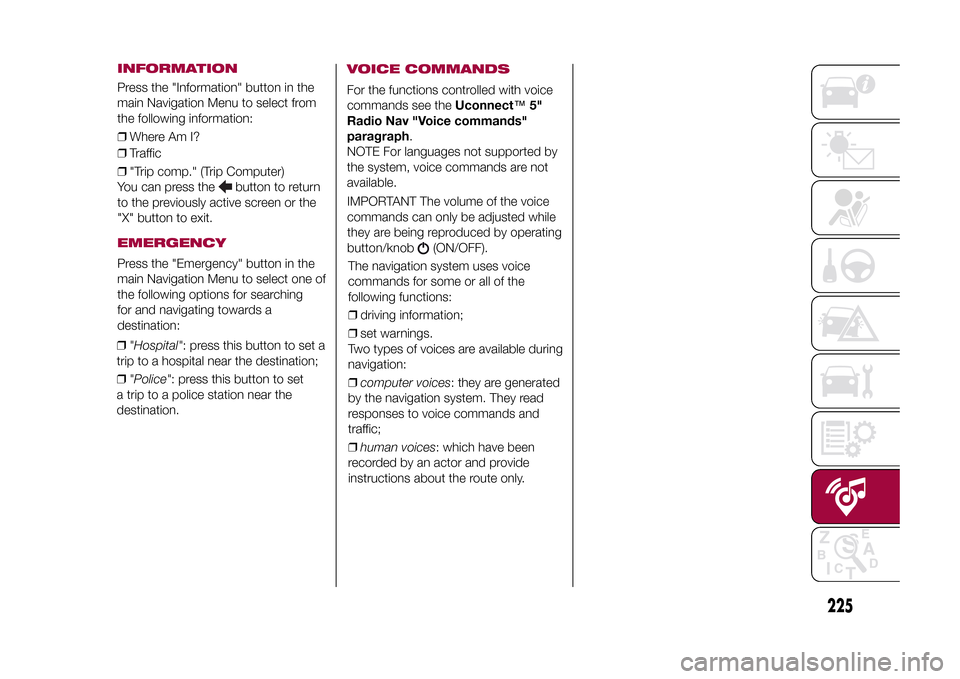
instructions about the route only. ❒"Hospital": press this button to set a
trip to a hospital near the destination;
❒"Police": press this button to set
a trip to a police station near the
destination.
INFORMATIONPress the "Information" button in the
main Navigation Menu to select from
the following information:
❒Where Am I?
❒Traffic
❒"Trip comp." (Trip Computer)
You can press the
button to return
to the previously active screen or the
"X" button to exit.
EMERGENCYPress the "Emergency" button in the
main Navigation Menu to select one of
the following options for searching
for and navigating towards a
destination:
Page 238 of 240
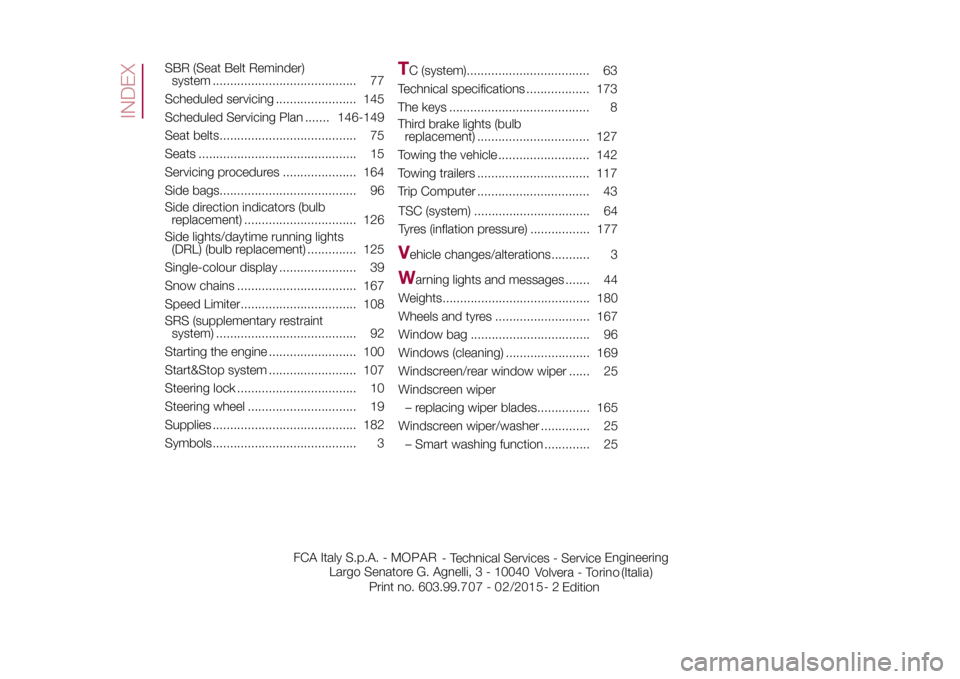
SBR (Seat Belt Reminder)
system ......................................... 77
Scheduled servicing ....................... 145
Scheduled Servicing Plan ....... 146-149
Seat belts....................................... 75
Seats ............................................. 15
Servicing procedures ..................... 164
Side bags....................................... 96
Side direction indicators (bulb
replacement) ................................ 126
Side lights/daytime running lights
(DRL) (bulb replacement) .............. 125
Single-colour display ...................... 39
Snow chains .................................. 167
Speed Limiter................................. 108
SRS (supplementary restraint
system) ........................................ 92
Starting the engine ......................... 100
Start&Stop system ......................... 107
Steering lock .................................. 10
Steering wheel ............................... 19
Supplies ......................................... 182
Symbols......................................... 3
TC (system)................................... 63
Technical specifications .................. 173
The keys ........................................ 8
Third brake lights (bulb
replacement) ................................ 127
Towing the vehicle .......................... 142
Towing trailers ................................ 117
Trip Computer ................................ 43
TSC (system) ................................. 64
Tyres (inflation pressure) ................. 177V
ehicle changes/alterations........... 3
W
arning lights and messages ....... 44
Weights.......................................... 180
Wheels and tyres ........................... 167
Window bag .................................. 96
Windows (cleaning) ........................ 169
Windscreen/rear window wiper ...... 25
Windscreen wiper
– replacing wiper blades............... 165
Windscreen wiper/washer .............. 25
– Smart washing function ............. 25
INDEX
FCA Italy S.p.A. - MOPAR
- Technical Services - ServiceEngineering
Largo Senatore G. Agnelli, 3 - 10040
Volvera - Torino (Italia)
Print no. 603.99.7 - 0 /201 5 -
Edition 07 2 2