wheel FIAT 500X 2015 2.G Repair Manual
[x] Cancel search | Manufacturer: FIAT, Model Year: 2015, Model line: 500X, Model: FIAT 500X 2015 2.GPages: 240, PDF Size: 10.72 MB
Page 218 of 240
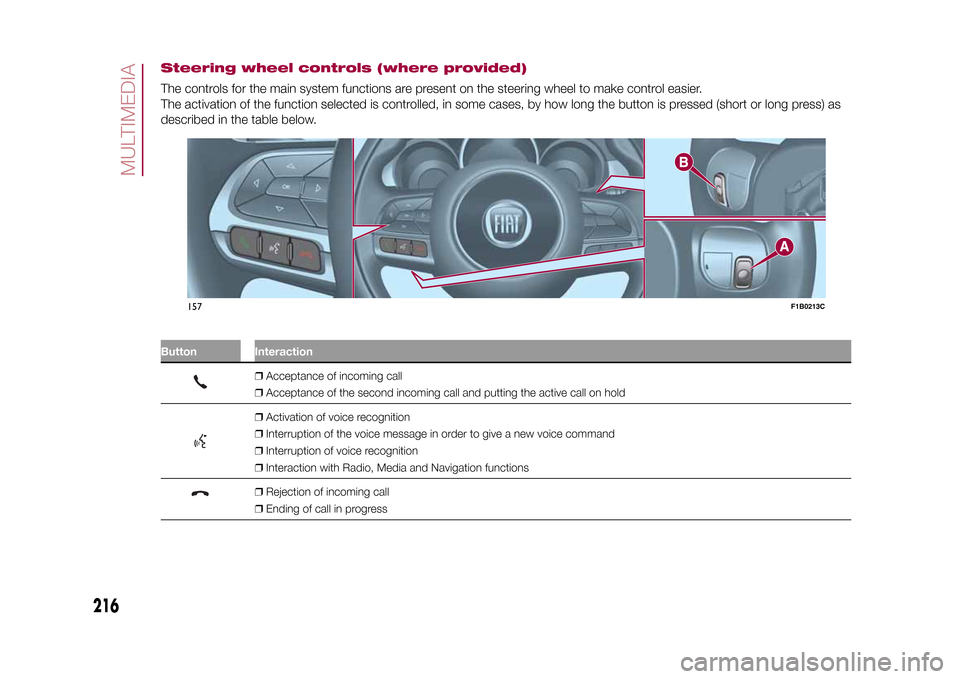
Steering wheel controls (where provided)The controls for the main system functions are present on the steering wheel to make control easier.
The activation of the function selected is controlled, in some cases, by how long the button is pressed (short or long press) as
described in the table below.
.
Button Interaction
❒Acceptance of incoming call
❒Acceptance of the second incoming call and putting the active call on hold❒Activation of voice recognition
❒Interruption of the voice message in order to give a new voice command
❒Interruption of voice recognition
❒Interaction with Radio, Media and Navigation functions❒Rejection of incoming call
❒Ending of call in progress
.
157
F1B0213C
216
MULTIMEDIA
15-12-2014 8:23 Pagina 216
Page 219 of 240
Upper button❒Brief button press: search for next radio station or selection of USB/iPod next track.
❒Long button press: scan of higher frequencies until released/fast forward of USB/
iPod track.
Central buttonWith each press it scrolls through sources AM, FM, USB/iPod, AUX and SD (where
provided). Only the available sources will be selected.
Lower button❒Brief button press: search for previous radio station or selection of next track on
USB/iPod and SD (where provided).
❒Long button press: scan of lower frequencies until released/fast forward of track on
USB/iPod and SD (where provided).
Button B (right side, behind the steering wheel)
Upper buttonVolume increase
❒Brief button press: single volume increase.
❒Long button press: fast volume increase.
Central button Activation/deactivation of Mute function
Lower buttonVolume decrease
❒Brief button press: single volume decrease.
❒Long button press: fast volume decrease.
217
15-12-2014 8:23 Pagina 217
Buttons InteractionButton A (left side, behind the steering wheel)
Page 220 of 240
SWITCHING THE SYSTEM
ON/OFFThe system is switched on/off by
pressing the
(ON/OFF) button/knob.
Turn the button/knob clockwise to
increase the radio volume or
anticlockwise to decrease it.
RADIO (TUNER) MODEThe system has the following tuners:
AM, FM and DAB (where provided).Radio mode selectionPress the RADIO button on the front
panel to activate radio mode.
The different tuning modes can be
selected with the corresponding button
on the display.
Up to 12 favourite radio stations can be
stored in each mode.Selecting a frequency
bandPress one of the buttons at the left of
the display to select the frequency
band: AM, FM and DAB (where
provided).Indications on displayAfter the desired radio station is
selected, the following information is
shown on the display:At the top: display of the stored radio
station (preset) list. If the current station
is in the list of presets, it will be
highlighted on the display.
In the middle: the name of the radio
station being listened to and the
buttons to select the previous or the
next radio station are displayed.
At the bottom: display of the following
buttons:
❒"browse": search available radio
stations
❒"tune" : manual radio station tuning
(not available for DAB radios);
❒"audio": access to the "Audio
settings" screen
❒
and
: permit searching for
the desired radio station.
Select previous/next
radio stationThe previous/next radio station can be
selected using the following methods:
turning the BROWSE ENTER
button/knob, briefly pressing the
or
button on the display, pressing of
the buttons behind the steering wheel.
Holding down the
or
buttons
on the display activates rapid scrolling
through the active frequency band.
Previous/next radio
station fast searchTo start the fast search press the
or
button on the display, or use the
corresponding steering wheel controls.
AM/FM radio station
tuningPress the "tune" button, then select the
first digit of the desired radio station.
Press the
button to delete a wrong
number (and enter the correct station
number).
After entering the last digit of the station
the system will tune to the selected
one.
The screen disappears automatically
after 5 seconds or manually by pressing
the OK button.
DAB radio (where
provided)Once DAB radio mode is selected, the
information on the current station is
displayed and the following functions.
The "browse" button is used to display:
❒the list of all DAB stations;
❒the list of all the favourites;
❒the list of stations filtered by
"Ensembles" (broadcast group).
Within each list, the "ABC" button
allows the user to skip to the desired
letter in the list.
218
MULTIMEDIA
15-12-2014 8:23 Pagina 218
Page 223 of 240
AUX SUPPORTTo activate AUX mode, connect an
appropriate device to the AUX socket
on the vehicle.
Adjust the volume using the
button/
knob on the front panel or using the
volume adjustment control on the
connected device.
IMPORTANTThe functions of the device connected
with the AUX socket are directly
managed by the device itself: it is not
possible to change track/folder/playlist
or control playing start/end/pause
with the controls on the front panel or
on the steering wheel.
Do not leave the cable of your portable
player connected to the AUX socket
after disconnection, to avoid possible
hiss from the speakers.PHONE MODE
Activating the Phone
modePress the PHONE button on the front
panel to activate the Phone mode.
The buttons on the display can be used
to:
❒compose the phone number (using
the graphic keypad on the display);
❒display and call the contacts in the
mobile phone phonebook;❒display and call contacts from the
registers of recent calls;
❒pair up to 10 phones to make access
and connection easier and quicker;
❒transfer calls from the system to the
mobile phone and vice versa and
deactivate the microphone audio for
private conversations.
The mobile phone audio is transmitted
through the vehicles’s audio system;
the system automatically mutes the
radio when the Phone function is used.
Pairing a mobile phoneProceed as follows:
❒activate theBluetooth® function on
the mobile phone;
❒press the PHONE button on the front
panel;
❒if no phone is paired with the system
yet, the display shows a dedicated
screen;
❒select "Yes" to start the pairing
procedure, then search for the
Uconnect™device on the mobile
phone (if "No" is selected, the Phone
main screen is displayed);
❒when prompted by the mobile
phone, use its keypad to enter the PIN
code shown on the system display
or confirm on the mobile phone the PIN
displayed;❒from the "Phone" screen you can
always pair a mobile phone by pressing
the "Settings" button: press the "Add
Device" button and proceed as
described above;
❒during the pairing stage a screen is
displayed showing the progress of
the operation;
❒when the pairing procedure is
completed successfully, a screen is
displayed: answer "Yes" to the question
to pair the mobile phone as favourite
(the mobile phone will have priority over
all other mobile phones to be paired
subsequently). If no other devices are
paired, the system will consider the first
associated device as favourite.
221
15-12-2014 8:23 Pagina 221
Making a phone callProceed as follows:
❒selecting the
icon (mobile
phone phonebook);
❒selecting "Recent Calls";
❒selecting the
icon;
❒pressing the "Redial" button.
The operations described above can
only be accessed if supported by
the mobile phone in use.
SMS MESSAGE READERThe system can read the messages
received by the mobile phone.
To use this function the mobile phone
Page 225 of 240
❒"Frnt Coll. Warning" (where provided):
allows you to select the Full Brake
Control system operation mode. The
options available are:
- "Off": the system is deactivated;
- "Only warning": the system intervenes
only by providing the driver with a
warning (where provided);
- "Only active braking": the system
intervenes by activating automatic
braking (where provided);
- "Warning + active braking": the
system intervenes by providing the
driver with a warning and activating
automatic braking.
❒"Forward Collision System Sensitivity"
(where provided): allows you to select
the intervention readiness for the
system according to the distance of the
obstacle. The options available are
"Near", "Med", "Far".
❒"Park Assist" (where provided): allows
you to select the type of warning
provided by the Park Assist system.
The available options are:
- "Sound Only": the system warns the
driver that an obstacle is present
through acoustic warnings only, via the
speakers in the vehicle;
- "Sound & Display": the system warns
the driver that an obstacle is present
through acoustic (via the speakers
in the vehicle) and visual (on the
instrument panel) warnings.❒"Front Park Assist vol." (where
provided): allows you to select the
volume of the acoustic warnings for the
front Park Assist system;
❒"Rear Park Assist vol." (where
provided): allows you to select the
volume of the acoustic warnings for the
rear Park Assist system,
❒"Lane Assist Warning" (where
provided): allows you to select the Lane
Assist system intervention readiness;
❒"Lane Assist Strength" (where
provided): allows you to select the force
to apply to the steering wheel to put
the vehicle back in the lane through the
electric steering system, in the event
of Lane Assist system intervention.
❒"Side Assist" (where provided): allows
you to select the type of warning from
the Side Sensor system. The options
available are:
- "Off": the system is off;
- "Sound Only": the system warns the
driver that an obstacle is present
through acoustic warnings only, via the
speakers in the vehicle;
- "Sound & Display": the system warns
the driver that an obstacle is present
through acoustic (via the speakers
in the vehicle) and visual (on the
instrument panel) warnings.❒"Side Assist volume" (where
provided): allows you to select the
volume of the acoustic warnings from
the Side Sensor system.
❒"Rain sensor" (where provided):
allows you to activate/deactivate the
automatic switching on of the wipers in
the case of rain.
223
15-12-2014 8:23 Pagina 223
❒"Brakes" (where provided): this
function can be used to select the
following submenus:
- "Brake Service" (where provided):
allows you to activate the procedure for
carrying out braking system servicing;
- "Electric Park Brake" (where
provided): allows you to activate/
deactivate the electric park brake
engagement.
Page 236 of 240
INDEX
3" Uconnect Radio ........................ 1935" Uconnect Radio LIVE ................ 200
5" Uconnect Radio Nav LIVE.......... 2006.5" Uconnect Radio Nav .............. 214A
BS (system) ................................ 62
Active safety systems ..................... 62
Airbags
– Front airbags ............................. 92
– Side bags .................................. 96
Airbag (SRS supplementary
restraint system) ........................... 92
Alarm ............................................. 11
Automatic dual zone climate
control system ............................. 29
Automatic light control (AUTO
function) ....................................... 21
Automatic transmission gear
lever unlocking ............................. 140
Automatic transmission .................. 10
B
attery .......................................... 161
– advice for extending its life ........ 161
– replacement .............................. 161
Battery recharging.......................... 163
Blind Spot Assist (system) .............. 66
Bodywork (cleaning and
maintenance) ............................... 168
Bonnet ........................................... 34
Boot (extension) ............................. 17Boot............................................... 35
Brake lights (bulb replacement) ...... 126
Brakes
– brake fluid level.......................... 160
Bulbs
– types of bulbs ........................... 123
C
arrying children safely ................. 81
Changing a wheel .......................... 133
Checking levels .............................. 156
Child protection systems ................ 81
Child safety device ......................... 14
Climate control system ................... 27
CO2 emissions............................... 188
Colour display ................................ 40
Control buttons .............................. 41
Control panel and on-board
instruments .................................. 39
D
aytime running lights (DRL) ......... 22
Dead Lock (device) ........................ 14
Dimensions .................................... 178
Dipped beam headlights ................ 22
Dipped/main beam headlights
(bulb replacement) ....................... 125
Direction indicators ........................ 23
Display ........................................... 41
Doors ............................................. 12
Driving assistance systems ............ 66
Driving mode selector .................... 110
DST (system).................................. 64DTC (system) ................................. 62
E
lectrically adjustable front
seats............................................ 16
Electric Parking Brake (EPB)........... 101
Electric sun roof ............................. 32
Electric windows ............................ 31
Electronic Cruise Control ................ 109
Emergency starting ........................ 138
Engine compartment...................... 156
Engine compartment (washing) ...... 169
Engine............................................ 174
– engine coolant level ................... 160
– marking ..................................... 173
Engine oil
– consumption ............................. 160
– level check ................................ 160
EPB (Electric Parking Brake)........... 101
ERM (system) ................................. 64
ESC (system) ................................. 62
Exterior lights ................................. 21
Fiat Code (system) ........................ 11
Fix&Go automatic kit ...................... 136
Fluids and lubricants ...................... 184
Fog lights (bulb replacement) ......... 126
Fog lights ....................................... 22
Front roof light ................................ 24
Front seat electric heating .............. 16
Front seats (manual
adjustments) ................................ 15
INDEX
5
Page 237 of 240
Fuel consumption .......................... 186
Fuel cut-off system......................... 140
Full Brake Control (system) ............. 68
Fuse boxes .................................... 128
Fuses (replacement) ....................... 128G
SI (Gear Shift Indicator)............... 41
H
azard warning lights ................... 122
– Emergency braking ................... 122
Headlight alignment adjustment ..... 23
Headlight alignment corrector ........ 23
Headlights (cleaning) ...................... 169
Head restraints............................... 18
Heated steering wheel.................... 19
Heavy-duty use of the vehicle
(scheduled servicing) .................... 155
HHC (system)................................. 63
Identification data
– chassis marking ........................ 173
– engine marking.......................... 173
– VIN plate ................................... 173
Ignition device ................................ 9
Ignition key emergency removal
(automatic transmission)............... 141
Important information and
recommendations ........................ 226
Interior lights .................................. 24
Interiors (cleaning) .......................... 170
i-Size child restraint systems .......... 86ISOFIX child restraint system
(installation) .................................. 84
iTPMS (indirect Tyre Pressure
Monitoring System) ...................... 72
Jump starting ................................ 138K
eyless Entry (system) .................. 13
Keys
– electronic key ............................ 8
– key with remote control ............. 8
Lane Assist system ....................... 114
Lane Change ................................. 23
Lifting the vehicle ........................... 167
Light switch.................................... 21M
ain beam headlights .................. 22
Main beam headlights
– Automatic main beam
headlights ................................. 23
Main menu ..................................... 42
Manual climate control system ....... 27
Manual gearbox ............................. 104
Mood Selector ............................... 110
N
umber plate lights (bulb
replacement) ................................ 127
O
ccupant protection systems ....... 75
P
aintwork (cleaning and
maintenance) ............................... 168
Park Assist (system) ....................... 112
Parking lights ................................. 22
PBA (system) ................................. 63Performance (top speed) ................ 186
Periodic checks (scheduled
servicing)...................................... 155
Prescriptions for handling the
vehicle at the end of its life ........... 189
Pretensioners ................................. 79
– Load limiters.............................. 79
R
ain sensor .................................. 25
RCP system ................................... 67
Rear direction indicators (bulb
replacement) ................................ 126
Rear seats...................................... 17
Rear side lights (bulb
replacement) ................................ 126
Rear view camera .......................... 116
Rear View Camera ......................... 116
Rear view mirrors ........................... 20
Rear window washer
– windscreen/rear window
washing fluid level ..................... 160
Rear window wiper
– blade replacement..................... 165
Rear window wiper/washer ............ 26
Reconfigurable load platform.......... 36
Refuelling procedure ...................... 119
– Emergency refuelling ................. 119
Refuelling the vehicle ...................... 119
Replacing a bulb ............................ 122
Replacing an external bulb ............. 125
Rims and tyres (dimensions)........... 176
S
BR (Seat Belt Reminder) ............. 77
Page 238 of 240
SBR (Seat Belt Reminder)
system ......................................... 77
Scheduled servicing ....................... 145
Scheduled Servicing Plan ....... 146-149
Seat belts....................................... 75
Seats ............................................. 15
Servicing procedures ..................... 164
Side bags....................................... 96
Side direction indicators (bulb
replacement) ................................ 126
Side lights/daytime running lights
(DRL) (bulb replacement) .............. 125
Single-colour display ...................... 39
Snow chains .................................. 167
Speed Limiter................................. 108
SRS (supplementary restraint
system) ........................................ 92
Starting the engine ......................... 100
Start&Stop system ......................... 107
Steering lock .................................. 10
Steering wheel ............................... 19
Supplies ......................................... 182
Symbols......................................... 3
TC (system)................................... 63
Technical specifications .................. 173
The keys ........................................ 8
Third brake lights (bulb
replacement) ................................ 127
Towing the vehicle .......................... 142
Towing trailers ................................ 117
Trip Computer ................................ 43
TSC (system) ................................. 64
Tyres (inflation pressure) ................. 177V
ehicle changes/alterations........... 3
W
arning lights and messages ....... 44
Weights.......................................... 180
Wheels and tyres ........................... 167
Window bag .................................. 96
Windows (cleaning) ........................ 169
Windscreen/rear window wiper ...... 25
Windscreen wiper
– replacing wiper blades............... 165
Windscreen wiper/washer .............. 25
– Smart washing function ............. 25
INDEX
FCA Italy S.p.A. - MOPAR
- Technical Services - ServiceEngineering
Largo Senatore G. Agnelli, 3 - 10040
Volvera - Torino (Italia)
Print no. 603.99.7 - 0 /201 5 -
Edition 07 2 2
Page 239 of 240

We really know your car because we invented, designed and built it: we r\
eally know every single detail. At Fiat Service authorised workshops you can find technicians directly trained by us,
offering quality and professionalism for all service operations.
Fiat workshops are always close to you for the regular servicing operati\
ons, season checks and practical recommendations by our experts.
With Original Parts distributed by MOPAR
®, you maintain the reliability, comfort
and performance features that you bought your new car for over time.
Always ask for Genuine Parts for the components used on our cars; we rec\
ommend them because
they come from our steady commitment in research and development of high\
ly innovative technologies. For all these reasons: rely on Genuine Parts, because they are the only ones designed
by FCA for your car.
SAFETY:
BRAKING SYSTEMENVIRONMENT: PARTICULATE FILTERS, CLIMATE CONTROL MAINTENANCECOMFORT: SUSPENSION
AND WINDSCREEN WIPERS PERFORMANCE: SPARK PLUGS, INJECTORS AND BATTERIESLINEACCESSORI
ROOF RACK BARS, WHEEL RIMS
WHY CHOOSING GENUINE PARTS
This Owner Handbook is intended to show the vehicle's operating conditio\
ns.
For the enthusiast user who wants to have insights, curiosities and deta\
iled information about the characteristics and function s
of the vehicle, Fiat gives the opportunity to consult a dedicated sectio\
n which is available in electronic format.
ONLINE VEHICLE OWNER HANDBOOK
The following symbol is reported within the text of the Owner Handbook, next to the subjects \
for which details are provided.
Go to the www.mopar.eu/owner
website and access your personal area.
The “Maintenance and care” page includes all the information about\
your vehicle and the link to access eLUM, where you will find
all the details of the Owner Handbook.
The eLUM website is free and will allow you, among many other things, to easily c\
onsult the on-board documents
of all the other vehicles of the Group.
Have a nice reading and happy motoring!
Cop 500X LUM GB_500 UM ITA 28/10/14 08.12 Pagina 2