ECO mode FIAT 500X 2015 2.G Owners Manual
[x] Cancel search | Manufacturer: FIAT, Model Year: 2015, Model line: 500X, Model: FIAT 500X 2015 2.GPages: 240, PDF Size: 10.72 MB
Page 3 of 240
Dear Customer,We would like to congratulate and thank you for choosing a Fiat.
We have written this handbook to help you get to know all the features of your vehicle and use it in the best possible way.
Here you will find information, advice and important warnings regarding use of your vehicle and how to achieve the best
performance from the technical features of your Fiat 500X.
You are advised to read it right through before taking to the road for the first time, to become familiar with the controls and
above all with those concerning brakes, steering and gearbox; at the same time, you can understand the vehicle behaviour on
different road surfaces.
This document also provides a description of special features and tips, as well as essential information for the safe driving, care
and maintenance of your Fiat 500X over time.
After reading it, you are advised to keep the handbook inside the vehicle, for an easy reference and for making sure it remains
on board the vehicle should it be sold.
In the attached Warranty Booklet you will also find a description of the Services that Fiat offers to its customers, the Warranty
Certificate and the detail of the terms and conditions for maintaining its validity.
We are sure that these will help you to get in touch with and appreciate your new vehicle and the service provided by the
people at Fiat.
Enjoy reading. Happy motoring!
This Owner Handbook describes all Fiat 500X versions. Options, equipment dedicated to specific markets or
versions are not explicitly indicated in the text: as a consequence, you should only consider the information which
is related to the trim level, engine and version that you have purchased. Any content introduced throughout the
production of the model, outside the specific request of options at the time of purchase, will be identified with the
wording(where provided).
All data contained in this publication are intended to help you use your vehicle in the best possible way.
FCA Italy S.p.A. aims at a constant improvement of the vehicles produced. For this reason it reserves the
right to make changes to the model described for technical and/or commercial reasons.
For further information, contact a Fiat Dealership.
15-12-2014 8:23 Pagina 1
Page 15 of 240
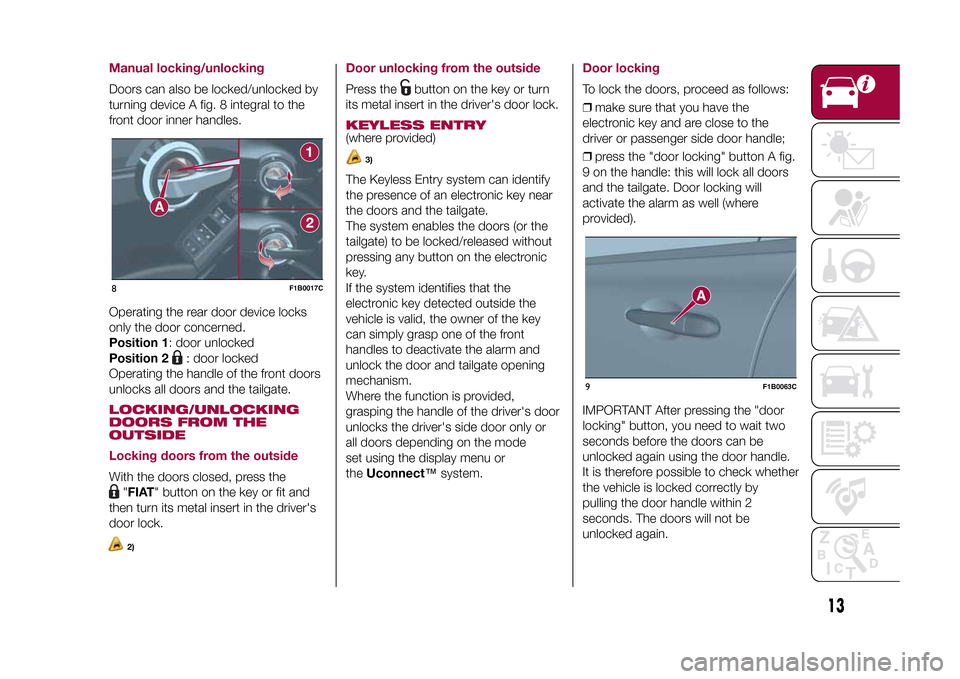
Manual locking/unlockingDoors can also be locked/unlocked by
turning device A fig. 8 integral to the
front door inner handles.
Operating the rear door device locks
only the door concerned.
Position 1: door unlocked
Position 2
: door locked
Operating the handle of the front doors
unlocks all doors and the tailgate.
LOCKING/UNLOCKING
DOORS FROM THE
OUTSIDE
Locking doors from the outsideWith the doors closed, press the
"FIAT" button on the key or fit and
then turn its metal insert in the driver's
door lock.2)
Door unlocking from the outsidePress the
button on the key or turn
its metal insert in the driver's door lock.
KEYLESS ENTRY(where provided)
3)
The Keyless Entry system can identify
the presence of an electronic key near
the doors and the tailgate.
The system enables the doors (or the
tailgate) to be locked/released without
pressing any button on the electronic
key.
If the system identifies that the
electronic key detected outside the
vehicle is valid, the owner of the key
can simply grasp one of the front
handles to deactivate the alarm and
unlock the door and tailgate opening
mechanism.
Where the function is provided,
grasping the handle of the driver's door
unlocks the driver's side door only or
all doors depending on the mode
set using the display menu or
theUconnect™system.
Door lockingTo lock the doors, proceed as follows:
❒make sure that you have the
electronic key and are close to the
driver or passenger side door handle;
❒press the "door locking" button A fig.
9 on the handle: this will lock all doors
and the tailgate. Door locking will
activate the alarm as well (where
provided).
IMPORTANT After pressing the "door
locking" button, you need to wait two
seconds before the doors can be
unlocked again using the door handle.
It is therefore possible to check whether
the vehicle is locked correctly by
pulling the door handle within 2
seconds. The doors will not be
unlocked again.
8
F1B0017C
9
F1B0063C
13
15-12-2014 8:23 Pagina 13
Page 28 of 240
REAR WINDOW
WIPER/WASHER
20)
Turn ring nut B fig. 31 from positionO
to position
to operate the rear
window wiper as follows:
❒in intermittent mode when the
windscreen wiper is not operating;
❒in synchronous mode (at half the
speed of the windscreen wiper) when
the windscreen wiper is operating;
❒in continuous mode with active
control or reverse gear engaged.
Position: intermittent operation.
Position: continuous slow
operation.
With reverse gear engaged and
windscreen wiper on, the rear window
wiper is activated in continuous mode.
Pushing the stalk towards the
dashboard (unstable position) will
activate the rear window washer jet.
Keep the stalk pushed for more than
half a second to activate the rear
window wiper as well. The wiper stops
working three strokes after the stalk
is released. The cycle is completed,
after about 6 seconds, by a final
cleaning stroke of the rear window
wiper.
WARNING
20)If the window needs to be cleaned,
make sure the device is deactivated or the
ignition button and the key are on STOP.
WARNING
7)Do not use the windscreen wiper to
remove layers of snow or ice from the
windscreen. In such conditions, the
windscreen wiper may be subjected to
excessive stress and the motor cut-out
switch, which prevents operation for a few
seconds, may intervene. If operation is
not subsequently restored, even after the
vehicle is restarted, contact a Fiat
Dealership.
8)Do not operate the windscreen wiper
with blades lifted from the windscreen.
9)Do not activate the rain sensor while
washing the vehicle in an automatic
washing system.
10)If ice is found on the windscreen, make
sure that the device was disconnected
properly.
26
GETTING TO KNOW YOUR CAR
15-12-2014 8:23 Pagina 26
Page 107 of 240
To select the "sequential" mode, move
the lever from D (Drive) to the left: the
position + (upper gear) or – (lower gear)
can be reached; these are unstable
positions, which means that the lever
always returns to the central position.
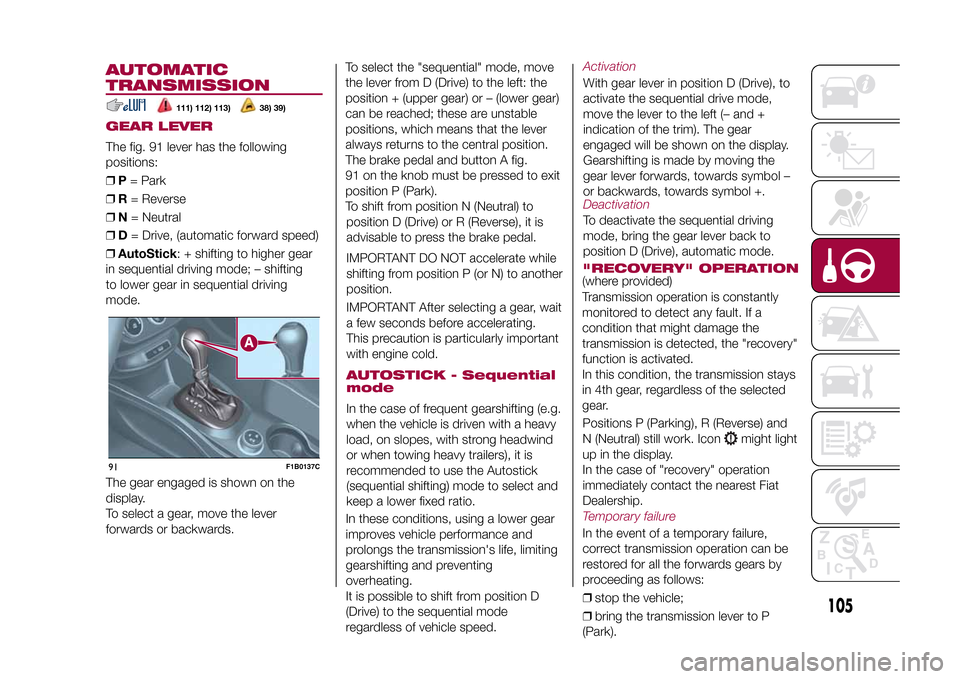
The brake pedal and button A fig.
91 on the knob must be pressed to exit
position P (Park).
To shift from position N (Neutral) to
position D (Drive) or R (Reverse), it is
advisable to press the brake pedal.
IMPORTANT DO NOT accelerate while
shifting from position P (or N) to another
position.
IMPORTANT After selecting a gear, wait
a few seconds before accelerating.
This precaution is particularly important
with engine cold.AUTOSTICK - Sequential
modeIn the case of frequent gearshifting (e.g.
when the vehicle is driven with a heavy
load, on slopes, with strong headwind
or when towing heavy trailers), it is
recommended to use the Autostick
(sequential shifting) mode to select and
keep a lower fixed ratio.
In these conditions, using a lower gear
improves vehicle performance and
prolongs the transmission's life, limiting
gearshifting and preventing
overheating.
It is possible to shift from position D
(Drive) to the sequential mode
regardless of vehicle speed.
ActivationWith gear lever in position D (Drive), to
activate the sequential drive mode,
move the lever to the left (– and +
indication of the trim). The gear
engaged will be shown on the display.
Gearshifting is made by moving the
gear lever forwards, towards symbol –
or backwards, towards symbol +.DeactivationTo deactivate the sequential driving
mode, bring the gear lever back to
position D (Drive), automatic mode."RECOVERY" OPERATION(where provided)
Transmission operation is constantly
monitored to detect any fault. If a
condition that might damage the
transmission is detected, the "recovery"
function is activated.
In this condition, the transmission stays
in 4th gear, regardless of the selected
gear.
Positions P (Parking), R (Reverse) and
N (Neutral) still work. Icon
might light
up in the display.
In the case of "recovery" operation
immediately contact the nearest Fiat
Dealership.
Temporary failureIn the event of a temporary failure,
correct transmission operation can be
restored for all the forwards gears by
proceeding as follows:
❒stop the vehicle;
❒bring the transmission lever to P
(Park).
105
15-12-2014 8:23 Pagina 105
AUTOMATIC
TRANSMISSIONGEAR LEVERThe fig. 91 lever has the following
positions:
❒P= Park
❒R= Reverse
❒N= Neutral
❒D= Drive, (automatic forward speed)
❒AutoStick: + shifting to higher gear
in sequential driving mode; – shifting
to lower gear in sequential driving
mode.
111) 112) 113)
38) 39)
The gear engaged is shown on the
display.
To select a gear, move the lever
forwards or backwards.91
F1B0137C
Page 111 of 240
ELECTRONIC
CRUISE CONTROLThis is an electronically controlled
driving assistance device that allows
the desired vehicle speed to be
maintained, without having to press the
accelerator pedal. This device can be
used at a speed above 30 km/h on
long stretches of dry, straight roads
with few variations (e.g. motorways).
It is therefore not recommended to use
this device on extra-urban roads with
traffic. Do not use it in town.ACTIVATING THE DEVICE
115) 116) 117)
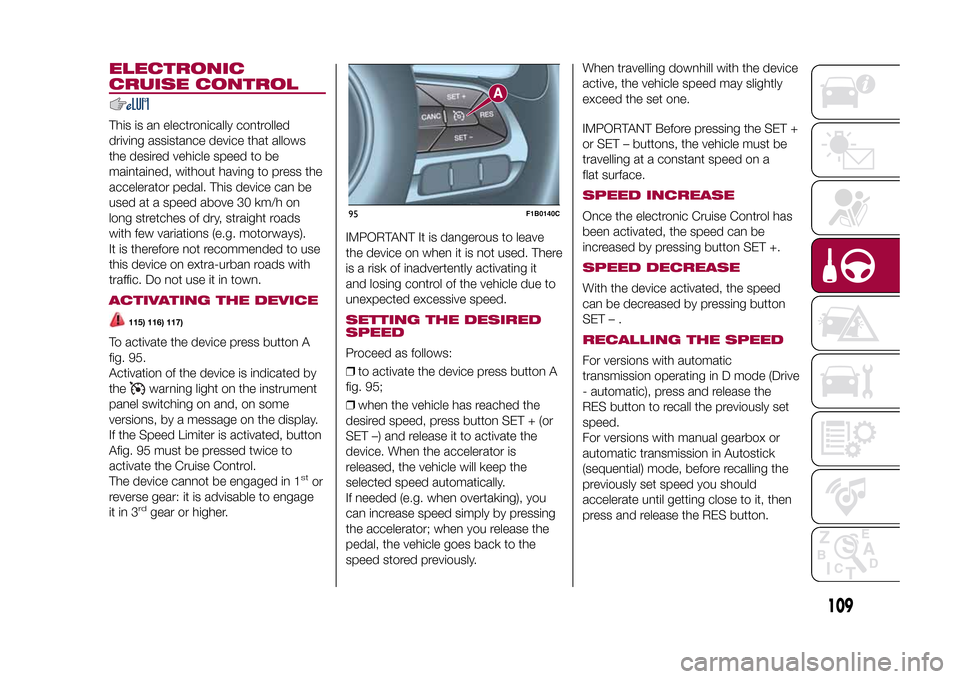
To activate the device press button A
fig. 95.
Activation of the device is indicated by
the
warning light on the instrument
panel switching on and, on some
versions, by a message on the display.
If the Speed Limiter is activated, button
Afig. 95 must be pressed twice to
activate the Cruise Control.
The device cannot be engaged in 1
stor
reverse gear: it is advisable to engage
it in 3
rd
gear or higher.IMPORTANT It is dangerous to leave
the device on when it is not used. There
is a risk of inadvertently activating it
and losing control of the vehicle due to
unexpected excessive speed.
SETTING THE DESIRED
SPEEDProceed as follows:
❒to activate the device press button A
fig. 95;
❒when the vehicle has reached the
desired speed, press button SET + (or
SET –) and release it to activate the
device. When the accelerator is
released, the vehicle will keep the
selected speed automatically.
If needed (e.g. when overtaking), you
can increase speed simply by pressing
the accelerator; when you release the
pedal, the vehicle goes back to the
speed stored previously.When travelling downhill with the device
active, the vehicle speed may slightly
exceed the set one.
IMPORTANT Before pressing the SET +
or SET – buttons, the vehicle must be
travelling at a constant speed on a
flat surface.
SPEED INCREASEOnce the electronic Cruise Control has
been activated, the speed can be
increased by pressing button SET +.SPEED DECREASEWith the device activated, the speed
can be decreased by pressing button
SET–.RECALLING THE SPEEDFor versions with automatic
transmission operating in D mode (Drive
- automatic), press and release the
RES button to recall the previously set
speed.
For versions with manual gearbox or
automatic transmission in Autostick
(sequential) mode, before recalling the
previously set speed you should
accelerate until getting close to it, then
press and release the RES button.
95
F1B0140C
109
15-12-2014 8:23 Pagina 109
Page 113 of 240
"Auto" MODEThis mode is aimed at comfort and
safety in normal grip and driving
conditions. On 4x4 versions, this mode
also reduces fuel consumption, since
it automatically disconnects the
transmission from the rear wheels if the
road and driving conditions allow it, in
addition to changing drive torque
distribution between the front and rear
axles.ActivationStarting from the active "Traction/All
Weather" mode, turn the ring nut
anticlockwise, keeping it in this position
for at least half a second, and in any
case until the relevant LED turns on,
and the selected mode is shown on the
display. The LED for the previously set
mode will simultaneously turn off. Upon
release, the ring nut will return to the
central position.
Starting from the active "Sport" mode,
turn the ring nut clockwise, keeping it in
this position for at least half a second,
and in any case until the relevant LED
turns on, and the selected mode is
shown on the display. The LED for the
previously set mode will simultaneously
turn off. Upon release, the ring nut will
return to the central position.
"Traction"/"All Weather" MODEIt is a driving mode for safety in poor
vehicle grip conditions (wet/slippery
road surface, rain, snow). On the 4x4
versions use is also recommended
on unsurfaced roads or off-road.ActivationStarting from the active "Auto" mode,
turn the ring nut clockwise, keeping it in
this position for at least half a second,
and in any case until the relevant LED
turns on, and the selected mode is
shown on the display. The LED for the
previously set mode will simultaneously
turn off. Upon release, the ring nut will
return to the central position.
Starting from the active "Sport" mode,
turn the ring nut anticlockwise, keeping
it in this position for at least half a
second, and in any case until the
relevant LED turns on, and the selected
mode is shown on the display. The
LED for the previously set mode will
simultaneously turn off. Upon release,
the ring nut will return to the central
position.
"Sport" MODEIt is the mode that emphasises the
pleasure of sport driving; it increases
fuel consumption however. Traction
is optimised on 4x4 versions, allowing
the vehicle road-hold performance
to be improved, even on bends.ActivationStarting from the active "Auto" mode,
turn the ring nut anticlockwise, keeping
it in this position for at least half a
second, and in any case until the
relevant LED turns on, and the selected
mode is shown on the display. The
LED for the previously set mode will
simultaneously turn off. Upon release,
the ring nut will return to the central
position.
Starting from the active "Traction/All
Weather" mode, turn the ring nut
clockwise, keeping it in this position for
at least half a second, and in any case
until the relevant LED turns on, and
the selected mode is shown on the
display. The LED for the previously set
mode will simultaneously turn off. Upon
release, the ring nut will return to the
central position.
111
15-12-2014 8:23 Pagina 111
Page 114 of 240
FAULT INDICATIONSIn the case of system and selector
faults, the mode change option will be
automatically disabled. The system
will automatically set itself to "Auto"
mode. In these cases the display will
show a dedicated warning. Go to a Fiat
Dealership as soon as possible to
have the system checked.
PARK ASSIST
SYSTEMSENSORS
118)41) 42)
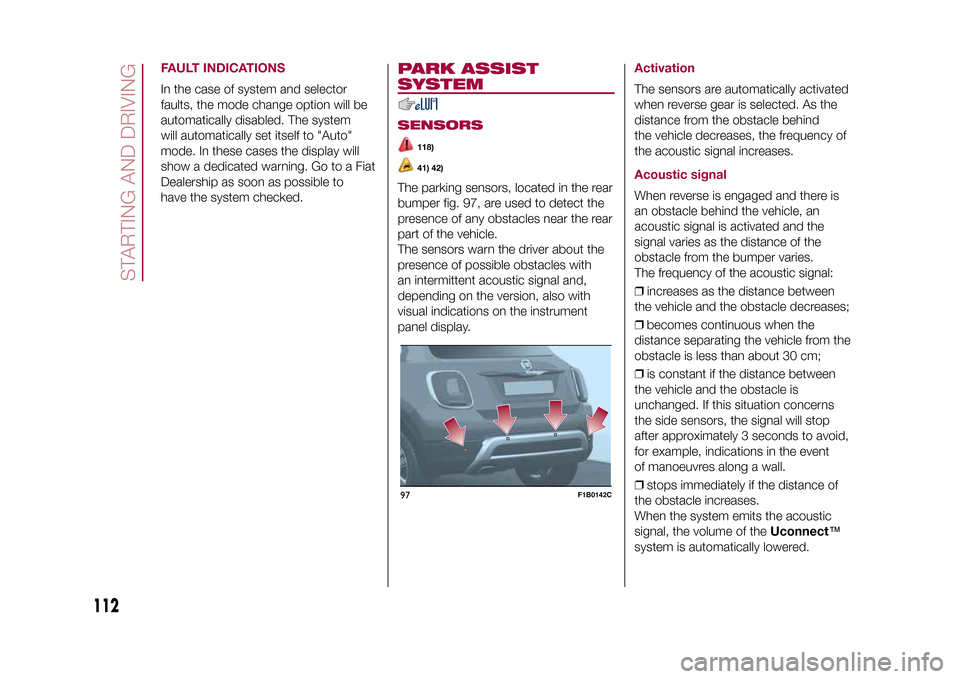
The parking sensors, located in the rear
bumper fig. 97, are used to detect the
presence of any obstacles near the rear
part of the vehicle.
The sensors warn the driver about the
presence of possible obstacles with
an intermittent acoustic signal and,
depending on the version, also with
visual indications on the instrument
panel display.
ActivationThe sensors are automatically activated
when reverse gear is selected. As the
distance from the obstacle behind
the vehicle decreases, the frequency of
the acoustic signal increases.Acoustic signalWhen reverse is engaged and there is
an obstacle behind the vehicle, an
acoustic signal is activated and the
signal varies as the distance of the
obstacle from the bumper varies.
The frequency of the acoustic signal:
❒increases as the distance between
the vehicle and the obstacle decreases;
❒becomes continuous when the
distance separating the vehicle from the
obstacle is less than about 30 cm;
❒is constant if the distance between
the vehicle and the obstacle is
unchanged. If this situation concerns
the side sensors, the signal will stop
after approximately 3 seconds to avoid,
for example, indications in the event
of manoeuvres along a wall.
❒stops immediately if the distance of
the obstacle increases.
When the system emits the acoustic
signal, the volume of theUconnect™
system is automatically lowered.
97
F1B0142C
112
STARTING AND DRIVING
15-12-2014 8:23 Pagina 112
Page 137 of 240
❒place the punctured tyre in the boot
upside down (with the outer part facing
upwards), then reposition the jack
and the used tools;
❒reposition the boot mat then
reposition the reconfigurable load
platform in a flat position (see "Boot" in
the "Knowing your vehicle" chapter).
Restore the standard wheel as soon as
possible, because, once placed in the
associated compartment, the boot load
platform is rendered uneven as the
standard wheel is larger than the
space-saver wheel.
WARNING
132)If left in the passenger compartment,
the punctured wheel and jack constitute
a serious risk to the safety of occupants in
the event of accidents or sharp braking.
Therefore, always place both the jack and
punctured wheel in the dedicated housing
in the boot.
133)It is extremely dangerous to attempt
to change a wheel on the side of the
vehicle next to the driving lane: make sure
that the vehicle is at a sufficient distance
from the road, to avoid being run over.
134)Alert other drivers that the vehicle is
stationary in compliance with local
regulations: hazard warning lights, warning
triangle, etc. Any passengers on board
should leave the vehicle, especially if it is
heavily laden. Passengers should stay
away from on-coming traffic while the
wheel is being changed. For safety
reasons, always block the wheels with the
chocks provided.135)The vehicle's driving characteristics
will be modified with the space-saver wheel
fitted. Avoid violent acceleration and
braking, abrupt steering and fast cornering.
The overall duration of the space-saver
wheel is about 3000 km, after which the
relevant tyre must be replaced with another
one of the same type. Never install a
standard tyre on a rim that is designed for
use with a space-saver wheel. Have the
wheel repaired and refitted as soon as
possible. Using two or more space-saver
wheels at the same time is forbidden.
Do not grease the threads of the stud bolts
before fitting them: they might slip out
when driving!
136)The space-saver wheel is specific to
your vehicle: do not use it on other models,
or use the space-saver wheel of other
models on your vehicle. The space-saver
wheel must only be used in the event of an
emergency. It must only be used for the
distance necessary to reach a service point
and the vehicle speed must not exceed
80 km/h. The space-saver wheel has
an orange label that summarises the main
cautions for use and limitations. Never
remove or cover the sticker.
126
F1B0225C
135
15-12-2014 8:23 Pagina 135
Page 138 of 240
137)The jack is a tool developed and
designed only for changing a wheel, if a
tyre gets punctured or damaged, on the
vehicle with which it is supplied or on other
vehicles of the same model. It must not
be used, for example, to jack other vehicle
models or objects. Never use the jack to
carry out maintenance or repairs under the
vehicle. Never position yourself under a
jacked vehicle. Should it be necessary to
work under the vehicle, contact a Fiat
Dealership. Incorrectly positioning the jack
may cause the vehicle to fall: use it only
in the positions indicated. Do not use the
jack for loads higher than the one shown
on its label.
138)The space-saver wheel cannot be
fitted with snow chains. If a front (drive) tyre
is punctured and chains are needed, use
a standard wheel from the rear axle and
install the space-saver wheel on the rear
axle. In this way, with two normal drive
wheels at the front axle, it is possible to use
snow chains (this instruction is also valid
for 4x4 versions).
139)Never tamper with the inflation valve.
Never introduce tools of any kind between
the rim and the tyre. Check tyre and
space-saver wheel pressures regularly,
complying with the values given in the
"Technical specifications" chapter.
FIX&GO AUTOMATIC
KIT(where provided)DESCRIPTION
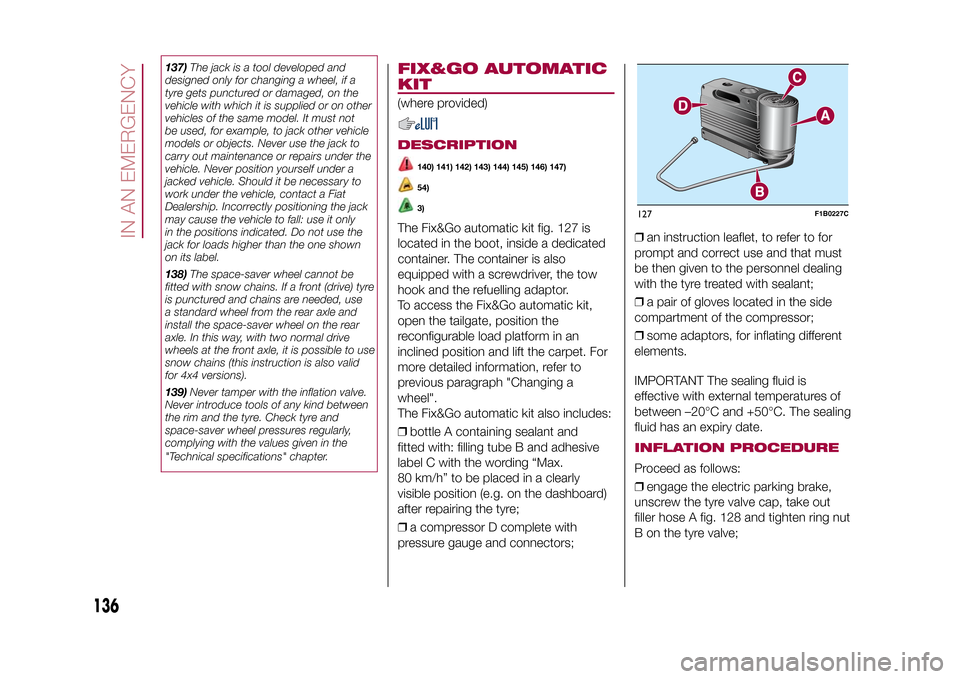
140) 141) 142) 143) 144) 145) 146) 147)54)3)
The Fix&Go automatic kit fig. 127 is
located in the boot, inside a dedicated
container. The container is also
equipped with a screwdriver, the tow
hook and the refuelling adaptor.
To access the Fix&Go automatic kit,
open the tailgate, position the
reconfigurable load platform in an
inclined position and lift the carpet. For
more detailed information, refer to
previous paragraph "Changing a
wheel".
The Fix&Go automatic kit also includes:
❒bottle A containing sealant and
fitted with: filling tube B and adhesive
label C with the wording “Max.
80 km/h” to be placed in a clearly
visible position (e.g. on the dashboard)
after repairing the tyre;
❒a compressor D complete with
pressure gauge and connectors;❒an instruction leaflet, to refer to for
prompt and correct use and that must
be then given to the personnel dealing
with the tyre treated with sealant;
❒a pair of gloves located in the side
compartment of the compressor;
❒some adaptors, for inflating different
elements.
IMPORTANT The sealing fluid is
effective with external temperatures of
between –20°C and +50°C. The sealing
fluid has an expiry date.
INFLATION PROCEDUREProceed as follows:
❒engage the electric parking brake,
unscrew the tyre valve cap, take out
filler hose A fig. 128 and tighten ring nut
B on the tyre valve;127
F1B0227C
136
IN AN EMERGENCY
15-12-2014 8:23 Pagina 136
Page 199 of 240
SWITCHING THE SYSTEM
ON/OFFThe system is switched on/off by
pressing the
button/knob.
Turn the button/knob clockwise to
increase the radio volume or
anticlockwise to decrease it.
RADIO (TUNER) MODEThe system features the following
tuners: AM, FM.Radio mode selectionPress the RADIO button on the front
panel to activate radio mode.Selecting a frequency
bandThe different tuning modes can be
selected by pressing the RADIO button
on the front panel.Indications on displayAfter the desired radio station is
selected on the display, the following
information is shown (INFO mode
activated):
In the upper part: the preset station, the
time and the other active radio settings
are highlighted.
In the central part: the name of the
current station, the frequency and the
radio text information (if any) are
highlighted.
FM station listPress the BROWSE ENTER button/
knob to display the complete list of the
FM stations that can be received.AM/FM radio station
storageThe preset stations are available in all
system modes and are selected by
touching one of the presetting buttons
1-2-3-4-5-6on the front panel.
If you are tuned to a radio station that
you wish to store, hold down the button
on the display which corresponds to
the desired preset until an acoustic
confirmation signal is emitted.AM/FM radio station
selectionTo search for the desired radio station
press the
or
button or use
the wheel of the steering wheel controls
, or turn the "BROWSE ENTER"
knob.
Previous/next radio
station searchPress briefly the
or
button or
use the wheel of the steering wheel
controls
: when the button is
released the previous or next
radio station is displayed.
Previous/next radio
station fast searchHold down the
or
button to
start the fast search: when the button is
released, the first tunable radio is
played.
MEDIA MODEInteraction modes for AUX, USB/iPod
operation.Track change
(next/previous)Briefly press the
button or turn the
BROWSE ENTER button/knob
clockwise to play the next track.
Briefly press thebutton or turn the
BROWSE ENTER button/knob
anticlockwise to return to the beginning
of the selected track or to the beginning
of the previous track (if this has been
played for less than 3 seconds).
Fast forward/rewind
through tracksHold down the
button to fast
forward the selected track.
Hold down thebutton to fast
rewind the track.
197
15-12-2014 8:23 Pagina 197