wheel FIAT 500X 2016 2.G Owners Manual
[x] Cancel search | Manufacturer: FIAT, Model Year: 2016, Model line: 500X, Model: FIAT 500X 2016 2.GPages: 587, PDF Size: 5.18 MB
Page 522 of 587
•Set Date
When in this display, you may set the date manually.
Press the “Set Date” button on the touchscreen then press
the corresponding arrows above and below the current
date to adjust.
• Sync Time — If Equipped
When in this display, you may sync the time with GPS.
Press the “Sync Time” button on the touchscreen and
select from “ON” or “OFF.”
Safety/Assistance
After pressing the “Safety/Assistance” button on the
touchscreen the following settings will be available:
• ParkView Backup Camera Delay — If Equipped
When the vehicle is shifted out of REVERSE (with camera
delay turned OFF), the rear camera mode is exited and
the navigation or audio screen appears again. When the vehicle is shifted out of REVERSE (with camera delay
turned ON), the rear view image with dynamic grid lines
will be displayed for up to 10 seconds after shifting out of
“REVERSE” unless the forward vehicle speed exceeds
8 mph (12 km/h), the transmission is shifted into PARK
or the ignition is switched to the OFF position. To set the
ParkView Backup Camera Delay press the “+ MORE”
button on the faceplate, the “settings” button on the
touchscreen, then the “Safety & Driving Assistance”
button on the touchscreen. Press the “Parkview Backup
camera Delay” button on the touchscreen to turn the
ParkView Delay ON or OFF.
•
ParkView Backup Camera Active Guide Lines — If
Equipped
When this feature is enabled, active (dynamic) grid lines
are overlaid on the Rear Backup Camera image to
illustrate the width of the vehicle and its projected back
up path based on the steering wheel position. A dashed
520 MULTIMEDIA
Page 524 of 587
in REVERSE and the vehicle speed is less than 11 mph
(18 km/h). It will provide an alert (audible and/or
visual) to indicate the proximity to other objects. The
system can be enabled with Sound Only, or Sound and
Display. To change the ParkSense status, press and re-
lease the “Sound Only” or “Sounds and Display” button.
Refer to “ParkSense” in “Starting And Operating” for
system function and operating information.
•Front ParkSense Volume — If Equipped
Front Park Assist chime volume settings can be selected
from the EVIC or Uconnect System (if equipped). The
chime volume settings include “LOW,” “MEDIUM,” and
“HIGH.” The factory default volume setting is MEDIUM.
• Rear ParkSense Volume — If Equipped
Rear Park Assist chime volume settings can be selected
from the EVIC or Uconnect System (if equipped). The
chime volume settings include “LOW,” “MEDIUM,” and
“HIGH.” The factory default volume setting is MEDIUM. •
Rear ParkSense Braking Assist — If Equipped
When this feature is selected, the park assist system will
detect objects located behind the vehicle and utilize
autonomous braking to stop the vehicle.
Refer to “ParkSense Rear Park Assist” in “Starting and
Operating” for system function and operating informa-
tion.
• LaneSense Warning — If Equipped
When this feature is selected, it sets the distance at which
the steering wheel will provide feedback for potential
lane departures. The LDW sensitivity can be set to
provide either an “early,” “medium,” or “late” warning
zone start point.
For further information, refer to “LaneSense Warning
(LDW)” in “Starting and Operating.”
522 MULTIMEDIA
Page 525 of 587
•LaneSense Strength — If Equipped
When this feature is selected, it sets the strength of the
steering wheel feedback for potential lane departures.
The amount of directional torque the steering system can
apply to the steering wheel to correct for vehicle lane
departure can be set at “Low,” “Medium” or “High.”
For further information, refer to “Lane Departure Warn-
ing (LDW)” in “Starting and Operating.”
• Blind Spot Alert — If Equipped
When this feature is selected, the Blind Spot Alert feature
can be set to Off, Lights or Lights and Chime. The Blind
Spot Alert feature can be activated in Lights mode. When
this mode is selected, the Blind Spot Monitor (BSM)
system is activated and will only show a visual alert in
the outside mirrors. When Lights & Chime mode is
activated, the Blind Spot Monitor (BSM) will show a
visual alert in the outside mirrors as well as an audible alert when the turn signal is on. When Off is selected, the
Blind Spot Monitor (BSM) system is deactivated. To
change the Blind Spot Alert status, press the “Off,”
“Lights” or “Lights & Chime” button on the touchscreen.
Then press the back arrow button on the touchscreen.
NOTE:
If your vehicle has experienced any damage in
the area where the sensor is located, even if the fascia is
not damaged, the sensor may have become misaligned.
Take your vehicle to an authorized dealer to verify sensor
alignment. A sensor that is misaligned will result in the
BSM not operating to specification.
• Rain Sensing Wipers — If Equipped
When this feature is selected, the system will automati-
cally activate the windshield wipers if it senses moisture
on the windshield. To make your selection, press the
“Rain Sensing” button on the touchscreen and make your
selection.
11
MULTIMEDIA 523
Page 527 of 587
•Auto High Beams — If Equipped
When this feature is selected, the high beam headlights
will activate/deactivate automatically under certain con-
ditions. To make your selection, press the “Auto High
Beams” button on the touchscreen, then select from “On”
or “Off.”
• Daytime Running Lights
When this feature is selected, the headlights will turn on
while the engine is running. To make your selection,
press the “Daytime Running Lights” button on the touch-
screen, then choose “Yes” or “No.” The button will
highlight indicating that the setting has been selected.
• Cornering Lights
When this feature is selected, if the steering wheel
rotation angle is large or the turn signal indicators are on,
a light (incorporated in the fog light) will turn on, on the
relevant side to improve visibility at night. To change the Cornering Lights setting, press the “On” or “Off” button
on the touchscreen to select your desired Cornering
Lights setting.
•
Flash Lights With Lock — If Equipped
When this feature is selected, the exterior lights will flash
when the doors are locked or unlocked with the Remote
Keyless Entry (RKE) transmitter. This feature may be
selected with or without the Sound Horn on Lock feature
selected. To make your selection, press the “Flash Lights
w/Lock” button on the touchscreen, then choose “On” or
“Off.”
Doors & Locks
After pressing the “Doors & Locks” button on the touch-
screen the following settings will be available.
• Auto Door Locks
When this feature is selected, all doors will lock auto-
matically when the vehicle reaches a speed of 12 mph
11
MULTIMEDIA 525
Page 539 of 587
collision. The ABA applies additional brake pressure
when the driver requests insufficient brake pressure to
avoid a potential frontal collision. The ABA system
becomes active at 5 mph (8 km/h). To change the Active
Braking status, press the “Active Braking” button and
select from the following three options: “Off,” “Audio,”
“Audio & Brake.”
For further information, refer to “Forward Collision
Warning-Plus (FCW+) With Mitigation” in “Safety.”
•LaneSense Warning — If Equipped
When this feature is selected, it sets the distance at which
the steering wheel will provide feedback for potential
lane departures. The LDW sensitivity can be set to
provide either an “early,” “medium,” or “late” warning
zone start point. To change the LaneSense Warning
status, press the “LaneSense Warning” button and select
from the “Early,” “Med,” or “Late” buttons. For further information, refer to “LaneSense Warning
(LDW)” in “Starting And Operating.”
•
LaneSense Strength — If Equipped
When this feature is selected, it sets the strength of the
steering wheel feedback for potential lane departures.
The amount of directional torque the steering system can
apply to the steering wheel to correct for vehicle lane
departure can be set at “Low,” “Med” or “High.” To
change the LaneSense Strength status, Press the “La-
neSense Strength” button and select from the “Low,”
“Medium” or “High” buttons.
For further information, refer to “Lane Departure Warn-
ing (LDW)” in “Starting And Operating.”
• ParkSense — If Equipped
The ParkSense system will scan for objects behind the
vehicle when the transmission shift lever/gear selector is
in REVERSE and the vehicle speed is less than 11 mph (18
11
MULTIMEDIA 537
Page 543 of 587
•Headlight Off Delay
When this feature is selected, it allows the adjustment of
the amount of time the headlights remain on after the
engine is shut off. To change the Headlights Off Delay
setting, press the Headlights Off Delay button on the
touchscreen, and choose either 0 sec, 30 sec, 60 sec or 90
seconds. The selected button will highlight indicating
that the setting has been selected.
• Greeting Lights
When this feature is selected, it allows the greeting lights
to be turned On or Off. To change the Greeting Lights
setting, press the “On” or “Off” button on the touch-
screen to select your desired Greeting Light setting.
• Auto Dim High Beams — If Equipped
When this feature is selected, the high beam headlights
will deactivate automatically under certain conditions. To make your selection, press the “Auto High Beams”
button on the touchscreen, then choose “Yes” or “No.”
•
Daytime Running Lights
When this feature is selected, the headlights will turn on
while the engine is running. To make your selection,
press the “Daytime Running Lights” button on the touch-
screen, then choose “Yes” or “No.” The button will
highlight indicating that the setting has been selected.
• Cornering Lights
When this feature is selected, if the steering wheel
rotation angle is large or the turn signal indicators are on,
a light (incorporated in the fog light) will turn on, on the
relevant side to improve visibility at night. To change the
Cornering Lights setting, press the “On” or “Off” button
on the touchscreen to select your desired Cornering
Lights setting.
11
MULTIMEDIA 541
Page 551 of 587
Refer to the Uconnect Radio Supplement for external
USB support capability.
Center Console USB Port
Located in the center console is a second USB port.
NOTE:Depending on vehicle configuration, the USB
port may be charge only, or media file capable.
STEERING WHEEL AUDIO CONTROLS
The remote sound system controls are located at the rear
of the steering wheel. Reach behind the wheel to access
the switches.
Center Console USB (Charge Only) Port — If Equipped
11
MULTIMEDIA 549
Page 552 of 587
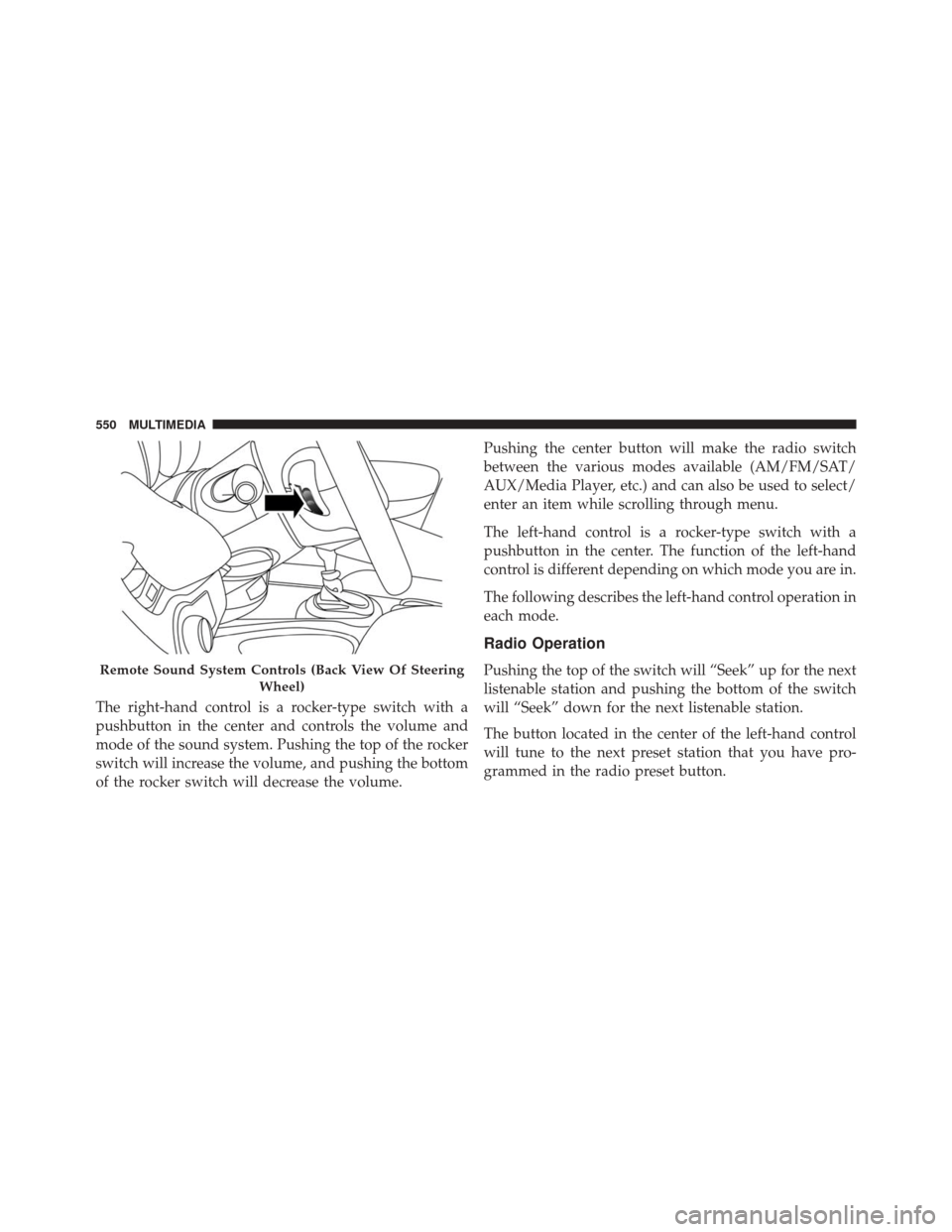
The right-hand control is a rocker-type switch with a
pushbutton in the center and controls the volume and
mode of the sound system. Pushing the top of the rocker
switch will increase the volume, and pushing the bottom
of the rocker switch will decrease the volume.Pushing the center button will make the radio switch
between the various modes available (AM/FM/SAT/
AUX/Media Player, etc.) and can also be used to select/
enter an item while scrolling through menu.
The left-hand control is a rocker-type switch with a
pushbutton in the center. The function of the left-hand
control is different depending on which mode you are in.
The following describes the left-hand control operation in
each mode.
Radio Operation
Pushing the top of the switch will “Seek” up for the next
listenable station and pushing the bottom of the switch
will “Seek” down for the next listenable station.
The button located in the center of the left-hand control
will tune to the next preset station that you have pro-
grammed in the radio preset button.Remote Sound System Controls (Back View Of Steering
Wheel)
550 MULTIMEDIA
Page 556 of 587
Key Features:
•6.5-inch Color Touchscreen Display with AM/FM/
USB/SD Card/Bluetooth
• Bluetooth with integrated voice control
• GPS navigation (if equipped)
Get Started
All you need to control your Uconnect system with your
voice are the buttons on your steering wheel.
1. Visit UconnectPhone.com to check mobile device and
feature compatibility and to find phone pairing
instructions.
2. Reduce background noise. Wind and passenger con- versations are examples of noise that may impact
recognition.
3. Speak clearly at a normal pace and volume while facing straight ahead. The microphone is positioned
on the rearview mirror and aimed at the driver.
Uconnect 6.5AN
554 MULTIMEDIA
Page 570 of 587
About Your Brakes....................... .197
Adding Engine Coolant (Antifreeze) ............460
Adding Fuel ............................ .340
Adding Washer Fluid ..................... .455
Additives, Fuel .......................... .338
AirBag ............................... .224
Advance Front Air Bag ................224, 225
Air Bag Operation ...................... .227
Air Bag Warning Light ...................237
Driver Knee Air Bag .....................228
Event Data Recorder (EDR) ................240
FrontAirBag ......................... .224
If A Deployment Occurs ..................234
Knee Impact Bolsters .....................228
Maintaining Your Air Bag System ............239
Redundant Air Bag Warning Light ...........239
Side Air Bags ......................... .228
Transporting Pets ...................... .262
Air Bag Deployment ...................... .224Air Bag Light
........................ .237, 264
Air Bag Maintenance ...................... .239
Air Cleaner, Engine (Engine Air Cleaner Filter) . . . .449
Air Conditioner Maintenance ..........113,126, 451
Air Conditioning ..................... .109, 124
Air Conditioning Controls ...................109
Air Conditioning Filter .....................452
Air Conditioning Refrigerant ..............451, 452
Air Conditioning System .................109, 451
Air Pressure, Tires ........................ .490
Air Recirculation ......................113,123
Alarm Arm The System ........................50
All Wheel Drive (AWD) .....................305
Alterations/Modifications, Vehicle ...............7
Antifreeze (Engine Coolant) ...............459, 509
Disposal ............................. .462
Anti-Lock Brake System (ABS) ................198
Appearance
Care ........................ .469
568 INDEX