brakes FIAT 500X 2016 2.G User Guide
[x] Cancel search | Manufacturer: FIAT, Model Year: 2016, Model line: 500X, Model: FIAT 500X 2016 2.GPages: 587, PDF Size: 5.18 MB
Page 329 of 587
Changing LaneSense Status
The LaneSense system has settings to adjust the intensity
of the torque warning and the warning zone sensitivity
(early/late) that you can configure through the Uconnect
system screen. Refer to “Uconnect Settings” in “Multime-
dia” for further information.
NOTE:
•When enabled the system operates above 37 mph
(60 km/h) and below 112 mph (180 km/h).
• Use of the turn signal suppresses the warnings.
• The system will not apply torque to the steering wheel
whenever a safety system engages. (anti-lock brakes,
traction control system, electronic stability control,
forward collision warning, etc.).
PARKVIEW REAR BACK UP CAMERA — IF
EQUIPPED
The ParkView Rear Back Up Camera that allows you to
see an on-screen image of your vehicle’s rear surround-
ings when the shift lever is put into REVERSE. The image
will be displayed on the touchscreen display along with
a note to “check entire surroundings” across the top of
the screen. After five seconds this note will disappear.
The ParkView camera is located above the rear license
plate.
7
STARTING AND OPERATING 327
Page 348 of 587
items down low and be sure that the weight is distributed
equally. Stow all loose items securely before driving.
Improper weight distributions can have an adverse effect
on the way your vehicle steers and handles and the way
the brakes operate.
CAUTION!
Do not load your vehicle any heavier than the GVWR
or the maximum front and rear GAWR. If you do,
parts on your vehicle can break, or it can change the
way your vehicle handles. This could cause you to
lose control. Also overloading can shorten the life of
your vehicle.
DRIVING ON SLIPPERY SURFACES
Acceleration
Rapid acceleration on snow covered, wet, or other slip-
pery surfaces may cause the driving wheels to pull
erratically to the right or left. This phenomenon occurs
when there is a difference in the surface traction under
the front (driving) wheels.
WARNING!
Rapid acceleration on slippery surfaces is dangerous.
Unequal traction can cause sudden pulling of the
front wheels. You could lose control of the vehicle
and possibly have a collision. Accelerate slowly and
carefully whenever there is likely to be poor traction
(ice, snow, wet, mud, loose sand, etc.).
346 STARTING AND OPERATING
Page 350 of 587
Shallow Standing Water
Although your vehicle is capable of driving through
shallow standing water, consider the following Cautions
and Warnings before doing so.
WARNING!
•Driving through standing water limits your vehi-
cle’s traction capabilities. Do not exceed 5 mph
(8 km/h) when driving through standing water.
• Driving through standing water limits your vehi-
cle’s braking capabilities, which increases stopping
distances. Therefore, after driving through stand-
ing water, drive slowly and lightly press on the
brake pedal several times to dry the brakes.
• Failure to follow these warnings may result in
injuries that are serious or fatal to you, your pas-
sengers, and others around you.
CAUTION!
• Always check the depth of the standing water
before driving through it. Never drive through
standing water that is deeper than the bottom of
the tire rims mounted on the vehicle.
• Determine the condition of the road or the path
that is under water and if there are any obstacles in
the way before driving through the standing water.
• Do not exceed 5 mph (8 km/h) when driving
through standing water. This will minimize wave
effects.
• Driving through standing water may cause damage
to your vehicle’s drivetrain components. Always
inspect your vehicle’s fluids (i.e., engine oil, trans-
mission, axle, etc.) for signs of contamination (i.e.,
fluid that is milky or foamy in appearance) after
driving through standing water. Do not continue to
(Continued)
348 STARTING AND OPERATING
Page 438 of 587
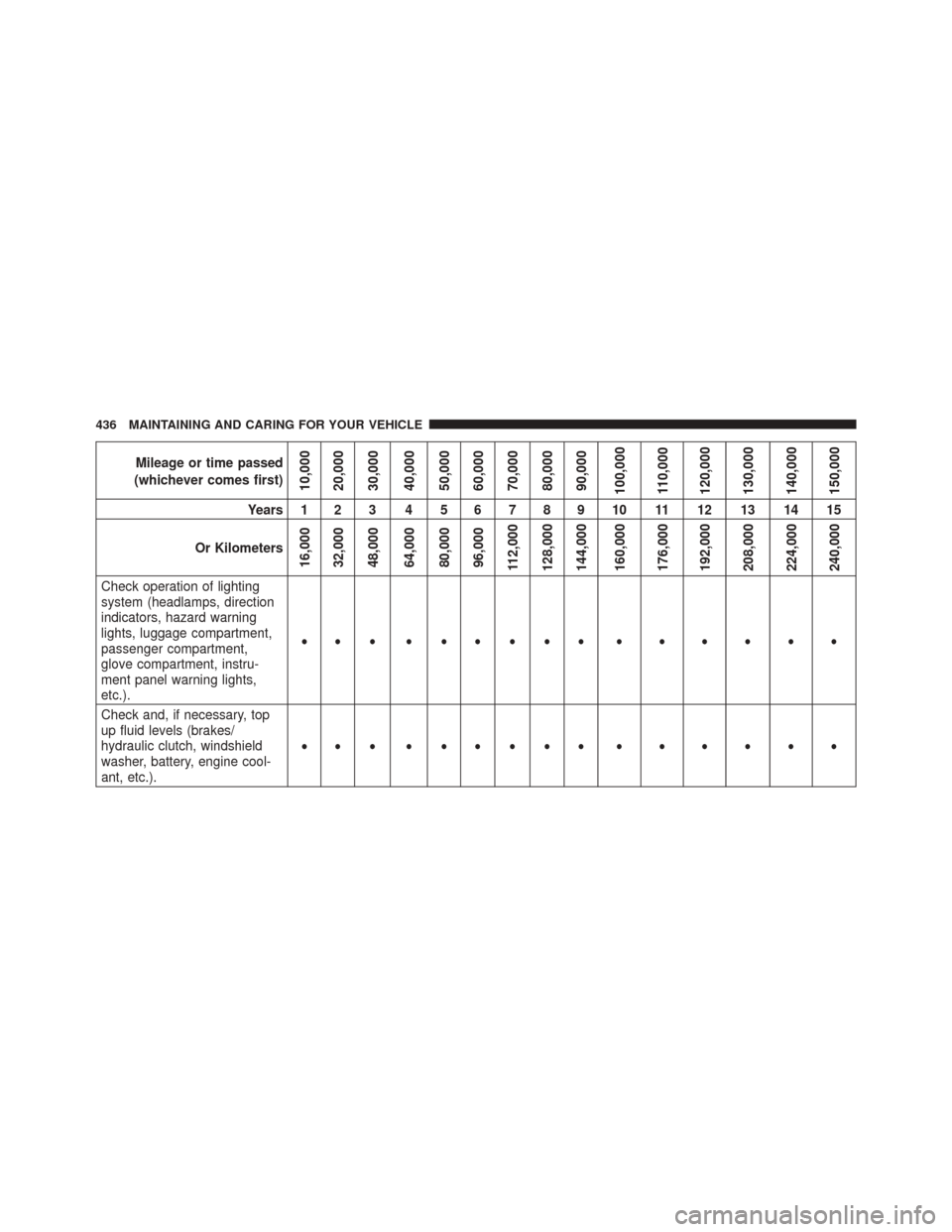
Mileage or time passed
(whichever comes first)
10,000
20,000
30,000
40,000
50,000
60,000
70,000
80,000
90,000
100,000
110,000
120,000
130,000
140,000
150,000
Years 1 2 3 4 5 6 7 8 9 10 11 12 13 14 15
Or Kilometers
16,000
32,000
48,000
64,000
80,000
96,000
112,000
128,000
144,000
160,000
176,000
192,000
208,000
224,000
240,000
Check operation of lighting
system (headlamps, direction
indicators, hazard warning
lights, luggage compartment,
passenger compartment,
glove compartment, instru-
ment panel warning lights,
etc.). •••••••••••••••
Check and, if necessary, top
up fluid levels (brakes/
hydraulic clutch, windshield
washer, battery, engine cool-
ant, etc.). •••••••••••••••
436 MAINTAINING AND CARING FOR YOUR VEHICLE
Page 439 of 587
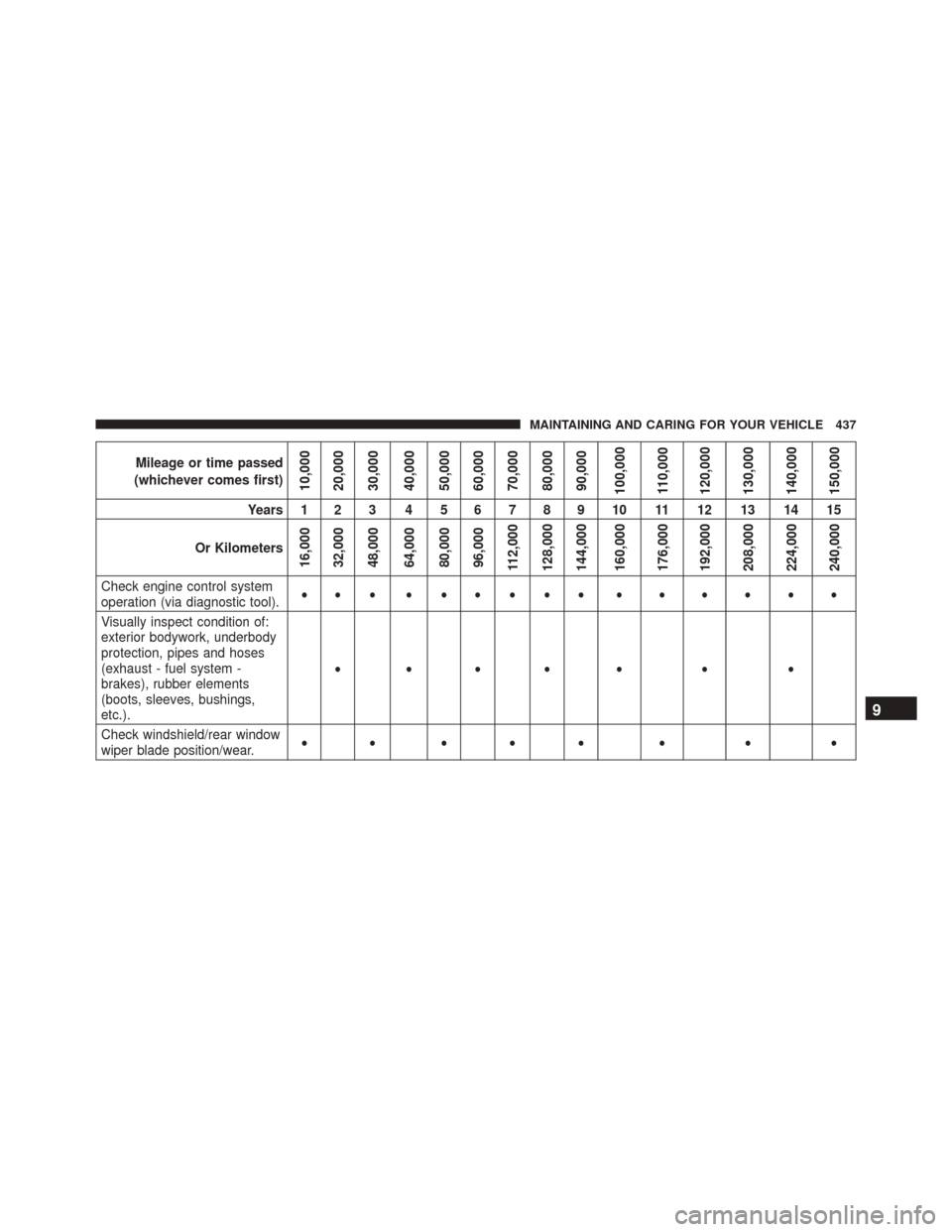
Mileage or time passed
(whichever comes first)
10,000
20,000
30,000
40,000
50,000
60,000
70,000
80,000
90,000
100,000
110,000
120,000
130,000
140,000
150,000
Years 1 2 3 4 5 6 7 8 9 10 11 12 13 14 15
Or Kilometers
16,000
32,000
48,000
64,000
80,000
96,000
112,000
128,000
144,000
160,000
176,000
192,000
208,000
224,000
240,000
Check engine control system
operation (via diagnostic tool). •••••••••••••••
Visually inspect condition of:
exterior bodywork, underbody
protection, pipes and hoses
(exhaust - fuel system -
brakes), rubber elements
(boots, sleeves, bushings,
etc.). •••• • • •
Check windshield/rear window
wiper blade position/wear. •• ••• • • •
9
MAINTAINING AND CARING FOR YOUR VEHICLE 437
Page 440 of 587
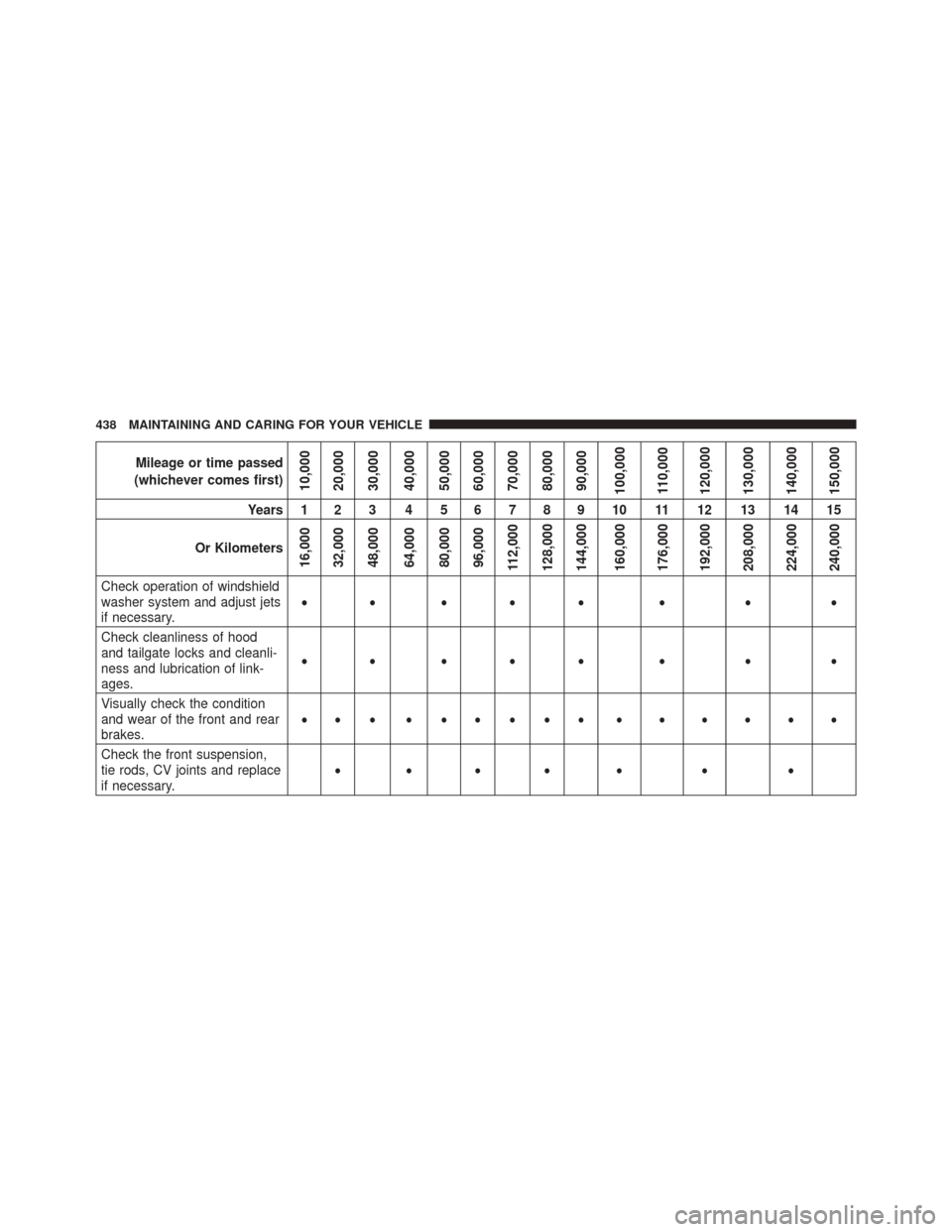
Mileage or time passed
(whichever comes first)
10,000
20,000
30,000
40,000
50,000
60,000
70,000
80,000
90,000
100,000
110,000
120,000
130,000
140,000
150,000
Years 1 2 3 4 5 6 7 8 9 10 11 12 13 14 15
Or Kilometers
16,000
32,000
48,000
64,000
80,000
96,000
112,000
128,000
144,000
160,000
176,000
192,000
208,000
224,000
240,000
Check operation of windshield
washer system and adjust jets
if necessary. •• ••• • • •
Check cleanliness of hood
and tailgate locks and cleanli-
ness and lubrication of link-
ages. •• ••• • • •
Visually check the condition
and wear of the front and rear
brakes. •••••••••••••••
Check the front suspension,
tie rods, CV joints and replace
if necessary. •••• • • •
438 MAINTAINING AND CARING FOR YOUR VEHICLE
Page 466 of 587
•If frequent engine coolant (antifreeze) additions are
required, the cooling system should be pressure tested
for leaks.
• Maintain engine coolant (antifreeze) concentration at a
minimum of 50% OAT coolant (conforming to
MS.90032) and distilled water for proper corrosion
protection of your engine which contains aluminum
components.
• Keep the front of the radiator clean. If your vehicle is
equipped with air conditioning, keep the front of the
condenser clean.
• Do not change the thermostat for Summer or Winter
operation. If replacement is ever necessary, install
ONLY the correct type thermostat. Other designs may
result in unsatisfactory engine coolant (antifreeze)
performance, poor gas mileage, and increased emis-
sions.Brake System
In order to assure brake system performance, all brake
system components should be inspected periodically.
Refer to the “Maintenance Schedule” for the proper
maintenance intervals.
WARNING!
Riding the brakes can lead to brake failure and
possibly a collision. Driving with your foot resting or
riding on the brake pedal can result in abnormally
high brake temperatures, excessive lining wear, and
possible brake damage. Riding the brakes may also
reduce braking capacity in an emergency.
Brake Master Cylinder
The fluid level in the master cylinder should be checked
when performing under hood services, or immediately if
the “Brake Warning Light” is on.
464 MAINTAINING AND CARING FOR YOUR VEHICLE
Page 523 of 587
center line overlay indicates the center of the vehicle to
assist with parking or aligning to a hitch/receiver.
•ParkView Backup Camera Fixed Guide Lines — If
Equipped
When this feature is enabled, fixed (static) grid lines are
overlaid on the Rear Backup Camera image to illustrate
the width of the vehicle.
• Forward Collision Warning-Plus (FCW+) — If
Equipped
The Front Collision Warning (FCW+) feature can be can
be set to Far, or set to Near. The default status of FCW+
is the Far setting. This means the system will warn you of
a possible collision with the vehicle in front of you when
you are farther away. This gives you the most reaction
time. To change the setting for a more dynamic driving
experience, select the Near setting. This warns you of a possible collision when you are much closer to the
vehicle in front of you. To change the FCW+ status, press
and release the “Near” or “Far” button.
•
Forward Collision Warning-Plus (FCW+) Active
Braking — If Equipped
The FCW+ system includes Advanced Brake Assist
(ABA). When this feature is selected, it will apply the
brakes to slow your vehicle in case of potential forward
collision. The ABA applies additional brake pressure
when the driver requests insufficient brake pressure to
avoid a potential frontal collision. The ABA system
becomes active at 5 mph (8 km/h).
For further information, refer to “Forward Collision
Warning-Plus (FCW+) With Mitigation” in “Safety.”
• ParkSense — If Equipped
The ParkSense system will scan for objects behind the
vehicle when the transmission shift lever/gear selector is
11
MULTIMEDIA 521
Page 538 of 587
make your selection, press the “–” or “+” buttons on the
touchscreen to adjust the hours up or down.
•Set Minutes
This feature will allow you to adjust the minutes. The
Sync Time with GPS “On” button must not be selected.
To make your selection, press the “–” or “+” buttons on
the touchscreen to adjust the minutes up or down.
• Time Format
This feature will allow you to select the time format
display setting. Press the “Time Format” button on the
touchscreen. Press the “12hrs” or “24hrs” button on the
touchscreen.
Safety & Driving Assistance
After pressing the “Safety & Driving Assistance” button
on the touchscreen the following settings will be avail-
able: •
Forward Collision Warning-Plus (FCW+) — If
Equipped
The Front Collision Warning (FCW+) feature can be can
be set to Far, or Near. The default status of FCW+ is the
Far setting. This means the system will warn you of a
possible collision with the vehicle in front of you when
you are farther away. This gives you the most reaction
time. To change the setting for a more dynamic driving
experience, select the Near setting. This warns you of a
possible collision when you are much closer to the
vehicle in front of you. To change the FCW+ status, press
the “Fwd Collision Warning” button and select the
“Near”, “Medium” or “Far” button.
• Forward Collision Warning-Plus (FCW+) Active
Braking — If Equipped
The FCW+ system includes Advanced Brake Assist
(ABA). When this feature is selected, it will apply the
brakes to slow your vehicle in case of potential forward
536 MULTIMEDIA
Page 542 of 587
•Brakes
This feature provides a means for a technician or vehicle
owner to utilize a vehicle integrated, menu driven sys-
tem, to command the electric park brake retraction, to
service the rear foundation brakes (brake pads, calipers,
rotors, etc.). For further information, refer to “Service
Mode (Unlocking rear brake pads)” in “Maintaining And
Caring For Your Vehicle.”
• Auto Park Brake
This feature provides a means for a technician or vehicle
owner to enable/disable auto insertion of the Electric
Park Brake. For further information, refer to “Auto Park
Brake” in “Starting And Operating.”Lights
After pressing the “Lights” button on the touchscreen the
following settings will be available:
• Headlight Sensitivity
When this feature is selected, it allows the Headlight
Sensitivity to be adjusted according to three levels:
Level 1 = minimum sensitivity
Level 2 = medium sensitivity
Level 3 = maximum sensitivity
NOTE: The greater the sensitivity set, the less the exter-
nal light variation required to turn on the lights (e.g. with
a setting on level 3 at sunset the headlights turn on earlier
than in levels 1 and 2). To change the Headlight Sensi-
tivity setting, press the “1,” “2” or “3” button on the
touchscreen to select your desired Headlight Sensitivity
level.
540 MULTIMEDIA