wheel FIAT 500X 2016 2.G Service Manual
[x] Cancel search | Manufacturer: FIAT, Model Year: 2016, Model line: 500X, Model: FIAT 500X 2016 2.GPages: 587, PDF Size: 5.18 MB
Page 308 of 587
Additionally, on dry pavement under heavy throttle
input (where one may have no wheel spin), torque will be
sent to the rear in a pre-emptive effort to improve vehicle
launch and performance characteristics.
CAUTION!
All wheels must have the same size and type tires.
Unequal tire sizes must not be used. Unequal tire
size may cause failure of the power transfer unit.
DYNAMIC SELECTOR — IF EQUIPPED
The Dynamic Selector combines the capabilities of the
vehicle control systems, along with driver input, to
provide the best performance in all driving conditions.The Dynamic Selector consists of the following positions:
Auto Mode –
This mode is designed for comfort and
safety in normal driving conditions. In versions equipped
with all-wheel drive this mode also reduces fuel con-
sumption, as automatically alters the distribution of
torque between the front and rear axle.Dynamic Selector Switch
306 STARTING AND OPERATING
Page 324 of 587
LaneSense system uses a forward looking camera to
detect lane markings and measure vehicle position
within the lane boundaries.
When both lane markings are detected and the driver
unintentionally drifts out of the lane (no turn signal
applied), the LaneSense system provides a haptic warn-
ing in the form of torque applied to the steering wheel to
prompt the driver to remain within the lane boundaries.
If the driver continues to unintentionally drift out of the
lane, the LaneSense system provides a visual warning
through the Electronic Vehicle Information Center (EVIC)
to prompt the driver to remain within the lane boundar-
ies.
The driver may manually override the haptic warning by
applying torque into the steering wheel at any time.
When only a single lane marking is detected and the
driver unintentionally drifts across the lane marking (no
turn signal applied), the LaneSense system provides avisual warning through the EVIC to prompt the driver to
remain within the lane. When only a single lane marking
is detected, a haptic (torque) warning will not be pro-
vided.
NOTE:
When operating conditions have been met, the
LaneSense system will monitor if the driver ’s hands are
on the steering wheel and provides an audible warning
to the driver when the driver ’s hands are not detected on
the steering wheel. The system will cancel if the driver
does not return their hands to the wheel.
Turning LaneSense ON Or OFF
The default status of LaneSense is “OFF”.
The LaneSense button is located on the end of the turn
signal stalk located on the steering column.
To turn the LaneSense system ON, push the
Lane Assist button (LED turns OFF). A “Lane
Sense On” message is shown in the EVIC.
322 STARTING AND OPERATING
Page 326 of 587
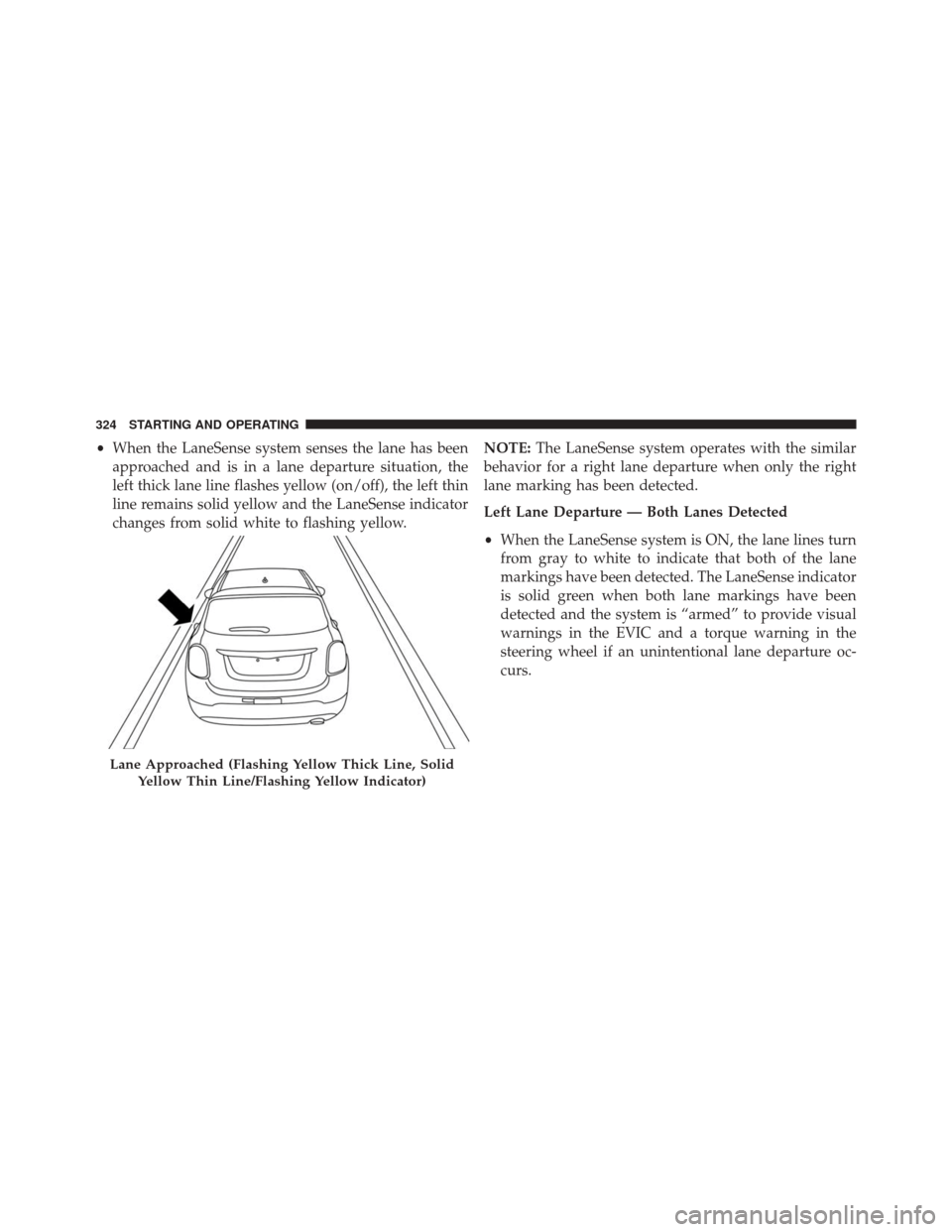
•When the LaneSense system senses the lane has been
approached and is in a lane departure situation, the
left thick lane line flashes yellow (on/off), the left thin
line remains solid yellow and the LaneSense indicator
changes from solid white to flashing yellow. NOTE:
The LaneSense system operates with the similar
behavior for a right lane departure when only the right
lane marking has been detected.
Left Lane Departure — Both Lanes Detected
• When the LaneSense system is ON, the lane lines turn
from gray to white to indicate that both of the lane
markings have been detected. The LaneSense indicator
is solid green when both lane markings have been
detected and the system is “armed” to provide visual
warnings in the EVIC and a torque warning in the
steering wheel if an unintentional lane departure oc-
curs.
Lane Approached (Flashing Yellow Thick Line, Solid
Yellow Thin Line/Flashing Yellow Indicator)
324 STARTING AND OPERATING
Page 327 of 587
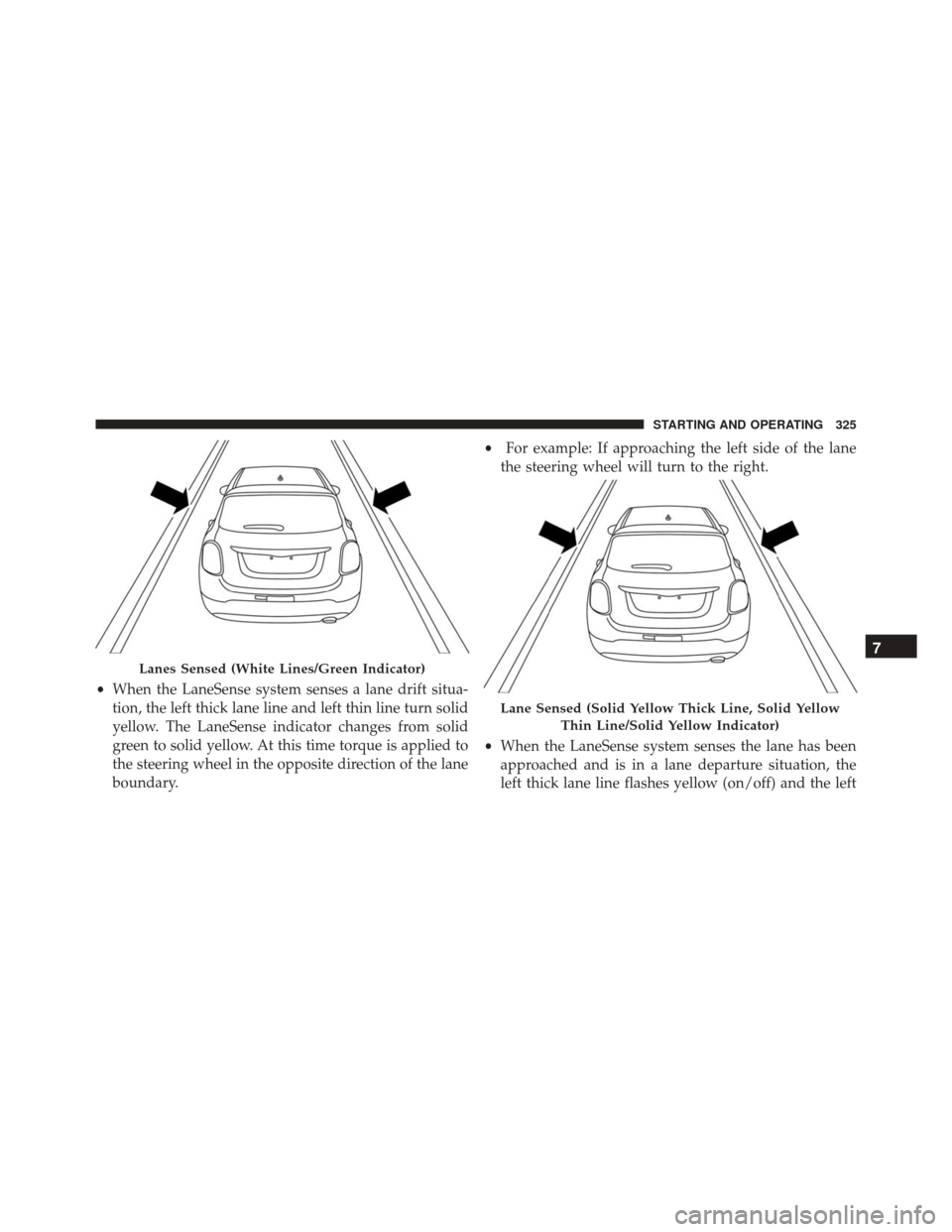
•When the LaneSense system senses a lane drift situa-
tion, the left thick lane line and left thin line turn solid
yellow. The LaneSense indicator changes from solid
green to solid yellow. At this time torque is applied to
the steering wheel in the opposite direction of the lane
boundary. •
For example: If approaching the left side of the lane
the steering wheel will turn to the right.
• When the LaneSense system senses the lane has been
approached and is in a lane departure situation, the
left thick lane line flashes yellow (on/off) and the left
Lanes Sensed (White Lines/Green Indicator)
Lane Sensed (Solid Yellow Thick Line, Solid Yellow
Thin Line/Solid Yellow Indicator)
7
STARTING AND OPERATING 325
Page 328 of 587
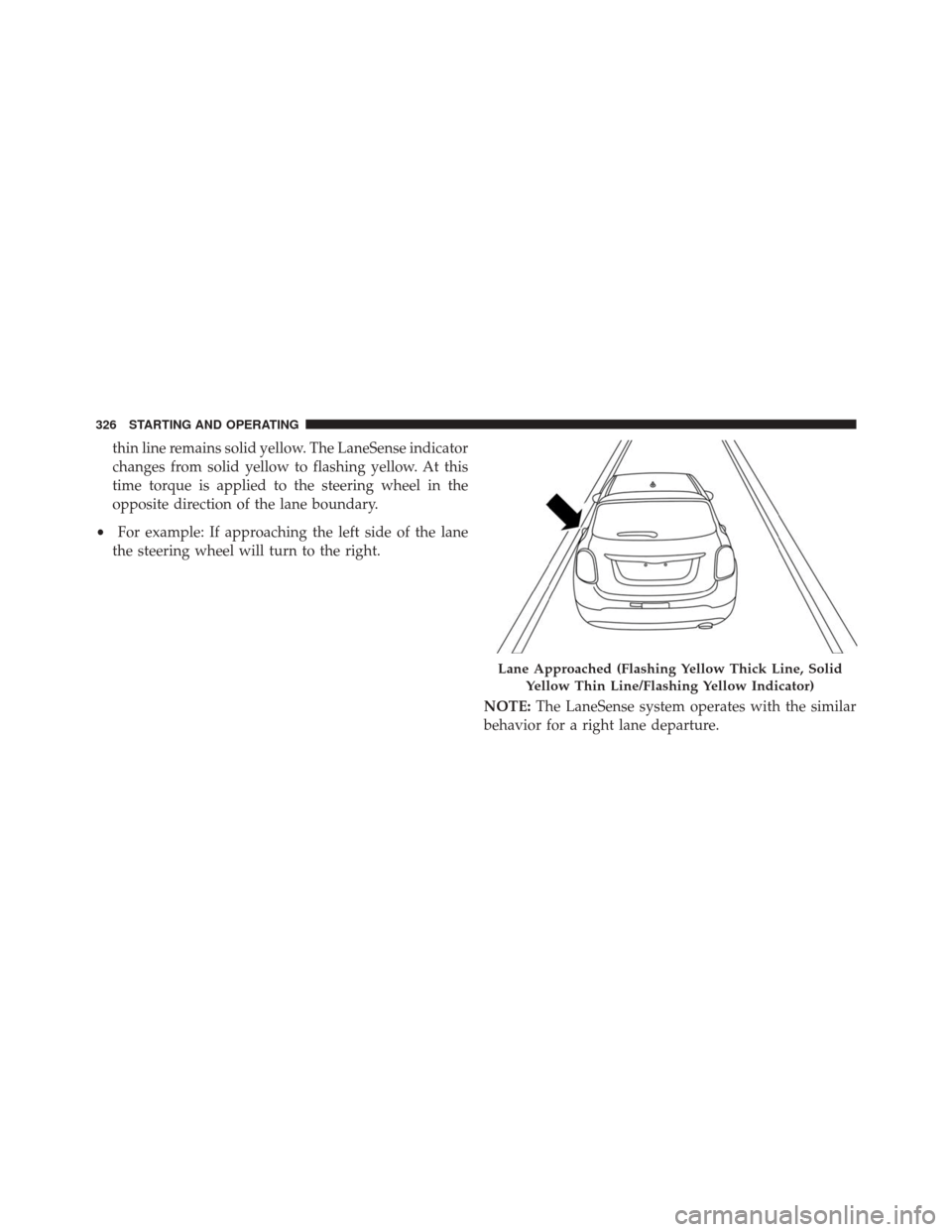
thin line remains solid yellow. The LaneSense indicator
changes from solid yellow to flashing yellow. At this
time torque is applied to the steering wheel in the
opposite direction of the lane boundary.
• For example: If approaching the left side of the lane
the steering wheel will turn to the right.
NOTE:The LaneSense system operates with the similar
behavior for a right lane departure.
Lane Approached (Flashing Yellow Thick Line, Solid
Yellow Thin Line/Flashing Yellow Indicator)
326 STARTING AND OPERATING
Page 329 of 587
Changing LaneSense Status
The LaneSense system has settings to adjust the intensity
of the torque warning and the warning zone sensitivity
(early/late) that you can configure through the Uconnect
system screen. Refer to “Uconnect Settings” in “Multime-
dia” for further information.
NOTE:
•When enabled the system operates above 37 mph
(60 km/h) and below 112 mph (180 km/h).
• Use of the turn signal suppresses the warnings.
• The system will not apply torque to the steering wheel
whenever a safety system engages. (anti-lock brakes,
traction control system, electronic stability control,
forward collision warning, etc.).
PARKVIEW REAR BACK UP CAMERA — IF
EQUIPPED
The ParkView Rear Back Up Camera that allows you to
see an on-screen image of your vehicle’s rear surround-
ings when the shift lever is put into REVERSE. The image
will be displayed on the touchscreen display along with
a note to “check entire surroundings” across the top of
the screen. After five seconds this note will disappear.
The ParkView camera is located above the rear license
plate.
7
STARTING AND OPERATING 327
Page 330 of 587
When the vehicle is shifted out of REVERSE (with camera
delay turned OFF), the rear camera mode is exited and
the navigation or audio screen appears again.
When the vehicle is shifted out of REVERSE (with camera
delay turned ON), the camera image will continue to be
displayed for up to 10 seconds after shifting out ofREVERSE unless the vehicle speed exceeds 8 mph
(13 km/h), the vehicle is shifted into PARK or the ignition
is switched to the STOP/OFF position.
A touchscreen button to disable the camera is available
when the vehicle is not in REVERSE. Display of the
camera image after shifting out of REVERSE can be
disabled via Uconnect Settings.
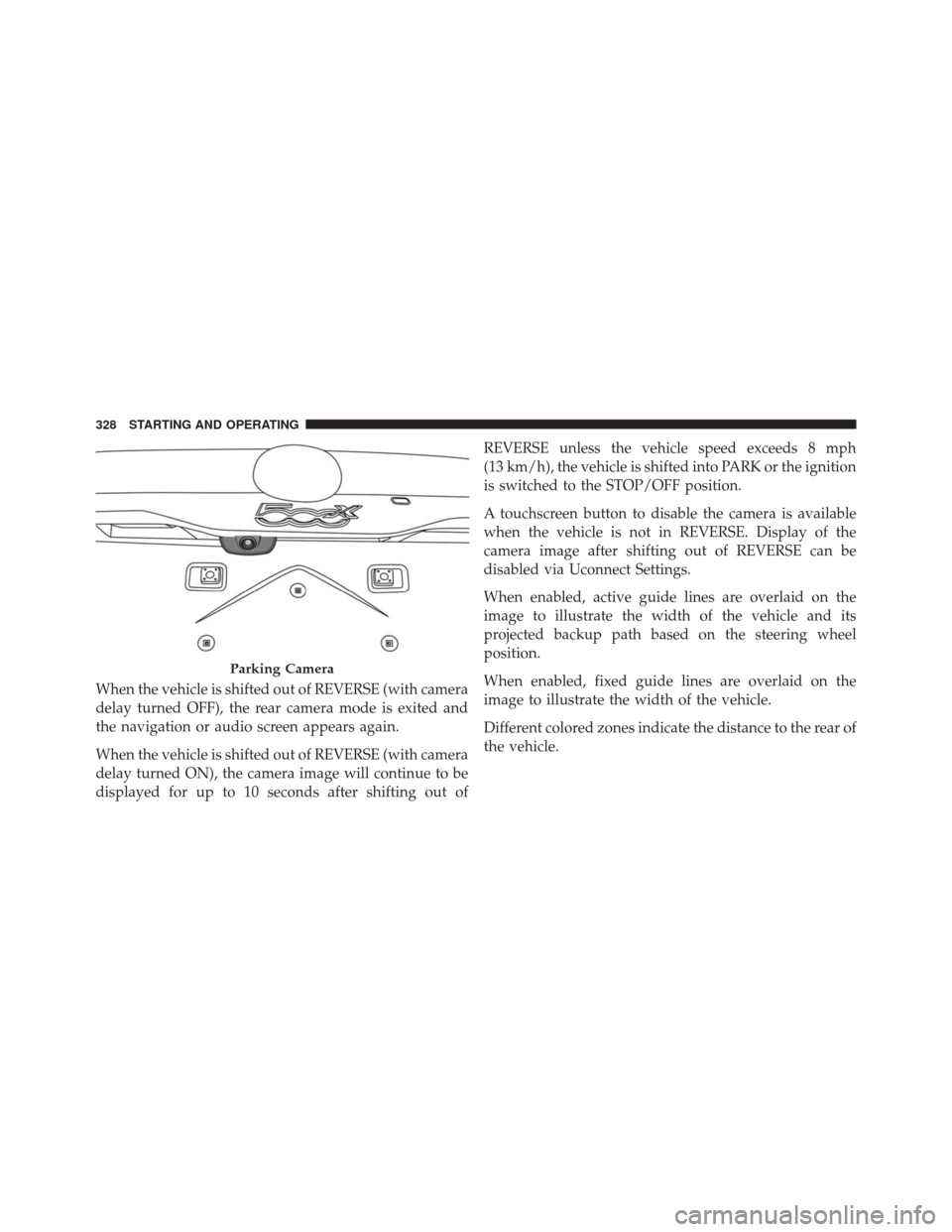
When enabled, active guide lines are overlaid on the
image to illustrate the width of the vehicle and its
projected backup path based on the steering wheel
position.
When enabled, fixed guide lines are overlaid on the
image to illustrate the width of the vehicle.
Different colored zones indicate the distance to the rear of
the vehicle.
Parking Camera
328 STARTING AND OPERATING
Page 333 of 587
The TPMS will continue to warn the driver of low tire
pressure as long as the condition exists, and will not turn
off until the tire pressure is at or above the recommended
cold tire pressure on the placard. Once the low tire
pressure warning (Tire Pressure Monitoring Telltale
Light) illuminates, you must increase the tire pressure to
the recommended cold tire pressure in order for the Tire
Pressure Monitoring Telltale Light to turn off. The system
will automatically update and the Tire Pressure Monitor-
ing Telltale Light will turn off once the system receives
the updated tire pressures. The vehicle may need to be
driven for up to 20 minutes above 15 mph (24 km/h) in
order for the TPMS to receive this information.
For example, your vehicle may have a recommended
cold (parked for more than three hours) tire pressure of
30 psi (207 kPa). If the ambient temperature is 68° F (20°
C) and the measured tire pressure is 27 psi (186 kPa), a
temperature drop to 20° F (-7° C) will decrease the tire
pressure to approximately 23 psi (159 kPa). This tirepressure is sufficiently low enough to turn on the Tire
Pressure Monitoring Telltale Light. Driving the vehicle
may cause the tire pressure to rise to approximately 27
psi (186 kPa), but the Tire Pressure Monitoring Telltale
Light will still be on. In this situation, the Tire Pressure
Monitoring Telltale Light will turn off only after the tires
are inflated to the vehicle’s recommended cold tire pres-
sure value.
CAUTION!
•
The TPMS has been optimized for the original
equipment tires and wheels. TPMS pressures and
warnings have been established for the tire size
equipped on your vehicle. Undesirable system op-
eration or sensor damage may result when using
replacement equipment that is not of the same size,
type, and/or style. Aftermarket wheels can cause
(Continued)
7
STARTING AND OPERATING 331
Page 335 of 587
Base System
This is the TPMS warning indicator located in the
instrument cluster.
The TPMS uses wireless technology with wheel rim
mounted electronic sensors to monitor tire pressure lev-
els. Sensors, mounted to each wheel as part of the valve
stem, transmit tire pressure readings to the Receiver
Module.
NOTE: It is particularly important for you to check the
tire pressure in all of the tires on your vehicle regularly
and to maintain the proper pressure.
The TPMS consists of the following components:
• Receiver Module.
• Four Tire Pressure Monitoring Sensors.
• Tire Pressure Monitoring Telltale Light.
Tire Pressure Monitoring Low Pressure Warnings
The Tire Pressure Monitoring Telltale Light will illumi-
nate in the instrument cluster, an acoustic signal will be
activated, and the “Check left or right front/rear tire”
text message will display when one or more of the four
active road tire pressures are low. Should this occur, you
should stop as soon as possible, check the inflation
pressure of each tire on your vehicle, and inflate each tire
to the vehicle’s recommended cold placard pressure
value. The system will automatically update and the Tire
Pressure Monitoring Light will extinguish once the up-
dated tire pressures have been received. The vehicle may
need to be driven for up to 20 minutes above 15 mph
(24 km/h) to receive this information.
Check TPMS Warnings
The Tire Pressure Monitoring Telltale Light will flash on
and off for 75 seconds and remain on solid when a system
fault is detected, an audible chime will be activated and
7
STARTING AND OPERATING 333
Page 336 of 587
the “Service Tire Pressure Monitoring System” text mes-
sage will display. If the ignition key is cycled, this
sequence will repeat providing the system fault still
exists. The Tire Pressure Monitoring Telltale Light will
turn off when the fault condition no longer exists. A
system fault can occur with any of the following sce-
narios:
•Jamming due to electronic devices or driving next to
facilities emitting the same radio frequencies as the
TPM sensors.
• Installing some form of aftermarket window tinting
that affects radio wave signals.
• Snow or ice around the wheels or wheel housings.
• Using tire chains on the vehicle.
• Using wheels/tires not equipped with TPM sensors. NOTE:
Your vehicle may be equipped with a compact
spare wheel and tire assembly.
• The compact spare tire does not have a tire pressure
monitoring sensor. Therefore, the TPMS will not moni-
tor the tire pressure in the compact spare tire.
• If you install the compact spare tire in place of a road
tire that has a pressure below the low-pressure warn-
ing limit, upon the next ignition key cycle, a chime will
sound and the Tire Pressure Monitoring Telltale Light
will still turn ON due to the low tire.
• However, after driving the vehicle for up to 20 minutes
above 15 mph (24 km/h), the Tire Pressure Monitoring
Telltale Light will flash on and off for 75 seconds and
then remain on solid.
334 STARTING AND OPERATING