Release Switch FIAT 500X 2016 2.G Owners Manual
[x] Cancel search | Manufacturer: FIAT, Model Year: 2016, Model line: 500X, Model: FIAT 500X 2016 2.GPages: 587, PDF Size: 5.18 MB
Page 40 of 587
NOTE:When having the Sentry Key Immobilizer System
serviced, bring all vehicle keys with you to an authorized
dealer.
IGNITION SWITCH
Operation
Your vehicle uses either a key start ignition system or
keyless ignition system. The key start ignition system
consists of a Key Fob with a Remote Keyless Entry (RKE)
transmitter and an Integrated Mechanical Key Ignition.
The keyless ignition system consists of a Key Fob with
Remote Keyless Entry (RKE) transmitter and a Keyless
Push Button Ignition.
Mechanical Key
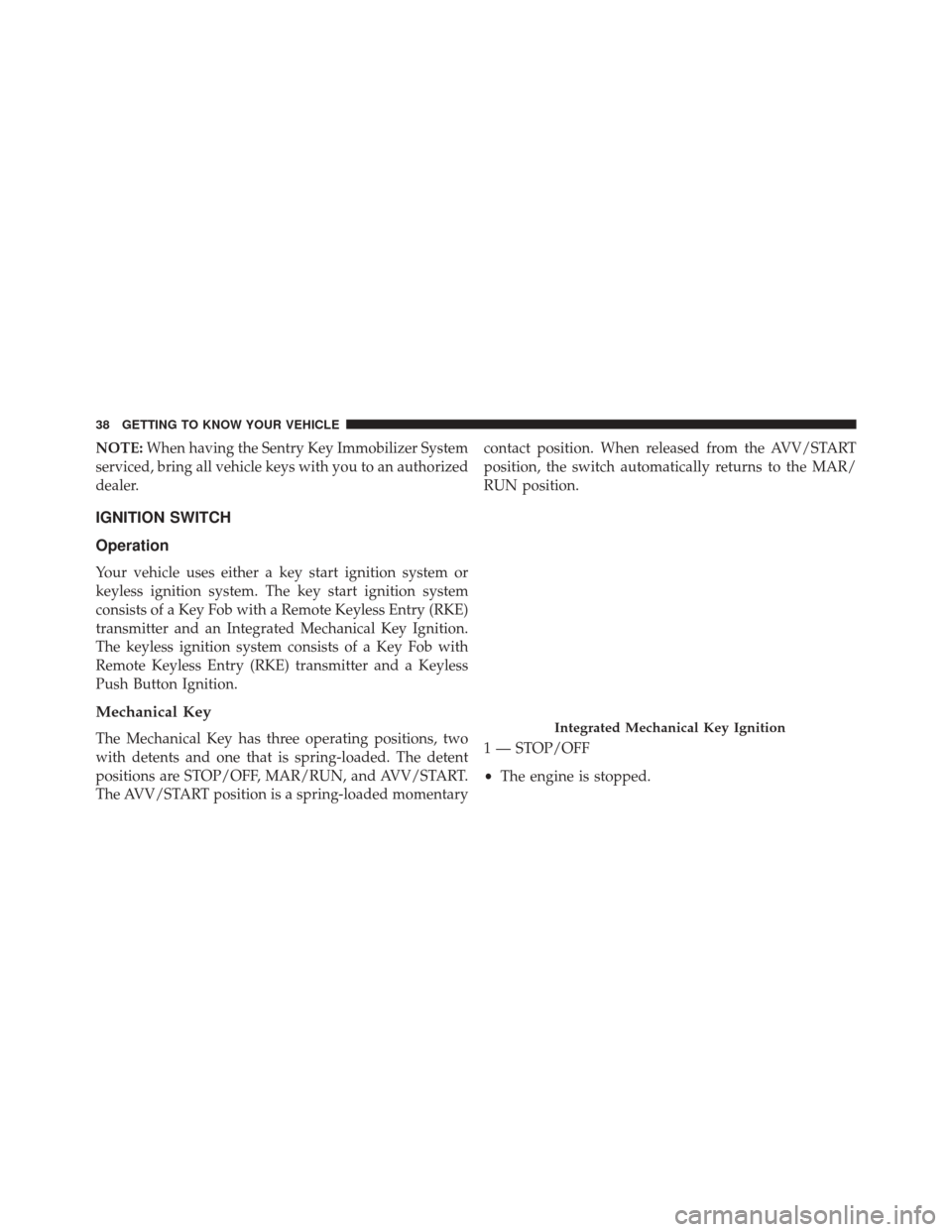
The Mechanical Key has three operating positions, two
with detents and one that is spring-loaded. The detent
positions are STOP/OFF, MAR/RUN, and AVV/START.
The AVV/START position is a spring-loaded momentary contact position. When released from the AVV/START
position, the switch automatically returns to the MAR/
RUN position.
1 — STOP/OFF
•
The engine is stopped.Integrated Mechanical Key Ignition
38 GETTING TO KNOW YOUR VEHICLE
Page 48 of 587
To Exit Remote Start Mode Without Driving The
Vehicle
Push and release the REMOTE START button one time or
allow the engine to run for the entire 15-minute cycle.
NOTE:To avoid unintentional shutdowns, the system
will disable the one time push of the REMOTE START
button for two seconds after receiving a valid Remote
Start request.
To Exit Remote Start Mode And Drive The Vehicle
Before the end of 15-minute cycle, push and release the
UNLOCK button on the RKE transmitter to unlock the
doors and disarm the Vehicle Security Alarm (if
equipped). Then, prior to the end of the 15-minute cycle,
push and release the START/STOP button. NOTE:
For vehicles equipped with the Keyless Enter-
N-Go feature, the message “Remote Start Active — Push
Start Button” will display in the Electronic Vehicle Infor-
mation Center (EVIC) or the Driver Information Dispay
(DID) until you push the START button.
Remote Start Comfort Systems — If Equipped
When Remote Start is activated, the heated steering
wheel and driver heated seat features will automatically
turn on in cold weather. These features will stay on
through the duration of Remote Start or until the ignition
switch is cycled to the MAR/RUN position.
NOTE: The Remote Start Comfort System can be acti-
vated and deactivated through the Uconnect Settings. For
more information on Remote Start Comfort System op-
eration, refer to “Uconnect Settings” in “Multimedia.”
46 GETTING TO KNOW YOUR VEHICLE
Page 50 of 587
CAUTION!(Continued)
•The Sentry Key Immobilizer system is not compat-
ible with some aftermarket remote starting sys-
tems. Use of these systems may result in vehicle
starting problems and loss of security protection.
General Information
The following regulatory statement applies to all radio
frequency (RF) devices equipped in this vehicle:
This device complies with Part 15 of the FCC Rules and
with Industry Canada licence-exempt RSS standard(s).
Operation is subject to the following two conditions:
1. This device may not cause harmful interference, and 2. This device must accept any interference received,
including interference that may cause undesired op-
eration.
NOTE: Changes or modifications not expressly approved
by the party responsible for compliance could void the
user ’s authority to operate the equipment.VEHICLE SECURITY ALARM
The Vehicle Security Alarm monitors the vehicle doors
for unauthorized entry and if the ignition switch is cycled
to the ON/RUN position without a valid key. While the
Vehicle Security Alarm is armed, interior switches for
door locks and liftgate release are disabled.
48 GETTING TO KNOW YOUR VEHICLE
Page 69 of 587
Forward Or Rearward Adjustment
The seat can be adjusted both forward and rearward.
Push the seat switch forward or rearward, the seat will
move in the direction of the switch. Release the switch
when the desired position has been reached.
Height Adjustment
The height of the seats can be adjusted up or down. Pull
upward or push downward on the seat switch, the seat
will move in the direction of the switch. Release the
switch when the desired position is reached.
Recline Adjustment
Push the seat recliner switch forward or rearward, the
seatback will move in the direction of the switch. Release
the switch when the desired position has been reached.Tilt Adjustment
The angle of the seat cushion can be adjusted up or
down. Pull upward or push downward on the front of
the seat switch, the front of the seat cushion will move in
the direction of the switch.
Power Lumbar Adjustment
Push the switch forward or rearward to increase or
decrease the lumbar support. Push the switch upward or
downward to raise or lower the lumbar support.
Heated Seats — If Equipped
The heated seat switches are located on the instrument
panel.
You can choose between two heating levels:
•
Push the heated seat button
once to turn the HI
setting ON. 4
GETTING TO KNOW YOUR VEHICLE 67
Page 105 of 587
CAUTION!
Always remove any buildup of snow that prevents
the windshield wiper blades from returning to the
“park” position. If the windshield wiper switch is
turned off, and the blades cannot return to the “park”
position, damage to the wiper motor may occur.
Windshield Wiper Operation
Rotate the windshield wiper knob to one of the two
detent positions for intermittent settings, the third detent
for low wiper operation and the fourth for high wiper
operation.
Windshield Washer Operation
To use the washer, pull the lever toward you and hold
while spray is desired. If the lever is pulled while in the
intermittent setting, the wipers will turn on and operate for several wipe cycles after the lever is released, and
then resume the intermittent interval previously selected.
If the lever is pulled while the wipers are in the off
position, the wipers will operate for several wipe cycles,
then turn off.
WARNING!
Sudden loss of visibility through the windshield
could lead to a collision. You might not see other
vehicles or other obstacles. To avoid sudden icing of
the windshield during freezing weather, warm the
windshield with the defroster before and during
windshield washer use.
4
GETTING TO KNOW YOUR VEHICLE 103
Page 108 of 587
mode. Once the operator is in the vehicle and has placed
the ignition switch in the MAR/RUN position, rain
sensing wiper operation can resume, if it has been
selected, and no other inhibit conditions (mentioned
previously) exist.
Rear Window Wiper/Washer
The rear wiper/washer controls are located on the lever
on the right side of the steering column. The rear
wiper/washer is operated by rotating a switch, located at
the middle of the lever.Rotate the center portion of the lever upward to
the first detent for intermittent operation and to
the second detent for continuous rear wiper operation.
To use the washer, push the lever forward and
hold while spray is desired. If the lever is
pushed while in the intermittent setting, the
wiper will turn on and operate for several wipe cycles after the end of the lever is released, and then
resume the intermittent interval previously selected.
If the lever is pushed while the wiper is in the off
position, the wiper will operate for several wipe cycles,
then turn off.
NOTE:
As a protective measure, the pump will stop if
the switch is held for more than 30 seconds. Once the
lever is released, the pump will resume normal opera-
tion.
If the rear wiper is operating when the ignition is turned
to the STOP/OFF position, the wiper will automatically
return to the “park” position.
Rear Window Defroster
The rear window defroster button is located with
the Climate Controls on the instrument panel.
Push this button to turn on the rear window defroster. An
indicator in the button will illuminate when the rear
106 GETTING TO KNOW YOUR VEHICLE
Page 131 of 587
AUTO-Down Feature — If EquippedThe driver and passenger power window switches have
an AUTO-down feature. Push the switch for half a
second and release it; the window will go down auto-
matically.
To partially open the window, push the window switch
and release it when you want the window to stop.
To stop the window from going all the way down during
the AUTO-down operation, pull up on the switch briefly
when the when the window has reached the desired
position.
Push To Activate AUTO-Down Feature
4
GETTING TO KNOW YOUR VEHICLE 129
Page 132 of 587
AUTO-Up Feature With Anti-Pinch Protection — If
Equipped
Lift and hold the window switch for half a second,
release, and the window will go up automatically.
To stop the window from going all the way up during the
AUTO operation, push down on the switch briefly.To partially close the window, lift the window switch and
release it when you want the window to stop.
NOTE:
•
If the window runs into any obstacle during auto-
closure, it will reverse direction and then go back
down. Remove the obstacle and use the window
switch again to close the window.
• Any impact due to rough road conditions may trigger
the auto-reverse function unexpectedly during auto-
closure. If this happens, pull the switch lightly and
hold to close the window manually.
WARNING!
There is no anti-pinch protection when the window
is almost closed. Be sure to clear all objects from the
window before closing.
Lift To Activate AUTO-Up Feature
130 GETTING TO KNOW YOUR VEHICLE
Page 136 of 587
Anti-Pinch Safety Device
This feature will detect an obstruction in the opening of
the sunroof during Express Close operation. If an ob-
struction in the path of the sunroof is detected, the
sunroof will automatically retract. Remove the obstruc-
tion if this occurs. Next, push the switch forward and
release to Express Close.
Emergency Operation
If the power sunroof switch fails, the sunroof can be
operated manually as follows:
1. Remove the protective cap located on the inner lining.
2. Remove the Allen Key that is supplied in the tool bagin the cargo area.
3. Insert the Allen Key into the key hole and turn it clockwise to open the roof or counter-clockwise to
close.
Emergency Key And Key Hole
1 — Allen Key
2 — Key Hole
134 GETTING TO KNOW YOUR VEHICLE
Page 166 of 587
•UP Arrow Button
Push and release the UP arrow button to scroll
upward through the main menu and
submenus.
• DOWN Arrow Button
Push and release the DOWN arrow button to
scroll downward through the main menu and
submenus.
• RIGHT Arrow Button
Push and release the RIGHT arrow button to
access the information screens or submenu
screens of a main menu item.
• BACK/LEFT Arrow Button
Push and release the LEFT arrow button to
access the information screens or submenu
screens of a main menu item. •
OK Button
The OK button may be used for the following:
Select
Reset (hold)
Engine Oil Change Reset
Your vehicle is equipped with an engine oil change
indicator system. The “Change Engine Oil” message will
flash in the EVIC display for approximately 10 seconds
after a single chime has sounded to indicate the next
scheduled oil change interval. The engine oil change
indicator system is duty cycle based, which means the
engine oil change interval may fluctuate, dependent
upon your personal driving style.
Unless reset, this message will continue to display each
time you turn the ignition switch to the MAR/RUN
164 GETTING TO KNOW YOUR INSTRUMENT CLUSTER