steering wheel FIAT 500X 2019 Owner handbook (in English)
[x] Cancel search | Manufacturer: FIAT, Model Year: 2019, Model line: 500X, Model: FIAT 500X 2019Pages: 284, PDF Size: 8.33 MB
Page 168 of 284
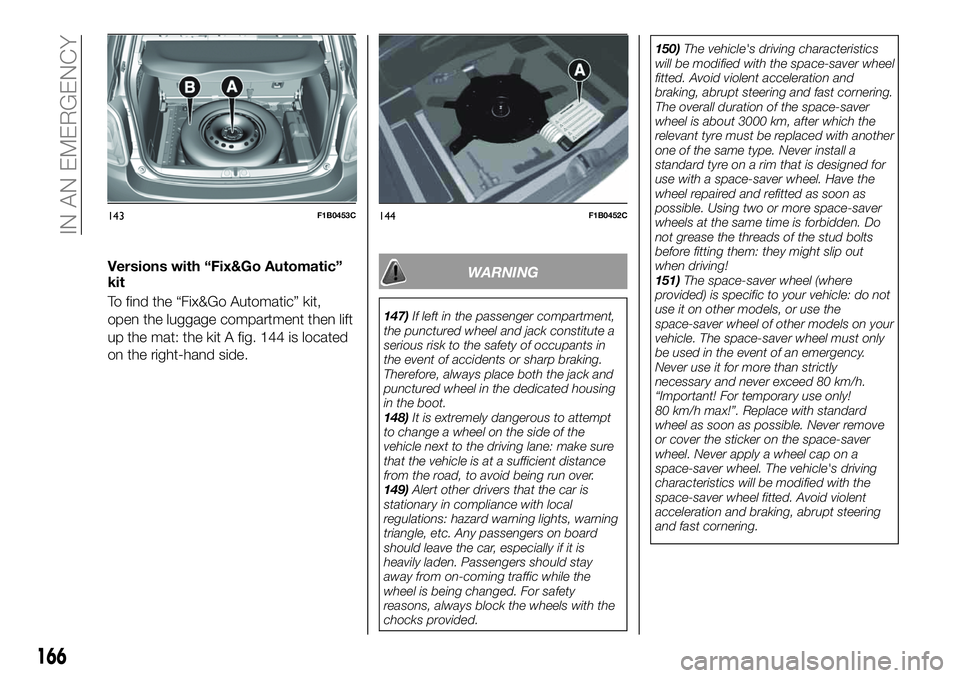
Versions with “Fix&Go Automatic”
kit
To find the “Fix&Go Automatic” kit,
open the luggage compartment then lift
up the mat: the kit A fig. 144 is located
on the right-hand side.WARNING
147)If left in the passenger compartment,
the punctured wheel and jack constitute a
serious risk to the safety of occupants in
the event of accidents or sharp braking.
Therefore, always place both the jack and
punctured wheel in the dedicated housing
in the boot.
148)It is extremely dangerous to attempt
to change a wheel on the side of the
vehicle next to the driving lane: make sure
that the vehicle is at a sufficient distance
from the road, to avoid being run over.
149)Alert other drivers that the car is
stationary in compliance with local
regulations: hazard warning lights, warning
triangle, etc. Any passengers on board
should leave the car, especially if it is
heavily laden. Passengers should stay
away from on-coming traffic while the
wheel is being changed. For safety
reasons, always block the wheels with the
chocks provided.150)The vehicle's driving characteristics
will be modified with the space-saver wheel
fitted. Avoid violent acceleration and
braking, abrupt steering and fast cornering.
The overall duration of the space-saver
wheel is about 3000 km, after which the
relevant tyre must be replaced with another
one of the same type. Never install a
standard tyre on a rim that is designed for
use with a space-saver wheel. Have the
wheel repaired and refitted as soon as
possible. Using two or more space-saver
wheels at the same time is forbidden. Do
not grease the threads of the stud bolts
before fitting them: they might slip out
when driving!
151)The space-saver wheel (where
provided) is specific to your vehicle: do not
use it on other models, or use the
space-saver wheel of other models on your
vehicle. The space-saver wheel must only
be used in the event of an emergency.
Never use it for more than strictly
necessary and never exceed 80 km/h.
“Important! For temporary use only!
80 km/h max!”. Replace with standard
wheel as soon as possible. Never remove
or cover the sticker on the space-saver
wheel. Never apply a wheel cap on a
space-saver wheel. The vehicle's driving
characteristics will be modified with the
space-saver wheel fitted. Avoid violent
acceleration and braking, abrupt steering
and fast cornering.
143F1B0453C144F1B0452C
166
IN AN EMERGENCY
Page 175 of 284
fully depress the brake pedal and
hold it down;
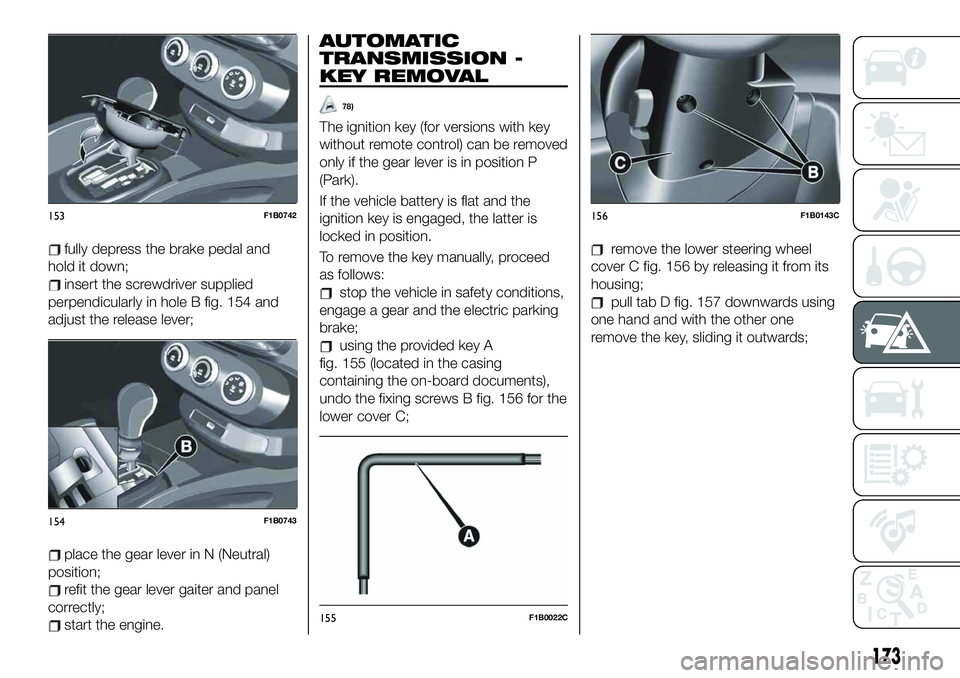
insert the screwdriver supplied
perpendicularly in hole B fig. 154 and
adjust the release lever;
place the gear lever in N (Neutral)
position;
refit the gear lever gaiter and panel
correctly;
start the engine.
AUTOMATIC
TRANSMISSION -
KEY REMOVAL
78)
The ignition key (for versions with key
without remote control) can be removed
only if the gear lever is in position P
(Park).
If the vehicle battery is flat and the
ignition key is engaged, the latter is
locked in position.
To remove the key manually, proceed
as follows:
stop the vehicle in safety conditions,
engage a gear and the electric parking
brake;
using the provided key A
fig. 155 (located in the casing
containing the on-board documents),
undo the fixing screws B fig. 156 for the
lower cover C;
remove the lower steering wheel
cover C fig. 156 by releasing it from its
housing;
pull tab D fig. 157 downwards using
one hand and with the other one
remove the key, sliding it outwards;
153F1B0742
154F1B0743
155F1B0022C
156F1B0143C
173
Page 179 of 284
Rear
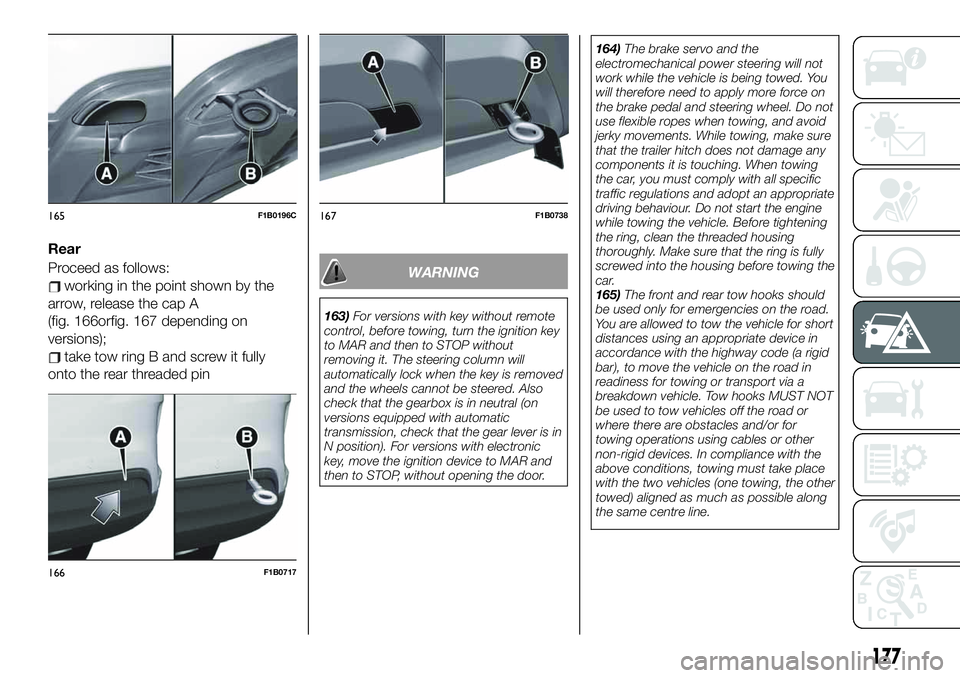
Proceed as follows:
working in the point shown by the
arrow, release the cap A
(fig. 166orfig. 167 depending on
versions);
take tow ring B and screw it fully
onto the rear threaded pin
WARNING
163)For versions with key without remote
control, before towing, turn the ignition key
to MAR and then to STOP without
removing it. The steering column will
automatically lock when the key is removed
and the wheels cannot be steered. Also
check that the gearbox is in neutral (on
versions equipped with automatic
transmission, check that the gear lever is in
N position). For versions with electronic
key, move the ignition device to MAR and
then to STOP, without opening the door.164)The brake servo and the
electromechanical power steering will not
work while the vehicle is being towed. You
will therefore need to apply more force on
the brake pedal and steering wheel. Do not
use flexible ropes when towing, and avoid
jerky movements. While towing, make sure
that the trailer hitch does not damage any
components it is touching. When towing
the car, you must comply with all specific
traffic regulations and adopt an appropriate
driving behaviour. Do not start the engine
while towing the vehicle. Before tightening
the ring, clean the threaded housing
thoroughly. Make sure that the ring is fully
screwed into the housing before towing the
car.
165)The front and rear tow hooks should
be used only for emergencies on the road.
You are allowed to tow the vehicle for short
distances using an appropriate device in
accordance with the highway code (a rigid
bar), to move the vehicle on the road in
readiness for towing or transport via a
breakdown vehicle. Tow hooks MUST NOT
be used to tow vehicles off the road or
where there are obstacles and/or for
towing operations using cables or other
non-rigid devices. In compliance with the
above conditions, towing must take place
with the two vehicles (one towing, the other
towed) aligned as much as possible along
the same centre line.
165F1B0196C
166F1B0717
167F1B0738
177
Page 203 of 284
BATTERY
174) 175) 176)
85)
5)
The battery does not require the
electrolyte to be topped up with distilled
water.
A periodic check carried out at a Fiat
Dealership is, however, necessary to
check efficiency.
Replacing the battery
If necessary, replace the battery with
another original battery with the same
specifications. Follow the battery
Manufacturer’s instructions for
maintenance.
USEFUL ADVICE FOR
EXTENDING THE LIFE OF
YOUR BATTERY
Useful advice for extending the life
of your battery
To avoid draining your battery and
make it last longer, observe the
following instructions:
when you park the vehicle, ensure
that the doors, tailgate and bonnet are
closed properly, to prevent any lights
from remaining on inside the passenger
compartment;
switch off all roof lights inside the
vehicle: the vehicle is however
equipped with a system which switches
all interior lights off automatically;
do not keep accessories (e.g. radio,
hazard warning lights, etc.) switched on
for a long time when the engine is not
running;
before performing any operation on
the electrical system, disconnect the
negative battery cable.
If, after purchasing the vehicle, you wish
to install electrical accessories which
require permanent electrical supply (e.g.
alarm, etc.) or accessories which
influence the electrical supply
requirements, contact a Fiat Dealership,
whose qualified staff will evaluate the
overall electrical consumption.
86)
IMPORTANT After the battery is
disconnected, the steering must be
initialised. The
warning light on the
instrument panel (or symbol on the
display) switches on to indicate this. To
carry out this procedure, simply turn the
steering wheel all the way from one end
to the other or drive in a straight line for
about a hundred metres.IMPORTANT If the charge level remains
under 50% for a long time, the battery
is damaged by sulphation, reducing its
capacity and efficiency at start-up. The
battery is also more prone to the risk of
freezing (at temperatures of -10°C).
Refer to the "Vehicle inactivity"
paragraph in "Starting and driving"
chapter if the vehicle is left parked for a
long time.
WARNING
166)Never smoke while working in the
engine compartment: gas and inflammable
vapours may be present, with the risk of
fire.
167)Be very careful when working in the
engine compartment when the engine is
hot: you may get burned.
168)If the engine oil is being topped up,
wait for the engine to cool down before
loosening the filler cap, particularly for
vehicles with aluminium cap (where
provided). WARNING: risk of burns!
169)The cooling system is pressurised. If
the cap needs replacing, do so with
another original or the effectiveness of the
system may be compromised. Do not
remove the reservoir plug when the engine
is hot: you risk scalding yourself.
201
Page 210 of 284
Check the tension of the snow chains
after the first few metres have been
driven.
IMPORTANT Using snow chains with
tyres with non-original dimensions may
damage the vehicle.
IMPORTANT Using different size or type
(M+S, snow, etc.) tyres between front
and rear axle may adversely affect
vehicle driveability, with the risk of losing
control of the vehicle and resulting
accidents.
SUGGESTIONS ABOUT
THE ROTATION OF THE
TYRES
The front and rear tyres are subject to
different loads and stress due to
steering, manoeuvres and braking. For
this reason they are subject to uneven
wear.
To resolve this problem, tyres should be
rotated at the appropriate time. Tyre
rotation means moving the wheels to a
different position, with respect to the
vehicle. The single wheel will therefore
operate on a different axle and, where
possible, on the opposite side of the
vehicle.Tyre rotation contributes to the
preservation of the grip and traction
performance on wet, muddy or snowy
roads, guaranteeing optimal driveability
of the vehicle.
In the case of irregular wear of the tyres
identify the cause and correct it as soon
as possible, by contacting a Fiat
Dealership.
WARNING
180)The road holding qualities of the car
also depend on the correct inflation
pressure of the tyres.
181)If tyre pressure is too low, it may
overheat and be severely damaged as a
result.
182)If the tyres are "unidirectional", do not
switch tyres from the right-hand side of the
vehicle to the left-hand side, and vice
versa. This type of tyres can only be
switched from the front axle to the rear axle
and vice versa, keeping them on the same
side of the vehicle.
183)Never submit alloy rims to repainting
treatments requiring the use of
temperatures exceeding 150°C. The
mechanical properties of the wheels could
be impaired.
184)The wheel rotation methods shown in
the text must NOT be used with one-way
tyres! This type of tyres can only be
switched from the front axle to the rear axle
and vice versa, keeping them on the same
side of the vehicle.185)Travelling with partially or completely
deflated tyres can cause safety problems
and damage the concerned tyre beyond
repair.
IMPORTANT
95)Keep your speed down when snow
chains are fitted; do not exceed 50 km/h.
Avoid potholes, do not drive over steps or
pavements and do not drive long distances
over roads without snow, to avoid
damaging both your vehicle and the road
surface.
208
SERVICING AND MAINTENANCE
Page 245 of 284
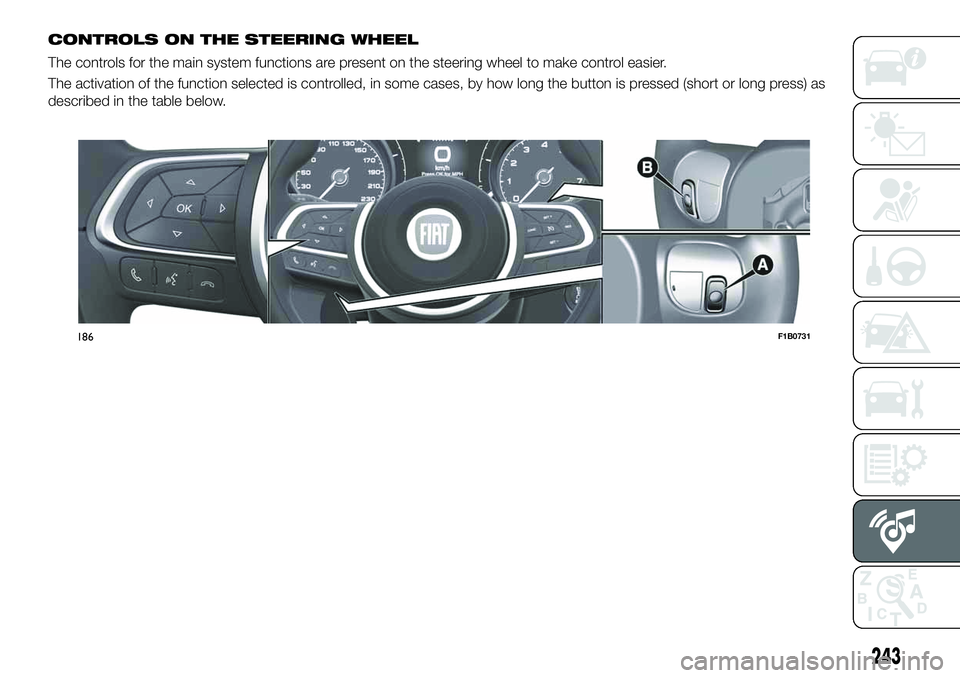
CONTROLS ON THE STEERING WHEEL
The controls for the main system functions are present on the steering wheel to make control easier.
The activation of the function selected is controlled, in some cases, by how long the button is pressed (short or long press) as
described in the table below.
186F1B0731
243
Page 246 of 284
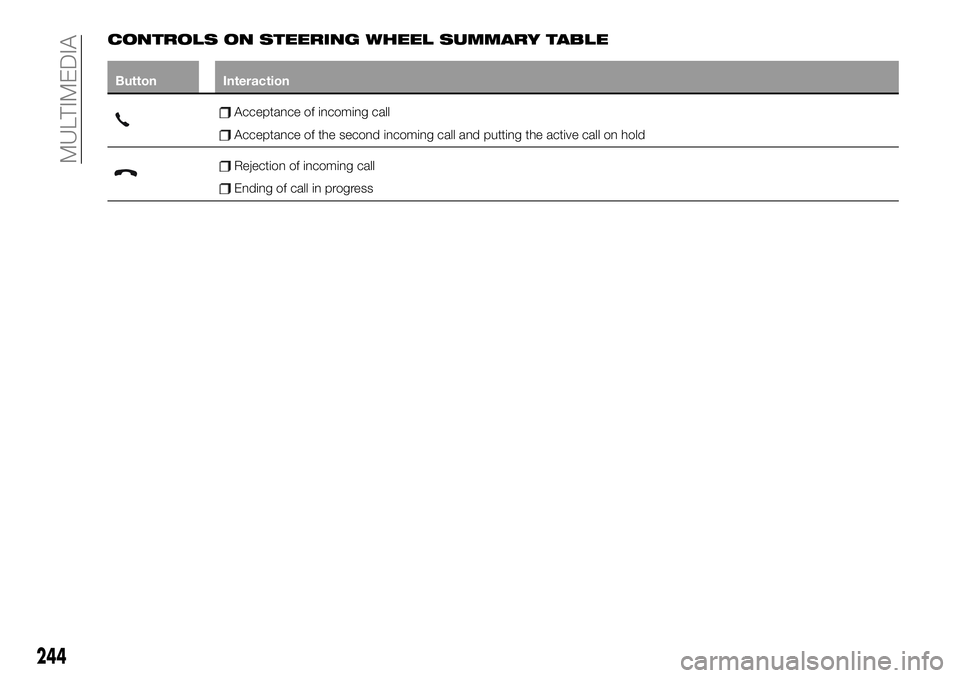
CONTROLS ON STEERING WHEEL SUMMARY TABLE
Button Interaction
Acceptance of incoming call
Acceptance of the second incoming call and putting the active call on hold
Rejection of incoming call
Ending of call in progress
244
MULTIMEDIA
Page 247 of 284
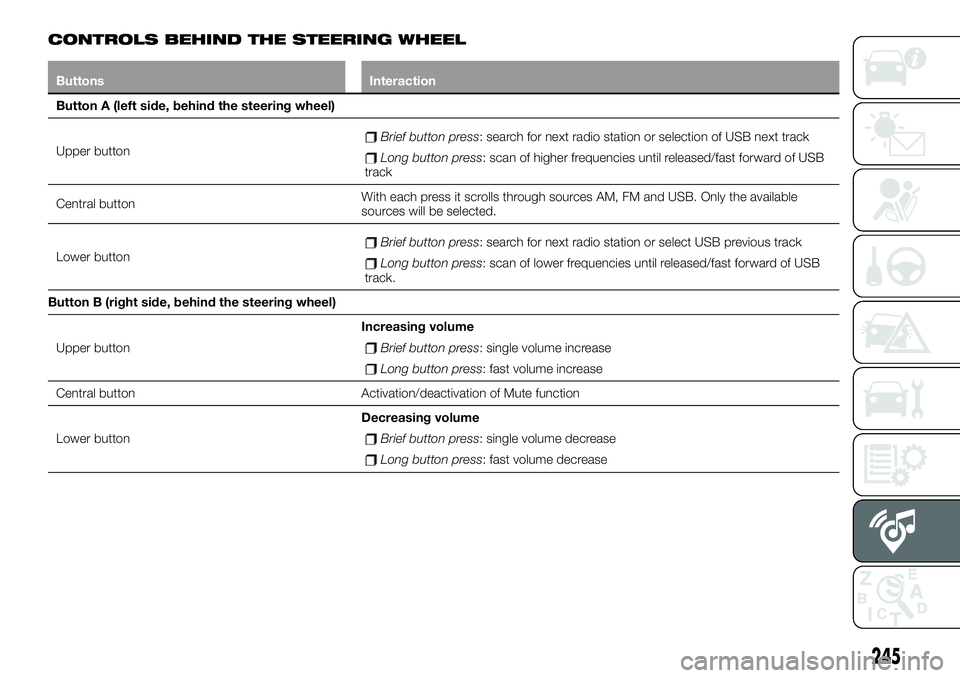
CONTROLS BEHIND THE STEERING WHEEL
Buttons Interaction
Button A (left side, behind the steering wheel)
Upper button
Brief button press: search for next radio station or selection of USB next track
Long button press: scan of higher frequencies until released/fast forward of USB
track
Central buttonWith each press it scrolls through sources AM, FM and USB. Only the available
sources will be selected.
Lower button
Brief button press: search for next radio station or select USB previous track
Long button press: scan of lower frequencies until released/fast forward of USB
track.
Button B (right side, behind the steering wheel)
Upper buttonIncreasing volume
Brief button press: single volume increase
Long button press: fast volume increase
Central button Activation/deactivation of Mute function
Lower buttonDecreasing volume
Brief button press: single volume decrease
Long button press: fast volume decrease
245
Page 248 of 284
SWITCHING THE SYSTEM
ON/OFF
The system is switched on/off by
pressing the
button/knob.
Turn the button/knob clockwise to
increase the radio volume or
anticlockwise to decrease it.
RADIO (TUNER) MODE
The system features the following
tuners: AM, FM.
RADIO MODE SELECTION
Press the RADIO button on the front
panel to activate radio mode.
FREQUENCY BAND
SELECTION
The different tuning modes can be
selected by pressing the RADIO button
on the front panel.
DISPLAYED
INFORMATION
After the desired radio station is
selected on the display, the following
information is shown (INFO mode
activated):
In the upper part: the preset station, the
time and the other active radio settings
are highlighted.
In the central part: the name of the
current station, the frequency and the
radio text information (if any) are
highlighted.
FM station list
Press the BROWSE ENTER
button/knob to display the complete list
of the FM stations that can be received.
SETTING THE PRESETS
The preset stations are available in all
system modes and are selected by
touching one of the presetting buttons
1-2-3-4-5-6on the front panel.
If you are tuned to a radio station that
you wish to store, hold down the button
on the display which corresponds to
the desired preset until an acoustic
confirmation signal is emitted.
RADIO STATION
SELECTION
To search for the desired radio station
press the
orbutton or use
the wheel of the steering wheel controls
, or turn the "BROWSE ENTER"
knob.
PREVIOUS/NEXT RADIO
STATION SEARCH
Press briefly theorbutton
or use the wheel of the steering wheel
controls
: when the button is
released the previous or next radio
station is displayed.
PREVIOUS/NEXT RADIO
STATION FAST SEARCH
Hold down theorbutton to
start the fast search: when the button is
released, the first tunable radio is
played.
MEDIA MODE
To select the USB source, press the
MEDIAbutton.
To select and playback music tracks on
the mobile phone CD card (where the
phone allows) press the BROWSE
ENTER button/knob, select Folders
then Card.
IMPORTANT Some multimedia player
devices may not be compatible with the
Uconnect™system.
TRACK CHANGE
(previous/next)
Briefly press thebutton or turn
the BROWSE ENTER button/knob
clockwise to play the next track.
Briefly press the
button or turn
the BROWSE ENTER button/knob
anticlockwise to return to the beginning
of the selected track or to the beginning
of the previous track (if this has been
played for less than 3 seconds).
246
MULTIMEDIA
Page 250 of 284
TheUconnect™system may not
support some USB keys: in this case, it
may not automatically switch from
“Radio” mode to “Media” mode.
If the device used does not play, verify
its compatibility by selecting Media
mode: a dedicated message will appear
on theUconnect™system display.
PHONE MODE
Phone mode activation
Press thePHONEbutton on the front
panel to activate the Phone mode.
If no mobile phone is connected, the
respective display warning screen
appears:
Pairing of a
Bluetooth®
mobile
phone
The system connects automatically to
the paired mobile phone with the
highest priority.
To choose a specific
Bluetooth®
mobile phone, proceed as follows:
press theMENUbutton on the front
panel;
select "Phone menu/Bluetooth" on
the display;
select the "Bluetooth/Phones" list
using the corresponding button;
select the specific device
(
Bluetooth®
mobile phone);
select "Connect";
the device connected is highlighted
in the list.
Unpairing of a
Bluetooth®
mobile
phone
To disconnect a specific
Bluetooth®
mobile phone, proceed as follows:
press theMENUbutton on the front
panel;
select "Phone menu/Bluetooth" on
the display;
select the "Bluetooth/Phones" list
using the corresponding button;
select the specific device (mobile
phone or
Bluetooth®
device);
select "Disconnect".
Making a phone call
A call can be made by:
selecting "Contacts" (Phonebook
......);
select the “Recent calls list”: the
received, made and missed calls are
viewed;
pressPHONEon the front panel,
then select “Keypad” to enter the
numbers using the “BROWSE/ENTER”
right knob and finally press the
icon
to make the call. Alternatively, you can
use the keypad of your phone (not while
driving).Ending a call
Press the "End" button or the
button on the steering wheel
controls (where present) to end a call in
progress.
SETTINGS
Press the MENU button on the front
panel to display the "Settings" menu.
NOTE The menu items displayed can
vary according to the versions.
The menu includes the following items:
System Settings: Language, Reset
Default Value, System Power Off,
Power on Volume Limit, Auto-On Radio.
Radio Settings: Browse FM Station
List, Traffic Announcements, Regional,
Alternative Frequency.
Radio off delay: allows the system
to be kept on for a preset time after the
ignition device has been turned to
STOP.
Audio settings: access the audio
settings menu.
Telephone: access to the telphone
settings menu.
248
MULTIMEDIA