ECO mode FIAT 500X 2022 User Guide
[x] Cancel search | Manufacturer: FIAT, Model Year: 2022, Model line: 500X, Model: FIAT 500X 2022Pages: 312, PDF Size: 13.26 MB
Page 46 of 312
44GETTING TO KNOW YOUR VEHICLE
In cold weather, use of Recirculation mode may
lead to excessive window fogging. The
Recirculation feature may be unavailable if
conditions exist that could create fogging on the
inside of the windshield.
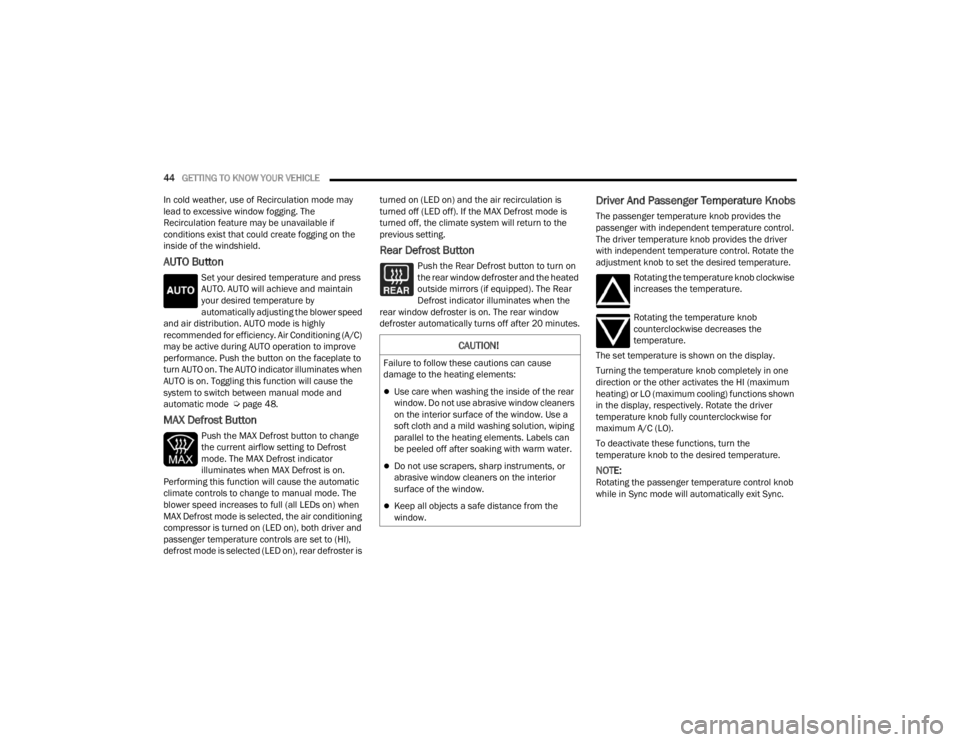
AUTO Button
Set your desired temperature and press
AUTO. AUTO will achieve and maintain
your desired temperature by
automatically adjusting the blower speed
and air distribution. AUTO mode is highly
recommended for efficiency. Air Conditioning (A/C)
may be active during AUTO operation to improve
performance. Push the button on the faceplate to
turn AUTO on. The AUTO indicator illuminates when
AUTO is on. Toggling this function will cause the
system to switch between manual mode and
automatic mode Ú page 48.
MAX Defrost Button
Push the MAX Defrost button to change
the current airflow setting to Defrost
mode. The MAX Defrost indicator
illuminates when MAX Defrost is on.
Performing this function will cause the automatic
climate controls to change to manual mode. The
blower speed increases to full (all LEDs on) when
MAX Defrost mode is selected, the air conditioning
compressor is turned on (LED on), both driver and
passenger temperature controls are set to (HI),
defrost mode is selected (LED on), rear defroster is turned on (LED on) and the air recirculation is
turned off (LED off). If the MAX Defrost mode is
turned off, the climate system will return to the
previous setting.
Rear Defrost Button
Push the Rear Defrost button to turn on
the rear window defroster and the heated
outside mirrors (if equipped). The Rear
Defrost indicator illuminates when the
rear window defroster is on. The rear window
defroster automatically turns off after 20 minutes.
Driver And Passenger Temperature Knobs
The passenger temperature knob provides the
passenger with independent temperature control.
The driver temperature knob provides the driver
with independent temperature control. Rotate the
adjustment knob to set the desired temperature.
Rotating the temperature knob clockwise
increases the temperature.
Rotating the temperature knob
counterclockwise decreases the
temperature.
The set temperature is shown on the display.
Turning the temperature knob completely in one
direction or the other activates the HI (maximum
heating) or LO (maximum cooling) functions shown
in the display, respectively. Rotate the driver
temperature knob fully counterclockwise for
maximum A/C (LO).
To deactivate these functions, turn the
temperature knob to the desired temperature.
NOTE:Rotating the passenger temperature control knob
while in Sync mode will automatically exit Sync.
CAUTION!
Failure to follow these cautions can cause
damage to the heating elements:
Use care when washing the inside of the rear
window. Do not use abrasive window cleaners
on the interior surface of the window. Use a
soft cloth and a mild washing solution, wiping
parallel to the heating elements. Labels can
be peeled off after soaking with warm water.
Do not use scrapers, sharp instruments, or
abrasive window cleaners on the interior
surface of the window.
Keep all objects a safe distance from the
window.
22_FD_OM_EN_USC_t.book Page 44
Page 48 of 312
46GETTING TO KNOW YOUR VEHICLE
Climate Control Power Button
Press and release the Climate Control
Power button to turn the Climate Control
on/off.
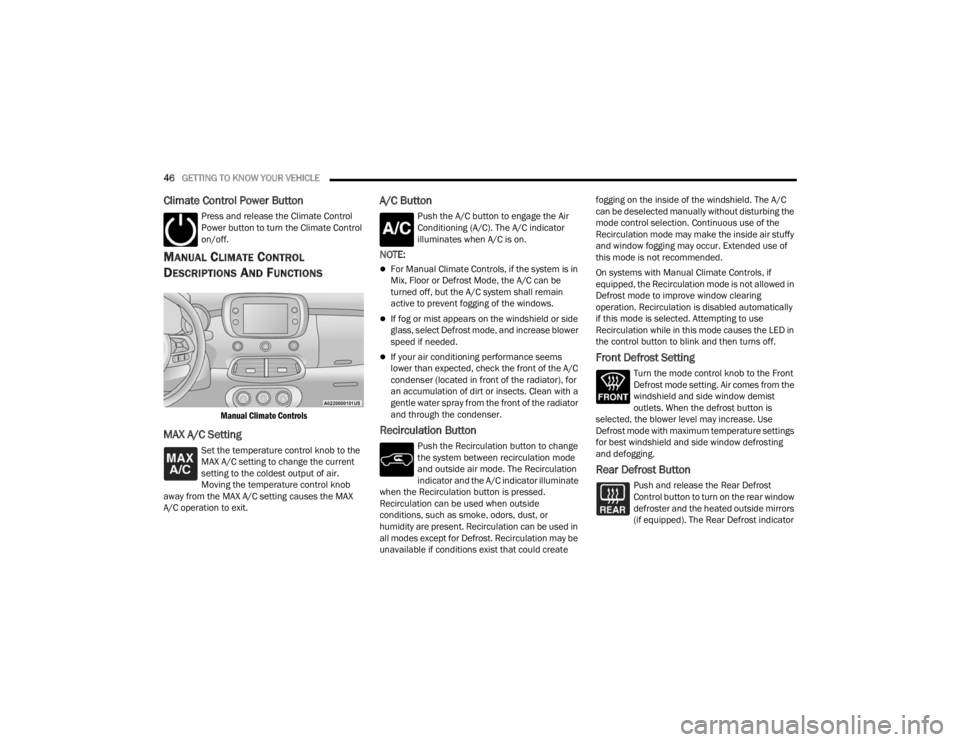
MANUAL CLIMATE CONTROL
D
ESCRIPTIONS AND FUNCTIONS
Manual Climate Controls
MAX A/C Setting
Set the temperature control knob to the
MAX A/C setting to change the current
setting to the coldest output of air.
Moving the temperature control knob
away from the MAX A/C setting causes the MAX
A/C operation to exit.
A/C Button
Push the A/C button to engage the Air
Conditioning (A/C). The A/C indicator
illuminates when A/C is on.
NOTE:
For Manual Climate Controls, if the system is in
Mix, Floor or Defrost Mode, the A/C can be
turned off, but the A/C system shall remain
active to prevent fogging of the windows.
If fog or mist appears on the windshield or side
glass, select Defrost mode, and increase blower
speed if needed.
If your air conditioning performance seems
lower than expected, check the front of the A/C
condenser (located in front of the radiator), for
an accumulation of dirt or insects. Clean with a
gentle water spray from the front of the radiator
and through the condenser.
Recirculation Button
Push the Recirculation button to change
the system between recirculation mode
and outside air mode. The Recirculation
indicator and the A/C indicator illuminate
when the Recirculation button is pressed.
Recirculation can be used when outside
conditions, such as smoke, odors, dust, or
humidity are present. Recirculation can be used in
all modes except for Defrost. Recirculation may be
unavailable if conditions exist that could create fogging on the inside of the windshield. The A/C
can be deselected manually without disturbing the
mode control selection. Continuous use of the
Recirculation mode may make the inside air stuffy
and window fogging may occur. Extended use of
this mode is not recommended.
On systems with Manual Climate Controls, if
equipped, the Recirculation mode is not allowed in
Defrost mode to improve window clearing
operation. Recirculation is disabled automatically
if this mode is selected. Attempting to use
Recirculation while in this mode causes the LED in
the control button to blink and then turns off.
Front Defrost Setting
Turn the mode control knob to the Front
Defrost mode setting. Air comes from the
windshield and side window demist
outlets. When the defrost button is
selected, the blower level may increase. Use
Defrost mode with maximum temperature settings
for best windshield and side window defrosting
and defogging.
Rear Defrost Button
Push and release the Rear Defrost
Control button to turn on the rear window
defroster and the heated outside mirrors
(if equipped). The Rear Defrost indicator
22_FD_OM_EN_USC_t.book Page 46
Page 50 of 312
48GETTING TO KNOW YOUR VEHICLE
Climate Control OFF
To turn the Climate Controls off, turn the
blower control knob to the OFF (O)
position.
AUTOMATIC TEMPERATURE CONTROL
(ATC)
Automatic Operation
1. Push the AUTO button on the front ATC panel
and the word “AUTO” will illuminate in the
front ATC display, along with two
temperatures for the driver and front
passenger. The system will then automat -
ically regulate the amount of airflow.
2. Adjust the temperature you would like the system to maintain, by adjusting the driver,
and passenger temperatures. Once the
desired temperature is displayed, the system
will achieve and automatically maintain that
comfort level.
3. When the system is set up for your comfort level, it is not necessary to change the
settings. You will experience the greatest
efficiency by simply allowing the system to
function automatically.
NOTE:It is not necessary to move the temperature
settings. The system automatically adjusts the
temperature, mode, and fan speed to provide
comfort as quickly as possible.
To provide you with maximum comfort in the
automatic mode, during cold start-ups, the blower
fan will remain on low until the engine warms up.
The fan will engage immediately if the Defrost
mode is selected, or by changing the front blower
knob setting.
Manual Operation Override
This system offers a full complement of manual
override features. The AUTO symbol in the front
ATC display will be turned off when the system is
being used in the manual mode.
CLIMATE VOICE RECOGNITION
Adjust vehicle temperatures hands-free and keep
everyone comfortable while you keep moving
ahead. (If vehicle is equipped with climate control.)
Push the VR button . After the beep, say one of
the following commands:
“Set the driver temperature to 70 degrees ”
“Set the passenger temperature to 70 degrees ”Did You Know:
Voice Command for Climate may
only be used to adjust the interior temperature of
your vehicle. Voice Command will not work to
adjust the heated seats or steering wheel if
equipped.
OPERATING TIPS
Refer to the chart at the end of this section for
suggested control settings for various weather
conditions.
Summer Operation
The engine cooling system must be protected with
a high-quality antifreeze coolant to provide proper
corrosion protection and to protect against engine
overheating. OAT coolant (conforming to
MS.90032) is recommended.
Winter Operation
To ensure the best possible heater and defroster
performance, make sure the engine cooling
system is functioning properly and the proper
amount, type, and concentration of coolant is
used. Use of the Air Recirculation mode during
Winter months is not recommended, because it
may cause window fogging.
22_FD_OM_EN_USC_t.book Page 48
Page 59 of 312
GETTING TO KNOW YOUR VEHICLE57
POWER FOLDING ROOF — IF EQUIPPED
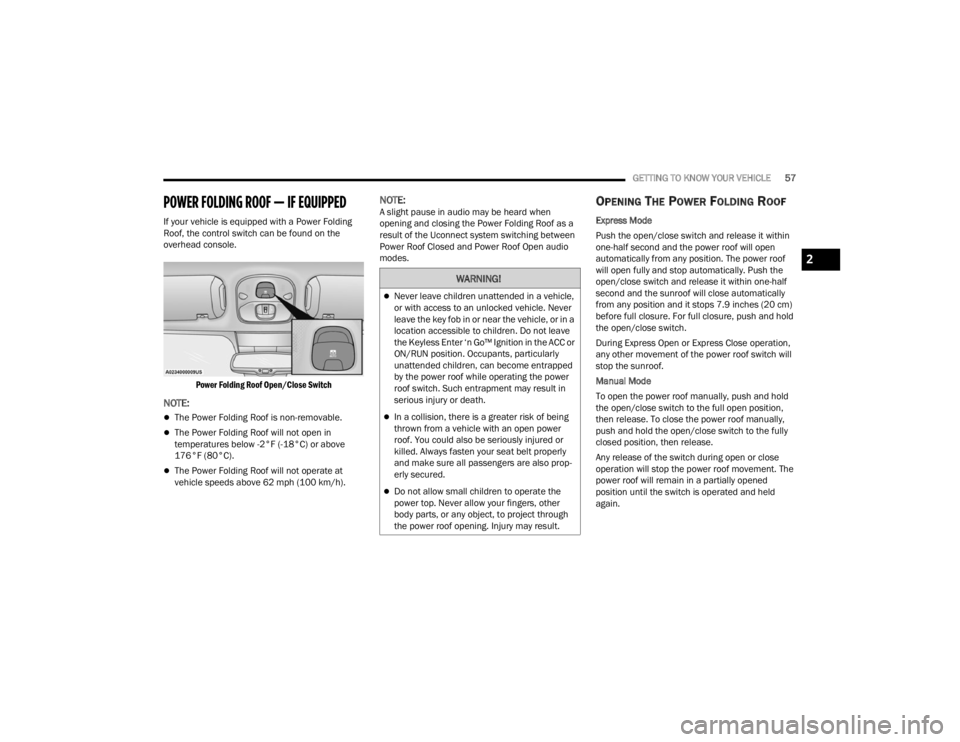
If your vehicle is equipped with a Power Folding
Roof, the control switch can be found on the
overhead console.
Power Folding Roof Open/Close Switch
NOTE:
The Power Folding Roof is non-removable.
The Power Folding Roof will not open in
temperatures below -2°F (-18°C) or above
176°F (80°C).
The Power Folding Roof will not operate at
vehicle speeds above 62 mph (100 km/h).
NOTE:A slight pause in audio may be heard when
opening and closing the Power Folding Roof as a
result of the Uconnect system switching between
Power Roof Closed and Power Roof Open audio
modes.OPENING THE POWER FOLDING ROOF
Express Mode
Push the open/close switch and release it within
one-half second and the power roof will open
automatically from any position. The power roof
will open fully and stop automatically. Push the
open/close switch and release it within one-half
second and the sunroof will close automatically
from any position and it stops 7.9 inches (20 cm)
before full closure. For full closure, push and hold
the open/close switch.
During Express Open or Express Close operation,
any other movement of the power roof switch will
stop the sunroof.
Manual Mode
To open the power roof manually, push and hold
the open/close switch to the full open position,
then release. To close the power roof manually,
push and hold the open/close switch to the fully
closed position, then release.
Any release of the switch during open or close
operation will stop the power roof movement. The
power roof will remain in a partially opened
position until the switch is operated and held
again.
WARNING!
Never leave children unattended in a vehicle,
or with access to an unlocked vehicle. Never
leave the key fob in or near the vehicle, or in a
location accessible to children. Do not leave
the Keyless Enter ‘n Go™ Ignition in the ACC or
ON/RUN position. Occupants, particularly
unattended children, can become entrapped
by the power roof while operating the power
roof switch. Such entrapment may result in
serious injury or death.
In a collision, there is a greater risk of being
thrown from a vehicle with an open power
roof. You could also be seriously injured or
killed. Always fasten your seat belt properly
and make sure all passengers are also prop -
erly secured.
Do not allow small children to operate the
power top. Never allow your fingers, other
body parts, or any object, to project through
the power roof opening. Injury may result.
2
22_FD_OM_EN_USC_t.book Page 57
Page 60 of 312
58GETTING TO KNOW YOUR VEHICLE
CLOSING THE POWER ROOF
Express Mode
Push the close switch and release it within one-half
second. The power roof will close fully and stop
automatically. This is called “Express Close”.
During Express Close operation, any movement of
the switch will stop the power roof.
Manual Mode
To close the power roof manually, push and hold
the close switch. The power roof will move forward
and automatically stop at the fully closed position.
Any release of the switch will stop the movement.
The power roof will remain in a partially closed
position until the switch is pushed and held again.
If the power roof switch fails, the sunroof can be
operated manually. See, Úpage 56 for further
information.
POWER ROOF MAINTENANCE
Use only a non-abrasive cleaner and a soft cloth to
clean the window glass. For important information
on cleaning and caring for your vehicle
Ú page 286.
IGNITION OFF OPERATION
The power sliding roof switch can remain active in
Accessory Delay for up to approximately
10 minutes after the vehicle’s ignition is placed to the OFF position. Opening either front door will
cancel this feature.
NOTE:Ignition Off timing is programmable through the
Uconnect system Ú
page 123.
RELEARN PROCEDURE
For vehicles equipped with a power sliding roof,
there is a relearn procedure that allows you to
calibrate the power roof when the “Express Mode”
stops working. To reset the power sliding roof,
follow these steps:
1. Place the ignition in the RUN position, and
start the vehicle.
NOTE:The engine must be running to perform the relearn
procedure.
2. Ensure the power sliding roof is in the fully closed position.
3. Push and hold the open/close switch for 10 seconds. This will put the power sliding roof
into calibration mode.
4. Continue holding down the close button while the top goes fully open and then back to fully
close. 5. Once the power sliding roof has stopped in the
fully closed position, release the open/close
switch. The power sliding roof is now reset and
ready to use.
NOTE:If the open/close switch is released anytime during
the relearning process, the relearn may not be
complete, and the procedure must be repeated.
HOOD
TO OPEN THE HOOD
To open the hood, two latches must be released.
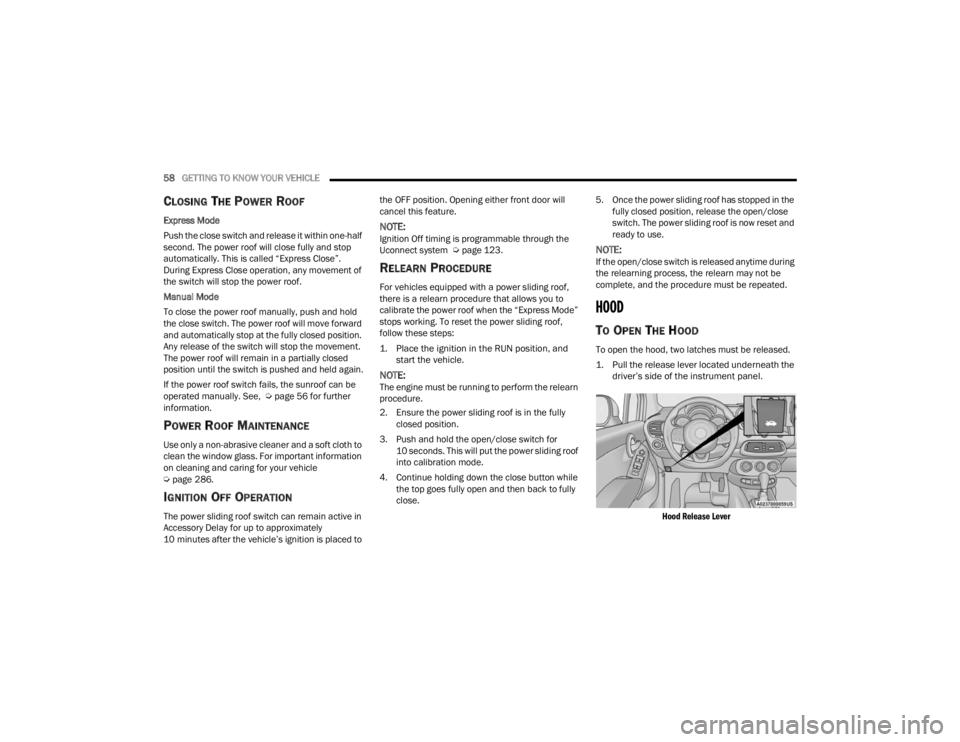
1. Pull the release lever located underneath the driver’s side of the instrument panel.
Hood Release Lever
22_FD_OM_EN_USC_t.book Page 58
Page 67 of 312

GETTING TO KNOW YOUR INSTRUMENT PANEL65
The instrument cluster display features a driver
interactive display that is located in the instrument
cluster. Pushing the controls on the left side of the
steering wheel allows the driver to select vehicle
information and Personal Settings.
Push the back/left arrow button to access
the information screens or submenu screens of
a main menu item.
Push the up arrow button to scroll upward
through the main menus and submenus
(Speedometer, Trip, Drive Mode Selector,
Vehicle Info, Driver Assist, Audio, Phone, Naviga -
tion, Messages, Settings).
Push the right arrow button to access the
information screens or submenu screens of a
main menu item.
Push the down arrow button to scroll down -
ward through the main menu and submenus
(Speedometer, Trip, Drive Mode Selector,
Vehicle Info, Driver Assist, Audio, Phone, Naviga -
tion, Messages, Settings).
Push the OK button to access/select the infor -
mation screens or submenu screens of a main
menu item. Push and hold the OK button for two
seconds to reset displayed/selected features
that can be reset.
ENGINE OIL CHANGE RESET —
I
F EQUIPPED
Your vehicle may be equipped with an engine oil
change indicator system. The “Change Engine Oil”
message will display in the instrument cluster
display. The engine oil change indicator system is
duty cycle based, which means the engine oil
change interval may fluctuate, dependent upon
your personal driving style.
Unless reset, this message will continue to display
each time you turn the ignition switch to the ON/
RUN position. To reset the oil change indicator
system (after performing the scheduled
maintenance), refer to the following procedure.
1. Turn the ignition switch to the ON position (do
not start the engine).
2. Fully push the accelerator pedal slowly, three times, within 10 seconds.
3. Turn the ignition switch to the OFF position.
NOTE:If the indicator message illuminates when you start
the vehicle, the oil change indicator system did not
reset. If necessary, repeat this procedure.
INSTRUMENT CLUSTER DISPLAY MAIN
M
ENU
The Main Menu is composed of several options
that can be selected using the control buttons
above.
NOTE:
The display mode of the menu items varies
depending on the type of display.
For some items, a submenu is provided.
In the Uconnect system, some items on the
menu are not shown on the instrument cluster
display Ú page 64.
Instrument Cluster Display Menu/
Submenu Items
The Menu is composed of the following items:
Speedometer
Trip
Instantaneous Info
Trip A
Trip B
Drive Mode Selector — If Equipped
Auto Mode
Sport Mode
All Weather Mode
3
22_FD_OM_EN_USC_t.book Page 65
Page 68 of 312

66GETTING TO KNOW YOUR INSTRUMENT PANEL
Vehicle Info
Tire Pressure
Oil Temperature
Battery Voltage
Driver Assist
Lane Departure Warning
Adaptive Cruise Control
Stop/Start — If Equipped
Audio
Phone
Navigation
Messages
Settings
Display
Units
Clock and Date
Security
Safety & Assistance
Lights
Doors & Locks
Engine OFF Procedure — If Equipped
Speedometer
View and change the speedometer scale from mph
to km/h (km/h to mph).
Trip
This instrument cluster display menu item allows
you to view and select information about the "Trip
Computer”:
Instantaneous info
View the distance to empty (miles or km).
View the instantaneous consumption (mpg,
or l/100km or km/l).
Trip A
View Trip A distance (miles or km).
View travel time A (hours/minutes/
seconds).
View average consumption A (mpg, or
l/100km or km/l).
View average speed A (mph or km/h).
Trip B
View Trip B distance (miles or km).
View travel time B (hours/minutes/
seconds).
View average consumption B (mpg, or
l/100km or km/l).
View average speed B (mph or km/h).
Drive Mode Selector
This instrument cluster display menu/submenu
items allows you to view and select information
about the "Drive Mode".
Vehicle Info
Push and release the up or down arrow
button until "Vehicle Info" is highlighted in the
instrument cluster display. Push and release the
right arrow button and Coolant Temp will be
displayed. Push the right or left arrow button
to scroll through the following information displays:
Tire pressure
View the information relating to the Tire
Pressure Monitoring System (TPMS) (if
equipped).
Oil Temperature
View the engine oil temperature.
Battery Voltage
View the voltage value (state of charge) of
the battery.
22_FD_OM_EN_USC_t.book Page 66
Page 70 of 312

68GETTING TO KNOW YOUR INSTRUMENT PANEL
Lights
Doors and Locks
Engine OFF Procedure — If Equipped
Display
By selecting "Display," you can access the following
settings:
Screen Setup: Allows you to configure the
display screen.
Language: Allows you to select the language in
which to display the information/warnings.
Automatic Reset Trip B: Allows you to set the
options to reset the Trip B (never, always, every
two hours or every eight hours).
Phone Repetition: Allows you to select “On” or
“Off”. The instrument cluster display can also
display the information concerning phone
mode. The information that can be displayed is
the connection status of the mobile phone
(phone connected or disconnected), the active
telephone calls/incoming/on hold, and the
management of double calls (first incoming
second waiting, etc.).
Navigation Repetition: Allows you to select “On”
or “Off” on the instrument cluster display, infor -
mation relating to the navigation mode.
Units
By selecting the item "Units Of Measure,” you can
select the unit of measure used in the display. Possible options are:
US
Metric
Custom
Clock And Date
By selecting the item "clock and date," you can
adjust the clock.
Possible options are:
Set Time: Adjust hours/minutes.
Set Format: Adjust the time format "12h"
(12 hours) or "24h" (24 hours).
Set Date: Adjust day/month/year.
Security
By selecting the item “Security,” you can make the
following adjustments:
Speed Warning: Set the vehicle speed limit
(mph or km/h), which the driver is notified
through a visual and acoustic signaling (display
of a message and a symbol on the display).
Seat Belt Buzzer: This function is only viewable
when the Seat Belt Reminder (SBR) system is
active.
Hill Start Assist: Activation/Deactivation of the
Hill Start Assist system. Safety And Assistance
By selecting the item "Safety & Assistance," you
can make the following adjustments:
Full Brake Control: A selection of operating
modes of the Full Brake Control system.
Full Brake Control Sensitivity: A selection of the
"readiness" of intervention of the Full Brake
Control system, based on the distance to the
obstacle.
Park Assist: A selection of the type of informa
-
tion provided by Park Assist.
Park Assist Vol.: A selection of the volume of
acoustic signals provided by Park Assist.
Rain Sensing Wipers: Enabling/disabling the
automatic operation of wipers in the event of
rain.
LaneSense Warning — If Equipped: A selection
of the "readiness" of intervention of LaneSense.
Warning Buzzer Volume: Increase or decrease
the volume of the buzzer by selecting “Low”,
“Medium”, or “High”.
Maintenance Brakes — If Equipped: Activation
of the procedure to carry out braking system
maintenance.
Auto Park Brake — If Equipped: Enable/disable
auto-insertion of the Electric Parking Brake.
22_FD_OM_EN_USC_t.book Page 68
Page 84 of 312
82STARTING AND OPERATING
When the ignition is in the OFF position, the
window switches remains active for three minutes.
Opening a front door will cancel this function.
After severe driving, idle the engine to allow the
temperature inside the engine compartment to
cool before shutting off the engine.
TURBOCHARGER “COOL DOWN” —
I
F EQUIPPED
This vehicle is equipped with an after-run pump to
cool the turbocharger after the engine is shut off.
Depending on the type of driving and the amount
of cargo, the pump will run for up to 10 minutes
after the engine has been shut off to circulate
coolant through the turbocharger. Although the
pump is rubber-mounted for quiet operation, it is
normal to hear it running during this time.
ENGINE BREAK-IN RECOMMENDATIONS
A long break-in period is not required for the engine
and drivetrain (transmission and axle) in your
vehicle.
Drive moderately during the first 300 miles
(500 km). After the initial 60 miles (100 km),
speeds up to 50 or 55 mph (80 or 90 km/h) are
desirable.
While cruising, brief full-throttle acceleration within
the limits of local traffic laws contributes to a good break-in. Wide-open throttle acceleration in low
gear can be detrimental and should be avoided.
The engine oil installed in the engine at the factory
is a high-quality energy conserving type lubricant.
Oil changes should be consistent with anticipated
climate conditions under which vehicle operations
will occur. For the recommended viscosity and
quality grades Ú
page 293.
NOTE:A new engine may consume some oil during its first
few thousand miles (kilometers) of operation. This
should be considered a normal part of the break-in
and not interpreted as a problem.
ELECTRIC PARK BRAKE (EPB)
Your vehicle is equipped with an EPB that offers
simple operation, and some additional features
that make the parking brake more convenient and
useful.
The parking brake is primarily intended to prevent
the vehicle from rolling while parked. Before
leaving the vehicle, make sure that the parking
brake is applied. Also, be certain to leave the
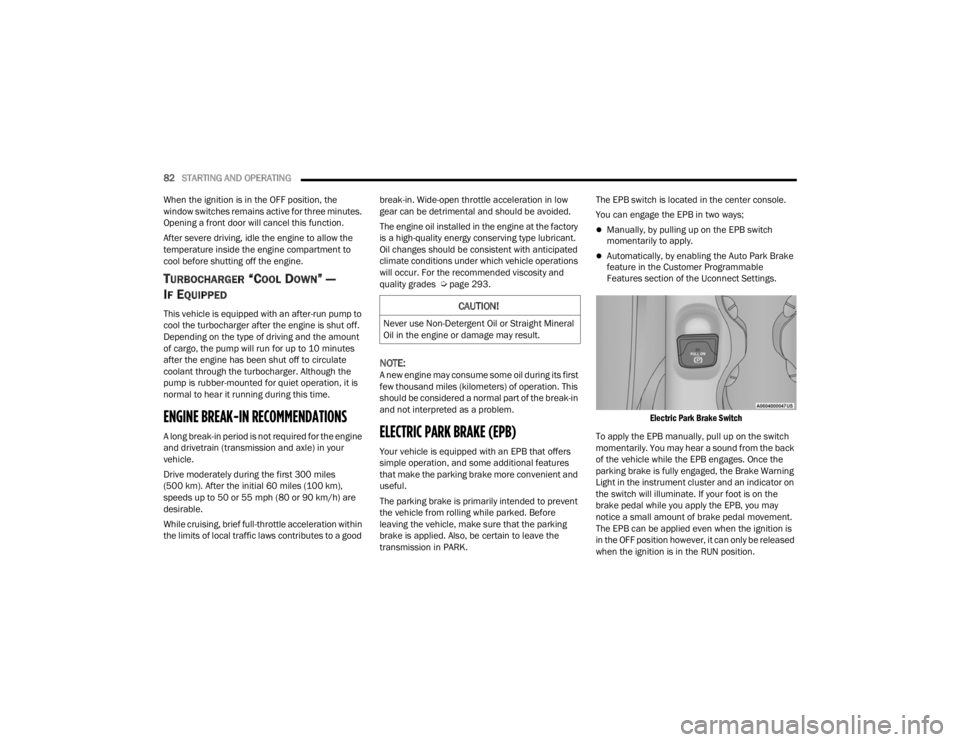
transmission in PARK. The EPB switch is located in the center console.
You can engage the EPB in two ways;
Manually, by pulling up on the EPB switch
momentarily to apply.
Automatically, by enabling the Auto Park Brake
feature in the Customer Programmable
Features section of the Uconnect Settings.
Electric Park Brake Switch
To apply the EPB manually, pull up on the switch
momentarily. You may hear a sound from the back
of the vehicle while the EPB engages. Once the
parking brake is fully engaged, the Brake Warning
Light in the instrument cluster and an indicator on
the switch will illuminate. If your foot is on the
brake pedal while you apply the EPB, you may
notice a small amount of brake pedal movement.
The EPB can be applied even when the ignition is
in the OFF position however, it can only be released
when the ignition is in the RUN position.
CAUTION!
Never use Non-Detergent Oil or Straight Mineral
Oil in the engine or damage may result.
22_FD_OM_EN_USC_t.book Page 82
Page 86 of 312

84STARTING AND OPERATING
In the unlikely event of a malfunction of the EPB
system, a yellow EPB fault lamp will illuminate. This
may be accompanied by the Brake Warning Light
flashing. In this status, some EPB functionalities
may be deactivated. In this event, urgent service of
the EPB system is required. Do not rely on the EPB
to hold the vehicle stationary.
AUTO PARK BRAKE
The EPB can be programmed to be applied
automatically whenever the vehicle speed is below
1.9 mph (3 km/h) and the automatic transmission
is placed in PARK whenever the ignition is in the
OFF position. Auto Park Brake is enabled and
disabled by customer selection through the
Customer Programmable Features section of the
Uconnect Settings.
Any single Auto Park Brake application can be
bypassed by pushing the EPB switch to the release
position while the transmission is placed in PARK
and the ignition is in the RUN position. In some cases, if the ignition is cycled from ON/RUN to OFF
and the gear selector is not firmly locked in the
PARK position, EPB applies automatically even if
Auto Park Brake has been previously disabled.
SAFEHOLD
SafeHold is a safety feature of the EPB system that
will engage the parking brake automatically if the
vehicle is left unsecured while the ignition switch is
in the RUN position.
The EPB will automatically engage if all of the
following conditions are met:
Vehicle speed is below 1.9 mph (3 km/h).
There is no attempt to press the brake pedal or
accelerator pedal.
The seat belt is unbuckled.
The driver door is open.
The vehicle is not in the PARK position.
SafeHold can be temporarily bypassed by pushing
the EPB switch while the driver door is open and
the brake pedal is pressed. Once manually
bypassed, SafeHold will be enabled again once the
vehicle reaches 12 mph (20 km/h) or the ignition
is cycled to the OFF position and back to RUN
position.
BRAKE SERVICE MODE
We recommend having your brakes serviced by an
authorized dealer. You should only make repairs
for which you have the knowledge and the right
equipment. You should only enter Brake Service
Mode during brake service.
When servicing your rear brakes, it may be
necessary for you or your technician to push the
rear piston into the rear caliper bore. With the EPB
system, this can only be done after retracting the
EPB actuator. The actuator retraction can be done
easily by entering the Brake Service Mode. This
menu based system will guide you through the
steps necessary to retract the EPB actuator in
order to perform rear brake service.
Service Mode has requirements that must be met
in order to be activated:
The vehicle must be at a standstill.
The parking brake must be disabled.
The transmission must be in PARK or NEUTRAL.
The EPB switch not activated.
The ignition is in the ON/RUN position.
The brake pedal not pressed.
While in service mode, the EPB fault lamp will flash
continuously while the ignition is placed in the ON
position.
WARNING!
Driving the vehicle with the parking brake
engaged, or repeated use of the parking brake
to slow the vehicle may cause serious damage to
the brake system. Be sure the parking brake is
fully disengaged before driving; failure to do so
can lead to brake failure and a collision.
22_FD_OM_EN_USC_t.book Page 84