USB FIAT 500X 2022 User Guide
[x] Cancel search | Manufacturer: FIAT, Model Year: 2022, Model line: 500X, Model: FIAT 500X 2022Pages: 312, PDF Size: 13.26 MB
Page 166 of 312
164MULTIMEDIA
Android Auto™ Voice Command
NOTE:Feature availability depends on your carrier and
mobile phone manufacturer. Some Android Auto™
features may or may not be available in every
region and/or language.
Android Auto™ allows you to use your voice to
interact with Android’s™ best-in-class speech
technology through your vehicle’s voice recognition
system, and use your smartphone’s data plan to
project your Android™-powered smartphone and a
number of its apps onto your Uconnect
touchscreen. Connect your Android™ 6.0 or higher
to one of the media USB ports, using the
factory-provided USB cable, and press the new
Android Auto™ icon that replaces your “Phone”
icon on the main menu bar to begin Android Auto™.
Push and hold the VR button on the steering wheel,
or press and hold the “Microphone” icon within
Android Auto™, to activate Android™’s VR, which
recognizes natural voice commands, to use a list of
your smartphone’s features:
Maps
Music
Phone
Text Messages
Additional Apps
NOTE:
To use Android Auto™ on your car display, you’ll
need an Android phone running Android 6.0 or
higher, an active data plan, and the Android
Auto™ app.
To wirelessly use Android Auto™ on your car
display, you need a compatible Android smart -
phone with an active data plan. You can check
which smartphones are compatible at g.co/
androidauto/requirements.
Android™ is a trademark of Google Inc.
APPLE CARPLAY®
Use this QR code to access your
digital experience.
Uconnect works seamlessly with
Apple CarPlay®, the smarter,
more secure way to use your
iPhone® in the car, and stay
focused on the road. Use your
Uconnect Touchscreen display, the vehicle's knobs
and controls, and your voice with Siri to get access
to Apple Music®, Maps, Messages, and more.
NOTE:Feature availability depends on your carrier and
mobile phone manufacturer. Some Apple
CarPlay® features may or may not be available in
every region and/or language.
To use Apple CarPlay®, make sure you are using
iPhone® 5 or later, have Siri enabled in Settings,
ensure your iPhone® is unlocked for the very first
connection only, and then use the following
procedure:
1. Connect your iPhone® to one of the media USB ports in your vehicle.
NOTE:Be sure to use the factory-provided Lightning cable
that came with your phone, as aftermarket cables
may not work.
2. Once the device is connected and recognized, the Phone icon on the drag & drop menu bar
changes to the Apple CarPlay® Icon.
NOTE:Apple CarPlay® is set to launch immediately. You
can also launch it by pressing the Apple CarPlay®
icon on the touchscreen.
22_FD_OM_EN_USC_t.book Page 164
Page 167 of 312
MULTIMEDIA165
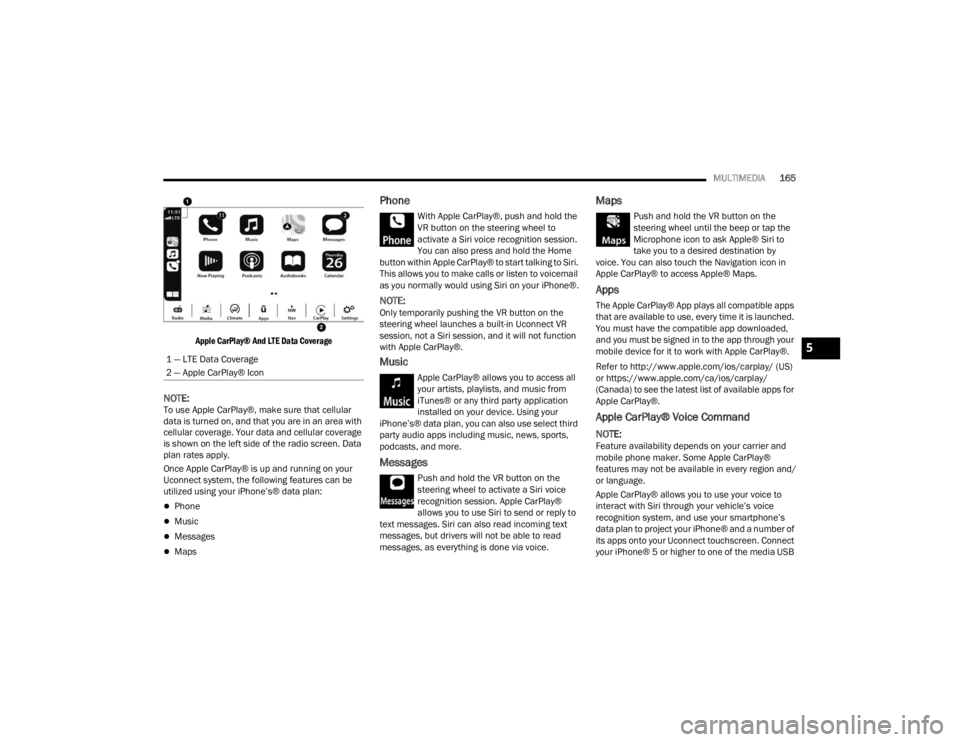
Apple CarPlay® And LTE Data Coverage
NOTE:To use Apple CarPlay®, make sure that cellular
data is turned on, and that you are in an area with
cellular coverage. Your data and cellular coverage
is shown on the left side of the radio screen. Data
plan rates apply.
Once Apple CarPlay® is up and running on your
Uconnect system, the following features can be
utilized using your iPhone’s® data plan:
Phone
Music
Messages
Maps
Phone
With Apple CarPlay®, push and hold the
VR button on the steering wheel to
activate a Siri voice recognition session.
You can also press and hold the Home
button within Apple CarPlay® to start talking to Siri.
This allows you to make calls or listen to voicemail
as you normally would using Siri on your iPhone®.
NOTE:Only temporarily pushing the VR button on the
steering wheel launches a built-in Uconnect VR
session, not a Siri session, and it will not function
with Apple CarPlay®.
Music
Apple CarPlay® allows you to access all
your artists, playlists, and music from
iTunes® or any third party application
installed on your device. Using your
iPhone’s® data plan, you can also use select third
party audio apps including music, news, sports,
podcasts, and more.
Messages
Push and hold the VR button on the
steering wheel to activate a Siri voice
recognition session. Apple CarPlay®
allows you to use Siri to send or reply to
text messages. Siri can also read incoming text
messages, but drivers will not be able to read
messages, as everything is done via voice.
Maps
Push and hold the VR button on the
steering wheel until the beep or tap the
Microphone icon to ask Apple® Siri to
take you to a desired destination by
voice. You can also touch the Navigation icon in
Apple CarPlay® to access Apple® Maps.
Apps
The Apple CarPlay® App plays all compatible apps
that are available to use, every time it is launched.
You must have the compatible app downloaded,
and you must be signed in to the app through your
mobile device for it to work with Apple CarPlay®.
Refer to http://www.apple.com/ios/carplay/ (US)
or https://www.apple.com/ca/ios/carplay/
(Canada) to see the latest list of available apps for
Apple CarPlay®.
Apple CarPlay® Voice Command
NOTE:Feature availability depends on your carrier and
mobile phone maker. Some Apple CarPlay®
features may not be available in every region and/
or language.
Apple CarPlay® allows you to use your voice to
interact with Siri through your vehicle’s voice
recognition system, and use your smartphone’s
data plan to project your iPhone® and a number of
its apps onto your Uconnect touchscreen. Connect
your iPhone® 5 or higher to one of the media USB
1 — LTE Data Coverage
2 — Apple CarPlay® Icon
5
22_FD_OM_EN_USC_t.book Page 165
Page 168 of 312
166MULTIMEDIA
ports, using the factory-provided Lightning cable,
and press the new Apple CarPlay® icon that
replaces your “Phone” icon on the main menu bar
to begin Apple CarPlay®. Push and hold the VR
button on the steering wheel, or press and hold the
Home button within Apple CarPlay®, to activate
Siri, which recognizes natural voice commands to
use a list of your iPhone’s® features:
Phone
Music
Messages
Maps — If Equipped
Additional Apps — If Equipped
NOTE:Apple CarPlay® is a trademark of Apple® Inc.
iPhone® is a trademark of Apple® Inc., registered
in the US and other countries. Apple® terms of use
and privacy statements apply.
ANDROID AUTO™ AND APPLE
C
ARPLAY® TIPS AND TRICKS
Android Auto™ And Apple CarPlay® Automatic
Bluetooth® Pairing
After connecting to Android Auto™ or Apple
CarPlay® for the first time and undergoing the
setup procedure, the smartphone pairs to the
Uconnect system via Bluetooth® without any setup required every time it is within range, if Bluetooth®
is turned on.
NOTE:Apple CarPlay® uses a USB connection while
Android Auto™ uses both USB and Bluetooth®
connections to function. The connected device is
unavailable to other devices when connected
using Android Auto™ or Apple CarPlay®.
Multiple Devices Connecting To The Uconnect
System — If Equipped
It is possible to have multiple devices connected to
the Uconnect system. For example, if using Android
Auto™/Apple CarPlay®, the connected device will
be used to place hands-free phone calls or send
hands-free text messages. However, another
device can also be paired to the Uconnect system,
via Bluetooth®, as an audio source, so the
passenger can stream music.
NOTE:Apple CarPlay® and Android Auto™ can only be
launched from the front and center console USB
ports.
NAVIGATION MODE — IF EQUIPPED
NAVIGATION MAIN MENU
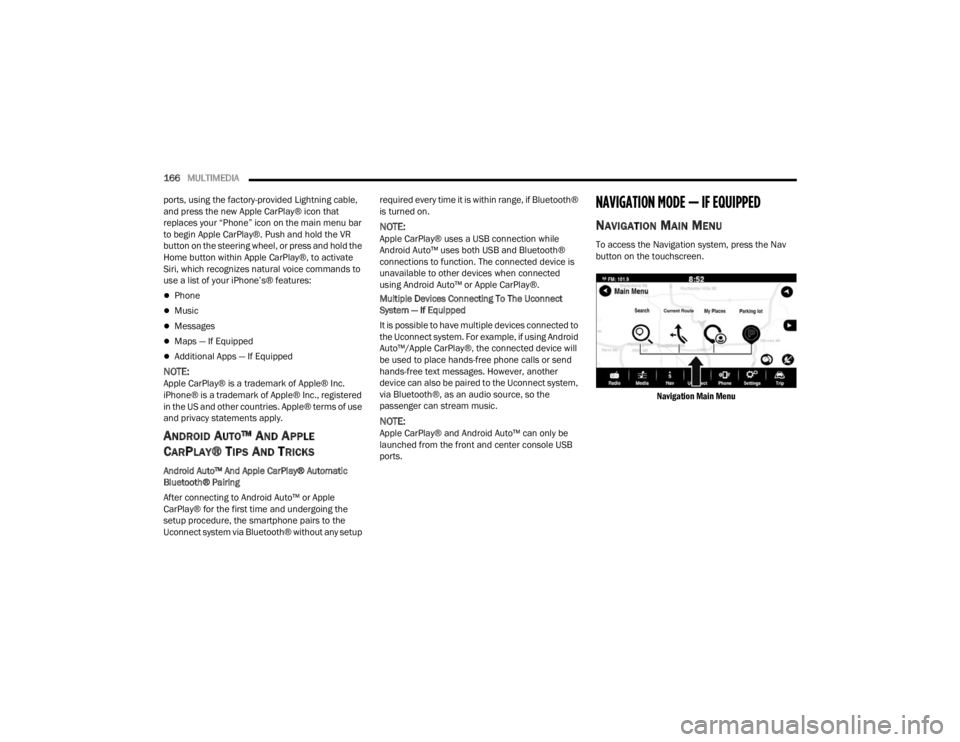
To access the Navigation system, press the Nav
button on the touchscreen.
Navigation Main Menu
22_FD_OM_EN_USC_t.book Page 166
Page 260 of 312

258SERVICING AND MAINTENANCE
CavityMini Fuse Description
F317.5 Amp Brown Fan Air Conditioning, Power Socket
F33 20 Amp Yellow Power Window Front (Passenger Side)
F34 20 Amp Yellow Power Window Front (Driver’s Side)
F36 15 Amp Blue Supply Uconnect System, Air Conditioning, USB Port, Rear lateral ceiling light in case of open roof, EOBD port
F37 10 Amp RedSystem Power Forward Collision Warning Plus, All-Wheel Drive (AWD), IPC, Central stack switches, Brake Pedal
Switch (NC)
F38 20 Amp Yellow Central Locking
F42 7.5 Amp Brown BSM - Brake Control Module, EPS - Electric Power-Assisted Steering
F43 20 Amp Yellow Bi-directional Pump Washer
F47 20 Amp Yellow Power Rear Window (Driver Side)
F48 20 Amp Yellow Power Rear Window (Passenger Side)
F49 7.5 Amp Brown Supply ParkSense, Spot Lights Front Dome, Internal Electrochromic Mirror, Heated Front Seats, SGW, Sunroof
Motor.
F50 7.5 Amp Brown Supply Air Bag
F51 7.5 Amp Brown Air Conditioning Compressor, Plaque Automatic Transmission, Rear Camera, Air Conditioning, LDW - Lane
Departure Warning, ASS - Auxiliary Stack Switch, DSU - Drive Selector Unit, Reverse gear switch, side mirrors
and rear window defrost
F53 7.5 Amp Brown Supply IPC/Starter Device/System Keyless Enter ‘n Go™ , Brake Pedal Switch (NA), EPB - Electric Parking
Brake
22_FD_OM_EN_USC_t.book Page 258
Page 304 of 312

302 Gauge
.......................................................... 73Materials Added........................................ 290Methanol................................................... 291Octane Rating................................. 290, 293Specifications............................................ 293Tank Capacity............................................ 292Full Brake Control System............................. 182Fuses............................................................. 252
G
Gasoline, (Fuel)............................................. 290Gasoline, Clean Air........................................ 290Gasoline, Reformulated................................. 290GaugesFuel............................................................. 73Gear Selector Override.................................. 230Glass Cleaning............................................... 288Gross Axle Weight Rating............................... 113GVWR............................................................ 112
H
HazardDriving Through Flowing, Rising, Or Shallow Standing Water
........................ 120Hazard Warning Flashers.............................. 218Head Restraints............................................... 30HeadlightsAutomatic.................................................... 37Cleaning.................................................... 286Delay........................................................... 37
High Beam/Low Beam Select Switch.......... 36Lights On Reminder..................................... 37Passing........................................................ 37Switch.......................................................... 36Time Delay................................................... 37Heated Mirrors................................................. 35Heated Seats................................................... 29High Beam/Low Beam Select (Dimmer)
Switch.............................................................. 36Hill Start Assist.............................................. 177HitchesTrailer Towing........................................... 115Holder, Coin..................................................... 51Hood Prop........................................................ 58Hood Release.................................................. 58
I
Ignition............................................................. 17Switch.......................................................... 17Inside Rearview Mirror..................................... 33Instrument Cluster........................................... 63Display......................................................... 64Instrument Panel Lens Cleaning................... 288Interior Appearance Care.............................. 287Interior Lights................................................... 38Intermittent Wipers (Delay Wipers).................. 40iPod/USB/MP3 Control.................................... 51
J
Jack Location................................................ 219Jack Operation.............................................. 220Jacking Instructions...................................... 220Jump Starting................................................ 226
K
Key FobArm The Alarm
.............................................21Disarm The Alarm........................................21Keyless Entry...............................................23Remote Keyless Entry..................................14Key Fob Battery Service (Remote Keyless
Entry)...............................................................15Keyless Enter 'n Go™Enter The Trunk...........................................23Lock The Vehicle’s Doors................... 23, 132Passive Entry...............................................23Passive Entry Programming.........................23Remote Control............................................23Unlock From The Driver’s Side.....................23Unlock From The Passenger’s Side.............23Keyless Entry...................................................14Keys.................................................................14Replacement...............................................16
L
Lane Change And Turn Signals........................38Lane Change Assist..........................................38LaneSense.................................................... 108
22_FD_OM_EN_USC_t.book Page 302
Page 309 of 312

307
Call Termination
........................................ 160Cancel Command...................................... 154Connecting To A Particular Mobile Phone Or Audio Device After Pairing..... 156Help Command......................................... 154Join Calls................................................... 159Making A Phone Or Audio Device A Favorite................................................. 156Making A Second Call While Current Call Is In Progress........................................ 159Managing Your Favorites........................... 157Natural Speech......................................... 154Operation.................................................. 153Overview.................................................... 152Pair (Link) Uconnect Phone To A Mobile Phone................................................... 154Pair A Bluetooth Streaming Audio Device.. 155Phonebook Download............................... 157Place/Retrieve A Call From Hold............... 159Power-Up................................................... 162Recent Calls.............................................. 158Redial........................................................ 160To Remove A Favorite............................... 157Toggling Between Calls............................. 159Touch-Tone Number Entry......................... 158Transfer Call To And From Mobile Phone.. 160Voice Command........................................ 160
Uconnect SettingsCustomer ProgrammableFeatures
............................... 20, 123, 132Passive Entry Programming...................... 132Uconnect System.......................................... 138Uniform Tire Quality Grades.......................... 285Untwisting Procedure, Seat Belt................... 192USB.................................................................. 51
V
Vanity Mirrors.................................................. 33Vehicle Identification Number (VIN).............. 289Vehicle Loading................................... 112, 273Vehicle Maintenance.................................... 242Vehicle Modifications/Alterations...................... 9Vehicle Storage................................................ 49Voice Command............................ 32, 164, 165Voice Recognition System (VR)........................ 32
W
Warning Flashers, Hazard............................. 218Warnings, Roll Over........................................... 8Warranty Information.................................... 295
WasherAdding Fluid.............................................. 241Washing Vehicle............................................ 286WaterDriving Through........................................ 120Wheel And Wheel Tire Care........................... 282Wheel And Wheel Tire Trim........................... 282Wind Buffeting.................................................54Window Fogging...............................................49Windows..........................................................53Windshield Defroster.................................... 215Windshield Washers........................................40Windshield Wiper Blades.............................. 245Windshield Wipers...........................................40Wipers Blade Replacement........................... 245Wipers, Intermittent.........................................40Wipers, Rain Sensitive.....................................41Wrecker Towing............................................. 232
11
22_FD_OM_EN_USC_t.book Page 307