battery FIAT 500X 2022 User Guide
[x] Cancel search | Manufacturer: FIAT, Model Year: 2022, Model line: 500X, Model: FIAT 500X 2022Pages: 312, PDF Size: 13.26 MB
Page 42 of 312
40GETTING TO KNOW YOUR VEHICLE
Rear Dome Light — If Equipped
Push the switch on the rear dome light once to turn
the light on, the light will remain on at all times.
Push the switch a second time to turn the light off,
the light will remain off until a door is opened.
Rear Dome Light On/Off Switch
Retractable Roof Lights
For vehicles equipped with a retractable roof, there
are two interior lights located below the grab
handles of the rear doors.
The lights come on by opening any of the doors.
CARGO AREA LIGHTS
An interior light is located on the left side panel in
the cargo area.
This light automatically turns on/off when the
liftgate is opened and closed, regardless of the
position of the ignition.
NOTE:In order to preserve the life of the battery, the light
will turn off after 15 minutes.
WINDSHIELD WIPERS AND WASHERS
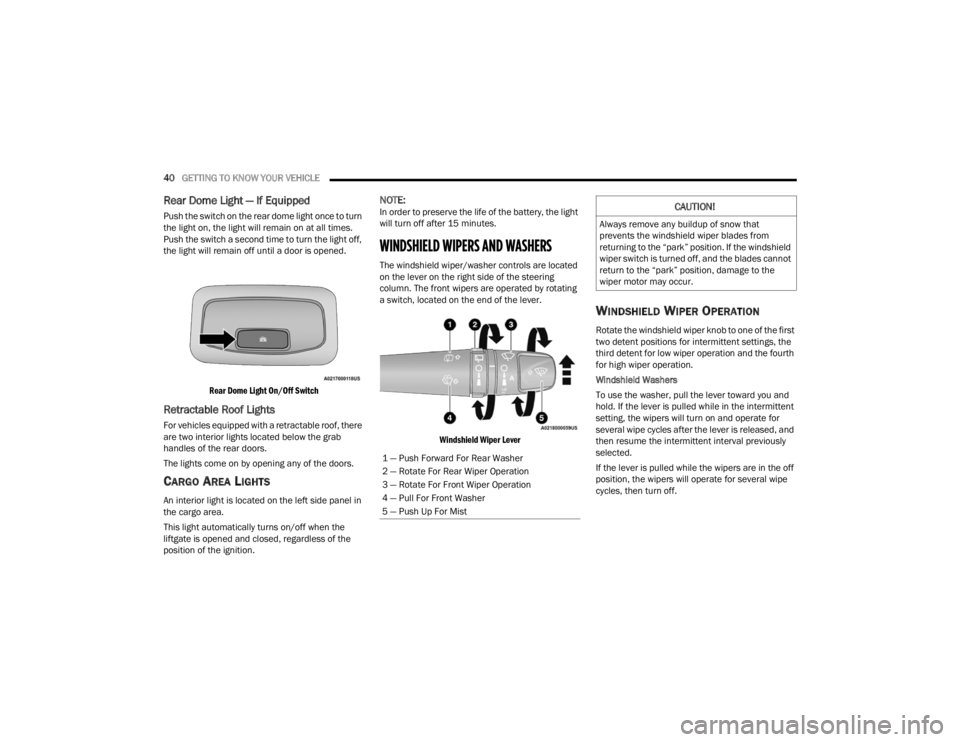
The windshield wiper/washer controls are located
on the lever on the right side of the steering
column. The front wipers are operated by rotating
a switch, located on the end of the lever.
Windshield Wiper Lever
WINDSHIELD WIPER OPERATION
Rotate the windshield wiper knob to one of the first
two detent positions for intermittent settings, the
third detent for low wiper operation and the fourth
for high wiper operation.
Windshield Washers
To use the washer, pull the lever toward you and
hold. If the lever is pulled while in the intermittent
setting, the wipers will turn on and operate for
several wipe cycles after the lever is released, and
then resume the intermittent interval previously
selected.
If the lever is pulled while the wipers are in the off
position, the wipers will operate for several wipe
cycles, then turn off.
1 — Push Forward For Rear Washer
2 — Rotate For Rear Wiper Operation
3 — Rotate For Front Wiper Operation
4 — Pull For Front Washer
5 — Push Up For Mist
CAUTION!
Always remove any buildup of snow that
prevents the windshield wiper blades from
returning to the “park” position. If the windshield
wiper switch is turned off, and the blades cannot
return to the “park” position, damage to the
wiper motor may occur.
22_FD_OM_EN_USC_t.book Page 40
Page 54 of 312
52GETTING TO KNOW YOUR VEHICLE
POWER OUTLETS
There is one 12 Volt (13 Amp) power outlet in this
vehicle, located under the climate controls. This
power outlet can power mobile phones, electronics
and other low power devices.
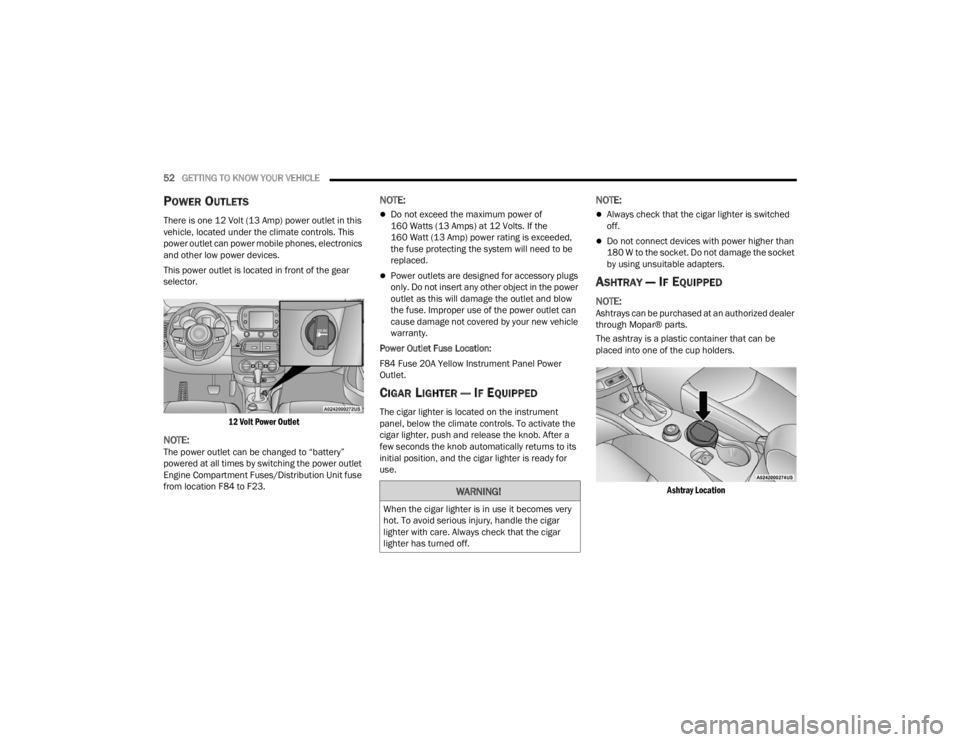
This power outlet is located in front of the gear
selector.
12 Volt Power Outlet
NOTE:The power outlet can be changed to “battery”
powered at all times by switching the power outlet
Engine Compartment Fuses/Distribution Unit fuse
from location F84 to F23.
NOTE:
Do not exceed the maximum power of
160 Watts (13 Amps) at 12 Volts. If the
160 Watt (13 Amp) power rating is exceeded,
the fuse protecting the system will need to be
replaced.
Power outlets are designed for accessory plugs
only. Do not insert any other object in the power
outlet as this will damage the outlet and blow
the fuse. Improper use of the power outlet can
cause damage not covered by your new vehicle
warranty.
Power Outlet Fuse Location:
F84 Fuse 20A Yellow Instrument Panel Power
Outlet.
CIGAR LIGHTER — IF EQUIPPED
The cigar lighter is located on the instrument
panel, below the climate controls. To activate the
cigar lighter, push and release the knob. After a
few seconds the knob automatically returns to its
initial position, and the cigar lighter is ready for
use.
NOTE:
Always check that the cigar lighter is switched
off.
Do not connect devices with power higher than
180 W to the socket. Do not damage the socket
by using unsuitable adapters.
ASHTRAY — IF EQUIPPED
NOTE:Ashtrays can be purchased at an authorized dealer
through Mopar® parts.
The ashtray is a plastic container that can be
placed into one of the cup holders.
Ashtray Location
WARNING!
When the cigar lighter is in use it becomes very
hot. To avoid serious injury, handle the cigar
lighter with care. Always check that the cigar
lighter has turned off.
22_FD_OM_EN_USC_t.book Page 52
Page 62 of 312
60GETTING TO KNOW YOUR VEHICLE
LIFTGATE
TO UNLOCK/OPEN THE LIFTGATE
To unlock the liftgate from the outside, push the
electronic liftgate release and pull the liftgate open
with one fluid motion.
Electronic Liftgate Release
When opening the door, the interior dome light will
illuminate. The interior dome light will turn off
automatically by closing the liftgate Ú page 38.
If the liftgate is left open, the interior dome light will
shut off after a few minutes to conserve battery
life.
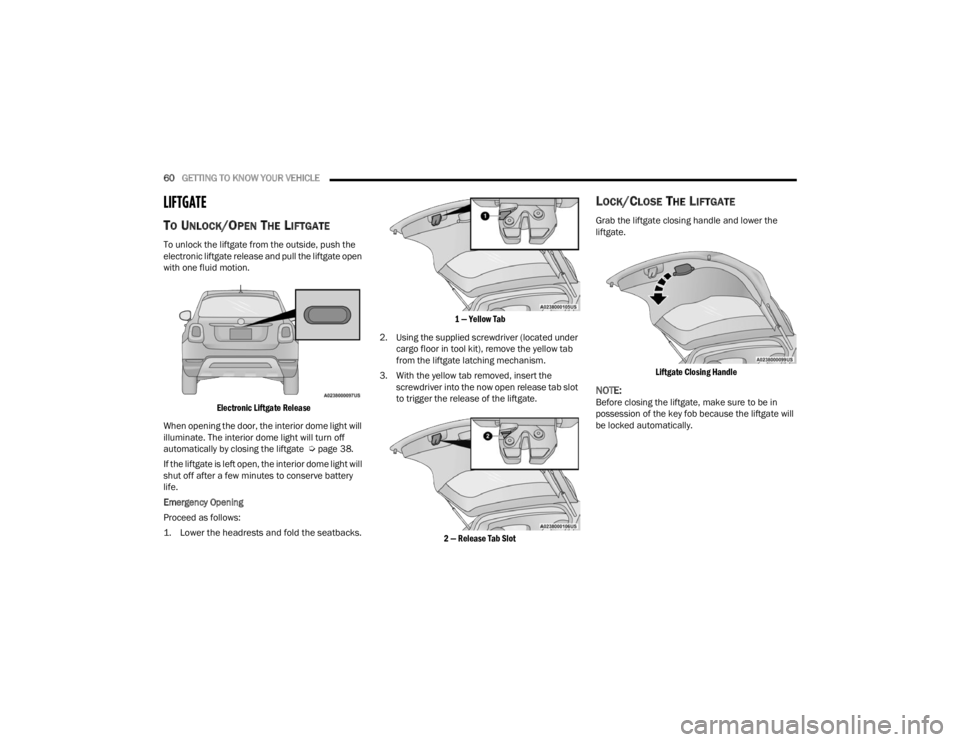
Emergency Opening
Proceed as follows:
1. Lower the headrests and fold the seatbacks.
1 — Yellow Tab
2. Using the supplied screwdriver (located under cargo floor in tool kit), remove the yellow tab
from the liftgate latching mechanism.
3. With the yellow tab removed, insert the screwdriver into the now open release tab slot
to trigger the release of the liftgate.
2 — Release Tab Slot
LOCK/CLOSE THE LIFTGATE
Grab the liftgate closing handle and lower the
liftgate.
Liftgate Closing Handle
NOTE:Before closing the liftgate, make sure to be in
possession of the key fob because the liftgate will
be locked automatically.
22_FD_OM_EN_USC_t.book Page 60
Page 68 of 312
66GETTING TO KNOW YOUR INSTRUMENT PANEL
Vehicle Info
Tire Pressure
Oil Temperature
Battery Voltage
Driver Assist
Lane Departure Warning
Adaptive Cruise Control
Stop/Start — If Equipped
Audio
Phone
Navigation
Messages
Settings
Display
Units
Clock and Date
Security
Safety & Assistance
Lights
Doors & Locks
Engine OFF Procedure — If Equipped
Speedometer
View and change the speedometer scale from mph
to km/h (km/h to mph).
Trip
This instrument cluster display menu item allows
you to view and select information about the "Trip
Computer”:
Instantaneous info
View the distance to empty (miles or km).
View the instantaneous consumption (mpg,
or l/100km or km/l).
Trip A
View Trip A distance (miles or km).
View travel time A (hours/minutes/
seconds).
View average consumption A (mpg, or
l/100km or km/l).
View average speed A (mph or km/h).
Trip B
View Trip B distance (miles or km).
View travel time B (hours/minutes/
seconds).
View average consumption B (mpg, or
l/100km or km/l).
View average speed B (mph or km/h).
Drive Mode Selector
This instrument cluster display menu/submenu
items allows you to view and select information
about the "Drive Mode".
Vehicle Info
Push and release the up or down arrow
button until "Vehicle Info" is highlighted in the
instrument cluster display. Push and release the
right arrow button and Coolant Temp will be
displayed. Push the right or left arrow button
to scroll through the following information displays:
Tire pressure
View the information relating to the Tire
Pressure Monitoring System (TPMS) (if
equipped).
Oil Temperature
View the engine oil temperature.
Battery Voltage
View the voltage value (state of charge) of
the battery.
22_FD_OM_EN_USC_t.book Page 66
Page 72 of 312
70GETTING TO KNOW YOUR INSTRUMENT PANEL
Brake Warning Light
This warning light monitors various brake
functions, including brake fluid level and
parking brake application. If the brake
light turns on it may indicate that the
parking brake is applied, that the brake fluid level
is low, or that there is a problem with the Anti-Lock
Brake System reservoir.
If the light remains on when the parking brake has
been disengaged, and the fluid level is at the full
mark on the master cylinder reservoir, it indicates
a possible brake hydraulic system malfunction or
that a problem with the Brake Booster has been
detected by the Anti-Lock Brake System (ABS) /
Electronic Stability Control (ESC) system. In this
case, the light will remain on until the condition has
been corrected. If the problem is related to the
brake booster, the ABS pump will run when
applying the brake, and a brake pedal pulsation
may be felt during each stop.
The dual brake system provides a reserve braking
capacity in the event of a failure to a portion of the
hydraulic system. A leak in either half of the dual
brake system is indicated by the Brake Warning
Light, which will turn on when the brake fluid level
in the master cylinder has dropped below a
specified level.
The light will remain on until the cause is corrected.
NOTE:The light may flash momentarily during sharp
cornering maneuvers, which change fluid level
conditions. The vehicle should have service
performed, and the brake fluid level checked.
If brake failure is indicated, immediate repair is
necessary.
Vehicles equipped with the Anti-Lock Brake System
(ABS) are also equipped with Electronic Brake
Force Distribution (EBD). In the event of an EBD
failure, the Brake Warning Light will turn on along
with the ABS Light. Immediate repair to the ABS
system is required.
Operation of the Brake Warning Light can be
checked by turning the ignition switch from the OFF
position to the ON/RUN position. The light should
illuminate for approximately two seconds. The light
should then turn off unless the parking brake is
applied or a brake fault is detected. If the light does
not illuminate, have the light inspected by an
authorized dealer. The light also will turn on when the parking brake
is applied with the ignition switch in the ON/RUN
position.
NOTE:This light shows only that the parking brake is
applied. It does not show the degree of brake appli
-
cation.
Battery Charge Warning Light
This warning light will illuminate when the
battery is not charging properly. If it stays
on while the engine is running, there may
be a malfunction with the charging
system. Contact an authorized dealer as soon as
possible.
This indicates a possible problem with the
electrical system or a related component.
Coolant Temperature Warning Light
This light warns of an overheated engine
condition. If the light turns on while driving,
safely pull over and stop the vehicle. If the
Air Conditioning (A/C) system is on, turn it
off. Also, shift the transmission into NEUTRAL and
idle the vehicle. If the temperature reading does not
return to normal, turn the engine off immediately
and call for service.
NOTE:As the coolant temperature gauge approaches "H",
this indicator will illuminate and a single chime will
sound.
WARNING!
Driving a vehicle with the red brake light on is
dangerous. Part of the brake system may have
failed. It will take longer to stop the vehicle. You
could have a collision. Have the vehicle checked
immediately.
22_FD_OM_EN_USC_t.book Page 70
Page 80 of 312
78GETTING TO KNOW YOUR INSTRUMENT PANEL
ONBOARD DIAGNOSTIC SYSTEM — OBD II
Your vehicle is equipped with a sophisticated
Onboard Diagnostic system called OBD II. This
system monitors the performance of the
emissions, engine, and transmission control
systems. When these systems are operating
properly, your vehicle will provide excellent
performance and fuel economy, as well as engine
emissions well within current government
regulations.
If any of these systems require service, the OBD II
system will turn on the Malfunction Indicator Light
(MIL). It will also store diagnostic codes and other
information to assist your service technician in
making repairs. Although your vehicle will usually
be drivable and not need towing, see an authorized
dealer for service as soon as possible.
ONBOARD DIAGNOSTIC SYSTEM
(OBD II) C
YBERSECURITY
Your vehicle is required to have an OBD II and a
connection port to allow access to information
related to the performance of your emissions
controls. Authorized service technicians may need
to access this information to assist with the
diagnosis and service of your vehicle and
emissions system Ú page 122.
EMISSIONS INSPECTION AND
MAINTENANCE PROGRAMS
In some localities, it may be a legal requirement to
pass an inspection of your vehicle's emissions
control system. Failure to pass could prevent
vehicle registration.
For states that require an Inspection and
Maintenance (I/M), this check verifies
the Malfunction Indicator Light (MIL) is
functioning and is not on when the
engine is running, and that the OBD II system is
ready for testing.
Normally, the OBD II system will be ready. The
OBD II system may not be ready if your vehicle was
recently serviced, recently had a depleted battery
or a battery replacement. If the OBD II system
should be determined not ready for the I/M test,
your vehicle may fail the test.
CAUTION!
Prolonged driving with the MIL on could cause
further damage to the emission control
system. It could also affect fuel economy and
driveability. The vehicle must be serviced
before any emissions tests can be performed.
If the MIL is flashing while the vehicle is
running, severe catalytic converter damage
and power loss will soon occur. Immediate
service is required.
WARNING!
ONLY an authorized service technician should
connect equipment to the OBD II connection
port in order to read the VIN, diagnose, or
service your vehicle.
If unauthorized equipment is connected to the
OBD II connection port, such as a
driver-behavior tracking device, it may:
Be possible that vehicle systems,
including safety related systems, could be
impaired or a loss of vehicle control could
occur that may result in an accident
involving serious injury or death.
Access, or allow others to access, infor -
mation stored in your vehicle systems,
including personal information.
22_FD_OM_EN_USC_t.book Page 78
Page 81 of 312

GETTING TO KNOW YOUR INSTRUMENT PANEL79
Your vehicle has a simple ignition actuated test,
which you can use prior to going to the test station.
To check if your vehicle's OBD II system is ready,
you must do the following:
1. Cycle the ignition switch to the ON position, but do not crank or start the engine.
NOTE:If you crank or start the engine, you will have to
start this test over.
2. As soon as you cycle the ignition switch to the ON position, you will see the Malfunction
Indicator Light (MIL) symbol come on as part of
a normal bulb check. 3. Approximately 15 seconds later, one of two
things will happen:
The MIL will flash for about 10 seconds and
then return to being fully illuminated until
you turn OFF the ignition or start the engine.
This means that your vehicle's OBD II
system is not ready and you should not
proceed to the I/M station.
The MIL will not flash at all and will remain
fully illuminated until you place the ignition
in the off position or start the engine. This
means that your vehicle's OBD II system is
ready and you can proceed to the I/M
station. If your OBD II system is
not ready, you should see
an authorized dealer or repair facility. If your
vehicle was recently serviced or had a battery
failure or replacement, you may need to do nothing
more than drive your vehicle as you normally would
in order for your OBD II system to update. A
recheck with the above test routine may then
indicate that the system is now ready.
Regardless of whether your vehicle's OBD II system
is ready or not, if the MIL is illuminated during
normal vehicle operation you should have your
vehicle serviced before going to the I/M station.
The I/M station can fail your vehicle because the
MIL is on with the engine running.3
22_FD_OM_EN_USC_t.book Page 79
Page 82 of 312
80
STARTING AND OPERATING
STARTING THE ENGINE
Before starting your vehicle, adjust your seat,
adjust the inside and outside mirrors, fasten your
seat belt, and if present, instruct all other
occupants to buckle their seat belts.
Start the engine with the gear selector in the
NEUTRAL or PARK position. Apply the brake before
shifting to any driving range.Normal Starting
Proceed as follows:
1. Set the Electric Park Brake (EPB) and put the
gear selector in the PARK or NEUTRAL
position.
2. Press on the brake pedal, without pressing the accelerator.
3. Press the START/STOP ignition button and release it as soon as the engine is started.
4. If the engine does not start, place the ignition in the OFF position and wait 10-15 seconds
before attempting to restart the engine.
TIP START FEATURE
Do not press the accelerator. Briefly press the
START/STOP ignition button and release it. The
starter motor will continue to run but will
automatically disengage when the engine is
running.
COLD WEATHER OPERATION
To ensure reliable starting under extreme cold
conditions an externally powered electric block
heater (if equipped) is required below -20°F
(-29°C). To prevent possible engine damage while starting
at low temperatures, this vehicle will inhibit engine
cranking when the ambient temperature is less
than -20°F (-29°C), and the oil temperature
sensor reading indicates an engine block heater
has not been used. The message “Plug in Engine
Heater” will be displayed in the instrument cluster
when the ambient temperature is below -4°F
(-20°C) at the time the engine is shut off as a
reminder to avoid possible crank delays at the next
cold start.
EXTENDED PARK STARTING
NOTE:Extended Park condition occurs when the vehicle
has not been started or driven for at least 30 days.
1. Install a battery charger or jumper cables to
the battery to ensure a full battery charge
during the crank cycle.
2. Press the START/STOP ignition button and release it when the engine starts.
3. If the engine fails to start within 10 seconds, place the ignition in the OFF position, wait
10 to 15 seconds to allow the starter to cool,
then repeat the Extended Park Starting
procedure.
WARNING!
Never leave children alone in a vehicle, or with
access to an unlocked vehicle.
Allowing children to be in a vehicle unattended
is dangerous for a number of reasons. A child
or others could be seriously or fatally injured.
Children should be warned not to touch the
parking brake, brake pedal or the gear
selector.
Do not leave the key fob in or near the vehicle
(or in a location accessible to children), and do
not leave the ignition in the ON or RUN posi -
tion. A child could operate power windows,
other controls, or move the vehicle.
22_FD_OM_EN_USC_t.book Page 80
Page 83 of 312
STARTING AND OPERATING81
4. If the engine fails to start after eight attempts, allow the starter to cool for at least
10 minutes, then repeat the procedure.
IF ENGINE FAILS TO START
If the engine fails to start after you have followed
the “Normal Starting” or “Cold Weather Operation”
procedure, and has not experienced an extended
park condition as identified in “Extended Park
Starting” procedure it may be flooded. Push the
accelerator pedal all the way to the floor and hold
it there. Crank the engine for no more than
10 seconds. This should clear any excess fuel in
case the engine is flooded. Leave the ignition in the
RUN position, release the accelerator pedal and
repeat the “Normal Starting” procedure.
AFTER STARTING — WARMING UP THE
E
NGINE
Proceed as follows:
Travel slowly, letting the engine run at a reduced
RPM, without accelerating suddenly.
It is recommended to wait until the engine
coolant temperature gauge starts to rise for
maximum performance.
STOPPING THE ENGINE
To shut off the engine with vehicle speed greater
than 5 mph (8 km/h), you must push and hold the
ignition or push the ENGINE START/STOP button
three times consecutively within a few seconds.
The engine will shut down, and the ignition will be
placed in the RUN position.
Turning off the car (place the ignition from the RUN
position to the OFF position), the power supply to
the accessories are maintained for a period of
three minutes.
NOTE:If the vehicle fails to shut off using the ignition
Ú page 64.
Opening the driver side door with the ignition in
RUN will sound a short chime that reminds the
driver to place the ignition to OFF.
CAUTION!
To prevent damage to the starter, do not crank
continuously for more than 10 seconds at a
time. Wait 10 to 15 seconds before trying again.
WARNING!
Never pour fuel or other flammable liquid into
the throttle body air inlet opening in an
attempt to start the vehicle. This could result
in flash fire causing serious personal injury.
Do not attempt to push or tow your vehicle to
get it started. Vehicles equipped with an auto -
matic transmission cannot be started this
way. Unburned fuel could enter the catalytic
converter and once the engine has started,
ignite and damage the converter and vehicle.
If the vehicle has a discharged battery,
booster cables may be used to obtain a start
from a booster battery or the battery in
another vehicle. This type of start can be
dangerous if done improperly Ú page 226.
CAUTION!
To prevent damage to the starter, do not
continuously crank the engine for more than
10 seconds at a time. Wait 10 to 15 seconds
before trying again.
4
22_FD_OM_EN_USC_t.book Page 81
Page 93 of 312

STARTING AND OPERATING91
NOTE:
Even if the power steering assistance is no
longer operational, it is still possible to steer the
vehicle. Under these conditions there will be a
substantial increase in steering effort, espe -
cially at low speeds and during parking maneu -
vers.
If the condition persists, see an authorized
dealer for service.
STOP/START SYSTEM
The Stop/Start function was developed to reduce
fuel consumption. The system will stop the engine
automatically during a vehicle stop if the required
conditions are met. Releasing the brake pedal or
pressing the accelerator pedal will automatically
restart the engine.
AUTOMATIC MODE
The Stop/Start feature is enabled after every
normal customer engine start. At that time, the
system will go into STOP/START READY and if all
other conditions are met, can go into a STOP/
START AUTOSTOP ACTIVE “Autostop” mode. To Activate The Autostop Mode, The Following
Must Occur:
The system must be in STOP/START READY
state. A STOP/START READY message will be
displayed in the instrument cluster display
within the Stop/Start section Ú
page 64.
The vehicle must be completely stopped.
The gear selector must be in a forward gear and
the brake pedal pressed.
The engine will shut down, the tachometer will
move to the zero position and the Stop/Start
telltale will illuminate indicating you are in
Autostop. Customer settings will be maintained
upon return to an engine running condition.
POSSIBLE REASONS THE ENGINE DOES
N
OT AUTOSTOP
Prior to engine shut down, the system will check
many safety and comfort conditions to see if they
are fulfilled. Detailed information about the
operation of the Stop/Start system may be viewed
in the instrument cluster display Stop/Start
Screen. In the following situations the engine will
not stop:
Driver’s seat belt is not buckled.
Driver’s door is not closed.
Battery temperature is too warm or cold.
Battery charge is low.
The vehicle is on a steep grade.
Cabin heating or cooling is in process and an
acceptable cabin temperature has not been
achieved.
HVAC is set to full defrost mode at a high blower
speed.
HVAC set to MAX A/C.
Engine has not reached normal operating
temperature.
The transmission is not in a forward gear.
Hood is open.
Vehicle is in 4WD Low transfer case mode (if
equipped with 4WD).
Brake pedal is not pressed with sufficient pres -
sure with vehicle in DRIVE position.
Accelerator pedal input.
Engine temp is too high.
5 mph (8 km/h) threshold not achieved from
previous AUTOSTOP.
Steering angle is beyond threshold.
It may be possible for the vehicle to be driven
several times without the Stop/Start system going
into a STOP/START READY state under more
extreme conditions of the items listed above.
4
22_FD_OM_EN_USC_t.book Page 91