climate control FIAT 500X 2022 User Guide
[x] Cancel search | Manufacturer: FIAT, Model Year: 2022, Model line: 500X, Model: FIAT 500X 2022Pages: 312, PDF Size: 13.26 MB
Page 49 of 312
GETTING TO KNOW YOUR VEHICLE47
illuminates when the rear window defroster is on.
The rear window defroster automatically turns off
after 20 minutes.
Temperature Control
Temperature Control regulates the temperature of
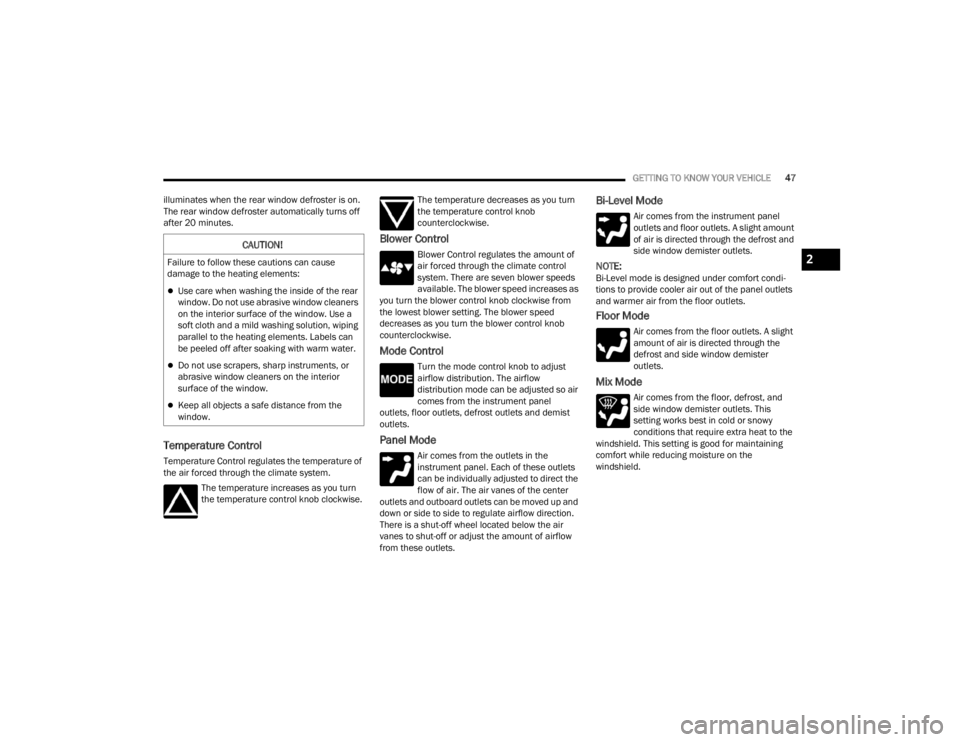
the air forced through the climate system. The temperature increases as you turn
the temperature control knob clockwise. The temperature decreases as you turn
the temperature control knob
counterclockwise.
Blower Control
Blower Control regulates the amount of
air forced through the climate control
system. There are seven blower speeds
available. The blower speed increases as
you turn the blower control knob clockwise from
the lowest blower setting. The blower speed
decreases as you turn the blower control knob
counterclockwise.
Mode Control
Turn the mode control knob to adjust
airflow distribution. The airflow
distribution mode can be adjusted so air
comes from the instrument panel
outlets, floor outlets, defrost outlets and demist
outlets.
Panel Mode
Air comes from the outlets in the
instrument panel. Each of these outlets
can be individually adjusted to direct the
flow of air. The air vanes of the center
outlets and outboard outlets can be moved up and
down or side to side to regulate airflow direction.
There is a shut-off wheel located below the air
vanes to shut-off or adjust the amount of airflow
from these outlets.
Bi-Level Mode
Air comes from the instrument panel
outlets and floor outlets. A slight amount
of air is directed through the defrost and
side window demister outlets.
NOTE:Bi-Level mode is designed under comfort condi -
tions to provide cooler air out of the panel outlets
and warmer air from the floor outlets.
Floor Mode
Air comes from the floor outlets. A slight
amount of air is directed through the
defrost and side window demister
outlets.
Mix Mode
Air comes from the floor, defrost, and
side window demister outlets. This
setting works best in cold or snowy
conditions that require extra heat to the
windshield. This setting is good for maintaining
comfort while reducing moisture on the
windshield.
CAUTION!
Failure to follow these cautions can cause
damage to the heating elements:
Use care when washing the inside of the rear
window. Do not use abrasive window cleaners
on the interior surface of the window. Use a
soft cloth and a mild washing solution, wiping
parallel to the heating elements. Labels can
be peeled off after soaking with warm water.
Do not use scrapers, sharp instruments, or
abrasive window cleaners on the interior
surface of the window.
Keep all objects a safe distance from the
window.
2
22_FD_OM_EN_USC_t.book Page 47
Page 50 of 312
48GETTING TO KNOW YOUR VEHICLE
Climate Control OFF
To turn the Climate Controls off, turn the
blower control knob to the OFF (O)
position.
AUTOMATIC TEMPERATURE CONTROL
(ATC)
Automatic Operation
1. Push the AUTO button on the front ATC panel
and the word “AUTO” will illuminate in the
front ATC display, along with two
temperatures for the driver and front
passenger. The system will then automat -
ically regulate the amount of airflow.
2. Adjust the temperature you would like the system to maintain, by adjusting the driver,
and passenger temperatures. Once the
desired temperature is displayed, the system
will achieve and automatically maintain that
comfort level.
3. When the system is set up for your comfort level, it is not necessary to change the
settings. You will experience the greatest
efficiency by simply allowing the system to
function automatically.
NOTE:It is not necessary to move the temperature
settings. The system automatically adjusts the
temperature, mode, and fan speed to provide
comfort as quickly as possible.
To provide you with maximum comfort in the
automatic mode, during cold start-ups, the blower
fan will remain on low until the engine warms up.
The fan will engage immediately if the Defrost
mode is selected, or by changing the front blower
knob setting.
Manual Operation Override
This system offers a full complement of manual
override features. The AUTO symbol in the front
ATC display will be turned off when the system is
being used in the manual mode.
CLIMATE VOICE RECOGNITION
Adjust vehicle temperatures hands-free and keep
everyone comfortable while you keep moving
ahead. (If vehicle is equipped with climate control.)
Push the VR button . After the beep, say one of
the following commands:
“Set the driver temperature to 70 degrees ”
“Set the passenger temperature to 70 degrees ”Did You Know:
Voice Command for Climate may
only be used to adjust the interior temperature of
your vehicle. Voice Command will not work to
adjust the heated seats or steering wheel if
equipped.
OPERATING TIPS
Refer to the chart at the end of this section for
suggested control settings for various weather
conditions.
Summer Operation
The engine cooling system must be protected with
a high-quality antifreeze coolant to provide proper
corrosion protection and to protect against engine
overheating. OAT coolant (conforming to
MS.90032) is recommended.
Winter Operation
To ensure the best possible heater and defroster
performance, make sure the engine cooling
system is functioning properly and the proper
amount, type, and concentration of coolant is
used. Use of the Air Recirculation mode during
Winter months is not recommended, because it
may cause window fogging.
22_FD_OM_EN_USC_t.book Page 48
Page 51 of 312

GETTING TO KNOW YOUR VEHICLE49
Vacation/Storage
For information on maintaining the Climate Control
system when the vehicle is being stored for an
extended period of time, see Úpage 286.
Window Fogging
Vehicle windows tend to fog on the inside in mild,
rainy, and/or humid weather. To clear the
windows, select Defrost or Mix mode and increase
the front blower speed. Do not use the
Recirculation mode without A/C for long periods,
as fogging may occur.
Outside Air Intake
Make sure the air intake, located directly in front of
the windshield, is free of obstructions, such as
leaves. Leaves collected in the air intake may
reduce airflow, and if they enter the air distribution
box, they could plug the water drains. In Winter
months, make sure the air intake is clear of ice,
slush, and snow.
Cabin Air Filter
The Climate Control system filters out dust and
pollen from the air. Contact an authorized dealer to
service your cabin air filter, and to have it replaced
when needed.
System Maintenance
In Winter, the Climate Control system must be
turned on at least once a month for approximately
10 minutes.
Have the system inspected at an authorized dealer
before the Summer.
NOTE:The system uses R-1234yf (refrigerant) which does
not pollute the environment in the event of acci -
dental leakage. Under no circumstances is the use
of R-134a (refrigerant) allowed.
Rapid Window Demisting (MAX-Defrost
Function)
Push the MAX-defrost button to activate (LED on)
the windshield and side window demisting
function.
The Climate Control system carries out the
following operations:
Turns on the air conditioning compressor when
environmental conditions are suitable
Turns air recirculation off
Sets blower fan to the maximum speed and
displays the fan speed (Blower Control Indicator
LED illuminated)
Directs air flow to windshield and front side
window diffusers
Activates the heated rear window defrost
Activates the heated windshield (if equipped)
When the function is activated, the AUTO button
LED turns off. With the function activated, the only
possible manual adjustments are pushing the A/C
control button, adjusting the fan speed and turning
the heated rear window off.
When the Recirculation Control or AUTO buttons
are pushed, the Climate Control system will
deactivate the Front Defrost (MAX-DEF) function.
Selecting the footwell/windshield or only
windshield distribution activates the Climate
Control system compressor and the air
recirculation is set to outside air intake.
This logic guarantees optimum visibility at the
windows. Max-defrost is also available in manual
mode.
2
22_FD_OM_EN_USC_t.book Page 49
Page 52 of 312
50GETTING TO KNOW YOUR VEHICLE
Climate Control System Compressor
Push the A/C Control button to activate/deactivate
the compressor (activation is indicated by the LED
on the button turning on).
The system remembers that the compressor has
been turned off, even after the engine has
stopped.
Pushing the A/C button will stop AUTO mode (AUTO
LED will turn off). To restore automatic control of
compressor, push the AUTO button again.
NOTE:With the compressor off, air cannot be introduced
to the passenger compartment with a temperature
lower than the outside temperature. Under certain
environmental conditions, windows could fog
rapidly since the air is not dehumidified.
Operating Tips Chart
INTERIOR STORAGE AND EQUIPMENT
STORAGE
Glove Compartments
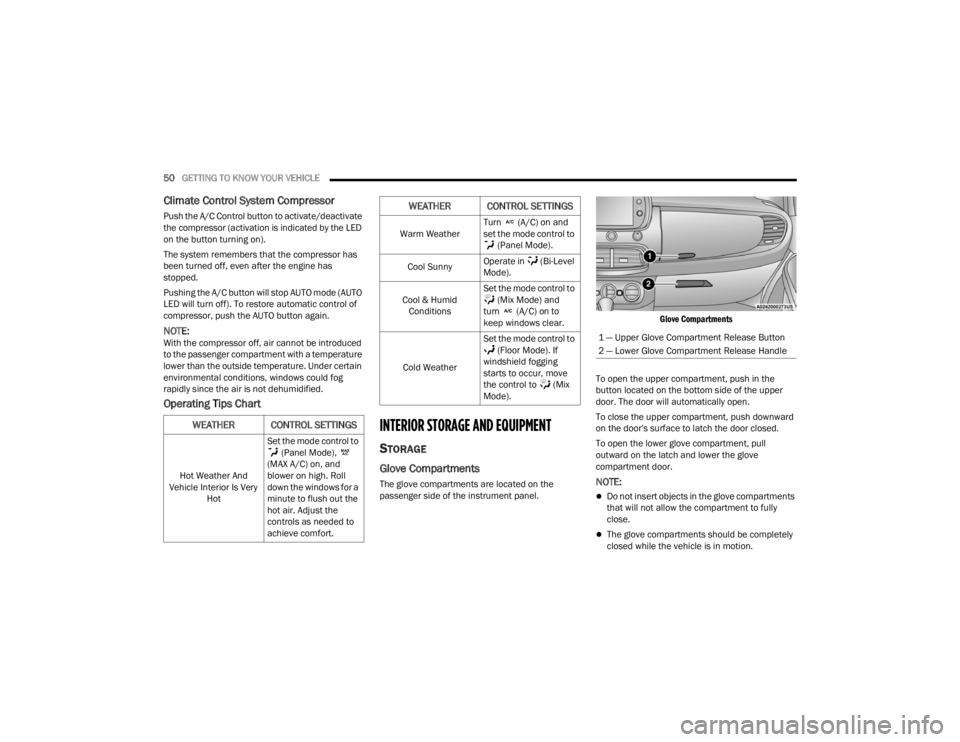
The glove compartments are located on the
passenger side of the instrument panel.
Glove Compartments
To open the upper compartment, push in the
button located on the bottom side of the upper
door. The door will automatically open.
To close the upper compartment, push downward
on the door's surface to latch the door closed.
To open the lower glove compartment, pull
outward on the latch and lower the glove
compartment door.NOTE:
Do not insert objects in the glove compartments
that will not allow the compartment to fully
close.
The glove compartments should be completely
closed while the vehicle is in motion.
WEATHER CONTROL SETTINGS
Hot Weather And
Vehicle Interior Is Very Hot Set the mode control to
(Panel Mode),
(MAX A/C) on, and
blower on high. Roll
down the windows for a
minute to flush out the
hot air. Adjust the
controls as needed to
achieve comfort.
Warm Weather Turn (A/C) on and
set the mode control to
(Panel Mode).
Cool Sunny Operate in (Bi-Level
Mode).
Cool & Humid Conditions Set the mode control to
(Mix Mode) and
turn (A/C) on to
keep windows clear.
Cold Weather Set the mode control to
(Floor Mode). If
windshield fogging
starts to occur, move
the control to (Mix
Mode).
WEATHER CONTROL SETTINGS
1 — Upper Glove Compartment Release Button
2 — Lower Glove Compartment Release Handle
22_FD_OM_EN_USC_t.book Page 50
Page 54 of 312
52GETTING TO KNOW YOUR VEHICLE
POWER OUTLETS
There is one 12 Volt (13 Amp) power outlet in this
vehicle, located under the climate controls. This
power outlet can power mobile phones, electronics
and other low power devices.
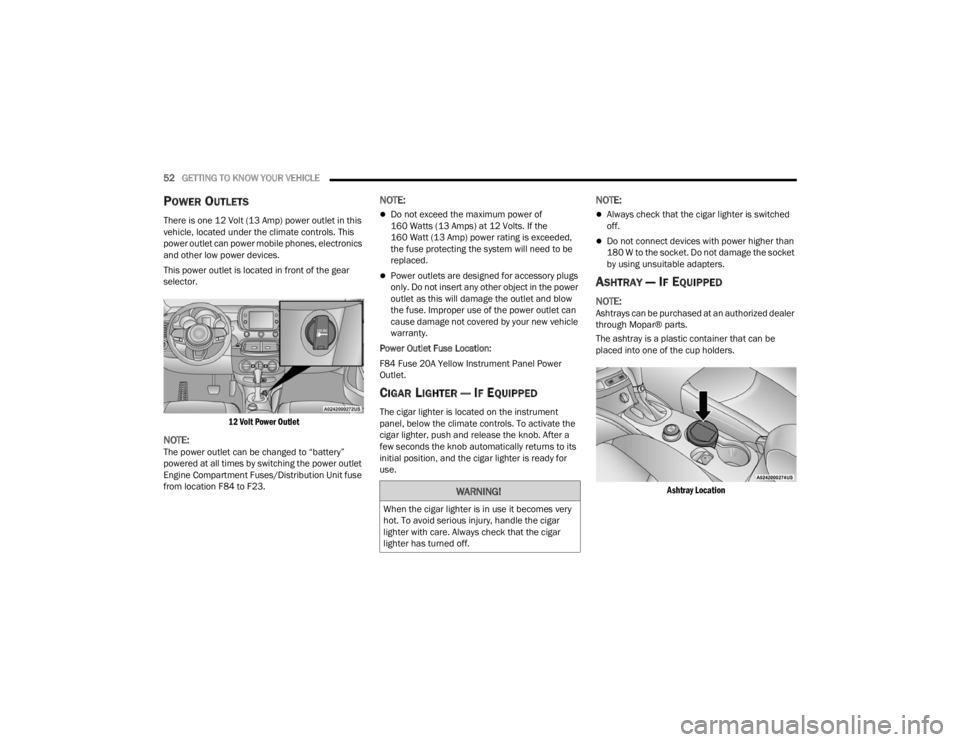
This power outlet is located in front of the gear
selector.
12 Volt Power Outlet
NOTE:The power outlet can be changed to “battery”
powered at all times by switching the power outlet
Engine Compartment Fuses/Distribution Unit fuse
from location F84 to F23.
NOTE:
Do not exceed the maximum power of
160 Watts (13 Amps) at 12 Volts. If the
160 Watt (13 Amp) power rating is exceeded,
the fuse protecting the system will need to be
replaced.
Power outlets are designed for accessory plugs
only. Do not insert any other object in the power
outlet as this will damage the outlet and blow
the fuse. Improper use of the power outlet can
cause damage not covered by your new vehicle
warranty.
Power Outlet Fuse Location:
F84 Fuse 20A Yellow Instrument Panel Power
Outlet.
CIGAR LIGHTER — IF EQUIPPED
The cigar lighter is located on the instrument
panel, below the climate controls. To activate the
cigar lighter, push and release the knob. After a
few seconds the knob automatically returns to its
initial position, and the cigar lighter is ready for
use.
NOTE:
Always check that the cigar lighter is switched
off.
Do not connect devices with power higher than
180 W to the socket. Do not damage the socket
by using unsuitable adapters.
ASHTRAY — IF EQUIPPED
NOTE:Ashtrays can be purchased at an authorized dealer
through Mopar® parts.
The ashtray is a plastic container that can be
placed into one of the cup holders.
Ashtray Location
WARNING!
When the cigar lighter is in use it becomes very
hot. To avoid serious injury, handle the cigar
lighter with care. Always check that the cigar
lighter has turned off.
22_FD_OM_EN_USC_t.book Page 52
Page 141 of 312
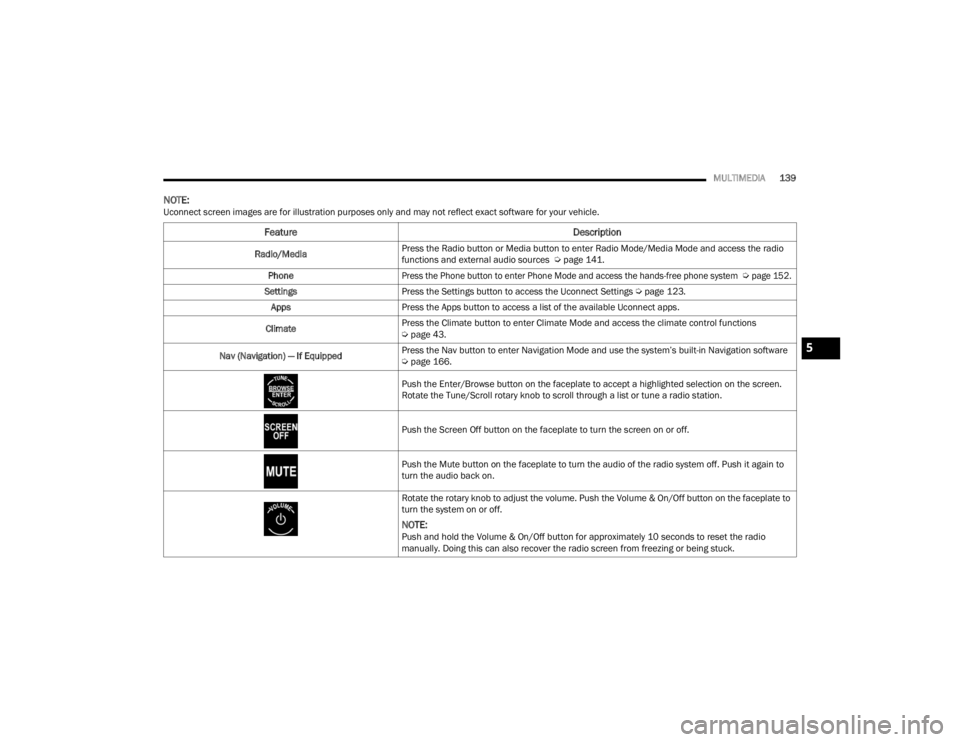
MULTIMEDIA139
NOTE:Uconnect screen images are for illustration purposes only and may not reflect exact software for your vehicle.
Feature Description
Radio/MediaPress the Radio button or Media button to enter Radio Mode/Media Mode and access the radio
functions and external audio sources Ú
page 141.
Phone
Press the Phone button to enter Phone Mode and access the hands-free phone system
Ú
page 152.
Settings Press the Settings button to access the Uconnect Settings Ú page 123.
Apps Press the Apps button to access a list of the available Uconnect apps.
Climate Press the Climate button to enter Climate Mode and access the climate control functions
Ú
page 43.
Nav (Navigation) — If Equipped Press the Nav button to enter Navigation Mode and use the system’s built-in Navigation software
Ú
page 166.
Push the Enter/Browse button on the faceplate to accept a highlighted selection on the screen.
Rotate the Tune/Scroll rotary knob to scroll through a list or tune a radio station.
Push the Screen Off button on the faceplate to turn the screen on or off.
Push the Mute button on the faceplate to turn the audio of the radio system off. Push it again to
turn the audio back on.
Rotate the rotary knob to adjust the volume. Push the Volume & On/Off button on the faceplate to
turn the system on or off.
NOTE:Push and hold the Volume & On/Off button for approximately 10 seconds to reset the radio
manually. Doing this can also recover the radio screen from freezing or being stuck.
5
22_FD_OM_EN_USC_t.book Page 139
Page 219 of 312

SAFETY217
The best protection against carbon monoxide entry
into the vehicle body is a properly maintained
engine exhaust system. Whenever a change is noticed in the sound of the
exhaust system, when exhaust fumes can be
detected inside the vehicle, or when the underside
or rear of the vehicle is damaged, have an
authorized dealer inspect the complete exhaust
system and adjacent body areas for broken,
damaged, deteriorated, or mispositioned parts.
Open seams or loose connections could permit
exhaust fumes to seep into the passenger
compartment. In addition, inspect the exhaust
system each time the vehicle is raised for
lubrication or oil change. Replace as required.
CARBON MONOXIDE WARNINGS
If you are required to drive with the trunk/lift
-
gate/rear doors open, make sure that all
windows are closed and the climate control
BLOWER switch is set at high speed. DO NOT
use the recirculation mode.
If it is necessary to sit in a parked vehicle with
the engine running, adjust your heating or
cooling controls to force outside air into the
vehicle. Set the blower at high speed.
WARNING!
WARNING!
Carbon monoxide (CO) in exhaust gases is
deadly. Follow the precautions below to prevent
carbon monoxide poisoning:
Do not inhale exhaust gases. They contain
carbon monoxide, a colorless and odorless
gas, which can kill. Never run the engine in a
closed area, such as a garage, and never sit in
a parked vehicle with the engine running for
an extended period. If the vehicle is stopped in
an open area with the engine running for more
than a short period, adjust the ventilation
system to force fresh, outside air into the
vehicle.
Guard against carbon monoxide with proper
maintenance. Have the exhaust system
inspected every time the vehicle is raised.
Have any abnormal conditions repaired
promptly. Until repaired, drive with all side
windows fully open.
6
22_FD_OM_EN_USC_t.book Page 217
Page 287 of 312

SERVICING AND MAINTENANCE285
DEPARTMENT OF TRANSPORTATION
UNIFORM TIRE QUALITY GRADES
The following tire grading categories
were established by the National
Highway Traffic Safety Administration.
The specific grade rating assigned by the
tire's manufacturer in each category is
shown on the sidewall of the tires on
your vehicle.
All passenger vehicle tires must conform
to Federal safety requirements in
addition to these grades.
TREADWEAR
The Treadwear grade is a comparative
rating, based on the wear rate of the tire
when tested under controlled conditions
on a specified government test course.
For example, a tire graded 150 would
wear one and one-half times as well on
the government course as a tire graded
100. The relative performance of tires
depends upon the actual conditions of
their use, however, and may depart
significantly from the norm due to variations in driving habits, service
practices, and differences in road
characteristics and climate.
TRACTION GRADES
The Traction grades, from highest to
lowest, are AA, A, B, and C. These grades
represent the tire's ability to stop on wet
pavement, as measured under
controlled conditions on specified
government test surfaces of asphalt and
concrete. A tire marked C may have poor
traction performance.
TEMPERATURE GRADES
The Temperature grades are A (the
highest), B, and C, representing the tire's
resistance to the generation of heat and
its ability to dissipate heat, when tested
under controlled conditions on a
specified indoor laboratory test wheel.
Sustained high temperature can cause
the material of the tire to degenerate
and reduce tire life, and excessive
temperature can lead to sudden tire
failure. The grade C corresponds to a
level of performance, which all
passenger vehicle tires must meet
under the Federal Motor Vehicle Safety
Standard No. 109. Grades B and A
represent higher levels of performance
on the laboratory test wheel, than the
minimum required by law.
WARNING!
The traction grade assigned to this tire is based
on straight-ahead braking traction tests, and
does not include acceleration, cornering,
hydroplaning, or peak traction characteristics.WARNING!
The temperature grade for this tire is
established for a tire that is properly inflated and
not overloaded. Excessive speed,
under-inflation, or excessive loading, either
separately or in combination, can cause heat
buildup and possible tire failure.
8
22_FD_OM_EN_USC_t.book Page 285
Page 302 of 312

300 B-Pillar Location
............................................. 273Brake Assist System...................................... 175Brake Control System, Electronic.................. 175Brake Fluid.................................................... 293Brake System...................................... 250, 289Anti-Lock (ABS).......................................... 289Fluid Check............................................... 293Master Cylinder......................................... 250Warning Light.............................................. 70Brightness, Interior Lights................................ 39Bulbs, Light.................................................... 216
C
Camera, Rear................................................ 110Capacities, Fluid............................................ 292Caps, Filler Oil (Engine)................................................ 240Radiator (Coolant Pressure)...................... 249Car Washes................................................... 286Carbon Monoxide Warning.................. 216, 217CD.................................................................. 150Cellular Phone............................................... 173Certification Label......................................... 112Chains, Tire.................................................... 283Chart, Tire Sizing............................................ 270Check Engine Light (Malfunction Indicator
Light)............................................................... 78Checking Your Vehicle For Safety.................. 214Checks, Safety............................................... 214Child Restraint............................................... 204
Child RestraintsBooster Seats........................................... 207Child Seat Installation.............................. 213How To Stow An unused ALR Seat Belt.... 211Infant And Child Restraints....................... 206LATCH Positions....................................... 208Locating The LATCH Anchorages.............. 210Lower Anchors And Tethers For Children.. 208Older Children And Child Restraints......... 206Seating Positions...................................... 207Cigar Lighter.................................................... 52Clean Air Gasoline......................................... 290CleaningWheels..................................................... 282Climate Control................................................ 43Clutch........................................................... 250Fluid......................................................... 250Coin Holder...................................................... 51Cold Weather Operation.................................. 80Compact Spare Tire...................................... 280Console............................................................ 51Floor............................................................ 51Contract, Service.......................................... 295Controls........................................................ 142Cooling Pressure Cap (Radiator Cap)............ 249Cooling System............................................. 247Adding Coolant (Antifreeze)...................... 248Coolant Level............................................ 249Cooling Capacity....................................... 292
Disposal Of Used Coolant......................... 249Drain, Flush, And Refill............................. 248Inspection........................................ 247, 249Points To Remember................................ 249Pressure Cap............................................ 249Radiator Cap............................................. 249Selection Of Coolant (Antifreeze)......................... 248, 292, 293Corrosion Protection..................................... 286Cruise Control (Speed Control).........................93Cruise Light............................................... 76, 77Customer Assistance.................................... 294Customer Programmable Features............... 123Cybersecurity................................................ 122
D
Daytime Running Lights...................................36Defroster, Rear Window...................................42Defroster, Windshield................................... 215De-Icer, Remote Start......................................20Deleting A Phone........................................... 156Diagnostic System, Onboard............................78Dimmer SwitchHeadlight.....................................................36DipsticksOil (Engine)............................................... 241Disabled Vehicle Towing............................... 232Disc Drive...................................................... 150Disconnecting............................................... 156
22_FD_OM_EN_USC_t.book Page 300