clock FIAT 500X 2022 User Guide
[x] Cancel search | Manufacturer: FIAT, Model Year: 2022, Model line: 500X, Model: FIAT 500X 2022Pages: 312, PDF Size: 13.26 MB
Page 143 of 312
MULTIMEDIA141
Care And Maintenance
Do not press the touchscreen with any hard or
sharp objects (pen, USB stick, jewelry, etc.),
which could scratch the surface.
Do not spray any liquid or chemicals directly on
the screen! Use a clean and dry microfiber lens
cleaning cloth in order to clean the touchscreen.
If necessary, use a lint-free cloth dampened
with a cleaning solution, such as isopropyl
alcohol or an isopropyl alcohol and water solu -
tion ratio of 50:50. Be sure to follow the solvent
manufacturer's precautions and directions
Ú page 297.
UCONNECT MODES
STEERING WHEEL AUDIO CONTROLS
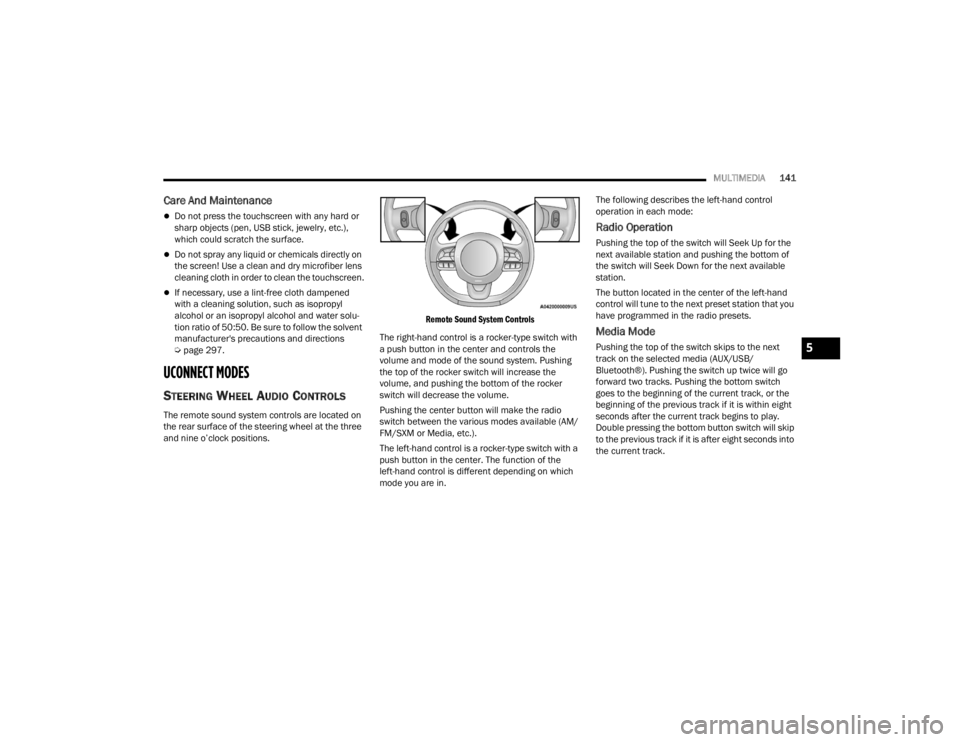
The remote sound system controls are located on
the rear surface of the steering wheel at the three
and nine o’clock positions.
Remote Sound System Controls
The right-hand control is a rocker-type switch with
a push button in the center and controls the
volume and mode of the sound system. Pushing
the top of the rocker switch will increase the
volume, and pushing the bottom of the rocker
switch will decrease the volume.
Pushing the center button will make the radio
switch between the various modes available (AM/
FM/SXM or Media, etc.).
The left-hand control is a rocker-type switch with a
push button in the center. The function of the
left-hand control is different depending on which
mode you are in. The following describes the left-hand control
operation in each mode:
Radio Operation
Pushing the top of the switch will Seek Up for the
next available station and pushing the bottom of
the switch will Seek Down for the next available
station.
The button located in the center of the left-hand
control will tune to the next preset station that you
have programmed in the radio presets.
Media Mode
Pushing the top of the switch skips to the next
track on the selected media (AUX/USB/
Bluetooth®). Pushing the switch up twice will go
forward two tracks. Pushing the bottom switch
goes to the beginning of the current track, or the
beginning of the previous track if it is within eight
seconds after the current track begins to play.
Double pressing the bottom button switch will skip
to the previous track if it is after eight seconds into
the current track.5
22_FD_OM_EN_USC_t.book Page 141
Page 144 of 312
142MULTIMEDIA
RADIO MODE
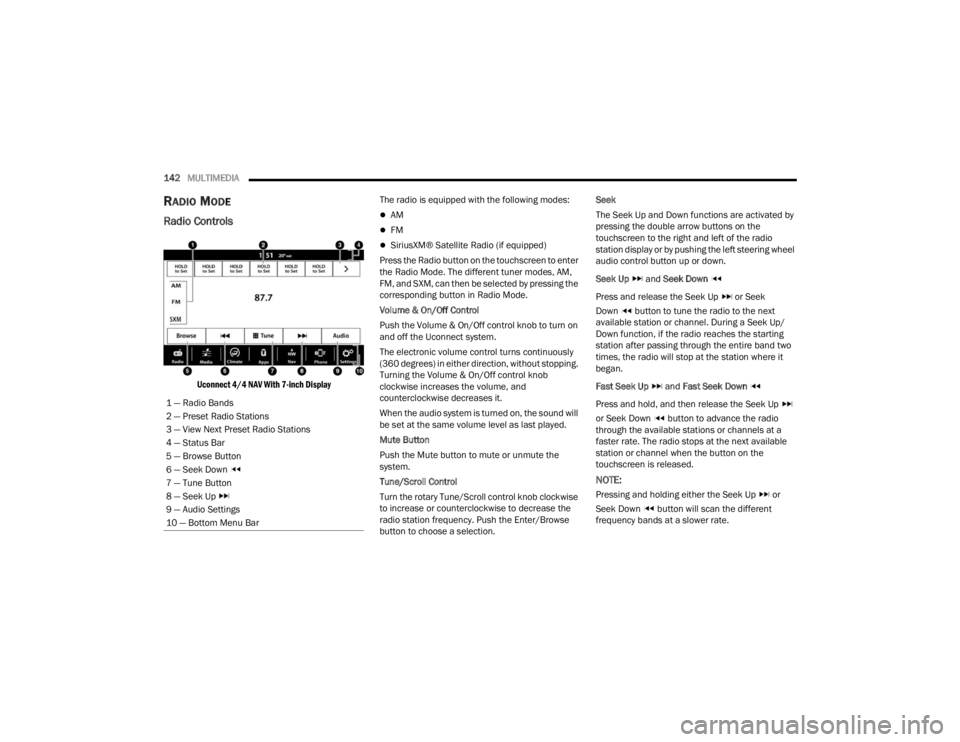
Radio Controls
Uconnect 4/4 NAV With 7-inch Display
The radio is equipped with the following modes:
AM
FM
SiriusXM® Satellite Radio (if equipped)
Press the Radio button on the touchscreen to enter
the Radio Mode. The different tuner modes, AM,
FM, and SXM, can then be selected by pressing the
corresponding button in Radio Mode.
Volume & On/Off Control
Push the Volume & On/Off control knob to turn on
and off the Uconnect system.
The electronic volume control turns continuously
(360 degrees) in either direction, without stopping.
Turning the Volume & On/Off control knob
clockwise increases the volume, and
counterclockwise decreases it.
When the audio system is turned on, the sound will
be set at the same volume level as last played.
Mute Button
Push the Mute button to mute or unmute the
system.
Tune/Scroll Control
Turn the rotary Tune/Scroll control knob clockwise
to increase or counterclockwise to decrease the
radio station frequency. Push the Enter/Browse
button to choose a selection. Seek
The Seek Up and Down functions are activated by
pressing the double arrow buttons on the
touchscreen to the right and left of the radio
station display or by pushing the left steering wheel
audio control button up or down.
Seek Up
and Seek Down
Press and release the Seek Up or Seek
Down button to tune the radio to the next
available station or channel. During a Seek Up/
Down function, if the radio reaches the starting
station after passing through the entire band two
times, the radio will stop at the station where it
began.
Fast Seek Up and Fast Seek Down
Press and hold, and then release the Seek Up
or Seek Down button to advance the radio
through the available stations or channels at a
faster rate. The radio stops at the next available
station or channel when the button on the
touchscreen is released.
NOTE:
Pressing and holding either the Seek Up or
Seek Down button will scan the different
frequency bands at a slower rate.
1 — Radio Bands
2 — Preset Radio Stations
3 — View Next Preset Radio Stations
4 — Status Bar
5 — Browse Button
6 — Seek Down
7 — Tune Button
8 — Seek Up
9 — Audio Settings
10 — Bottom Menu Bar
22_FD_OM_EN_USC_t.book Page 142
Page 223 of 312
IN CASE OF EMERGENCY221
1. Remove the spare tire, jack, and wheel bolt wrench.
2. If equipped with wheels where the center cap covers the wheel bolts, use the wheel bolt
wrench to pry the center cap off carefully
before raising the vehicle.
3. Before raising the vehicle, use the wheel bolt wrench to loosen, but not remove, the wheel
bolts on the wheel with the flat tire. Turn the
wheel bolts counterclockwise one turn while
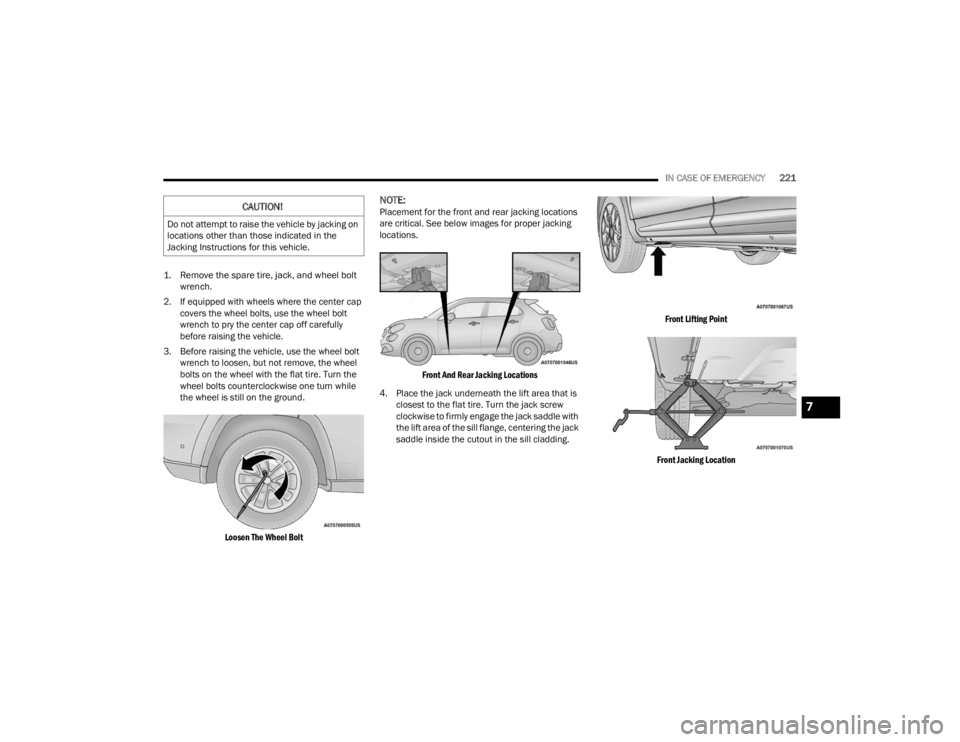
the wheel is still on the ground.
Loosen The Wheel Bolt
NOTE:Placement for the front and rear jacking locations
are critical. See below images for proper jacking
locations.
Front And Rear Jacking Locations
4. Place the jack underneath the lift area that is closest to the flat tire. Turn the jack screw
clockwise to firmly engage the jack saddle with
the lift area of the sill flange, centering the jack
saddle inside the cutout in the sill cladding.
Front Lifting Point
Front Jacking Location
CAUTION!
Do not attempt to raise the vehicle by jacking on
locations other than those indicated in the
Jacking Instructions for this vehicle.
7
22_FD_OM_EN_USC_t.book Page 221
Page 224 of 312
222IN CASE OF EMERGENCY
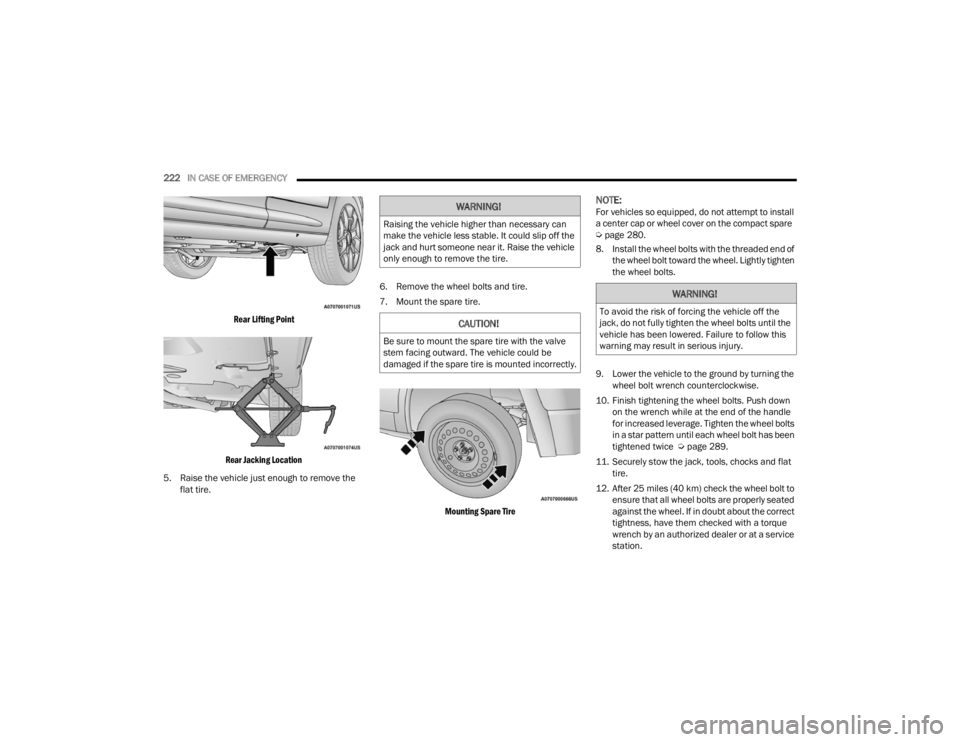
Rear Lifting Point
Rear Jacking Location
5. Raise the vehicle just enough to remove the flat tire. 6. Remove the wheel bolts and tire.
7. Mount the spare tire.
Mounting Spare Tire
NOTE:For vehicles so equipped, do not attempt to install
a center cap or wheel cover on the compact spare
Úpage 280.
8. Install the wheel bolts with the threaded end of the wheel bolt toward the wheel. Lightly tighten
the wheel bolts.
9. Lower the vehicle to the ground by turning the wheel bolt wrench counterclockwise.
10. Finish tightening the wheel bolts. Push down on the wrench while at the end of the handle
for increased leverage. Tighten the wheel bolts
in a star pattern until each wheel bolt has been
tightened twice Ú page 289.
11. Securely stow the jack, tools, chocks and flat tire.
12. After 25 miles (40 km) check the wheel bolt to ensure that all wheel bolts are properly seated
against the wheel. If in doubt about the correct
tightness, have them checked with a torque
wrench by an authorized dealer or at a service
station.WARNING!
Raising the vehicle higher than necessary can
make the vehicle less stable. It could slip off the
jack and hurt someone near it. Raise the vehicle
only enough to remove the tire.
CAUTION!
Be sure to mount the spare tire with the valve
stem facing outward. The vehicle could be
damaged if the spare tire is mounted incorrectly.
WARNING!
To avoid the risk of forcing the vehicle off the
jack, do not fully tighten the wheel bolts until the
vehicle has been lowered. Failure to follow this
warning may result in serious injury.
22_FD_OM_EN_USC_t.book Page 222
Page 256 of 312
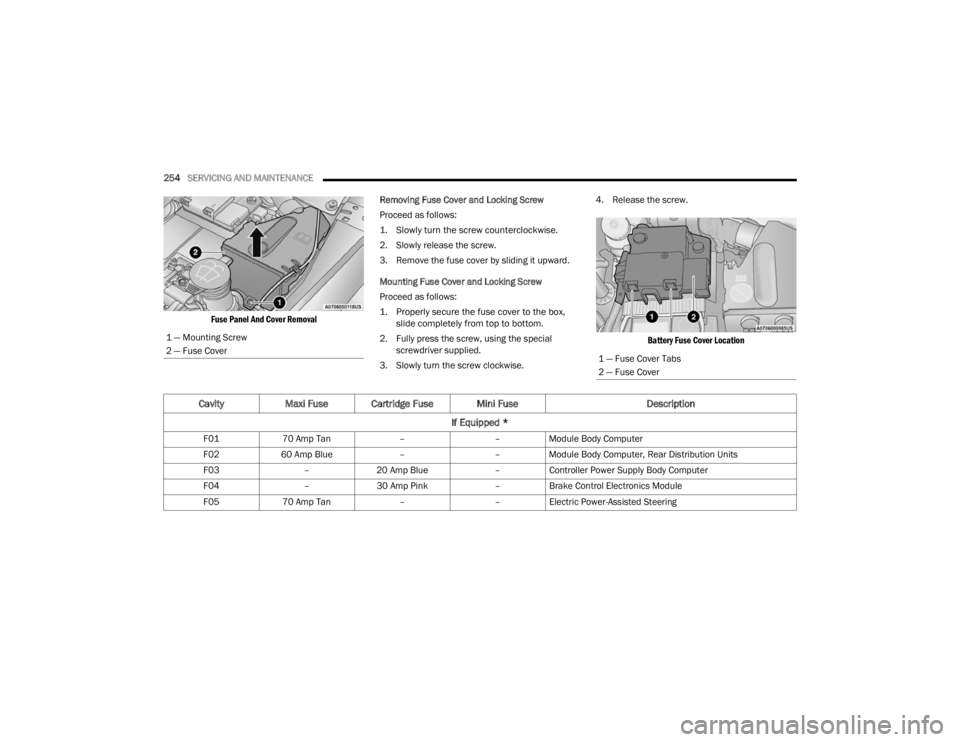
254SERVICING AND MAINTENANCE
Fuse Panel And Cover Removal
Removing Fuse Cover and Locking Screw
Proceed as follows:
1. Slowly turn the screw counterclockwise.
2. Slowly release the screw.
3. Remove the fuse cover by sliding it upward.
Mounting Fuse Cover and Locking Screw
Proceed as follows:
1. Properly secure the fuse cover to the box,
slide completely from top to bottom.
2. Fully press the screw, using the special screwdriver supplied.
3. Slowly turn the screw clockwise. 4. Release the screw.
Battery Fuse Cover Location
1 — Mounting Screw
2 — Fuse Cover
1 — Fuse Cover Tabs
2 — Fuse Cover
Cavity
Maxi Fuse Cartridge Fuse Mini Fuse Description
If Equipped *
F01 70 Amp Tan ––Module Body Computer
F02 60 Amp Blue ––Module Body Computer, Rear Distribution Units
F03 –20 Amp Blue –Controller Power Supply Body Computer
F04 –30 Amp Pink –Brake Control Electronics Module
F05 70 Amp Tan ––Electric Power-Assisted Steering
22_FD_OM_EN_USC_t.book Page 254
Page 263 of 312
SERVICING AND MAINTENANCE261
Replacing Exterior Bulbs
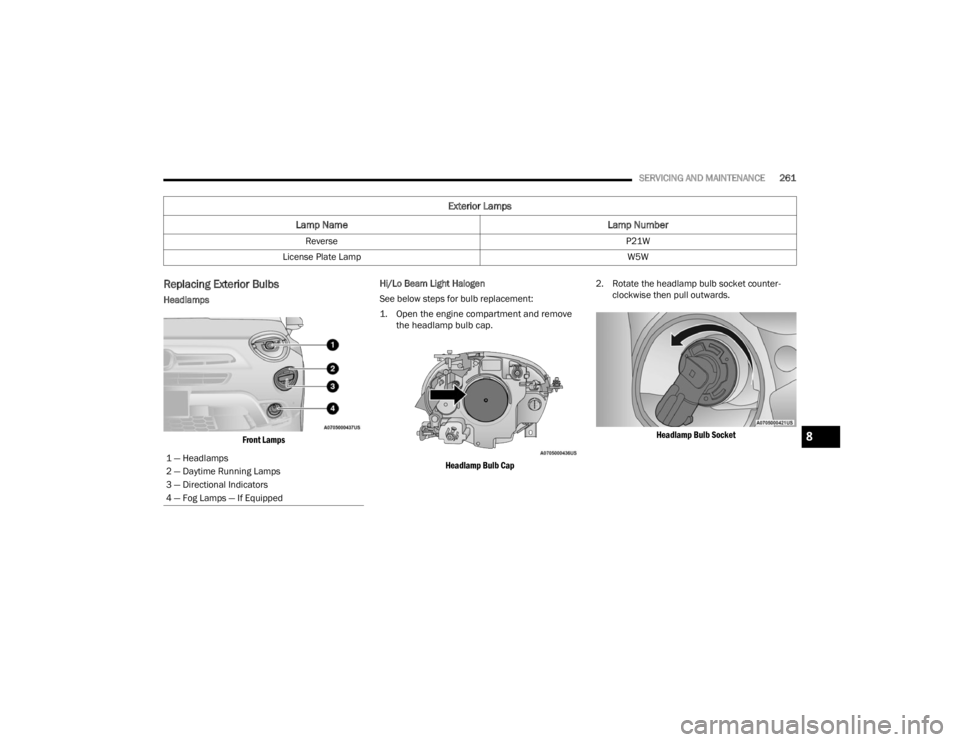
Headlamps
Front Lamps
Hi/Lo Beam Light Halogen
See below steps for bulb replacement:
1. Open the engine compartment and remove
the headlamp bulb cap.
Headlamp Bulb Cap
2. Rotate the headlamp bulb socket counter
-
clockwise then pull outwards.
Headlamp Bulb Socket
Reverse
P21W
License Plate Lamp W5W
Exterior Lamps
Lamp Name Lamp Number
1 — Headlamps
2 — Daytime Running Lamps
3 — Directional Indicators
4 — Fog Lamps — If Equipped
8
22_FD_OM_EN_USC_t.book Page 261
Page 264 of 312
262SERVICING AND MAINTENANCE
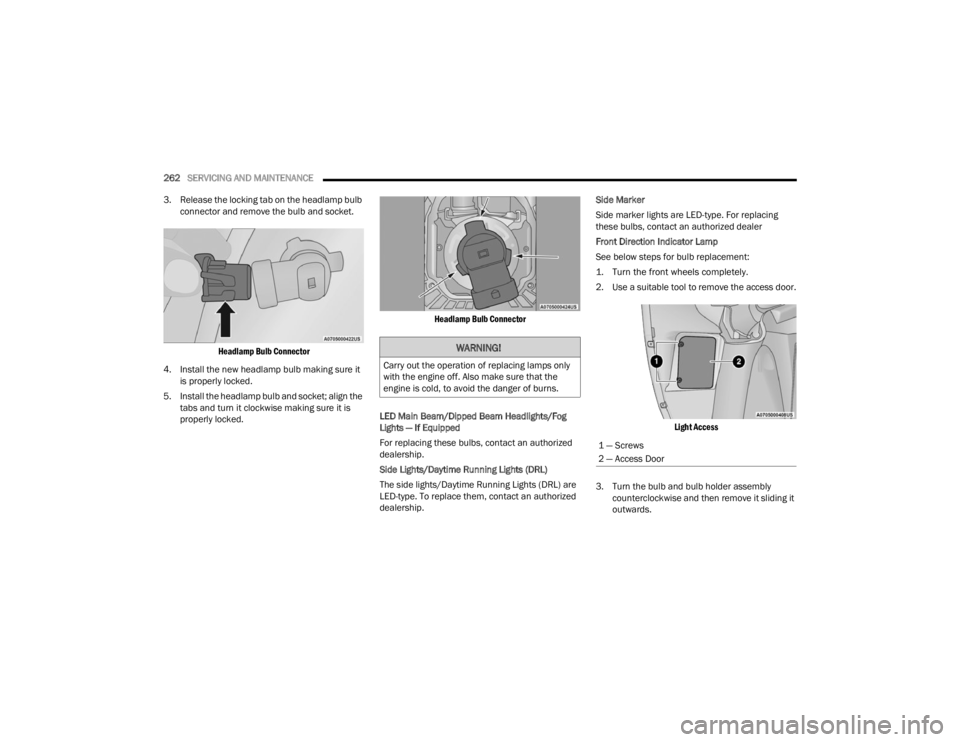
3. Release the locking tab on the headlamp bulb connector and remove the bulb and socket.
Headlamp Bulb Connector
4. Install the new headlamp bulb making sure it is properly locked.
5. Install the headlamp bulb and socket; align the tabs and turn it clockwise making sure it is
properly locked.
Headlamp Bulb Connector
LED Main Beam/Dipped Beam Headlights/Fog
Lights — If Equipped
For replacing these bulbs, contact an authorized
dealership.
Side Lights/Daytime Running Lights (DRL)
The side lights/Daytime Running Lights (DRL) are
LED-type. To replace them, contact an authorized
dealership. Side Marker
Side marker lights are LED-type. For replacing
these bulbs, contact an authorized dealer
Front Direction Indicator Lamp
See below steps for bulb replacement:
1. Turn the front wheels completely.
2. Use a suitable tool to remove the access door.
Light Access
3. Turn the bulb and bulb holder assembly counterclockwise and then remove it sliding it
outwards.
WARNING!
Carry out the operation of replacing lamps only
with the engine off. Also make sure that the
engine is cold, to avoid the danger of burns.
1 — Screws
2 — Access Door
22_FD_OM_EN_USC_t.book Page 262
Page 265 of 312

SERVICING AND MAINTENANCE263
4. Replace the bayonet-fitted bulb.
Bulb Assembly
5. Finally, refit the inspection door, fully tightening fixing screws.
Fog Lights (Halogen)
See below steps for bulb replacement:
1. Turn the front wheels completely.
2. Use a suitable tool to remove the access door.
Fog Light Access
3. Turn the bulb and bulb holder assembly counterclockwise and then remove it sliding it
outwards.
Fog Lamp Bulb Location
4. Replace the bayonet-fitted bulb.
Bulb Assembly
5. Finally, refit the inspection door, fully tightening fixing screws.
Side Indicators on External Rear View Mirrors –
If Equipped
1 — Bulb Holder
2 — Bulb
1 — Screws
2 — Access Door
1 — Bulb Holder
2 — Bulb
CAUTION!
The procedure is described as a guideline. For
the replacement of the lamp it is recommended
that you contact an authorized dealer.
8
22_FD_OM_EN_USC_t.book Page 263
Page 266 of 312
264SERVICING AND MAINTENANCE
See below steps for bulb replacement:
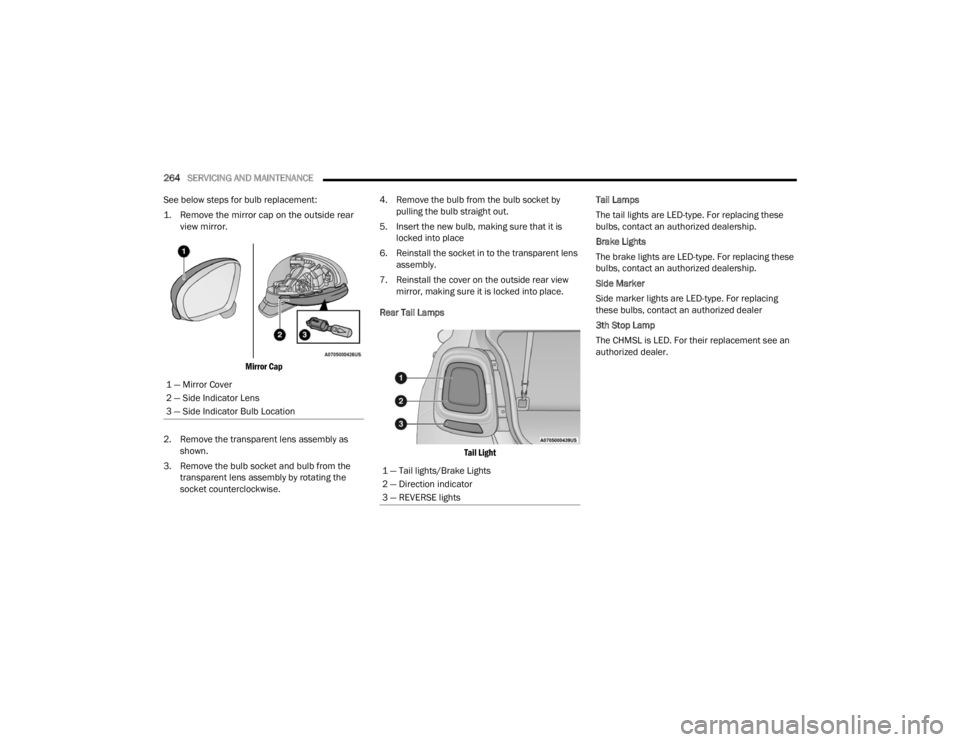
1. Remove the mirror cap on the outside rear view mirror.
Mirror Cap
2. Remove the transparent lens assembly as shown.
3. Remove the bulb socket and bulb from the transparent lens assembly by rotating the
socket counterclockwise. 4. Remove the bulb from the bulb socket by
pulling the bulb straight out.
5. Insert the new bulb, making sure that it is locked into place
6. Reinstall the socket in to the transparent lens assembly.
7. Reinstall the cover on the outside rear view mirror, making sure it is locked into place.
Rear Tail Lamps
Tail Light
Tail Lamps
The tail lights are LED-type. For replacing these
bulbs, contact an authorized dealership.
Brake Lights
The brake lights are LED-type. For replacing these
bulbs, contact an authorized dealership.
Side Marker
Side marker lights are LED-type. For replacing
these bulbs, contact an authorized dealer
3th Stop Lamp
The CHMSL is LED. For their replacement see an
authorized dealer.
1 — Mirror Cover
2 — Side Indicator Lens
3 — Side Indicator Bulb Location
1 — Tail lights/Brake Lights
2 — Direction indicator
3 — REVERSE lights
22_FD_OM_EN_USC_t.book Page 264
Page 267 of 312
SERVICING AND MAINTENANCE265
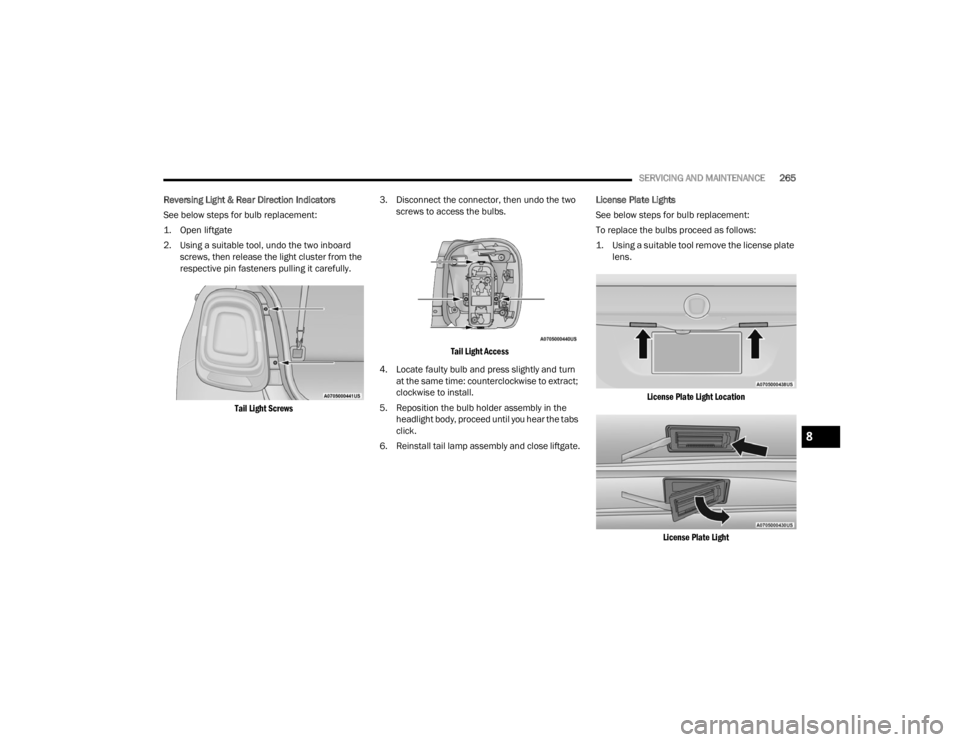
Reversing Light & Rear Direction Indicators
See below steps for bulb replacement:
1. Open liftgate
2. Using a suitable tool, undo the two inboard screws, then release the light cluster from the
respective pin fasteners pulling it carefully.
Tail Light Screws
3. Disconnect the connector, then undo the two
screws to access the bulbs.
Tail Light Access
4. Locate faulty bulb and press slightly and turn at the same time: counterclockwise to extract;
clockwise to install.
5. Reposition the bulb holder assembly in the headlight body, proceed until you hear the tabs
click.
6. Reinstall tail lamp assembly and close liftgate. License Plate Lights
See below steps for bulb replacement:
To replace the bulbs proceed as follows:
1. Using a suitable tool remove the license plate
lens.
License Plate Light Location
License Plate Light
8
22_FD_OM_EN_USC_t.book Page 265